Unlock a world of possibilities! Login now and discover the exclusive benefits awaiting you.

- Qlik Community
- :
- All Forums
- :
- QlikView App Dev
- :
- Re: Section Access on Sheet
- Subscribe to RSS Feed
- Mark Topic as New
- Mark Topic as Read
- Float this Topic for Current User
- Bookmark
- Subscribe
- Mute
- Printer Friendly Page

- Mark as New
- Bookmark
- Subscribe
- Mute
- Subscribe to RSS Feed
- Permalink
- Report Inappropriate Content
Section Access on Sheet
Hi All,
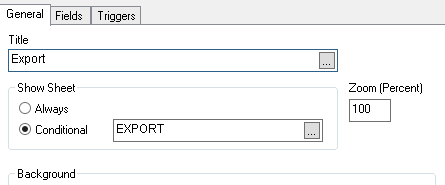
I'm trying to restrict sheet access using section access. But, it is not working as expected.
Below is my script. Please let me know if I'm making any mistake.
Section Access;
LOAD ACCESS,
UPPER(NTNAME) as NTNAME
FROM
[$(vDOCPath)\Tab_Access.xlsx]
(ooxml, embedded labels, table is Access);
SECTION Application;
LOAD UPPER(NTNAME) as NTNAME,
EXPORT
FROM
[$(vDOCPath)\Tab_Access.xlsx]
(ooxml, embedded labels, table is Tab);
Access table
| ACCESS | NTNAME |
| ADMIN | QlikView Admin |
| USER | a |
| USER | b |
| USER | c |
Tab table
| NTNAME | EXPORT |
| a | 1 |
| b | 0 |
| c | 0 |
Thanks,
Vinod Kumar V
- Tags:
- new_to_qlikview
Accepted Solutions

 avinashelite
- Mark as New
- Bookmark
- Subscribe
- Mute
- Subscribe to RSS Feed
- Permalink
- Report Inappropriate Content
have you check the initial data reduction in the Document property >Opening ? if not do it .
Then what's your expected result ?? whats the result your getting can you please cot some words on that ?
try to add a = before the EXPORT in the conditional and then try
avinashelite
- Mark as New
- Bookmark
- Subscribe
- Mute
- Subscribe to RSS Feed
- Permalink
- Report Inappropriate Content
have you check the initial data reduction in the Document property >Opening ? if not do it .
Then what's your expected result ?? whats the result your getting can you please cot some words on that ?
try to add a = before the EXPORT in the conditional and then try
- Mark as New
- Bookmark
- Subscribe
- Mute
- Subscribe to RSS Feed
- Permalink
- Report Inappropriate Content
what you are getting .. Is your application asking for ID/PWD.
If not save your app and close Qlikview again open it and see if now its asking for ID/pwd or not .
Thanks
BKC
- Mark as New
- Bookmark
- Subscribe
- Mute
- Subscribe to RSS Feed
- Permalink
- Report Inappropriate Content
To restrict the sheets you don't need to use section access
=MixMatch(
osuser(),
'ADID1',
'ADID2',
)
>0
- Mark as New
- Bookmark
- Subscribe
- Mute
- Subscribe to RSS Feed
- Permalink
- Report Inappropriate Content
Thanks Avinash...
I forgot enable that checkbox 