Unlock a world of possibilities! Login now and discover the exclusive benefits awaiting you.

- Qlik Community
- :
- All Forums
- :
- QlikView App Dev
- :
- Blank Tables???
- Subscribe to RSS Feed
- Mark Topic as New
- Mark Topic as Read
- Float this Topic for Current User
- Bookmark
- Subscribe
- Mute
- Printer Friendly Page

 samvile18
- Mark as New
- Bookmark
- Subscribe
- Mute
- Subscribe to RSS Feed
- Permalink
- Report Inappropriate Content
Blank Tables???
Morning All,
I have an odd issue which I've not seen before. I have a QVW that I'm opening via my Access Point, when I open it the tables in a specific tab are completely blank. There is data there and the thumbnail shows the table in it's populated form, I have no idea why this is happening.
It only seems to be happening on one tab.
I am however using QV11 personal edition, the publisher and server is still QV10...does that make any difference??
- « Previous Replies
-
- 1
- 2
- Next Replies »
Accepted Solutions

 flipside
- Mark as New
- Bookmark
- Subscribe
- Mute
- Subscribe to RSS Feed
- Permalink
- Report Inappropriate Content
Go to the server and then to Administrative Tools > Services and look for the Qlikview Services (usually 5 or 6 of them).
You just need to restart Qlikview Server service to fix this, bear in mind this will disconnect all (Qlikview) users.
samvile18
- Mark as New
- Bookmark
- Subscribe
- Mute
- Subscribe to RSS Feed
- Permalink
- Report Inappropriate Content
BUMP - still getting this issue, I'm back using QV10 now and it's still happening.
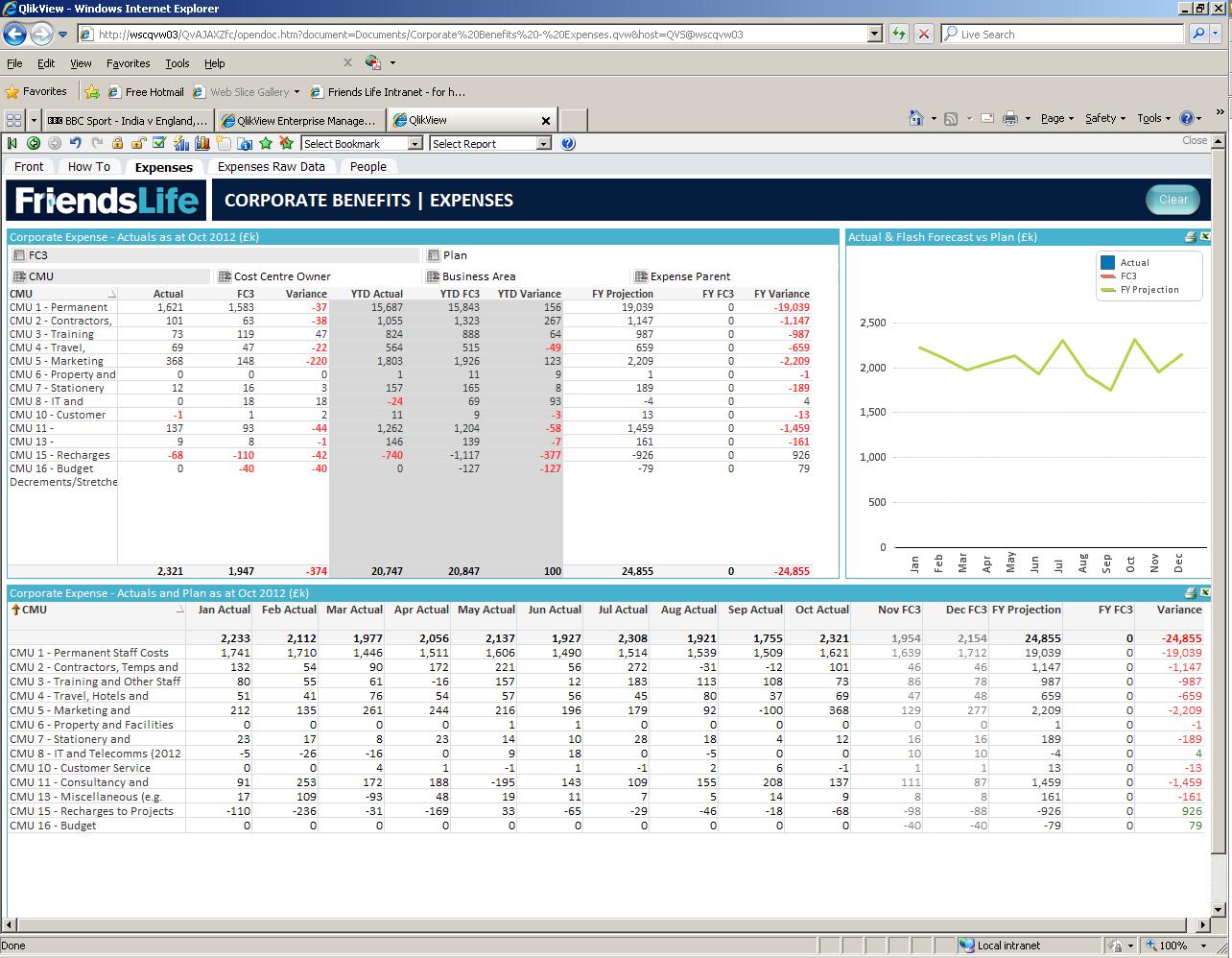
I've got one column of data that shows zero's on the access point although the data is present within my developer.
 Jason_Michaelid
- Mark as New
- Bookmark
- Subscribe
- Mute
- Subscribe to RSS Feed
- Permalink
- Report Inappropriate Content
Can you provide a sample?
samvile18
- Mark as New
- Bookmark
- Subscribe
- Mute
- Subscribe to RSS Feed
- Permalink
- Report Inappropriate Content
Hi Jason,
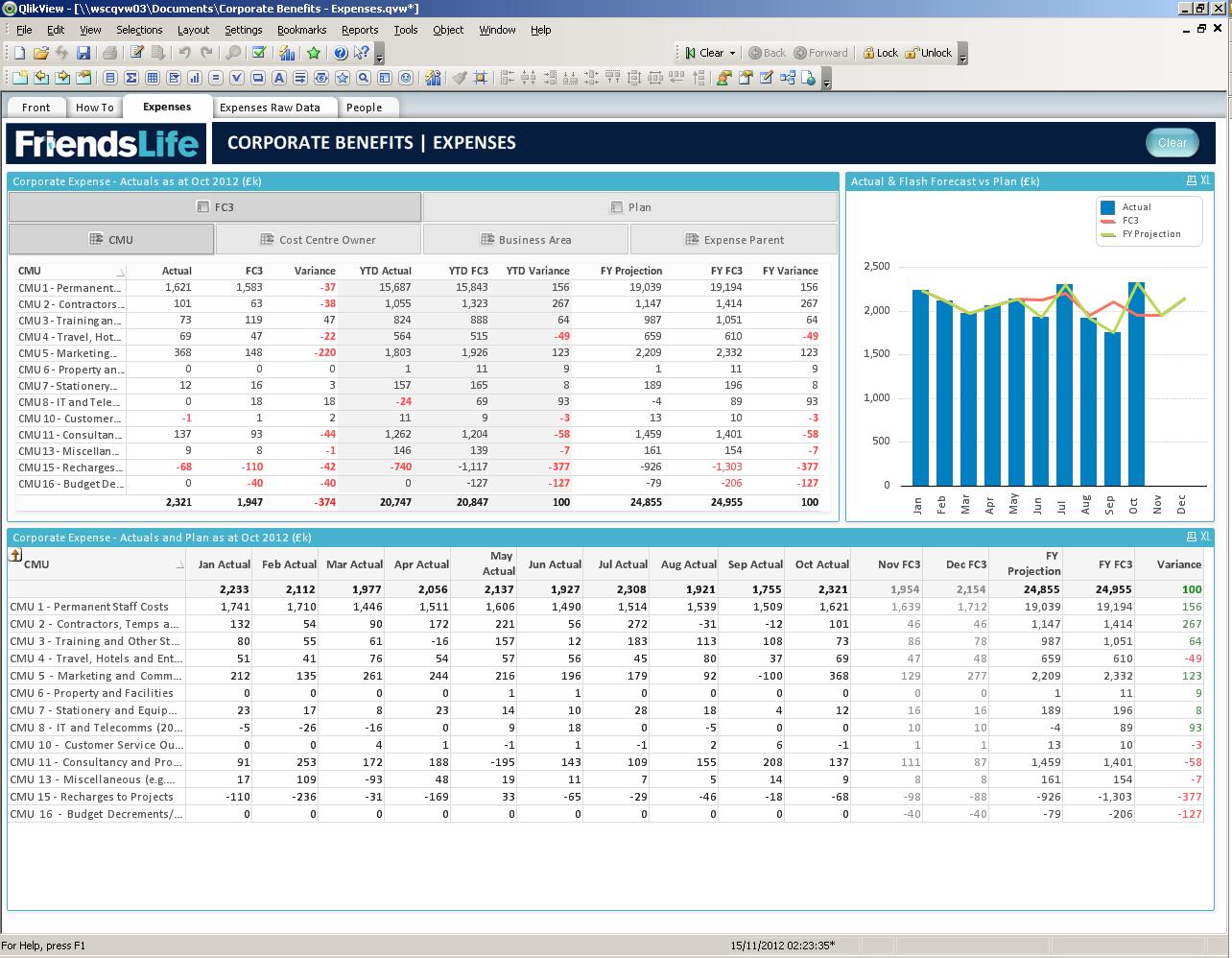
Here are two screen prints. The first one shows the tables from my Access Point (note the missing data in FY FC3) the second shows the tables within my developer where everything is working as expected.
Jason_Michaelid- Mark as New
- Bookmark
- Subscribe
- Mute
- Subscribe to RSS Feed
- Permalink
- Report Inappropriate Content
I meant a sample qvw file.
samvile18
- Mark as New
- Bookmark
- Subscribe
- Mute
- Subscribe to RSS Feed
- Permalink
- Report Inappropriate Content
I can but it won't show the issue I'm experiencing with the Access Point
flipside
- Mark as New
- Bookmark
- Subscribe
- Mute
- Subscribe to RSS Feed
- Permalink
- Report Inappropriate Content
I would put my mortgage on it being a memory issue messing with your Set Analysis. I've posted this issue on here before, but nobody seems to think it's a major issue.
Reboot your services and let us know if it's fixed.
flipside
samvile18
- Mark as New
- Bookmark
- Subscribe
- Mute
- Subscribe to RSS Feed
- Permalink
- Report Inappropriate Content
I was thinking about the memory being a problem as our server is so poor, I hope it is the issue as this is turning my hair grey with all the thinking!
samvile18
- Mark as New
- Bookmark
- Subscribe
- Mute
- Subscribe to RSS Feed
- Permalink
- Report Inappropriate Content
Next question...how do I actually reboot my services??
flipside
- Mark as New
- Bookmark
- Subscribe
- Mute
- Subscribe to RSS Feed
- Permalink
- Report Inappropriate Content
Go to the server and then to Administrative Tools > Services and look for the Qlikview Services (usually 5 or 6 of them).
You just need to restart Qlikview Server service to fix this, bear in mind this will disconnect all (Qlikview) users.

- « Previous Replies
-
- 1
- 2
- Next Replies »