Unlock a world of possibilities! Login now and discover the exclusive benefits awaiting you.

- Qlik Community
- :
- All Forums
- :
- QlikView
- :
- Re: Concatenate Issue
- Subscribe to RSS Feed
- Mark Topic as New
- Mark Topic as Read
- Float this Topic for Current User
- Bookmark
- Subscribe
- Mute
- Printer Friendly Page

 tamilarasu
- Mark as New
- Bookmark
- Subscribe
- Mute
- Subscribe to RSS Feed
- Permalink
- Report Inappropriate Content
Concatenate Issue

I am trying to concatenate multiple excel sheets from workbooks. So I am using loop to consolidate the data. But I am getting an error and I am not sure where I a wrong. Can any one check and correct the code?
SET Counter = 0;
FOR EACH file in FileList('C:\Users\Tamilarasu.Nagaraj\Desktop\RPC n\Sample\Sample - Copy\*.xlsx');


Let Counter = Counter +1;
ODBC CONNECT32 TO [Excel Files;DBQ=$(file)];


Temp:
SQLtables;
DISCONNECT;


FOR i = 0 to NoOfRows('Temp')-1
LET sheetName = purgeChar(peek('TABLE_NAME', i, 'Temp'), chr(36));
LET sheetName=replace(sheetName,chr(39)&chr(39),chr(39));


Table:
Load * ,
FileBaseName()as FIle,
FileDir() as Dir,
FileName() as File_Name,
'$(sheetName)' as Sheet_name


From $(file)(ooxml, embedded labels, table is [$(sheetName)], filters(
Remove(Row, RowCnd(CellValue, 1, StrCnd(null)))));


If (Counter =1 and i =0) then


NoConcatenate
Consolidated:
Load *
Resident Table;


Drop Table Table;


Else


Concatenate (Consolidated)
Rem:
Load *
Resident Table;


Drop Table Table;


End If


NEXT i
Drop table Temp;
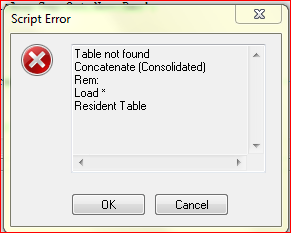
Thank you.
- « Previous Replies
-
- 1
- 2
- Next Replies »
Accepted Solutions

 Gysbert_Wassena
- Mark as New
- Bookmark
- Subscribe
- Mute
- Subscribe to RSS Feed
- Permalink
- Report Inappropriate Content
Ok, if that CounterCounter is not the real problem then try adapting this code:
/*--------------------------------------------------------------------------------------------------*/
SUB LoadAllExcelSheets(vFile)


ODBC CONNECT TO [Excel Files;DBQ=$(vFile)];

tables:
SQLtables;
DISCONNECT;

LET vSheetCount = NoOfRows('tables');

FOR i = 0 to $(vSheetCount) -1


  // The replace function is used because the sheet names in my example files contain a period character.
  // The odbc driver replaces these with the # character. These # characters need to be turned in periods again.
  LET vSheetName = replace(purgeChar(purgeChar(peek('TABLE_NAME', $(i), 'tables'), chr(39)), chr(36)),'#','.');

    $(vConcatenate)
    [$(vSheetName)]:
    LOAD *, '$(vSheetName)' as Sheet, '$(vFile)' as FileName
    FROM [$(vFile)] (ooxml, embedded labels, table is [$(vSheetName)]);
  SET vConcatenate = Concatenate;
NEXT i

DROP TABLE tables;


END SUB


/*--------------------------------------------------------------------------------------------------*/
SUB ScanFolder(Root)
          FOR EACH FileExtension in 'xlsx'
                    FOR EACH FoundFile in filelist( Root & '\*.' & FileExtension)
                CALL LoadAllExcelSheets('$(FoundFile)');
                    NEXT FoundFile
          NEXT FileExtension
          FOR EACH SubDirectory in dirlist( Root & '\*' )
                    CALL ScanFolder(SubDirectory)
          NEXT SubDirectory
END SUB

SET vConcatenate= ;
CALL ScanFolder('d:\data\my xl files') ;
talk is cheap, supply exceeds demand

 pokassov
- Mark as New
- Bookmark
- Subscribe
- Mute
- Subscribe to RSS Feed
- Permalink
- Report Inappropriate Content
Hello!
Resident table is a table that was previous loaded in your script. I didn't see it.
You have to use something like this:
Load *;
sql select * from $(sheetName);
Gysbert_Wassena- Mark as New
- Bookmark
- Subscribe
- Mute
- Subscribe to RSS Feed
- Permalink
- Report Inappropriate Content
This doesn't look right to me: Let CounterCounter = Counter +1;
talk is cheap, supply exceeds demand
tamilarasu
- Mark as New
- Bookmark
- Subscribe
- Mute
- Subscribe to RSS Feed
- Permalink
- Report Inappropriate Content
I am getting SQL error now.
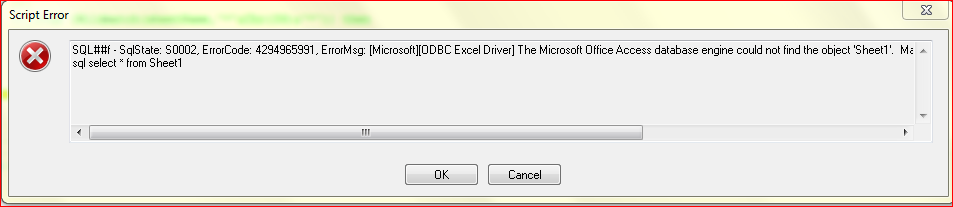
First, I am loading the first sheet in table, then I am storing the data into consolidate table. After that I drop the Table Table (To avoid Joining), then the loop goes again and storing the data into table. Next, trying to concatenate the data with Consolidated Table (Where I am getting error).
tamilarasu
- Mark as New
- Bookmark
- Subscribe
- Mute
- Subscribe to RSS Feed
- Permalink
- Report Inappropriate Content
Yes, It should be Counter= Counter + 1. I have pasted the code in Syntax Highlighting -> XML, but it convert the above line wrongly as CounterCounter = Counter +1;
pokassov
- Mark as New
- Bookmark
- Subscribe
- Mute
- Subscribe to RSS Feed
- Permalink
- Report Inappropriate Content
O, I missed it.
pokassov
- Mark as New
- Bookmark
- Subscribe
- Mute
- Subscribe to RSS Feed
- Permalink
- Report Inappropriate Content
May be your first table has 0 rows? Can you add checking for NoOfRows('Consolidated') and use concatenate only if it has rows?
Gysbert_Wassena- Mark as New
- Bookmark
- Subscribe
- Mute
- Subscribe to RSS Feed
- Permalink
- Report Inappropriate Content
Ok, if that CounterCounter is not the real problem then try adapting this code:
/*--------------------------------------------------------------------------------------------------*/
SUB LoadAllExcelSheets(vFile)


ODBC CONNECT TO [Excel Files;DBQ=$(vFile)];

tables:
SQLtables;
DISCONNECT;

LET vSheetCount = NoOfRows('tables');

FOR i = 0 to $(vSheetCount) -1


  // The replace function is used because the sheet names in my example files contain a period character.
  // The odbc driver replaces these with the # character. These # characters need to be turned in periods again.
  LET vSheetName = replace(purgeChar(purgeChar(peek('TABLE_NAME', $(i), 'tables'), chr(39)), chr(36)),'#','.');

    $(vConcatenate)
    [$(vSheetName)]:
    LOAD *, '$(vSheetName)' as Sheet, '$(vFile)' as FileName
    FROM [$(vFile)] (ooxml, embedded labels, table is [$(vSheetName)]);
  SET vConcatenate = Concatenate;
NEXT i

DROP TABLE tables;


END SUB


/*--------------------------------------------------------------------------------------------------*/
SUB ScanFolder(Root)
          FOR EACH FileExtension in 'xlsx'
                    FOR EACH FoundFile in filelist( Root & '\*.' & FileExtension)
                CALL LoadAllExcelSheets('$(FoundFile)');
                    NEXT FoundFile
          NEXT FileExtension
          FOR EACH SubDirectory in dirlist( Root & '\*' )
                    CALL ScanFolder(SubDirectory)
          NEXT SubDirectory
END SUB

SET vConcatenate= ;
CALL ScanFolder('d:\data\my xl files') ;
talk is cheap, supply exceeds demand
tamilarasu
- Mark as New
- Bookmark
- Subscribe
- Mute
- Subscribe to RSS Feed
- Permalink
- Report Inappropriate Content
Gysbert,
I am getting an error window. I have attached Sample excel data for your convenient. 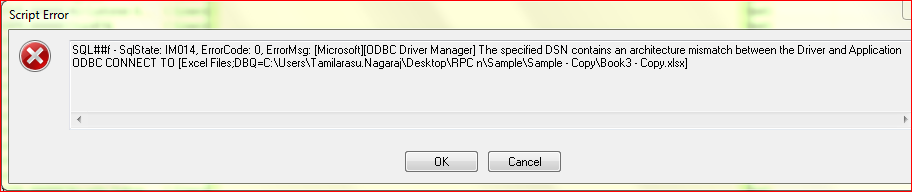
tamilarasu
- Mark as New
- Bookmark
- Subscribe
- Mute
- Subscribe to RSS Feed
- Permalink
- Report Inappropriate Content

- « Previous Replies
-
- 1
- 2
- Next Replies »