Unlock a world of possibilities! Login now and discover the exclusive benefits awaiting you.

- Qlik Community
- :
- All Forums
- :
- QlikView
- :
- Re: Creating A Master Calendar
- Subscribe to RSS Feed
- Mark Topic as New
- Mark Topic as Read
- Float this Topic for Current User
- Bookmark
- Subscribe
- Mute
- Printer Friendly Page

 Josh_Good
- Mark as New
- Bookmark
- Subscribe
- Mute
- Subscribe to RSS Feed
- Permalink
- Report Inappropriate Content
Creating A Master Calendar
This videos show how to create a Master Date Calendar in QlikView. The script mentioned in the video is below.
QuartersMap:
MAPPING LOAD
rowno() as Month,
'Q' & Ceil (rowno()/3) as Quarter
AUTOGENERATE (12);
Temp:
Load
min(OrderDate) as minDate,
max(OrderDate) as maxDate
Resident Orders;
Let varMinDate = Num(Peek('minDate', 0, 'Temp'));
Let varMaxDate = Num(Peek('maxDate', 0, 'Temp'));
DROP Table Temp;
TempCalendar:
LOAD
$(varMinDate) + Iterno()-1 As Num,
Date($(varMinDate) + IterNo() - 1) as TempDate
AutoGenerate 1 While $(varMinDate) + IterNo() -1 <= $(varMaxDate);
MasterCalendar:
Load
TempDate AS OrderDate,
week(TempDate) As Week,
Year(TempDate) As Year,
Month(TempDate) As Month,
Day(TempDate) As Day,
YeartoDate(TempDate)*-1 as CurYTDFlag,
YeartoDate(TempDate,-1)*-1 as LastYTDFlag,
inyear(TempDate, Monthstart($(varMaxDate)),-1) as RC12,
date(monthstart(TempDate), 'MMM-YYYY') as MonthYear,
ApplyMap('QuartersMap', month(TempDate), Null()) as Quarter,
Week(weekstart(TempDate)) & '-' & WeekYear(TempDate) as WeekYear,
WeekDay(TempDate) as WeekDay
Resident TempCalendar
Order By TempDate ASC;
Drop Table TempCalendar;
- « Previous Replies
- Next Replies »

 ben_skerrett
- Mark as New
- Bookmark
- Subscribe
- Mute
- Subscribe to RSS Feed
- Permalink
- Report Inappropriate Content
Hi Josh,
Thank you for posting this excellent video. I have created a master calendar but seem to have a bit of an anomally. Could you please look into my post below, to see if you have had a similar issue?
Thanks
Ben

.png "Former Employee") Wlad_Masi
Wlad_Masi
- Mark as New
- Bookmark
- Subscribe
- Mute
- Subscribe to RSS Feed
- Permalink
- Report Inappropriate Content
@ben_skerrett
I answered your post on the provided link, please let me know if the information I requested is possible to be sent.
Thank you in advance.

 chriscools
- Mark as New
- Bookmark
- Subscribe
- Mute
- Subscribe to RSS Feed
- Permalink
- Report Inappropriate Content
Hello,
i used your example to create a master data table.
I changed the table and date fieldname as you suggested.
When i reload i don't get an error, but it seems that the tempCalender just keeps iterating without an end:
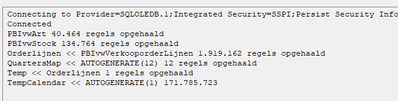
Any idea what might cause this?
thanx!
chris
 neerajthakur
- Mark as New
- Bookmark
- Subscribe
- Mute
- Subscribe to RSS Feed
- Permalink
- Report Inappropriate Content
It is partially correct and needs changes for future proofing, suppose their is a Field Shipping Date and it is obvious that Shipping Date will be more than the Order Date, thus that date won't be in calendar and I won't be able to results of that day. We can't go back and make changes everytime a new date gets added. Therefore, please make improvements as these post will help New Users very much and give proper insights.
Please Accepts as Solution if it solves your query.

 simonh
- Mark as New
- Bookmark
- Subscribe
- Mute
- Subscribe to RSS Feed
- Permalink
- Report Inappropriate Content
Used the same code for Sense, worked great.
 Haley
Haley
- Mark as New
- Bookmark
- Subscribe
- Mute
- Subscribe to RSS Feed
- Permalink
- Report Inappropriate Content
Hi Josh,
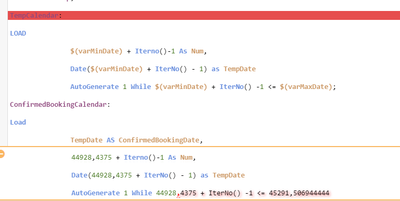
May I ask a question, I run the script in Qlik Sense, but there was an error as below.
Could you show me how to fix that error? I really appreciate that. Thank you.

 marcus_sommer
- Mark as New
- Bookmark
- Subscribe
- Mute
- Subscribe to RSS Feed
- Permalink
- Report Inappropriate Content
Your dates are not date else timestamps and your (default) number-format used a comma as the decimal-delimiter which within the variables is treated as parameter-delimiter.
The solution is to remove the time-part from the values, for example per:
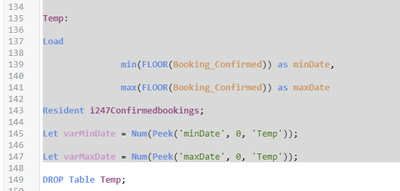
floor(YourTimetsampField) as YourDateField
in each case before assigning the values to the variables.
Haley
- Mark as New
- Bookmark
- Subscribe
- Mute
- Subscribe to RSS Feed
- Permalink
- Report Inappropriate Content
Hi Marcus,
Thank you for your help. I just FLOOR it and it works.
 ksiddiqui
- Mark as New
- Bookmark
- Subscribe
- Mute
- Subscribe to RSS Feed
- Permalink
- Report Inappropriate Content
But how will I use this if I want to make two different tables year into one. if you see here
I am facing this issue in master calender - Qlik Community - 2425223

- « Previous Replies
- Next Replies »