Unlock a world of possibilities! Login now and discover the exclusive benefits awaiting you.

- Qlik Community
- :
- All Forums
- :
- QlikView
- :
- Cross Table with Master Calendar
- Subscribe to RSS Feed
- Mark Topic as New
- Mark Topic as Read
- Float this Topic for Current User
- Bookmark
- Subscribe
- Mute
- Printer Friendly Page

- Mark as New
- Bookmark
- Subscribe
- Mute
- Subscribe to RSS Feed
- Permalink
- Report Inappropriate Content
Cross Table with Master Calendar
Hi all,
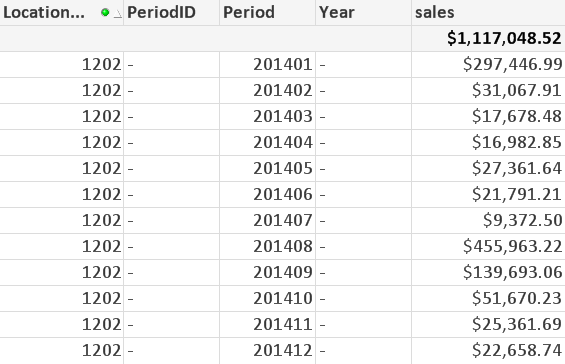
I have data transformed using a cross table. I then transformed the headers into date format. But when I link it to a master calendar, it is not working. Any help would be appreciated: The master table code is taken from qlikview 11 for developers. I changed the highlighted part alone.
[tmpData]:
CrossTable([Sales Period], sales)
LOAD [Location Code],
[201401],
[201402],
[201403],
[201404],
[201405],
[201406],
[201407],
[201408],
[201409],
[201410],
[201411],
[201412]
FROM
[24 months sales.xlsx]
(ooxml, embedded labels, table is Sales);
Final:
Load [Location Code],
Date#([Sales Period], 'YYYYMM') as Period,
sales
Resident tmpData;
Drop Table tmpData;
Temp_Calendar_Range:
LOAD
Min(Period) as MinDate,
Max(Period) as MaxDate
RESIDENT [Final];
LET vMinDate = Peek('MinDate', 0, 'Temp_Calendar_Range');
LET vMaxDate = Peek('MaxDate', 0, 'Temp_Calendar_Range');
DROP TABLE Temp_Calendar_Range; // Cleanup
[Master Calendar]:
Load
*,
AutoNumber(Period, 'PeriodID') as [PeriodID];
LOAD DISTINCT
Year(Temp_Date) * 100 + Month(Temp_Date) as [Period],
Year(Temp_Date) as [Year],
Month(Temp_Date) as [Month],
Date(Temp_Date, 'YYYY-MM') as [Year - Month],
'Q' & Ceil(Month(Temp_Date) / 3) as [Quarter];
LOAD DISTINCT
MonthStart($(vMinDate) + IterNo() - 1) as Temp_Date
AUTOGENERATE (1)
WHILE $(vMinDate) + IterNo() - 1 <= $(vMaxDate);
//--- Remove the temporary variables
LET vMinDate = Null();
LET vMaxDate = Null();
Output:
Accepted Solutions

 MarcoWedel
- Mark as New
- Bookmark
- Subscribe
- Mute
- Subscribe to RSS Feed
- Permalink
- Report Inappropriate Content
the creation of the period field in your calendar script is different from the Period created in the final table.
Change
Year(Temp_Date) * 100 + Month(Temp_Date) as [Period],to
Date(MonthStart(Temp_Date),'YYYYMM') as Period,hope this helps
regards
Marco
MarcoWedel
- Mark as New
- Bookmark
- Subscribe
- Mute
- Subscribe to RSS Feed
- Permalink
- Report Inappropriate Content
the creation of the period field in your calendar script is different from the Period created in the final table.
Change
Year(Temp_Date) * 100 + Month(Temp_Date) as [Period],to
Date(MonthStart(Temp_Date),'YYYYMM') as Period,hope this helps
regards
Marco
- Mark as New
- Bookmark
- Subscribe
- Mute
- Subscribe to RSS Feed
- Permalink
- Report Inappropriate Content
Thank you so much. I completely overlooked that part of the code.
MarcoWedel
- Mark as New
- Bookmark
- Subscribe
- Mute
- Subscribe to RSS Feed
- Permalink
- Report Inappropriate Content
You're welcome
regards
Marco