Unlock a world of possibilities! Login now and discover the exclusive benefits awaiting you.

- Qlik Community
- :
- All Forums
- :
- QlikView
- :
- Date help
- Subscribe to RSS Feed
- Mark Topic as New
- Mark Topic as Read
- Float this Topic for Current User
- Bookmark
- Subscribe
- Mute
- Printer Friendly Page

 bharatkishore
- Mark as New
- Bookmark
- Subscribe
- Mute
- Subscribe to RSS Feed
- Permalink
- Report Inappropriate Content
Date help
Hi All,
I have a date field in a table with 'YYYY-MM' format and i have years from 1950-01 to 2019-01.
Now i need to make all the years which are <=2011-01 to 2011-01.
I have give condition like this
if(date(Install_Date<='2011-01'),'2011-01',Install_Date) as Install_Date_Dummy, but in the list box i am getting as below:
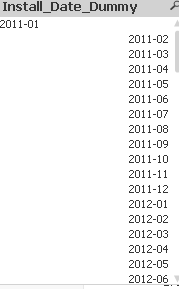
But for 2011-01 i am getting left side in list box.. can you please tell me how to get all in one format.
Thanks,
Bharat
Accepted Solutions

 tresB
tresB
- Mark as New
- Bookmark
- Subscribe
- Mute
- Subscribe to RSS Feed
- Permalink
- Report Inappropriate Content
It's not good practice to use text comparison here. Having said that, for a quick fix, you could try like:
if(date(Install_Date<='2011-01'),Date(Date#('2011-01', 'YYYY-MM'),'YYYY-MM'),Install_Date) as Install_Date_Dummy
tresB
- Mark as New
- Bookmark
- Subscribe
- Mute
- Subscribe to RSS Feed
- Permalink
- Report Inappropriate Content
It's not good practice to use text comparison here. Having said that, for a quick fix, you could try like:
if(date(Install_Date<='2011-01'),Date(Date#('2011-01', 'YYYY-MM'),'YYYY-MM'),Install_Date) as Install_Date_Dummy
bharatkishore
- Mark as New
- Bookmark
- Subscribe
- Mute
- Subscribe to RSS Feed
- Permalink
- Report Inappropriate Content
date#(if(date(Install_date<='2011-01'),'2011-01',Install_Date))
