Unlock a world of possibilities! Login now and discover the exclusive benefits awaiting you.

- Qlik Community
- :
- All Forums
- :
- QlikView
- :
- FieldValue
- Subscribe to RSS Feed
- Mark Topic as New
- Mark Topic as Read
- Float this Topic for Current User
- Bookmark
- Subscribe
- Mute
- Printer Friendly Page

 Chanty4u
- Mark as New
- Bookmark
- Subscribe
- Mute
- Subscribe to RSS Feed
- Permalink
- Report Inappropriate Content
FieldValue
Hi all,
I have a data like below attached Excel with input and output required. i need to get one extr column
- « Previous Replies
-
- 1
- 2
- Next Replies »
 sunny_talwar
- Mark as New
- Bookmark
- Subscribe
- Mute
- Subscribe to RSS Feed
- Permalink
- Report Inappropriate Content
Create a RowNo() field to show distinct values. or if you add your quantity field which made it distinct, the row would show up
sunny_talwar
- Mark as New
- Bookmark
- Subscribe
- Mute
- Subscribe to RSS Feed
- Permalink
- Report Inappropriate Content
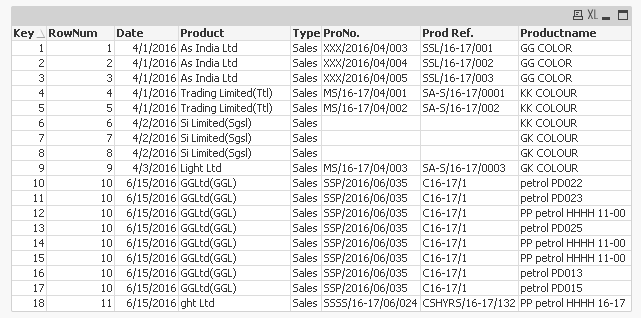
Here you are
Table:
LOAD RowNo() as RowNum,
Date,
Product,
Type,
ProNo.,
[Prod Ref.]
FROM
[SAMPLE-JEW.xlsx]
(ooxml, embedded labels, table is Original)
Where Len(Trim(Date)) > 0;
TempTable:
LOAD If(Len(Trim(Date)) = 0, Peek('RowNum'), RangeSum(Peek('RowNum'), 1)) as RowNum,
Date,
Trim(Product) as Productname
FROM
[SAMPLE-JEW.xlsx]
(ooxml, embedded labels, table is Original);
Left Join (Table)
LOAD RowNum,
Productname
Resident TempTable
Where Len(Trim(Date)) = 0;
DROP Table TempTable;
FinalTable:
LOAD RowNo() as Key,
*
Resident Table;
DROP Table Table;
Chanty4u
- Mark as New
- Bookmark
- Subscribe
- Mute
- Subscribe to RSS Feed
- Permalink
- Report Inappropriate Content
thank you sunny  its clear now. tommrow i will check with original data and will close
thanks
sunny_talwar
- Mark as New
- Bookmark
- Subscribe
- Mute
- Subscribe to RSS Feed
- Permalink
- Report Inappropriate Content
Sounds good
 MarcoWedel
- Mark as New
- Bookmark
- Subscribe
- Mute
- Subscribe to RSS Feed
- Permalink
- Report Inappropriate Content
Hi,
maybe the File Wizard Transformation function might help as well:
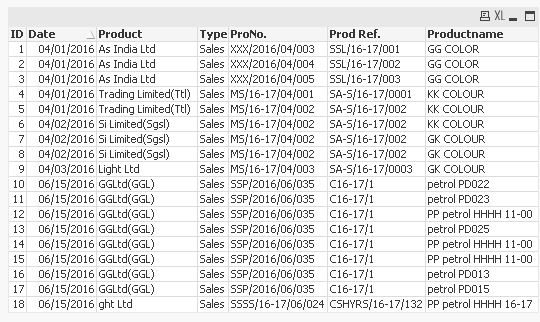
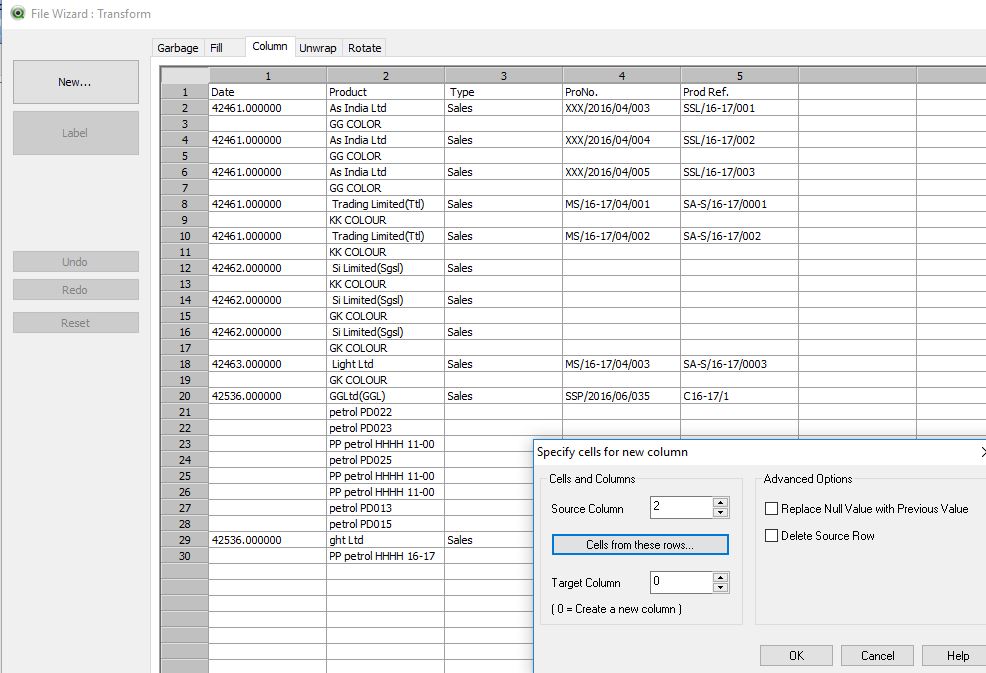
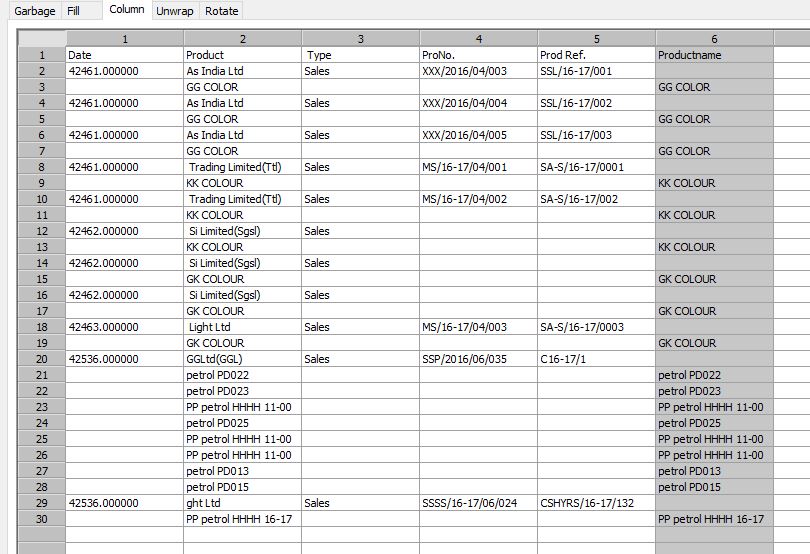
table1:
LOAD RecNo() as ID,
    Date(Date) as Date,
    Product,
    Type,
    ProNo.,
    [Prod Ref.],
    Productname
FROM [https://community.qlik.com/servlet/JiveServlet/download/1141516-249521/SAMPLE-JEW.xlsx] (ooxml, embedded labels, table is Original, filters(
ColXtr(2, RowCnd(CellValue, 1, StrCnd(null)), 0),
ColXtr(2, RowCnd(CellValue, 1, StrCnd(null, not)), 0),
Remove(Col, Pos(Top, 2)),
Top(5, 'Productname'),
Replace(1, top, StrCnd(null)),
Replace(2, top, StrCnd(null)),
Replace(3, top, StrCnd(null)),
Replace(4, top, StrCnd(null)),
Replace(6, top, StrCnd(null)),
Remove(Row, RowCnd(CellValue, 5, StrCnd(null)))
));
(besides the erroneously filled ProNo. and Prod Ref. columns in this example ...  )
)
regards
Marco
Chanty4u
- Mark as New
- Bookmark
- Subscribe
- Mute
- Subscribe to RSS Feed
- Permalink
- Report Inappropriate Content
Excellent Macro  Nice
Nice
MarcoWedel
- Mark as New
- Bookmark
- Subscribe
- Mute
- Subscribe to RSS Feed
- Permalink
- Report Inappropriate Content
glad you liked it.
please close your thread if your question is answered:
Qlik Community Tip: Marking Replies as Correct or Helpful
thanks
regards
Marco

- « Previous Replies
-
- 1
- 2
- Next Replies »