Unlock a world of possibilities! Login now and discover the exclusive benefits awaiting you.

- Qlik Community
- :
- All Forums
- :
- QlikView
- :
- Re: How to Create a New Table From Two Different T...
- Subscribe to RSS Feed
- Mark Topic as New
- Mark Topic as Read
- Float this Topic for Current User
- Bookmark
- Subscribe
- Mute
- Printer Friendly Page

- Mark as New
- Bookmark
- Subscribe
- Mute
- Subscribe to RSS Feed
- Permalink
- Report Inappropriate Content
How to Create a New Table From Two Different Tables?
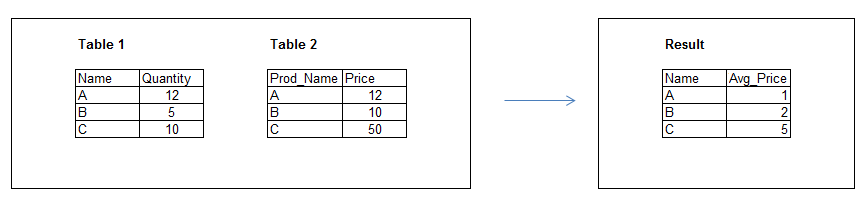
I have two tables, Table 1 and Table 2 (see above).
Table 1
Dimension: Name
Expression: Sum(Quantity)
Table 2
Dimension: Prod_Name
Expression: Sum(Price)
The value inside "Name" and "Prod_Name" are the same; however they are from different tables and have different field name (thus I cannot use the Expression "Sum(Quantity)/Sum(Price)" to calculate the average price).
Is it possible to create the result table based on the data from the previose two tables?
I tried to use AGGR to create a vitual table, but I don't know how to match the value from Table 2 to Table 1.
Any help would be greatly appreciated!
- Tags:
- new_to_qlikview
Accepted Solutions

 julian_rodrigue
- Mark as New
- Bookmark
- Subscribe
- Mute
- Subscribe to RSS Feed
- Permalink
- Report Inappropriate Content
First, join the two fact tables:
Table1_tmp:
LOAD
Name,
Sum(Quantity) AS Quantity
FROM
Table_1_Source //Your data source
GROUP BY Name;
Table2_tmp:
LEFT JOIN
LOAD
Prod_Name AS Name,
Sum(Price) AS Price
FROM
Table_2_Source //Your data source
GROUP BY Prod_Name;
Then, use a Resident sentence to calculate the average:
Result:
LOAD *,
Quantity/Price AS Average
Resident Table1_tmp;
Drop Table1_tmp;
I have not Qlikview at hand, but I think it should work...
Regards!
julian_rodrigue- Mark as New
- Bookmark
- Subscribe
- Mute
- Subscribe to RSS Feed
- Permalink
- Report Inappropriate Content
First, join the two fact tables:
Table1_tmp:
LOAD
Name,
Sum(Quantity) AS Quantity
FROM
Table_1_Source //Your data source
GROUP BY Name;
Table2_tmp:
LEFT JOIN
LOAD
Prod_Name AS Name,
Sum(Price) AS Price
FROM
Table_2_Source //Your data source
GROUP BY Prod_Name;
Then, use a Resident sentence to calculate the average:
Result:
LOAD *,
Quantity/Price AS Average
Resident Table1_tmp;
Drop Table1_tmp;
I have not Qlikview at hand, but I think it should work...
Regards!

 maxgro
- Mark as New
- Bookmark
- Subscribe
- Mute
- Subscribe to RSS Feed
- Permalink
- Report Inappropriate Content
if you don't want to change the script perhaps with a sum if
sum(if([Prod_Name]=Name, Quantity / Price))
better to change the script, just rename Prod_Name in Table2 to Name (Prod_Name as Name)
to associate products at the db level