Unlock a world of possibilities! Login now and discover the exclusive benefits awaiting you.

- Qlik Community
- :
- All Forums
- :
- QlikView
- :
- How to improve the QlikView Permanence
- Subscribe to RSS Feed
- Mark Topic as New
- Mark Topic as Read
- Float this Topic for Current User
- Bookmark
- Subscribe
- Mute
- Printer Friendly Page

- Mark as New
- Bookmark
- Subscribe
- Mute
- Subscribe to RSS Feed
- Permalink
- Report Inappropriate Content
How to improve the QlikView Permanence
Dear QlikView Gurus,
We are new in the QlikView to implement our organization.We have One Server & Publisher, PDFs distribution licences and 40 CALs but our Data is huge.
We have many QVW application in our server, the problem is that when the user access the Report via AcessPoint , they have to wait more time to interact the reports but end users probably don't like this performance.
I am doing bench-marking about how to improve the QlikView Performance so, I would be really grateful if you advise for my questions.
Have a lovely day !
Best,
Robert
- Tags:
- new_to_qlikview

 morgankejerhag
- Mark as New
- Bookmark
- Subscribe
- Mute
- Subscribe to RSS Feed
- Permalink
- Report Inappropriate Content
Hi Robert,
There are so many ways that a document can have problems with performance. It can of course also be a problem outside of QlikView - like a slow network.
Do you have yule amounts of data? Server size in ram and cpu? Showing many objects with expressions simultaneously? Badly written expressions? Incorrect configured server environment? Virtual servers? And so on.
I would recommend you to talk to Qlik or to a really experienced Consultant that can help you and analyze your specific case.

 ramasaisaksoft
- Mark as New
- Bookmark
- Subscribe
- Mute
- Subscribe to RSS Feed
- Permalink
- Report Inappropriate Content
Hi Robert,
what is your server configuration? (RAM size,CPU size,
which QV server version you have?
Data base files size
1) check all the qvw files are compressed or not? Settings->Document properties->General->
Save Format->Compression->"High"
2)check in "Session time" out technique for qlikview files in Qlikview publisher.(Means if the user open that document and he was in stand alone time u need to fix particular time)
Raise this query with Qlikview Admin persons in QV community ,they will help to u more than us

 vardhancse
- Mark as New
- Bookmark
- Subscribe
- Mute
- Subscribe to RSS Feed
- Permalink
- Report Inappropriate Content
Server should have good configuration based on the data and coming to dashboard some performance techniques need to be followed.
tasks should be scheduled one after the another, like creating some dependencies...
What is the reload time scheduled to dashboard..it also depends..as ur saying the volume is huge..
using delta/incremental load logic will help to reload faster when compared to full load for huge volume of data.
While loading data from any table, loading only required data will help us out to decrease the load while reload.
like left keep/join and all so that only in fact table the complete data set will be there, and in dim tables only related data from fact will be loaded.
Removing un used fields will help out to increase performance.
more data fields like subject are not required in reporting and so removing them will help out.
using autonumberhash functions will help out in decrease the storage of data for primary keys.
- Mark as New
- Bookmark
- Subscribe
- Mute
- Subscribe to RSS Feed
- Permalink
- Report Inappropriate Content
Robert,
Check the properties of objects to see the Calc time and memory consumed. That will tell you where to "fish".
Always try to avoid IF statements in expressions and also eliminate/change DIV to Multiplication when you can.
example Cost/Sales/100 would be better as Cost/Sales*.01
To eliminate IF's set flags in script with IF then use Set analysis in expressions to select only the flag values you want.
Shawn
- Mark as New
- Bookmark
- Subscribe
- Mute
- Subscribe to RSS Feed
- Permalink
- Report Inappropriate Content
Robert,
Also, if you can attach a screen shot of your Data Model, I could probably pint a few things out there to help
Data modeling is foundation of good app and should help drive efficient expression building for a pleasant UI experience
Shawn
- Mark as New
- Bookmark
- Subscribe
- Mute
- Subscribe to RSS Feed
- Permalink
- Report Inappropriate Content
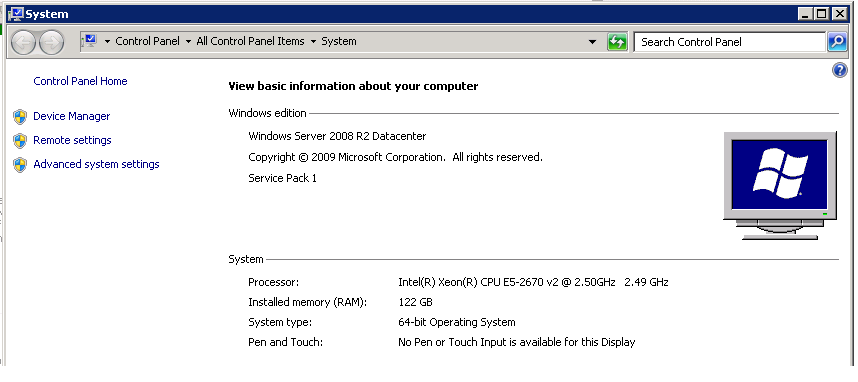
Hi,
Please find below my Server configuration information.