Unlock a world of possibilities! Login now and discover the exclusive benefits awaiting you.

- Qlik Community
- :
- All Forums
- :
- QlikView
- :
- Mode and Prices
- Subscribe to RSS Feed
- Mark Topic as New
- Mark Topic as Read
- Float this Topic for Current User
- Bookmark
- Subscribe
- Mute
- Printer Friendly Page

- Mark as New
- Bookmark
- Subscribe
- Mute
- Subscribe to RSS Feed
- Permalink
- Report Inappropriate Content
Mode and Prices
Hello!
I have a little table like this:
| Period | City | Sku | Brand | Price | Sales |
| 201301 | A | Sku1 | Alpha | 1.5 | 100 |
| 201301 | A | Sku2 | Alpha | 1.5 | 150 |
| 201301 | A | Sku3 | Beta | 1.6 | 120 |
| 201301 | B | Sku1 | Alpha | 1.4 | 130 |
| 201301 | B | Sku2 | Alpha | 1.4 | 120 |
| 201301 | B | Sku3 | Beta | 1.3 | 100 |
| 201301 | C | Sku1 | Alpha | 1.5 | 120 |
| 201301 | C | Sku2 | Alpha | 1.4 | 110 |
| 201301 | C | Sku3 | Beta | 1.3 | 130 |
| 201301 | C | Sku4 | Gamma | 1.3 | 130 |
| 201301 | C | Sku5 | Gamma | 1.3 | 150 |
I just want to build a Pivot Table that calculates the sum of the sales by city where the price equals the modal price (also by city).
I can't seem to find out how to solve this problem.
Any help would be really appreciated!
PS: I'm attaching a qvw with the table and what I've done so far...
- « Previous Replies
-
- 1
- 2
- Next Replies »
Accepted Solutions

.png "Former Employee") hic
hic
- Mark as New
- Bookmark
- Subscribe
- Mute
- Subscribe to RSS Feed
- Permalink
- Report Inappropriate Content
Sorry, I forgot a "nodistinct"
Sum(If(Price=Aggr(nodistinct Mode(Price),Period,City), Sales))
HIC
hic
- Mark as New
- Bookmark
- Subscribe
- Mute
- Subscribe to RSS Feed
- Permalink
- Report Inappropriate Content
Sum(If(Price=Aggr(Mode(Price),Period,City), Sales))
HIC

 sujeetsingh
- Mark as New
- Bookmark
- Subscribe
- Mute
- Subscribe to RSS Feed
- Permalink
- Report Inappropriate Content
Please explain more deep

 matthias_v
- Mark as New
- Bookmark
- Subscribe
- Mute
- Subscribe to RSS Feed
- Permalink
- Report Inappropriate Content
Hi Ruben,
I adjusted your example to fit your needs (see attachment). I placed the logic in the script as to gain performance towards your end-users.
- Mark as New
- Bookmark
- Subscribe
- Mute
- Subscribe to RSS Feed
- Permalink
- Report Inappropriate Content
Thanks for your answer Henric Cronström !
I used your expression but, sadly, I'm still not getting the correct numbers:
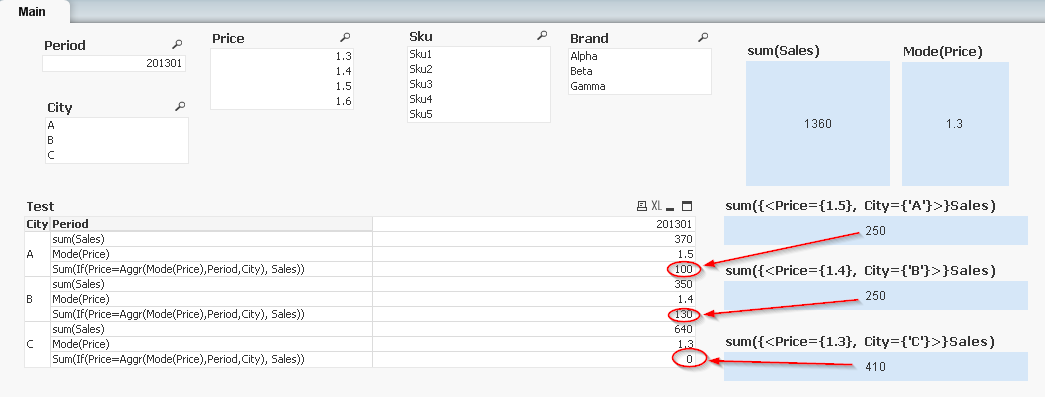
The correct numbers should be the ones on the textboxes to the right.
Am I doing something wrong?
hic
- Mark as New
- Bookmark
- Subscribe
- Mute
- Subscribe to RSS Feed
- Permalink
- Report Inappropriate Content
Set analysis is not the answer here, since Ruben wants to make a comparison on every row of the pivot table. Set analysis will use a common "selection" for all rows.
So, instead I use the Aggr() function, which in this case calculates the most common value (Mode(Price)) for each combination of Period and City, and then this value is used to select the relevant transactions.
HIC
- Mark as New
- Bookmark
- Subscribe
- Mute
- Subscribe to RSS Feed
- Permalink
- Report Inappropriate Content
Hi Matthias,
Thanks for your answer!
I tried you approach and it works, I get the numbers.
But can this be done in a more "dynamic" way?
I just used "period" and "city" as dimensions, but if I add another (let's say "brand") I would have to reconfigure the LEFT JOIN in your script
Thanks in advance!
hic
- Mark as New
- Bookmark
- Subscribe
- Mute
- Subscribe to RSS Feed
- Permalink
- Report Inappropriate Content
Sorry, I forgot a "nodistinct"
Sum(If(Price=Aggr(nodistinct Mode(Price),Period,City), Sales))
HIC
matthias_v
- Mark as New
- Bookmark
- Subscribe
- Mute
- Subscribe to RSS Feed
- Permalink
- Report Inappropriate Content
Hey Ruben,
In that case Henric has the answer you seek.
- Mark as New
- Bookmark
- Subscribe
- Mute
- Subscribe to RSS Feed
- Permalink
- Report Inappropriate Content
Excellent Henric!!!!
It works!!!
- « Previous Replies
-
- 1
- 2
- Next Replies »