Unlock a world of possibilities! Login now and discover the exclusive benefits awaiting you.

Announcements
Want to see what's currently in public preview? We've pulled it all together in one place. Check it out here
- Qlik Community
- :
- All Forums
- :
- QlikView
- :
- Multiple background colours
Options
- Subscribe to RSS Feed
- Mark Topic as New
- Mark Topic as Read
- Float this Topic for Current User
- Bookmark
- Subscribe
- Mute
- Printer Friendly Page
Turn on suggestions
Auto-suggest helps you quickly narrow down your search results by suggesting possible matches as you type.
Showing results for

Not applicable
2012-12-05
11:35 AM
- Mark as New
- Bookmark
- Subscribe
- Mute
- Subscribe to RSS Feed
- Permalink
- Report Inappropriate Content
Multiple background colours
Hi,
I want to use multiple backgrounds, just like this:
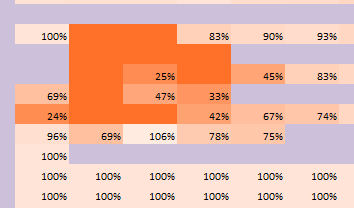
Help me please!
Thanks!
684 Views
3 Replies

 MayilVahanan
MVP
2012-12-05
11:47 AM
- Mark as New
- Bookmark
- Subscribe
- Mute
- Subscribe to RSS Feed
- Permalink
- Report Inappropriate Content
Hi
You can use background color in the expression tab by clicking the '+' sign in it.
or
right click the chart, you can see custom format cell option.. You can use that.
Thanks & Regards, Mayil Vahanan R
Please close the thread by marking correct answer & give likes if you like the post.
Please close the thread by marking correct answer & give likes if you like the post.
567 Views
Not applicable
2012-12-05
11:55 AM
Author
- Mark as New
- Bookmark
- Subscribe
- Mute
- Subscribe to RSS Feed
- Permalink
- Report Inappropriate Content
But i want it automatically, calculated on the value of the table
567 Views
MayilVahanan
MVP
2012-12-05
12:07 PM
- Mark as New
- Bookmark
- Subscribe
- Mute
- Subscribe to RSS Feed
- Permalink
- Report Inappropriate Content
HI
You can use background color in the expression tab by clicking the '+' sign in it.
In that you can give the expression and color based on your requirement. For ex:
=if(Sum(Sales) <= 500, red(), green())
Thanks & Regards, Mayil Vahanan R
Please close the thread by marking correct answer & give likes if you like the post.
Please close the thread by marking correct answer & give likes if you like the post.
567 Views