Unlock a world of possibilities! Login now and discover the exclusive benefits awaiting you.

- Qlik Community
- :
- All Forums
- :
- QlikView
- :
- Pivot Chart - Dimension Expression Header/Level Ch...
- Subscribe to RSS Feed
- Mark Topic as New
- Mark Topic as Read
- Float this Topic for Current User
- Bookmark
- Subscribe
- Mute
- Printer Friendly Page

- Mark as New
- Bookmark
- Subscribe
- Mute
- Subscribe to RSS Feed
- Permalink
- Report Inappropriate Content
Pivot Chart - Dimension Expression Header/Level Change & Sorting
Hello There!
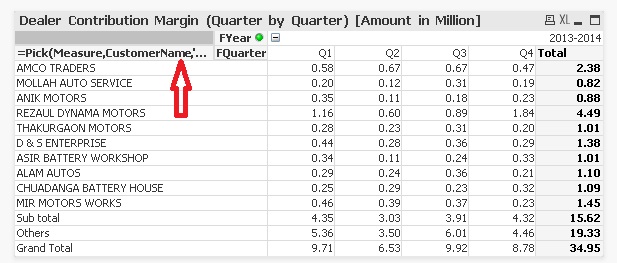
I need a solution for to change the Dimension Expression Header/Level for Pivot Chart and as well as Sorting the Dimension Expression as per the Value. How can I achieve that?
I'm posting here a snap-shot of my current Pivot Chart for your ready reference and suggestion.
Thanks in Advance.
Sajjad Ali.
Accepted Solutions

 pokassov
- Mark as New
- Bookmark
- Subscribe
- Mute
- Subscribe to RSS Feed
- Permalink
- Report Inappropriate Content
pokassov
- Mark as New
- Bookmark
- Subscribe
- Mute
- Subscribe to RSS Feed
- Permalink
- Report Inappropriate Content
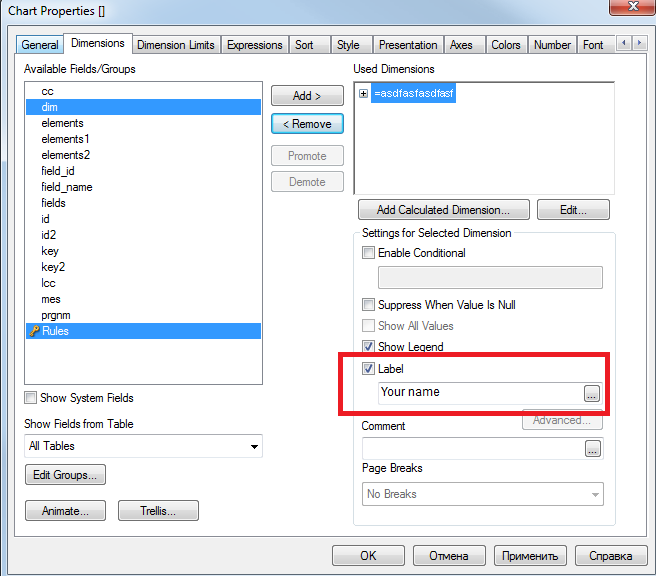
Hi!
- Mark as New
- Bookmark
- Subscribe
- Mute
- Subscribe to RSS Feed
- Permalink
- Report Inappropriate Content
Hello!
Thanks for your suggestion/solution.... Actually I found the Level check-box was dimmed (Disabled); however it works fine.
Can you please suggest regarding 'Sorting the Dimension Expression as per the Value. How can I achieve that?'
Thanks & Regards,
Sajjad.
pokassov
- Mark as New
- Bookmark
- Subscribe
- Mute
- Subscribe to RSS Feed
- Permalink
- Report Inappropriate Content
1. Tab "Sort"
2. Select Dimension that you want to sort
3. Check box "Expression"
4. Put you expression there
5. Uncheck boxes "Numeric Value",'Text'