Unlock a world of possibilities! Login now and discover the exclusive benefits awaiting you.

- Qlik Community
- :
- All Forums
- :
- QlikView
- :
- Re: Pivot Table Custom subtotal in P&L
- Subscribe to RSS Feed
- Mark Topic as New
- Mark Topic as Read
- Float this Topic for Current User
- Bookmark
- Subscribe
- Mute
- Printer Friendly Page

 waszcma1
- Mark as New
- Bookmark
- Subscribe
- Mute
- Subscribe to RSS Feed
- Permalink
- Report Inappropriate Content
Pivot Table Custom subtotal in P&L
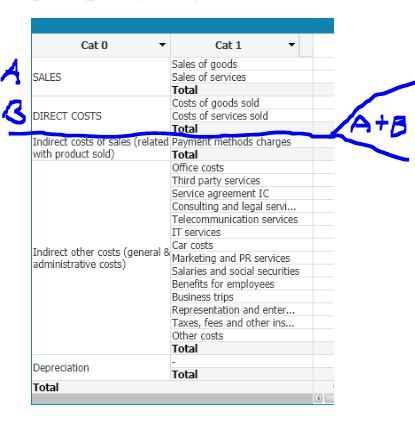
Could you help me to add custom subtotal but based only on some part of the data?
In this example I would like to have subTotal which calculates total of SALES + total of DIRECT COSTS
How Can I achieve this ? is it possible?
Accepted Solutions
waszcma1
- Mark as New
- Bookmark
- Subscribe
- Mute
- Subscribe to RSS Feed
- Permalink
- Report Inappropriate Content
Good hit! , I forgot about customized dimension option because I am always avoiding it as it is really lowering report performance (but my data model is not so big)
Any way I have discover other options which allows me to create view like this:
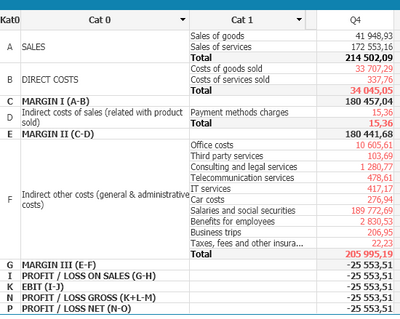
To do so I have use this expression:
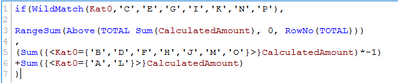
it works fine but I am not sure if this is the best approach. I am still testing it.
waszcma1
- Mark as New
- Bookmark
- Subscribe
- Mute
- Subscribe to RSS Feed
- Permalink
- Report Inappropriate Content
Confirm that the solution I have found works as I expected.
The only thing is that I had to create some DUMMY line with value 0 for the cumulative subtotal.

 chrismarlow
- Mark as New
- Bookmark
- Subscribe
- Mute
- Subscribe to RSS Feed
- Permalink
- Report Inappropriate Content
Hi,
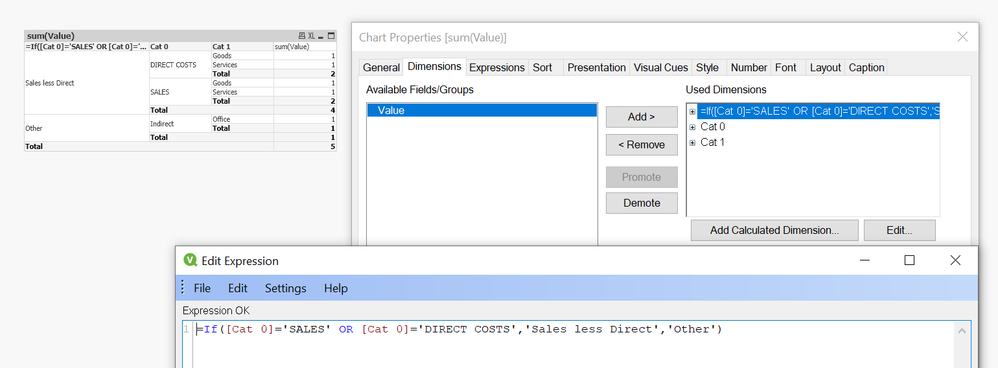
I am not sure you can get just a subtotal in that part of the chart, but you can add a calculated dimension similar to below that will at least show you the values;
Cheers,
Chris.
waszcma1
- Mark as New
- Bookmark
- Subscribe
- Mute
- Subscribe to RSS Feed
- Permalink
- Report Inappropriate Content
Good hit! , I forgot about customized dimension option because I am always avoiding it as it is really lowering report performance (but my data model is not so big)
Any way I have discover other options which allows me to create view like this:
To do so I have use this expression:
it works fine but I am not sure if this is the best approach. I am still testing it.
waszcma1
- Mark as New
- Bookmark
- Subscribe
- Mute
- Subscribe to RSS Feed
- Permalink
- Report Inappropriate Content
Confirm that the solution I have found works as I expected.
The only thing is that I had to create some DUMMY line with value 0 for the cumulative subtotal.
