Unlock a world of possibilities! Login now and discover the exclusive benefits awaiting you.

- Qlik Community
- :
- All Forums
- :
- QlikView
- :
- Qlikview straight table
- Subscribe to RSS Feed
- Mark Topic as New
- Mark Topic as Read
- Float this Topic for Current User
- Bookmark
- Subscribe
- Mute
- Printer Friendly Page

- Mark as New
- Bookmark
- Subscribe
- Mute
- Subscribe to RSS Feed
- Permalink
- Report Inappropriate Content
Qlikview straight table
Hi,
I have two spreadsheet.
1)Report
2)Vendor
In the application(Vendor) i have written load script to extract data from spreadtsheet but i am not able to see any coulmn of vendor sheet in the application.
i want to represent data in the staright tablke format in the application(Vendor tab). The representation i have mentioned in the image file.
Please enclosed all the requ

Accepted Solutions

 jsingh71
- Mark as New
- Bookmark
- Subscribe
- Mute
- Subscribe to RSS Feed
- Permalink
- Report Inappropriate Content
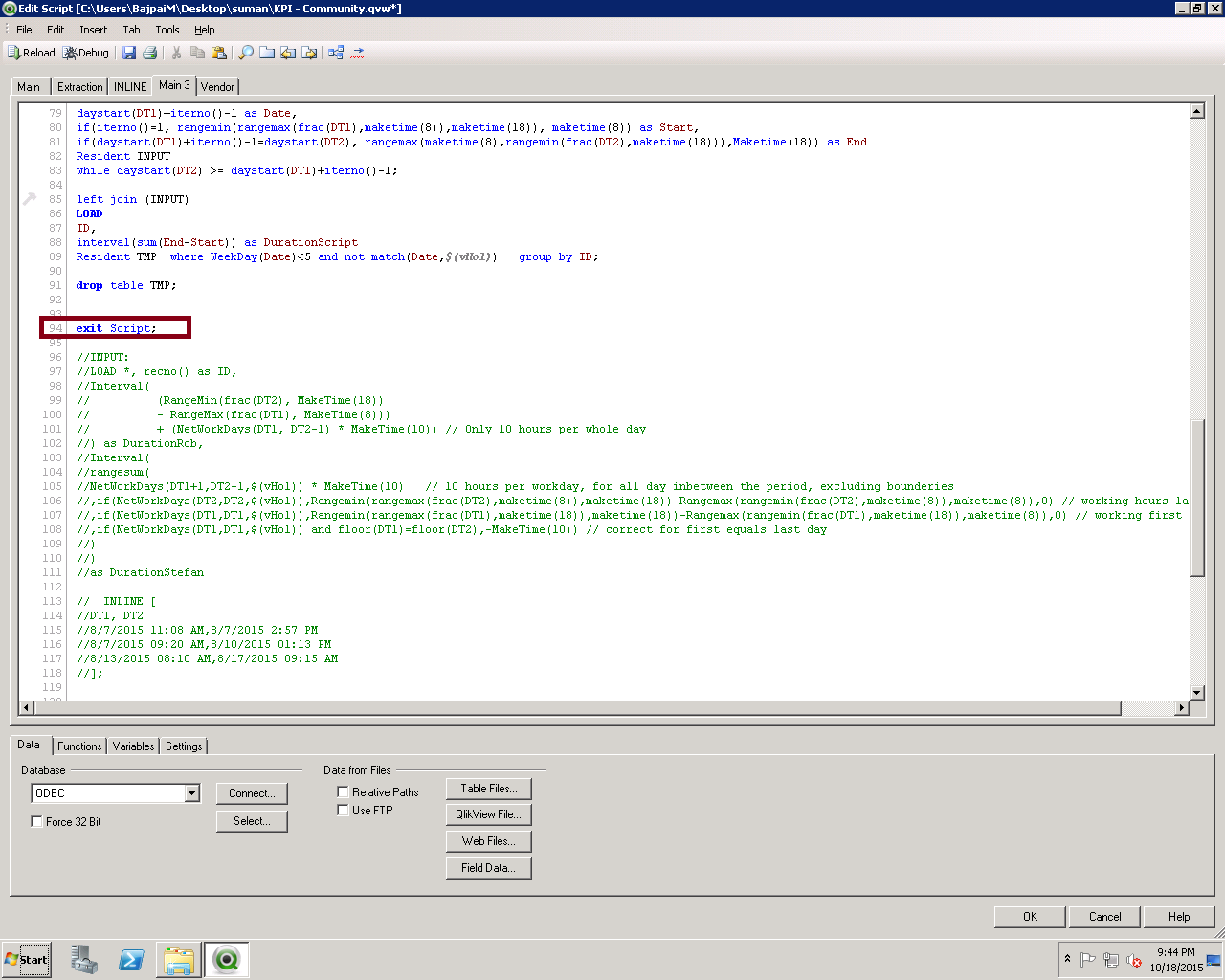
Hi Suman,
Comment "Exit Script" command which you wrote under "Main 3" Tab. Then reload your application.
Still facing any issue then let me know.
jsingh71
- Mark as New
- Bookmark
- Subscribe
- Mute
- Subscribe to RSS Feed
- Permalink
- Report Inappropriate Content
Hi Suman,
Comment "Exit Script" command which you wrote under "Main 3" Tab. Then reload your application.
Still facing any issue then let me know.
- Mark as New
- Bookmark
- Subscribe
- Mute
- Subscribe to RSS Feed
- Permalink
- Report Inappropriate Content
How will I set default should be refresh with one dimension.
jsingh71
- Mark as New
- Bookmark
- Subscribe
- Mute
- Subscribe to RSS Feed
- Permalink
- Report Inappropriate Content
I didn't understand. Can you explain in detail.
- Mark as New
- Bookmark
- Subscribe
- Mute
- Subscribe to RSS Feed
- Permalink
- Report Inappropriate Content
we have 5-6 dimension (Technology Wise)
In the deafault option i don't want to show all the list but instead only one technology will be the default option.
It will not show all the list
- Mark as New
- Bookmark
- Subscribe
- Mute
- Subscribe to RSS Feed
- Permalink
- Report Inappropriate Content
I have checked "always one selected value". All ok now
jsingh71
- Mark as New
- Bookmark
- Subscribe
- Mute
- Subscribe to RSS Feed
- Permalink
- Report Inappropriate Content
means at a time you want to show only one dimension?
where you want to show selected dimension, In Straight Table or in any chart?
By using Adhoc Reporting you can implement this.