Unlock a world of possibilities! Login now and discover the exclusive benefits awaiting you.

- Qlik Community
- :
- All Forums
- :
- QlikView
- :
- Re: Round numbers (%) in expression
- Subscribe to RSS Feed
- Mark Topic as New
- Mark Topic as Read
- Float this Topic for Current User
- Bookmark
- Subscribe
- Mute
- Printer Friendly Page

- Mark as New
- Bookmark
- Subscribe
- Mute
- Subscribe to RSS Feed
- Permalink
- Report Inappropriate Content
Round numbers (%) in expression
Hi,
I try get MAX values in bar chart for each category (picture below). I got it, but I have a problem with round numbers. May I ask for help?
This is code, which I need for MAX values in Category in %. It works fine.
=if(RANK(AGGR(Sum({<DATUM_ID = {">=$(=datum_od) <=$(=datum_do)"}>} PRIJATE)/ Sum(TOTAL <AREA> {<DATUM_ID = {">=$(=datum_od) <=$(=datum_do)"}>} PRIJATE) ,AREA, TYPE)) = 1,rgb(80,80,80))
p.s. "DATUM_ID" means DATE

Accepted Solutions

 sunny_talwar
- Mark as New
- Bookmark
- Subscribe
- Mute
- Subscribe to RSS Feed
- Permalink
- Report Inappropriate Content
Show Value just specify which value to show, but to format you either need to format your actual expression using Num() function or go to Numbers tab to format it.
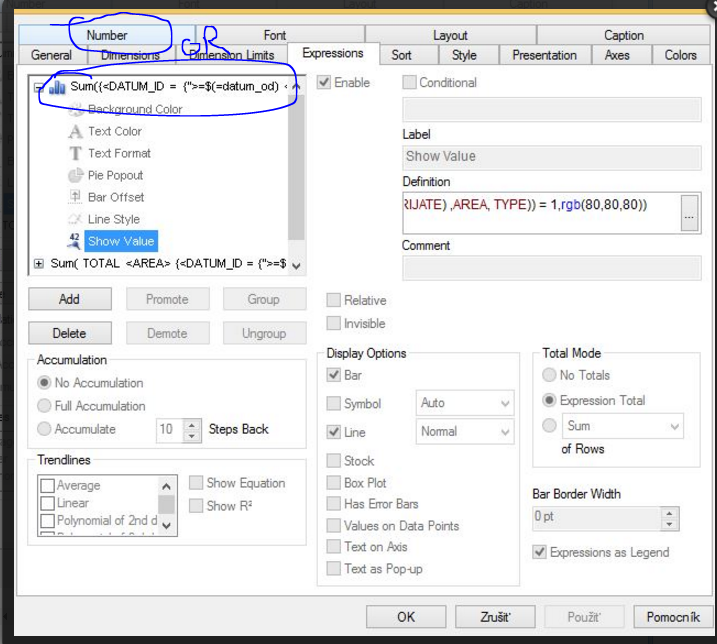
Also, show value should work with this only
Rank(Sum({<DATUM_ID = {">=$(=datum_od) <=$(=datum_do)"}>} PRIJATE)/ Sum(TOTAL <AREA> {<DATUM_ID = {">=$(=datum_od) <=$(=datum_do)"}>} PRIJATE)) = 1
sunny_talwar
- Mark as New
- Bookmark
- Subscribe
- Mute
- Subscribe to RSS Feed
- Permalink
- Report Inappropriate Content
You are looking to show 94,339622641509% as 94%? May be this:
Num(Sum({<DATUM_ID = {">=$(=datum_od) <=$(=datum_do)"}>} PRIJATE)/ Sum(TOTAL <AREA> {<DATUM_ID = {">=$(=datum_od) <=$(=datum_do)"}>} PRIJATE), '##%')
Or on the Number's tab of the chart properties you can select Integer and then check 'Show in Percent (%)'
- Mark as New
- Bookmark
- Subscribe
- Mute
- Subscribe to RSS Feed
- Permalink
- Report Inappropriate Content
I edited my code. It is right:
=if(RANK(AGGR(Sum({<DATUM_ID = {">=$(=datum_od) <=$(=datum_do)"}>} PRIJATE)/ Sum(TOTAL <AREA> {<DATUM_ID = {">=$(=datum_od) <=$(=datum_do)"}>} PRIJATE) ,AREA, TYPE)) = 1,rgb(80,80,80))
but Num(..., '##%') doesn't work 
sunny_talwar
- Mark as New
- Bookmark
- Subscribe
- Mute
- Subscribe to RSS Feed
- Permalink
- Report Inappropriate Content
This code is used for background color, right?
=if(RANK(AGGR(Sum({<DATUM_ID = {">=$(=datum_od) <=$(=datum_do)"}>} PRIJATE)/ Sum(TOTAL <AREA> {<DATUM_ID = {">=$(=datum_od) <=$(=datum_do)"}>} PRIJATE) ,AREA, TYPE)) = 1,rgb(80,80,80))
You don't need formatting for color. You need this in your original expression.....
- Mark as New
- Bookmark
- Subscribe
- Mute
- Subscribe to RSS Feed
- Permalink
- Report Inappropriate Content
No, it is code for Show Value.
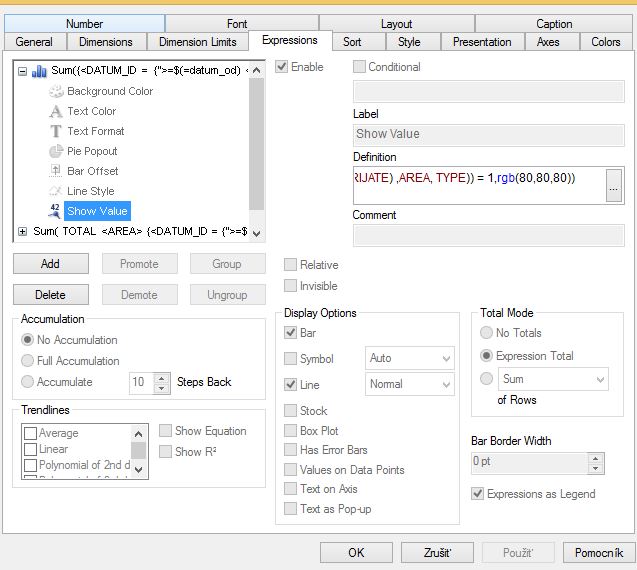

 swuehl
- Mark as New
- Bookmark
- Subscribe
- Mute
- Subscribe to RSS Feed
- Permalink
- Report Inappropriate Content
You would need to set the format for your expression ( Sum({<DATUM_ID = ....), not for the expression attribute 'Show Value'.
Hence add the Num() part to your original expression or set the format accordingly on number tab.
sunny_talwar
- Mark as New
- Bookmark
- Subscribe
- Mute
- Subscribe to RSS Feed
- Permalink
- Report Inappropriate Content
Show Value just specify which value to show, but to format you either need to format your actual expression using Num() function or go to Numbers tab to format it.
Also, show value should work with this only
Rank(Sum({<DATUM_ID = {">=$(=datum_od) <=$(=datum_do)"}>} PRIJATE)/ Sum(TOTAL <AREA> {<DATUM_ID = {">=$(=datum_od) <=$(=datum_do)"}>} PRIJATE)) = 1
- Mark as New
- Bookmark
- Subscribe
- Mute
- Subscribe to RSS Feed
- Permalink
- Report Inappropriate Content
Thank you Sunny. You are right. 
Show Value work only with this:
Rank(Sum({<DATUM_ID = {">=$(=datum_od) <=$(=datum_do)"}>} PRIJATE)/ Sum(TOTAL <AREA> {<DATUM_ID = {">=$(=datum_od) <=$(=datum_do)"}>} PRIJATE)) = 1
and in Number tab I add Format Pattern 0%. Now this is according to my idea.