Unlock a world of possibilities! Login now and discover the exclusive benefits awaiting you.

- Qlik Community
- :
- All Forums
- :
- QlikView
- :
- Set Expression Problem
- Subscribe to RSS Feed
- Mark Topic as New
- Mark Topic as Read
- Float this Topic for Current User
- Bookmark
- Subscribe
- Mute
- Printer Friendly Page

- Mark as New
- Bookmark
- Subscribe
- Mute
- Subscribe to RSS Feed
- Permalink
- Report Inappropriate Content
Set Expression Problem
Hello All,
I am a beginner on QlikView  .
.
I want to select a value in the field "Perc" which correspond to the "PC "field but which is not connected to the "AsOf" Field, that is why is think to put "1" parameters for the field AsOf.
I tried this Expression:
=SUM( {1<AsOf, PC = {"=$(=GetFieldSelections(PC))">} Perc)*100
Thank you in advance for your help,
Sébastien.

 sunny_talwar
- Mark as New
- Bookmark
- Subscribe
- Mute
- Subscribe to RSS Feed
- Permalink
- Report Inappropriate Content
I think this in itself should be enough:
=SUM({<AsOf, PC = {"=$(=GetFieldSelections(PC))">} Perc)*100
Further simplify this like this:
If(GetSelectedCount(PC) > 0, Sum({<AsOf>} Perc) * 100)
- Mark as New
- Bookmark
- Subscribe
- Mute
- Subscribe to RSS Feed
- Permalink
- Report Inappropriate Content
Thanks you for your respons but even this expression doen't work:
=SUM( {<AsOf>} Perc)*100
I obtain 100 ok, but when i choose a item in the PC field, it doesn't work.
Because i set the Option "Always one valu selected" for the AsOf field:
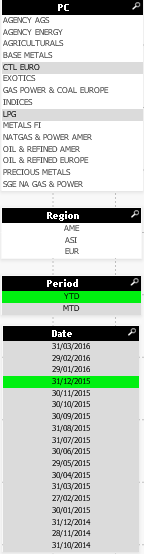
Here "AsOf" is the "Date" field.
Here the Field Perc:
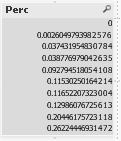
and the Selection Field:
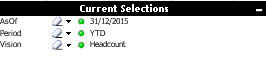
Thanks in advance for your help,
Sébastien.
sunny_talwar
- Mark as New
- Bookmark
- Subscribe
- Mute
- Subscribe to RSS Feed
- Permalink
- Report Inappropriate Content
What about this?
=SUM( {<AsOf, Period>} Perc)*100
- Mark as New
- Bookmark
- Subscribe
- Mute
- Subscribe to RSS Feed
- Permalink
- Report Inappropriate Content
Thanks for your response, but it doesn't work too :/.
I think i can solve the problem with changing the database model
sunny_talwar
- Mark as New
- Bookmark
- Subscribe
- Mute
- Subscribe to RSS Feed
- Permalink
- Report Inappropriate Content
Ya, it seems like a data issue. Not sure why it won't work.
sunny_talwar
- Mark as New
- Bookmark
- Subscribe
- Mute
- Subscribe to RSS Feed
- Permalink
- Report Inappropriate Content
This is working?
=SUM({1} Perc)*100