Unlock a world of possibilities! Login now and discover the exclusive benefits awaiting you.

- Qlik Community
- :
- All Forums
- :
- QlikView
- :
- Re: Set analysis not working inside IF
- Subscribe to RSS Feed
- Mark Topic as New
- Mark Topic as Read
- Float this Topic for Current User
- Bookmark
- Subscribe
- Mute
- Printer Friendly Page

 martynlloyd
- Mark as New
- Bookmark
- Subscribe
- Mute
- Subscribe to RSS Feed
- Permalink
- Report Inappropriate Content
Set analysis not working inside IF
Hi Everyone,
I have a dimension "Dimension" with 4 values:
Units
Registrations
Share
TY v LY
If I have an expression: Sum({$<Dimension={'Units','Registrations','Share'}>} Measure)
- that works fine
I want a different format for the Share, so I use:
If (Dimension='Share', Num(Sum({$<Dimension={'Units','Registrations','Share'}>} Measure),'##0.0%'),Sum({$<Dimension={'Units','Registrations','Share'}>} Measure))
So now I get ALL 4 values - the set analysis is ignored.
Why?
best regards,
Marty.
- Tags:
- if(sum
- set analysis
Accepted Solutions

 sunny_talwar
- Mark as New
- Bookmark
- Subscribe
- Mute
- Subscribe to RSS Feed
- Permalink
- Report Inappropriate Content
 robert_mika
- Mark as New
- Bookmark
- Subscribe
- Mute
- Subscribe to RSS Feed
- Permalink
- Report Inappropriate Content
No sure but the only difference between the False-and true is the format.
So if the Dimension is Share you will get % otherwise get Expression format.
Could you post your data or screenshot?
martynlloyd
- Mark as New
- Bookmark
- Subscribe
- Mute
- Subscribe to RSS Feed
- Permalink
- Report Inappropriate Content
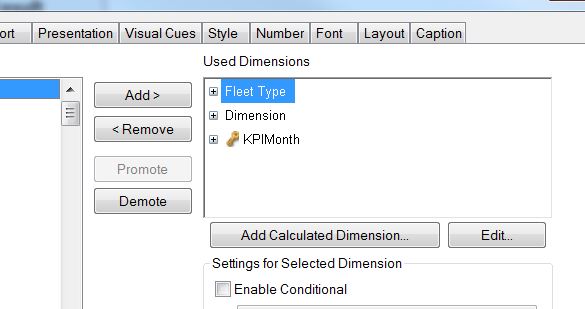
Screenshots

sunny_talwar
- Mark as New
- Bookmark
- Subscribe
- Mute
- Subscribe to RSS Feed
- Permalink
- Report Inappropriate Content
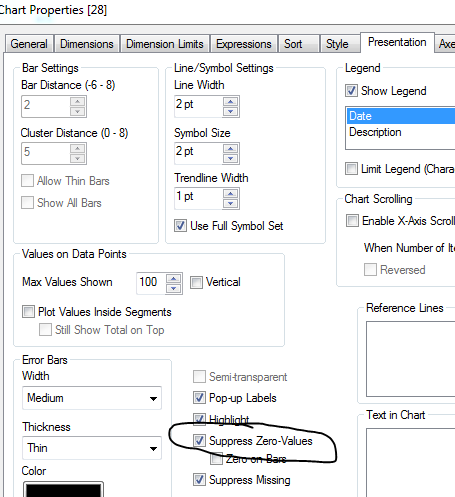
Make sure Suppress Zero-Values on Presentation tab is checked:
martynlloyd
- Mark as New
- Bookmark
- Subscribe
- Mute
- Subscribe to RSS Feed
- Permalink
- Report Inappropriate Content
Thanks!
I'm trying to do two incompatible things at the same time - I'll have to solve that in the script...
Marty.
sunny_talwar
- Mark as New
- Bookmark
- Subscribe
- Mute
- Subscribe to RSS Feed
- Permalink
- Report Inappropriate Content
Or try using a calculated dimension for one of them and suppress is from there.
If(Match(Dimension, 'Units', 'Registrations', 'Shares'), Dimension)
and select "Suppress When Value Is Null" option on the Dimensions tab. and then you won't have to worry about z15 v 14 and you will be able to uncheck Suppress Zero Values on presentation tab.
HTH
Best,
Sunny
