Unlock a world of possibilities! Login now and discover the exclusive benefits awaiting you.

- Qlik Community
- :
- All Forums
- :
- QlikView
- :
- Re: Splitting a field into multiple fields
- Subscribe to RSS Feed
- Mark Topic as New
- Mark Topic as Read
- Float this Topic for Current User
- Bookmark
- Subscribe
- Mute
- Printer Friendly Page

- Mark as New
- Bookmark
- Subscribe
- Mute
- Subscribe to RSS Feed
- Permalink
- Report Inappropriate Content
Splitting a field into multiple fields
Hi,
I have one query in this post.
Splitting a field into multiple fields
How can I use variable in this part for i=1 to 5 of the script?.. I want to make it for i =1 to max(test)... test is field in Tab2.
Tab2:
LOAD *,SubStringCount(Change1,'|') as test Inline [
Team1,Change1
A,10|20|30|40|50
];
for i=1 to 5
Tab23:
LOAD *, SubField(Change1,'|',$(i)) as fieldname$(i)
Resident Tab2 ;
NEXT i;

 marcus_sommer
- Mark as New
- Bookmark
- Subscribe
- Mute
- Subscribe to RSS Feed
- Permalink
- Report Inappropriate Content
If you used subfield within a load without the third parameter qlik will be automatically loop through them - this meant you don't need your extra outside loop.
- Marcus
 sunny_talwar
- Mark as New
- Bookmark
- Subscribe
- Mute
- Subscribe to RSS Feed
- Permalink
- Report Inappropriate Content
Maybe Generic load once you have the data in different rows?
- Mark as New
- Bookmark
- Subscribe
- Mute
- Subscribe to RSS Feed
- Permalink
- Report Inappropriate Content
Is it possible in some way for i =1 to max(test).
I tried several combinations of Subfield, Concat. I am not getting what I need. With the script above I am getting the right result but If I am able to put max the solution will become dynamic which is required.
Thanks
SAK
sunny_talwar
- Mark as New
- Bookmark
- Subscribe
- Mute
- Subscribe to RSS Feed
- Permalink
- Report Inappropriate Content
Are you trying to get this?
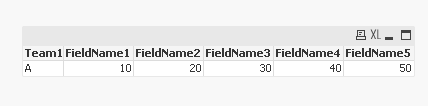
Tab2:
LOAD * Inline [
Team1,Change1
A,10|20|30|40|50
];
FinalTable:
LOAD Distinct Team1
Resident Tab2;
FOR i = 1 to SubStringCount(FieldValue('Change1', 1), '|') + 1
Left Join (FinalTable)
LOAD Team1,
SubField(Change1, '|', $(i)) as FieldName$(i)
Resident Tab2;
NEXT
DROP Table Tab2;