Unlock a world of possibilities! Login now and discover the exclusive benefits awaiting you.

- Qlik Community
- :
- All Forums
- :
- QlikView
- :
- Re: Straight Table - Highlight Selected Fields jus...
- Subscribe to RSS Feed
- Mark Topic as New
- Mark Topic as Read
- Float this Topic for Current User
- Bookmark
- Subscribe
- Mute
- Printer Friendly Page

- Mark as New
- Bookmark
- Subscribe
- Mute
- Subscribe to RSS Feed
- Permalink
- Report Inappropriate Content
Straight Table - Highlight Selected Fields just like List box
Hi,
I am having a Straight Table for which I am displaying "All Values" for Dimension and removing check on "Suppressing Zero Values" so that I can view all the available options.
But when I select one of the value, its not showing which value I have selected.

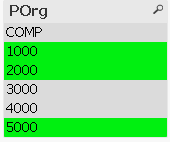
As you can see above, I have selected 1000,2000 & 5000 but its not highlighting the row as if it was a list box below.
Is this something possible?
Accepted Solutions

 andrey_krylov
- Mark as New
- Bookmark
- Subscribe
- Mute
- Subscribe to RSS Feed
- Permalink
- Report Inappropriate Content
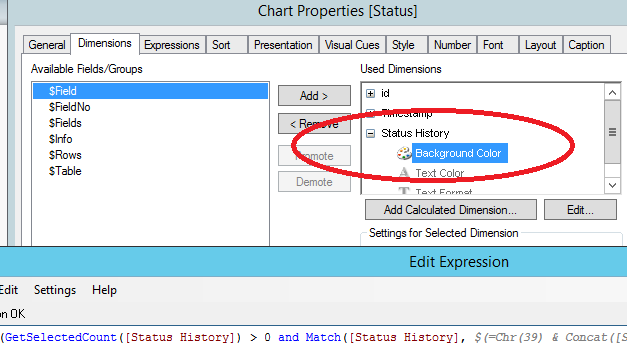
Of course. Chart Properties -> Dimensions -> Used Dimensions -> Status History -> Background Color
And there is the expression
=If(GetSelectedCount([Status History]) > 0 and Match([Status History], $(=Chr(39) & Concat([Status History], Chr(39) & Chr(44) & Chr(39)) & Chr(39)) ), LightGreen(), White())
andrey_krylov
- Mark as New
- Bookmark
- Subscribe
- Mute
- Subscribe to RSS Feed
- Permalink
- Report Inappropriate Content
Hi, Samik. See attached, maybe that's what you need.
- Mark as New
- Bookmark
- Subscribe
- Mute
- Subscribe to RSS Feed
- Permalink
- Report Inappropriate Content
Andrew, you got exactly what I wanted. But I am not able to get how you did that in the file.
Can you please provide the exact screenshot of section where you did it.
andrey_krylov
- Mark as New
- Bookmark
- Subscribe
- Mute
- Subscribe to RSS Feed
- Permalink
- Report Inappropriate Content
Of course. Chart Properties -> Dimensions -> Used Dimensions -> Status History -> Background Color
And there is the expression
=If(GetSelectedCount([Status History]) > 0 and Match([Status History], $(=Chr(39) & Concat([Status History], Chr(39) & Chr(44) & Chr(39)) & Chr(39)) ), LightGreen(), White())
- Mark as New
- Bookmark
- Subscribe
- Mute
- Subscribe to RSS Feed
- Permalink
- Report Inappropriate Content
Thank you Andrew. Much appreciated!!