Unlock a world of possibilities! Login now and discover the exclusive benefits awaiting you.

- Qlik Community
- :
- All Forums
- :
- QlikView
- :
- Re: Sum of Rows in Text Box
- Subscribe to RSS Feed
- Mark Topic as New
- Mark Topic as Read
- Float this Topic for Current User
- Bookmark
- Subscribe
- Mute
- Printer Friendly Page

- Mark as New
- Bookmark
- Subscribe
- Mute
- Subscribe to RSS Feed
- Permalink
- Report Inappropriate Content
Sum of Rows in Text Box
Hi ,
Is there anyway to replicate the Sum of Rows in a Straight chart into a Text Box.
The problem I am facing is,the Total of an Expression is different when you individually calculate the expression for each quarter.
Any help would be greatly appreciated
- « Previous Replies
-
- 1
- 2
- Next Replies »
Accepted Solutions

 sunny_talwar
- Mark as New
- Bookmark
- Subscribe
- Mute
- Subscribe to RSS Feed
- Permalink
- Report Inappropriate Content
I don't know if this is a copy paste error, but you are missing a parenthesis here:
Sum(Aggr(
(Sum({<Scenario={'Actual'}>}Clms_Vol) *
Sum({<Scenario-={'Actual'}>}Unit) *
Sum({<Scenario-={'Actual'}>}UnitPrice)),
Quarter))

 Gysbert_Wassena
- Mark as New
- Bookmark
- Subscribe
- Mute
- Subscribe to RSS Feed
- Permalink
- Report Inappropriate Content
You can use the aggr function: sum(aggr(sum(Something),Dimension1, Dimension2, ...etc)
talk is cheap, supply exceeds demand
 maxgro
- Mark as New
- Bookmark
- Subscribe
- Mute
- Subscribe to RSS Feed
- Permalink
- Report Inappropriate Content
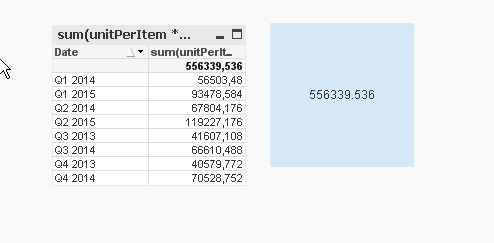
try
| =sum(aggr(sum(unitPerItem | * | [Unit Price] * | [Rejected Items]), Date)) |
sunny_talwar
- Mark as New
- Bookmark
- Subscribe
- Mute
- Subscribe to RSS Feed
- Permalink
- Report Inappropriate Content
Gysbert - Isn't that the same thing as Sum(Something) unless you have a distinct -> Sum(Aggr(Sum(DISTINCT Something), Dimension1, Dimension2, ...etc)
- Mark as New
- Bookmark
- Subscribe
- Mute
- Subscribe to RSS Feed
- Permalink
- Report Inappropriate Content
I tried that,its not working in my case,wit the above example following expression is used in the text box.
=(sum(aggr(sum({<Test-={'Actual'},BrandId=p(DealId)>}CostPerBundle),Quarter,Id))/
sum(aggr(sum({<Test-={'Actual'},BrandId=p(DealId)>}TotaUnits),Quarter,Id)))
*sum(aggr(sum({<Test={'Actual'},BrandId=p(DealId)>}Rejected Items),Quarter,Id))*
sum(aggr(avg({<Test={'Actual'},BrandId=p(DealId)>}unitPerItem),Quarter,Id))
sunny_talwar
- Mark as New
- Bookmark
- Subscribe
- Mute
- Subscribe to RSS Feed
- Permalink
- Report Inappropriate Content
Give this a try:
=Sum(Aggr(
((Sum({<Test-={'Actual'}, BrandId=p(DealId)>} CostPerBundle)/Sum({<Test-={'Actual'}, BrandId=p(DealId)>} TotaUnits)) * Sum({<Test={'Actual'}, BrandId=p(DealId)>} Rejected Items) * Avg({<Test={'Actual'}, BrandId=p(DealId)>} unitPerItem)),
Quarter,Id))
Gysbert_Wassena- Mark as New
- Bookmark
- Subscribe
- Mute
- Subscribe to RSS Feed
- Permalink
- Report Inappropriate Content
It depends on the Something.
talk is cheap, supply exceeds demand
sunny_talwar
- Mark as New
- Bookmark
- Subscribe
- Mute
- Subscribe to RSS Feed
- Permalink
- Report Inappropriate Content
So you mean if it is field or a bunch of calculations (like in his case a division and multiplication)?
- Mark as New
- Bookmark
- Subscribe
- Mute
- Subscribe to RSS Feed
- Permalink
- Report Inappropriate Content
Thanks Maxgro.....it worked well when I am just using the tree fields,but when I use the Set Analysis condition for all the three fields its not working.
Any help
sunny_talwar
- Mark as New
- Bookmark
- Subscribe
- Mute
- Subscribe to RSS Feed
- Permalink
- Report Inappropriate Content
Did you try this John?
=Sum(Aggr(
((Sum({<Test-={'Actual'}, BrandId=p(DealId)>} CostPerBundle)/Sum({<Test-={'Actual'}, BrandId=p(DealId)>} TotaUnits)) * Sum({<Test={'Actual'}, BrandId=p(DealId)>} Rejected Items) * Avg({<Test={'Actual'}, BrandId=p(DealId)>} unitPerItem)),
Quarter,Id))
- « Previous Replies
-
- 1
- 2
- Next Replies »