Unlock a world of possibilities! Login now and discover the exclusive benefits awaiting you.

- Qlik Community
- :
- All Forums
- :
- QlikView
- :
- Re: Summing the current & previous month
- Subscribe to RSS Feed
- Mark Topic as New
- Mark Topic as Read
- Float this Topic for Current User
- Bookmark
- Subscribe
- Mute
- Printer Friendly Page

- Mark as New
- Bookmark
- Subscribe
- Mute
- Subscribe to RSS Feed
- Permalink
- Report Inappropriate Content
Summing the current & previous month
Hi,
I'm currently having a problem with a piece of Set Analysis which I found on this website - I'm looking at performing a sum on the current selected month plus the previous selected month. The expression I'm using is this:
=Sum({<Date={">=$(=MonthStart(AddMonths(Max(Date),-1)))<=$(=MonthEnd(AddMonths(Max(Date),-0)))"}>}Sales)
However, it seems to be taking the very minimum month in the whole dataset as the min month (i actually want 'current month -1'), and the selected month as the max (which is what I want).
I'm probably missing something obvious... could someone take a look and give me a hand?
Thanks very much!

 buzzy996
- Mark as New
- Bookmark
- Subscribe
- Mute
- Subscribe to RSS Feed
- Permalink
- Report Inappropriate Content
try this way,
PREVIOUS MONTH
sum({$<Year = {$(=only(Year) - $(=if(only(Month) = 1, 1, 0)))}, Month = {$(=month(addmonths(MonthYear, -1)))}>} LineSalesAmount)

 maxgro
- Mark as New
- Bookmark
- Subscribe
- Mute
- Subscribe to RSS Feed
- Permalink
- Report Inappropriate Content
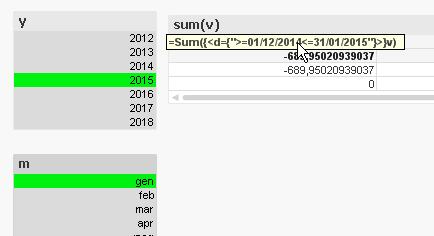
it seems correct,I just replace my field in your exp and I get (DD/MM/YYYY)
to see the expression as in image, remove the label

 ramoncova06
- Mark as New
- Bookmark
- Subscribe
- Mute
- Subscribe to RSS Feed
- Permalink
- Report Inappropriate Content
you don't need the addmonths and the monthend function for you current month
=Sum({<Date={">=$(=MonthStart(AddMonths(Max(Date),-1)))<=$(=Max(Date))"}>}Sales)
 nico_ilog
- Mark as New
- Bookmark
- Subscribe
- Mute
- Subscribe to RSS Feed
- Permalink
- Report Inappropriate Content