Unlock a world of possibilities! Login now and discover the exclusive benefits awaiting you.

- Qlik Community
- :
- All Forums
- :
- QlikView
- :
- themes in qlikview
- Subscribe to RSS Feed
- Mark Topic as New
- Mark Topic as Read
- Float this Topic for Current User
- Bookmark
- Subscribe
- Mute
- Printer Friendly Page

- Mark as New
- Bookmark
- Subscribe
- Mute
- Subscribe to RSS Feed
- Permalink
- Report Inappropriate Content
themes in qlikview
hi guys,
i want to import the beckgrounds and the images from another qlik document to my document how can i do that.
- « Previous Replies
-
- 1
- 2
- Next Replies »

 MK_QSL
- Mark as New
- Bookmark
- Subscribe
- Mute
- Subscribe to RSS Feed
- Permalink
- Report Inappropriate Content
Go to the object of qvw from where you want to use the theme...
Go to Layout tab of that object and use Theme maker...
After saving the Theme, you can use the same in another document by Apply Theme.
- Mark as New
- Bookmark
- Subscribe
- Mute
- Subscribe to RSS Feed
- Permalink
- Report Inappropriate Content
can please explain what you want to say

 ashfaq_haseeb
- Mark as New
- Bookmark
- Subscribe
- Mute
- Subscribe to RSS Feed
- Permalink
- Report Inappropriate Content
Hi,
Open the document that you would like to create theme from.
Now go to Setting --> Document properties --> Layout tab --> Click on theme maker and follow instructions.
Its a self explanatory wizard. Make sure you save theme in required location.
Now open any new document
Now go to Setting --> Document properties --> Layout tab --> Click Apply theme ans select the theme you created earlier.
Regards
ASHFAQ
- Mark as New
- Bookmark
- Subscribe
- Mute
- Subscribe to RSS Feed
- Permalink
- Report Inappropriate Content
hi,
there's no teme marker in the layout tab.
ashfaq_haseeb
- Mark as New
- Bookmark
- Subscribe
- Mute
- Subscribe to RSS Feed
- Permalink
- Report Inappropriate Content
Hi
Go to
Setting --> Document properties --> Layout tab -->
Not Layout tab directly.
If possible send snapshot.
Regards
ASHFAQ
- Mark as New
- Bookmark
- Subscribe
- Mute
- Subscribe to RSS Feed
- Permalink
- Report Inappropriate Content
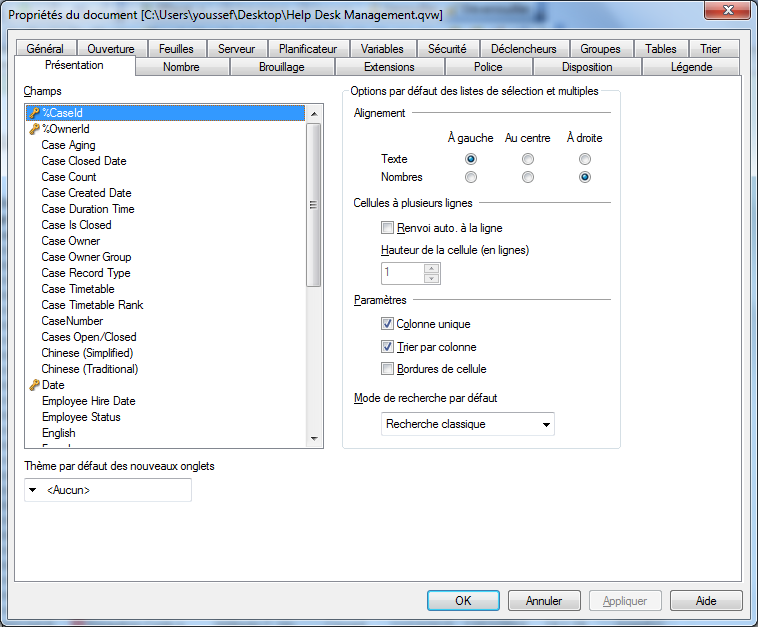
ashfaq_haseeb
- Mark as New
- Bookmark
- Subscribe
- Mute
- Subscribe to RSS Feed
- Permalink
- Report Inappropriate Content
Hi,
This is presentation tab look at layout tab.
have a look at attached image.
May be last second tab in your image.
Regards
ASHFAQ

- Mark as New
- Bookmark
- Subscribe
- Mute
- Subscribe to RSS Feed
- Permalink
- Report Inappropriate Content
Hi,
You have the french version that's why you didn't find the layout tab.
Va dans l'onglet 'DISPOSITION' des 'Propriétés du document', tu trouveras le bouton 'Créateur de thèmes...'
- Mark as New
- Bookmark
- Subscribe
- Mute
- Subscribe to RSS Feed
- Permalink
- Report Inappropriate Content
thank you for your help guys, but the problem i've got just the background
- « Previous Replies
-
- 1
- 2
- Next Replies »