Unlock a world of possibilities! Login now and discover the exclusive benefits awaiting you.

- Qlik Community
- :
- Forums
- :
- Archive
- :
- Archived Groups
- :
- QDF 1.4.1 Error: Internal Fatal error (-130)
- Subscribe to RSS Feed
- Mark Topic as New
- Mark Topic as Read
- Float this Topic for Current User
- Bookmark
- Subscribe
- Mute
- Printer Friendly Page

 arish_delon
- Mark as New
- Bookmark
- Subscribe
- Mute
- Subscribe to RSS Feed
- Permalink
- Report Inappropriate Content
QDF 1.4.1 Error: Internal Fatal error (-130)
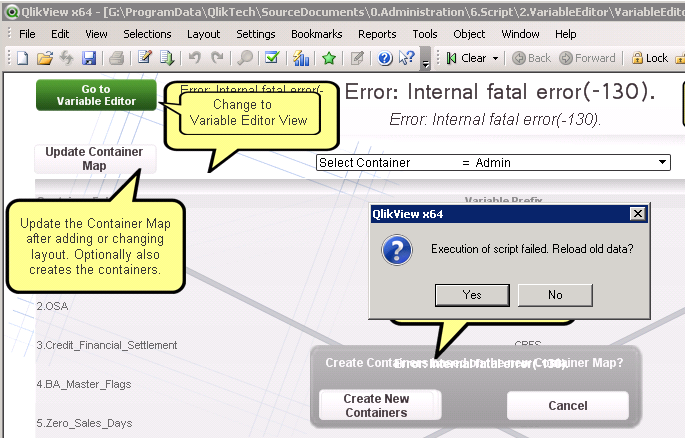
Hi All, do you know how to correct this issue? (I am on QlikView 11.20 SR 13)
I can launch the Qlikview variable editor. After launching, it prompts me to update Container Map.
Then it prompts to "create new containers" after some time i get the following error: Internal Fatal error (-130).
Is the container map csv file is corrupted? I tried to restore the backup container file and i get the same error.
Accepted Solutions

- Mark as New
- Bookmark
- Subscribe
- Mute
- Subscribe to RSS Feed
- Permalink
- Report Inappropriate Content
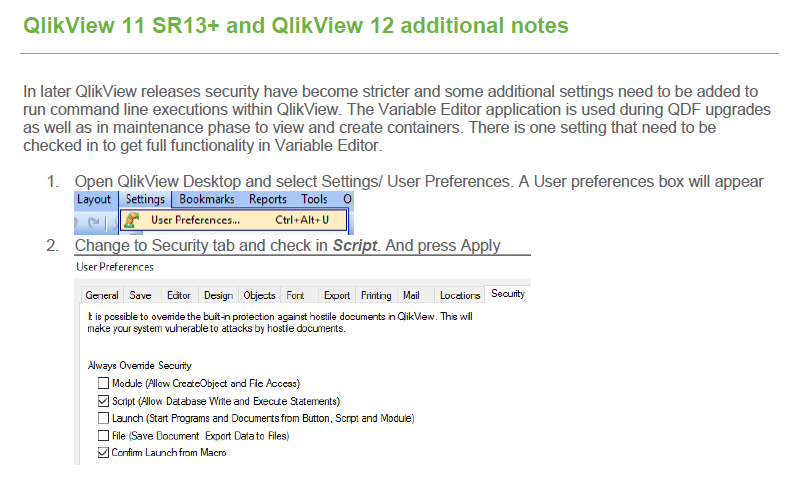
have you setup the security settings as per page 9 of the deployment guide?
- Mark as New
- Bookmark
- Subscribe
- Mute
- Subscribe to RSS Feed
- Permalink
- Report Inappropriate Content
have you setup the security settings as per page 9 of the deployment guide?
arish_delon
- Mark as New
- Bookmark
- Subscribe
- Mute
- Subscribe to RSS Feed
- Permalink
- Report Inappropriate Content
Hi Damian Waldron,
I found the instruction in page 4. Thank you for the tip. The errors are gone.