Unlock a world of possibilities! Login now and discover the exclusive benefits awaiting you.

- Qlik Community
- :
- Forums
- :
- Archive
- :
- Archived Groups
- :
- CALS
- Subscribe to RSS Feed
- Mark Topic as New
- Mark Topic as Read
- Float this Topic for Current User
- Bookmark
- Subscribe
- Mute
- Printer Friendly Page

- Mark as New
- Bookmark
- Subscribe
- Mute
- Subscribe to RSS Feed
- Permalink
- Report Inappropriate Content
CALS
How to assign CALS.
what is the tab available in QMC or publisher
Accepted Solutions

 maxgro
- Mark as New
- Bookmark
- Subscribe
- Mute
- Subscribe to RSS Feed
- Permalink
- Report Inappropriate Content
document
in document tab choose a documen
you can assign on the right (see image)
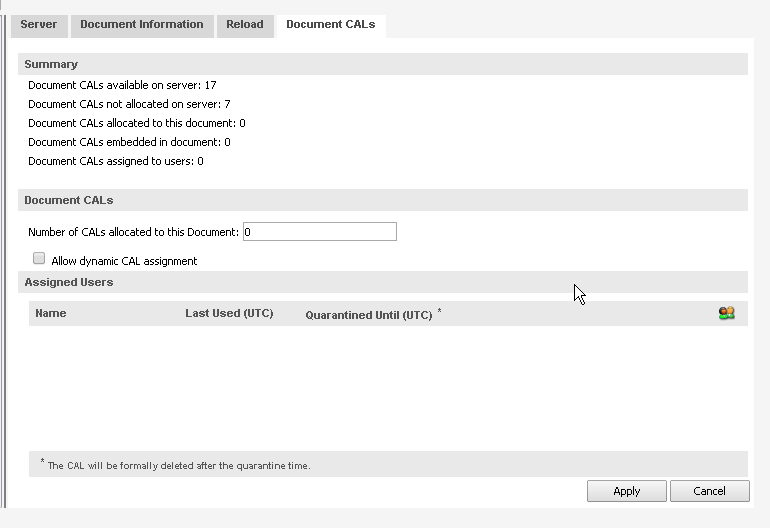
named cal
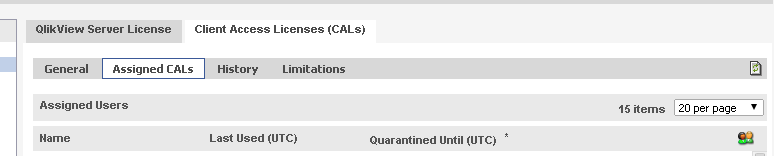
in system tab --> licenses --> choose server
on the right (see image) you can assign cals
More here
document and named cal lease
http://community.qlik.com/docs/DOC-2993
document cal
http://community.qlik.com/message/270038#270038
and in the attachment
- Mark as New
- Bookmark
- Subscribe
- Mute
- Subscribe to RSS Feed
- Permalink
- Report Inappropriate Content
Hi Venu,
What type of CAL you want assign? Which version of QV you are using?
--
Vinoth
- Mark as New
- Bookmark
- Subscribe
- Mute
- Subscribe to RSS Feed
- Permalink
- Report Inappropriate Content
Qlikview 11 SR2 want know assighning all types of CALS.
Regards
maxgro
- Mark as New
- Bookmark
- Subscribe
- Mute
- Subscribe to RSS Feed
- Permalink
- Report Inappropriate Content
document
in document tab choose a documen
you can assign on the right (see image)
named cal
in system tab --> licenses --> choose server
on the right (see image) you can assign cals
More here
document and named cal lease
http://community.qlik.com/docs/DOC-2993
document cal
http://community.qlik.com/message/270038#270038
and in the attachment