Unlock a world of possibilities! Login now and discover the exclusive benefits awaiting you.

- Qlik Community
- :
- Forums
- :
- Archive
- :
- Archived Groups
- :
- Re: Expression To get Presented EmpCount
- Subscribe to RSS Feed
- Mark Topic as New
- Mark Topic as Read
- Float this Topic for Current User
- Bookmark
- Subscribe
- Mute
- Printer Friendly Page

 vengadeshpalani
- Mark as New
- Bookmark
- Subscribe
- Mute
- Subscribe to RSS Feed
- Permalink
- Report Inappropriate Content
Expression To get Presented EmpCount
Hi Community,
I'm new to Qlik View, I faced this case, and I need your help please.
| EmpID | EmpName | Joining Date | RelevingDate |
|---|---|---|---|
| 001 | Bose | 05/05/2014 | 05/05/2015 |
| 001 | Bose | 01/01/2016 | 07/01/2016 |
| 002 | Siva | 02/02/2015 | 09/10/2016 |
| 003 | Chandra | 02/01/2015 | |
| 004 | Cp | 10/10/2016 | |
| 005 | JP | 05/05/2015 | 05/05/2016 |
I have month and year master calendar Filter Please tell the expression when I select any one of month and year, I want the present EmpID Count only for the selected Month and year
Accepted Solutions

 sunny_talwar
- Mark as New
- Bookmark
- Subscribe
- Mute
- Subscribe to RSS Feed
- Permalink
- Report Inappropriate Content
Like this?
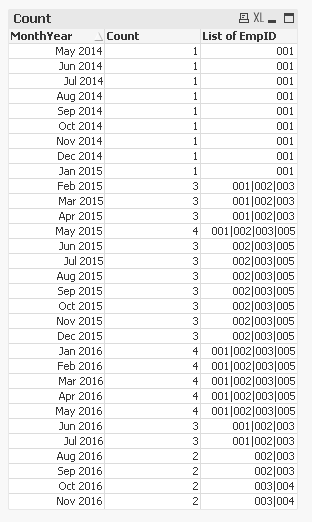
Script:
Table:
LOAD EmpID,
EmpName,
[Joining Date] as Joining_Date,
RelevingDate,
If(Len(Trim(RelevingDate)) = 0, Today(), RelevingDate) as Releving_Date
FROM [https://community.qlik.com/thread/241033]
(html, codepage is 1252, embedded labels, table is @1);
MinMax:
LOAD Min(Joining_Date) as Min,
Max(Releving_Date) as Max
Resident Table;
LET vMin = Peek('Min');
LET vMax = Peek('Max');
DROP Table MinMax;
Calendar:
LOAD Date,
MonthName(Date) as MonthYear,
Year(Date) as Year,
Month(Date) as Month;
LOAD Date($(vMin) + IterNo() - 1) as Date
AutoGenerate 1
While $(vMin) + IterNo() - 1 <= $(vMax);
Left Join (Table)
IntervalMatch (Date)
LOAD Joining_Date,
Releving_Date
Resident Table;
Assuming you already have a master calendar, the script is red is what you will need to make a connection between your master calendar and the fact table.
sunny_talwar
- Mark as New
- Bookmark
- Subscribe
- Mute
- Subscribe to RSS Feed
- Permalink
- Report Inappropriate Content
Like this?
Script:
Table:
LOAD EmpID,
EmpName,
[Joining Date] as Joining_Date,
RelevingDate,
If(Len(Trim(RelevingDate)) = 0, Today(), RelevingDate) as Releving_Date
FROM [https://community.qlik.com/thread/241033]
(html, codepage is 1252, embedded labels, table is @1);
MinMax:
LOAD Min(Joining_Date) as Min,
Max(Releving_Date) as Max
Resident Table;
LET vMin = Peek('Min');
LET vMax = Peek('Max');
DROP Table MinMax;
Calendar:
LOAD Date,
MonthName(Date) as MonthYear,
Year(Date) as Year,
Month(Date) as Month;
LOAD Date($(vMin) + IterNo() - 1) as Date
AutoGenerate 1
While $(vMin) + IterNo() - 1 <= $(vMax);
Left Join (Table)
IntervalMatch (Date)
LOAD Joining_Date,
Releving_Date
Resident Table;
Assuming you already have a master calendar, the script is red is what you will need to make a connection between your master calendar and the fact table.
vengadeshpalani
- Mark as New
- Bookmark
- Subscribe
- Mute
- Subscribe to RSS Feed
- Permalink
- Report Inappropriate Content
Thanks @sunny
