Unlock a world of possibilities! Login now and discover the exclusive benefits awaiting you.

- Qlik Community
- :
- Forums
- :
- Archive
- :
- Archived Groups
- :
- Re: Logout - Login Issue
- Subscribe to RSS Feed
- Mark Topic as New
- Mark Topic as Read
- Float this Topic for Current User
- Bookmark
- Subscribe
- Mute
- Printer Friendly Page

 gajapathy74
- Mark as New
- Bookmark
- Subscribe
- Mute
- Subscribe to RSS Feed
- Permalink
- Report Inappropriate Content
Logout - Login Issue
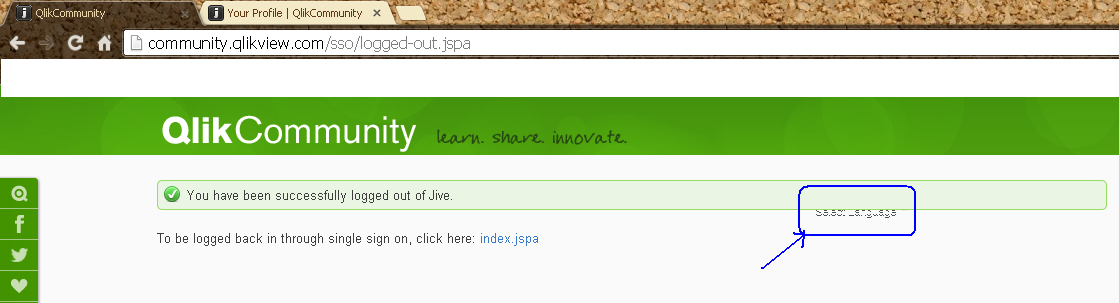
on click of user profile, log out shows the message "You have been successfully logged out of Jive." and also below the green border some text is getting displayed.
the another issue when click on ".... click here. index.jspa" taken to home screen and then click on "login" authenticate with my earlier logged in account without asking my credentials.

 Gysbert_Wassena
- Mark as New
- Bookmark
- Subscribe
- Mute
- Subscribe to RSS Feed
- Permalink
- Report Inappropriate Content
Your browser remembers your credentials for you. If you don't want that you have to make sure that in your browser settings you don't have something like 'Offer to save passwords I enter on the web' enabled. And preferably close your browser after logging out.
talk is cheap, supply exceeds demand
gajapathy74
- Mark as New
- Bookmark
- Subscribe
- Mute
- Subscribe to RSS Feed
- Permalink
- Report Inappropriate Content
Thanks for your input. I am sure that I have not enabled save password in
my browser and am used to cloee my browser after I visit the web pages. But
in this scenario it look like the session or cookie is not properly cleared
/closed.
.png "Miguel_Angel_Baeyens")
 Miguel_Angel_Ba
- Mark as New
- Bookmark
- Subscribe
- Mute
- Subscribe to RSS Feed
- Permalink
- Report Inappropriate Content
Hi,
Thanks for sharing, we will take a look at it. However, if you have any other session kept open with QlikView (for example, Downloads, Demos or Qonnect Portal), since the same credential works for all sites (it's a single sign-on) you won't be prompted, as long as you are already logged on a site, and will take credentials from there.
Anyway, would you be so kind as to send us as much information as possible in regards to time, browser (I know, it's Chrome, but version) and confirm whether or not you had another session open with the SSO?
Thanks.
Miguel
gajapathy74
- Mark as New
- Bookmark
- Subscribe
- Mute
- Subscribe to RSS Feed
- Permalink
- Report Inappropriate Content
Hello Miguel,
I used only one instance of Chrome and only one tab opened by that time. Given below the browser details.
Browser: Chrome
Version: 29.0.1547.57 m
Regards
Miguel_Angel_Ba- Mark as New
- Bookmark
- Subscribe
- Mute
- Subscribe to RSS Feed
- Permalink
- Report Inappropriate Content
Thanks for the info.
Just to make sure, can you please try to log in at www.qlik.com then log out and see if the issue happens as well in that site or only in the QlikCommunity?
Many thanks.
Miguel

- Mark as New
- Bookmark
- Subscribe
- Mute
- Subscribe to RSS Feed
- Permalink
- Report Inappropriate Content
Hi,
i also faced issue 2, login without asking for password again even though i logout.
i dnt set remember password, and even if i do it shud take me to login screen first & not to the Homepage.
using Mozilla Firefox
Regards
gajapathy74
- Mark as New
- Bookmark
- Subscribe
- Mute
- Subscribe to RSS Feed
- Permalink
- Report Inappropriate Content
I tried with www.qlik.com and it works as expected. After I logout and click login again taking me to the login screen. It fails only in Qlik Community.
Miguel_Angel_Ba- Mark as New
- Bookmark
- Subscribe
- Mute
- Subscribe to RSS Feed
- Permalink
- Report Inappropriate Content