Unlock a world of possibilities! Login now and discover the exclusive benefits awaiting you.

- Qlik Community
- :
- Forums
- :
- Archive
- :
- Archived Groups
- :
- Promulgating changes to script to all containers
- Subscribe to RSS Feed
- Mark Topic as New
- Mark Topic as Read
- Float this Topic for Current User
- Bookmark
- Subscribe
- Mute
- Printer Friendly Page

 qliknerd
- Mark as New
- Bookmark
- Subscribe
- Mute
- Subscribe to RSS Feed
- Permalink
- Report Inappropriate Content
Promulgating changes to script to all containers
Hi
If I make changes to a file e.g. ..\3.Include\4.Sub\7.CalendarGen.qvs to include some extra flags, how do I promulgate the changes through to all of the other containers? Do I have to copy and paste the updated file to each container or is there alternative way?
Thanks
Ian
- Tags:
- Group_Discussions
Accepted Solutions
qliknerd
- Mark as New
- Bookmark
- Subscribe
- Mute
- Subscribe to RSS Feed
- Permalink
- Report Inappropriate Content
Hmm, thought so. Thanks for the responses. I may need to write a macro to feed a change through to multiple containers.
Edit:
Easier than I thought - found a sample batch file here, I'm on Win7 and here's what I did. This worked for me, but make sure you proceed with caution/have a backup if you want to try this for yourselves:
- Place edited 7.CalendarGen.qvs in root QlikView folder (C:\~Qlik~)
- Did a search in Windows Explorer for all 7.CalendarGen.qvs files with this folder and all subfolders. I currently have 32 containers.
- Select all files, Right Click>Properties, changed "Read Only" attributes to False.
- Opened up a command window (cmd) and navigated to C:\~Qlik~ using the command cd C:\~Qlik~
- Ran the following command: for /F "tokens=*" %P in ('dir /b /s 7.CalendarGen.qvs') do copy /Y .\7.CalendarGen.qvs "%P"
- All the files in all of the subcontainers were overwritten with the one in my root folder.
- Select all the 7.CalendarGen.qvs files again in windows explorer, Right Click>Properties, changed "Read Only" attributes back to True.
- Deleted the 7.CalendarGen.qvs in root QlikView folder
- All subcontiners had the following file with a changed date modified:
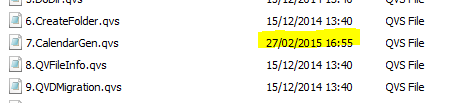
I can now run this whenever I want to update all files with the same name in future, e.g. like I had to with the 3.UK.qvs in the Locale folder

- Mark as New
- Bookmark
- Subscribe
- Mute
- Subscribe to RSS Feed
- Permalink
- Report Inappropriate Content
Maybe have a common repository ... ?

 maximiliano_vel
- Mark as New
- Bookmark
- Subscribe
- Mute
- Subscribe to RSS Feed
- Permalink
- Report Inappropriate Content
You could change the file in 0.Administration\0.Template\1.ContainerTemplate\3.Include\... This change will the replicate to every NEW container you create with the variable editor, for existing containers you will have to do it manually
Regards
qliknerd
- Mark as New
- Bookmark
- Subscribe
- Mute
- Subscribe to RSS Feed
- Permalink
- Report Inappropriate Content
Hmm, thought so. Thanks for the responses. I may need to write a macro to feed a change through to multiple containers.
Edit:
Easier than I thought - found a sample batch file here, I'm on Win7 and here's what I did. This worked for me, but make sure you proceed with caution/have a backup if you want to try this for yourselves:
- Place edited 7.CalendarGen.qvs in root QlikView folder (C:\~Qlik~)
- Did a search in Windows Explorer for all 7.CalendarGen.qvs files with this folder and all subfolders. I currently have 32 containers.
- Select all files, Right Click>Properties, changed "Read Only" attributes to False.
- Opened up a command window (cmd) and navigated to C:\~Qlik~ using the command cd C:\~Qlik~
- Ran the following command: for /F "tokens=*" %P in ('dir /b /s 7.CalendarGen.qvs') do copy /Y .\7.CalendarGen.qvs "%P"
- All the files in all of the subcontainers were overwritten with the one in my root folder.
- Select all the 7.CalendarGen.qvs files again in windows explorer, Right Click>Properties, changed "Read Only" attributes back to True.
- Deleted the 7.CalendarGen.qvs in root QlikView folder
- All subcontiners had the following file with a changed date modified:
I can now run this whenever I want to update all files with the same name in future, e.g. like I had to with the 3.UK.qvs in the Locale folder

 Magnus_Berg
- Mark as New
- Bookmark
- Subscribe
- Mute
- Subscribe to RSS Feed
- Permalink
- Report Inappropriate Content
There is an easy way to do this as well  VariableEditor has an upgrade function that can be used just for this kind of things. Read more on this in Operations Guide Variable Editor section. If you have added good additions to the calendar it would be great to update the framework for everyone, please attach the script.
Best regards
Magnus
qliknerd
- Mark as New
- Bookmark
- Subscribe
- Mute
- Subscribe to RSS Feed
- Permalink
- Report Inappropriate Content
Thanks Magnus I will have a read through the op guide.
A lot of the work I'm doing is driven off Fiscal Year so I needed some additional flags for this Fiscal YTD and Previous Fiscal YTD. I'm UK based and our Fiscal Year starts in April.
Load [$(vL.DateFieldLinkName)],
// Fiscal Dates
Year(AddMonths([$(vL.DateFieldLinkName)],$(vL.MonthsLeftFiscalDates))) AS [$(vL.CalendarTableName) Fiscal Year],
Dual(Num(Month(AddMonths([$(vL.DateFieldLinkName)],$(vL.MonthsLeftFiscalDates)))) & '. ' & Month([$(vL.DateFieldLinkName)]),
Num(Month(AddMonths([$(vL.DateFieldLinkName)],$(vL.MonthsLeftFiscalDates))))) AS [$(vL.CalendarTableName) Fiscal Month],
'Q' & Ceil(Num(Month(AddMonths([$(vL.DateFieldLinkName)],$(vL.MonthsLeftFiscalDates)))) / 3) AS [$(vL.CalendarTableName) Fiscal Quarter],
Date(MonthStart(AddMonths([$(vL.DateFieldLinkName)],$(vL.MonthsLeftFiscalDates))),'MM-YYYY') AS [$(vL.CalendarTableName) Fiscal MonthYear],
dual('Q' & Ceil(Num(Month(AddMonths([$(vL.DateFieldLinkName)],$(vL.MonthsLeftFiscalDates)))) / 3) & '-' & Year(AddMonths([$(vL.DateFieldLinkName)],$(vL.MonthsLeftFiscalDates))),
QuarterStart(AddMonths([$(vL.DateFieldLinkName)],$(vL.MonthsLeftFiscalDates)))) AS [$(vL.CalendarTableName) Fiscal QuarterYear],
if(YearToDate([$(vL.DateFieldLinkName)], 0, 4, $(vL.CalendarGenToday)),1,0) AS [$(vL.CalendarTableName) Fiscal YTD Flag],
if(YearToDate([$(vL.DateFieldLinkName)], -1, 4, $(vL.CalendarGenToday)),1,0) AS [$(vL.CalendarTableName) Fiscal PYTD Flag]
// End Fiscal Dates
Resident [$(vL.CalendarTableName)];