Unlock a world of possibilities! Login now and discover the exclusive benefits awaiting you.

Product Innovation
By reading the Product Innovation blog, you will learn about what's new across all of the products in our growing Qlik product portfolio.
Support Updates
The Support Updates blog delivers important and useful Qlik Support information about end-of-product support, new service releases, and general support topics.
Qlik Academic Program
This blog was created for professors and students using Qlik within academia.
Community News
Hear it from your Community Managers! The Community News blog provides updates about the Qlik Community Platform and other news and important announcements.
Qlik Digest
The Qlik Digest is your essential monthly low-down of the need-to-know product updates, events, and resources from Qlik.
Qlik Learning
The Qlik Learning blog offers information about the latest updates to our courses and programs, as well as insights from the Qlik Learning team.
Recent Blog Posts
-
String Functions
QlikView is full of functions that can be used in expressions and/or the script to manipulate and parse the data. I decided to write about some common string functions that can be very helpful:Subfield()Len()Index()MinString()MaxString()Substringcount()Subfield()One of the most useful functions is the Subfield() function. From within the script, this function returns a specific substring from a larger delimited substring. This function allows ... Show MoreQlikView is full of functions that can be used in expressions and/or the script to manipulate and parse the data. I decided to write about some common string functions that can be very helpful:
- Subfield()
- Len()
- Index()
- MinString()
- MaxString()
- Substringcount()
Subfield()
One of the most useful functions is the Subfield() function. From within the script, this function returns a specific substring from a larger delimited substring. This function allows you to transform a table like this:
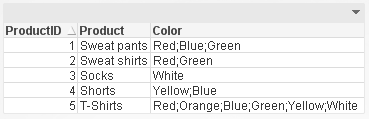
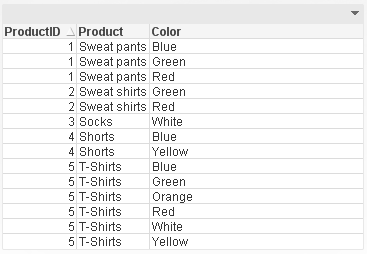
To a table like this parsing the Color field so that each product and color combination has its own row. This makes it easier to filter the data by color using list boxes.
Len()
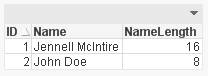
The Len() function returns the length of a string in either an expression (Len(Name)) or in the script providing the number of characters in in string like this:
Index()
The Index() function returns the position of a substring within another string. This function may be overlooked but it can be very handy when parsing a string field like a phone number. Using the Index() function, I can determine where the ‘-‘ are in the phone number therefore capturing the parts correctly.
Phone:
NoConcatenate LOAD
ID,
Phone,
Left(Phone, Index(Phone, '-')-1) as Phone1,
Mid(Phone, Index(Phone, '-')+1, 3) as Phone2,
Right(Phone, Len(Phone)-Index(Phone, '-', 2)) as Phone3
Resident PhoneTemp;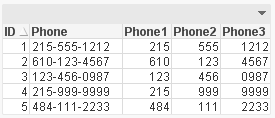
MinString() and MaxString()
Next are the MinString() and MaxString() functions. I think everyone has used these functions at least once in QlikView. They return the first or last value over a dimension (in an expression) or over a group by clause (in a script). I find these functions most helpful in chart expressions when I need to see the first or last value across a dimension.
Substringcount()
The last function is the Substringcount() function. I think this is a hidden treasure – not many people know about it but once you do, you use it all the time. The Substringcount() function returns the number of times a substring is in a string. So, if the field String is “abcdefabcdef” then the expression Substringcount(String, ‘def’) will return 2. I find this helpful with a show condition when I want to determine is a value has been selected or is possible.
There are so many string functions in QlikView that can make your life easier. Browse through them the next time you are in the Help section to see what shortcuts you can use to manipulate your data.
I wrote a technical brief about these string functions with more detail.
-
Mobile Usability, a few guidelines
Mobile access to information is becoming big business. While the share of the mobile market depends on what study you read, a 2012 study by Chitika said US mobile devices accounted for about 20% of all US internet traffic. Of that 20% smartphones were 14.6% while tablets were 5.6%. These numbers are all up from previous years. As the number of devices increases so too does the power of these devices. Mobile devices are moving away from being sole... Show MoreMobile access to information is becoming big business. While the share of the mobile market depends on what study you read, a 2012 study by Chitika said US mobile devices accounted for about 20% of all US internet traffic. Of that 20% smartphones were 14.6% while tablets were 5.6%. These numbers are all up from previous years. As the number of devices increases so too does the power of these devices. Mobile devices are moving away from being solely information consumption devices and into the realm of information creation devices. As the hardware becomes more powerful, and the user experiences become more sophisticated, our mobile devices are allowing us access to interact with information from anywhere. With this groundswell in mobile are increased expectations from users for well-designed, considerate, intelligent designs that work well on the device at hand. Smartphone experiences shouldn’t be the same as desktop experiences but it should be just as good. The usability considerations for how we interact with these devices can be very different from device to device.
The attached technical paper begins to address some mobile usability considerations. The summary of this paper is that:
• The conversation around mobile devices is less about Consumption vs. Creation and more about Task Complexity vs. Task Duration.
• Properly sized designs for the desktop experience will also work for the tablet experience.
• Smartphones want customized experiences.
• Progressive disclosure is more important than ever on smartphones.
• How people interact with touch-based devices influences success rate of applications.
• Leave room to enable scrolling.

-
Introducing Qlik Sense 1.1
Hello Qlik Community! You may be wondering - how do we make our product delight as many people as possible? It is quite simple actually. We take everything we've learned as a software company and push it one step further. That being said, we are very excited to announce Qlik Sense version 1.1, our first point release for our next generation self-service data visualization software. Qlik Sense 1.1 introduces new visualization objects, usability im... Show MoreHello Qlik Community! You may be wondering - how do we make our product delight as many people as possible? It is quite simple actually. We take everything we've learned as a software company and push it one step further.
That being said, we are very excited to announce Qlik Sense version 1.1, our first point release for our next generation self-service data visualization software. Qlik Sense 1.1 introduces new visualization objects, usability improvements and of course bug fixes. To learn more about Qlik Sense 1.1, watch this brief video to see its highlights and continue reading on to learn about each feature.
Get a free version of Qlik Sense Desktop - here
Qlik Sense 1.1 Highlights
New Pivot Table
A welcomed addition to Qlik Sense is our new Pivot Table object. It offers rapid interchangeability of metrics and dimensions, which create different responsive views of the same data-set. Depending on what you want to focus on, you simply “pivot” dimensions and measures to summarize and group data of interest and hide data that is either too detailed or irrelevant during the analysis. We have also added on-the-fly filtering and search, which simplifies your analysis by allowing you to focus on what’s important so the necessary data is displayed front and center. When used in combination with other Qlik Sense visualizations, uncovering outliers and spotting areas of interest become even easier. Watch this brief video (7 min) below to see the Pivot Table in action.
The KPI Object
Our customers are just as innovative as we are. We noticed that the Text and Image object was being used often to present summarized metrics. So we took this capability one step further and we added a new type of visualization called the KPI object. The KPI object is used to quickly track performance of your metrics. It can display a main measure along with an optional secondary measure for complimentary or comparison purposes. There is also conditional styling and defined thresholds, which can easily highlight alerts and comparison differences. With the addition of graphics, such as trending arrows and other symbols, visual notification is improved - allowing you to quickly visualize and track performance of key metrics and measures. Take a look at this brief video (5 min) to see the KPI object in action.
Map Object Update
In this latest release of Qlik Sense, our goal was to make our mapping easier to use. By teaming up with Mapbox, an innovative provider of comprehensive mapping capabilities, we provide simplified mapping without the need to negotiate usage agreements or pay additional fees. This is available to both the Free Qlik Sense Desktop product and Qlik Sense Server. If you have your own map service or want to use another the option is available for you to configure. Other improvements include null value recognition, adjustable opacity, improved color intelligence, labels for expressions and the ability to take snapshots for storytelling.Watch this brief video update (8 min) to learn more about the changes to the Qlik Sense map object.
Finally, small changes make a big difference. We have added a number of usability enhancements that improve the overall user experience when navigating and creating content in Qlik Sense. Some of these include, improvements to Data Storytelling, additional shortcut menu options, automatic grouping of date and time fields and much more, please refer to the Qlik Sense 1.1 release notes for more information on these and other improvements.
Thanks for taking the time to learn what’s new in Qlik Sense. Don’t forget to visit the New to Qlik Sense forum on the Qlik Community where you can quickly learn how to get started with Qlik Sense, browse how-to videos and join in the conversation with me and others.
Kindest Regards,
Michael Tarallo
Senior Product Marketing Manager
@mtarallo - Follow me on Twitter
Qlik

-
Tips on posting questions
The Education Services team is thrilled to see the amount of activity in the forum and we are dedicated to ensuring you get the answers to your Qlik questions. In order to get the most from responses from your posts, please follow the guidelines below:Only use the categories QlikView and Qlik Sense (all other categories are for internal employees only)Ensure your post has a specific question including question marks ???Make sure to mark your ques... Show MoreThe Education Services team is thrilled to see the amount of activity in the forum and we are dedicated to ensuring you get the answers to your Qlik questions.
In order to get the most from responses from your posts, please follow the guidelines below:
- Only use the categories QlikView and Qlik Sense (all other categories are for internal employees only)
- Ensure your post has a specific question including question marks ???
- Make sure to mark your question with bold letters so its clear for members what exactly you are asking
- Put the question in the title of the post but at the same time, keep the title relevant - 'Hi' or 'QlikView question' is not very helpful for scanning for questions and answers
- Attach images or samples to help explain your question
Refer to the guideline attached for more helpful tips

-
We are back online- sorry for extended maintenance time today
Hello Qlik Community Members,Apologies for the Community down time today! We had a planned maintenance window early this morning and the vendor encountered some issues which required additional time to resolve.We are very sorry for the inconvenience and appreciate your patience. We do NOT have any planned outages over the coming weeks so your collaboration should be uninterrupted.Have a great week!-The Qlik Community Team
-
Design's big questions
What is design? Who is a designer? I've been a designer for 13 years and what I do now isn't the same as what I started doing but I'm still a designer. I spent the first couple of years designing books and doing traditional ad agency work, eventually moving into User Experience design. While the nature of the output changed I was still a "designer" just in different mediums.I've heard the term "designer" used to describe a wide variety of jobs. U... Show MoreWhat is design? Who is a designer? I've been a designer for 13 years and what I do now isn't the same as what I started doing but I'm still a designer. I spent the first couple of years designing books and doing traditional ad agency work, eventually moving into User Experience design. While the nature of the output changed I was still a "designer" just in different mediums.
I've heard the term "designer" used to describe a wide variety of jobs. Usually when people outside of the creative world talk about designers they are thinking just about people who make things look nice. At the same time however I've heard Information Architects referred to as designers and they don't usually contribute to the aesthetic at all. So who's a designer? What defines a designer? I think the answer is in how you answer the larger question of, "what is design?"
What is Design?
Design is not defined by making things look pretty. Making things aesthetically pleasing can be a component of design, but it is not the sole defining factor. At it's most broad, design is problem solving. It is making a solution to meet the needs of other people (users). By this definition you can have well designed code, a well designed wire-frame, a well designed city, a well designed phone, a well designed experience, etc. It isn't necessarily about the visual. When something is well designed it meets the needs of the intended audience - it has solved a problem. User Experience design works to solve the problems of users interacting with an experience (usually digital). A UX designer then is someone taking human computer interaction knowledge, usability data, and visual design and bringing them together to create great interactive experiences that help people.
Still though the idea that great design means something looks great persists. Is Craigslist well designed? It isn't attractive but it has the content people want and it solves a problem. Is the Juicy Salif well designed? It's beautiful but the gold plated version can't be used to juice lemons because the acid in the lemons will destroy the gold. It can be challenging to define what makes great design, but at its core is the creation of something that solves problems for others.
-
Building new visualizations in Qlik Sense
In the words of the Fugees; Ready or not, here I come. Be warned though, this will be a wall of text so grab yourself a cup of coffee, sit back, relax and immerse yourself into the world of code and a little history lesson.A brief history of timeWith the release of QlikView 10 we shipped the possibility for developers to build their own QlikView objects using web technologies like javascript, HTML and CSS. These objects could leverage the power o... Show MoreIn the words of the Fugees; Ready or not, here I come.
Be warned though, this will be a wall of text so grab yourself a cup of coffee, sit back, relax and immerse yourself into the world of code and a little history lesson.A brief history of time
With the release of QlikView 10 we shipped the possibility for developers to build their own QlikView objects using web technologies like javascript, HTML and CSS. These objects could leverage the power of the QlikView association engine, making selections and behave just like standard QlikView charts would. Did you need a specific chart for this specific project? No problem, now you could extend the standard set of charts with something custom and specific just for you.
So was it a huge success out of the gate? Hell no.
Not only did this introduce a new skillset that previous was not common amongst a BI team but back then the browser landscape was extremely fragmented and inconsistencies between them was many.
Things started to pick up as QlikView 11 was released (adding support for Document Extensions) and a huge improvement was made both to the documentation and the many examples that started to ship with the product. I guess it was also around this time that things really started moving outside of the Qlik-o-sphere. Infographics, charts on the web and javascript frameworks became more commonplace, normal people’s interest in data spiked and development time on the web was greatly reduced.Over the years we have seen innovative mapping solutions for QlikView entering the market, lots and lots of new charts has been developed and are available for free and under open source licenses. Mind you this is not something Qlik has developed, we merely produced the tools and the community stepped up and has produced some amazing things.
Fast forward to 2015 and beyond
Charts and data in the real world has become more and more common place, web technologies has advanced tremendously and we are soon reaching an evergreen state of web browsers allowing developers to leverage the greatest and latest features the web has to offer. Visualization frameworks and libraries are popping up everywhere making it easier and easier to chart data which in turn also puts pressure on us, Qlik, to be as open as possible and be able to integrate with these libraries.Qlik Sense has also been released for almost 6 months and that marked a milestone for us, not only is it a new product but it was also built with the mindset that everything a software developer at Qlik is able to build should be built on an open and documented platform that anyone should be able to leverage.
We no longer make a separation between things built by Qlik and visualizations produced by a partner or a customer, we give each visualization an equal amount of weight.
We also took the opportunity to do a little name change, because naming things are important.
No longer is it called Extensions, as in an extension of the product, but instead we simply refer to it as Visualizations.Enough with the ranting, let’s write some code!
So what skills do you need
- A understanding of HTML and CSS
- Basic to advanced javascript knowledge
What software do you need
- Qlik Sense Desktop
- A text editor (Optional)
This video will give you a short introduction to the workbench editor that ships together with Qlik Sense Desktop and showing you how to build your first visualization.
Additional assets:
http://help.qlik.com – Documentation
http://branch.qlik.cm – Developer Community to share and collaborate on projects
-
Chart Dimensionality
A chart in QlikView or in Qlik Sense has Dimensions and Measures. What these are is described in Dimensions and Measures. This post is about charts with multiple dimensions and/or multiple measures and your options when designing such charts.
-
Customer benefits using Qlik Education Services!
"Thanks to Qlik Education Services, we’ve achieved a rapid ROI. We’ve trained around 25 designers and three developers using the software to better analyze our data sources. What used to take two days to produce now takes two hours. We’re highly committed to QlikView and see it as a vital business tool. Qlik Education Services has helped us transform our working culture with customized designer training". – Paul Holtom, Principal Analyst, IT Depa... Show More"Thanks to Qlik Education Services, we’ve achieved a rapid ROI. We’ve trained around 25 designers and three developers using the software to better analyze our data sources. What used to take two days to produce now takes two hours. We’re highly committed to QlikView and see it as a vital business tool. Qlik Education Services has helped us transform our working culture with customized designer training". – Paul Holtom, Principal Analyst, IT Department, Statoil
Statoil is a Norwegian integrated energy company with operations in 41 countries and territories. The group markets the gas portion belonging to the Norwegian state and is responsible for 75 percent of Norway’s gas exports.
Read more about their challenges and how they overcame them utilizing Qlik Education Services!
Customer Challenges
- Reduce the 25% of analyst time spent on populating reports
- Empower energy analyst team with new BI software to gain new insights into existing data sources
- Ensure a level playing field of knowledge about the new BI software for all analysts
- Bring all global analyst teams to the same level of competence
Customer Solution
- Engaged with Qlik Education Services to ensure rapid adoption of QlikView software and fast ROI with new applications
- Gained business discovery skills through high-quality onsite training, extended in-house to global offices
Customer Benefits using Qlik Education Services
- Improved ad hoc analysis of data sources—from two days to two hours with high quality results
- Engendered a step-change improvement in the way strategic analysis was planned and delivered
- Supported Statoil’s vision for cost effective Information and Communications Technology (ICT)
-
Ideas Redesign in Qlik Community
Hello Qlik Community Members, We are in the process of redesigning our Ideas area, the review process and how we gather and use the very valuable information you share with us. The Ideas area, submit an idea and review/voting on others ideas will be closing for the near future but we will preserve and save a copy of all of your submitted ideas, comments and votes. You will not lose any points or mission badges from this but don’t hesitate to cont... Show MoreHello Qlik Community Members,
We are in the process of redesigning our Ideas area, the review process and how we gather and use the very valuable information you share with us. The Ideas area, submit an idea and review/voting on others ideas will be closing for the near future but we will preserve and save a copy of all of your submitted ideas, comments and votes. You will not lose any points or mission badges from this but don’t hesitate to contact us if you have any questions or feedback.
Best Regards,
Qlik Community Management Team
-
Some assembly required
With the gift-giving holidays comes all manner of gifts that require work before you can start doing the thing you wanted to do in the first place. Assembly, registration, installation - at best it is a momentary detour. At worst it is an infuriating concatenation of failure that leaves you not want the thing you are trying to use.I spent part of Christmas helping relatives navigate the UX pitfalls/failures of setting up new pedometers, using web... Show MoreWith the gift-giving holidays comes all manner of gifts that require work before you can start doing the thing you wanted to do in the first place. Assembly, registration, installation - at best it is a momentary detour. At worst it is an infuriating concatenation of failure that leaves you not want the thing you are trying to use.
I spent part of Christmas helping relatives navigate the UX pitfalls/failures of setting up new pedometers, using web apps to upload photos to be printed, and getting photos onto a digital picture frame. With each test of patience I came away with one piece of solid UX advice: When in doubt, dumb it down.
When in doubt, dumb it down
Generic error messages, vaguely labeled options whose wording doesn't exactly apply to what a user is trying to do, hiding navigation, losing focus with extraneous options, clickable links that are disguised as plain text, inconsistent experiences across different device types - all of these help to reenforce the point that your users aren't mind readers; they don't have the knowledge that you had when you created an experience. The thing that is so obvious to you might not be obvious to them.
This is a message I've written about before but it bears repeating: you are designing for users of different ages, backgrounds, varying levels of technically savviness, different amounts of familiarity to the content. etc. You never know exactly who might be using your creation. User experiences should be obvious and easy to follow, lowering the barrier to entry for all potential users. If you are deciding between making something "cool" or painfully obvious, choose the obvious. Make your links look like links, make your labels specific to the content, make navigation items easy to find, etc. Steve Krug has written about this in his book Don't Make Me Think. If you are looking for a beginner crash-course to designing with usability & UX in mind his book is a good start.
-
A design lesson from Van Halen
When something is well designed it shows that time and consideration have been made to create something that is well thought-out and not just hastily thrown together last minute. It shows planning. It’s like wearing a well designed suit: it shows you put effort into presenting the best possible version of yourself.In the 1970s & ‘80s Van Halen was one of the biggest rock bands in the world. They had a huge stage show: 9 eighteen-wheeler trucks fu... Show More
When something is well designed it shows that time and consideration have been made to create something that is well thought-out and not just hastily thrown together last minute. It shows planning. It’s like wearing a well designed suit: it shows you put effort into presenting the best possible version of yourself.
In the 1970s & ‘80s Van Halen was one of the biggest rock bands in the world. They had a huge stage show: 9 eighteen-wheeler trucks full of equipment traveled with them from city to city and at every show this equipment had to be assembled and disassembled. Van Halen also had a rider – a rider is a list of the requirements & demands a performer or band need fulfilled in order to perform. It is the concert promoter’s job to meet all of these requests.
Usually you hear about a band’s rider when they make crazy requests such as how much alcohol they want, how many towels they need, exotic foods, etc. Van Halen’s rider was a massive document with mostly technical requirements on how to assemble their equipment but in the middle of the document, out of nowhere, there was a line-item that said there should be a bowl of M&Ms but “…there will be no brown M&M's in the backstage area, upon pain of forfeiture of the show, with full compensation.” The no brown M&Ms became the stuff of rock lore but there was a really practical reason why it was included. The M&Ms were the canary in the coal mine, they were a visual indicator whether or not the rider had been read in detail and followed. The band knew that if the concert promoter didn’t catch that detail then guaranteed if they did a line inspection of the equipment there would be other problems.
To Van Halen the brown M&Ms were a reflection of the concert promoter’s attention to detail. They knew if this simple front-end item was broken then guaranteed there were more problems on the back-end, that the concert promoter didn’t take the time to pay attention to all of the necessary details.
Like seeing brown M&Ms, a poorly designed application can be treated with suspicion as to the overall quality. We generally consider well designed items to be of better quality. Good design is an indicator that something is smart and well created - that the designer knows what they are doing. Take the time to consider the design of your applications because your users certainly will.
-
On the rise of the quantified self
History is scattered with luminaries who used personal reflection to change their lives. From the personal journal entries of James Boswell to the more scientific daily measurements of Sanctorius Sanctorius, people have used qualitative and quantitative records to better understand themselves. The inventor of seemingly everything, Benjamin Franklin, had a system to measure how well he lived his 13 virtues on a daily basis using the data to see wh... Show MoreHistory is scattered with luminaries who used personal reflection to change their lives. From the personal journal entries of James Boswell to the more scientific daily measurements of Sanctorius Sanctorius, people have used qualitative and quantitative records to better understand themselves. The inventor of seemingly everything, Benjamin Franklin, had a system to measure how well he lived his 13 virtues on a daily basis using the data to see where he went wrong with the intention of ultimately living a life free from transgression.
Over the last several years personal activity trackers have gained significant traction in the market place. BI Intelligence has conservatively forecasted a $12 billion market for wearable devices over the next 5 years. I've been using a Fitbit device for the past few years but I have also been tracking a variety of data points more manually for the last 5 years. Actively collecting & analyzing personal data definitely places me in the minority but also potentially as an early adopter.
As technology gets smaller and less expensive more and more people are actively & passively tracking data about themselves. Just looking at the news shows us how much data we are passively (sometimes unknowingly) generating about ourselves and is being used by big business and big government.
When will this wave of passive data collection break into active mainstream collection & use of data?
In some ways many people already do actively collect data. People are regularly posting thoughts to Twitter and Facebook which can be used as a running tally of feelings and analyzed for sentiment. Runners and cyclists have been using various hardware and smartphone apps for years now to analyze their performance. People can count calories and check their weight. We have credit card statements of how much we spend as well as investment data on how our money is performing. The problem though is that, with a few exceptions, most of this data is never seriously analyzed by the people generating it. Further, most of the data is left as isolated data sets and is rarely brought together into one consolidated view. Several activity trackers have ways of feeding other activity oriented data into their Dashboard pages but even then they remain isolated from other personal data.
So what's the hold up? Why is the notion of the quantified self still seen as a fringe concept? There are a few answers but two specifically. First, most people aren't very technical and connecting all these disparate data repositories is still not easy. A second answer could lie with the concept of path dependence. Most people don't actively collect & analyze personal data and it's easier to just keep not collecting & analyzing personal data. You have to go out of your way to get started and since most people you know aren't doing it it's hard to see the value.
So why develop your quantified self?
The answer is varied and up to you. Looking around the internet you can find a variety of people who collect personal data and study their own behavior for a variety of reasons. Nicholas Felton generates a very well designed personal annual report each year of his activity; Thomas Christiansen has studied how many times, and the circumstances under which, he sneezes to better understand his allergies. Most people collecting & analyzing their own data are doing so to improve some aspect(s) of their own lives.
One of the nice things about using data is that it is an impartial and detailed mirror of our lives. The human brain is greatly influenced by a variety of cognitive biases. In short we forget things and we aren't great at thinking about ourselves in the future. We suffer from impact bias which is the tendency for our prefrontal cortex to not simulate future situations as well as we think it can. To help make new or better decisions it is nice to have an impartial record of our behavior that might steer us towards the best (and possibly different) future course of action other than the one our brains may have imagined on their own.
As Richard Buckminster-Fuller said "There is no such thing as a failed experiment, only experiments with unexpected outcomes."
-
We would love to hear what our Qlik Customers have to say!
We are eliciting feedback for our NEW website redesign. If you are a Customer who researched information on Qlik.com and were the decision maker on purchasing a Qlik product in the last two years, we would LOVE to speak with you! In return we are offering a $50 Amazon gift card.If you would like to participate, please send an email to alexia.neves@qlik.com with the following:First and Last NamePhone Number Preferred EmailDate of PurchaseProduct... Show MoreWe are eliciting feedback for our NEW website redesign. If you are a Customer who researched information on Qlik.com and were the decision maker on purchasing a Qlik product in the last two years, we would LOVE to speak with you! In return we are offering a $50 Amazon gift card.
If you would like to participate, please send an email to alexia.neves@qlik.com with the following:
- First and Last Name
- Phone Number
- Preferred Email
- Date of Purchase
- Product Purchased
- A brief summary of your research experience on Qlik.com (1-2 brief paragraphs)
- Where did you receiving pricing information? A Partner, Qlik or other?
Once we review the information, a Qlik representative will reach out to you to schedule a 30-45 minute phone interview at a time that is convenient for you. After the interview we will send your Amazon gift card.
If you are NOT a Qlik Customer but would still like to provide feedback, please click on the below link to fill out our survey on your experience with Qlik.
Survey:qlik.com Web Survey
-
Developers, Developers, Developers!
Who can forget when Steve Ballmer went a little bit crazy on stage and showed his appreciation for developers. We also try to show our appreciation, although perhaps not as flamboyantly.Qlik Community is an amazing resource where QlikView and Qlik Sense users and developers come together to share ideas and apps, help each other and form relationships. It is not only amazing but also one of the most active product communities on the web! This fall... Show MoreWho can forget when Steve Ballmer went a little bit crazy on stage and showed his appreciation for developers.
We also try to show our appreciation, although perhaps not as flamboyantly.
Qlik Community is an amazing resource where QlikView and Qlik Sense users and developers come together to share ideas and apps, help each other and form relationships. It is not only amazing but also one of the most active product communities on the web!
This fall we also launched Qlik Branch, a meeting place for the developers that extend and customize our products. Branch aims to bring together those people that program against our APIs and the projects they are working on. Developers can share code, collaborate on projects and publish solutions to the repository.
Qlik Branch is strictly open source only, meaning that any project you find on the site will be free to use and you are free to contribute to the code as you please.
Don’t know how to code? Don’t fret; Branch is also a repository for solutions that you as a user or developer can leverage free of charge, just go ahead and download them and plug them in!We believe… No, we know, that by giving our community the tools, support, and areas for collaboration you will create amazing things we could never have dreamed off.
So what are you waiting for? Head on over to Branch and check it out!
-
You ask, we answer! Additional Q&A from our Qlik Sense Webcast
On October 8, 2014, Qlik hosted a live webcast featuring CTO Anthony Deighton and CMO Rick Jackson introducing Qlik Sense. We only had one hour slotted for our speakers to run through the demonstration and answer questions. Unfortunately we could not get to them all.We had some great questions that ended up in the unanswered queue, so we wanted to address them separately here on our Design Blog. If you missed the webcast, you can view it in its ... Show More On October 8, 2014, Qlik hosted a live webcast featuring CTO Anthony Deighton and CMO Rick Jackson introducing Qlik Sense. We only had one hour slotted for our speakers to run through the demonstration and answer questions. Unfortunately we could not get to them all.
We had some great questions that ended up in the unanswered queue, so we wanted to address them separately here on our Design Blog. If you missed the webcast, you can view it in its entirety here. Thanks to everyone who was able to join us last week, and we hope that you can drop by the website to try Qlik Sense for yourself!
Be sure to join the conversation on the Qlik Community. Our members share various insight, tips, tricks and other contributions that can make you more familiar with Qlik Sense.
Q: Can Qlik Sense reports be shared and scheduled for automated delivery?
A: Assuming automated delivery means the sending of an attachment or posting of a static document for others to review, in a traditional BI sense, then no, not at this time. However, this is not your typical BI product, you may want to rethink how information is distributed. Qlik Sense provides both online and desktop-based self-service data visualization capabilities, including storytelling through the creation of apps. These apps can be shared in a few ways. Qlik Sense Desktop users can share their local app with other Qlik Sense Desktop users – simply through file sharing and/or email. They can also upload an interact-only copy of their app to the Qlik Cloud online sharing service – to be shared with those inside and outside of their organization. You can see both these capabilities in action here: Qlik Sense Desktop - Sharing Apps (video) and Qlik Sense Desktop - Sharing Apps (video)
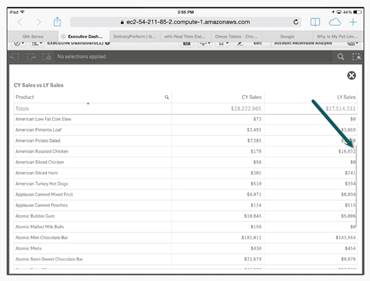
Q: Does Qlik Sense allow scroll-bars in chart objects on iPads and iPhones?
A: Yes – when and where necessary and depending on the chart object. Our responsive design enables chart objects to resize and reconfigure themselves along with their layout depending on the device and form-factor. Here is a screenshot showing a scroll-bar that displays only when a drag gesture is performed on the table object.
Q: Can Qlik Sense export data / data model from another Qlik Sense dashboard app?
A: Yes – a .qvf file (which is the Qlik Sense app in file form and contains the data and the model) can be used as a data source with the BINARY LOAD Qlik syntax. Note that similar, if not all, Qlik script syntax concepts that have been used with QlikView, can also be used with Qlik Sense. You can see this in action here: Qlik Sense Desktop - Loading Data from QlikView Applications (video) Also note that chart objects - can also export, the chart object's individual data, by right-clicking on the object and selecting "export data" from the pop-up menu.
Q: Does Qlik Sense use DMS and NTFS for authorization?
A: With Qlik Sense, authorization is similar to the QlikView DMS mechanism, but has been vastly improved with the introduction of the Qlik Sense Repository and the new security rules engine. NTFS is no longer needed as Qlik Sense apps are not accessed or stored via the file system like they were with QlikView. Take a look at the Qlik Management Console video series and the Qlik Sense help site for more information on this topic.
Q: What sort of security does Qlik Sense provide as some data may be company sensitive?
A: In summary, any type you want. We can handle many different layers of security from authentication, authorization, action and data level perspectives. This topic can be quite elaborate, so we suggest you check out the Qlik Help site under the security topic. Data level security in regards to rows and columns can be handled with Dynamic Data Reduction and Section Access.
Q: Is it possible to see a 3D view of Geographical data?
A: In version 1.0 of Qlik Sense, no not with the available out-of-the-box chart objects. However an extension object that utilizes a 3rd party library and API such as D3 could be built to do this. In addition it could be made available from our extensive partner network. Qlik Sense has a robust set of APIs and works with open standards making it easy and familiar for developers and partners to create such a thing. You may want to check out – Qlik Branch - to join the developer community and download some creative and useful extensions for both QlikView and Qlik Sense. You can learn more about Qlik Sense extensions here: Qlik Sense - Introduction to Extensions (video)
Q: How could Qlik Sense work offline if a network connection is not available?
A: The free Qlik Sense Desktop could be used to access a Qlik Sense app that has been exported from the complete Qlik Sense platform or used to open a shared Qlik Sense app file provided by another Qlik Sense Desktop user; therefore providing a type of offline access.
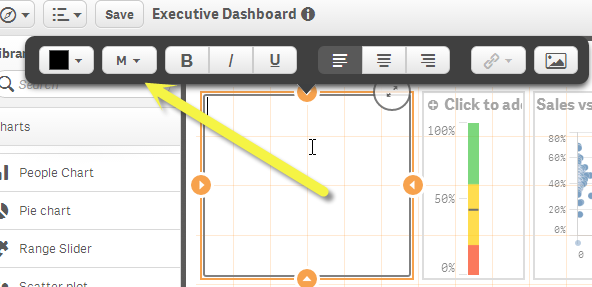
Q: Will users have the ability to change things like fonts and font colors?
A: At the moment there is a theme engine in place that can be configured with the use of files, to change and brand the global interface and object styles. Branding and other user style capabilities are making their way into the product over time. Specifics have not been communicated just yet, however as you can see with the text / image object and the data storytelling capabilities – you can change font sizes and colors, so the capability is part of the architecture. Enhancements such as these are prioritized along with other needs.
Q: Are there any downloadable files (spreadsheets, desktop Qlik Sense file, etc) available for training?
A: There is an extensive list of video tutorials, documents, guides and samples available in the Qlik Community and the Qlik Help site, these include:
-
Real Madrid v. Barcelona fandom map; why this map is untruthful.
It was Saturday 11:30 when my phone buzzed; I picked it out of my pocket and checked the message. “Hey, I’m running late. See you in 15 min“. At that time I was already in a bar packed with football fans wearing Messi or Ronaldo jerseys ready to watch one of the best games of the year. El Clásico, where the two best teams in the world, Real Madrid and Barcelona, go head-to-head.With a few minutes to kill before the game kickoff I was browsing my ... Show MoreIt was Saturday 11:30 when my phone buzzed; I picked it out of my pocket and checked the message. “Hey, I’m running late. See you in 15 min“. At that time I was already in a bar packed with football fans wearing Messi or Ronaldo jerseys ready to watch one of the best games of the year. El Clásico, where the two best teams in the world, Real Madrid and Barcelona, go head-to-head.
With a few minutes to kill before the game kickoff I was browsing my Twitter (@arturoqv) timeline when I stumbled upon a link to the map below.
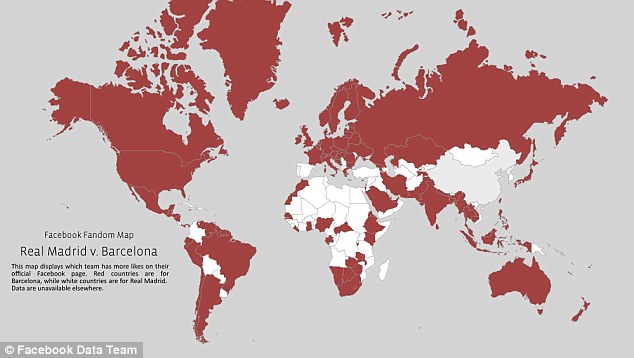
Facebook Fandom map.Displays which one of the two teams has more fans (likes) on their official Facebook page.
When I looked at the map, and despite having a pretty good idea of what to expect, it took me a while to understand what I was looking at. Where was the chart legend? After reading the text on the chart I finally understood that the red areas were for Barcelona while the white areas are for Real Madrid fans. It’s pretty clear that Barcelona has a lot more fans that Real Madrid, right?
Later when the game ended (congratulations to Real Madrid fans for such a great game and victory) I wanted to check the map again. This time I used my favorite search engine to find the map, it pointed me to an article from the Daily Mail. The article includes some facts in addition to the cited map, such as the total number of fans. Based on Facebook-likes data, Barcelona has more than 77 million fans while Real Madrid has a very close 75.5 million. Just 1.5 million people difference.
But, wait a minute that changes everything, right?
Why this map is poorly coded?
It seems clear that Facebook Data team aim was to illustrate fandom across the world in a binary and easy way by comparing just two numbers, Barcelona and Real Madrid number of fans, but is the visualization being truthful?
Well, I don’t think so. The data may be good but the information it contains is partial and is not giving the readers all the relevant data.
Based on the above map color code, you might think that Barcelona FC is by far more popular. When looking at the actual numbers; there are only 2% more Barça supporters than Real Madrid. The map doesn’t reflect at all that small difference; on the contrary it’s showing a huge distance between teams.
How to improve it?
Working with diverging gradient color scheme will show where the difference is more intense, where the gap is bigger.
In the map below we still can see how the forces are distributed across the countries, blue versus red, but this time using color intensity we can see how big the difference between the two teams is.
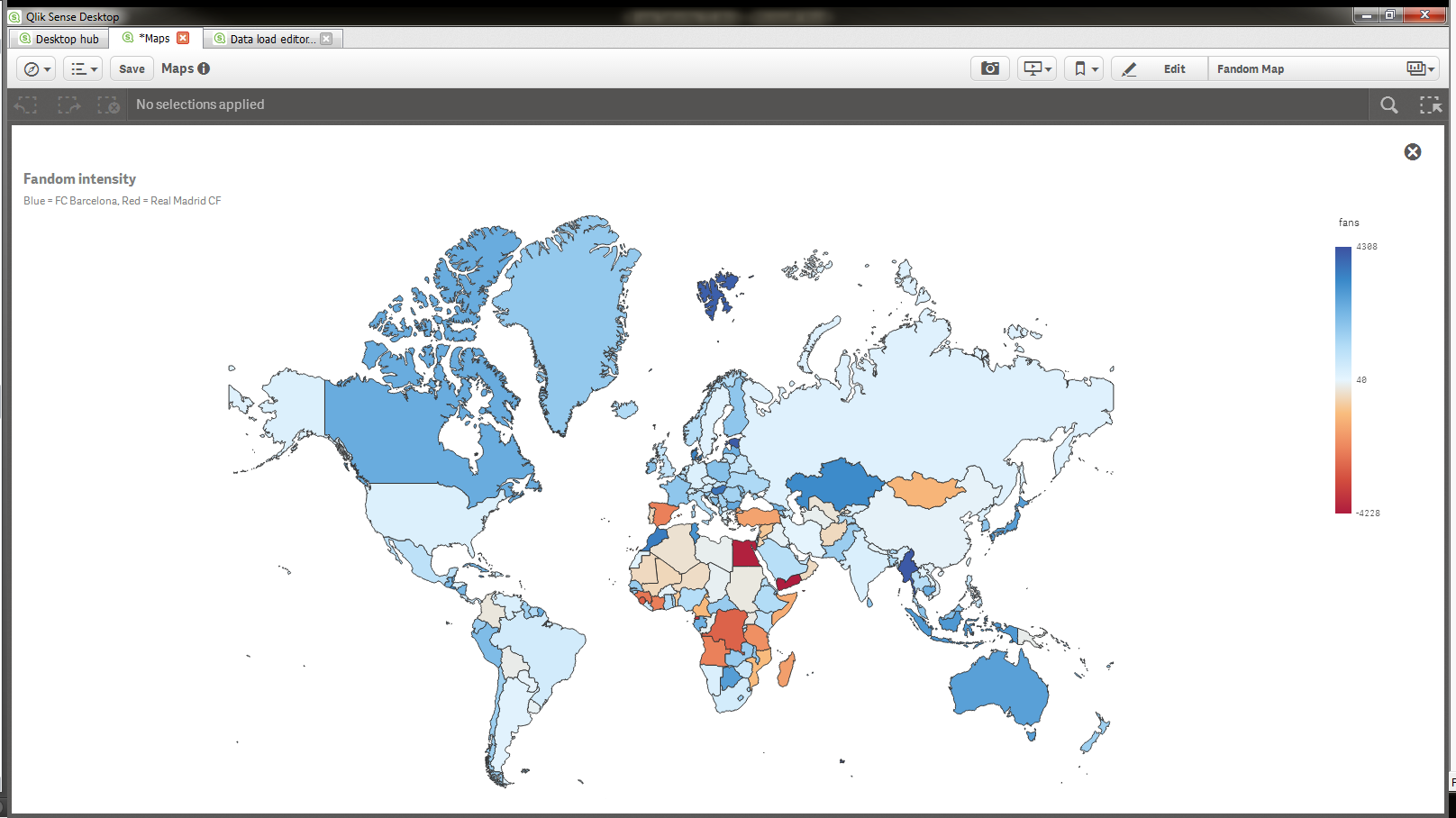
Unfortunately Facebook is not making their data available anywhere so I made up some fake data to illustrate my example
Adding more information layers
In terms of data density the map above is far more complete and truthful than the original one but the downside is that isn’t so obvious which team has more fans across the globe.
We could improve readers’ comprehension creating what I think is a better and more truthful experience.
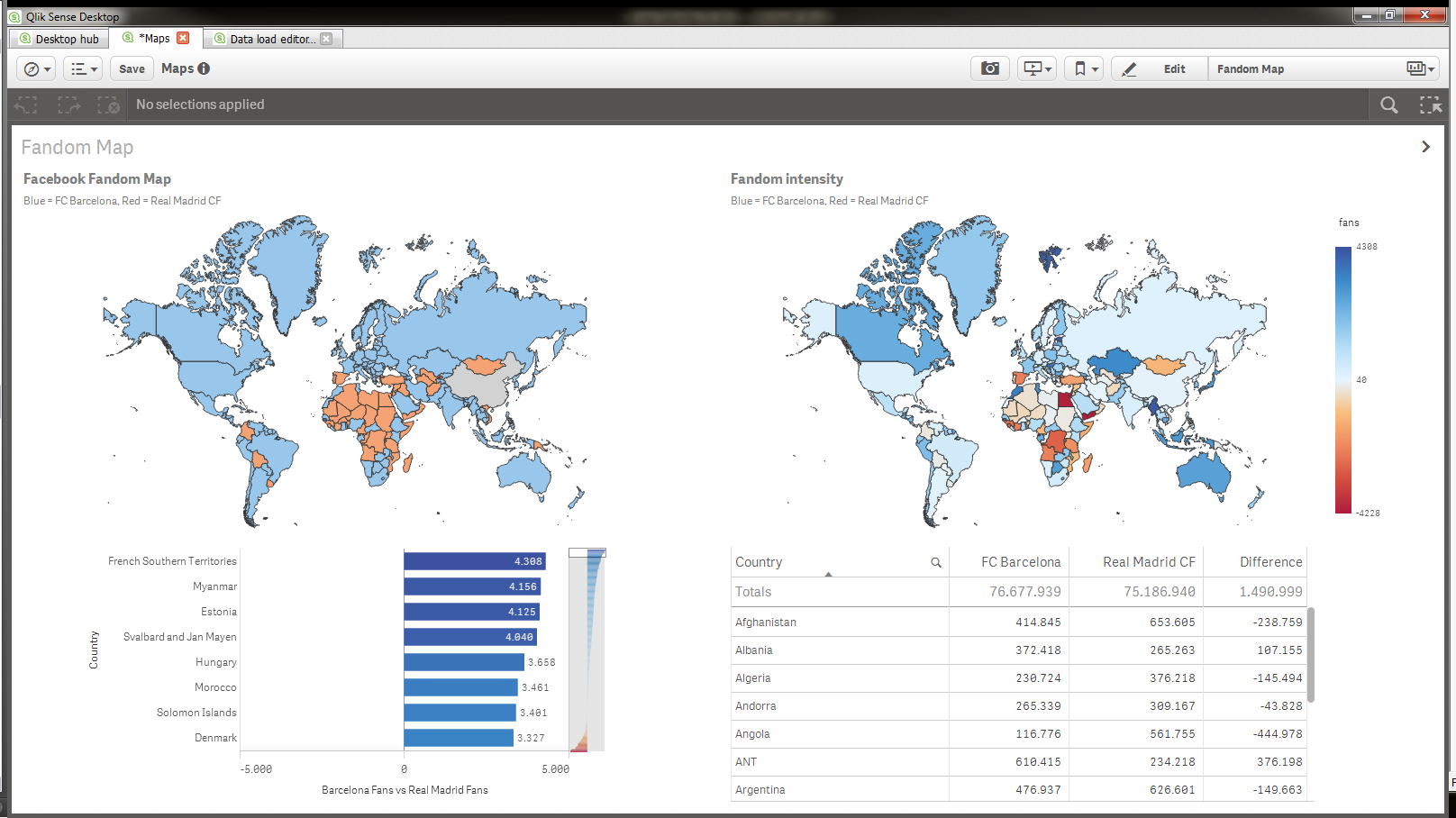
First we will create a map that will color the countries based on which team has more fans in it (top left chart) nothing new here, we are showing same information as in the original chart. Next we’ll add more information layers (objects) to our sheet. Fandom intensity chart on the top right corner shows not just where there are bluer fans but also it displays how big the gap is. To complete our alternative proposal we could add a couple of supporting charts; a bar chart that lets readers accurately see how big the gap is and compare countries, and a table for those number lovers in the audience.
I guess the bottom line of this story is, always show all the relevant and supportive data that will guide readers or users to better understand the facts.
Enjoy Qliking!

-
Navigating through Qlik Sense Desktop
I am sure everyone has already downloaded Qlik Sense Desktop, so I wanted to help you get comfortable with navigating within an application. Understanding how to get to where you want to go is half of the battle.Top left navigation 1. Navigation Menu – This menu allows you to navigate to different areas of Qlik Sense desktop. a. App Overview – Go back to the main screen within the current app and view the sheet layout of the app. ... Show MoreI am sure everyone has already downloaded Qlik Sense Desktop, so I wanted to help you get comfortable with navigating within an application. Understanding how to get to where you want to go is half of the battle.
Top left navigation
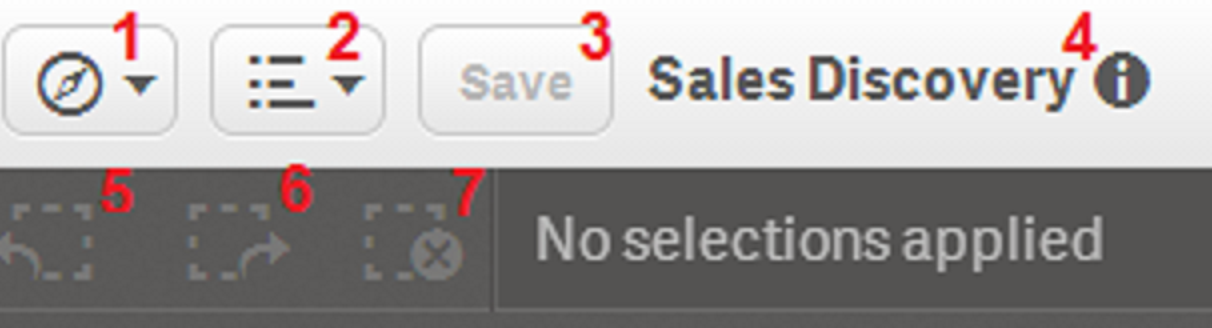
1. Navigation Menu – This menu allows you to navigate to different areas of Qlik Sense desktop.
a. App Overview – Go back to the main screen within the current app and view the sheet layout of the app.
b. Data load editor – Create or modify the data load script.
c. Data model viewer – See how the tables are structured within the app and preview the data.
d. Open hub – Go back to the area where you can see all of the available apps.
2. Menu – This menu offers options to learn more about Qlik Sense Desktop as well as the option for the Quick data load.
a. Quick data load – Allows you add new data to the app or add files to replace the existing data.
b. Help – This is where you can find answers to all Qlik Sense related questions.
c. About – This will tell you which version of Qlik Sense Desktop you are running.
3. Save – Saves changes made to the app.
4. Information about the app – View the app thumbnail, title, last loaded date, file name, and the app description.
5. Step back – Reverse the last selection made within the app.
6. Step forward – Reapply the last selection.
7. Clear all selections – this will remove all current selections.
Top right navigation
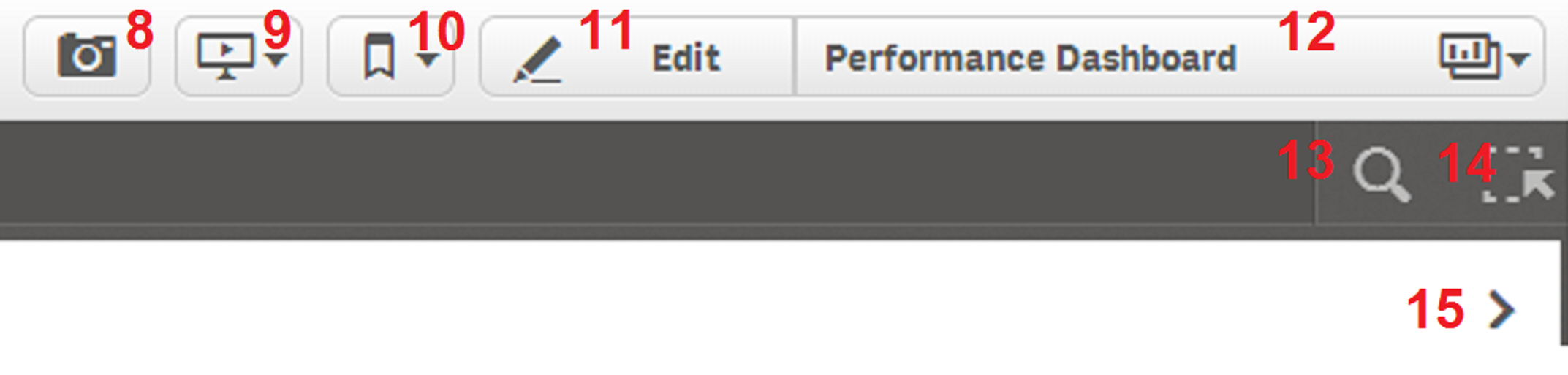
8. Take a snapshot – This allows you to take a snapshot of the different objects within the app. Snapshots can be used within
Storytelling.
9. Storytelling – This area allows you build a story about your data. Use images, snapshots, objects and text to create a
compelling story about your data.
10. Bookmarks – This allows you to create and save different selection states to be used at a later time.
11. Edit / Done – This button allows you to edit the sheet. Create visualizations, measures, etc. Once you are finished in edit
mode, select done to see your how your changes respond to user interaction.
12. Sheets – This allows the user to move around from sheet to sheet within the app.
13. Search Tool – Selecting this option will allow you to search your data for a particular value.
14. Selections Tool – This option allows you to view and select from all of the data fields available as well as view the current
selections.
15. Sheet navigation - Navigate to the next sheet or the previous sheet.
Now that you know where the navigation options are located and what they allow you to do, go ahead start developing your Qlik Sense apps! Happy Qliking!

-
Protecting Qlik Sense against rogue servers and eavesdropping
When we designed Qlik Sense one important aspects was to start using standard security components where possible to solve different aspects of security. Protecting communication is a good example of this, as we used standard components to protect against adding rogue servers and eavesdropping.If you interested in understanding how we achieved this in Qlik Sense then continue reading…When Qlik Sense needs to exchange information between different ... Show MoreWhen we designed Qlik Sense one important aspects was to start using standard security components where possible to solve different aspects of security. Protecting communication is a good example of this, as we used standard components to protect against adding rogue servers and eavesdropping.
If you interested in understanding how we achieved this in Qlik Sense then continue reading…
When Qlik Sense needs to exchange information between different services, a couple of things need to be in place. The services need to trust each other and they need a way to talk without other listening in to the conversation.
In Qlik Sense all communication between services and clients use web protocols. With these we get the option of using a widely deployed standard for building trust and protecting the communication from eavesdropping. The way of achieving secure communication is tightly knit together by two components:
• TLS (Transport Layer Security), the protocol for how encryption and exchange of information/keys works
• Certificates for authentication of the servers that need to communicate
What TLS supplies is a way to build protected tunnels between two identified servers using encryption. The identification of the servers that communicate is done using certificates. Each tunnel needs two certificates, one to prove to the one starting the communication that they talk to the correct recipient and one to prove to the recipient that the one wanting to communicate is allowed to do so, i.e. mutual authentication.
So how do we know if the certificates are valid for communication between the servers? All certificates that belong to a trust zone are signed by the same signature (root certificate) and only if this signature exists will they be accepted as proof that you belong to the trust zone.
When these protected tunnels are in place and we have the right certificates in place we are able to build a trust zone for all Qlik Sense services to work within. Within the Qlik Sense trust zone only the services belonging to that specific Qlik Sense installation can communicate.
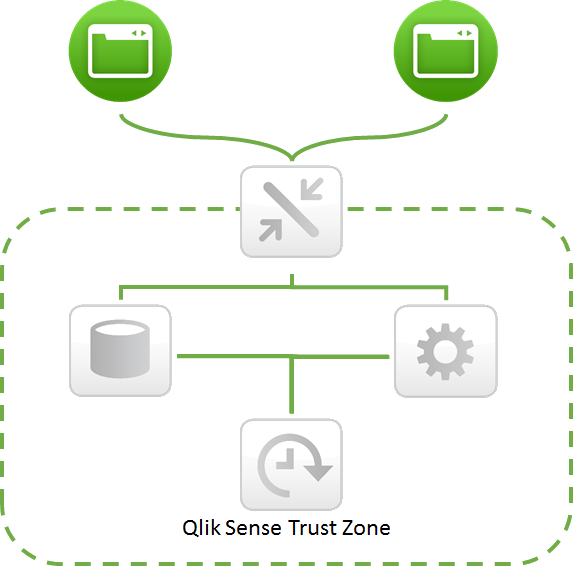
Outside this trust zone we have the clients (Qlik Management Console and the Client). These components are running on less trusted end user devices; therefore we do not allow them to be part of the Qlik Sense trust zone. The only component that can bridge the two zones is the proxy (but there may exist more than one bridge in an installation). The criteria for being allowed to cross the bridge and communicate in a controlled way with the servers in the trust zone is that you can authenticate (show who you are) to the system so it can determine if you are allowed to cross the bridge.
Even though the clients are not part of the Qlik Sense trust zone, protected tunnels (TLS) play a vital role in securing the communication between the client and the proxy, as sensitive information is sent across this connection. But as this is a different trust zone a certificate with a different signature should be used for client communication.
-
New Qlik Sense Forum Areas and Subject Matter Expert Intros
Hello Community Members, We are happy to announce the addition of new community forums to help support growing activity for Qlik Sense users. The structure for the new forum areas is designed to be simple and similar to the existing areas for easy navigation. We would also like to introduce the subject matter experts for the Qlik Sense Forums and Resource Library. Both of them are long term Qlikkies and already very active in Qlik Community. Mich... Show MoreHello Community Members,
We are happy to announce the addition of new community forums to help support growing activity for Qlik Sense users. The structure for the new forum areas is designed to be simple and similar to the existing areas for easy navigation.
We would also like to introduce the subject matter experts for the Qlik Sense Forums and Resource Library. Both of them are long term Qlikkies and already very active in Qlik Community.
Michael Tarallo
Senior Product Marketing Manager, Qlik

Michael has over 16 years of Business Intelligence and Data Integration experience covering both proprietary and open source BI solutions. He is responsible for a broad spectrum of Product Marketing and Sales Enablement activities, including building close relationships with our Qlik Community members and providing them with the valuable resources needed to get started with Qlik products. Mike is an avid video gamer, health nut, do-it-yourselfer and all around family guy. In his spare time he loves to dabble in video editing and movie making.
Josh Good
Director of Product Marketing, Qlik

Josh has been with Qlik for 4 years where he has held positions in presales and most recently Product Marketing. As a presales consultant he was a key member of innovating Qlik's go to market through inside sales. He is now focused on continuing to innovate Qlik's go-to market via a freemium model. Prior to Qlik, Josh lead business intelligence and analytics projects at a premium outdoor clothing company. He also has experience in government acquisition and biomechanical research. Josh holds a bachelor's of Applied Science and a Master's of Science from Queen's University. In his spare time, Josh is an avid skier, mountain biker and sea kayaker.
If you haven't already please take a minute to visit the new Qlik Sense Forums and Resource Library and learn more about the product and collaborate with other users.
Best Regards,
Qlik Community Management


