Unlock a world of possibilities! Login now and discover the exclusive benefits awaiting you.

Product Innovation
By reading the Product Innovation blog, you will learn about what's new across all of the products in our growing Qlik product portfolio.
Support Updates
The Support Updates blog delivers important and useful Qlik Support information about end-of-product support, new service releases, and general support topics.
Qlik Academic Program
This blog was created for professors and students using Qlik within academia.
Community News
Hear it from your Community Managers! The Community News blog provides updates about the Qlik Community Platform and other news and important announcements.
Qlik Digest
The Qlik Digest is your essential monthly low-down of the need-to-know product updates, events, and resources from Qlik.
Qlik Learning
The Qlik Learning blog offers information about the latest updates to our courses and programs, as well as insights from the Qlik Learning team.
Recent Blog Posts
-
From A to Z – 100 new Qlik Talend Cloud connectors
In July 2024, Connector Factory is releasing a lot of new connectors for data integration in addition to new and updated connectors for data analytics and application automation. -
SDG Dashboard Public Health
SDG Dashboard Public Health Bitmetric After winning the Qlik Academic Program datathon by Jesse van Haasteren, we were excited to continue and work on the SDG insights. Because we had a fantastic dataset we could continue building apps around several topics. This one is about “Public health” and we shared it with the platform "data on the earth" but we would like to present is as well here in the Qlik Gallery (we also will publish the winni... Show MoreSDG Dashboard Public HealthBitmetric After winning the Qlik Academic Program datathon by Jesse van Haasteren, we were excited to continue and work on the SDG insights. Because we had a fantastic dataset we could continue building apps around several topics. This one is about “Public health” and we shared it with the platform "data on the earth" but we would like to present is as well here in the Qlik Gallery (we also will publish the winning app from the datathon).
Discoveries
Overall conclusion: Discussing public health involves a great amount of factors. As seen in this application many countries are affected by disease(s), food shortages, food overconsumption, alcohol consumption, mental state, water and sanitation and energy consumption. With this dashboard we hope to give more insight in problems evolving around public health over different countries and time periods. We can see for example that there are still a lot of cases of overweighted people but also cases of undernourishment, shifting this to the center of a balanced state would be the ultimate challenge but also a great goal to achieve in the future. Also the occurence of different diseases could be lowered. To our biggest surprise we saw that the amount of tuberculosis cases is overwhelmingly large.
Impact
It made us realize that we must protect the world, our children and be careful with our beautiful earth!
Audience
For any person that is interested in the SDG goals.
Data and advanced analytics
We got strong insights of things we didnt know, like the effect of safe water supplies, or HIV, and Malaria but also that tubercolosis is on the rise. It made us aware of things we didnt know. But also think of the problem about alcohol consumption. We loved working it and Jesse and I learned a lot from this work.
-
Leadership Standards Automated Reporting
Leadership Standards Automated ReportingC40 CitiesProvides a two-page personalized compliance report for each member city which can be sent to city officials. Compliance data is taken from our database and the report is assembled by an automation.DiscoveriesQlik Sense can handle our compliance rules easily. They are applied as a color code for every item.ImpactCompliance reports are a easily generated. We were able to substitute NPrinting with Ql... Show MoreLeadership Standards Automated ReportingC40 CitiesProvides a two-page personalized compliance report for each member city which can be sent to city officials. Compliance data is taken from our database and the report is assembled by an automation.
Discoveries
Qlik Sense can handle our compliance rules easily. They are applied as a color code for every item.
Impact
Compliance reports are a easily generated. We were able to substitute NPrinting with Qlik Cloud Reporting.
Audience
Business Planning & Reporting, City Liaisons. Almost 100 distinct reports are generated in five different languages.
Data and advanced analytics
Reports can be generated in minutes and as often as needed from our Salesforce data.
-
Another successful Datathon by Anurag University
Another successful datathon event was concluded by Anurag University on June 28-30th. This event saw more than 600 participants working on different themes. Around 90 participants worked on Qlik Sense under the data analytics theme, showcasing a growing engagement with Qlik and the Academic Program. -

-
Bookmarks
Bookmarks allow users or developers to save a selection state in an app. They are useful when a user would like to save their selections in an app to view later or to share with others. For developers, bookmarks are useful if you would like to redirect a user to a specific sheet, with selections, when they open an app. Let's begin by looking at how to create a bookmark. First, go to the sheet that you would like to bookmark and make sure your sel... Show MoreBookmarks allow users or developers to save a selection state in an app. They are useful when a user would like to save their selections in an app to view later or to share with others. For developers, bookmarks are useful if you would like to redirect a user to a specific sheet, with selections, when they open an app.
Let's begin by looking at how to create a bookmark. First, go to the sheet that you would like to bookmark and make sure your selections are already made. Then click on Bookmarks in the toolbar.
The Bookmarks window will open showing any bookmarks that have already been created. There is also a Create new bookmark button that can be clicked to create a new bookmark. After clicking the Create new bookmark button, the Create bookmark dialog window opens.
Here is where you can give the bookmark a name, add a description, and set some optional settings. By default, the Save sheet location is checked. This will save the sheet you are on when you created the bookmark and will navigate the user to this sheet when the bookmark is applied. The Save layout option will save the layout of the sheet and will apply that layout when the bookmark is applied. This is useful if you have made any layout changes on the sheet, such as expanding a pivot table or sorting a chart and want the bookmark to maintain the layout. The last option is to Save variable state in bookmarks. This option will save the current state of any variables when this bookmark is created. Once the bookmark is created, the user can use it at any time to return to the bookmarked state.
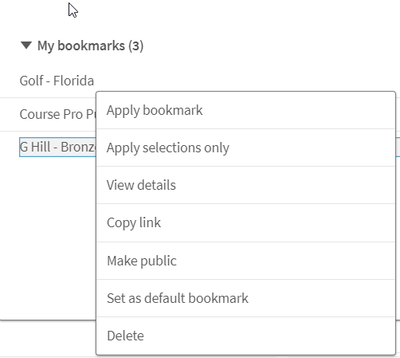
Let’s look at some other options that are available when you right click on the name of a bookmark.
- Apply bookmark – will apply bookmark selections and layout and clear any previous selections.
- Apply selections only - will just apply the selections of the bookmark to the app, clearing any previous selections. It will not apply any layout settings if they were saved with the bookmark.
- View details – will show the details of the bookmark.
- Copy link - will copy the URL for the bookmark so that it can be shared with others. Note, the bookmark will need to be made public before it can be shared. If you make a bookmark public, anyone can see and use it and you are no longer the owner, unless it is made private again.
- Set as default bookmark - will redirect users to the sheet, layout and selections that are saved in the bookmark when the app is opened (instead of the app overview).
- Delete – will delete the bookmark.
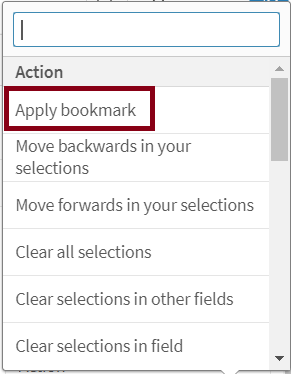
There are also many ways to apply a bookmark. A bookmark can be applied from the app overview by clicking Bookmarks or the toolbar of a sheet. A bookmark can be indirectly applied by using a button, for instance, and setting the action to apply the bookmark.
Bookmarks can also be used in set analysis expressions and applied to a visualization. In the expression editor, the bookmark can be inserted as seen below or can be used by name.
Example expressions using the bookmark name:
These expressions will apply the bookmark to the chart, much like when you use set analysis.
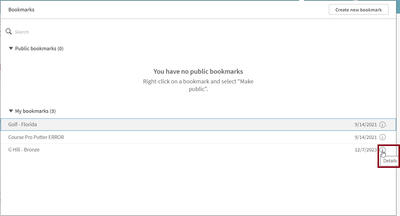
A bookmark can be edited if the name, description, or selections in the bookmark need to change. There is no longer the need to delete and create a bookmark if a change needs to be made to the selections. To edit a bookmark, click on the Bookmarks button in the toolbar and then click the Details icon next to the bookmark you would like to edit or right click on the bookmark and select View details.
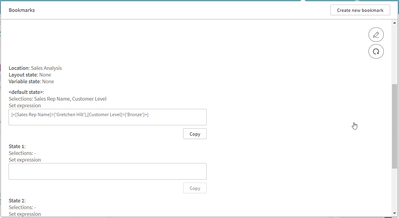
From the details view, you can select the edit icon to make changes to the name or description of the bookmark. Once done, you can click the check mark to stop editing or the update icon to also update the bookmark with the current selections.
Also note that possible alternate states are visible when editing a bookmark. If there were selections made in these states when the bookmark was created, they will be visible here as well. Users have the option to copy the set expression for the bookmark if they would like to use it elsewhere in the app.
Bookmarks are a great tool for your own personal use but also for collaboration. They are easy to create and edit and take the legwork out of remembering what selections were applied when you want to return to a previous viewed state or share an insight with a colleague. Check out Qlik Help to learn more.
Thanks,
Jennell
-
-
Summer is the best time to... LEARN!
Discount inside Catching up and learning what you need to improve your Qlik Sense skills is always easier in the summer. Our course catalog is evolving, and we will stop offering some of our courses that will only be available for private training. If you are interested in any of these courses, I recommend you book your spot today because you won’t see them again: QlikView Designer QlikView Developer Qlik Sense for QlikView Developers Big Data S... Show MoreDiscount inside
Catching up and learning what you need to improve your Qlik Sense skills is always easier in the summer.
Our course catalog is evolving, and we will stop offering some of our courses that will only be available for private training. If you are interested in any of these courses, I recommend you book your spot today because you won’t see them again:
- QlikView Designer
- QlikView Developer
- Qlik Sense for QlikView Developers
- Big Data Solutions with Qlik Sense
- Qlik Geoanalytics
- Embed Analytics with Qlik Sense APIs
- Foundations of Qlik Data Integration
Plus, if you join any of our public courses during July and/or August, this year comes with a reward! You can enjoy a 30% discount by booking your spot on our website and using the code CLASSROOM30 at checkout.
Don't miss this chance to learn and save!
-
Goodbye Qlik Continuous Classroom, hello Qlik Learning!
Discount inside Not everything good has to end—it can transform! We’re saying farewell to Qlik Continuous Classroom and welcoming Qlik Learning, the new self-paced learning platform from Qlik that combines content from Qlik and Talend to give you the best learning experience possible. But Qlik Continuous Classroom isn’t leaving without a special farewell offer: get a fabulous 20% discount on your subscription if you purchase it before August 30th... Show MoreDiscount inside
Not everything good has to end—it can transform! We’re saying farewell to Qlik Continuous Classroom and welcoming Qlik Learning, the new self-paced learning platform from Qlik that combines content from Qlik and Talend to give you the best learning experience possible.
But Qlik Continuous Classroom isn’t leaving without a special farewell offer: get a fabulous 20% discount on your subscription if you purchase it before August 30th. Search your subscription and use the coupon discount code SELFPACED20 at checkout.
The best part? When it’s time to say goodbye to Qlik Continuous Classroom, your subscription will automatically transfer to the new platform, letting you enjoy all its benefits without interruption.
Decide now and save.
Don’t miss out on this opportunity!
-
-
Talend Data Fabric - Upgrade Notification, Java 17 compatibility for Talend 8 R2...
To our Talend 8 Customers, To enhance both your security and Talend experience, Java 17 will be the only supported Java version for future updates to Talend Studio and the following supported applications. Talend Studio Talend Administration Center Talend Data Preparation - (client managed installation) Talend Data Stewardship - (client managed installation) Talend SAP RFC Server Talend Semantic Dictionary Talend Identity and Access Management ... Show MoreTo our Talend 8 Customers,
To enhance both your security and Talend experience, Java 17 will be the only supported Java version for future updates to Talend Studio and the following supported applications.
- Talend Studio
- Talend Administration Center
- Talend Data Preparation - (client managed installation)
- Talend Data Stewardship - (client managed installation)
- Talend SAP RFC Server
- Talend Semantic Dictionary
- Talend Identity and Access Management
Note: this upgrade does not impact execution of your artifacts that continue to support Java 8 or 11.
Previous versions of Java will no longer be supported by the above application when electing to upgrade to R2024-05. We are giving you this advanced notice to ensure you can plan this upgrade and take time to review your current Java environment. Java 17 support was first introduced with the R2023-10 release.
By giving this advanced notification, we are delighted to be able to reach a point of maturity where we can fully support best practices with dependencies and third-party libraries and be proactive in addressing CVEs to deliver constant improvement to the Talend Studio platform.
Compatibility Documentation:
For further questions please contact Qlik Talend Support and subscribe to the Support Blog for future updates.
Thank you for choosing Qlik,
Qlik Talend Customer Success
-
Get ready for the Simplified Authoring Experience in Qlik Sense SaaS
Get ready for the Simplified Authoring Experience in Qlik Sense SaaS -
Qlik、14 年連続でリーダーの 1 社に!「2024年 Gartner® アナリティクス / BI プラットフォームの Magic Quadrant™」(Q...
ブログ著者:Chris Powell 本ブログは「Being a Leader Never Gets Old: Qlik is named a Leader in the 2024 Gartner Magic Quadrant for Data Analytics and Business Intelligence」の翻訳になります。 太陽が降り注ぐ米国フロリダ州オーランドで開催した Qlik Connect での素晴らしい体験を振り返ると(もっと適切な言葉があるかもしれませんが)、興奮と誇りに満ちています。 今年の Qlik Connect は、格別なイベントとなりました。当社の強固なデータ基盤である Qlik Talend Cloud や、多種の非構造化データソースから生成された質問にパーソナライズされた適切な回答を提供する新しい知的アシスタントの Qlik Answers など、強化された Qlik の製品ポートフォリオをお披露目することができたからです。 この発表は、AWS お... Show Moreブログ著者:Chris Powell
本ブログは「Being a Leader Never Gets Old: Qlik is named a Leader in the 2024 Gartner Magic Quadrant for Data Analytics and Business Intelligence」の翻訳になります。太陽が降り注ぐ米国フロリダ州オーランドで開催した Qlik Connect での素晴らしい体験を振り返ると(もっと適切な言葉があるかもしれませんが)、興奮と誇りに満ちています。
今年の Qlik Connect は、格別なイベントとなりました。当社の強固なデータ基盤である Qlik Talend Cloud や、多種の非構造化データソースから生成された質問にパーソナライズされた適切な回答を提供する新しい知的アシスタントの Qlik Answers など、強化された Qlik の製品ポートフォリオをお披露目することができたからです。
この発表は、AWS および国連との新たなパートナーシップの発表との相乗効果で、この分野における当社の優位性を真に物語っています。こうしたエキサイティングな開発の詳細は、6月 4日のブログでご紹介しています。Qlik は、データサイエンスの統合における前進や大規模言語モデルの統合における先駆的な取り組みを結合し、企業の開発者やアナリストにとって非常に強力な AI を活用したデータから意思決定までのワークフローを提供します。
イベントが開催されたオーランドは、バスケットボールチームの「オーランド・マジック」を初め、Qlik の顧客でもあるディズニーの「マジック・キングダム」まで、“マジック”で知られる地です。そして、当社が別の“マジック”を祝うのに適した前兆とも思える地でした。Qlik は、「2024年 Gartner® アナリティクス / BI プラットフォームの Magic Quadrant™」で、リーダーの 1 社として位置づけられたのです。
「2023年 Gartner® データ統合ツールの Magic Quadrant™」でリーダーの 1 社として評価されましたが、これに続き、アナリティクス / BI プラットフォーム部門でもリーダーの 1 社に評価されたことは、大変喜ばしいことです。今回で 14 回目の快挙を達成することができました。詳細なレポートは、こちらからダウンロードできます。これは、当社のイノベーション、卓越性、そして顧客のビジネス成果の向上に対する当社の継続的な取り組みが評価された非常に意義深いものだと思います。
12 ヶ月にわたるイノベーション
この 12 ヶ月間、当社は Talend 社の買収を完結するなど、数々の重要な変化を経て、現在は分析 / BI プラットフォームとデータ統合ツールの両分野で、収益上位 5 社の 1 社となっています。この成果は、当社の揺るぎない市場での位置付けと成長を明確に示しています。
比類なき柔軟性が、Qlik の卓越した特長の 1 つだと個人的には思っています。これは、顧客からも頻繁に強調いただいている特長です。AWS / Google Cloud / Microsoft Azure / Alibaba Cloudでも、Qlik はすべての代表的なクラウドプラットフォームでシームレスに動作します。
Gartner 社の Magic Quadrant™ において、データ統合およびアナリティクス / BI プラットフォームの両分野でリーダーの 1 社として評価されたことは、当社の強力な機能と柔軟性を証明するものだと思います。
「2024年 Gartner® アナリティクス / BI プラットフォームの Magic Quadrant™」レポートを見る
Gartner, Magic Quadrant for Analytics and Business Intelligence Platforms, Kurt Schlegel, et al, 20 June 2024
GARTNER is a registered trademark and service mark of Gartner, Inc. and/or its affiliates in the U.S. and internationally, and MAGIC QUADRANT is a registered trademark of Gartner, Inc. and/or its affiliates and are used herein with permission. All rights reserved.
Gartner does not endorse any vendor, product or service depicted in its research publications, and does not advise technology users to select only those vendors with the highest ratings or other designation. Gartner research publications consist of the opinions of Gartner’s research organization and should not be construed as statements of fact. Gartner disclaims all warranties, expressed or implied, with respect to this research, including any warranties of merchantability or fitness for a particular purpose.
-
【新着レポート】Qlik、14 年連続で BI 市場のリーダーの 1 社に!
「2024年 Gartner® アナリティクス / BI プラットフォームの Magic Quadrant™ 」が発表になりました。Qlik は、 14 年連続でアナリティクス / BI プラットフォームのリーダーの 1 社に位置付けられました。 -
Do More with Qlik - Art of the Possible, Embedding Qlik, Capabilities Recap and ...
Join Principal Technical Marketing Manager Mike Tarallo and Senior Web Developer Ouadie Limouni as the team up once again to show you what is possible and what you may have missed in the Qlik Cloud platform. Witness the art of the possible, sophisticated and simple embedding, and a recent recap of the capabilities that make Qlik a leader for 14 years in the Gartner Magic Quadrant in Analytics and Business Intelligence Platforms.
-
Enhance your AI Skills with a Free Qlik Learning Live Webinar!
Imagine completely transforming the way you work with your data using the power of Artificial Intelligence (AI) in Qlik. Since 2018, we have been adding features to help our users get the most value from their data. After all these years, one thing is clear: this is just the beginning! Don't want to fall behind but not sure where to start? Join the Qlik Education Team for a special 90-minute webinar session on July 9th at 10:00 AM EST/4:00 PM CES... Show MoreImagine completely transforming the way you work with your data using the power of Artificial Intelligence (AI) in Qlik. Since 2018, we have been adding features to help our users get the most value from their data.
After all these years, one thing is clear: this is just the beginning!
Don't want to fall behind but not sure where to start?
Join the Qlik Education Team for a special 90-minute webinar session on July 9th at 10:00 AM EST/4:00 PM CEST; that will provide a deep dive into the world of Artificial Intelligence and explore the Augmented Analytics Capabilities in Qlik Sense.
What You'll Learn in This 90-Minute Webinar:
- Fundamentals of Artificial Intelligence (AI): Understand the basics and different types of AI.
- Insight Advisor: Discover its conversational capabilities to enhance your application use.
- AutoML: Learn how it uses historical data to predict future outcomes through classification and regression algorithms.
- Qlik Cloud Analytics and Large Language Models (LLMs): See how Qlik can help you leverage their power.
We have prepared a wealth of valuable content for you, and we’re excited to help you elevate your data analysis skills to the next level.
REGISTER now to secure your spot as spaces are limited.
Don’t miss out on this FREE opportunity!
We look forward to seeing you there!
-
More on qlik-embed: Charts on the Fly and OAuth Impersonation
In the last couple of posts, we explored qlik-embed, Qlik’s new library for embedding Qlik Sense analytics into web applications, and went over how to do silent authentication with OAuth. Since then, the library has seen some updates, and today, we’ll delve into a new feature that allows to embed charts that are created on the fly as well as look into how to handle anonymous access using OAuth impersonation. What’s New in qlik-embed? Charts o... Show MoreIn the last couple of posts, we explored qlik-embed, Qlik’s new library for embedding Qlik Sense analytics into web applications, and went over how to do silent authentication with OAuth. Since then, the library has seen some updates, and today, we’ll delve into a new feature that allows to embed charts that are created on the fly as well as look into how to handle anonymous access using OAuth impersonation.
-
What’s New in qlik-embed?
Charts on the Fly
One of the features that standout in the newest qlik-embed release is "charts on the fly." This allows you to create charts dynamically from data within a Qlik Sense app without needing the chart to pre-exist in the app itself.
Instead, you pass a chart definition including dimensions, measures, and chart properties, and qlik-embed generates it on the fly in your web app.
Here’s a quick example using qlik-embed web components:
<!DOCTYPE html>
<html lang="en">

<head>
    <meta charset="UTF-8" />
    <meta name="viewport" content="width=device-width, initial-scale=1.0" />
    <meta http-equiv="X-UA-Compatible" content="ie=edge" />
    <style>
        .container {
            padding: 8px;
            gap: 8px;
            position: relative;
            flex: 1 0 auto;
            display: flex;
            flex-direction: column;
            align-items: stretch;
            box-sizing: border-box;
        }

        .viz {
            width: 600px;
            height: 600px;
            padding: 16px;
            border: 1px solid #bbb;
            border-radius: 3px;
            box-shadow: 1px 1px 10px rgba(0, 0, 0, 0.2);
            position: relative;
        }
    </style>
    <title>@qlik/embed-web-components example - using OAuth</title>
    <script crossorigin="anonymous" type="application/javascript"
        src="https://cdn.jsdelivr.net/npm/@qlik/embed-web-components@1/dist/index.min.js"
        data-host="<YOUR TENANT>" data-client-id="<CLIENT ID>"
        data-redirect-uri="https://localhost:3000/index_oauth_object.html" data-access-token-storage="session"></script>
</head>

<body>
    <div id="main-app">
        <div class="container">
            <h1>@qlik/embed-web-components Example</h1>
        </div>
        <div id="analytics-chart" class="container">
            <h2>"qlik-embed" <em>analytics-chart</em> embedding chart on the fly.</h2>
            <div class="viz">
                <qlik-embed id="visualization" ui="analytics/chart" app-id="<THE APP ID>"
                    type="barchart" dimensions='["Type", "Experience"]' measures='["Count([Demo ID])"]'
                    properties='{ orientation: "horizontal", barGrouping: { grouping: "stacked" } }'
                    context___json='{ theme: "Breeze", interactions: { select: false } }'></qlik-embed>

            </div>
        </div>
</body>

</html>
This feature is particularly powerful for creating highly dynamic and responsive dashboards where the visualizations can adapt to the user's needs in real time. However, keep in mind that "charts on the fly" is currently limited to the chart types available in the analytics/chart UI within qlik-embed. You can refer to the chart compatibility table for the most up-to-date information.
Notice that you can now pass context using the context___json (triple underscores (
___)) to apply a specific theme etc..For instance:
<qlik-embed context___json='{ theme: "Breeze" }' ... />-
Understanding OAuth Impersonation
OAuth impersonation tokens in Qlik Cloud are a game-changer for web applications needing to access resources on behalf of users, especially when dealing with different identity providers. This method replaces the need for third-party cookies with OAuth tokens to maintain state, significantly improving security and user experience.
Things to keep in mind when using OAuth Impersonation:
- Do Not Expose Machine-to-Machine Clients on the Frontend: keep your client secrets in the backend.
- Use a Backend Web Application for Token Issuance: Create an endpoint in your backend application to issue tokens.
- Explicitly Set Scopes on Impersonation Tokens: Ensure your tokens have the minimal required scopes to enhance security.
Here’s an example snippet for issuing impersonation tokens using the @qlik/api library:
import { auth as qlikAuth, users as qlikUsers } from "@qlik/api";

const qlikConfig = {
  authType: "oauth2",
  host: "https://tenantName.region.qlikcloud.com",
  clientId: "OAuth impersonation client Id",
  clientSecret: "OAuth impersonation client secret",
};

//set the host configuration to talk to Qlik tenant
qlikAuth.setDefaultHostConfig(qlikConfig);

//access token method the frontend will call
app.post("/access-token", requiresAuth(), async (req, res) => {
  const userId = req.session?.user?.id;
  try {
    //call to Qlik Cloud tenant to obtain an access token
    const accessToken = await qlikAuth.getAccessToken({
      hostConfig: {
        ...qlikConfig,
        userId,
        noCache: true,
      },
    });
    console.log("I got an access token!");
    //access token returned to front end
    res.send(accessToken);
  } catch (err) {
    console.log(err);
    res.status(401).send("No access");
  }
});
Or using the fetch API:const hostConfig = { host: "https://tenantName.region.qlikcloud.com", }; const payload = { client_id: "OAuth impersonation client Id", client_secret: "OAuth impersonation client secret", grant_type: "urn:qlik:oauth:user-impersonation", user_lookup: { field: "subject", value: "SUBJECT_VALUE", }, scope: "user_default", }; async function getAccessToken(hostConfig, payload) { const getToken = await fetch(`${hostConfig.host}/oauth/token`, { method: "POST", mode: "cors", credentials: "include", headers: { "Content-Type": "application/json", }, body: JSON.stringify(payload), }); const response = await getToken.json(); //console.log(response); return response; } (async () => { await getAccessToken(hostConfig, payload); })();Once you have the backend that generates the access token built, you can access it on the frontend in the qlik-embed library by using the "data-get-access-token" attribute and passing it the name of the function that calls your access token backend API endpoint, like this:
    <script crossorigin="anonymous" type="application/javascript"
        src="https://cdn.jsdelivr.net/npm/@qlik/embed-web-components@1/dist/index.min.js"
        data-host="<YOUR TENANT>" data-client-id="<YOUR CLIENT ID>"
        data-get-access-token="getAccessToken" data-auth-type="Oauth2"></script>

    <script>
        async function getAccessToken() {
            const response = await fetch("<BACKEND API URL>/access-token", {
                method: "POST",
                credentials: "include",
                redirect: "follow",
                mode: "cors"
            });
            if (response.status === 200) {
                const tokenResp = await response.json();
                const accessToken = tokenResp.access_token;
                return accessToken;
            }
            const err = new Error("Unexpected serverside authentication error");
            err.status = response.status;
            err.detail;
            throw err;
        }
    </script>
You can visit qlik.dev for more information about authentication concepts.
The qlik-embed library continues to evolve, bringing powerful new features and enhanced security capabilities to the table. Whether you're creating dynamic visualizations on the fly or implementing different auth methods, qlik-embed provides the tools needed for bring Qlik analytics into your web applications.
-
-
Talend Data Catalog 8.1 is Here!
Drive enhanced governance with the latest Talend Data Catalog 8.1 release! TDC 8.1 brings improved capabilities like enhanced metadata bridges, BPMN standard support, and scalable Solr-powered search. Read this post to learn more.. -
Qlik のデータ統合と品質ビジネスにとって決定的な年
昨年の Qlik World 2023 のがステージ上でMike Caponeが Talend 買収と Qlik データ事業部の設立を発表しました。データ事業部は、Qlik データ統合と Talend、Stitch Data の長所を組み合わせ、市場をリードするデータ統合と品質ソリューションを提供することを使命としていました。 -
QlikView - New Security Patches Available Now
Update 21st of March 16:00 CET: published CVE numberUpdate 27th of March 10:45 CET: added FAQ Hello Qlik Users, A security issue in QlikView has been identified and patches have been made available. Details can be found in the Security Bulletin High Severity Security fix for QlikView (CVE-2024-29863). Today, 20th of March 2024, we have released two service releases across the latest versions of QlikView to patch the reported issue. All versions o... Show MoreUpdate 21st of March 16:00 CET: published CVE number
Update 27th of March 10:45 CET: added FAQHello Qlik Users,
A security issue in QlikView has been identified and patches have been made available. Details can be found in the Security Bulletin High Severity Security fix for QlikView (CVE-2024-29863).
Today, 20th of March 2024, we have released two service releases across the latest versions of QlikView to patch the reported issue. All versions of QlikView prior to and including the releases below are impacted:
- QlikView May 2023 SR1 (12.80.20100)
- QlikView May 2022 SR2 (12.70.20200)
Call to Action
As no workarounds can be provided, Customers should upgrade QlikView to one of the following versions that contain the fix:
- QlikView May 2023 SR2 (12.80.20200)
- QlikView May 2022 SR3 (12.70.20300)
This issue only impacts QlikView. Other Qlik data analytics products including Qlik Cloud and Qlik Sense Enterprise on Windows are not impacted.
Additional Details
- All Qlik software can be downloaded from our official Qlik Download page (customer login required). Follow best practices when upgrading QlikView.
- Qlik provides patches for major releases until the next Initial or Service Release is generally available. See Release Management Policy for Qlik Software.
- Notwithstanding, additional patches for earlier releases may be made available at Qlik’s discretion.
- The information in this post and Security Bulletin High Severity Security fix for QlikView (CVE-2024-29863) is disclosed in accordance with our published Security and Vulnerability Policy.
The Security Notice label is used to notify customers about security patches and upgrades that require a customer’s action. Please subscribe to the ‘Security Notice’ label to be notified of future updates.Frequently Asked Questions
Q: Is the vulnerability present in the QlikView Plugin or other QlikView products?
A: The vulnerability is related to the MSI files on disk.Q: Will deleting the MSI files mitigate the issue?
A: Qlik does not consider removing the MSI files a complete workaround. A server user can restore them.