Unlock a world of possibilities! Login now and discover the exclusive benefits awaiting you.

Analytics & AI
Forums for Qlik Analytic solutions. Ask questions, join discussions, find solutions, and access documentation and resources.
Data Integration & Quality
Forums for Qlik Data Integration solutions. Ask questions, join discussions, find solutions, and access documentation and resources
Explore Qlik Gallery
Qlik Gallery is meant to encourage Qlikkies everywhere to share their progress – from a first Qlik app – to a favorite Qlik app – and everything in-between.
Qlik Community
Get started on Qlik Community, find How-To documents, and join general non-product related discussions.
Qlik Resources
Direct links to other resources within the Qlik ecosystem. We suggest you bookmark this page.
Qlik Academic Program
Qlik gives qualified university students, educators, and researchers free Qlik software and resources to prepare students for the data-driven workplace.
Recent Blog Posts
-
Qlik Automate New Update
New: Concurrent runs for automations We are excited to share that Qlik Automate will now support concurrent runs, giving you more speed, scalability,... Show MoreNew: Concurrent runs for automations
We are excited to share that Qlik Automate will now support concurrent runs, giving you more speed, scalability, and flexibility when managing your automations in Qlik Cloud.
With concurrent runs, you can process multiple runs of the same automation in parallel, making it easier to handle high-volume workloads, event-driven workflows, or large-scale data operations that need to happen fast.
Key Benefits:
- Performance: Run multiple automation instances simultaneously for faster throughput.
- Scalability: Handle complex data operations or multiple input sources at once
- Efficiency: Eliminates wait for queues and streamlines complex workflows
This functionality is being rolled out in phases and not immediately available in all regions.
This can be configured in the settings for each automation and globally in the Automations section in the Activity center. For more information, see the Settings section in Navigating the user interface.
See Qlik Automate in Action
Want to see how Qlik Automate helps teams connect data, orchestrate processes, and drive intelligent action?
Check out our new Qlik Automate overview video — a great introduction for anyone looking to get more out of their automation workflows.
Do More with Qlik with Mike Tarallo: Explore the 4-part series “Taking Action on Your Data” to see how Qlik Analytics and Qlik Automate combine to build intelligent, action-driven dashboards.
Part 1: Part 1 - Quick Demo - Taking Action On You..
Part 2: Part 2 - "Hello World" - Taking Action On ...
Part 3: Part 3 - Input Parameters - Taking Action ...
Part 4: Part 4 - Taking Action on Your Data - Full Basic Tu...
Livestream Recording: Livestream Fridays: Taking Action on Your Data
Recent Qlik Automate Update You May Have Missed
In case you missed them, here are a few Qlik Automate updates released over the past few months:
- Automate Deployment of the Data Capacity Reporting App (Sept 30, 2025): New template to help you automatically deploy and refresh your capacity reporting app for daily usage insights and monitoring. Learn more.
- Webhooks for Qlik Talend Cloud Pipelines (Sept 25, 2025): Tigger automations when pipeline tasks start, stop, complete, or fail—enabling monitoring and automated remediation. Learn more.
- Reload Weights and Reload Variables (Sept 25, 2025): Gain more control over reload priorities and parameters with updates to Reload blocks. Learn more about reload weights here and reload variables here.
- Block Search in Automation Editor (Sept 2, 2025): Quickly locate blocks, connectors, or comments with new search tool (Ctrl/Cmd + F).
- Qlik Predict Connector Enhancements (July 15, 2025): New block lets you automate ML tasks like creating experiments, deploying models, and analyzing predictions. Learn more.
Other Helpful Resources on Qlik Automate:
-
GitOqlok. Version control tool and time saver
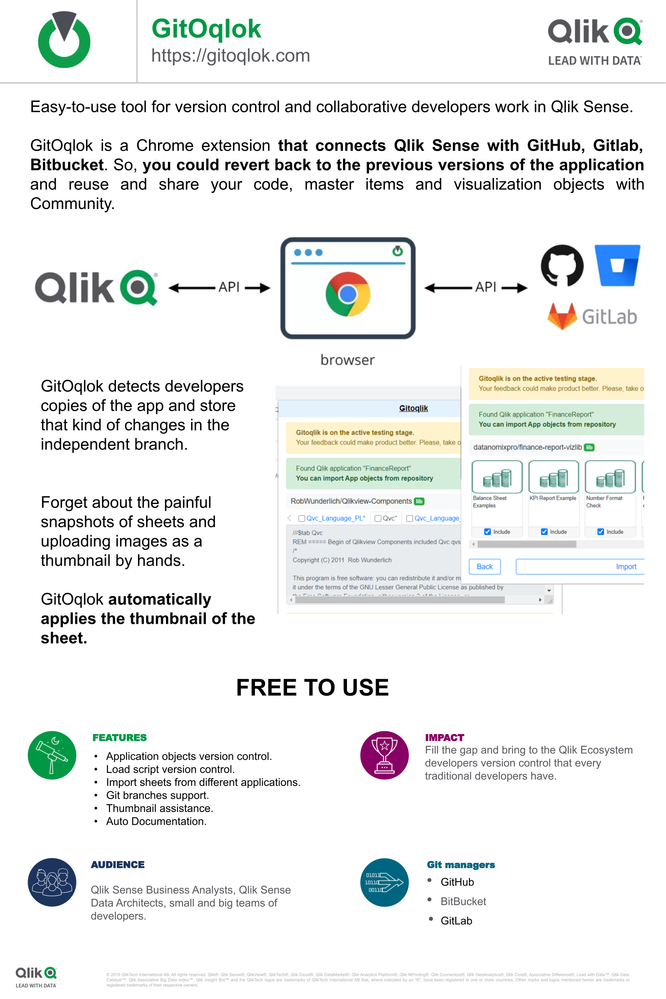
GitOqlok (git time machine) is an easy-to-use tool for version control in Qlik Sense. Git + Qlik Sense integration. GitOqlok could retrieve your load ... Show MoreGitOqlok (git time machine) is an easy-to-use tool for version control in Qlik Sense.
Git + Qlik Sense integration.
GitOqlok could retrieve your load script, serialize diagrams, master items, variables into JSON and store it in the GitHub/Gitlab/Bitbucket. So, you could revert to the previous versions of the application.
Also, you could easily share your Qlik Sense applications and code snippets with Qlik Community and your team.
Import and reuse objects from QS applications:
✔ sheets;
✔ variables;
✔ master items;
For instance, you could import Rob Wunderlich QlikViewComponents into any application by one click.See more:
- https://gitoqlok.com
- https://docs.gitoqlok.com
- How to manage Qlik project with GitHub
- Join us in Slack
-
【参加レポート】Qlik Luminary Meetup 2025 in Lund
初日は滞在ホテルでの Welcome Reception からスタートです。開催期間中は、CEO である Mike Capone もルンドに滞在し、ご挨拶としてこのミートアップの重要性を参加の皆様にあらためてお伝えしました。 今年は、日本からはホンダ小川様、セガ萬様の2名にご参加いただきました。Q... Show More初日は滞在ホテルでの Welcome Reception からスタートです。開催期間中は、CEO である Mike Capone もルンドに滞在し、ご挨拶としてこのミートアップの重要性を参加の皆様にあらためてお伝えしました。
今年は、日本からはホンダ小川様、セガ萬様の2名にご参加いただきました。Qlik からは CEO の Mike をはじめ、製品事業部トップの Drew Clark、Brendan Grady、製品開発チームなどが参加し、ロードマップや開発中の新機能の UI などを紹介しました。中でもオープンレイクハウス、エージェンティック AI、データプロダクトの重要性が強調されていました。午後は開発、ユーザー、パートナーによるワークショップとなり、次の製品デザインに向けてのフィードバックやアイディア出し、議論が行われました。
また、Qlik ユーザーである地元のアイスホッケーのチーム Redhawks の本拠地を訪問し、バックステージツアーと事例セッションが行われました。
このミートアップは、Qlik にとってユーザーからフィードバックを聞く貴重な機会です。同時にグローバルなユーザー同士の情報交換の場でもあり、多くのディスカッション、会話が生まれていました。
なお、Qlik Luminary の日本版である Qlikアドボケイトでは、引き続きメンバー募集中です。ご興味のある方はぜひお声がけください。
-
ValueLists, Match and Pick
One of the many things that I love about working here at Qlik, is that I am always learning something new. Let me show you something I learned recentl... Show MoreOne of the many things that I love about working here at Qlik, is that I am always learning something new. Let me show you something I learned recently while updating the CPG Market Analytics app. In the app I found this sheet:
This page is titled ‘How do we compare’ and shows five different gauges, each showing a different metric along with three ranges, and a reference line. The tick mark represents an average for the brand. So, the purpose of these visualizations is to show the values of each metric for Qlik_CPG, a manufacturer. I wanted to take these gauges to create a cleaner visualization, while also keeping and improving the capabilities of the originals by allowing users to compare the metrics of Qlik_CPG to other manufacturers.
So how can I do this?
After much debate and searching for inspiration, I decided upon a bullet chart. A bullet chart is kind of like a combination of a bar chart, and a gauge. It uses a bar within the chart to show progress toward a goal.
Unlike a bullet chart which requires both a measure and a dimension, our gauges only need a measure, but that is okay, we’ll be using a synthetic dimension to combine our gauges into a single dimension.
Here’s how:
We’ll start with the dimension. Bullet charts only allow for one dimension to be used, so we can use the ‘ValueList’ function to display multiple metric names. Our dimension will look like this:
The ValueList() function creates a synthetic dimension that allows you to define a list of values that Qlik treats like one dimension. So basically, “Hey Qlik, I want to create a dimension, here are the values.”
So, with our dimension taken care of, we’ll move to the measure. This is what our measure looks like:
A little more complicated, but easily explainable. Our expression can be broken down into three functions, ValueList, Match and Pick.
ValueList() creates a synthetic dimension inside the chart with the labels we want to show (e.g., Attractive Packaging, Creative Advertisement, etc.).
Match() takes the current ValueList() value and compares it to our list of labels, returning the position of the first match (1 for the first item, 2 for the second, and so on).
Pick() then uses that numeric position to return the Nth measure expression from our list of measures. In other words, the order of labels in Match() is aligned with the order of expressions passed to Pick(): label #1 maps to measure #1, label #2 to measure #2, etc.
This lets us pair each label with its corresponding calculation. For example, when Qlik evaluates the Attractive Packaging dimension value, the expression resolves to Avg({$<Manufacturer={'Qlik_CPG'}>}[Attractive packaging]). Each ValueList item is evaluated in the same way, with Pick returning the appropriate measure for that label. When we place this into a bullet chart with targets, ranges, and styling, we get a compact visual of performance vs target across multiple KPIs.
Now keep in mind; that as per our expression, we are only showing these values for one Manufacturer, ‘Qlik_CPG’, we’re missing out on the functionality of being able to compare Qlik_CPG with the other Manufacturers. To keep this functionality, we’ll add another bullet chart with the other manufacturers to compare our Qlik CPG metrics to.
Here is an expression for the second bullet chart:
Great! Now our comparison chart shows every Manufacturer, and we can put it side by side with our Qlik_CPG chart to compare!
Maybe we want to be able to compare our Qlik_CPG metrics against the metrics of selected Manufacturers instead of all of them at once, adding a Filter Pane with the Manufacturers field will allow us to do just that.
To make things even better, we can go into our second bullet chart and make a dynamic title to show which manufacturers we’re showing in our chart. That expression for the Title will look like this:
This just says, “If we don’t have any selections for Manufacturer made, just title the chart ‘All Brands’ but if we do have a Manufacturer selected, name the chart those selections”.
So now we have taken our sheet, and gave it a whole new look that is much more concise and cleaner, while learning about the Pick, Match and ValueList functions.
Did you learn something through this article? Do you think the updated sheet looks better than the original? What would you do differently? How do you plan to use these functions in your own sheets? Leave your ideas in the comments below!
-
Dynamic Engine now powers Talend Data Services & Camel Routes, at scale!
With this release, organizations running API and Route workloads that were previously restricted to “Remote Engines” (Gen1) can now seamlessly deploy,... Show MoreWith this release, organizations running API and Route workloads that were previously restricted to “Remote Engines” (Gen1) can now seamlessly deploy, manage, and run all use cases at scale on Dynamic Engine - while enjoying the benefits of container-native infrastructure, advanced scaling, and zero downtime operations
Full Feature Parity & Cloud-Native Advantages
Dynamic Engine now covers all Data Fabric use cases, including:
- Data Integration (batch & real-time jobs)
- Big Data workloads
- Data Services (APIs)
- Camel/ESB Routes
This achieves full parity with Remote Engine Gen1, while adding new strengths such as dynamic scaling options and simplified operations.
Feature Support
Remote Engine (Gen1)
Dynamic Engine
Data Integration
✅
✅
Big Data*
✅
✅
Data (API) Services
✅
🆕
(Camel/ESB) Routes
✅
🆕
Scaling options
⛔️
🆕
Lightning-fast, Frictionless Deployment
It has never been easier to build and deploy Data/API Services on Kubernetes, using Dynamic Engine:
- Prepare your Engine: Set up Dynamic Engine environments in a few clicks, leveraging powerful Helm-based customization.
- Build & Publish: Use Talend Studio to develop your Data Service or Route, then publish to Qlik Talend Cloud.
- One-click Deploy: Deploy your API or route, request scaling, and monitor live - all inside Talend Management Console.
- Observe & Control: Always-on monitoring at the replica and deployment level, with live metrics for troubleshooting.
You no longer have to script or configure parallel instances to handle uptimes or traffic peaks - Dynamic Engine takes care of orchestration and resource management automatically.
No-downtime, Always-on Workloads
One of the game-changers with Dynamic Engine is the modern, Kubernetes-native rolling update strategy. Whether you’re updating a Data Service, deploying a new version of a Camel Route, or simply scaling out the number of replicas, Dynamic Engine ensures:
- Zero production downtime: The rolling update process keeps previous replicas serving traffic while new ones start, with smooth traffic handover.
- No-disruption upgrades: Maintenance windows become obsolete. You can deploy updates or scale up during peak hours with confidence.
- 24/7 readiness: Your API and service workloads remain available, even when scaling or updating - critical for real-time and regulated workloads.
Here’s a step-by-step description of the rolling update process for deploying a new version of an API service in Dynamic Engine, as illustrated in the image
This diagram illustrates how Dynamic Engine performs seamless version upgrades using Kubernetes-native rolling updates:
- Step 1: All replicas run the current version (v1), serving traffic normally.
- Step 2: A new replica (v2) is added while v1 replicas remain active.
- Step 3: One v1 replica is replaced with v2, maintaining uninterrupted service.
- Step 4: All replicas now run v2, completing the transition with no service downtime.
Please note that disruptive changes in the API services (or Route) definition shouldn’t be re-deployed this way, as consumers may not request the older and newer API services using the same API contract.
Built for Scalability
Dynamic Engine introduces intelligent, configurable scaling for all workload types:
- Static and Automatic scaling: Choose a static number of service replicas (greater or equal to one) or set automatic min/max rules based on resource utilization via HELM custom values.
- Smart resource allocation: The engine intelligently provisions compute based on demand, even during peak periods.
- Microservice deployment: Each service or route runs as an independent, isolated container, reducing resource contention and enabling efficient scale.
Seamless Transition – No Additional Subscriptions Needed
Best of all, Dynamic Engine’s expanded support for Data Services and Camel Routes is already available to all Qlik Talend Cloud and Talend Cloud customers - no changes in contract or subscription required. Simply set up your Dynamic Engine environment and start running API services at scale today.
In short: Dynamic Engine truly brings Talend’s API and data service runtime into the cloud-native era: no more legacy constraints, no more deployment headaches, no business downtime - just effortless, scalable, and reliable integration.
Are you an existing user? Your Cloud subscription already entitles you to all these features - start taking advantage of scale and zero-downtime now!
References
-
Quick and Easy Dashboard Makeover
The Original Let’s face it, the original dashboard was boring. It was just a plain, functional dashboard with no “Wow“ factor. My goal for this makeov... Show MoreThe Original
Let’s face it, the original dashboard was boring. It was just a plain, functional dashboard with no “Wow“ factor. My goal for this makeover was to add some character to the dashboard.
Step 1: Find a color palette
The color palette that I decided on was on the green scale. Here are the colors that I used:
Sheet Background: #3d6666
Chart Background: #578080
Font color: #ffffff
Step 2: Change the sheet background color
- In Edit Sheet mode, click on the sheet background to open up the Sheet Properties panel
- Select Styling from the Sheet Properties panel
- Toggle off the Background – Auto icon to show Custom
- Select the Background color dropdown and enter the hex code that you would like to use
Step 3 – Chart Styling
Much of the work is done this section. The way I approached this was to style one chart and then use the copy/paste style function to bring the other charts to life with the new chart properties.
Note: When copy and pasting styles between chart types, there may be some additional editing needed to update all the chart characteristics. I started with the Profitability by Clinician bar chart.
- First, we need to change the bars to white by selecting it in the Properties Panel > Colors and Legends
- Next, we need to edit the other chart properties by opening the Styling Properties
- We make the changes in the General section first.
- Change the text color of the Title, Subtitle, and Footnote: #ffffff
- Change the background color to our new chart background color: #578080
- Change the color of the border to the sheet background color: #3d6666
- Change the corner radius to 7px
- Change the shadow to medium
- We now need to make the same changes to the Chart section
- Change the text color of the Axis Title, Axis Label, Value Label, Legend Title, Legend Label to #ffffff
- Here is our new chart after the changes:
- Next we need to copy/paste the new style to all of the charts by right clicking on the chart and selecting Copy Style.
- Next, we right click on the chart where we want to paste the style and select Paste style
- Once we update the characteristics of each chart, we will add grid containers to help us to layout each section of the dashboard and add in the corresponding charts to each section.
After all of the visualizations are added to the grid containers, we now have a new and improved dashboard.
Summary: With just some small changes to our color scheme and chart properties, we were able to completely transform our dashboard. With all the new features, chart types, and chart properties available to the Qlik Sense developer, the only limit to customizing a Qlik Sense app is your own imagination.
-
Watch Q&A with Qlik: Qlik Open Lakehouse!
Don't miss our next Q&A with Qlik! Hear from our panel of experts to help you get the most out of your Qlik experience. WATCH RECORDING HERE ... Show MoreDon't miss our next Q&A with Qlik! Hear from our panel of experts to help you get the most out of your Qlik experience.

-
【オンデマンド配信】金融 DX を加速!データ活用で実現する顧客体験と業務変革
デジタル変革が必須となった金融業界において、データ活用こそが競争優位性を確立する鍵です。本 Web セミナーでは、世界各国の有力金融機関が Qlik のデータ統合・分析プラットフォームを導入し、どのようにビジネスを変革したのか。以下のデータ駆動型経営の具体的な成果とその成功戦略について、深く解説しま... Show Moreデジタル変革が必須となった金融業界において、データ活用こそが競争優位性を確立する鍵です。本 Web セミナーでは、世界各国の有力金融機関が Qlik のデータ統合・分析プラットフォームを導入し、どのようにビジネスを変革したのか。以下のデータ駆動型経営の具体的な成果とその成功戦略について、深く解説します。貴社の次なる DX 戦略のヒントとして、ぜひご活用ください。
- 基幹システムのデータ連携を劇的に高速化し、運用コストを削減
- 大量のデジタルデータをリアルタイムに処理する能力を獲得し、ビジネススピードが向上
- 全社共通の信頼できるデータ基盤を確立し、顧客へのパーソナライズを高度化
- 緊急時にも迅速な意思決定と顧客サポートを可能にする体制を構築
※ パソコン・タブレット・スマートフォンで、どこからでもご参加・ご視聴いただけます。
今すぐ視聴する -
【オンデマンド配信】分散データをつなぎ、現場の“いま”を見える化する
外食・ホスピタリティ業界では、POS・予約・在庫・人員など多様なシステムから膨大なデータが生成される一方、それらが分断されており、即時の経営判断や顧客体験向上を阻む要因となっています。本 Web セミナーでは、「分散データの統合による現場オペレーション効率化」と「リアルタイム分析による利益最大化」と... Show More外食・ホスピタリティ業界では、POS・予約・在庫・人員など多様なシステムから膨大なデータが生成される一方、それらが分断されており、即時の経営判断や顧客体験向上を阻む要因となっています。
本 Web セミナーでは、「分散データの統合による現場オペレーション効率化」と「リアルタイム分析による利益最大化」という二軸から、Qlik × Talend による実践的アプローチを紹介。クラウド・オンプレ混在環境を前提に、データ統合ハブ構築からダッシュボード可視化、店舗別収益性や在庫最適化のユースケースまでを解説し、短期改善とデータドリブン経営の両立を実現する道筋を提示します。※ パソコン・タブレット・スマートフォンで、どこからでもご視聴いただけます。
今すぐ視聴する -
Qlik Cloud 10月の新機能
分析の新機能 モバイル アプリが Qlik Analytics に名称変更 Qlik Sense Saas モバイル アプリは Qlik Analytics に名称変更されました。同じアプリですが、Qlik Cloud Analytics プラットフォームの進化に合わせて名称が変更されました。 ... Show More分析の新機能
モバイル アプリが Qlik Analytics に名称変更
Qlik Sense Saas モバイル アプリは Qlik Analytics に名称変更されました。同じアプリですが、Qlik Cloud Analytics プラットフォームの進化に合わせて名称が変更されました。
折れ線グラフへの画像の追加
折れ線グラフに、メディア ライブラリまたはカスタム URL から画像を追加できます。データと文脈を結び付け直感的に理解を促すために、最大値や最小値を強調、急上昇や下降を強調、新製品発売日やキャンペーン開始日に画像を表示するなどのユースケースに使用できます。
棒グラフ、コンボ チャート、散布図に図形を追加
特定の軸値を強調表示するポイントを追加したり、主要業績評価指標の最高点と最低点の間に線を描画したり、 4象限を表現することができます。
データフローのアップデート
- ピボットプロセッサーが追加され、ノーコードで行から列へ変換できるようになりました。
- ウィンドウ プロセッサーにCount Distinct や Concatenate を含む新しい演算と、オプションのソートのサポートを追加しました。
- 日付プロセッサーの部分から日付を作成、部分から時刻を作成、部分から日付と時刻を作成が強化され、それぞれの部分に定数値を入力できるようになりました。
ドラッグ アンド ドロップでシートを公開と展開の保持
シート概要とシート セクションで、ドラッグすることで、シートの公開・非公開ができるようになりました。また、ビューの現在の展開状態は、ユーザーが変更するまで保持されます。
チャートの監視の強化
スペースや名前、タグを指定してチャートの監視を指定できます。比較する履歴の指定も行いやすくなりました。
多変量時系列予測
Qlik Predict に新たに多変量時系列予測モデルが加わりました。複数の時間ベース信号により、依存関係と相互作用を自動検出します。
アプリのアクセスリクエスト
権限のないアプリを開く場合に、アクセスをリクエストできるようになりました。
その他のアップデート
- パブリック API でテナントごとの関連するコネクタを有効または無効にすることができます。
- Qlik Answersの新たな検索機能強化により、より正確かつ迅速な回答提供が可能になりました。
- Databricksコネクタの認証オプションが更新されました。
データ統合の新機能
Qlik Talend Cloud での検証ルールの提案
検証ルールを素早く作成できるように、Qlik Talend Cloud に新しい検証ルールの提案を導入しました。複数のフィールドにまたがるルールを含め、データセットに基づいて検証ルールを自動的に提案します。
- 使用にはQlik Talend Cloud Enterprise サブスクリプションが必要です。
- 提案の情報は顧客データとして扱われ、Qlik Cloud または GenAI モデルのトレーニングには使用されません。
- この機能は生成人工知能 (GenAI) を使用します。提案内容は必ずしも正しくない場合があります。
- GenAI 出力を使用または共有する前に、それを確認および検証し、その使用が特定のユース ケースに適切かどうか、および適用法に準拠しているかどうかを評価することはユーザーの責任です。
その他のアップデート
- 変換フローの日付プロセッサは、柔軟性を高めるために、日時の精度(有効桁数)を調整できるようになりました。
- レプリケーションまたはレイク ランディング タスクを使用する場合、SaaS アプリケーション ソースからの JSON データ型は、互換性のあるターゲット データ型に自動的にマッピングされます。
- Qlik Trust Score がデータ製品の概要画面に直接表示されるようになりました。ページの構造も改善しています。
- データに関する検証ルールにおいて、新しい二項演算子を使用して、日付/時刻フィールドと期間を比較する検証ルールを作成できるようになりました。
- 各セマンティック タイプが適用されているデータセットの数を確認できるようになりました。
管理者向けの新機能
IP 許可リストによるセキュリティ強化
許可リストに、クラウド テナントへのアクセスを許可する IPv4 アドレスまたは範囲を指定し、クライアントが接続すると、システムはその IP を許可リストと照合します。IP が許可リストにあれば接続は許可され、なければ接続はブロックされます。これにより、テナントにアクセスできるネットワークを制御することで、セキュリティのレイヤーが追加され、テナントを不正アクセスから保護し、潜在的なセキュリティの脅威にさらされる機会を減らすことができます。
IPv4 アドレスのみサポートしています。
- デュアルスタック IPv4/IPv6 ネットワーク:
クライアントが IPv6 を使用して接続した場合、許可リストが存在してもアクセスはブロックされます。クライアントが IPv4 を使用して接続する場合、IPv4 アドレスが有効な許可リストに含まれている場合のみ、アクセスが許可されます。
- IPv6 専用ネットワーク
すべての接続がブロックされています。
組織でデュアルスタックまたは IPv6 のみのネットワークを使用している場合は、IP 許可リストを有効にしないでください。そうすると、IPv6 で接続するユーザーの一部またはすべてがブロックされます。
RFC1918 で定義されているプライベート IPv4 範囲はサポートされていません。
カスタム アナウンス
ニュースやアップデート情報、重要なお知らせなどを、Qlik Cloud 上に告知バナーを設定し、直接ユーザーと共有できるようになりました。
その他のアップデート
- テナント内の SMTP メール サーバー構成で、送信者名を定義できるようになりました。
- カスタム ロールの設定により、Qlik Reporting Service のレポートアクションを実行できるユーザーを制御できるようになりました。
- カスタム ロールの設定により、Insight Advisor に対する権限を設定できるようになりました。
- OAuth のスコープに、新たに Direct Access gateway に関する権限が追加されました。
- Qlik Cloud がブラジルにテナントを持てるようになりました。
Client-Managed の新機能
Qlik Sense
- November 2025 の Technical Previewが公開されました。
- https://community.qlik.com/t5/Release-Notes/Qlik-Sense-Enterprise-on-Windows-Technical-Preview-for-November/ta-p/2532969
Qlik Replicate
- November 2025 の Technical Previewが公開されました。
- https://community.qlik.com/t5/Release-Notes/Qlik-Replicate-November-2025-Technical-Preview/ta-p/2533591
Qlik Enterprise Manager
- November 2025 の Technical Previewが公開されました。
- https://community.qlik.com/t5/Release-Notes/Qlik-Enterprise-Manager-November-2025-Technical-Preview/ta-p/2533592
Talend の新機能
Talend Administration Center
新しいコマンドが追加されました。
- ogetServerIdByName : サーバー名を使用してサーバー ID を取得
- oupdateTaskParamsForExecute : タスク実行のための既存のJVMパラメータを更新
Talend Administration Center からランタイム管理コンソールが削除されました。
Talend Studio 8.0
共通機能
- RESTサービス向けAPIドキュメントの有効化機能の追加
- cLangChainMCPClient コンポーネントの追加:ルートが大規模言語モデル (LLM) を使用して MCP サーバーに接続し、通信が可能
- API インポート ウィザードの機能強化により、API デザイナーのリポジトリを反映
- cLangChainTools コンポーネントでチャット メモリをアクティブ化
ビッグデータ
- 単一の Spark 3.x オプションで Databricks Spark 3.x ランタイムを統合的にサポート
- tIcebergInput および tIcebergOutput での Databricks Unity Catalog のサポート
CI
- Talend CI Builder のバージョン 8.0.24 へのアップグレード
データ統合
- 標準ジョブの DocumentDB コンポーネントに対する Amazon DocumentDB バージョン 5.0 のサポート
データマッパー
- 標準マップの MapValues 関数の自動マッピングのサポート
- DSQL マップの式エディタにおける関数のドラッグ アンド ドロップの改善
- DSQL マップのフラグメント エディターのインデントオプションのサポート
データ品質
- データマートとしてのSnowflakeの認証方法のサポート(基本・キーペア・OAuth 2.0)
その他、不具合が修正されています。

-
New Series - Qlik Sense and Salesforce Working Together
Hi guys - I'm pleased to present to you a new video series that shows you how Qlik Sense and Salesforce work together. With so many companies ru... Show MoreHi guys -
I'm pleased to present to you a new video series that shows you how Qlik Sense and Salesforce work together.
With so many companies running multiple business systems, Qlik offers an alternative to data consolidation confusion by relating information within Salesforce and other enterprise systems for seamless visual analysis, dashboards and reports. Qlik can easily be accessed within Salesforce as a custom tab or as embedded Qlik graphs, tables, and charts within other Salesforce tabs. Alternatively, Salesforce data can be immediately integrated into a Qlik application via a native data connector to provide an unparalleled view into your business’ entire data.
Please take a few minutes to watch and learn. Enjoy!
Regards,
Mike Tarallo
Qlik
Follow me https://twitter.com/mtarallo - for instant Qlik updates and insights!Part 1: Introduction
Part 2: Embedded Analytics Use Case Demo
Part 3: Qlik Sense Client & Other FeaturesResources:

-
今回は神回!🍁 実りの秋に学びと発見がいっぱいのQlikユーザーミートアップを開催しました!✨
秋晴れの10月28日(火)、お茶の水ソラシティにて、今年2回目となる—and 今年最後の—ユーザーミートアップを開催しました。なんと120名を超えるお申込みをいただき、会場はほぼ満席に!多くの方にご参加いただき、熱気あふれる会となりました。 今回の司会はアドボケイトの中川様にお願いし、Lumi... Show More秋晴れの10月28日(火)、お茶の水ソラシティにて、今年2回目となる—and 今年最後の—ユーザーミートアップを開催しました。なんと120名を超えるお申込みをいただき、会場はほぼ満席に!多くの方にご参加いただき、熱気あふれる会となりました。
今回の司会はアドボケイトの中川様にお願いし、Luminaryで幹事を務める萬様の活動報告からスタートしました。
まず、株式会社ディーエイチシー様より「Qlik Sense® オンプレ版活用事例とQlik Sense SaaS への移行」と題して、QVDやQlik NPrintingを活用した運用事例、そしてCloud移行によるQlik Automateの利用や、今後のAI活用についてご紹介いただきました。
続いて、大日本印刷株式会社様からは「購買本部の挑戦:Qlik Sense® で進める業務改革とガバナンス強化」として、従来は個別にしか得られなかった各システムの情報をつなぎ購買業務を改革した取り組みや、実際のアプリ画面をご披露いただきました。
その後、第5回 Qlik データソン入賞者による受賞アプリに関するパネルディスカッションを実施。
受賞アプリの工夫や裏側について、パネラーから多くの質問が寄せられ、開発者の方々が一つひとつ丁寧に回答してくださいました。マップが思わぬ形で使われていたり、SVGで緻密にコーディングされた画像や、実はシンプルな標準機能をうまく活用した斬新なUIなどが紹介されると、会場からは思わずどよめきが。
時間いっぱいまで質問が続きましたが、午後から The AI Reality Tour Tokyo 2025 が控えていたため、皆さん今半の牛肉弁当を楽しみながらディスカッションを締めくくりました。多くの事例やアプリのテクニックが共有され、学びと発見の多い充実した会になったと思います。
ご登壇者のみなさま、お疲れさまでした!
そして、ご参加くださった皆さま、ありがとうございました!楽しんでいただけていたらうれしいです。
当日の動画もお楽しみください!
-
Qlik Cloud: Removing the deprecated Developer role and Enable API keys toggle
The following two items were deprecated in June 2025: Developer role Enable API keys toggle The deprecation notice was communicated in an Administ... Show MoreThe following two items were deprecated in June 2025:
- Developer role
- Enable API keys toggle
The deprecation notice was communicated in an Administration announcement and documented on our What's New in Qlik Cloud feed. See Developer role and API key toggle deprecated | 6/16/2025 for details.
Following the deprecation, the Developer role and the Enable API keys toggle will be removed in the coming weeks, in line with the original announcement, aiming for the end of 2025.
For more information, see Qlik Cloud: Removing the deprecated Developer role and Enable API keys toggle (November 2025).
If you have any questions, we're happy to assist. Reply to this blog post or take your queries to our Support Chat.
Thank you for choosing Qlik,
Qlik Support -
Checkout the New Pivot Table!
The New Pivot Table can quickly transform rows and columns into actionable insights with just a few clicks. You can organize, analyze, and visualize y... Show MoreThe New Pivot Table can quickly transform rows and columns into actionable insights with just a few clicks. You can organize, analyze, and visualize your data and even style various elements such as headers, borders, fonts, grid lines and more. Say goodbye to manual calculations and hello to dynamic summaries. Pivot Tables,. simplify complexity, reveal patterns, and take control of your information.
Try it now and elevate your data game to new heights.
Qlik Help: Pivot ObjectCan't See the video? - Check it out on Qlik's video site
-
Our most popular instructor-led courses are now available for self-paced learnin...
Qlik Learning, the go-to library for self-paced learning, is celebrating a new milestone. Our new learning paths Create Visualizations with Qlik Clou... Show MoreQlik Learning, the go-to library for self-paced learning, is celebrating a new milestone.
Our new learning paths Create Visualizations with Qlik Cloud Analytics /Qlik Sense and Data Modeling for Qlik Cloud Analytics/Qlik Sense are now available — anytime, anywhere, and without complexity.
- Learn at your own rhythm with guided content.
- Practice using the virtual machines prepared for you.
- Build solid Qlik skills to boost your confidence and impact.
- Earn a Qlik Learning Achievement award when you complete the course!
About the courses:
Create Visualizations with Qlik Cloud Analytics/Qlik Sense
Learn how to create effective and interactive dashboards that drive insights and decisions.Data Modeling with Qlik Cloud Analytics/Qlik Sense
Master data modeling techniques to structure your data efficiently and get more value from your Qlik apps.👉 If you already have a Qlik Learning subscription, log into Qlik Learning today and start learning.
If not… maybe it’s time to get one 😉
-
【開催報告】AI Reality Tour Tokyo 2025
Qlik のカバーする領域が BI から DI、そして AI へと拡大していることを反映して、今年は登録者目標数を昨年より大幅にアップしていました。ところが、予想以上にお申し込みの勢いが止まらず、さらに目標数を引きあげたのですが、最終的にはこの数字をも上回るご登録をいただきました。Qlik への皆様... Show MoreQlik のカバーする領域が BI から DI、そして AI へと拡大していることを反映して、今年は登録者目標数を昨年より大幅にアップしていました。ところが、予想以上にお申し込みの勢いが止まらず、さらに目標数を引きあげたのですが、最終的にはこの数字をも上回るご登録をいただきました。Qlik への皆様からの熱い期待を社員一同実感しました。
今年も執行役員今井による開会のご挨拶で始まり、Chief Strategy Officer の James Fisher の基調講演では、Qlik はこれまでお客様にお約束したビジョンをしっかりと実行するフェーズに入ったことを示し、AI エージェント時代における Qlik ソリューションをご紹介しました。
続いてプリセールス中嶋より、次世代のエージェンティック AI を実現する、新しい Qlik Answers やオープンレイクハウスなどの新製品をデモを交えてご紹介しました。
昨年、Qlik と AWS はグローバルで強力なパートナーシップを結びました。AWS Japan の河原様にご登壇いただき、Qlik の目指す方向性(エージェンティック AI とレイクハウス)へのご賛同と、マーケットプレイスのメリットをご紹介いただきました。
Qlik では毎年、Global Transformation Awards として、Qlik 製品を使って大きなビジネスインパクトを実現したお客様を表彰しています。日本からもホンダ様、富士通様が過去に受賞されています。この日本版として今年、新たに 「Qlik データトランスフォーメーションアワード」が創設され、NECパーソナルコンピュータ、富士通、サッポロホールディングスの 3社が受賞されました。おめでとうございます!
コーヒーブレイクを挟み、グループ共通基盤 SAPPORO DATA FACTORY へのデータ統合と戦略的活用に取り組まれているサッポロホールティングス様より、 Qlik Talend Cloud によるデータ統合が経営や現場にもたらしている変化や活用の実態をお話しいただきました。
同じくお客様事例として、今まさに「AI 駆動型経営」という次なる変革に向けて全社を挙げて取り組みを加速されている富士通様より、11 万人規模での全社変革の挑戦の軌跡、実践ノウハウ、今後の展望をご紹介いただきました。
松井証券様からは、サービス拡充に伴い増加するデータベースを管理するために構築されている統合データベースと各システム間でのリアルタイムデータ連携に、なぜ Qlik を採用したのかをご紹介いただきました。
展示エリアではスポンサー様のソリューションブースに加え、今年初めての試みとしてミニシアターを設置しました。パートナー様が Qlik の最新テクノロジーやソリューションを自社の強みを交えてご紹介されました。
プログラム終了後の懇親会も例年にない盛り上がりを見せ、ユーザー、パートナー、Qlik 社員による、AI とデータ活用について活発な情報交換が行われました。
さて、AI Reality Tour Tokyo はこれで終わりではありません。当日はビジネスセッションのみでしたが、製品・技術をご紹介する「AI Reality Tour Tokyo テクノロジーセッション」、そして当日のハイライトをご紹介する「AI Reality Tour Tokyo Replay」を後日オンラインでお届けします。詳細はあらためてご案内いたします。ご期待ください!
-
Techspert Talks - Build on Iceberg with Qlik Open Lakehouse
Hi everyone, Want to stay a step ahead of important Qlik support issues? Then sign up for our monthly webinar series where you can get first-hand ins... Show MoreHi everyone,
Want to stay a step ahead of important Qlik support issues? Then sign up for our monthly webinar series where you can get first-hand insights from Qlik experts.The session from November looked at Building on Iceberg with Qlik Open Lakehouse.
But wait, what is it exactly?
Techspert Talks is a free webinar held on a monthly basis, where you can hear directly from Qlik Techsperts on topics that are relevant to Customers and Partners today.In this session we will cover:
- Benefits of Iceberg Lakehouse
- How to build an Open Lakehouse
- Mirroring
-
You Spoke, We Listened - See What’s New at Qlik!
Qlik Cloud Analytics Performance and Efficiency Upgrades App Performance Evaluation – Run tailored performance evaluations during app development t... Show MoreQlik Cloud Analytics
Performance and Efficiency Upgrades
- App Performance Evaluation – Run tailored performance evaluations during app development to identify bottlenecks and compare performance across versions. Now available for large apps in Qlik Cloud and on-premise apps in your cloud tenant
- Faster Visualization Downloads – Access image, data, and PDF downloads directly from the hover menu for quicker, more efficient exporting. Learn more.
- Smarter Editing & Script Reuse – Enjoy an updated sheet editing experience combining advanced filters and data previews, plus reusable editable scripts for modular, maintainable app development.
- Dont show me again - Dismissible dialogs like when editing masterlet you clear messages once and stay focused—fewer clicks, faster flow.
Enhanced User Experience & Customization
- Custom Announcements - Share news, updates, and important notices directly with users, right inside the product. Learn more.
- Request access - Seamless access, smarter collaboration, users can now request access to applications directly—no more dead ends, just faster insights.
- Natural Language Search – Search applications by name or description using everyday language, now supporting multiple languages.
- Custom CSS Styling – Apply your own CSS directly in the sheet styling property panel for greater design flexibility.
- Interactive Table Recipe – Prepare single-table datasets through a lightweight, spreadsheet-like interface with instant visual feedback and structured, repeatable steps. Learn more.
- Refreshed Application Settings – Navigate configurations more easily with a new tabbed layout for streamlined access to setting categories.
- Unified Sheets and Bookmarks View – Explore all public, community, and private items in one place with the new “All” category for simpler navigation.
- Automation Editor Enhancements - Improved readability and usability with collapsible blocks, aligned history order, and easier access to settings. Learn more.
Qlik Talend Cloud Data Integration
Talend Studio Enhancements
- Smarter Search & Navigation - Native search, Favorites & Recents filters for easy access, and smoother canvas navigation.
- Improved Job Readability & Coding tools - Restored readability of Jobs with color-coded Joblets, Subjobs and customizable connection colors, along with smarter coding tools like syntax highlighting and autocompletion.
- Modernized Git operations - Industry-standard Git operations with updated staging/history views
- Automatic reconnection to remote projects.
Qlik Open Lakehouse | General Availability in Qlik Talend Cloud Pipelines - Learn More
- Enable high-volume low-latency CDC ingestion into Apache Iceberg in your AWS environment
- Automated SCD Type 1/2 helps keep records up-to-date
- An adaptive optimizer compacts files for high-performing querying
- Mirror Iceberg tables to Snowflake for cross-project pipelines.
Have questions about these updates? Reply to this post or check our detailed documentation.
-
Your Voice Matters: Qlik's Partner Customer NPS Program
How Qlik's Partner Customer NPS Program Improves Your Qlik Support Experience At Qlik, we believe great customer experiences start with listening. Tha... Show MoreHow Qlik's Partner Customer NPS Program Improves Your Qlik Support Experience
At Qlik, we believe great customer experiences start with listening.
That’s why we launched the Partner Customer NPS (Net Promoter Score) Program, a feedback initiative designed to capture your voice, understand your satisfaction, and help our partners continuously improve how they support you.
What Is the Partner’s Customer NPS Program?
When you receive a short NPS survey from Qlik or one of our partners, you’re invited to rate your experience with the partner who supports your Qlik environment.
This helps us understand how well our partners are delivering responsiveness, expertise, and overall satisfaction.
Your feedback is collected, analyzed, and shared with both Qlik and the partner, so your input directly influences how we enhance your support experience.
Why It Matters to You
Complete a quick NPC Survey > We and Qlik review your feedback > We act and track the progress over time
How you can participate
When you see an email or notification requesting feedback, please take a minute to complete it.
Your response doesn’t just measure satisfaction; it helps ensure that:- Your support partner is recognized for excellence.
- Qlik identifies areas for improvement across all partners.
- Future interactions with support become simpler, faster, and better.
Together, We Improve Every Day…
“The Partner NPS program is more than a survey; it’s a bridge between your experience, our partners, and Qlik’s commitment to customer excellence.
Thank you for sharing your voice, you are helping us make Qlik Support better for everyone.”Giuseppe Novello
Manager, Americas Partner Support & Alliances | Global Program Manager -
Bridging Borders: How Qlik Is Making a Difference in the UK and Germany
In the UK, Qlik’s initiatives have been embraced by institutions looking to broaden their international reach and diversify their academic networks. W... Show MoreIn the UK, Qlik’s initiatives have been embraced by institutions looking to broaden their international reach and diversify their academic networks. Whether through joint research projects, virtual seminars, or hands-on workshops, Qlik has provided a flexible yet structured platform for meaningful collaboration.
Similarly, in Germany, the emphasis on academic excellence and innovative teaching methods has found a natural ally in Qlik Academic Program`s collaborative model. The program is being praised for its ability to blend diverse educational perspectives while maintaining a strong focus on quality.
Qlik Academic Program offers a range of recognized qualifications and a diverse set of learning resources that are completely free. From a robust data analytics curriculum to flexible learning pathways on the platform, Qlik equips both students and educators with top-tier tools and resources. Educator resources are also readily available, ensuring that teaching staff can seamlessly integrate Qlik’s offerings into their curriculum.
As we continue to grow, these partnerships and resources are more than just geographical expansions—they're proof that Qlik's approach is truly universal. Whether you're in London or Berlin, the spirit of collaboration and the pursuit of knowledge remain the same. With each new connection, Qlik is building a more interconnected and inspired academic community.
If you’d like to find out more about how Qlik can support your academic journey, visit our website at qlik.com/academicprogram