Unlock a world of possibilities! Login now and discover the exclusive benefits awaiting you.

Analytics & AI
Forums for Qlik Analytic solutions. Ask questions, join discussions, find solutions, and access documentation and resources.
Data Integration & Quality
Forums for Qlik Data Integration solutions. Ask questions, join discussions, find solutions, and access documentation and resources
Explore Qlik Gallery
Qlik Gallery is meant to encourage Qlikkies everywhere to share their progress – from a first Qlik app – to a favorite Qlik app – and everything in-between.
Qlik Community
Get started on Qlik Community, find How-To documents, and join general non-product related discussions.
Qlik Resources
Direct links to other resources within the Qlik ecosystem. We suggest you bookmark this page.
Qlik Academic Program
Qlik gives qualified university students, educators, and researchers free Qlik software and resources to prepare students for the data-driven workplace.
Recent Blog Posts
-
Fully Integrated AI and ML - The Path Forward (Part 3 of the Series)
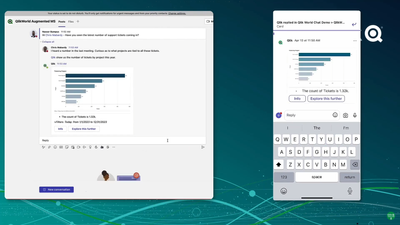
In this third video, we demonstrate our capabilities to embed augmented analytics features and capabilities using multiple integration endpoints avail... Show MoreIn this third video, we demonstrate our capabilities to embed augmented analytics features and capabilities using multiple integration endpoints available in Qlik Sense. We demonstrate a game-changing upcoming feature we showed at QlikWorld - conversational analytics within Microsoft Teams. We then cover the different types of integrations for embedding augmented capabilities, and show an example of API usage and embedded analytics in a web app.
Can't see the video? Access to YouTube Blocked or Restricted? Check out the playlist in on the Qlik Video Page.
With the newly released augmented analytics APIs, we are delivering an essential avenue for our users to leverage automated insights and natural language interaction in the environments of their choosing, as well as build business logic using data across a wide breadth of sources. Developers can leverage all of this to craft their own embedded experiences and mashups, while continuing to guide the user experience using business logic and items like example questions. All these endpoints come with developer guides and resources to assist developers with getting started.
Stay tuned for the next video in which we will be highlighting the use of Machine Learning Services in within our augmented analytics capabilities, including a demonstration of an exciting new capability for Key Driver Analysis.
AI & ML Path Forward Series:
Read Part 2 - Automated Insights through Insight Advisor in Qlik Sense
Read Part 1 - Qlik's Fully Integrated AI and ML Capabilities -
U.S. Climate, 2010–2023
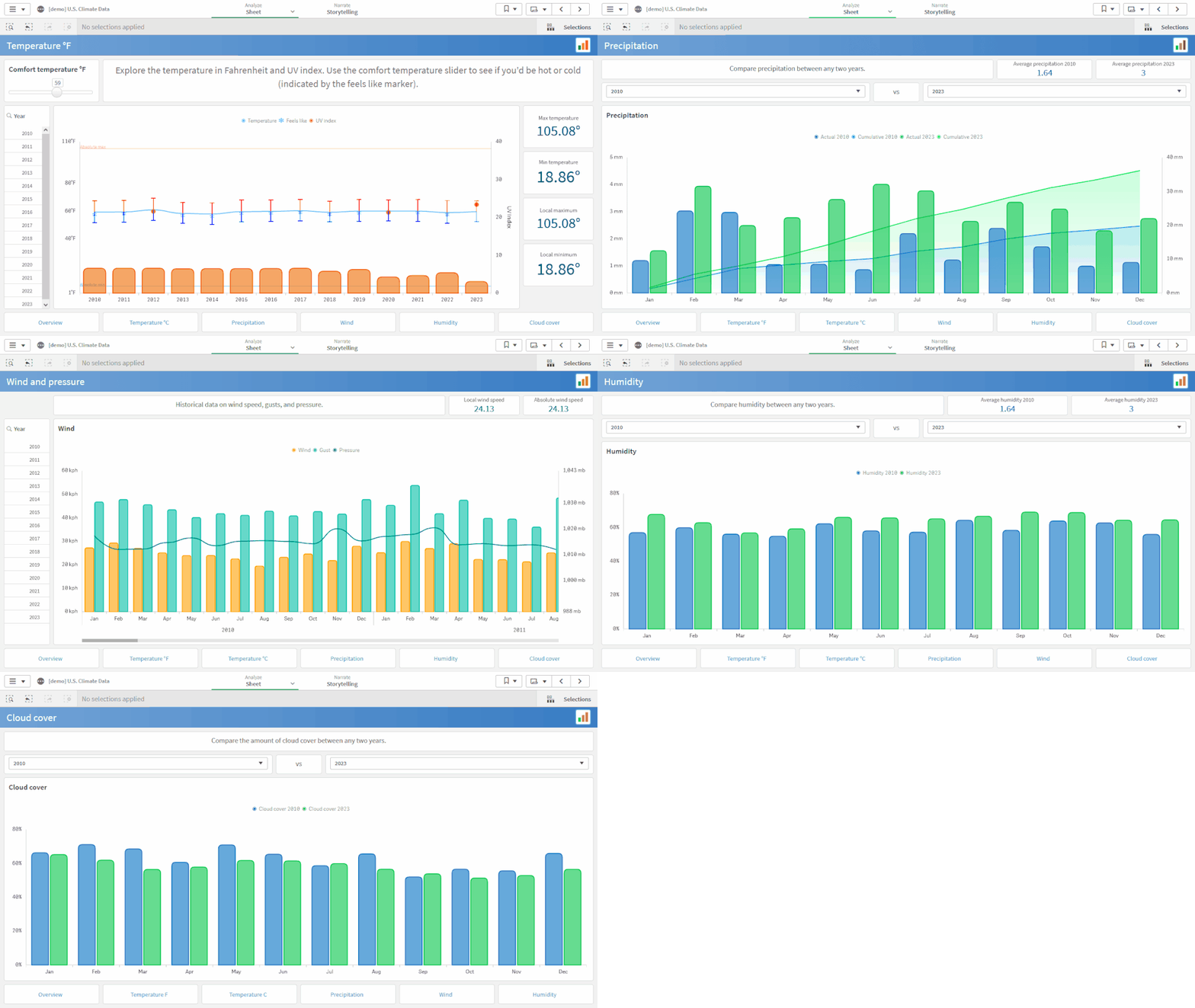
U.S. Climate, 2010–2023 AnyChart — QS Extensions Explore climate data for the United States between 2010 and 2023 from various perspectives with... Show MoreU.S. Climate, 2010–2023AnyChart — QS Extensions Explore climate data for the United States between 2010 and 2023 from various perspectives with the help of advanced Combo Charts powered by AnyChart's extension for Qlik Sense.
Discoveries
Monitor air temperatures and assess the comfort level of the weather. Delve into precipitation, wind, humidity, pressure, UV index, and cloud cover data, compare year-over-year trends, and discover more insights.
Impact
Check out AnyChart's Combo Chart extension in action and see how it can help you analyze the changes of several metrics over time or by category when they vary in scale, to discover possible correlations.
Audience
Anyone who wants to analyze weather data in-depth and see examples of advanced, yet still very intuitive to build combo charts in Qlik Sense.
Data and advanced analytics
The data is taken from the U.S. Climate Data dataset on Kaggle. The application features combo charts built with AnyChart's dedicated extension for Qlik Sense.
🔗 >> VIEW IT LIVE OR DOWNLOAD (.QVF) <<
-
Register Now for an Upcoming Live Instructor Webinar!
Qlik Continuous Classroom Live Instructor Webinars for the second half of the year are now available for registration! Delivered on a variety of advan... Show MoreQlik Continuous Classroom Live Instructor Webinars for the second half of the year are now available for registration! Delivered on a variety of advanced topics above and beyond the content offered in our self-paced learning. Sessions are held at 10:00 am in the associated time zone.
Below are a few examples of topics you will find for upcoming sessions:
- Custom Properties in Qlik Sense QMC and Hub – June 30
- Introduction to Set Analysis -July 3
- Data Classification - July 14
- Using Set Analysis (Without Writing Expressions) - July 17
- Debugging Data Load Editor Scripts - July 24
- Using the Insight Advisor - August 7
- Nested Aggregations - August 25
- Access Control: Customize Streams, Apps and App Objects Access - August 30
If you are unable attend a session for any reason, don't worry. Your registration link will provide you access the on-demand recording after the session is over.
Click here to access the Upcoming Events Calendar to view and register for an upcoming webinar.
Filtering capabilities allows you to find Learning events (Live Instructor Webinars, Academic Program Webinars, Workshops and more!) easier by filtering on Time Period, Region, Price, User Role and Category.
-
Document Approval
Document Approval Inphinity Documents, approval steps, final decision, related data as well as additional notes. All in one secure place - in th... Show MoreDocument ApprovalInphinityDocuments, approval steps, final decision, related data as well as additional notes. All in one secure place - in the Qlik application. Upload the document and let it be checked (facts, finance, legal). Capture data about checks and save notes if needed. Open the document, see the data, and make the decision - approve or decline it. The application is available for FREE (www.demo.myinphinity.com).Discoveries
See all documents that are/were in the approval process, their current stage, and related data.
Impact
TRANSPARENCY, EFFICIENCY, and SECURITY in approval processes.
Audience
Anyone involved in approval processes in your organization.
Data and advanced analytics
Documents, a full changelog, as well as a visual representation of the process flow, are available throughout.
-
Qlik Data Integration Newsletter - June 2023
This is our inaugural edition of our Monthly Newsletter for Qlik Data Integration updates. We'll cover one endpoint per month and share our top resour... Show MoreThis is our inaugural edition of our Monthly Newsletter for Qlik Data Integration updates. We'll cover one endpoint per month and share our top resources, best practices, release updates and upcoming webinars.
Subscribe to the Qlik Data Integration topic to be notified of future editions!Index
- Resource Highlights:
- Webinars
- Knowledgebase Articles
- Analyze Qlik Replicate Logs
- Endpoint Spotlight: Oracle
- New Issues Reported
- Tips!
- Release Updates
- Fixes
- Enhancements
- Qlik Data Integration Product End of Life Versions:
Resource Highlights:
Webinars
Book your calendar for the upcoming Qlik Replicate Q&A session scheduled for July 25th at 10:00 AM EDT. It is a live Q&A session with a panel of Qlik experts. Bring your questions, and we do our best to answer them.
Explore Qlik Support's recorded Techspert webinar series on-demand or visit our YouTube Channel to discover more!
Knowledgebase Articles
Analyze Qlik Replicate Logs
- We have put together a comprehensive guide on how to analyze Qlik Replicate log files. The guide will show you how to verify what version you are running what types of tasks are being run, and more: How to analyze a Qlik Replicate log
- In addition, we've compiled a List of the error types in Qlik Replicate.
Endpoint Spotlight: Oracle
Find our latest knowledge base articles for Oracle endpoints.
New Issues Reported
- Resume tasks failing after upgrading to 2022.11 SP03(.475) and SP04(.546).
- The correct SCN is not stored when the task is stopped. The task cannot be resumed due to the wrong SCN captured. Find the resolution in Qlik Replicate with Oracle endpoint: Resume tasks failing after upgrading to 2022.11 SP03(.475) and SP04(.546).
- Qlik Replicate captures no Data after the Oracle Source has been upgraded to 4 Node RAC
- The SCN value of the Qlik Replicate task is no longer valid after the Oracle environment upgrade as the SCN has changed. Find the resolution in Qlik Replicate captures no Data after the Oracle Source has been upgraded to 4 Node RAC.
- Qlik Replicate using Oracle source fails with missing redo log
- Qlik Replicate is always reading V$archived_log to get the archived REDO information. The redo log needs to have an active/available status from the V$archived_log.
- Find a solution to this error in Replicate using Oracle source fails with missing redo log.
Tips!
- How to start a Replicate task with Oracle source endpoint from a requested SCN
- To find the current SCN value follow the steps in How to start a Replicate task with Oracle source endpoint from a requested SCN.
- What is the usage of Oracle directories in Replicate Oracle source?
- Find answers for the following related question:
- Purpose for creation of directories in Oracle (Source)
- What are files we are going to keep in these directories
- What storage required for the directories
- If files are going to keep in the directories then what will be the retention period
- What's the usage of Oracle directories in Replicate Oracle source
- Find answers for the following related question:
- Best Practice: Configure Oracle ASM with copy redo logs to a temporary folder
- When the Copy redo logs to temporary folder option is enabled, Qlik Replicate instructs Oracle to copy the full redo log or chunks of the redo log to a local folder residing on the Oracle Server machine or to a shared network folder accessible by Oracle Server.
- Find out more in Configure Oracle ASM with copy redo logs to a temporary folder.
Release Updates
Fixes
Qlik Replicate May 2023 SP1
Type: Issue
Component/Process: Oracle Source - Replicate Log Reader
Description: Added support for Oracle DIRECT INSERT statements with PARALLEL_DML for non-compressed pages.
Enhancements
August 2023 SR
- New Confluent Endpoint (based on Kafka)
November 2023 IR
- Confluent Schema Register using BOTH authentication methods (Public Key + Username & password)
- Expose stream buffer tuning parameters in task settings per ideation request: Replicate & QEM - Expose stream buffer tuning para... - Qlik Community - 1763259
Note: To request features, share ideas, and upvote other ideas check out our ideation platform: Request | Feedback (qlik.com)
Qlik Data Integration Product End of Life Versions:
Qlik Release Qlik Replicate / Enterprise Manager End of Support Date Qlik Compose End of Support Date February 2021 November 2020 SR1 November 2022 February 2021 February 2023 May 2021 May 2021 May 2023 May 2021 May 2023 August 2021 May 2021 SR1 May 2023 August 2021 August 2023 November 2021 November 2021 November 2023 November 2021 November 2023 For more information, see Qlik Product Lifecycles.
-
Visualization Innovations Extend Self-service Exploration and Analysis
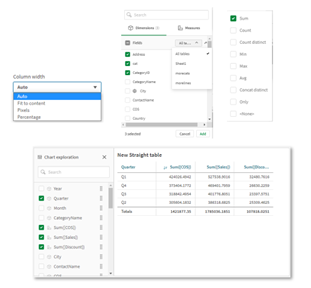
One of the most significant updates of the year, the new Straight Table greatly boosts self-service capabilities with expanded exploratory analysis an... Show MoreOne of the most significant updates of the year, the new Straight Table greatly boosts self-service capabilities with expanded exploratory analysis and reporting. The Straight Table, now available in the Visualization Bundle (available natively at a later date), acts as a catch-all table, providing application developers with the flexibility to pick and choose how they would like their layout presented.
Through the Straight Table, developers can add numerous fields simultaneously, alternate dimensions and measures, customize column width, view user field picker, choose pagination or virtual scroll, and store the layout in bookmarks.
Also, the new Filter Pane is a highly requested feature improvement. Similar to the QlikView List Box, the new Filter Pane includes a grid layout. It also provides several new capabilities, including grid mode, search mode (with wildcard option), checkbox mode, compact view, and histogram.
Other recent improvements give you more flexibility, allowing you to customize according to company branding, department, or personal preference. These include:
- Axis and value label styling for Bar, Pie, Combo Chart, Scatter Plot, DistPlot, BoxPlot, Waterfall Chart, Histogram, Mekko Chart, and Gauge Chart
- New styling panel for Line Chart and Mekko Chart (plus BG Image/Color options)
All these capabilities are now available in Qlik Sense SaaS and Qlik Sense Client-Managed.
Visit Qlik Help for more information. Additional details on these updates can be found here. And, for an array of Qlik Data Visualization updates, visit the Qlik Visualization Showcase.
-
【オンデマンド配信】富士通(株)事例:どうする?!データ利活用 悩める推進リーダーの集い
企業のビジネス活動において、データはこれまで以上に必要不可欠な資産となっています。増え続けるデータを管理・統合・分析し、データでアクションを起こす必要性が増している現在、成功している企業はどのようなデータ戦略を実行しているのか?本 Web セミナーシリーズでは、Qlik でデータからアクションを起こ... Show More企業のビジネス活動において、データはこれまで以上に必要不可欠な資産となっています。増え続けるデータを管理・統合・分析し、データでアクションを起こす必要性が増している現在、成功している企業はどのようなデータ戦略を実行しているのか?
本 Web セミナーシリーズでは、Qlik でデータからアクションを起こすデータ主導のビジネスで成功しているお客様より、課題から導入の経緯、デモンストレーション、活用例などをご紹介します。※ 参加費無料。パソコン・タブレット・スマートフォンで、どこからでもご視聴いただけます。
オンデマンド配信:
どうする?!データ利活用 悩める推進リーダーの集い各社でデータ利活用を推進する、悩めるリーダー仲間のみなさん。正解がない中、確かな手ごたえを感じることばかりではない中、次の一手に迷っていませんか?
本セッションでは、富士通が進める「データドリブン経営」の推進現場の今!をご紹介します。データ利活用基盤・サービス/人財育成/カルチャー変革、それぞれの推進リーダーが、活動を進める中で見えてきた課題と、その課題をどう乗り越えようとしているのかをお伝えします。 -
Consumer Sentiment with #chatgpt and the Qlik Analytics OpenAI Connector - Comi...
The OpenAI Analytics Connector - Coming Soon! I want to sell some items in my retrogaming collection, but I am not sure exactly what I should sell. I ... Show MoreThe OpenAI Analytics Connector - Coming Soon!
I want to sell some items in my retrogaming collection, but I am not sure exactly what I should sell. I need external insight from the broader retrogaming community to help make a decision based on their sentiment. Ah, I know - I can integrate my Qlik Cloud Analytics retrogaming collection app with OpenAI (#chatgpt ) using the OpenAI Analytics Connector (Coming Soon) to get a general feeling about what people are saying about particular items in my collection. This can help me decide if I should sell it or keep it. What do you think? Let me know in the comments.
Users can utilize our new, real-time OpenAI analytics connector to embed generative AI content within their analytics apps for natural language context and insights, synthesizing data for supplemental analysis, and asking questions using data from Qlik. This connector is built on the same architecture as our other advanced integrations, allowing direct, engine-level data exchange as the user clicks. The connector is easily accessible from our Analytics Connectors menu and can be used in both the data load process to augment data sets and for real-time questions through expressions within chart objects.

-
Qlik トレーニングのご案内
本トレーニングは、Qlik 製品の導入やデータリテラシーの向上に必要な世界水準の内容で構成されており、即座に製品をご活用いただけます。 バーチャルインストラクターによるトレーニング Qlik のエキスパートによるインタラクティブなハンズオン学習をご体験ください。ご自宅やオフィスにいながら、外出す... Show More本トレーニングは、Qlik 製品の導入やデータリテラシーの向上に必要な世界水準の内容で構成されており、即座に製品をご活用いただけます。
バーチャルインストラクターによるトレーニング
Qlik のエキスパートによるインタラクティブなハンズオン学習をご体験ください。ご自宅やオフィスにいながら、外出することなく、講師や他の受講生との交流などのメリットをご都合に合わせて受けられます。
コースの内容はこちらからダウンロードいただけます。
トレーニングソリューションパッケージ
エンドツーエンドのトレーニングソリューションパッケージでさらなるスキルの向上が期待できます。インストラクターによるライブトレーニングの 12 ヶ月サブスクリプションと、自習型の Qlik オンラインコースを組み合わせることができます。コースはすべて、ユーザーの職務に応じてご利用いただけます。ぜひご購入をご検討ください。
詳細については、apactraining@qlik.com までメールでお問い合わせください。
Qlik 認定資格
Qlik 製品・データ分析・データリテラシーの知識とスキルの認定を Pearson Vueで取得することができます。また、Qlik は Credly と提携し、デジタルバッジを提供しています。Credly のデジタルバッジを受領後、公式認定ロゴのダウンロード、認定証の印刷、第三者やソーシャルメディアでの訴求が可能になります。
ご利用いただける認定は以下です。
- Qlik Sense / QlikView ビジネスアナリスト認定(Qlik Senseは日本語で受講可能)
- Qlik Sense / QlikViewデータアーキテクト認定
- Qlik Sense / QlikViewシステム管理者認定
- Qlik Compose 認定
- Qlik Replicate 認定
Qlik 認定の詳細については、こちらをご確認ください。認定に関する FAQ は、こちらをご確認ください。
認定試験のバウチャーは、 Pearson Vue で購入いただけます。
-
Synthetic Keys
In a well visited post on the community forum, John Witherspoon some time ago asked “Should We Stop Worrying and Love the Synthetic Key?” John’s post ... Show MoreIn a well visited post on the community forum, John Witherspoon some time ago asked “Should We Stop Worrying and Love the Synthetic Key?” John’s post begins: “Synthetic keys have a bad reputation. The consensus seems to be that they cause performance and memory problems, and should usually or even always be removed. I believe that the consensus is wrong.” Here’s my view on this topic.
The creation of synthetic keys is simply QlikView’s way of managing composite keys. There is nothing strange or magic around it.
A single key is easy to manage: Just list all unique values in a symbol table (see Symbol Tables and Bit-Stuffed Pointers), and then link the data tables using a natural join.
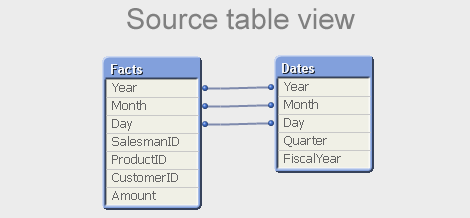
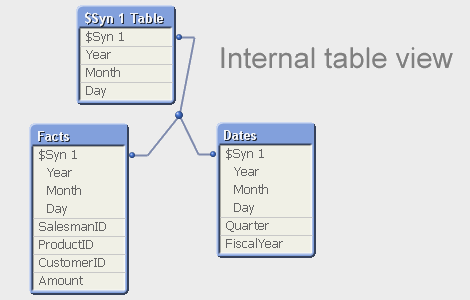
But a composite key is slightly different – there is no single symbol table that contains the relevant combinations of the multiple key fields. So QlikView needs to create such a table for all combinations: the $Syn table. In a way, you can say that the $Syn table is a symbol table for composite keys. In the data tables, the multiple keys are replaced by an identifier that uniquely identifies the combination of the values of the original keys: the $Syn key.
Hence, if you have the same set of multiple keys in two or more tables, the QlikView synthetic keys create a general, correct, compact and efficient solution. Synthetic keys do not per se cause performance and memory problems. They do not use a lot more memory than if you autonumber your own concatenated key. And they treat NULLs correctly, as opposed to an explicit concatenated key.
Hence: The synthetic key is in itself good and we should all love it.
However… still, also I avoid synthetic keys. Why?
- A synthetic key is in my experience often a sign of a poorly designed data model. I say that, given the number of times I have found a synthetic key in the table viewer only to realize that I made a mistake in the script. If you get a synthetic key and didn’t expect it, I can only say: Back to the drawing board! You should most likely change your data model.
- QlikView creates an additional table (the $Syn table) that in many cases is superfluous: An additional table is the best solution if none of the data tables by itself completely spans the set of composite keys. But in real life, there is usually one table that contains all relevant combinations of the keys, and then this table can be used to store the clear text of the individual keys.
- For clarity, I like to create my own concatenated keys. It forces me to think and create a data model that I believe in. Removing the synthetic keys becomes a method to ensure a good data model, rather than a goal in itself.
But in principle, I totally agree with John’s initial conclusion: Any problem around synthetic keys is really a data modeling problem and not a problem with the synthetic key itself.
The short answer to John’s question is Yes and No. Yes, we should love the synthetic key. But, No, we should not stop worrying. We should always be alert and ask ourselves: “Do I want this synthetic key? Is the data model OK?”
And so, because of the automated and irrevocable data-modeling process which rules out human meddling, the Synthetic Keys are scaring. But they are simple to understand. And completely credible and convincing.
Dr HIC
Further reading on Qlik data modelling:

-
Introducing our new Ideation area + other enhancements!
Hello Qlik Community! It was so great to meet so many of you in person at QlikWorld! We were able to put faces to usernames, build relationships with ... Show MoreHello Qlik Community!
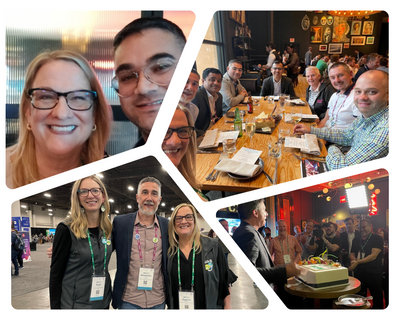
It was so great to meet so many of you in person at QlikWorld! We were able to put faces to usernames, build relationships with users all over the world, and gain valuable insight that will shape remainder of the year.
Here are the enhancements for the Month of June:
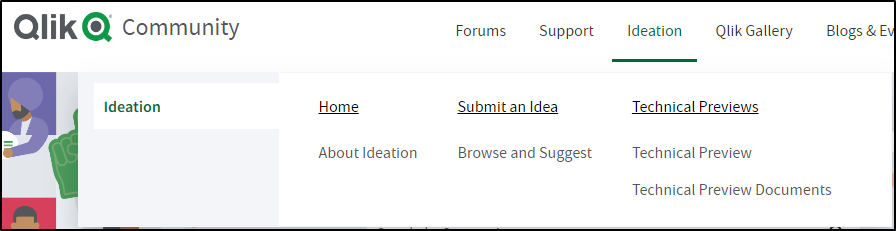
Introducing a New Ideation area!
Product Management needed a more efficient way to review Ideas and be able to scale with allowing users to submit ideas in-product. @Meghann_MacDonald led the charge to create a new and improved Ideation area:
About Ideation – a new landing page where you can learn about the program and processes.
Browse and Suggest – use a Qlik Sense app to browse existing ideas. When you’re ready to submit an idea, use the “Suggest Features” link to enter your idea.
Please note that adding ideas is limited to Customers, Partners, Luminaries, and MVPs.
New rankings for our Partner Ambassadors
New rankings were added for Partner Ambassador, Partner Ambassador Alumni, or Partner Ambassador/MVP.
Learn more about the Partner Ambassador program (and others!) on the Greenway
‘Ask a Question' Improvements
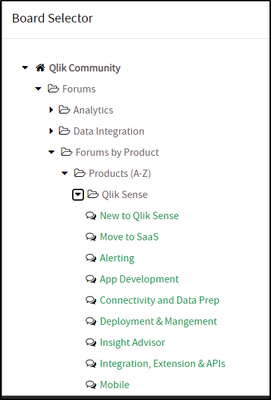
We’ve made it easier to see what boards are Qlik Sense related under Products (user requested).
Chatbot added to additional pages
The Chatbot has been added to individual posts under Qlik Fix, Release Notes, Product Lifecycle, and Support Updates Blog. Answers to questions are at your fingertips!
Let us know what you think in the comments below!
Kind regards,
Melissa, Sue, Jamie, and Nicole
-
Interacting with data using Enigma.js PT 3: Evaluate & Monitor Master Measures
In my previous blog posts (part 1, part 2), I explained how we can use enigma.js to communicate with the Qlik Associative Engine and get access to dat... Show MoreIn my previous blog posts (part 1, part 2), I explained how we can use enigma.js to communicate with the Qlik Associative Engine and get access to data. We also went through the concept of Generic Objects and saw how they can be used to do many things including getting raw data and using it to build visualizations.
In this post, we are going to expand on that and take a look at a real world example where enigma.js can be used to get Master Measures data that is rendered as KPIs in a web app, and monitor them for any changes to reflect the latest values.
This post is based on the following tutorial on qlik.dev where you can find the boilerplate code and more resources to help you get started: https://qlik.dev/embed/control-the-experience/dimensions-and-measures/get-master-measures/
You will find the full example code attached at the end of the post, I recommend you download it and open it in your favorite text editor as I will only feature some parts of it to keep this post short.
1- First, let’s take a look at the index.html:
- We include the enigma.js library.
- We define the configuration options to connect to our Qlik Cloud tenant and other needed variables including:
- the tenant URL
- the Web Integration ID (you can learn more about how to create this here)
- The App ID
- and a list containing the names of the Master Measures we wish to access.
const TENANT = '<INSERT YOUR TENANT HERE (example: xxxx.us.qlikcloud.com)>'; const WEB_INTEGRATION_ID = '<INSERT WEB INTEGRATION ID HERE>'; const APP_ID = '<INSERT APP ID HERE>'; const MASTER_MEASURE_NAMES = ['# of Invoices', 'Average Sales per Invoice', 'Sales (LYTD)', 'Sales LY']; const IDENTITY = '1234';- In the main function, we initiate the login process, get the csrf token, and open the Enigma session. Then we get all the Master Measures via the getMeasureList function, and render only the Master Measure data from the "MASTER_MEASURE_NAMES" list we previously defined.
- All the functions are defined in scripts.js
(async function main() {
    const isLoggedIn = await qlikLogin();
    const qcsHeaders = await getQCSHeaders();
    const [session, enigmaApp] = await getEnigmaSessionAndApp(qcsHeaders, APP_ID, IDENTITY);

    handleDisconnect(session);

    const allMasterMeasuresList = await getMeasureList(enigmaApp);
    const masterMeasureValuesDct = await masterMeasureHypercubeValues(enigmaApp, allMasterMeasuresList, MASTER_MEASURE_NAMES);
})();
2- Now, let’s take a look at the different functions that make this happen:
- Login and session handling:
- the qlikLogin function checks to see if you are login by fetching the /api/v1/users/me api endpoint, if not it redirects to the Interactive idp login page.
- getQCSHeaders fetches the CSRF token needed to make the websocket connection to the Qlik Engine.
// LOGIN async function qlikLogin() { const loggedIn = await fetch(`https://${TENANT}/api/v1/users/me`, { mode: 'cors', credentials: 'include', headers: { 'qlik-web-integration-id': WEB_INTEGRATION_ID, }, }) if (loggedIn.status !== 200) { if (sessionStorage.getItem('tryQlikAuth') === null) { sessionStorage.setItem('tryQlikAuth', 1); window.location = `https://${TENANT}/login?qlik-web-integration-id=${WEB_INTEGRATION_ID}&returnto=${location.href}`; return await new Promise(resolve => setTimeout(resolve, 10000)); // prevents further code execution } else { sessionStorage.removeItem('tryQlikAuth'); const message = 'Third-party cookies are not enabled in your browser settings and/or browser mode.'; alert(message); throw new Error(message); } } sessionStorage.removeItem('tryQlikAuth'); console.log('Logged in!'); return true; } // QCS HEADERS async function getQCSHeaders() { const response = await fetch(`https://${TENANT}/api/v1/csrf-token`, { mode: 'cors', credentials: 'include', headers: { 'qlik-web-integration-id': WEB_INTEGRATION_ID }, }) const csrfToken = new Map(response.headers).get('qlik-csrf-token'); return { 'qlik-web-integration-id': WEB_INTEGRATION_ID, 'qlik-csrf-token': csrfToken, }; }- Enigma session connection:
- we use enigma.create() function to establish the websocket connection and create a new QIX session.
- we use openDoc() method of the global object to open our app, and then return it for later use.
// ENIGMA ENGINE CONNECTION async function getEnigmaSessionAndApp(qcsHeaders, appId, identity) { const params = Object.keys(qcsHeaders) .map((key) => `${key}=${qcsHeaders[key]}`) .join('&'); return (async () => { const schema = await (await fetch('https://unpkg.com/enigma.js@2.7.0/schemas/12.612.0.json')).json(); try { return await createEnigmaAppSession(schema, appId, identity, params); } catch { const waitSecond = await new Promise(resolve => setTimeout(resolve, 1500)); try { return await createEnigmaAppSession(schema, appId, identity, params); } catch (e) { throw new Error(e); } } })(); } async function createEnigmaAppSession(schema, appId, identity, params) { const session = enigma.create({ schema, url: `wss://${TENANT}/app/${appId}/identity/${identity}?${params}` }); const enigmaGlobal = await session.open(); const enigmaApp = await enigmaGlobal.openDoc(appId); return [session, enigmaApp]; }- Get a list of all master measures in our app:
Now that we have the enigma app object, we can use the createSessionObject method to create a session object by passing the qMeasureListDef definition with qType “measure”
// GET LIST OF ALL MASTER MEASURES async function getMeasureList(enigmaApp) { const measureListProp = { "qInfo": { "qType": "MeasureList", "qId": "" }, "qMeasureListDef": { "qType": "measure", "qData": { "title": "/qMetaDef/title", "tags": "/qMetaDef/tags" } } } const measureListObj = await enigmaApp.createSessionObject(measureListProp); const measureList = await measureListObj.getLayout(); return measureList.qMeasureList.qItems; }- Get data from our list of Master Measures:
- Now, we loop through the list of all master measures returned from the function above and only grab the ones matching our list of matching measures from the MASTER_MEASURE_NAMES variable defined in index.html.
- We then create a generic object based on the Hypercube definition that includes the matchingMeasures representing the measureObjects’ qIds.
- Finally, we listen to any changes using the .on(”changed” …) event listener and grab the latest layout.
// CREATE HYPERCUBE WITH MULTIPLE MASTER MEASURES (INCLUDE MATCHING NAMES ONLY) async function masterMeasureHypercubeValues(enigmaApp, allMasterMeasuresList, desiredMasterMeasureNamesList) { let matchingMeasures = []; allMasterMeasuresList.forEach(measureObject => { if (desiredMasterMeasureNamesList.includes(measureObject.qMeta.title)) { matchingMeasures.push({ "qLibraryId": measureObject.qInfo.qId }) } }); if (!matchingMeasures.length > 0) { console.log('No matching master measures found! Exiting...'); return } const measureDef = { "qInfo": { "qType": 'hypercube', }, "qHyperCubeDef": { "qDimensions": [], "qMeasures": matchingMeasures, "qInitialDataFetch": [ { "qHeight": 1, "qWidth": matchingMeasures.length, }, ], }, }; const measureObj = await enigmaApp.createSessionObject(measureDef); const measureObjHypercube = (await measureObj.getLayout()).qHyperCube; // LISTEN FOR CHANGES AND GET UPDATED LAYOUT measureObj.on('changed', async () => { const measureObjHypercube = (await measureObj.getLayout()).qHyperCube; processAndPlotMeasureHypercube(measureObjHypercube); }) processAndPlotMeasureHypercube(measureObjHypercube); }- Render the data to the HTML as KPIs:
Lastly, we retrieve the data in “hypercube.qDataPages[0].qMatrix” and loop through it to construct an easy manipulate array of key/value objects which are then injected into the HTML.
//    HELPER FUNCTION TO PROCESS HYPERCUBE INTO USER FRIENDLY DICTIONARY
function processAndPlotMeasureHypercube(hypercube) {

    const masterMeasureValuesDict = Object.create(null);

    hypercube.qMeasureInfo.forEach((measure, i) => {
        masterMeasureValuesDict[measure.qFallbackTitle] = hypercube.qDataPages[0].qMatrix[0][i].qText;
    });

    const masterMeasureKeys = Object.keys(masterMeasureValuesDict);
    masterMeasureKeys.sort();

    const sortedMasterMeasureValuesDict = Object.create(null);
    masterMeasureKeys.forEach(name => {
        sortedMasterMeasureValuesDict[name] = masterMeasureValuesDict[name];
    })

    renderKpis(sortedMasterMeasureValuesDict);
}


// RENDER KPIs
function renderKpis(masterMeasureValuesDict) {

    let kpiData = [];
    Object.entries(masterMeasureValuesDict).forEach(([key, value]) => {
        kpiData.push({
            label: key,
            value: Number(value).toLocaleString()
        });
    });

    const kpisContainer = document.querySelector('#kpis');
    kpisContainer.innerHTML = '';

    kpiData.forEach((kpi) => {
        const kpiCard = document.createElement('div');
        kpiCard.classList.add('kpi-card');

        const labelElement = document.createElement('div');
        labelElement.classList.add('kpi-label');
        labelElement.innerText = kpi.label;

        const valueElement = document.createElement('div');
        valueElement.classList.add('kpi-value');
        valueElement.innerText = kpi.value;

        kpiCard.appendChild(labelElement);
        kpiCard.appendChild(valueElement);

        kpisContainer.appendChild(kpiCard);
    });
}
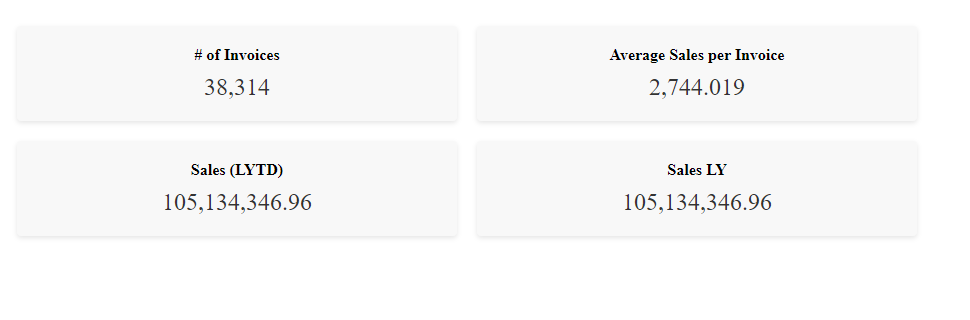
This is how the KPIs are rendered to the page:To show how the on-change event listener works, let's simulate a change by editing the # of Invoices Master Measure in Qlik:
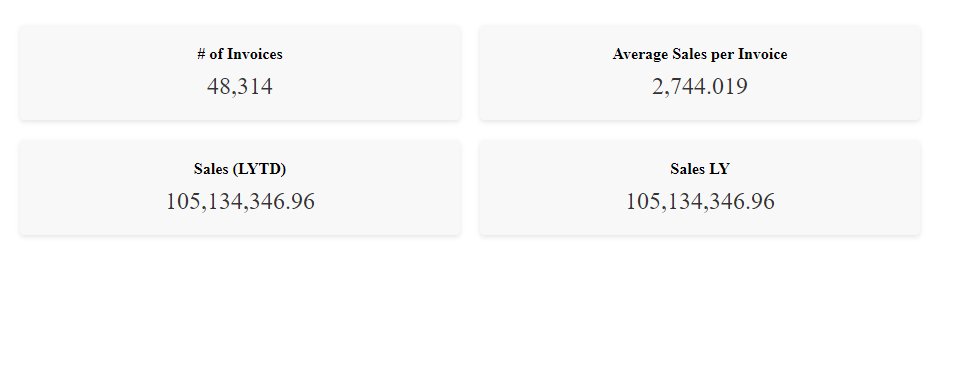
Looking back the web page, the change is instantly reflected on the KPI:
That’s all, I hope you found this post helpful, do not forget to check out more tutorials on qlik.dev that cover other important use cases!
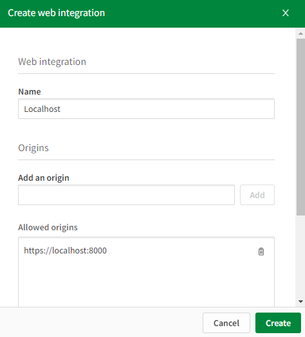
P.S: to make it easier to run the web app, I have included a server.py file to easily serve the files via https://localhost:8000. You can run it with the command: python server.py.
Also, don’t forget to whitelist this localhost domain when generating a new Web Integration ID:
Thanks for reading!
-
Qlik Sense Qualification Exams - 2023 Update
Qlik Education is pleased to announce the Business Analyst and Data Architect Qualification Exams have been updated and are based on the SaaS editions... Show MoreQlik Education is pleased to announce the Business Analyst and Data Architect Qualification Exams have been updated and are based on the SaaS editions* of Qlik Sense. However, you may also use Qlik Sense on Windows editions.
After completing the Business Analyst or Data Architect courses in the Continuous Classroom or taking the Create Visualizations with Qlik Sense or the Data Modeling for Qlik Sense training, consider earning a Qlik Sense Qualification.
What is a Qualification Exam?
Qualification exams enable you to validate your fundamental level of Qlik Sense skills. The Qlik Sense Business Analyst Qualification is earned after developing an application and completing a multiple-choice exam which tests your fundamental and applied knowledge. A Qlik Sense Qualification Certificate and digital badge will be awarded with a minimum passing score of 70%.
How do I access the Qualification Exams?
The exams are accessed on the Qlik Learning Portal, where all the latest Qlik training is available on demand, 24/7. Visit the Qlik Sense Business Analyst or Qlik Sense Data Architect Learning Plans --> Qualification Tab to access exams.
What do I receive after I pass?
After you receive a passing score, you will be awarded a certificate and digital badge for sharing on social sites. You will also receive notification from Credly platform that you have earned a digital badge. Credly allows you to manage your badges from Qlik and other professional organizations so you can easily share your badges on social media sites. You will need to simply accept the badge and click the share button or download the badge and certificate to keep for your records. You can even add their badges to your email signature!
Questions? Feedback?
Contact Education@qlik.com.
-
Qlik Data Gateway -Direct Access, now supports SAP Connectivity
Qlik Data Gateway provides a secure means of accessing or moving firewalled data for use in Qlik Cloud. The gateway is installed behind your organiza... Show MoreQlik Data Gateway provides a secure means of accessing or moving firewalled data for use in Qlik Cloud. The gateway is installed behind your organization's firewall, and then registered with Qlik Management Console. No matter if your protected data is on-premises or in a virtual private cloud, Direct Access gateway provides a secure connection to analyze data in a Qlik Cloud Analytics app.
Qlik Cloud expanding connectivity empowers our customers to centralize disparate data landscapes and simplify data-analytics operations with governed access. With Qlik Data Gateway - Direct Access, you can easily migrate analytics consumption into Qlik Cloud - no matter where the data resides!
!
To learn more, please see the key resources below.
Resources:
- Check out our Overview and Demo video here!
- Try Direct Access today with our guided demo app.
- To set up your Data Gateway, follow these deployment instructions.
- Detailed capabilities shared on our Product Innovation Blog!
- Documentation for the connectors can be found here for SAP SQL and SAP BW
-
Win $100 Amazon Gift Card for 7 minutes of your time!
Congratulations to Stephen Lan, Delani Klein-Lee and May Tang for being randomly selected as the winners! We received a lot of great feedback and wan... Show MoreCongratulations to Stephen Lan, Delani Klein-Lee and May Tang for being randomly selected as the winners! We received a lot of great feedback and want to extend our sincere gratitude to all who participated in the survey!
------------------------------------------------------------------------------------------------------------------------------------
Let your voice be heard! The Qlik Education Team wants to know more about your learning experience with the Qlik Continuous Classroom and your learning preferences. This short survey will take 7 minutes of your time and have a meaningful impact on the roadmap of our self-paced learning curriculum.
Three participants who fully complete the survey and submit their contact information will be eligible to win a $100 Amazon Gift Card after the survey completion date. The survey will run through August 5th at 5:00 PM PDT.
The objective of this brief survey is to better understand:- Your exposure and feedback on the Qlik Continuous Classroom, the self-paced, online learning courses on the Qlik Learning Portal
- Your current learning environment at work and in your job
- Your learning style and preferences
Take a quick moment to give us your feedback and earn some cash!
Note: This survey is not regarding our instructor-led training curriculum, but only our self-paced curriculum.

-
You Asked, We Answered!
As we continuously gather your feedback on the Qlik Learning Portal, we have compiled a list of your most frequently asked questions and answered them... Show MoreAs we continuously gather your feedback on the Qlik Learning Portal, we have compiled a list of your most frequently asked questions and answered them for you on this blog post.
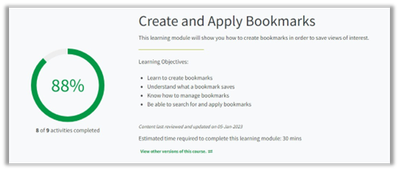
- I finished all the videos in the module, but my progress gauge isn’t showing as 100%. What should I do?
The Progress gauge does not update immediately and may take several minutes to do so. We recommend that you check back after 15 minutes, and it should then show as updated. If after 15 minutes it is still not updated correctly, please email Education@qlik.com.
2. English isn’t my first language. Is there were a way to translate the material on the learning portal?
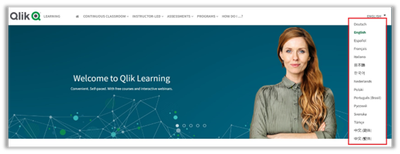
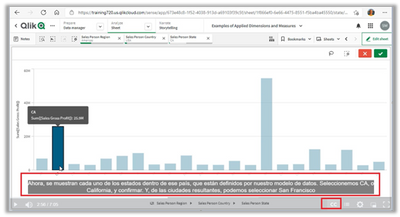
We offer machine translations in 14 languages to our customers as a convenience to their learning experience and with awareness of its limitations. The translations are primarily focused in the Qlik Continuous Classroom, self-paced learning video's closed captions (not audio) and Qlik Learning Portal pages. To engage machine translations to translate the text to a different language, select a language from the language Dropdown:
After launching a video from a course page, select the CC button at the bottom of the video to display the closed captions with machine translations:
3.I’m not sure where I should begin my learning journey. Can you recommend a good starting point?
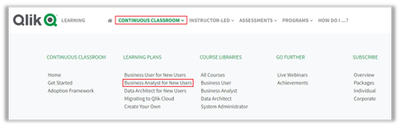
If you are unsure of where to start, we recommend starting with the Business Analyst for New Users plan. To locate this plan, click on the Continuous Classroom dropdown link and then choose Business Analyst for New Users under the Learning Plans section.
Once there, you will find a brief description of the plan, new user courses for the Business Analyst, as well as Qualification courses and Next Steps. All courses under the New User are free to access without a subscription so you can get started right away.
4. Is there a way to create a plan for myself that covers topics I am interested in learning?
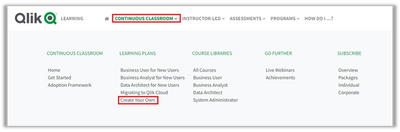
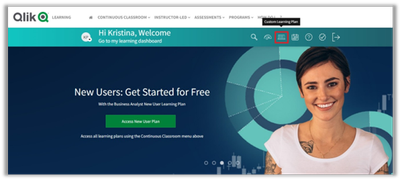
You can create a custom learning plan that meets your specific needs. Use the top navigation Continuous Classroom drop down and choose Create Your Own under Learning Plans or click the quick link on your learning dashboard for Custom Learning Plan.
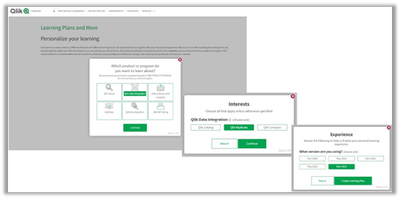
When you click the button to create your custom learning plan, you will be presented with a series of questions that assist in narrowing down the course options.
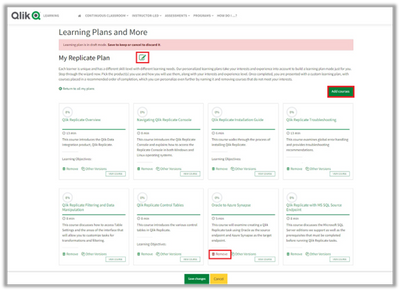
When you have completed the round of questions, click the Create Learning Plan button. Here you can give your learning plan a custom name by clicking on the Edit button under the Learning Plans and More title. You may also add or remove courses from the recommended list. When you are satisfied with your selections, click the Update plan button. You will be brought back to your Learning plan where you will need to click the Save Change button. Your new plan is now available to use and/or edit at any time.
You can create as many of these learning plans as you want. They are listed in the order you added them.
Have further questions? feedback?
On the right side of each course page, you can provide us feedback.
In less than one minute and one click you can let us know how we are doing, anonymously! We regularly review and consider this feedback for future curriculum updates.
Happy Learning!
-
Automated Insights through Insight Advisor in Qlik Sense - part of the fully Int...
Video 2 – Automated Insights through Insight Advisor in Qlik Sense These features are currently available, and we continue to innovate and expand th... Show MoreVideo 2 – Automated Insights through Insight Advisor in Qlik Sense
These features are currently available, and we continue to innovate and expand the breadth and depth of functionality. Insight Advisor delivers automated insights including visualizations and natural language insights by leveraging our unique associative engine combined with AI and ML and the business logic in your app. We will discuss Insight Advisor Search and Chat and our unique Analysis Types capability for generating advanced analytics in a few clicks. We will also demo our Natural Language Object, for deploying natural language insights directly within a sheet.
Visit the Playlist: https://www.youtube.com/playlist?list=PLW1uf5CQ_gSo5LpVJZgSTsT-gx80Jl89V
Can't see the video? Access to YouTube Blocked or Restricted? - Check out the playlist on the Qlik video page.
With automated insights and natural language analytics, we are delivering deeper and more powerful insights, as well as expanding access to data and driving efficiency. Business decision makers get a simple yet powerful way to quickly answer questions through chat, and also benefit from deeper insight they can explore in their dashboards. Analysts and content authors can easily create advanced analytics by choosing Analysis Types or using natural language search, reducing complexity and speeding time-to-value and efficiency. And with our robust business logic layer, insight generation and natural language processing can be customized for your unique business requirements. Chat, search and NLG are supported in over 11 languages.
Stay tuned for the next video in which we will be highlighting our embedded analytics and integration capabilities for Augmented Analytics, and demonstrating our exciting new Microsoft Teams Integration capability.
Read Next - Part 3 - Fully Integrated AI and ML
Read Part 1 - Qlik's Fully Integrated AI and ML Capabilities -
Qlik Digest - June 2023
What's New at Qlik? Qlik and Talend in Action - See the Demo Join us on June 20 as we unveil the strategic alliance between our two companies. Experie... Show MoreWhat's New at Qlik?
Qlik and Talend in Action - See the Demo
Join us on June 20 as we unveil the strategic alliance between our two companies. Experience a live demo and learn about the compelling reason behind this collaboration, the immediate advantages, and how it directly impacts you. Register Now
Say Hello to Instant Assistance
Our new generative AI chatbot is here to revolutionize your support experience! The bot is trained to instantly handle a wide range of support requests, and if you need further assistance, you will be connected directly to a live agent. This means fewer support tickets, less effort and more time saved for you! Chat with Qlik Support
AI and ML at Qlik
Tune into Qlik’s new AI and ML six-part video series. Learn about our broad capabilities for Augmented Analytics in Qlik Sense, AutoML for Predictive Analytics, and Data Science Integration. Plus, get a look in to what’s coming next! Learn More
Transform 3rd Party Data with Cloud Transformations
Qlik Cloud Data Integration can now transform data ingested by external tools and data stored in a data warehouse or lake. Transforming data in the cloud enables you to leverage automated transformations and pushdown processing to deliver business value while reducing data ingestion costs. Learn More
New Client-Managed releases for Qlik Data Integration Portfolio
Find out about the latest and greatest updates in our most recent Client-Managed releases. There are new endpoints in Qlik Replicate, security enhancements in Qlik Compose, data load scheduling developments in Qlik Catalog and much more! Learn More
Qlik Sense Qualifications Updates
Starting June 7 visit the Qlik Sense Business Analyst or Qlik Sense Data Architect Learning Plans to access the updated exams for 2023. Earn your qualification badge and share on your social sites!
Additional Featured Content
- Watch the inspiring stories of Qlik's 2023 Global Transformation Award Winners
- You asked, we answered - Qlik Learning Portal FAQs
- Discover the Cloud Advantage with Ikano Bank on June 14
- Seven Data Integration and Quality Scenarios for Qlik and Talend Solutions
- Qlik Advanced Analytics highlights global impact of flooding at Gartner Bake-Off
-
Computing Degrees Increasing in Popularity
As of February, the number of young people in the UK applying to study computing has risen by 9.6%. This is more than for any other university subjec... Show MoreAs of February, the number of young people in the UK applying to study computing has risen by 9.6%. This is more than for any other university subject, according to the chartered institute of IT. Part of this increase has come from a rise in the number of female students applying for computing degrees, figures from UCAS show that there was an increase of 18%, this is higher than any other degree course.
This could be due to a number of reasons such as the high profile rise of artificial intelligence. Young people are increasingly curious about emerging technologies and their relevance in their future lives and careers. In addition to this there is a growing awareness around the role and importance of data, with many students pursuing degrees in areas such as cybersecurity and data science. Since the pandemic forced everyone to stay home, the role of technology in our day to day lives became clearer, many young people now have a greater awareness of emerging technologies and the career opportunities they offer. In addition to this, the younger generation understand that these trends are not likely to change, so pursuing careers such as software engineering or data analytics provide a lot of job security.
This spike in applications for computer-based degrees has also meant that more students are choosing to take GCSE’s and A Levels in computing subjects too. The number of students choosing to sit computing exams at A-level rose for the fourth year in a row in 2022, and there was also an increase in the number of students taking the subject at GCSE level.
Even if students are not choosing to take a computing or data-based degree at university, they can still upskill themselves ready for the data driven world with the Qlik Academic Program. Our free courses on visualizations can be used alongside free Qlik Sense software access so that students can study both the theory and the practical elements too. Our program also offers a wide range of data literacy programs, as well as entry level courses on data analytics and advanced courses on data analytics. To learn about how students and educators at accredited universities can get free access, follow this link: qlik.com/academicprogram.
Articles used for this blog:
https://www.computerweekly.com/news/365531434/Computing-degrees-more-popular-due-to-AI-says-BCS
-
Natural Language API Now Available for Developers in Qlik Sense
Qlik has released the Natural Language Engine API for developers! The API allows developers and creators the ability to enhance their analytics enviro... Show MoreQlik has released the Natural Language Engine API for developers! The API allows developers and creators the ability to enhance their analytics environments by building their own client for Insight Advisor Chat within internal embedded solutions or enterprise chat bot platforms.
The Insight Advisor currently found within Qlik Sense already offers the convenience of conversational analytics but now with the Natural Language API, the power is yours to develop your own! Enrich your user’s analytics journey by providing augmented experiences like chat analytics and insight suggestions.
Click to link to video transcript
Want to build your own chat bot?
Visit our tutorial on Qlik.Dev here to discover how to build your own chat bot and leverage the Natural Language API.
Available in Qlik Sense SaaS and where Client-Managed versions have the Chat add-on included. Keep note that when developing with APIs, the overall experience from the Insight Advisor found in-app will be different than the experience via the API.