Unlock a world of possibilities! Login now and discover the exclusive benefits awaiting you.

Analytics & AI
Forums for Qlik Analytic solutions. Ask questions, join discussions, find solutions, and access documentation and resources.
Data Integration & Quality
Forums for Qlik Data Integration solutions. Ask questions, join discussions, find solutions, and access documentation and resources
Explore Qlik Gallery
Qlik Gallery is meant to encourage Qlikkies everywhere to share their progress – from a first Qlik app – to a favorite Qlik app – and everything in-between.
Qlik Community
Get started on Qlik Community, find How-To documents, and join general non-product related discussions.
Qlik Resources
Direct links to other resources within the Qlik ecosystem. We suggest you bookmark this page.
Qlik Academic Program
Qlik gives qualified university students, educators, and researchers free Qlik software and resources to prepare students for the data-driven workplace.
Recent Blog Posts
-
Connector Factory – May 2023 releases
Qlik Cloud Analytics: Google Analytics 4 Qlik has added a new connector to Qlik Sense Client-Managed called Google Analytics 4 which utilizes Google’... Show MoreQlik Cloud Analytics: Google Analytics 4
Qlik has added a new connector to Qlik Sense Client-Managed called Google Analytics 4 which utilizes Google’s new APIs. This latest version of Google’s Analytic service is a more flexible measuring tool that can collect event-based data from many different kinds of websites and apps. Note that the existing Qlik Google Analytics connector will continue to be supported until Google retires the old analytic service later this year.
Qlik Application Automation: ServiceNow
ServiceNow is a cloud-based solution that provides technical management support, such as IT service management, to the IT operations of large corporations. Qlik Application Automation already provides a ServiceNow connector but now this connector is also available within Qlik Cloud Government. Qlik Cloud Government is a slightly different edition of Qlik Cloud that is only available for the U.S. Public sector due to required security protocols.
About Connector Factory
Check out Mike Tarallo’s “Do More with Qlik” Tips and Tricks edition video series to learn more about some of the latest product enhancements and Explore here
-
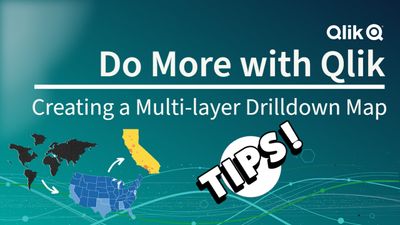
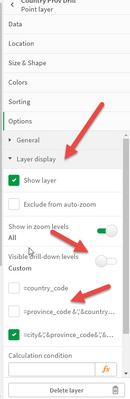
Tips and Tricks: Creating a Multi-layer Drilldown Map with different layer types
This video shares a few tips when creating a drilldown map. Qlik Help - Drilldown Dimension: https://help.qlik.com/en-US/cloud-services/Subsystems/Hu... Show MoreThis video shares a few tips when creating a drilldown map.
- Qlik Help - Drilldown Dimension: https://help.qlik.com/en-US/cloud-services/Subsystems/Hub/Content/Sense_Hub/Dimensions/create-drill-down-dimension.htm
- Qlik Help - Map Chart https://help.qlik.com/en-US/cloud-services/Subsystems/Hub/Content/Sense_Hub/Visualizations/Map/Map.htm
- Playlist: https://www.youtube.com/playlist?list=PLW1uf5CQ_gSqF5bcmbBrk1q7Q4-h899V1
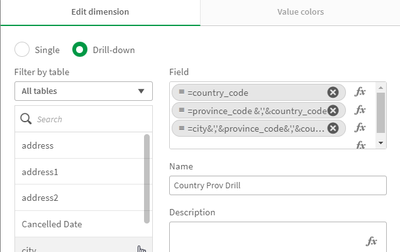
- Create a Drilldown Dimension in Master Items
- Fully qualify location fields if needed
i.e. =city&','&province_code&','&country_code
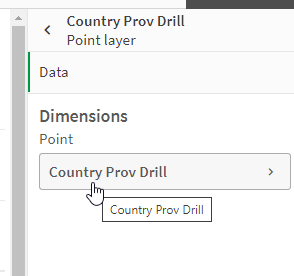
- Use that Drildown Dimension in your Map Layer
- Control layer display at the appropriate drill level

- Qlik Help - Drilldown Dimension: https://help.qlik.com/en-US/cloud-services/Subsystems/Hub/Content/Sense_Hub/Dimensions/create-drill-down-dimension.htm
-
Unbalanced, n-level hierarchies
Hierarchies are very common in all database and business intelligence solutions. Usually they are balanced and with a fix number of levels, and then t... Show MoreHierarchies are very common in all database and business intelligence solutions. Usually they are balanced and with a fix number of levels, and then they do not pose any problems. Just load the data, add a drill-down group, and you’re done.
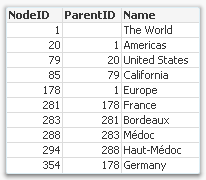
But there is one type of hierarchy that is somewhat tricky to get right – an unbalanced, n-level hierarchy. Typical for this type of hierarchy is that the levels are not named, and you really don’t know on which level you need to search for a specific node.
Usually such a hierarchy is stored in an Adjacent Nodes table, i.e. a table that has one record per node and each node has a reference to its parent.
Such a table can be loaded into QlikView directly using the Hierarchy prefix. This prefix will transform the Adjacent Nodes table into an Expanded Nodes table that has additional fields that you can use in your app.
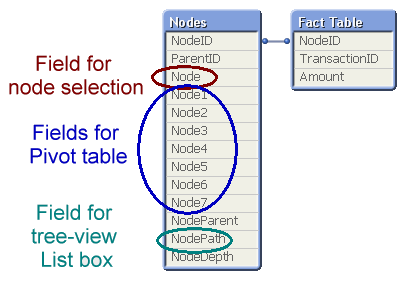
With the fields in this table, you can easily create a pivot table and a tree-view list box. Below you can see some wine districts displayed in both these object types:
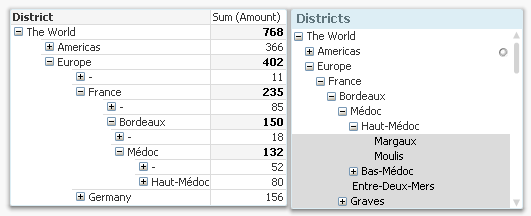
One challenge with hierarchies is that you can refer to a node in two different ways: Either to the node including the entire sub-tree, or to the node only, excluding all sub-nodes. In the example with the wine districts, it would mean any wine from Bordeaux, and unspecified Bordeaux, respectively. In the pivot table above, the difference is obvious: Any wine from Bordeaux sums up to 150 units, and the unspecified Bordeaux sums up to 18 units.
A user usually wants to make selections referring to the entire sub-tree, but the above solution does not have any field for this. To create such a field, you need the second hierarchy-resolving prefix – the HierarchyBelongsTo.
This prefix will also transform the hierarchy table. The result will be a table containing one record per descendant-ancestor pair. In other words, the ancestor (tree ID) will link to all its descendants (node ID), and can thus be used to make selections of entire sub-trees. (The “TreeBridge” table in the picture below.)
But it doesn’t stop here… The above solution creates one field in which tree searches can be made, but in order to create a drill-down for trees, you need an additional table – an expanded nodes table for the trees. This can be created with a second Hierarchy statement, but now one that links to the tree ID instead of the node ID. (The “Trees” table in the picture below.)
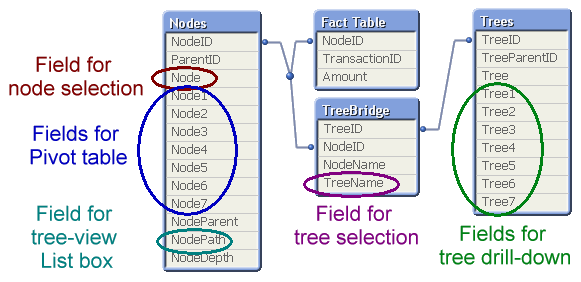
The data model with the three hierarchy tables is the one I recommend: It generates all fields you need.
A more elaborate explanation with script examples can be found in the technical brief about Hierarchies.
Further reading related to this topic:

-
Sankey Charts: Contribution and Distribution
In our previous entries in the coverage of Qlik’s available charts, we covered bar, line, and pie charts, some of the more widely known types. Today w... Show MoreIn our previous entries in the coverage of Qlik’s available charts, we covered bar, line, and pie charts, some of the more widely known types. Today we’re going to delve a bit deeper and look at a lesser-known chart called a ‘Sankey chart’.
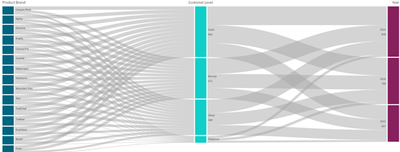
A Sankey chart is a visualization used to depict a flow from one set of values to another. The charts are divided into two basic elements, the nodes, and the paths, sometimes these paths or flows are shown in the shape of arrows.
It might be easier to think of these charts like a river system. While there may be many or few different inlets to a river’s flow, they filter into different channels of water, and are distributed in different ways.
For the example above, we have the ‘Product Brand’ node that filters into the ‘Customer Level’ node. This visualizes the amount of products being bought by each customer level with the thicker lines representing more sales. From this section of our chart, we can see that ‘Gold’ level customers are buying the most products, while ‘Platinum’ level customers are buying the least. Moving further down the line of the chart, we can see how the purchases of these customer levels are distributed by year, from this chart we can see that 2021 holds the most, with 2020 in second and 2022 in third.
So how would we use these charts?
We could use this chart to see the distribution of resources. We could see which resources are being sent to which regions, and by how much. We could then filter these results further to show which sections of these regions are using the most, or least amount.
When using a Sankey chart, it is important to remember two words: distribution and contribution. How are the amount of one data point being distributed to another data point, and how are these data points contributing to the other data points. Not only are we showing direction, we’re showing amount as well.
Thank you for giving this blog a look. Hopefully you now have a better understanding of how Sankey charts are used. How can you use a Sankey chart in your own apps? How would they be useful to you or your company? Is there something I might have missed? Leave me a comment down below to further the discussion on Sankey charts!
-
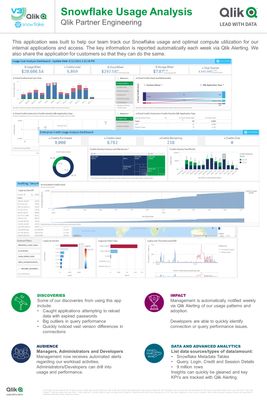
Snowflake Usage Analysis
Download the latest and greatest version of the application from GitHub here: https://github.com/Qlik-PE/Snowflake-Usage-Analysis-Dashboard Show MoreDownload the latest and greatest version of the application from GitHub here: https://github.com/Qlik-PE/Snowflake-Usage-Analysis-Dashboard
-
Calling All APAC Data Lovers!
With Qlik’s Analytics Expert Program “Applied Data Analytics using Qlik Sense”, in just 15 weeks, you will be on your way to become a leader in develo... Show MoreWith Qlik’s Analytics Expert Program “Applied Data Analytics using Qlik Sense”, in just 15 weeks, you will be on your way to become a leader in developing a data-driven culture in your organization.
You will not only learn data analytics best practices but also learn how to achieve a data-informed mindset that shifts you from just looking for data and information to looking for insights and knowledge.
Register Today to save your spot
Looking for more details? Check out our Course Page to access Data Sheet, Sample course and all other details.
Happy Learning!

-
【オンデマンド配信】QlikWorld 2023 ダイジェスト Web セミナー
今年 4月、毎年恒例の最大級のデータイベント「QlikWorld 2023」が、米国ラスベガスで開催されました。特別ゲストおよび Qlik エグゼクティブによる基調講演をはじめ、100 以上のセッションや実践的なワークショップ、グローバルトランスフォーメーションアワード授与式など、データ愛好家が一... Show More今年 4月、毎年恒例の最大級のデータイベント「QlikWorld 2023」が、米国ラスベガスで開催されました。
特別ゲストおよび Qlik エグゼクティブによる基調講演をはじめ、100 以上のセッションや実践的なワークショップ、グローバルトランスフォーメーションアワード授与式など、データ愛好家が一堂に会した 4 日間は、連日盛況のうちに終了しました。
本 Web セミナーでは、Qlik の日本の営業および技術者が、QlikWorld 2023 でご紹介した内容をわかりやすくまとめてお届けします。Qlik のビジョンや製品ポートフォリオ、最新のユーザー事例、Qlik で先進的なビジネス成果を挙げている企業に授与されるグローバルトランスフォーメーションアワードのほか、実際に参加した営業担当者が現地でのイベントの様子をご紹介します。ぜひ、データ活用のすべてを網羅した「QlikWorld 2023」をダイジェストでご視聴ください。※ 参加費無料。パソコン・タブレット・スマートフォンで、どこからでもご視聴いただけます。日本語字幕付きでお届けします。
-
2022 FIFA World Cup Teams
2022 FIFA World Cup Teams AnyChart — QS Extensions Explore Qatar 2022 teams by league and club with remarkable Decomposition Trees. Discov... Show More2022 FIFA World Cup TeamsAnyChart — QS Extensions Explore Qatar 2022 teams by league and club with remarkable Decomposition Trees.
Discoveries
Investigate how the national football/soccer teams of all 32 participating countries in the 2022 Qatar World Cup are made up of players from various leagues and clubs, using remarkable Decomposition Tree visualizations in Qlik Sense. (Re)arrange the order of the represented dimensions depending on how you want to disaggregate the totals. Analyze goals and caps for national teams similarly using intuitive decomposition trees.
Impact
Check out how AnyChart's Decomposition Tree works and how it can help you explore data across multiple dimensions.
Audience
Anyone who wants to analyze the 2022 Qatar World Cup's teams and see an example of a decomposition tree in Qlik Sense in action.
Data and advanced analytics
This application features decomposition trees built with AnyChart's Decomposition Tree extension for Qlik Sense.
🔗 >> VIEW IT LIVE OR DOWNLOAD (.QVF) <<
-
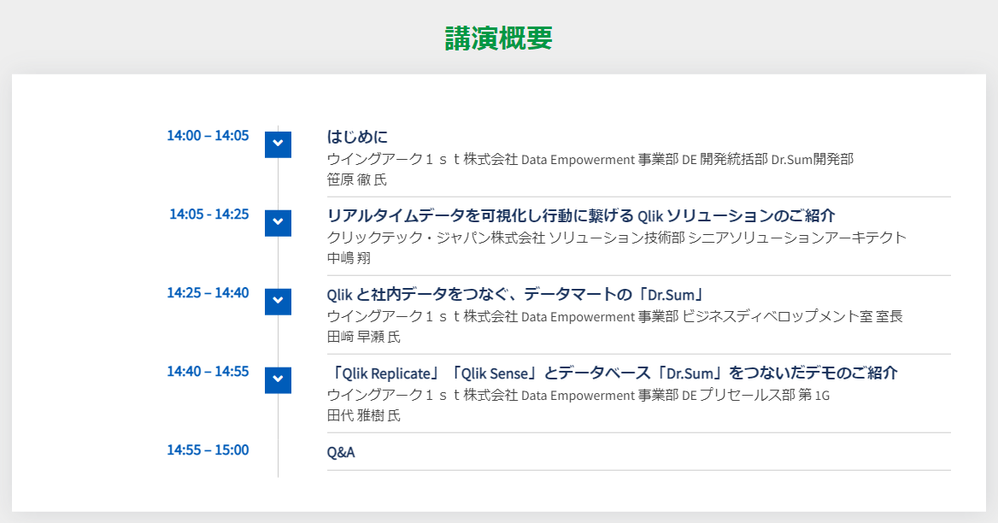
【6/7(水)14:00 - 15:00 開催】Web セミナー:Qlik と Dr.Sum で、散在するデータの再活用を促進!
データドリブンな組織づくりを推進しようと、データ活用を推し進める企業が増えてきました。社内に散っている多種多様なデータの統合や、BI ツールを使った可視化・分析を進めているものの、まだ部分的、あるいは分断的に導入されているケースが多く見受けられます。本質的なデータ活用に向けては、これらが一気通貫で実... Show Moreデータドリブンな組織づくりを推進しようと、データ活用を推し進める企業が増えてきました。社内に散っている多種多様なデータの統合や、BI ツールを使った可視化・分析を進めているものの、まだ部分的、あるいは分断的に導入されているケースが多く見受けられます。本質的なデータ活用に向けては、これらが一気通貫で実現され、誰でもデータにアクセスし分析できること、そしてデータをもとに行動できる状態にあることが必要不可欠です。
本セミナーでは、基幹システムなどさまざまなデータソースからほぼリアルタイムでデータを取得できる Qlik のデータ統合製品「Qlik Replicate」と、プログラミングを必要とせずビジネスユーザーが直感的に使える BI ツール「Qlik Sense」と、データ分析基盤として国内シェア No.1* を誇るウイングアーク 1stの「Dr.Sum」の連携によって、データ活用の用途の幅をどのように広げていくのかをご紹介いたします。
*出典:ITR「 DBMS/BI 市場 2021」データ分析/レポーティング市場:ベンター別売上金額推移およびシェア詳細を見る
【開催概要】
日時:2023年 6月 7日(水)14:00 - 15:00
会場:オンライン
参加費:無料 -
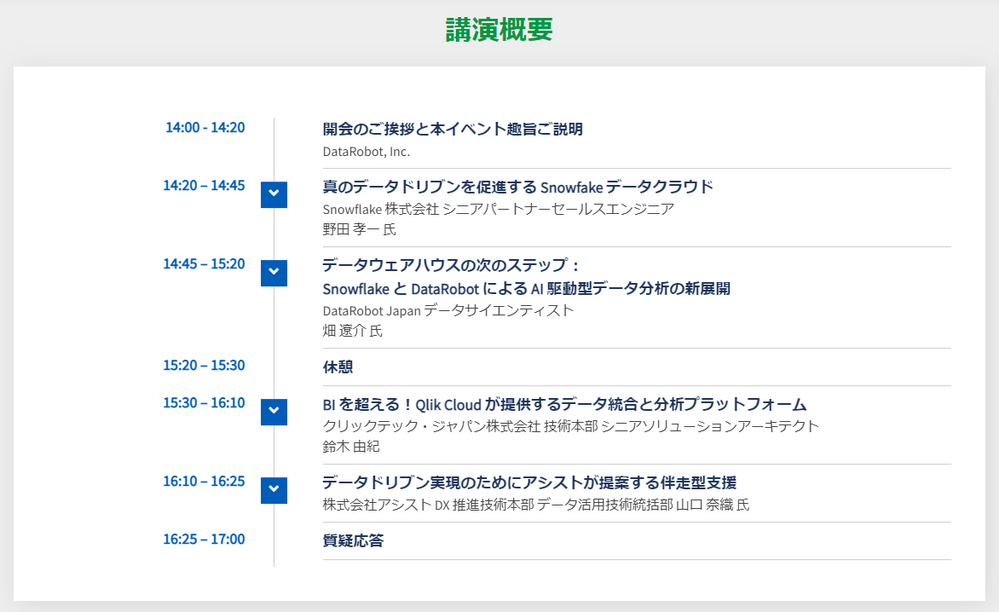
【7/7(金)14:00 - 17:00 開催】共催セミナー:データ分析の新時代を切り拓く
※2023年 6月 2日(金)開催予定でしたが、悪天候のため、延期となりました。 本イベントは、データ分析と AI 技術に関心のあるビジネスリーダーや分析担当者を対象とし、最先端のテクノロジーを活用して、データドリブンなビジネスの成功を実現する方法や、ビジネスにおけるデータ分析と AI 技術が果たす... Show More※2023年 6月 2日(金)開催予定でしたが、悪天候のため、延期となりました。
本イベントは、データ分析と AI 技術に関心のあるビジネスリーダーや分析担当者を対象とし、最先端のテクノロジーを活用して、データドリブンなビジネスの成功を実現する方法や、ビジネスにおけるデータ分析と AI 技術が果たす役割について学ぶことができます。
Snowflake、Qlik、DataRobot の 3 社から、それぞれの企業が提供するソリューションの概要や、それらを組み合わせてどのようにデータドリブンなビジネスの成功を支援するかについてご説明します。Snowflake は、クラウドベースのデータウェアハウスであり、高速で柔軟なデータ処理を提供します。Qlik は、分析のためのデータ基盤を構築するデータ統合と、データ可視化・分析のためのユーザーフレンドリーなインターフェースを備えたビジネスインテリジェンスを提供します。DataRobot は、自動化された機械学習プラットフォームであり、モデルの構築、トレーニング、評価を簡単かつ迅速に行うことができます。
アシストは、参加者の方が自社のビジネスに適した戦略やツールを見つけ、競争優位性を獲得するためにデータドリブンなアプローチを採用することを支援いたします。
詳細を見る
【開催概要】
日時:2023年 7月 7日(金)14:00 – 17:00
会場:株式会社アシスト 西日本支社会議室
大阪市北区大深町4-20 グランフロント大阪タワー A 13F
参加費:無料 -
Rugby World Cup Japan 2019: stats and analytics
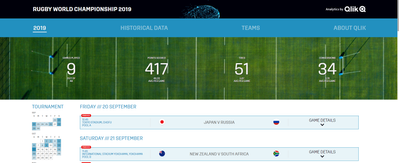
To celebrate the start of the tournament we are launching our own app including Rugby World Cup Japan 2019 stats and analytics. We’ve partnered with G... Show MoreTo celebrate the start of the tournament we are launching our own app including Rugby World Cup Japan 2019 stats and analytics. We’ve partnered with Gracenote as data provider and we’ve built a responsive Qlik Sense mashup that contains the tournament’s KPIs and stats.
The two major features of this app are the live updating match details and historical data from every tournament.
The live match details will update in real time and allow you to follow key metrics from the matches as they happen on the pitch. In the picture above you can see the first game of the tournament updated in our app.
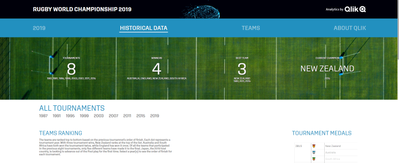
The historical statistics shows team details like finishes, aggregated statistics (tries, conversions, penalties, drop goals, etc.), key player statistics and more.
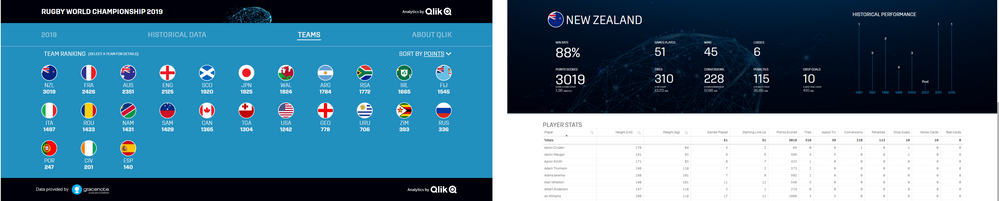
The Teams page shows a team ranking by different metrics and let you check all the details about favorite team.
You can see the app live here: https://webapps.qlik.com/rugby-world-championship/index.html
We hope you enjoy the Rugby World Cup and our data app as well 😉
Arturo (@arturoqv)

-
Qlik's Fully Integrated AI and ML Capabilities - Today and the Path Forward (tun...
In this first video, we introduce our overall approach, discuss what makes it unique, and describe our end-to-end capabilities and benefits that drive... Show MoreIn this first video, we introduce our overall approach, discuss what makes it unique, and describe our end-to-end capabilities and benefits that drive deeper and more meaningful insight, make that insight more accessible to all decision-makers, and speed up the time-to-value through automation. Unlike other solutions, Qlik offers fully integrated AI and ML built into our platform as foundational services, not a “bolt-on” or one-size-fits-all approach. We deliver a complete set of augmented capabilities, where we can “cross-pollenate” by leveraging ML-driven capabilities in Qlik Sense and Qlik Sense analytics in AutoML. The result is an end-to-end solution delivering the right experiences to users of all skill levels, helping them reach their full potential with data.
Watch the first Video of our series here:
Can't see the video? Access to YouTube Blocked or Restricted? - Check out the playlist on the Qlik video page.
In future videos you will get a deeper look at some current and future capabilities unveiled at Qlik World. This includes insight generation in Qlik Sense featuring Automated Insights and Natural Language, ML services with a preview of Key Driver Analysis, and Integrations with a look at Microsoft Teams Chat. You’ll also hear AutoML and predictive analytics, including our approach and a walkthrough of the predictive analytics life-cycle in Qlik AutoML, and resulting analysis in Qlik Sense. Stay tuned!
Read Next Blog here
-
Bonduelle - Jira Support
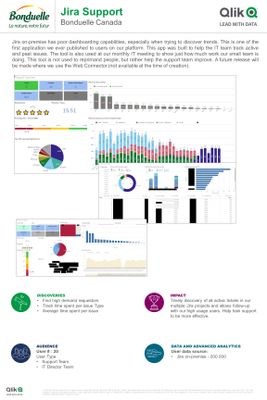
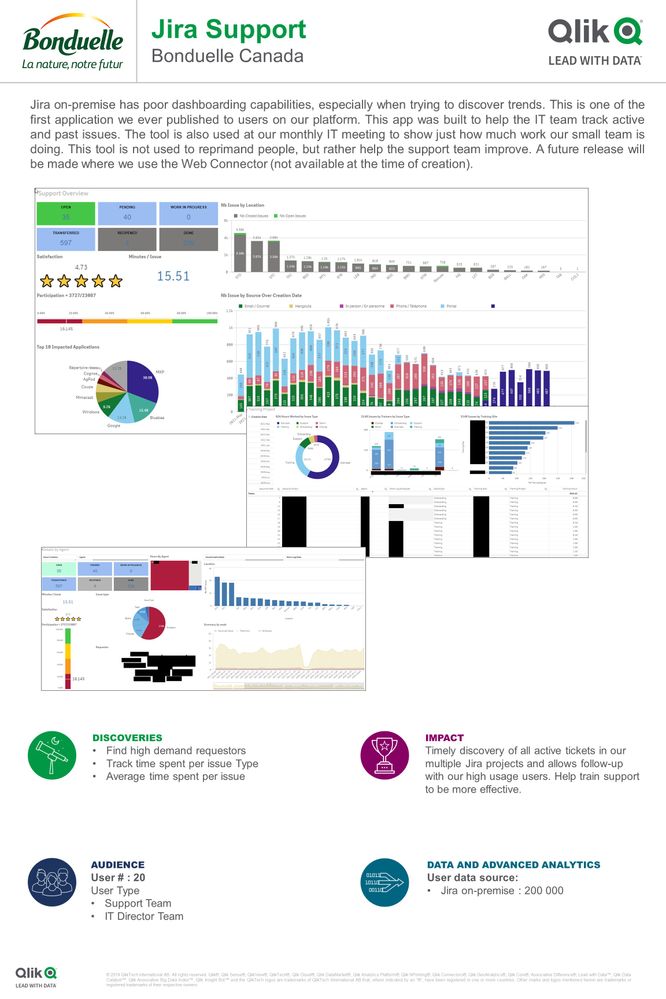
Jira on-premise has poor dashboarding capabilities, especially when trying to discover trends. This is one of the first application we ever published ... Show MoreJira on-premise has poor dashboarding capabilities, especially when trying to discover trends. This is one of the first application we ever published to users on our platform. This app was built to help the IT team track active and past issues. The tool is also used at our monthly IT meeting to show just how much work our small team is doing.
This tool is not used to reprimand people, but rather help the support team improve. A future release will be made where we use the Web Connector (not available at the time of creation).
-
Digital Accounting students get to grips with Qlik
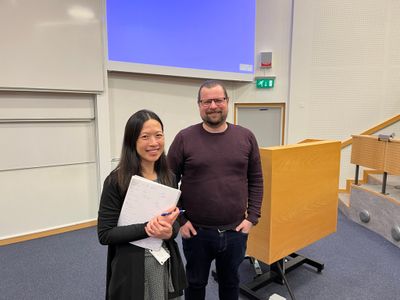
At Lund University our regional champion Ola Roxendell kicked off the term with an introduction to Qlik for Masters students studying a course in Digi... Show MoreAt Lund University our regional champion Ola Roxendell kicked off the term with an introduction to Qlik for Masters students studying a course in Digital Accounting, taught by Amanda Sonnerfeldt. At the end of this introduction Ola set the students an assignment in Qlik Sense that they had to work on in groups ready to present back to the class.
The assignment asked students to use Qlik to find a solution to Out of Stock issues. Firstly, they had to explore just how much of an impact on the business OOS issues were having. Then they had to build a dashboard to monitor business performance in a clear and concise way across various business indicators, for example, current stock levels, highest selling products, inventory. Students had to find the most suitable visualization for each business indicator and summarize their findings along with suggestions of what future action should take place. For example, what were the main causes of the OOS risk? What action is driving this? How can it be improved? Students had to address how BI could help with these issues and provide a solution. They were also required to explore the limitations of relying on a BI tool, in many cases students highlighted the lack of data skills among employees.
In some cases, students went beyond the dashboard build and used the storytelling functionality within Qlik Sense, embedding visualizations into a presentation that they could easily revisit in their app. The students had one lab session where they were able to bring their laptops to class and start working on their assignment with Ola and Amanda available to answer any questions or give any guidance. Outside of their classes they had to collaborate with their team to solve the task.
Students delivered some amazing work that very much impressed Amanda and Ola. Ola says; “Getting to be part of the course curriculum allowed us to go deeper into our product. They students presented their own visualizations and a report where they solved a business problem related to there field. I’m very impressed with their work, they put a lot of effort into it and it showed in the result.”
If you’re an educator and you’d like to make analytics a part of your course, our Qlik Academic Program can support you. We provide free software and training resources and can guide you through how to embed these into your teaching. To learn more follow this link qlik.com/academicprogram
-
Qlik | Talend:未来が今ここに(Qlik Blog 翻訳)
ブログ著者:Mike Capone 本ブログは Qlik | Talend: Looking Forward の翻訳になります。 私たちは常に前を向き、最も包括的で信頼できるソリューションをお客様に提供することに重点を置いてきました。このたび、Talend のクラウドデータ統合とデータ品質ソリ... Show Moreブログ著者:Mike Capone 本ブログは Qlik | Talend: Looking Forward の翻訳になります。
私たちは常に前を向き、最も包括的で信頼できるソリューションをお客様に提供することに重点を置いてきました。このたび、Talend のクラウドデータ統合とデータ品質ソリューションにより、さらに多くのことを提供できるようになりました。Talend の買収と、イノベーションと研究開発への継続的なコミットメントにより、Qlik はデータ統合、データ品質、アナリティクスのリーダーとなります。
私たちの業界には、市場を一変するような素晴らしい機会があります。一方で、企業のCIO が周囲を見渡した時に、選択肢が十分ではないという現実があります。
- 大きな頭痛の種となる(しかも実績の少ない)複数の単体製品
- 現在のニーズ(あるいは将来のニーズ)を満たさない不完全なレガシー製品
- ベンダーロックインを引き起こすハイパースケーラー(それが彼らのビジネスモデルです)
今日、私は新しいアプローチを発表できることを誇りに思います。最新で、実績があり、信頼できる、そしてオープンでクラウドの種類にとらわれないクラス最高のソリューションの広範なソリューションセットです。つまり、Qlik と Talend が一緒になることで、お客様は技術的負債とコストを排除し、信頼できるデータが最も重要な時に意思決定に利用できるという確信を高めることができるようになるのです。
さらに、Qlik と Talend の両社には輝かしい歴史があります。複数の市場カテゴリーで主要なソリューションプロバイダーとしての地位を獲得したことを光栄に思うとともに、今後もお客様の既存投資をサポートすることに全力を尽くします。ガートナーは、Talend を 7年連続でデータ統合ツールのマジック・クアドラントのリーダーに、5年連続でデータ品質ソリューションのマジック・クアドラントのリーダーに位置付けています。また、Qlik は 13年連続でマジック・クアドラントのアナリティクスおよびビジネス・インテリジェンス・プラットフォーム部門でリーダーに選ばれています。さらに、「IDC MarketScape:U.S. Business Intelligence and Analytics Platforms 2022 Vendor Assessment」においてもリーダーに選ばれています。
私の前職は CIO でしたがその際は、信頼できる少数のパートナーとソリューションを構築し、望む成果のために投資していました。そして私たちは Qlik をそういう会社として築いてきました。今日、私たちは世界中のパートナーエコシステムとともに未来に目を向け、業界最高のデータ統合、データ品質、アナリティクス、AI、機械学習ソリューションを提供いたします。
Talend チームを Qlik に迎え、皆様に「未来」をお見せするのがとても楽しみです。
統合されたポートフォリオの詳細についてはウェビナー「 Qlik | Talend: What's Next is Now」をご視聴ください。
-
Expand your Qlik Data Integration knowledge
Choose from over 50 Qlik Data Integration self-paced learning modules in the Qlik Continuous Classroom. From Qlik Replicate Troubleshooting to Qlik Co... Show MoreChoose from over 50 Qlik Data Integration self-paced learning modules in the Qlik Continuous Classroom.
From Qlik Replicate Troubleshooting to Qlik Compose for Data warehouses, find the course to suit you.
Sort by the Newest First to see the newly added or updated courses:
Don't know where to start? Sort by Course Order in our Course Search page which will provide you the recommended courses to start with:
Start exploring Qlik Data Integration with Using Qlik Cloud Data Integration to Onboard and Transform Data Module.
This module will explore the Data Movement and Transformation processes available in Qlik Cloud Data Integration. With this free module, you will be able to :
- Define Qlik Cloud Data Integration
- Differentiate Data Integration services
- Explore the data onboarding process
- Investigate lightweight data transformations
Happy Learning!
-
Qlik Sense February 2023 Client-Managed Release - Now Available!
Visualizations & Dashboards: Increased Number of Visible Points in Scatter Plot A highly-requested customer feature, the scatter plot now enables ... Show MoreVisualizations & Dashboards:
Increased Number of Visible Points in Scatter Plot
A highly-requested customer feature, the scatter plot now enables the developer to change the threshold for points on display. The maximum was previously 1500 points. The zoom and pan is adjusted automatically for large volumes and selection, tooltip and brushing turns off for larger data point sets.
New Styling Panel
A new Styling Panel has been added to Gauge, Histogram, and Waterfall Charts; plus, Box Plot, Distribution Plot, and KPI objects, providing greater flexibility and customization. Previously the Styling Panel was added to Bar, Pie, Map, Table, and Pivot Charts. Styling covers titles, subtitles, and footnotes, with options for font size, color, and family. Sheet background color and image can now also be added.
Styling Panel for Straight and Pivot Tables
Provides flexibility, allowing customers to conform to company, department, or personal style standards and preferences. Styling covers titles, subtitles, and footnotes, and includes options for font size, color, and family.
Chart Animations
Chart animations are the gradual transitions in a visualization from the old view to the new view when data has been changed, for example, after a selection has been made. Animations can be turned on or off under app settings.
New Sheet Grid and Sheet Background Options
Sheets can now have custom background images and colors, allowing you to divide your sheet into sections, add images from your media library, and much more! On top of that, we’ve also added a finer granular grid to the sheet, allowing for additional control over object placement and sheet grid size to support advanced formatting for presentations.
Augmented Analytics:
Ability to add Natural Language to Sheet as an Object
Qlik Sense now includes a natural language object that can be added directly to dashboards and applications to deliver AI-generated insights. App creators can configure the NLG object to produce narratives for any context by choosing dimensions, measures, and applicable analysis types – delivering insights for the overall context of a sheet, describing a group of visualizations, or creating readouts for individual visualizations. This capability extends our NLG capabilities beyond the Insight Advisor experience, allowing all Qlik Sense users to benefit from narrative interpretations and readouts when exploring in dashboards, boosting data literacy, and driving improved data storytelling.
Connectivity:
Support Views/Lists in Office 365 SharePoint Connector
You can now access data stored in ServiceNow. The new ServiceNow connector allows you to include ServiceNow data, such as incidents, requests, and case records within your analysis. The new connector includes security options such as OAuth or SSL to ensure that only authorized users can access this data.
Change S3 connector to use AWS SDK for .NET Core
Qlik is planning to add more security enhancements to this connector which require the use of AWS SDK. In preparation for these future capabilities, new versions of the Amazon S3 storage and metadata connectors built using AWS SDK for .NET have been released and are called Amazon S3 Connector V2. Note that, for now, the initial release of the S3 Connectors V2 and the existing S3 connectors (which rely on the REST API) will both have the same capabilities. However, new capabilities will only be added to the V2 connectors going forward. It is also anticipated that at some point in the future, the existing S3 Connectors will be depreciated.
DOWNLOAD LATEST VERSION OF QLIK SENSE HERE
Access Release notes: here
-
Filter Pane Customization
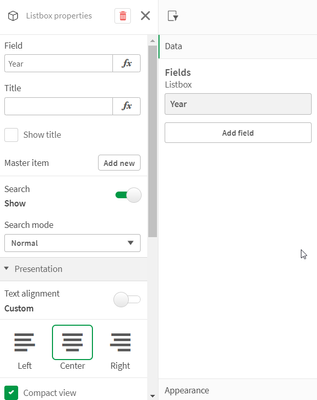
There are now many new ways a filter pane can be customized to change its appearance and/or functionality. In this blog, I will cover the new customiz... Show MoreThere are now many new ways a filter pane can be customized to change its appearance and/or functionality. In this blog, I will cover the new customizations available. Let's start with the new look of the filter pane properties panel (shown below). Now when the field or master item is selected in the properties panel, an additional properties panel is provided with further appearance and functionality options.
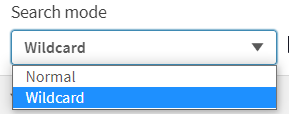
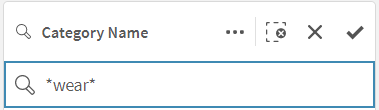
There is now a “Show title” checkbox that can be used by app developers to show or hide the title of the filter pane. App developers can indicate if they want search capabilities on or off in a filter pane by toggling the Search option. By default, the search mode for a filter pane is normal, but now it can be set to Wildcard mode which adds asterisks before and after the search text like this:
This example wildcard search will search for any text with “wear” in it.
In the presentation section of the properties panel, is where app developers can customize how the filter pane will look. By default, the text alignment is set to Auto, but it can also be set to left, center or right. There are checkboxes for the following options: Compact view, Checkbox mode and Histogram.
The Compact view option reduces the space between dimension values, fitting more items in less space. In the image below, the second filter pane has the Compact view option checked. Notice that there is less space between the list items, making the filter pane smaller than the default filter pane on the far left. This can be helpful if space is an issue on your sheet. The Checkbox mode (see third filter pane) will add a checkbox to the left of the list items and the checkbox is what is used to make selections. The Histogram option (fourth filter pane) displays bars under each list items to indicate the frequency of the item in the data – it is like a visual representation of the frequency. Each of these options can be used independently or in combination with one another. Below is an example of each and all three together.
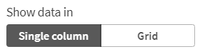
The last of the new customization options that can be found in the properties pane is how to show the data – either single column or grid.
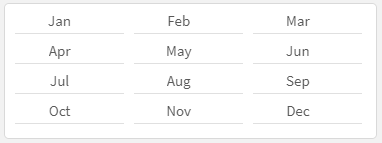
Here is a simple example using the Year dimension. The filter pane on the left is showing the filter as a grid while the filter pane on the right is showing a single column.
Here is another example of the grid option when there are more values.
When displaying the values in a grid, the app developer is presented with the option to set the order and the maximum number of columns. In the example above the values are ordered by row, so you read them from left to right versus top to bottom. The Max visible columns can be manually set (custom) or can be set to auto.
These new filter pane customization options provide the app developer with more flexibility in how they would like to present filter panes on a sheet. Check out Qlik Help for a video on creating a filter pane as well as additional helpful information. Also take a look at Michael Tarallo’s SaaS in 60 video here for this and other new features in Qlik Sense SaaS.
Thanks,
Jennell
-
Excluding values in Set Analysis
In Set Analysis, it is straightforward to make selections; to define the criteria for inclusion. But it is not as straightforward to define an exclusi... Show MoreIn Set Analysis, it is straightforward to make selections; to define the criteria for inclusion. But it is not as straightforward to define an exclusion. But there are in fact several ways to do this.
First of all, an inclusion can be defined the following way:

This expression is equivalent to saying “Sum the Amounts where Field equals X”.
But if you want to say the opposite – “where field does not equal X” – it becomes more complicated. The relation “not equal to” is not a Set operation. However, one way to do this is to use the implicit exclusion operator:

Note the minus sign in front of the equals sign. This will create an element set based on the existing selected values, but with the value X removed.
A second way to do this is to use the unary exclusion operator:

This will return the complement set of X and use this as element set in the set expression.
In many situations the two methods return identical sets. But there are cases when they are different. In the table below you can see that it makes a difference if there already is a selection in the field.
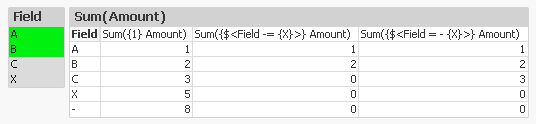
Note the difference on the row with the C. Since the implicit operator (the 2nd expression) is based on current selection, also the value C is excluded from the calculation. This is in contrast to the unary operator (the 3rd expression) that creates a completely new element set, not based on current selection.
We can also see that both of the above expressions exclude records where the field is NULL (the line where Field has a dash only). The reason is simple: As soon as there is a selection in the field, the logical inference will exclude NULL in the same field.
So what should you do if you want to exclude X but not NULL?
The answer is simple: Use another field for your selection. Typically you should use the primary key for the table where you find the Amount.

Here you need to use the element function E(), that returns excluded values. Hence, the above Set expression says: “Select the IDs that get excluded when selecting X.”
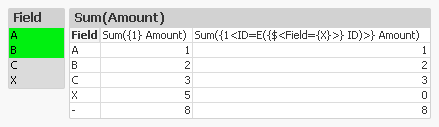
The table confirms that we get the records we want: X is excluded but NULL is still included.
With this, I hope that you understand Set Analysis somewhat better.
Further reading related to this topic:
-
Qlik Cloud Government releases major update with Data Integration, Automations, ...
The following release is significant in terms of capabilities for Qlik Cloud Government as an end-to-end platform built to drive informed action. See ... Show MoreThe following release is significant in terms of capabilities for Qlik Cloud Government as an end-to-end platform built to drive informed action. See below for a quick list of what’s been included within this release and scroll further for more in-depth details of each product.
Recently Released in Qlik Cloud Government:
- Qlik Cloud Data Integration
- Application Automation
- Lineage Connectors
- Direct Query
- Qlik Data Gateway - Direct Access
- PowerPoint Templates for Reporting
- Usage Homepage
2023 Qlik World Tour – U.S. Public Sector May 23rd in Washington DC
Don’t forget to register for our Public Sector Summit in Washington DC on May 23rd to hear from Qlik’s CEO and executives from DoD and other agencies on how Qlik Cloud Government has transformed their organizations.
The summit will cover everything from data integration to automation and analytics. If interested in migration strategies, check out the session Transitioning to Qlik Cloud: Navigating the Waters with Chase Boster, Qlik’s Professional Services Leader. If building enterprise data pipelines and change data capture is more up your alley, sign up for Jim Penn’s session - Qlik Cloud Data Integration: Deliver Real-time Data and Automate Transformation to Any Cloud!
Register now, link here!
Significant Releases:
1.Qlik Cloud Data Integration efficiently delivers large volumes of real-time, analytics-ready data into streaming and cloud platforms, data warehouses, and data lakes. And with an agentless and log-based approach to change data capture, your data is always current without impacting source systems. The platform enables a data fabric that delivers, transforms, and unifies your data across your organization via flexible, governed, and reusable data pipelines. These pipelines improve data freshness, reliability, and scale, essential for every analytics, ML, or digital transformation initiative. Watch video here.
2. Qlik Application Automation uses a no-code, drag-and-drop approach that helps you assemble automated flows that optimize processes, integrate SaaS applications and drive actions. These automations are fast to develop and eliminate the low-level complexity often required to automate back-office and analytics workflow activities. Check out the condensed overview and quick demo video below. Don't forget to check out the excellent resources at the end of this article. Watch the video.
What’s available now:
- Qlik Cloud
- Qlik Reporting Service
- Microsoft Teams on Office 365 Commercial and GCC
- Microsoft Excel Commercial and GCC
- Microsoft OneDrive Commercial and GCC
- Microsoft Outlook 365 Commercial and GCC
- Coming Soon: UiPath, ServiceNow, Slack
3. Qlik Lineage Connectors provide different connectors that allow you to extract and view data from different sources—providing full control over your data story. Qlik Lineage Connectors automatically gather metadata and lineage information from each targeted system. Watch the video.
Connectors available:
- QlikView
- Qlik Sense
- Qlik NPrinting
- Microsoft Power BI Services (including Microsoft O365 GCC and GCC High)
- Tableau
- Snowflake
- Azure SQL DB
- Microsoft SQL Server
- Microsoft SQL Server Integration Services (SSIS)
- Oracle DB
New Connectivity for both Cloud and On-Premises Sources!
4.Direct Query offers more options on how users can analyze data from cloud databases. Direct Query allows the user to keep the data in its underlying data source and generate SQL push-down as they interact with data through a Direct Query application. For performance, user experience, and data usage costs, it is recommended to leverage in-memory apps and Qlik’s Analytics Engine. Direct Query supports connectivity with Amazon RedShift, Databricks, Google BigQuery, and Snowflake. Learn more.
5. Data Gateway - Direct Access allows for safe, secure between Qlik Cloud Analytics apps and enterprise data that resides behind a firewall. This type of connection allows for enterprises to leave data where it is and safely consume through Qlik Cloud. Watch the video.
6. PowerPoint Template for Qlik Reporting Service
Users of Qlik Cloud Government can create automated multi-page reports based on a Qlik Sense app using the Qlik Reporting Service and Qlik Application Automation. Recipients either internal and/or external can receive complex, scheduled reports in PDF and PPT, even if they do not have access to Qlik Sense. Learn more.
7. Resource Consumption Monitoring
Administrators in the platform can monitor purchased and used amounts of different capacities in the Home pane in their Management Console. Learn more here.
Summary:
This latest release of products into Qlik Cloud Government showcases our investment into the platform for our U.S. Public Sector customers and has been purpose-built to support end-to-end data life-cycles. Qlik Cloud Government enables customers to shift from a passive form of business intelligence into an active environment that delivers real-time information and driving missions forward with insights and informed action. Stay tuned in for more deep dives into product features and upcoming releases.
Learn More at the QlikWorld Public Sector Tour! Register Here