Unlock a world of possibilities! Login now and discover the exclusive benefits awaiting you.

- Qlik Community
- :
- All Forums
- :
- QlikView App Dev
- :
- Re: List box selections
- Subscribe to RSS Feed
- Mark Topic as New
- Mark Topic as Read
- Float this Topic for Current User
- Bookmark
- Subscribe
- Mute
- Printer Friendly Page

 stephenedberkg
- Mark as New
- Bookmark
- Subscribe
- Mute
- Subscribe to RSS Feed
- Permalink
- Report Inappropriate Content
List box selections
i have the two same list box.that is list box 1 and list box 2.
.it contain same data
if i select the list box 1 it affect the list box 2 also
but
my requirement is if i select the list box 1 it does not affect the list box 2
thanks in advance
- Tags:
- new_to_qlikview

- Mark as New
- Bookmark
- Subscribe
- Mute
- Subscribe to RSS Feed
- Permalink
- Report Inappropriate Content
Hi. Go Settings->Document Properties->General->Alternate States-> Add list1 and Add list2. Then in expressions you mast do Sum({[list1]< .......etc.>} field) and other Sum({[list2]< ...... etc>} field)
stephenedberkg
- Mark as New
- Bookmark
- Subscribe
- Mute
- Subscribe to RSS Feed
- Permalink
- Report Inappropriate Content
my sample qvw file
stephenedberkg
- Mark as New
- Bookmark
- Subscribe
- Mute
- Subscribe to RSS Feed
- Permalink
- Report Inappropriate Content
i tired but its not working
- Mark as New
- Bookmark
- Subscribe
- Mute
- Subscribe to RSS Feed
- Permalink
- Report Inappropriate Content
Can attached qvw?
stephenedberkg
- Mark as New
- Bookmark
- Subscribe
- Mute
- Subscribe to RSS Feed
- Permalink
- Report Inappropriate Content
qvw files
- Mark as New
- Bookmark
- Subscribe
- Mute
- Subscribe to RSS Feed
- Permalink
- Report Inappropriate Content
See Settings->Document Properties->General->Alternate States->
- Mark as New
- Bookmark
- Subscribe
- Mute
- Subscribe to RSS Feed
- Permalink
- Report Inappropriate Content
See Settings->Document Properties->General->Alternate States
stephenedberkg
- Mark as New
- Bookmark
- Subscribe
- Mute
- Subscribe to RSS Feed
- Permalink
- Report Inappropriate Content
sorry i am using trial version it is does not support for me.
can you post the procedures and formulas
- Mark as New
- Bookmark
- Subscribe
- Mute
- Subscribe to RSS Feed
- Permalink
- Report Inappropriate Content
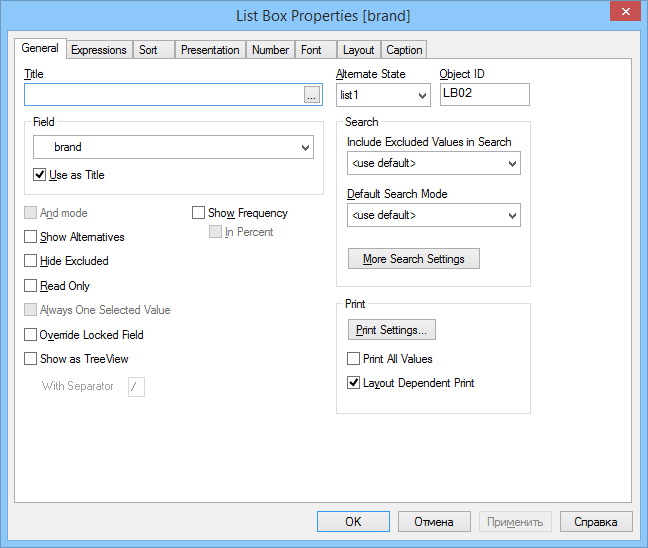
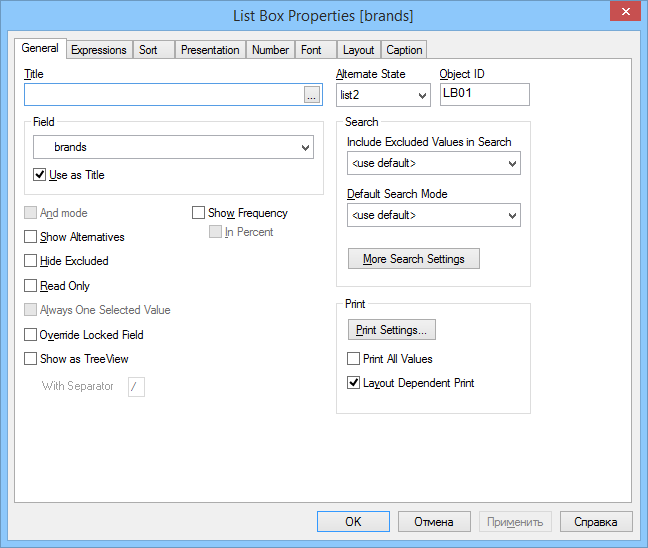
Go Settings->Document Properties->General->Alternate States-> Add list1 and Add list2
properties left 'brand'
properties right 'brand'
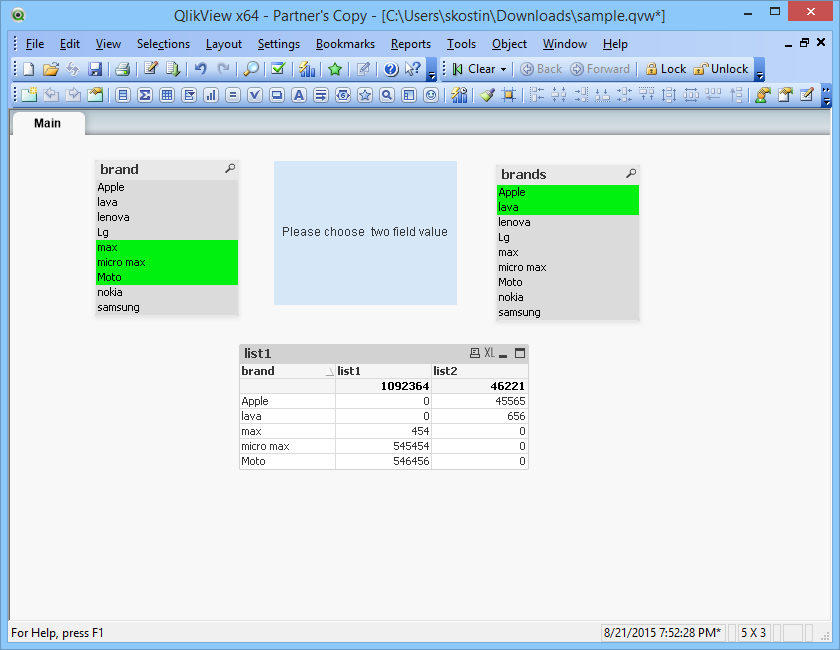
expression
for list1 sum({[list1]} sales)
for list2 sum({[list2]} sales)
stephenedberkg
- Mark as New
- Bookmark
- Subscribe
- Mute
- Subscribe to RSS Feed
- Permalink
- Report Inappropriate Content
its correct but my requirement is
if i select LG in brand1 and i select apple in brand in brand2
lg sales = 65661
apple sales = 45565
i want the variance of two brands
values is 20096