Unlock a world of possibilities! Login now and discover the exclusive benefits awaiting you.

- Qlik Community
- :
- All Forums
- :
- QlikView
- :
- Clear
- Subscribe to RSS Feed
- Mark Topic as New
- Mark Topic as Read
- Float this Topic for Current User
- Bookmark
- Subscribe
- Mute
- Printer Friendly Page

 mr_ramshini
- Mark as New
- Bookmark
- Subscribe
- Mute
- Subscribe to RSS Feed
- Permalink
- Report Inappropriate Content
Clear
Hi All
How do I design with a push-button chart values enable it to be erased?
In fact when i press button data in chart be clear
Please help me

 avinashelite
- Mark as New
- Bookmark
- Subscribe
- Mute
- Subscribe to RSS Feed
- Permalink
- Report Inappropriate Content
You need to cleat only the values in a particular chart?
mr_ramshini
- Mark as New
- Bookmark
- Subscribe
- Mute
- Subscribe to RSS Feed
- Permalink
- Report Inappropriate Content
No
i want when i press button my charts be hidden

 kristof_j
- Mark as New
- Bookmark
- Subscribe
- Mute
- Subscribe to RSS Feed
- Permalink
- Report Inappropriate Content
Create a variable like 'vShowChart'
Then a button with action 'Set Variable' under the 'External' action type.
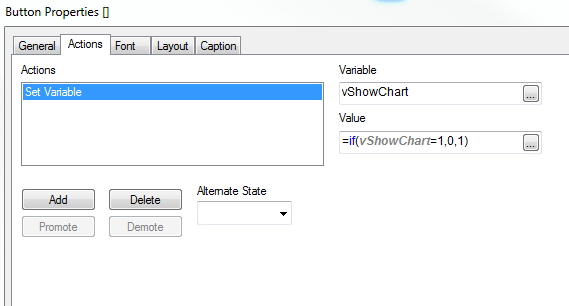
Then go to the chart properties > Layout tab
and under Conditional you enter vShowChart
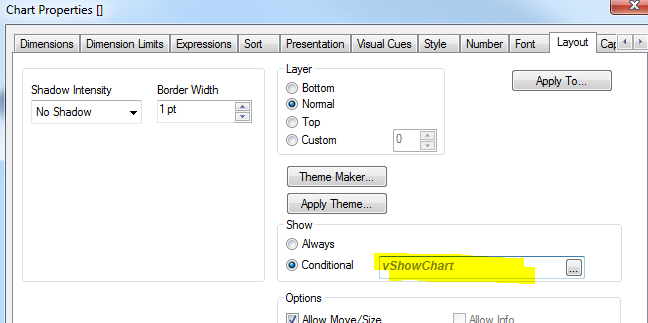
If you click the button the chart will disappear, click again and it appears

 sushil353
- Mark as New
- Bookmark
- Subscribe
- Mute
- Subscribe to RSS Feed
- Permalink
- Report Inappropriate Content
Hi,
Create a variable like 'vHide'
Then a button with action 'Set Variable' under the 'External' action type.
Variable Name : vHide
Value = Not vHide
the go to your chart and in layout tab under Show check the Conditional part and use your variable as =vHide
HTH
mr_ramshini
- Mark as New
- Bookmark
- Subscribe
- Mute
- Subscribe to RSS Feed
- Permalink
- Report Inappropriate Content
Thanks for your answer
but how i can define 2 variable?
i defined a variable for place my chart and i write your condition under it
is it true?
mr_ramshini
- Mark as New
- Bookmark
- Subscribe
- Mute
- Subscribe to RSS Feed
- Permalink
- Report Inappropriate Content
Thanks for your answer
but how i can define 2 variable?
i defined a variable for place my chart and i write your condition under it
is it true?
avinashelite
- Mark as New
- Bookmark
- Subscribe
- Mute
- Subscribe to RSS Feed
- Permalink
- Report Inappropriate Content
check this thread for the example
