Unlock a world of possibilities! Login now and discover the exclusive benefits awaiting you.

- Qlik Community
- :
- All Forums
- :
- QlikView
- :
- Re: date
- Subscribe to RSS Feed
- Mark Topic as New
- Mark Topic as Read
- Float this Topic for Current User
- Bookmark
- Subscribe
- Mute
- Printer Friendly Page

 upaliwije
- Mark as New
- Bookmark
- Subscribe
- Mute
- Subscribe to RSS Feed
- Permalink
- Report Inappropriate Content
date
Hi
IF((NUM(date#(PAID_MON,'YYYY-MM'))-NUM(date#(INT_MON,'YYYY-MM')))>150,'>5 MONTHS',INT_MON)As INT_MONTH1;
I am using above syntax in my load script to calculate above 5 months record.But I get the following result
| PAID_MONTH | INT_MONTH1 |
| 2015-07 | >5 MONTHS |
| 2015-07 | 2015-02 |
| 2015-07 | 2015-03 |
| 2015-07 | 2015-04 |
| 2015-07 | 2015-05 |
| 2015-07 | 2015-06 |
| 2015-07 | 2015-07 |
| 2015-07 | Total |
It gives 7 months may be due to the fact 28 days in Feb Month. Is there a way to rewrite the above syntax to get the following result
| PAID_MONTH | INT_MONTH1 |
| 2015-07 | >5 MONTHS |
| 2015-07 | 2015-03 |
| 2015-07 | 2015-04 |
| 2015-07 | 2015-05 |
| 2015-07 | 2015-06 |
| 2015-07 | 2015-07 |
| 2015-07 | Total |
Pls help
Accepted Solutions

 MarcoWedel
- Mark as New
- Bookmark
- Subscribe
- Mute
- Subscribe to RSS Feed
- Permalink
- Report Inappropriate Content
Hi,
another solution could be:
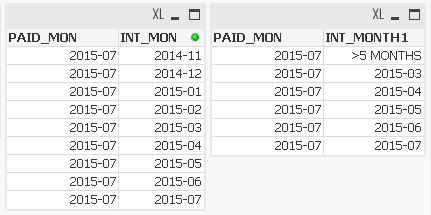

LOAD *,
    Ceil(Rand()*1000) as Amount,
    If((Year(PAID_MON)-Year(INT_MON))*12+(Month(PAID_MON)-Month(INT_MON))>4,Dual('>5 MONTHS',1),INT_MON) as INT_MONTH1;
LOAD Date#(PAID_MON,'YYYY-MM') as PAID_MON,
    Date#(INT_MON,'YYYY-MM') as INT_MON
Inline [
PAID_MON, INT_MON
2015-07, 2014-11
2015-07, 2014-12
2015-07, 2015-01
2015-07, 2015-02
2015-07, 2015-03
2015-07, 2015-04
2015-07, 2015-05
2015-07, 2015-06
2015-07, 2015-07
];
hope this helps
regards
Marco
 sunny_talwar
- Mark as New
- Bookmark
- Subscribe
- Mute
- Subscribe to RSS Feed
- Permalink
- Report Inappropriate Content
Is this what you are looking for?
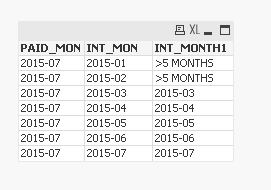
Try the script:
Table:
LOAD *,
IF((Num(Month(date#(PAID_MON,'YYYY-MM')))-Num(Month(date#(INT_MON,'YYYY-MM'))))>4,'>5 MONTHS',INT_MON)As INT_MONTH1;
LOAD * Inline [
PAID_MON, INT_MON
2015-07, 2015-01
2015-07, 2015-02
2015-07, 2015-03
2015-07, 2015-04
2015-07, 2015-05
2015-07, 2015-06
2015-07, 2015-07
];
HTH
Best,
Sunny
MarcoWedel
- Mark as New
- Bookmark
- Subscribe
- Mute
- Subscribe to RSS Feed
- Permalink
- Report Inappropriate Content
Hi,
another solution could be:
LOAD *,
    Ceil(Rand()*1000) as Amount,
    If((Year(PAID_MON)-Year(INT_MON))*12+(Month(PAID_MON)-Month(INT_MON))>4,Dual('>5 MONTHS',1),INT_MON) as INT_MONTH1;
LOAD Date#(PAID_MON,'YYYY-MM') as PAID_MON,
    Date#(INT_MON,'YYYY-MM') as INT_MON
Inline [
PAID_MON, INT_MON
2015-07, 2014-11
2015-07, 2014-12
2015-07, 2015-01
2015-07, 2015-02
2015-07, 2015-03
2015-07, 2015-04
2015-07, 2015-05
2015-07, 2015-06
2015-07, 2015-07
];
hope this helps
regards
Marco
upaliwije
- Mark as New
- Bookmark
- Subscribe
- Mute
- Subscribe to RSS Feed
- Permalink
- Report Inappropriate Content
Dear Wedel,
Thanks a lot . I learned a lot from your example. Pls also explain me following line in your syntax
Ceil(Rand()*1000) as Amount,
MarcoWedel
- Mark as New
- Bookmark
- Subscribe
- Mute
- Subscribe to RSS Feed
- Permalink
- Report Inappropriate Content
Hi,
you're welcome.
Ceil(Rand()*1000) as Amount,
only creates some random data I used in the bar chart.
This line is not required for this solution.
regards
Marco
upaliwije
- Mark as New
- Bookmark
- Subscribe
- Mute
- Subscribe to RSS Feed
- Permalink
- Report Inappropriate Content
Thanks
MarcoWedel
- Mark as New
- Bookmark
- Subscribe
- Mute
- Subscribe to RSS Feed
- Permalink
- Report Inappropriate Content
I forgot to mention:
you could get a similar result without scripting an additional field by defining dimension limits in your chart:
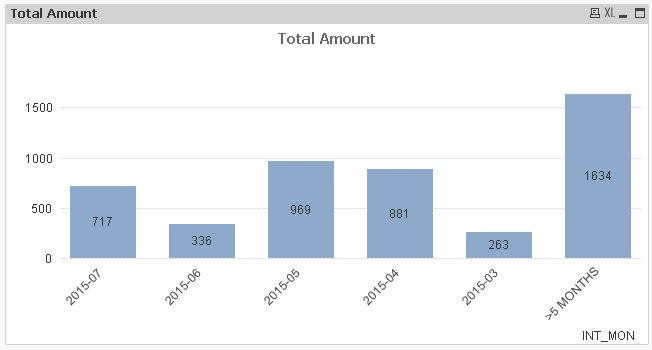
hope this helps
regards
Marco
upaliwije
- Mark as New
- Bookmark
- Subscribe
- Mute
- Subscribe to RSS Feed
- Permalink
- Report Inappropriate Content
Hi
Thanks a lot for your advice. Can I please contact you through email whenever I want your help in respect of QV issue. That would be a great favour.
