Unlock a world of possibilities! Login now and discover the exclusive benefits awaiting you.

Analytics & AI
Forums for Qlik Analytic solutions. Ask questions, join discussions, find solutions, and access documentation and resources.
Data Integration & Quality
Forums for Qlik Data Integration solutions. Ask questions, join discussions, find solutions, and access documentation and resources
Explore Qlik Gallery
Qlik Gallery is meant to encourage Qlikkies everywhere to share their progress – from a first Qlik app – to a favorite Qlik app – and everything in-between.
Qlik Community
Get started on Qlik Community, find How-To documents, and join general non-product related discussions.
Qlik Resources
Direct links to other resources within the Qlik ecosystem. We suggest you bookmark this page.
Qlik Academic Program
Qlik gives qualified university students, educators, and researchers free Qlik software and resources to prepare students for the data-driven workplace.
Recent Blog Posts
-
【オンデマンド配信】保険業界のデータ課題と Qlik での高度化
保険業界では、レガシーシステムや情報のサイロ化、非構造化データの未活用といった課題がある中、デジタルトランスフォーメーションが求められています。本 Web セミナーでは、保険会社が抱える経営課題・IT 課題の全体像を整理し、Qlik を活用したデータ統合・分析による解決策をご紹介します。「非構造化デ... Show More -
Watch Q&A with Qlik: Qlik Cloud Migration!
Don't miss our previous Q&A with Qlik! Pull up a chair and chat with our panel of experts to help you get the most out of your Qlik experience. Our ... Show MoreDon't miss our previous Q&A with Qlik! Pull up a chair and chat with our panel of experts to help you get the most out of your Qlik experience.
Our Qlik experts held a Qlik Cloud Migration live Q&A with Qlik webinar, answering all your questions about migration from on-prem to Qlik Cloud and using the tools that are available to make the process easier.

-
【オンデマンド配信】海外の自治体は DX 推進にどのように取り組んでいるか
海外の自治体が DX 推進にどのように取り組んでいるかを、Qlik のデータ活用事例を交えて紹介します。本 Web セミナーでは、住民サービスの向上、業務の効率化、政策判断の迅速化など、データドリブンな行政運営の実現に向けた具体的なアプローチを解説。日本の自治体にとって参考となるヒントや実践的な知見... Show More -
Onyx Data Challenge June 2025
Onyx Data Challange June 2025 Lupus Analitycs Social Media Analysis Discoveries Educational and Product Related post have most engagements... Show More
Onyx Data Challange June 2025Lupus Analitycs Social Media Analysis
Discoveries
Educational and Product Related post have most engagements
Impact
Showing when to post and which content is the best
Audience
Everyone interested in Social media content
Data and advanced analytics
Showing when to post and which content is the best
-
Pick() Function
The Pick function is a chart and script function that can be used to return the nth expression in a list based on a field or value. It is a good alter... Show MoreThe Pick function is a chart and script function that can be used to return the nth expression in a list based on a field or value. It is a good alternative to a large or nested If statement where each If statement needs to be evaluated. With the pick function, one value is read to determine which expression should be returned.
The syntax of the pick function according to Qlik Help looks like this:
pick(n, expr1[ , expr2,...exprN])
The first parameter (n) should be an integer. Based on this value, the first expression, second expression, third expression or nth expression is returned. Let’s look at an example. In the table below, there are three dimensions listed – the state abbreviation, the state name and a state code for the U.S. region the state is in. One is the Northeast region, 2 is the Midwest region, 3 is the South region and 4 is the West region.
The pick function can be used to show the region name that is represented by the state code. This can be done by adding the measure below to the table.
The pick function will assess the value of StateCode and based on that return a region. With the measure added to the table, the region name can also be displayed as seen below.
The pick function measure used in the table above is simpler than a nested if statement and is easy to read. It optimizes the table, returning results faster and using less resources to evaluate. Try it out.
Thanks,
Jennell
-
Qlik Automate execution token changes
Edit 24th of June 2026: Extended time from February to June. Hello Qlik Users, Execution tokens will become header parameters at the end of June 2026 ... Show MoreEdit 24th of June 2026: Extended time from February to June.
Hello Qlik Users,
Execution tokens will become header parameters at the end of June 2026 (originally planned for February 1st, 2026).
On January 13th, 2025, Qlik introduced breaking changes to the execution token functionality for triggered automations.
Contents
-
Learning on Your Own Time: How Self-Paced Education and Qlik’s Academic Program ...
One of the biggest shifts in education over the past few years has been the rise of self-paced learning. With students juggling busy schedules, intern... Show MoreOne of the biggest shifts in education over the past few years has been the rise of self-paced learning. With students juggling busy schedules, internships, part-time jobs, and extracurricular activities, the traditional classroom model doesn’t always provide the flexibility they need. That’s why universities and employers alike are placing more emphasis on programs and tools that let learners set their own pace.
Self-paced learning allows students to:
-
Revisit difficult topics without feeling rushed.
-
Move ahead quickly in areas they already understand.
-
Balance academics with personal and professional responsibilities.
And it’s not just about convenience. Research shows that when students have control over their learning journey, they retain more knowledge and build stronger skills for the real world.
Where Qlik’s Academic Program Fits In
The Qlik Academic Program is designed with this same philosophy in mind. Every student and educator who joins the program gets free, self-paced access to:
-
Online training modules on data analytics and visualization.
-
Qualifications and certifications to showcase on a resume or LinkedIn profile.
-
Interactive lesson plans and resources that can be used in or outside the classroom.
-
Qlik software, so students can practice and apply their skills right away.
Whether you’re a professor designing flexible assignments or a student looking to upskill on your own schedule, Qlik’s Academic Program makes it possible to learn at your pace and still achieve professional-level results.
Why It Matters Now
With the demand for data literacy and analytics skills growing across every industry, students who take advantage of self-paced resources like Qlik’s Academic Program are positioning themselves ahead of the curve. Employers aren’t just looking for degrees—they want proof of hands-on, applicable skills. Earning Qlik qualifications through self-paced learning is one way to stand out.
Take the Next Step
Education isn’t just happening in the classroom anymore—it’s happening anytime, anywhere. If you’re ready to take control of your learning journey and gain the skills employers value most, the Qlik Academic Program is here to support you every step of the way.
👉 Sign up today and start learning at your own pace: https://www.qlik.com/us/company/academic-program
-
-
Calculated Fields
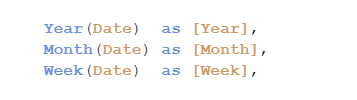
Normally, new fields are created in the script and stored as additional columns in the data model. Just write your expression inside a Load statement ... Show MoreNormally, new fields are created in the script and stored as additional columns in the data model. Just write your expression inside a Load statement and you’re done:
But you can also do the same thing in the user interface, and then it could look like this:
So, which way should you do it?
Generally, I would say that you should put as much as possible in the script. In most cases, it is far better to have these calculations pre-made, so that they do not have to be calculated at run-time, i.e. when the user clicks.
The Qlik Engine has two fundamentally different ways to calculate such expressions: As “Calculated dimension” or as “Field-on-the-fly”. The engine automatically decides how a specific calculation should be made, depending on the expression.
Fields-on-the-fly
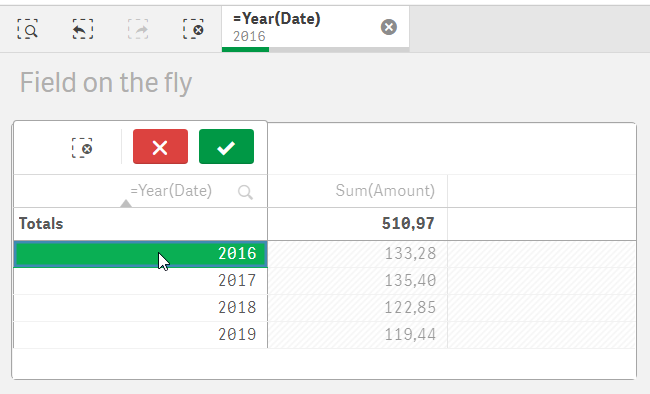
This method was introduced in one of the early versions of Qlik Sense. As the expression is evaluated, the engine creates an additional column in the data model, with a corresponding symbol table. Just as for a real field, the selection is stored in state vectors linked to this column.In the picture below you can see a table dimension defined as “=Year(Date)”, which results in four rows.
Now look at the selection bar: When a selection is made, the corresponding year is selected in the Field-on-the-fly called “=Year(Date)” – a field that does not exist in the original data model. And in the selection bar you can see that the selection is indeed stored in this “virtual” field, and not in the Date field.
Calculated dimensions
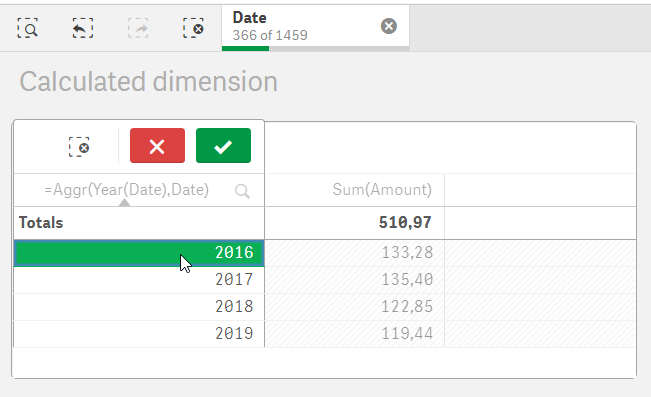
This is the old-fashioned way, and this is how QlikView still today does it. In the example below, the table dimension is “=Aggr(Year(Date),Date)” and it also results in four rows. Logically, this expression is equivalent to the above one.But here the selection is instead made in in the underlying field: in the Date field.
It is always possible to create a Calculated dimension, no matter what the expression looks like. But the same is not true for Fields-on-the-fly. There are limitations to when they can be generated:
- The expression must be based on one single field only, or on multiple non-key fields from the same table in the data model
- The expression cannot depend on the selection state, e.g. through the GetSelectedCount() function
- The expression cannot contain an Aggr() function
If a Field-on-the-fly cannot be generated, the expression will be evaluated as a Calculated dimension instead.
Performance
Both Calculated dimensions and Fields-on-the-fly can cause performance problems, so it is a good idea to consider moving them to the script instead. Fields-on-the-fly can almost always be moved to the script.For Fields-on-the-fly, the performance problems become especially severe if the underlying field has many distinct values. A common example is when calendar functions like Year and Month are used on a timestamp with millions of distinct values, rather than on a date with fewer values, like 2 x 365 dates. Further; since Fields-on-the-fly are added to the data model, and the hash of the data model is used in the ID of the cache entry, Fields-on-the-fly can prevent the cache from being re-used properly.
To improve the performance, Master dimensions containing Fields-on-the-fly are now (since Nov 2019) calculated already when the first user opens the app, something which can increase the time it takes to open a document. On the other hand, this will improve the response time considerably in the analysis phase, as well as mitigate cache problems, so we are confident that this is a correct decision. Hence, put your Fields-on-the-fly in the Master dimensions!
Should you want to tweak the behavior of the engine, you can always try the following:
- Using “UseAutoFieldOnTheFly=0” in Settings.ini will disable Fields-on-the-fly for all documents served by the engine
- Using “Set QlikInternalDisableFotfMode=1;” in the script will disable Fields-on-fly in the app
- Using “Set QlikInternalDisableFotfPregen =1;” in the script will prevent Fields-on-fly from being pre-calculated when the app is opened
- Wrapping the expression in “=CalcDim(…)” will force it to be a Calculated dimension
But most importantly - don't use a timestamp to create your calendar! Use a date instead:
Good luck!
HIC
Read also in Calculated Fields in Qlik Data Analytics .

-
Techspert Talks - Migrating to Qlik Cloud Analytics
Hi everyone, Want to stay a step ahead of important Qlik support issues? Then sign up for our monthly webinar series where you can get first-hand ins... Show MoreHi everyone,
Want to stay a step ahead of important Qlik support issues? Then sign up for our monthly webinar series where you can get first-hand insights from Qlik experts.The Techspert Talks from August look at Migrating to Qlik Cloud Analytics.
But wait, what is it exactly?
Techspert Talks is a free webinar held on a monthly basis, where you can hear directly from Qlik Techsperts on topics that are relevant to Customers and Partners today.In this session we covered:
- Demonstration of the Qlik Cloud Analytics Migration tool
- Advantages of Qlik Cloud
- SaaS Readiness
-
Upload Utility App
Upload Utility App Mahindra and Mahindra Ltd Purpose of the app The Upload Utility app provides business users with a self-service way to upload... Show MoreUpload Utility AppMahindra and Mahindra LtdPurpose of the app The Upload Utility app provides business users with a self-service way to upload and manage ad-hoc data files (mainly CSVs) that are not available in core systems like SAP. What it shows The app mirrors a three-level folder structure (Category → Sub-Category → KPI) from SharePoint into Qlik SaaS. Users select a folder from each level, and upon pressing the Fetch Files button, an automation is triggered that retrieves the file names from the chosen KPI folder. From this list, the user selects a file and uploads it into BigQuery, where it is stored along with the uploader’s name and timestamp. Users can also delete previously uploaded files through the same interface. Who uses it Multiple business stakeholders across functions use the app to independently contribute data specific to their KPIs, without requiring developer intervention. Value it’s having The app removes dependencies on IT teams, accelerates data availability, and empowers users to enrich dashboards with custom data. This has streamlined reporting processes, reduced turnaround time, and provided greater flexibility for business analysis.Discoveries
Some of the discoveries from using this app include: Business users can easily upload and manage non-system data to enhance dashboards. Automated user and timestamp logging improved transparency and governance. KPI-based folder navigation made organizing and locating files much simpler. Quick upload/delete reduced delays and improved reporting efficiency. Developers were freed from repetitive manual uploads and could focus on higher-value work.
Impact
The app has empowered business teams with self-service data uploads, reduced dependency on IT, and accelerated reporting cycles. By making complete and reliable data quickly available in dashboards, it has improved both decision-making speed and confidence.
Audience
The app is primarily used by business stakeholders such as Deputy Managers, managers, analysts, and operations teams across different functions. It is accessed directly in Qlik SaaS and used frequently to upload KPI-specific data not available in core systems. Since multiple departments rely on it, the app has become an important enabler for timely reporting and analysis.
Data and advanced analytics
The app has empowered business teams with self-service data uploads, reduced dependency on IT, and accelerated reporting cycles. By making complete and reliable data quickly available in dashboards, it has improved both decision-making speed and confidence.
-
【オンデマンド配信】DX - 建設業界の IT 課題と解決の方向性
建設業界は、人手不足や技術継承、属人化、進捗管理の難しさなど、DX が進みにくい課題を抱えています。本 Web セミナーでは、これらの課題に対し、データ分析・管理・統合といったデジタルツールがどのように貢献できるか、その方向性と解決のヒントを探っていきます。 ※ 参加費無料。パソコン・タブレット・ス... Show More -
Peeking through the Window() Script Function
You might be familiar with the concept of Window functions from Excel or SQL and know just how convenient and powerful they can be. Well, Qlik has one... Show MoreYou might be familiar with the concept of Window functions from Excel or SQL and know just how convenient and powerful they can be. Well, Qlik has one that you can use right in your Load Script!
Simply put, the Window function performs calculations over multiple rows producing a value for each row separately, unlike aggregate functions that will give a single value for the group of rows aggregated together.
You can think of it as looking through a window at your dataset and only seeing a subset based on different parameters you set which we will go over in a minute.
If you wanted to calculate the average transaction_amount by customer, you could of course do this in the chart expression with something like this: aggr(avg(transaction_amount), customer_id), or if you’re in the Load Script, perform another load and use Group By as follows:
Temp:
//inline load here

Transactions:
NoConcatenate Load
transaction_id,
transaction_date,
transaction_amount,
transaction_quantity,
customer_id,
size,
color_code
Resident Temp;

Load customer_id,
Avg(transaction_amount) AS AvgAmount
Resident Transactions
Group By customer_id;
But this requires a separate load and can’t just be done on the same loaded table, and it might not be ideal for more complex use cases.
This is where the Window function comes in, and the above can be re-written as follows:
Temp:
//inline load here

Transactions:
NoConcatenate Load
transaction_id,
transaction_date,
transaction_amount,
transaction_quantity,
customer_id,
size,
color_code,
Window(Avg(transaction_amount),customer_id) as AvgCustTransaction
Resident Temp;
Much easier!
Syntax:
Let’s take a closer look at the function syntax to understand it a little more and see what other capabilities it has:
Window( input_expr, [partition1, partition2, ...], [sort_type, [sort_expr]], [filter_expr], [start_expr,end_expr] )
- input_expr
Refers to the input expression calculated and returned by the function. It must be any expression based on an aggregation, such as Median(Salary). For example:
Window(Median(Salary)) as MedianSalaryThe input can also be a field name with no aggregation applied and in that case Qlik treats it like the Only() function. For example:
Window(Salary,Department) as WSalary- Partition: [partition1, partition2, ...]
After input_expr, you can define any number of partitions. Partitions are fields that define which combinations to apply the aggregations with. The aggregation is applied separately with each partition. (Think of it as the Group By clause). Multiple partitions can be defined. For example:
Window(Avg(Salary), Unit, Department, Country) as AvgSalary- sort_type, sort_expr
The sort type and the sort expression can be specified optionally. sort_type can have one of two values ASC (Ascending sorting) or DESC (Descending sort)
If sort_type is defined, then the sorting expression must also be defined. This is an expression that decides the order of the rows within a partition.
For example:
Window(RecNo(), Department, 'ASC', Year) // results within the partition are sorted Ascendingly by year- filter_expr
The optional Filter Expression is a Boolean expression that decides whether the record should be included in the calculation or not.
This parameter can be omitted completely, and the result should be that there is no filter.
For example:
Window(avg(Salary), Department, 'ASC', Age, EmployeeID=3 Or EmployeeID=7) as wAvgSalaryIfEmpIs3or7- Sliding Window with start_expr,end_expr
Optionally, you can set the argument for sliding window functionality. A sliding window requires two arguments:
- start_expr: The number of rows prior to the current row to include in the window.
- end_expr: The number of rows after the current row to include in the window.
For example, if you want to include the 3 preceding rows, the current row, and the 2 following row:
Window(concat(Text(Salary),'-'), Department, 'ASC', Age, Year>0, -3, 2) as WSalaryDepartmentExamples:
Let’s take a look at different use case examples:
1- Adding a field containing an aggregation
Transactions:
Load
*,
Window(Avg(transaction_amount),customer_id) as AvgCustTransaction;

Load * Inline [
transaction_id, transaction_date, transaction_amount, transaction_quantity, customer_id, size, color_code
3750, 20180830, 23.56, 2, 2038593, L, Red
3751, 20180907, 556.31, 6, 203521, M, Orange
3752, 20180916, 5.75, 1, 5646471, S, Blue
3753, 20180922, 125.00, 7, 3036491, L, Black
3754, 20180922, 484.21, 13, 049681, XS, Red
3756, 20180922, 59.18, 2, 2038593, M, Blue
3757, 20180923, 177.42, 21, 203521, XL, Black
3758, 20180924, 153.42, 14, 2038593, L, Red
3759, 20180925, 7.42, 5, 203521, M, Orange
3760, 20180925, 80.12, 18, 5646471, M, Blue
3761, 20180926, 3.42, 7, 3036491, XS, Black
3763, 20180926, 63.55, 12, 049681, S, Red
3763, 20180927, 177.56, 10, 2038593, L, Blue
3764, 20180927, 325.95, 8, 203521, XL, Black
];
2- Adding a field containing an aggregation filtered for specific values
Transactions:
Load
*,
Window(Avg(transaction_amount),customer_id, color_code = 'Blue') as AvgCustTransaction;

Load * Inline [
// Table goes here
];
3- Adding a field with a sliding window
Transactions:
Load
*,
Window(Avg(transaction_amount),customer_id, 'ASC', -1, 1, 0, 1) as AvgCustTransaction;

Load * Inline [
// Table goes here
];
This concludes this post, I hope you found it helpful!
A qvf with all the scripts is attached for reference.- Thanks
-
Qlik Cloud Reporting API: Going Beyond the Tenant Interface
If you’re running Qlik on-premise, NPrinting is the go-to for producing highly formatted, template-based reports. It works seamlessly with QlikView an... Show MoreIf you’re running Qlik on-premise, NPrinting is the go-to for producing highly formatted, template-based reports. It works seamlessly with QlikView and Qlik Sense Enterprise on Windows, letting you design in familiar tools like Excel, Word, PowerPoint, and PixelPerfect, then deliver reports as PDFs, HTML, or Office files to folders, the NPrinting NewsStand, email recipients, or even the Qlik Sense Hub — all with scheduling, cycling, and bursting built in.
In Qlik Cloud, reporting takes a different shape. You still have built-in options for creating and delivering reports directly in the tenant interface, but you also gain something new: an API-driven approach that opens up possibilities well beyond what’s available in the UI. And that’s where the Qlik Cloud Reporting API comes in.
What You Can Do in Qlik Cloud (Inside the Interface):
Qlik Cloud Reporting allows you to create reports from apps using native templates or PixelPerfect templates, then distribute them as PDFs, Excel files, or other formats. Through the tenant interface, you can:
-
Create and edit report templates
-
Apply selections and filters
-
Schedule recurring reports
-
Deliver reports to email recipients or Qlik Cloud spaces
These capabilities are fully documented in Qlik Help, and for many users, the UI-based workflow is all they need.
Why Go Beyond the Tenant Interface?
The Reporting API enables everything above — but from outside Qlik Cloud.
That means you can:-
Trigger reports from external systems
-
Integrate reporting into your own applications
-
Automate delivery to custom destinations
-
Include Qlik reports in larger automated workflows (think: customer portals, scheduled partner updates, or triggered operational reports)
If you’ve ever wished you could generate a Qlik report as part of an end-to-end automation pipeline, the API is the key.
Reporting with Qlik Automate
Not every reporting workflow requires custom code. Qlik Automate lets you build automated reports using the Qlik Reporting Service through a low-code, drag-and-drop interface. Reports can be delivered as PDF or PowerPoint and distributed via email or cloud connectors like SharePoint, OneDrive, Dropbox, Google Cloud Storage, Amazon S3, or SFTP.
Some common use cases include:
-
Bursted reports where each recipient only sees their own data
-
Looping reports that generate one page per dimension value (e.g. region or product)
-
Cross-app reporting combining insights from multiple Qlik Sense apps
-
External delivery to recipients without Qlik Cloud accounts
Think of Automate as the middle ground — more flexible than the tenant UI, but easier to adopt than full API coding.
How the Qlik Cloud Reporting API Works
At its core, the process involves:
1- Sending a POST request to create a report generation job.
2- Polling the outputs endpoint to check when the job is complete.
3- Downloading the generated file once it’s ready.
Here’s a real example:
Step 1: Request a Report
POST https://<tenant>/api/v1/reports
Body:
{
  "type": "sense-pixel-perfect-template-1.0",
  "sensePixelPerfectTemplate": {
    "appId": "1234567-a480-43f5-bc88-825736d8842f",
    "templateId": "1a2b3c-ba56-46ee-ac74-4746dd145816",
    "templateLocation": {
      "path": "https://<tenant>/api/v1/report-templates/3de5c6c2-ba56-46ee-ac74-4746dd145816",
      "format": "url"
    },
    "selectionChain": [
      {
        "selectionType": "selectionFilter",
        "selectionFilter": {
          "selectionStrategy": "stopOnError",
          "selectionsByState": {
            "$": [
              {
                "fieldName": "Currency",
                "defaultIsNumeric": false,
                "values": [{ "text": "USD", "isNumeric": false }]
              },
              {
                "fieldName": "Year",
                "defaultIsNumeric": true,
                "values": [{ "number": 45778, "isNumeric": true }]
              }
            ]
          }
        }
      }
    ]
  },
  "output": { "type": "pdf", "outputId": "pp", "pdfOutput": {} }
}
Response:
{
  "message": "Report request has been accepted and is being processed.",
  "outputsUrl": "https://<tenant>/api/v1/reports/1234567-bed1-4024-8614-37bb898a41b0/outputs",
  "requestId": "987654321-bed1-4024-8614-37bb898a41b0"
}
Here, you’ll notice:
-
outputsUrl gives you the endpoint to poll for the report status.
-
requestId uniquely identifies the job.
Step 2: Poll for the Output
GET https://<tenant>/api/v1/reports/{requestId}/outputs
Response:
{
  "data": [
    {
      "cycleSelections": [],
      "location": "https://<tenant>/api/v1/temp-contents/2342346c185413cc5ec121b",
      "outputId": "pp",
      "sizeBytes": 382078,
      "status": "done",
      "traceId": "abc1234d2e88db9bc155d8a732132899d"
    }
  ],
  "links": {
    "self": {
      "href": "https://<tenant>/api/v1/reports/{requestId}/outputs"
    }
  }
}
Key things to look for in the response:
-
status — "done" means the report is ready.
-
location — the direct link to the generated file.
Step 3: Download the File
Once the status is "done", perform a GET to the location URL.
For example:
GET https://<tenant>/api/v1/temp-contents/2342346c185413cc5ec121b
This returns the actual PDF (or other format, depending on your request).
Where to Learn More:
You can visit these pages for full API documentation and working samples:
Qlik Cloud’s tenant interface is powerful for building and scheduling reports right inside your analytics environment — but the Reporting API takes it further. By integrating directly with your external systems, you can build modern, automated, and scalable reporting workflows that go well beyond what’s possible within the tenant.
If you’re ready to move from manual scheduling to full automation, the Reporting API is where you start.
-
-
Tabular Reporting within Qlik Cloud Analytics
Tabular reporting capabilities have been a fundamental aspect of Qlik’s reporting software dating back to QlikView. At its core, it enables users to o... Show MoreTabular reporting capabilities have been a fundamental aspect of Qlik’s reporting software dating back to QlikView. At its core, it enables users to organize and share data with stakeholders in structured table formats. There’s a reason people still love and use Excel.
So — what exactly is Tabular Reporting with Qlik Cloud? What can it be used for? What is the state of this technology today? Let’s get into it.
Customers now have the capabilities to conquer those ever-present report distribution requirements. Whether you need paginated tables of sales/transactional data or repeated sheets of departmental analysis directly within an application in Qlik Cloud, we've got you covered.
With the introduction of Tabular Reporting, report developers can create custom highly formatted XLS or PDF documents from Qlik data and visualizations.
Governed Report Tasks can burst reports to any stakeholder, ensuring that the Qlik platform serves as the source for your business decisions, customer communications, and more.
Highlights of Tabular Reporting:
Create dynamic tabular reports by combining the Qlik add-in for Microsoft Excel with report preparation features available within a Qlik Sense app.
Deliver report output by email and to folders defined in Microsoft SharePoint connections. Reports can be in .xlsx or PDF format.
Define report templates of Qlik data and visualizations and produce reports in PDF and Excel.
Share branded, presentation-ready burst reports with internal and external stakeholders, with the self-service subscription ability to set up alerts.
Manage in-app distribution lists to support burst distribution to any internal or external stakeholder.
Control with governed report task control from within an integrated report preparation experience.
Qlik Cloud Reporting capabilities will continue to expand with new features and functions that enhance collaboration and enable users to leverage insights derived from reports across their organizations.
Ready to learn how to use these collaborative and tabular reporting features and want hands-on workshops? Join us in Orlando for Qlik Connect in June. You will even get insight into future releases during our roadmap sessions.
Want to ‘keep tabs’ on Tabular Reporting and other Qlik Cloud Reporting updates on the horizon?
- Tune in on March 27th for our webinar series: ‘Do More with Qlik’ - Tabular Reporting for NPrinting Customers.
- Check out What's New for official availability notices for Q2’24.
- Visit the Tabular Reporting Page within Qlik Help to learn more.
- Youtube:
-
6 Things You Might Not Know About Qlik-cli
Qlik-cli, known on the command line simply as qlik, is a command line interface for Qlik cloud. It provides access to all public APIs through the comm... Show MoreQlik-cli, known on the command line simply as qlik, is a command line interface for Qlik cloud. It provides access to all public APIs through the command line, making it easier to perform administrative tasks.
By now, working with Qlik-cli might be an obvious choice, to enhance your experience, here are six (6) things you might not know about Qlik-cli.
1. The alias command:
The alias command is a customisable command that enables you to create short names for commands that are not easy to remember. For example, if you want to list 50 items you would call qlik item ls --limit 50 .
Instead, you can create an alias i or use any word that makes it easier for you to remember.
To create the alias i , you can call: qlik alias i item ls --limit 50Therefore, next time you want to list 50 items you simply call:qlik iTo see existing aliases you can call:
qlik alias lsFor more details call:
qlik alias --help2. The edit command:
This command fetches the resource and opens it in your integrated development environment (IDE). This is most likelythe editor defined by your 'EDITOR' environment variable or fall back to 'vi' for Linux or 'notepad' for Windows.The resource will be updated according to the changes made in the editor, upon saving.To use this command, for instance on a space, simply call:qlik space edit <spaceid>3. The Raw Command:
This is an advanced command that can be used to send HTTP API requests to Qlik Cloud.When called, this command will return the full response from the server, including pagination links.Note: The raw command can be used for any public API in Qlik Cloud, and not only the ones natively supported in qlik-cli.As an example, you can use this command to get a response from the server on items.To do this, simply call:qlik raw get v1/itemsAdditionally, query parameters are specified using the --query flag and a body can be specified using one of the body flags that is: body, body-file or body-values.4. The verbose flag:
The verbose flag can be used to get detailed information regarding a request and response. It is very similar to what you get when you use the -v flag with curl. To log more information about a command or operation simply add -v to the command.For example, you can get more information upon app creation by calling:qlik app create -vThis is the response you get:
Server-type not set, guessing "cloud"
POST https://yourtenant.qlik.com/api/v1/apps
* Establishing connection to: yourtenant.qlik.com:443
* TLS Handshake started
* TLS Handshake done (188ms), version: TLS v1.3
* Connection established (410ms)
> Host:yourtenant.qlik.com
> User-Agent: qlik-cli/2.16.0 (darwin)
> Transfer-Encoding: chunked
> Authorization: Bearer **omitted**
> Content-Type: application/json
> Referer: https://yourtenant.qlik.com
> Accept-Encoding: gzip
PAYLOAD:
{}
< Cache-Control: no-store
< Connection: keep-alive
< Content-Length: 979
< Content-Type: application/json; charset=UTF-8
< Date: Wed, 11 Jan 2023 13:48:17 GMT
< Pragma: no-cache
< Strict-Transport-Security: max-age=15724800; includeSubDomains
Response time: 2s

Status: 200 OK
{
  "attributes": {
    "_resourcetype": "app",
    "createdDate": "2023-01-11T13:48:15.996Z",
    "custom": {},
    "description": "",
    "dynamicColor": "",
    "encrypted": true,
    "hasSectionAccess": false,
    "id": "514******",
    "isDirectQueryMode": false,
    "lastReloadTime": "",
    "modifiedDate": "2023-01-11T13:48:17.373Z",
    "name": "514fffd9-bf9c-4f95-9b59-93040211d014",
    "originAppId": "",
    "owner": "auth0|e43**********",
    "ownerId": "OwnerID",
    "publishTime": "",
    "published": false,
    "thumbnail": ""
  },
  "create": [
    {
      "canCreate": true,
      "resource": "sheet"
    },
    {
      "canCreate": true,
      "resource": "bookmark"
    },
    {
      "canCreate": true,
      "resource": "snapshot"
    },
    {
      "canCreate": true,
      "resource": "story"
    },
    {
      "canCreate": true,
      "resource": "dimension"
    },
    {
      "canCreate": true,
      "resource": "measure"
    },
    {
      "canCreate": true,
      "resource": "masterobject"
    },
    {
      "canCreate": true,
      "resource": "variable"
    }
  ],
  "privileges": [
    "read",
    "update",
    "delete",
    "reload",
    "export",
    "duplicate",
    "change_space",
    "export_reduced",
    "source"
  ]
}
And this is what you get when you create an app without the verbose flag (-v):
{
  "attributes": {
    "_resourcetype": "app",
    "createdDate": "2023-01-11T13:52:39.099Z",
    "custom": {},
    "description": "",
    "dynamicColor": "",
    "encrypted": true,
    "hasSectionAccess": false,
    "id": "9d*********",
    "isDirectQueryMode": false,
    "lastReloadTime": "",
    "modifiedDate": "2023-01-11T13:52:40.044Z",
    "name": "9d4c0950-ccd7-4824-9a96-db8f04a23716",
    "originAppId": "",
    "owner": "auth0|e43*********",
    "ownerId": "63*********",
    "publishTime": "",
    "published": false,
    "thumbnail": ""
  },
  "create": [
    {
      "canCreate": true,
      "resource": "sheet"
    },
    {
      "canCreate": true,
      "resource": "bookmark"
    },
    {
      "canCreate": true,
      "resource": "snapshot"
    },
    {
      "canCreate": true,
      "resource": "story"
    },
    {
      "canCreate": true,
      "resource": "dimension"
    },
    {
      "canCreate": true,
      "resource": "measure"
    },
    {
      "canCreate": true,
      "resource": "masterobject"
    },
    {
      "canCreate": true,
      "resource": "variable"
    }
  ],
  "privileges": [
    "read",
    "update",
    "delete",
    "reload",
    "export",
    "duplicate",
    "change_space",
    "export_reduced",
    "source"
  ]
}
5. The Quiet flag:
The --quiet or -q flag is used for chaining commands. For example, to get the last updated app you can call:qlik app ls -q | head -n1 | qlik app getThe quiet flag can also be used to only return the resource IDs for an operation. For instance, if you are creating an app and only want the appId, you can call:qlik app create -q6. Autocompletion:
The autocompletion provided in Qlik-cli does not only autocomplete the known commands but can also be used to list the resource id used for a specific command. If you have configured autocompletion in your shell you can use TAB to go through space IDs for instance.
Note: Completion should be added after Qlik-cli installation. You can see this tutorial on how to add completion.
If you are just getting started with Qlik-cli, you can learn more here or watch this video for an introduction to qlik-cli
Feel free to add more cool things we should know about qlik-cli.
/Gertrude.
-
Athletics Injuries Analysis
Athletics Injuries Analysis Lupus Analitycs Uncover global patterns in athletics injuries - 15,000 cases mapped across countries ,events and bod... Show More
Athletics Injuries AnalysisLupus AnalitycsUncover global patterns in athletics injuries - 15,000 cases mapped across countries ,events and body parts.Discoveries
The most common injuries in athletes is the Achiiles tendon
Impact
Which Injuries are most common
Audience
All intrested in sport
Data and advanced analytics
Discovery of potential risks.
-
【オンデマンド配信】銀行業界向けデータ活用の課題と Qlik による高度化
日本の銀行業界は、金融政策の転換や人口減少、フィンテック企業との競争激化といった構造的な変革期にあります。本 Web セミナーでは、これらの課題を乗り越えるための IT 戦略に焦点を当てます。具体的には、レガシーシステムの老朽化からの脱却、デジタルチャネルの最適化、サイバーセキュリティ対策、そして ... Show More日本の銀行業界は、金融政策の転換や人口減少、フィンテック企業との競争激化といった構造的な変革期にあります。
本 Web セミナーでは、これらの課題を乗り越えるための IT 戦略に焦点を当てます。具体的には、レガシーシステムの老朽化からの脱却、デジタルチャネルの最適化、サイバーセキュリティ対策、そして DX 人材の不足といった重要課題を整理します。特に、顧客接点や取引履歴、音声ログなどの非構造化データを活用しきれていない現状に対し、Qlik の ソリューションは、データを統合・分析し、生成 AI とも連携することで、パーソナライズされた提案やリスク予測の高度化を実現します。これにより、銀行は顧客体験の刷新や新たな収益モデルの構築を推進することができます。※ パソコン・タブレット・スマートフォンで、どこからでもご視聴いただけます。
今すぐ視聴する -
On Demand App Generation - Sooooooo much easier to implement! (VIDEO and samples...
Let's face it - it usually takes a bit longer for features and capabilities of any product to gain traction in an organization. We released On Deman... Show MoreLet's face it - it usually takes a bit longer for features and capabilities of any product to gain traction in an organization. We released On Demand App Generation in 2018 with our Qlik Sense client-managed edition. Frankly I don't have much insight into whom has or has not implemented it. BUT, I can tell you from those that I have spoken with over the years, many were surprised to even see this awesome feature in the product when I brought it up.
However, in older versions, in order to enable it - there were a number of requirements which involved copying data load script along with inserting bindings and variables - which at first glance could be perceived as cumbersome. Even the first time I worked with it, I was a bit overwhelmed. This was true for others as well, so much so, that some Qlik enthusiast even developed web app add-ons and extensions to simplify the process and generate the template for you.BUT....... since the release of ODAG, just like anything else, it has evolved and is now extremely simple to enable and implement. I show you this process in my latest Do More with Qlik (archive link below) session and summarize the ODAG concept in the latest Qlik Sense in 60 video embedded in this post - so please be sure to check them out. Let me know what you think in the comments below. Stay tuned to my next post where I build on what we learned about ODAG to introduce you to Dynamic Views!
On Demand App Generation - (ODAG - concept)
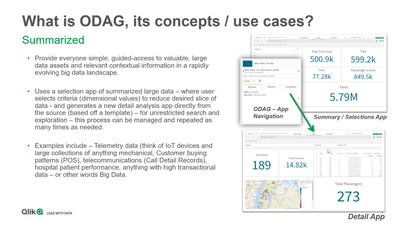
In summary, ODAG was originally developed to meet the need of analysis of very large data sets. The concept is quite simple:
- One Qlik Sense app displays summarized data with filters from the big data source.
- You select the filter values and reduce your answer set to meet a defined row count constraint.
- You click the app navigation link along the bottom to open the ODAG panel
- You click a button and a new more detailed app, dynamically built from a template, is generated directly from the source data with applied filters and defined metrics at a much more detailed level. That's it!
ODAG Requirements Summarized
- Qlik Sense base app (contains summarized measures as KPIS and desired dimension values as filters)
- Summarized data
- App Navigation link - linked to 2nd Qlik Sense template app
- Defined row count constraint
- App retention setting
- Qlik Sense template app (contains detail KPIs and detailed analysis metrics)
- Activation script with binding syntax
- WHERE conditions with odag_ binding variables added to query
Qlik Sense in 60 - On Demand App Generation (video)
(Video transcript attached)
Help Topics
Source data:
https://www1.nyc.gov/site/tlc/about/tlc-trip-record-data.page
Presentation:
Do More with Qlik Session - you may need to register to access it:
https://gateway.on24.com/wcc/experience/eliteqliktech/1910644/2395144/do-more-with-qlik-for-beginners-and-beyond
Register:https://pages.qlik.com/21Q3_QDEV_DA_GBL_DoMorewithQlikTargetpage_Registration-LP.html
Sample Apps attached - ODAG - Apps - Taxi Trips.zip - (Note you need to add your data connection and access SQL etc to your data sources)
Can't see the video? YouTube blocked by your region or organization? Download the .mp4 attached in this post to view this on your computer or mobile device.

-
【開催報告】Data Design Duel – 第 5 回 Qlik データソン
最初に、Qlik プリセールスの中嶋からの挨拶と今回の趣旨、評価基準などを説明しました。続いて、今回のアプリ審査員を務めた Qlik アナリティクス製品管理 ディレクター、Patric Nordström からのビデオメッセージをご紹介しました。流暢な日本語と英語を交え、「皆さまのアプリはとても素晴... Show More最初に、Qlik プリセールスの中嶋からの挨拶と今回の趣旨、評価基準などを説明しました。続いて、今回のアプリ審査員を務めた Qlik アナリティクス製品管理 ディレクター、Patric Nordström からのビデオメッセージをご紹介しました。流暢な日本語と英語を交え、「皆さまのアプリはとても素晴らしくて見るのが本当に楽しかったです。Qlik Analytics の新しい機能をふんだんに使ったアプリを審査する機会をいただいて光栄です。甲乙つけがたい数々の素晴らしいアプリを作成いただき、ありがとうございました。」と、参加者への感謝と労いの気持ちをお伝えしました。
■ファイナリスト発表
いよいよ全 58 のアプリを厳正に審査し、選出させていただいたファイナリストの発表です。Qlik プリセールスの鈴木から、20本のファイナリストのアプリの特徴を 1 つずつ丁寧にご紹介しました。どのアプリも力作で、他の参加者が作成したアプリのデザインを真剣な眼差しで見つめている会場の皆さんが印象的でした。
*チーム参加の場合はチーム名、個人参加の場合は個人名を記載しています。()内はアプリ名です。パートナー部門
ユーザー部門
吉野 智士さん(【Tennis】ATP Records) Inari623(HR analytics) インサイトクラン(人材管理システム) 川上 直人さん(Health Care) 上野 夏恋さん(Qlik Hue) Fujitsu DP All-Stars(日本食の世界における人気度) 久米 弘文さん(CX 分析) AI’M Qlik(HealthCheck) 杉山 奈緒さん
(ブランド比較アプリ・環境マネジメントアプリ)Data Practice Victors(MATCH COFFEE) SUZUKI(Google アナリティクスのデータ分析) 堀井 正敏さん
(宇宙(そら)からネットを見てみたら)Sayaka-Fukuhara(色彩図鑑) Under 31(CAR SELECTION) Tomo(航空会社Twitter 分析) やすぎーズ(経費管理) 老若男女
(SO Legends - Iconic Japanese Baseball Players)テクノプロジェクトデータ利活用チーム
(Qlik Facebook コネクター (コカ・コーラとペプシの FB ページ比較))YO(World Data Visualization) ■アワード受賞者発表
ついに…この瞬間がやってきました!デザイン王者の称号は誰の手に?!
Qlik の中嶋から、ユーザー部門・パートナー部門に分けて、それぞれの賞を発表しました。受賞者の皆さまには、後日、トロフィーと豪華賞品(Meta Quest 3S や Apple Watch など)を贈呈いたします。
*チーム参加の場合はチーム名、個人参加の場合は個人名を記載しています。()内はアプリ名です。パートナー部門
最優秀賞:SUZUKI(Google アナリティクスのデータ分析)
Google アナリティクスのデータを基に、レイアウトコンテナとアニメーションを組み合わせて制作しました。入口画面はインドの曼荼羅模様をイメージし、配色は赤を基調としたダークテーマという珍しい構成にしました。情報を前面に押し出すために基本はフィルターを排除し、必要な場合のみ右上から呼び出せるようにしました。ページ追加が容易になるよう設計し、SVG を活用した部品や Qlik Japan Blog の「Viz for Deck」を応用した表や地図も組み込んでいます。また、ユーザーがアクセスしたくなる仕掛けとして、おみくじが引ける機能を実装しました。結果は大吉から大凶までランダムに表示され、遊び心を加えています。優秀賞:Sayaka-Fukuhara(色彩図鑑)
業務とは関係なく、「自分の好きな色を詰め込む」ことをテーマにしました。構成は 4 シートで、1 シート目は表紙。ページを遷移する度に変わる名言を表示し、遊び心を加えています。さらに「おみくじ」機能があり、結果に応じて相性の良い色を表示します。最後の一覧ページでは、色自体やタイプ、モードで絞り込みが可能で、色相や彩度で並び替えもできます。背景色も変更でき、自分好みの色を探すことを楽しめるアプリです。審査員特別賞:久米 弘文さん(CX 分析)
「徹底的にシンプルにする」ことをテーマにしました。構成は、左側にアプリ概要のメニューと各シート上部にメニューバーを配置。画面上部にはフィルターと主要指標をまとめ、いつでも確認できるようにしています。チャートは 1 〜 2 種類に絞り、大きく表示して必要な情報をすぐ取得できる形にし、画面下部には説明を添えてガイドとして機能させています。全体を通して、他の作品とは異なるアプローチですが、シンプルさにこだわった点が特徴です。ユーザー部門
最優秀賞:川上 直人さん(Health Care)
今回のテーマは「デザイン」でしたが、画面の見た目だけでなく、ユーザーの気持ちや行動まで設計することが重要だと考え、ヘルスケアをテーマにアプリを制作しました。データをきれいに見せるだけでなく、健康への関心を高められるよう、遊び心のあるギミックや癒しになるイラストを散りばめています。アプリは英語と日本語の切り替えに対応し、ホーム画面では健康状態の概要を一目で確認できます。こだわりのギミックとして、水分補給量に応じて水位が変わる SVG 表現や、歩数に応じてキャラクターの動きが変化し、目標達成時には花吹雪が舞う演出を実装しました。また、筋トレアイコンを押すと体の部位ごとの疲労度を表示するなど、直感的に楽しめる仕組みも取り入れています。優秀賞:Inari623(HR analytics)
一人で短期間で開発したため、できるだけシンプルな画面構成を目指しました。「良いデザインは実用性がある」という考えのもと、SNS の UI を参考に、特に X(旧 Twitter)や Instagram を模した構成にしています。左側のアイコンをクリックすると画面が切り替わり、たとえば最上部のアイコンではデータ概要を表示します。差別化のため、アラート的な機能を実装し、異常がある場合は白い丸がオレンジ色のビックリマークに変わるなどの表示を行います。選択内容によってアラートの表示・非表示が切り替わる仕組みです。また、従業員詳細ページでは ID を選択すると顔写真を表示できるようにしました(画像は生成したものを利用)。全体的に実用性を重視し、華やかな他作品とは異なるアプローチをとったことが評価につながったと感じています。審査員特別賞:AI’M Qlik(HealthCheck)
ジムと内科の健康診断を想定したシステムです。内科ページでは、問診票に回答すると、心臓・肺・肝臓それぞれのスコアが表示されます。喫煙の有無などの回答内容に応じてスコアが変動し、さらにシート内で臓器を選択すると、その臓器の詳細結果が確認できます。ジムページでは、運動頻度や項目に応じて結果が変化します。こだわりとして、スコアに応じて臓器の画像が切り替わる仕組みを導入。スコアが低い場合は黒く変色した悪い臓器、高い場合は健康的な臓器が表示されるなど、視覚的にも結果を実感できるようにしています。受賞された皆さま、おめでとうございました!
なお、受賞者の Qlik Sense アプリは、日本語デモアプリサイト「Qlik Showcase」にて一般公開中です。ぜひ、ご覧ください!
また、10/28(火)開催「Qlik ユーザーミートアップ」では、入賞者による講演を予定しています。Qlik ユーザーまたは導入検討中の方であれば、どなたでもご参加いただけます。ぜひ、お申し込み・ご参加ください!
授賞式の最後は、クリックテック・ジャパン(株)執行役員 ソリューション技術本部長の濱野より、ご参加いただいた皆さまへ感謝のメッセージで締めくくりました。会場の盛り上がりはまだまだ続きます!Qlik の濱野による乾杯の音頭を皮切りに、懇親会がスタート。参加者同士の歓談はもちろん、よりカジュアルにお楽しみいただけるようダーツ大会を開催し、スコア順で Qlik のノベルティを選んでお持ち帰りいただきました。会話とダーツで盛り上がり、いつもと少し違うアワード授賞式&懇親会となりました。
そして、クリックテック・ジャパン(株)執行役員 エンタープライズ営業本部長の槙野より、最後のご挨拶と一本締めで盛況のもとに終了しました。
■最後に…
今回は、アプリ開発の達人のみならず、初心者でも挑戦できる “見た目が美しい魅せるダッシュボードだけ”を審査対象とした新たな試みのデータソンでした。審査員も唸るほどのアイデアとセンスを存分に表現した素晴らしいデザインのアプリを拝見し、「こんなこともできるんだ!」と、Qlik Sense の可能性を感じることができました。自身のスキルを試すだけでなく、他の参加者の成果物からヒントやアイデアを得られるのもデータソンの醍醐味ではないかと思います。ご参加いただいた皆さま、本当にありがとうございました!
-
Can just a few hours of student activity predict the future?
Stanford University researchers say yes. At the Learning Analytics and Knowledge Conference (LAK ’25), they revealed that looking at just two to five ... Show MoreStanford University researchers say yes.
At the Learning Analytics and Knowledge Conference (LAK ’25), they revealed that looking at just two to five hours of student activity in intelligent tutoring systems or educational games can predict, months in advance, how those students will perform on end-of-year standardized tests. Data from intelligent tutors helps predict K-12 academic outcomes, study finds | Stanford Report
Researchers analyzed only the early interaction logs and used machine learning to spot patterns. The surprise? These short-term models were just as accurate as those built from an entire year of data.
As Professor Emma Brunskill from Stanford explains:
“In education, we often are interested in delayed outcomes like end-of-the-year assessments, but it would be useful if we could predict those outcomes using shorter amounts of data from educational software platforms.”This shows you don’t need massive datasets to uncover valuable insights, you need the skills to interpret them. Early predictions like this allow teachers to act sooner, whether that means offering extra help or providing greater challenges.
That’s where data literacy comes in. When you know how to explore and interpret data, you can spot patterns early, act with precision, and track results over time.
The Qlik Academic Program helps make that possible, offering free access to Qlik Sense analytics software, self-paced training, certifications, and resources to apply insights ethically and effectively.
Ready to explore your own data?
Join for free: www.qlik.com/academicprogram