Unlock a world of possibilities! Login now and discover the exclusive benefits awaiting you.

Analytics & AI
Forums for Qlik Analytic solutions. Ask questions, join discussions, find solutions, and access documentation and resources.
Data Integration & Quality
Forums for Qlik Data Integration solutions. Ask questions, join discussions, find solutions, and access documentation and resources
Explore Qlik Gallery
Qlik Gallery is meant to encourage Qlikkies everywhere to share their progress – from a first Qlik app – to a favorite Qlik app – and everything in-between.
Qlik Community
Get started on Qlik Community, find How-To documents, and join general non-product related discussions.
Qlik Resources
Direct links to other resources within the Qlik ecosystem. We suggest you bookmark this page.
Qlik Academic Program
Qlik gives qualified university students, educators, and researchers free Qlik software and resources to prepare students for the data-driven workplace.
Recent Blog Posts
-
Qlik Automate: Deprecation of “Run Conversational Task” block for Hugging face c...
Hello Qlik Automate admins and users, The Run Conversational Task block in the Hugging Face connector has been deprecated and removed from Qlik Automa... Show MoreHello Qlik Automate admins and users,
The Run Conversational Task block in the Hugging Face connector has been deprecated and removed from Qlik Automate.
Why was the block removed?
The block was removed due to Model Unavailability. The API used no longer supports any available models for execution under the conversational task.
How does this affect me?
You will no longer see the Run Conversational Task block in the Hugging Face connector.
What action is needed from me?
Check Your Existing Workflows.
Review any workflows and automations that include the Run Conversational Task block and remove the block from the automation to prevent an execution error.
If you have any questions, we're happy to assist. Reply to this blog post or take similar queries to the Qlik Application Automation forum.
Thank you for choosing Qlik,
Qlik Support -
Viz for Deck: テーブルって地味かしら?
テーブルって地味って思っていませんか?テーブルって、他のチャートと比べて文字や数字の羅列になりがちで華がないよなあなどと思っている人もいるのではないでしょうか?今回はテーブルを華やかにするアイデアをお伝えします。長文ですけど、下にいくほど面白いので最後まで読んでくださいね! インジケーターやミニ... Show Moreテーブルって地味って思っていませんか?テーブルって、他のチャートと比べて文字や数字の羅列になりがちで華がないよなあなどと思っている人もいるのではないでしょうか?今回はテーブルを華やかにするアイデアをお伝えします。長文ですけど、下にいくほど面白いので最後まで読んでくださいね!
インジケーターやミニチャートはご存じですよね?ただ数字を表示するだけでなく、これらを使用すると直感的に理解しやすくなったり、さらに追加の情報を盛り込み、リッチな表現にすることができます。
下の図は特別なテクニックは全く使用していません。
1.インジケーター(アイコン)を利用しています。限度を1000000とし、上回る場合は緑の旗アイコン、下回る場合は赤の三角アイコンを表示しています。アイコンとともに値を表示するかしないか、値にもアイコンと同じ色を設定するかどうか、インジケーターの位置も調整できます。
2.ミニチャートを利用しています。テーブルの主軸は取引先ですが、その軸毎にさらに年月度を軸として、各月の値をミニチャートの棒グラフで表現しています。色もこまやかに指定することができます。
3.こちらもミニチャートですが、棒ではなく点線を表示しています。
4.ミニチャートのスパーク線を表示しています。
5.前月との差をミニチャートの正負で表示しています。負の場合は赤、正の色は青を指定しています。
ランキングによって絵文字を出すのはどうでしょう?ちょっと楽しくなります。簡単な数式で実現できます。
正と負の表現をアレンジしたのが下の図です。
利益率がマイナスの場合は左側に赤い棒と記号、正の場合は右側に青い棒を表示しています。式を解説します。
まず、利益率が 0 以上の場合、空白を11回繰り返した後、縦棒「|」を1文字表示します。その後ハイフォン 「-」を繰り返すのですが、商品名ごとに求めた利益率の絶対値が最も大きい値に対する当行の利益率の比率を求め、それを整数に四捨五入した数の30倍の「-」を繰り返します。何倍にするかは線が適当な長さになるように決めます。そしてそのあとに「●」を表示します。
利益率が 0 未満の場合は、縦棒「|」の位置を12文字目に合わせるために、最大利益率に対する比率分の長さを10から減算して空白を繰り返したのち「●」を表示します。そして比率分の数の「-」を繰り返して「|」を表示します。
最後に利益率の値を1文字の空白後に表示します。色はテキストカラー表現に設定します。
マークを変えればこんな楽しい図にもできます。
だいぶ長くなっちゃいましたが最後にピボットテーブルを利用した、グループ別のウォーターフォールをご紹介します。
さきほどと同様のテクニックで商品区分別の最大値に対する各行に比率を求めて「■」を繰り返し表示します。1軸目の商品区分の行でない場合のみ、最初に空白を置いています。
テーブルもアイデア次第でビジュいい感じに盛れますね!Happy Dueling !
** 過去の記事 **

-
Why data is key for AI
The old saying, GIGO-garbage in, garbage out, stays relevant even today with the world of fast evolving technologies. In particular, the world of data... Show MoreThe old saying, GIGO-garbage in, garbage out, stays relevant even today with the world of fast evolving technologies. In particular, the world of data-AI is no different. Your AI projects are majorly impacted by the quality of data and therefore data has to be "ready" for AI. What might be relevant for one particular AI project might not be relevant to another. Getting your AI project to deliver the right outcomes is dependent on the processes brought to the table with the data in question.
To learn more about how data can be ready for an AI project and what are the steps involved, read this article by Gartner: https://www.gartner.com/en/articles/ai-ready-data
To learn data analytics including free training and certifications, visit qlik.com/academicprogram
The Qlik Academic Program is being leveraged for getting trained in cutting edge data analytics technologies by more than 3300 universities and educational institutions worldwide.
-
Red-White-Blue Refresh: One-Click Tenant Makeovers via Qlik APIs
It’s the 4th of July, so while real fireworks fill the sky, I’m flipping my tenant into a star-spangled skin, and I'll switch it back to default first... Show MoreIt’s the 4th of July, so while real fireworks fill the sky, I’m flipping my tenant into a star-spangled skin, and I'll switch it back to default first thing Monday.
The holiday example is just a demo, what matters is that this is a repeatable pattern you can reuse for product launches, partner take-overs, dark-mode roll-outs or any scheduled swap.
How it works:
What it controls
Think of it as…
Brands API
Logo, favicon, browser titles
Signage
Themes API
Colors, fonts, object styling
Paint
Qlik Automate (Platform Ops connector)
Timed / event-driven swaps
Light switch
1. Brands API refresher:
- GA for all customers since 4 Oct 2024 (the OEM-only limit is gone). qlik.dev
- Only one brand can be active per tenant. qlik.dev
- Three assets: logo, favIcon, optional styles.css.
Key endpoints (all under /api/v1/brands) qlik.dev
POST    /brands
POST    /brands/{id}/actions/activate
POST    /brands/{id}/actions/deactivate
GET     /brands/active
2. Themes API at a glance:
- JSON + QEXT zip controls palettes, fonts, object defaults.
- Upload once, reference by name in any app.
- Theme changes are per-app, but brands are tenant-wide.
3. The Automation glue:
Multiple connectors including the Platform Operations connector ship ready-made blocks, so anyone with Automate access can schedule branding swaps.
P.S (Not Tested): To switch an app's theme using Automate may require an externally hosted piece of code that uses the Engine API to swap the theme, as I was not able to do this via the existing blocks in Automate (yet).
Fourth-of-July Demo:
1/ Build the theme
patriotic-theme.qext
{
  "type": "theme",
  "name": "Patriotic-July-4",
  "description": "Red-white-blue palette for Independence Day"
}
theme.json
Simple theme to get started:
{
  "type": "theme",
  "name": "Patriotic-July-4",
  "properties": {
    "color": {
      "primary"   : "#3C3B6E",
      "accent"    : "#B22234",
      "background": "#FFFFFF"
    },
    "palettes": {
      "data": [
        {
          "name": "Stars-and-Stripes",
          "colors": ["#B22234", "#3C3B6E", "#FFFFFF"]
        }
      ]
    },
    "object": {
      "title": { "color": "@accent", "fontSize": "18px" },
      "axis" : { "color": "@primary" }
    }
  }
}
- Zip the theme files into patriotic-theme.zip
- Then you can upload it to your tenant, or simply use qlik-cli to do that:
qlik theme create \
  --file patriotic-theme.zip \
  --name "Patriotic-July-4" \
  --description "Red-white-blue holiday palette"
More on Qlik CLI here.
2/ Create & activate the brand
Docs/Tutorial: https://qlik.dev/manage/platform-operations/brand-a-tenant/
2.1/ Create a new brand
qlik brand create \
  --name "Holiday Brand" \
  --description "Independence-Day wrapper" \
  --file-logo ./assets/logo-july4.png \
  --file-favIcon ./assets/favicon-july4.ico
Response:
{
  "active": false,
  "createdAt": "2025-07-03T20:30:36.000Z",
  "createdBy": "HdEcP-DYgrNwhQ6x2kw6CfidciVcoyz4",
  "description": "Independence-Day wrapper",
  "files": [
    {
      "contentType": "image/x-icon",
      "eTag": "\"9feeaa2531d7ba38bef8e3198017188b\"",
      "id": "favIcon",
      "path": "/api/v1/brands/6866e86ca2aba070cf814c5f/files/favIcon"
    },
    {
      "contentType": "image/png",
      "eTag": "\"848074eaa51cb8997aacaa6b04d01a9a\"",
      "id": "logo",
      "path": "/api/v1/brands/6866e86ca2aba070cf814c5f/files/logo"
    }
  ],
  "id": "6866e86ca2aba070cf814c5f",
  "name": "Holiday Brand",
  "updatedAt": "2025-07-03T20:30:36.000Z",
  "updatedBy": "HdEcP-DYgrNwhQ6x2kw6CfidciVcoyz4"
}
2.2/ Activate the brand
export BRAND_ID=6866e86ca2aba070cf814c5f
qlik brand activate $BRAND_ID
Response:
{
  "active": true,
  "createdAt": "2025-07-03T20:30:36.000Z",
  "createdBy": "HdEcP-DYgrNwhQ6x2kw6CfidciVcoyz4",
  "description": "Independence-Day wrapper",
  "files": [
    {
      "contentType": "image/x-icon",
      "eTag": "\"9feeaa2531d7ba38bef8e3198017188b\"",
      "id": "favIcon",
      "path": "/api/v1/brands/6866e86ca2aba070cf814c5f/files/favIcon"
    },
    {
      "contentType": "image/png",
      "eTag": "\"848074eaa51cb8997aacaa6b04d01a9a\"",
      "id": "logo",
      "path": "/api/v1/brands/6866e86ca2aba070cf814c5f/files/logo"
    }
  ],
  "id": "6866e86ca2aba070cf814c5f",
  "name": "Holiday Brand",
  "updatedAt": "2025-07-03T20:32:10.203Z",
  "updatedBy": "HdEcP-DYgrNwhQ6x2kw6CfidciVcoyz4"
}
(Under the hood: POST /brands, then …/actions/activate.) qlik.dev
3/ Schedule with Qlik Automate
Block
Settings
Start (Scheduled run mode)
2025-07-04 00:00 tenant time
Activate Brand (Qlik Platform Operations)
Brand = Holiday Brand
List Items (Qlik Platform Operations)
with Filter List condition: meta.tags's name equals "holiday-mode"
(Not Tested) For Each Item → Call externally hosted EngineAPI code using Call URL block
Your endpoint that receives appID and themeID and swaps the theme
example: https://yourfunction.run/paint?app=1234theme=5678Send Slack Message
“Patriotic Mode ON”
To revert back:Duplicate the flow → change trigger to 2025-07-06 00:00 → swap to "Deactivate Brand"→ patch apps back to "Sense Classic" (or default theme).
Some use cases beyond the Holiday:
Brands API
Themes API
Automate trigger
Quarterly refresh
Same brand
Four seasonal themes
Calendar
Partner co-branding
One brand per partner
Partner-specific palette
Tenant-creation webhook
Dark-mode toggle
Two brands (light/dark logo)
Light & dark themes
User button
A/B color testing
One brand
Theme A vs Theme B
Hourly schedule + metric logging
Keep logo & favicon changes in brand, color tweaks in theme, and let Automate decide when it happens. Also, remember that the brands affect the whole tenant, so make sure to preview in a sandbox tenant.
Happy Independence Day .. and happy theming!
-
Qlik Cloud 6月の新機能
分析の新機能 編集画面のアップデート 標準と詳細モードとの切替がなくなりました。値を選択したり、ソーステーブルを表示して確認しながら開発することができます。 新しいストレート テーブルが標準チャートに昇格 Visualization bundle に含まれていたストレートテーブルが標... Show More分析の新機能
編集画面のアップデート
標準と詳細モードとの切替がなくなりました。値を選択したり、ソーステーブルを表示して確認しながら開発することができます。
新しいストレート テーブルが標準チャートに昇格
Visualization bundle に含まれていたストレートテーブルが標準チャートに昇格しました。これまでのテーブルは(リタイア済み)と表示されていますが、今後廃止が予定されています。廃止は十分な期間を取って事前に告知されますが、早めの移行をお勧めします。
既存のテーブルの上に、ストレートテーブルをドラッグアンドドロップして、「以下に変換」を選択するとストレートテーブルに変換することができます。完全に機能が同じではないので、念のためシートのバックアップをとってから実施してください。
ピボット テーブル インジケーター
Visualization bundle のピボットテーブルのメジャーに、インジケーターを表示できるようになりました。テーブルやストレートテーブルと同様に、限度を設定してアイコンや色を設定することができます。
データ準備のアップデート
Qlik Automate に関するアップデート
これまで個人スペースでのみ作成していた自動化を共有スペースで作成し実行することができるようになりました。これによりチームによるコラボレーションと実行を効率的に行うことができます。詳細については、「共有自動化の導入」を参照してください。
その他、使いやすさも改善されています。
Qlik Predict に関するアップデート
MLの展開で、予測ファイルに名前を付ける時に、フォルダパスも含めることができるようになりました。
レポートに関するアップデート
アプリ内のHTMLエディタを使用して、HTMLレポートを作成することができるようになりました。レポートは EメールやWebサイトに埋め込むことができます。
データ統合に関するアップデート
データ移動・変換に関するアップデート
プロジェクトをインポートしたり、変更を取り込んだり、既存のプロジェクトをバージョン管理で取得したりする際、新しいユーザー・インターフェースで、これにより、以下のようなプロジェクト設定の選択が可能になりました。
- プロジェクトの各タスクのデータベース接続
- ターゲット接続
- クロスプロジェクトパイプラインのソースプロジェクト
- アイスバーグのボリュームとカタログ
★エクスポートファイルの形式が、単一のJSONファイルから、複数のJSONファイルを含むZIPファイルに変更されました。 旧JSON形式は、2026年1月30日までインポートに対応します。 JSONファイルを新しいフォーマットに変換するには、それらを インポートし、新しいZIPフォーマットにエクスポートする必要があります。 旧JSON形式のプロジェクトは、API経由でインポートすることはできません。 2026年1月30日までに、既存のプロジェクトを新しいフォーマットにエクスポートすることをお勧めします。
SSH トンネルを使用したデータ ソースへのセキュアなアクセス
Data Movement gateway を使用せず、SSH トンネル経由でサポートされているデータ ソースに接続できるようになりました。トンネル化により、ファイアウォール内のデータ ソースに安全にアクセスすると同時に、トンネルを通過するすべてのデータを暗号化することができます。
サポートされるデータ ソース コネクタ:
- MySQL
- PostgreSQL
- Microsoft SQL Server (Microsoft CDC ベース)
カタログに関するアップデート
管理・その他のアップデート
Developer ロールと API キーの切り替えは非推奨
「管理>ユーザーの管理>権限」の「Developer」ロールは廃止され、2025年末までに削除されます。影響を受けるユーザーとグループを「APIキーの管理」権限を含むカスタムロールに移行するか、「User Default」の「機能とアクション」の「開発者」欄で、APIキーを管理の権限を有効にしてください。
詳しくは、「カスタムロールの管理」をご覧ください。
オンプレミスで開発したアプリの評価
もともとオンプレミスで開発されたQlik Senseアプリのパフォーマンスを、 Qlik Cloudテナント内で直接評価できるようになりました。移行前やハイブリッド環境でのアプリのテスト、最適化、ベンチマークが可能になり、クラウドへの移行がよりスムーズとなります。
-
Connector Factory – May and June 2025 releases
Qlik Talend More Qlik Talend Cloud connectors We’re continuing to expand the connectivity of Qlik Talend Cloud with the addition of more application... Show MoreQlik Talend
More Qlik Talend Cloud connectors
We’re continuing to expand the connectivity of Qlik Talend Cloud with the addition of more applications that can now be used as a data source. These connectors will help companies eliminate the lengthy development time associated with custom connectors as well as accelerate user access to a wider variety of sources. The new connectors are for:
- ActiveCampaign - email marketing, marketing automation, sales automation, and CRM functionality for small-to-mid-sized businesses
- Close - specialized CRM platform designed for small to medium-sized businesses
- Dixa - customer service platform that unifies customer data and communication channels
- Google Sheets - web-based application that enables users to create and update spreadsheets in real time
- Intercom - customer communications platform
- Klaviyo - marketing automation platform that automates eCommerce SMS and email marketing
- Mailchimp - email and marketing automation platform
- Mambu - SaaS cloud banking platform
- Mixpanel - real-time analytics platform that helps companies measure and optimize user engagement
- Outreach - sales forecasting, deal insights, and conversation intelligence
- Pendo - provides in-app guidance, communications, and analytics
- Pipedrive - sales pipeline CRM
- Recharge – Manage subscriptions & Recurring Payments for Ecommerce
- Recurly - automating and managing small to medium-sized business subscription and revenue workflows
- S3-csv – Amazon object storage service
- Square - point-of-sale system for sellers with physical or online stores
- Stripe - suite of APIs powering online payment processing and commerce solutions
- Tiktok Ads - used to pay for share sponsored content on TikTok’s platform
- Twilio – cloud communications
- Typeform - specializes in online form building and online surveys
- Xero - online accounting software for small businesses
- Yotpo - cloud-based content marketing platform for e-commerce businesses
Qlik Analytics
New version of Direct Access gateway
The Qlik Data Gateway - Direct Access allows Qlik Sense SaaS applications to securely access behind the firewall data, over a strictly outbound, encrypted, and mutually authenticated connection.
We recently released Direct Access gateway 1.7.4 & 1.7.5 which, in addition to several bug fixes, introduced the following enhancements:
- Support for overriding the default Windows service account during setup
- Support for Windows Server 2025
- Added logging context to metadata preview calls
- Added support for "User defined credentials" to the MongoDB (via Direct Access gateway) and Google BigQuery (via Direct Access gateway) connectors
- Support for AsyncCommand with Load Data requests
- Performing Load Data requests asynchronously
- Support for changing the AGENT_LOG_OPTIONS property without needing to restart the Direct Access gateway service
SAP Report Connector integrated in Qlik Cloud Analytics
We have expanded our support for SAP by integrating the SAP Report Connector within Qlik Cloud Analytics, providing seamless connectivity to SAP Report objects.
Public API enhancements
- A new Public API for configuration of settings related to the Direct Access gateway was introduced
- The general public API for analytics connectors has been updated to support updates of existing connection definitions.
Qlik Automate (Formerly Qlik Application Automation)
New Connectors
- Qlik Cloud Catalog - A native connector that lets you automate tasks related to the Data Products Catalog and Data Quality workflows. This blog discusses how to get started.
Updated Connectors
- Improvements to the Snowflake connector
- Support for projects in the Qlik Talend Cloud Data Integration connector
-
The Web Developer's Introduction to Qlik Sense API's
IntroductionWe've covered on this blog about how to get started with the Qlik APIs and some of the associated tools like Enigma.js.But what if you're ... Show MoreIntroduction
We've covered on this blog about how to get started with the Qlik APIs and some of the associated tools like Enigma.js.But what if you're completely new to Qlik Sense and feel more comfortable developing websites and building visualizations? You're probably thinking: "Do I really have to learn something else? Just get me started!" Well this is what we'll try to do here - give web developers familiar with modern web development (e.g. React, Webpack, ES6+) an approachable tutorial to connect to Qlik Sense, understand the layout of the app, and get some data within 20 minutes!Before we get started, we will assume that you have some knowledge of web development as well as access to a Qlik Sense server and a pre-existing app. To follow along, take a look at this repo on GitHub and download the Consumer Goods Sales app from our Demo Site.Project Setup
Our first step will be to clone the example repo for the basic setup of the project. In this tutorial, we have already installed the development dependencies (Webpack, Webpack Dev Server, Babel) as well as the dependencies for the app (React, ReactDOM, Enigma.js). You are probably familiar with React and ReactDOM but probably not Enigma.js which is what we'll use to connect to and interact with the Qlik Engine JSON API. Enigma.js allows us to easily use all the methods that we need in simple JavaScript.
To get started, simply clone the repo, install the dependencies, and then we'll get going.git clone https://github.com/qlik-demo-team/qlik-engine-tutorial my-qlik-app cd my-qlik-app npm install npm run devGo to http://localhost:8080 to see "My Amazing Qlik Sense Mashup!" on your screen. Note: to see the final result of any one section, you can switch to one of five branches in the repo: start (setup), connection (connecting to Qlik Sense), hypercube (getting data), list-object (making a selection), finished (completed project).
Connecting to Qlik Sense
One of the first steps in building a web app with access to Qlik Sense is to get the domain for your Qlik Sense server as well as your app ID. Going to your Qlik Sense Hub is an easy way to get the domain. You can ignore the "https://" and just get the url of the Qlik Server (e.g. qlik-server.example.com) or if just running locally (localhost).Next you'll need the app ID of the app that you wantto access from your website. A simple way to do that is to just open the app and then look at theURL - the app ID is right in that url after "/sense/app/[appID]/" (your URL will probably not have the "windows" before "sense").Now that we have the domain and app ID, we can connect to Qlik Sense. We'll show the code first and then explain what we're doing. Copy and paste the code below into the Home.js file and update it with the domain of your Qlik server and app ID.const enigma = require('enigma.js'); const schema = require('enigma.js/schemas/12.170.2.json'); const SenseUtilities = require('enigma.js/sense-utilities'); const config = { host: '', // <== Qlik server domain here secure: true, port: 443, prefix: '', appId: '', // <== app ID here }; const url = SenseUtilities.buildUrl(config); const qDocPromise = enigma.create({ schema, url }).open().then(global => global.openDoc(config.appId)); console.log(qDocPromise)Enigma.js is a Promise-based library so as you'll notice, in your console, it says Promise {<pending>} meaning it has just logged the Promise itself, not the object. Establishing the connection is a great first step in understanding how Enigma works and how we'll be communicating with our Qlik server.
Because everything is Promise-based, to actually see the returned value, we'll need an extra bit of code:qDocPromise.then((doc) => { console.log(doc); })The resulting object is what we'll use to do most of the talking to the Qlik Sense server. Without going into much further detail, this object is called the "Doc" (in older versions, it was called the App but is now usually just called the Doc).
Listing the Available Fields
Now that we have made our connection to the Qlik server and opened the correct app, let's get a better understanding of the data by listing out the fields:qDocPromise.then((doc) => { console.log(doc); doc.createSessionObject({ qInfo: { qType: 'fields' }, qFieldListDef: {}}).then((fields) => fields.getLayout().then((layout) => { const { qItems } = layout.qFieldList; const sorted = qItems.sort((a,b) => a.qName > b.qName ? 1 : -1) console.log(sorted) })) })If you open your console, you can see that the resulting array has of over 200 fields. Building a mashup without understanding anything about the data is difficult but the above snippet does a good job of just listing all the fields
available to you. But because this is an introductory exercise, we're going to pick a couple fields that we know beforehand and see if we can get some data!Source: List fields in an appGetting Data
Getting started with the Qlik APIs is difficult if you are not familiar with the jargon. In the Qlik Engine JSON API documentation, you'll see terms like "hypercube", "dimension", and "measure" thrown around a good bit. A hypercube is just the code that requests the data you want. Some Qlik apps can be quite large with hundreds of fields and we obviously won't use ALL of that data in every visualization. A hypercube allows us to pick only what we want. A hypercube is comprised of dimensions (typically a category in your data, e.g. "customer", "product", etc.) and measures (typically some value on which you can make calculations, e.g. sum, count, average, etc.). Copy the code below into a new file called hypercube.js:// hypercube.js const hypercube = { qInfo: { qId: 'Consumer Sales', qType: 'data' }, qHyperCubeDef: { qDimensions: [ { qDef: { qFieldDefs: ['[Product Group Desc]']}, qFieldLabels: ['Product Group'] } ], qMeasures: [ { qDef: { qDef: '=SUM([Sales Margin Amount])/SUM([Sales Amount])', qLabel: 'Margin' }}, ], qInitialDataFetch: [{ qTop: 0, qLeft: 0, qWidth: 10, qHeight: 1000, }], qInterColumnSortOrder: [], qSuppressZero: true, qSuppressMissing: true, } } export default hypercube;Now that we have our hypercube, let's use our doc object to get the data. First import the hypercube at the top of the file, just below your Enigma imports, and then add the following code:
// Enigma.js imports
import hypercube from './hypercube';

// CODE

qDocPromise.then((doc) => {
  // new code
  doc.createSessionObject(hypercube).then((obj) => obj.getLayout().then(layout => {
    console.log(layout);
    const dataPages = layout.qHyperCube.qDataPages[0].qMatrix
    console.log(dataPages)
  }))
})
Boom! And just like that, we now have some data! In your console, you'll be able to see both the layout object as well as the data. For some users, this is good enough - if you know the fields you want, you can make as many hypercubes as you'd like to get the data you're looking for. From here, you can use vanilla JavaScript to clean-up
the array to feed into a visualization library like D3 or use Picasso.js which has a plugin that can work with hypercubes.Making a Selection
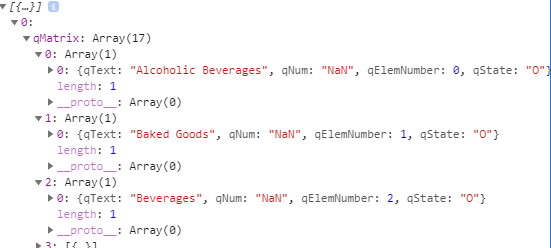
By this point, we have made our connection to Qlik Sense, we've written our first hypercube, and we've actually gotten some data. But how do we make selections? One of Qlik's key selling points is being able to interact with the data and make selections. To do that, we'll use another important object in the Qlik Engine called a List Object. List Objects, unlike hypercubes, only have one dimension and no measures. They aren't designed to give you data but rather give you information on a particular dimension. Let's dig into the example. First, create a new file called listObject.js:// listObject.js const listObject = { title: "A list object", description: "Description of the list object", qInfo: { qId: 'Consumer Sales List Object', qType: 'List Object'}, qListObjectDef: { qStateName: "$", qDef: { qFieldDefs: ['[Product Group Desc]'], qFieldLabels: ["Product Description"], qSortCriterias: [{qSortByLoadOrder: 1}]}, qInitialDataFetch: [{ qTop: 0, qLeft: 0, qWidth: 10, qHeight: 1000, }], }, } export default listObject;Import your list object at the top of the page. Then, inside the qDocPromise, right below the code to fetch the hypercube data, copy and paste the following:// top of page, below other import statements import listObject from './listObject'; // CODE qDocPromise.then((doc) => { // Getting data from hypercube doc.createSessionObject(hypercube).then((obj) => obj.getLayout().then(layout => { console.log(layout); const dataPages = layout.qHyperCube.qDataPages[0].qMatrix console.log(dataPages) })) // NEW CODE: List Object doc.createSessionObject(listObject).then((obj) => { obj.getListObjectData('/qListObjectDef',[ {qLeft: 0, qTop: 0, qWidth: 10, qHeight: 100}]).then(objectData => { console.log(objectData); }) }) })If we open our console and peak inside objectData, we see that inside the qMatrix property, there is an array with 17 items. Each item is an array with a single object that represents a possible value for the field of "Product Group Desc". There is a descriptor/title/name for that field (qText), a numeric value (qNum), an element number (qElemNumber), and it's selection state (qState). Let's try making a selection. Just for fun, let's pick "Beverages", which as we can see in the picture below has a qElemNumber of 2.
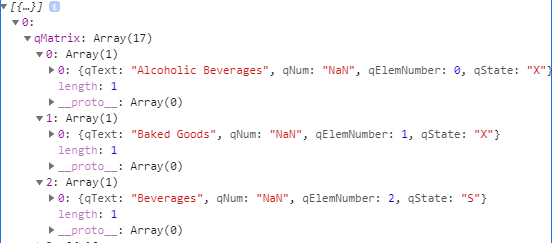
Now, update the code like this:qDocPromise.then((doc) => { // Getting data from hypercube doc.createSessionObject(hypercube).then((obj) => obj.getLayout().then(layout => { console.log(layout); const dataPages = layout.qHyperCube.qDataPages[0].qMatrix console.log(dataPages) })) // UPDATED CODE: List Object doc.createSessionObject(listObject).then((obj) => { obj.getListObjectData('/qListObjectDef',[ {qLeft: 0, qTop: 0, qWidth: 10, qHeight: 100}]).then(objectData => { console.log(objectData); obj.selectListObjectValues('/qListObjectDef', [2], true, false).then((res) => { console.log(res); obj.getListObjectData('/qListObjectDef',[ {qLeft: 0, qTop: 0, qWidth: 10, qHeight: 100}]).then(objectData2 => { console.log(objectData2) }) }) }) }) })Here is a quick rundown of what's happening. The doc.createSessionObject() creates our list object. We then use the resulting list object (which I've called `obj`) to call obj.getListObjectData(). When we logged that to the console, we saw that there was an array of 17 items, all of them with the name of the field and a qState of "O". We then called obj.selectListObjectValues() and selected "Beverages" which had a qElemNumber of 2 (we need to use qElemNumbers to tell the Qlik Engine which item to select). The log of "true" tells us that it was successful. We then call obj.getListObjectData() again to see that the list has been updated. There are still 17 items in the array but now we see that everything except "Beverages" has a qState of "X" while Beverages has a qState of "S". Selecting a value in this way is akin to clicking on a particular bar in a Qlik bar chart - you are selecting "Beverages" and now all the charts in Qlik Sense will, if they are connected to the column "Product Group Desc", show only the data for "Beverages". Here is the console output just to confirm our selections:Conclusion
So there it is, you've done it! You've learned the three most fundamental tasks in creating a Qlik Sense mashup:- Connecting to Qlik Sense
- Creating a Hypercube and Getting Data
- Creating a List Object and Making a Selection
With those three skills, you'll be able to make an interactive web app with your Qlik Data. In this tutorial, we scraped the surface of all that you can do with the Qlik Engine JSON API but we hope that you can now feel free to explore a bit. Here are a few resources that we think will help you get up-to-speed with the Qlik APIs: -
Viz for Deck: 侮るなかれ棒チャート
なんだ今回棒チャートか、と思った人いませんか?「基本のき」の棒チャートも工夫次第でいろんなアレンジができるんですよ。 デフォルトの設定で棒チャートを作成するとこんな感じですね。 プロパティパネルのスタイルのプレゼンテーションで「垂直」か「水平」かを切り替えられますね。 さらにスタイル指定のチャート... Show Moreなんだ今回棒チャートか、と思った人いませんか?「基本のき」の棒チャートも工夫次第でいろんなアレンジができるんですよ。
デフォルトの設定で棒チャートを作成するとこんな感じですね。
プロパティパネルのスタイルのプレゼンテーションで「垂直」か「水平」かを切り替えられますね。
さらにスタイル指定のチャートタブで、枠線や棒の太さを変更すると下記のように見栄えを変えることができます。
続いて次は色にグラデーションを設定した例です。
左は色の設定を「カスタム 数式を使用」にして、ColorMix1を使ってピンクからベージュへのグラデーションを設定しています。
Colormix1() は、0 ~ 1 の間の値を基準に 2 色グラデーションの ARGB カラー表現を返す数式で使用されます。Colormix1 (Value , ColorZero , ColorOne)と書きます。Value は、0 と 1 の間の実数です。Value = 0 の場合、ColorZero が返され、Value = 1 の場合、ColorOne が返されます。0 < Value < 1 のとき、相当する中間の色を返します。
上記の式では案件金額の順位をRank関数で求め、それを値の数の6で割ることで 0 ~ 1 に変換して Value として使用しています。
右の例では色は同じですが、透明度をグラデーションで変更しています。ARGB関数の最初の値は透明度を示しています。続く3つの値でRGBを指定します。次は全体で100%になる積み上げ棒チャートをアレンジしてみました。
左のあみだくじのようなチャートは色は単色とし、枠線を「大」にして棒の太さも太くして視覚的な効果を出しています。このチャートには軸が二つあります。例えば部門と四半期などです。そしてメジャーには、計算値を二つ目の軸を無視した合計「sum(Total <一つ目の軸> 項目)」で割って割合を求めています。
そして右のチャートですが、こちらは最大の値に対する各軸の比率を濃い色で表しています。実は棒チャートではなくコンボチャートで作っています。濃い色の部分は単純に項目の集計ですが、薄い透明な部分は最大の値からそれぞれの軸の値をマイナスして求めています。
この例では、軸(部門名)を無視して全部門のうち、案件金額の集計の最大値の部門の値から、各軸の案件金額をマイナスしています。
そしてコンボチャートではメジャー別にスタイルを設定することができるので、それぞれの「その他のプロパティ」でどちらも主軸とし、異なる色を設定しています。最大案件金額の透明度を上げた設定にしています。
最後に下記の2つのチャートをご覧ください。
左は棒チャートのバタフライモードです。メジャーが2つある場合にプレゼンテーションで簡単にバタフライ表示をすることができます。
右は実はコンボチャートです。2つ目のメジャーをマイナス値に変換するとともに、メジャー別のスタイル指定で色の透明度を上げた設定をしています。水に映っているような効果がありますね。
基本チャートもアイデア次第で魅力的に変身させることができます。
Happy Dueling !
** 過去の記事 **
-
Direct Access gateway versions 1.4 and 1.5 reaching End of Life by January 31st ...
Edited 1st of December 2025: End of Life date changed from December 31st, 2025, to January 31st, 2026. The old versions 1.4.x and 1.5.x of Qlik Data G... Show MoreEdited 1st of December 2025: End of Life date changed from December 31st, 2025, to January 31st, 2026.
The old versions 1.4.x and 1.5.x of Qlik Data Gateway - Direct Access will be officially End of Life by January 31st, 2026.
- Version 1.4 was released in June and July 2023 and reached End of Support on February 19, 2024.
- Version 1.5 was released in September 2023 and reached End of Support on June 12, 2024.
How will this affect me?
Both versions will stop working after reaching End of Life. We recommend you plan to upgrade to the latest available version of the currently supported 1.7.x as soon as possible.
How do I upgrade?
For the upgrade procedure, please refer to Upgrading Qlik Data Gateway - Direct Access on Qlik's online help. This page also lists all the significant changes for each version.
The upgrade to 1.7.x from 1.4 or 1.5 has been thoroughly tested, and the process is expected to be smooth. However, please follow the steps carefully and always take a backup before upgrading. It is also worth noting that .NET 8.x is required (from v1.6.6) and will be automatically installed during the upgrade.
What else do I need to keep in mind?
There are several configuration settings added in later versions of the Direct Access gateway that may be applicable for your deployment. Therefore, please review all details in the online help on Configuring and troubleshooting Qlik Data Gateway - Direct Access. Note that most Direct Access gateway settings can be configured in the Qlik Cloud Administration activity center (from v1.7.2).
Always upgrade to the latest version!
Version 1.6, which was initially released in December 2023, reached end-of-support on June 14, 2025, and is tentatively set for End-of-Life by end of June 2026. We will share an update later this year with the exact End-of-Life date for this version.
Please note that you are always better off upgrading to the latest version available, especially as cloud-side fixes, which get deployed almost every week, most often does not apply to older gateway versions.
If you have questions or need additional assistance, our forums are always open to you, and Support is only a chat away.
Thank you for choosing Qlik,
Qlik Support -
How Analytics is Transforming Healthcare
Today, predictive analytics is being used to anticipate patient needs before they arise. Hospitals can now analyze historical patient data to forecast... Show MoreToday, predictive analytics is being used to anticipate patient needs before they arise. Hospitals can now analyze historical patient data to forecast admissions, optimize staffing, and even predict potential complications. This proactive approach not only improves care but also reduces costs and increases efficiency.
Another major area of impact is personalized medicine. By analyzing genetic, lifestyle, and environmental data, healthcare professionals can create tailored treatment plans for individuals—leading to more effective interventions and better recovery rates.
As digital health records, wearable devices, and real-time monitoring become more common, the role of data in healthcare will only grow. Future professionals with strong data literacy skills will be at the forefront of this transformation.
To read more about how analytics is revolutionizing healthcare, check out: The Top 12 Transformative Insights in Healthcare | Qlik eBook
To learn how the Qlik Academic Program equips students and educators with free analytics software, hands-on training, certifications, and more, visit: qlik.com/academicprogram
-
Techspert Talks - Data Pipelines and Transformations
Hi everyone, Want to stay a step ahead of important Qlik support issues? Then sign up for our monthly webinar series where you can get first-hand insi... Show MoreHi everyone,
Want to stay a step ahead of important Qlik support issues? Then sign up for our monthly webinar series where you can get first-hand insights from Qlik experts.
The Techspert Talks session from July looked at Data Pipelines and Transformations.
But wait, what is it exactly?
Techspert Talks is a free webinar held on a monthly basis, where you can hear directly from Qlik Techsperts on topics that are relevant to Customers and Partners today.
In this session covered:
- Creating pipelines in Qlik Talend Cloud Data Integration
- Demonstrating transformation possibilities
- Preparing data for analytics
Click on this link to see the presentation

-
Get to Know our Expert Instructors!
This month we would like to introduce you to Lisa Phillips. Lisa is based out of Sydney, Australia and loves introducing students to the power of Qlik... Show MoreThis month we would like to introduce you to Lisa Phillips. Lisa is based out of Sydney, Australia and loves introducing students to the power of Qlik products.
1. How long have you been with Qlik?
I have been working at Qlik as a technical trainer since 2016, so 9 years now.
2. How did you become an instructor?
In past job roles I have moved from Network Operations to Training to Technical Selling to Management, but I decided to go back to training as it is the most satisfying role, and I found that with Qlik.
3. What do you love about teaching Qlik courses?
I love helping people realize the potential and power of Qlik, some have tried to learn using google before coming to training and may say “I had no idea you could do ¼ of the things you have showed us!”, so I feel that there is still an important role for training customers using Qlik.
4. What is your favorite course to teach?
My favorite course to teach is the Data Modeling for Qlik Sense course, but as with all our solutions, we have to keep up with the continuous changes and enhancements to platforms and software which means it never gets boring!
If you’re in the APAC region, be on the lookout for one of Lisa's exciting Live Instructor Webinars and register. We know you'll be back for more!
Happy Learning!
-
Why Every Major Needs Data Literacy—and How Qlik Can Help
So, Where Does Qlik Fit In? Qlik’s Academic Program is designed to bridge the gap between academia and the data-driven world. The best part? It’s comp... Show MoreSo, Where Does Qlik Fit In?Qlik’s Academic Program is designed to bridge the gap between academia and the data-driven world. The best part? It’s completely free for students and educators. Here’s how Qlik can support data literacy across disciplines:Easy Integration into Any CurriculumQlik’s self-paced learning modules, lesson plans, and ready-made assignments make it simple for educators in any department to embed data analysis into their courses—without needing to be a data expert themselves. Whether you're teaching environmental science, public health, economics, or marketing, Qlik has resources to help you incorporate real-world data experiences into your classroom.Hands-On Learning With Real ToolsStudents aren’t just reading about data—they’re using a world-class analytics platform. With Qlik Sense, they can build dashboards, explore trends, and visualize complex datasets in a way that’s interactive, intuitive, and empowering.Critical Thinking Meets Data ExplorationQlik emphasizes active, exploratory learning. Its associative engine encourages students to think beyond static spreadsheets, prompting them to ask better questions and make connections across variables. This kind of curiosity-driven analysis builds confidence and critical thinking—skills that transfer across industries and job roles.Qualifications That MatterThrough the Academic Program, students can earn Qlik Sense Business Analyst and Data Literacy qualifications at no cost. These industry-recognized credentials show employers that students are ready to contribute from day one—not just with theory, but with real, applied data skills.As we prepare students for a rapidly evolving future, it’s not enough to teach them how to read and write. We must also teach them how to read and write with data. Data literacy isn’t optional—it’s essential.Qlik makes it accessible, approachable, and impactful.Educators: Ready to bring Qlik into your course, no matter the subject?
Join the free Qlik Academic Program and explore the tools, training, and templates that can make it easy.Students: Want to boost your resume with in-demand skills?
Sign up today, earn certifications, and explore Qlik’s powerful tools for free. -
Viz for Deck: KPI はもっと自由になれる
KPIオブジェクトはそのままでは四角四面な感じです。 すっきりはしているのですが、遊び心を加えて図のようなKPIはいかがでしょうか?実は意外と簡単に作ることができます。 まずパワーポイントで背景用の画像を作ります。この図では図形の円を使用しています。塗りつぶしは単色で色は白、透明度は72%、... Show MoreKPIオブジェクトはそのままでは四角四面な感じです。
すっきりはしているのですが、遊び心を加えて図のようなKPIはいかがでしょうか?実は意外と簡単に作ることができます。
まずパワーポイントで背景用の画像を作ります。この図では図形の円を使用しています。塗りつぶしは単色で色は白、透明度は72%、線も単色の白、幅は9.5pt、スタイルは太い線と細い線の多重にしています。
この図を「図形として保存」で名前をつけて保存します。
そしてQlikのシート編集画面で KPI を作ります。スタイル指定の基本設定で背景を単色透明にし、背景画像として先ほど保存した円をメディアライブラリにアプロードして選びます。サイズは「常に適合」にして、位置は真ん中にしました。
スタイル指定のチャートで、タイトルとメジャーのフォントの大きさも適宜調整します。
そして、ちょっと面倒なのですが、プロパティパネルのプレゼンテーションの色から、「条件付きの色」も「ライブラリーカラー」もオフにして、白を選びます。これで完成です。同じ方法で下記のようなKPIも作成できます。ちょっと画面が華やぎますね。
Happy Dueling !** 過去の記事 **
Viz for Deck: 数字の視覚化アイデア
Viz for Deck: ダッシュボードの色を切り替える
-
【新着レポート】Qlik、15 年連続で BI 市場のリーダーの 1 社に!
AI 主導の世界で優位に立つには、いかに迅速にデータを意思決定に変換できるかにかかっています。だからこそ、自社の BI および分析のニーズに適したソリューションの選択が重要になります。Gartner® 社は、「Gartner® アナリティクス / BI プラットフォームの Magic Quadra... Show MoreAI 主導の世界で優位に立つには、いかに迅速にデータを意思決定に変換できるかにかかっています。だからこそ、自社の BI および分析のニーズに適したソリューションの選択が重要になります。Gartner® 社は、「Gartner® アナリティクス / BI プラットフォームの Magic Quadrant」で、15 年連続で Qlik をリーダーの 1 社として評価しました。2025年のレポートをご確認ください。
「Gartner® アナリティクス / BI プラットフォームの Magic Quadrant」で、Qlik が 15 年連続でリーダーの 1 社に評価された理由とは?無料のレポートで、その理由と BI 市場の全容をご確認ください。
無料のレポートを見る -
Dissecting the New UI: Administration Part 2
Welcome back to the final installment of our series covering the sections of Qlik Cloud’s New UI. In previous entries we have covered Insights, Analyt... Show MoreWelcome back to the final installment of our series covering the sections of Qlik Cloud’s New UI. In previous entries we have covered Insights, Analytics, Data Integrations, and half of Administration. Today we will be finishing up with Administration and with it this series.
Getting right into the second section of Administration, we’ll find API Keys. API keys are unique identified used to authenticate and authorize applications or users when accessing an API. In this section, users can generate and revoke keys as well as view the various details surrounding each of the API Keys. Please keep in mind that only users with the ‘Developer’ role can generate these keys.
The next section is Content Security Policy, also known as CSP. In this section you can add new origins, specifying their Name, and directive. You can also view the details of these origins, along with their created date, and last update. If you would like, you can also delete these origins as well in this section.
The OAuth section contains the OAuth clients that are tied to your tenant. OAuth is a security protocol that allows third-party applications to access API resources by disclosing end-user credentials. This section allows you to view the various information tied to the clients, such as the IDs tied to them, the name, status and type. Here you can create and delete these clients as needed to maintain security and performance for your tenant.
The Web section handles the web integrations for your tenant. These integrations can be a number of things such as web apps or mashups that are hosted on different sites. Using this section, users can stay up to date on interactions between third-party domains and their tenant. As with the previous sections, this section not only allows you to manage and view your web integrations, but create and delete them as well.
The Webhooks section of the Administration panel is used to set up event-based notifications that allow your Qlik environment to communicate with external systems in real time. In this section, like the others, you can create and delete these Webhooks, as well as view the various information about them.
The settings section contains the different settings for your tenant. Here you can change the names of your tenant. You can change the region of your Talend Cloud. Feature controls are here, allowing you to enable or disable data alerts. You can set up usage metrics for your tenant. The settings section contains so many toggles and settings that it could have its own blog. Let me know if you’d like to see that in a future installment.
The Identity Provider section allows users to connect Qlik Cloud to external authentication systems and configure single sign-ons. Qlik Cloud is compatible with many Identity Provider types and Providers that can be configured and deleted in this section. This section allows providers the issuers and the states of these providers here to help manage security on your tenant.
A Data Gateway is used with Qlik Cloud to connect your tenant to data stored on-premises or behind a firewall without exposing that data source directly to the internet. This section allows you to manage these gateways. Here you can see the type of gateway (Direct Access or Data Movement). The ID of the gateway, the status of it, and the space that the gateway is in. If for some reason your data is not connecting, this section is a great first step to see if it is in a connected state.
The Learn section is ‘Your center for knowledge and growth’. Here you will find instructional articles and videos that can help you learn more about what is possible with Qlik Cloud. Here you’ll also find links to ask the community a question, get more training working with Qlik Cloud, and an option for support if needed.
-
Analyzing customer churn using Qlik Sense & Amazon SageMaker.
In any subscription-based business model, one of the primary goals is to retain its customers. Also, with the increase in market competition, it is cr... Show MoreIn any subscription-based business model, one of the primary goals is to retain its customers. Also, with the increase in market competition, it is crucial to identify ‘unhappy’ customers at an early stage so as to provide additional benefits and retain them. Churn prediction refers to determining which consumers are most likely to abandon a service or terminate their membership. To be able to predict churn gives businesses the necessary edge since getting new customers is sometimes more expensive than keeping old ones.
Ref: https://www.opexengine.com/keep-customer-churn-rate-under-control-or-labor-like-sisyphus/
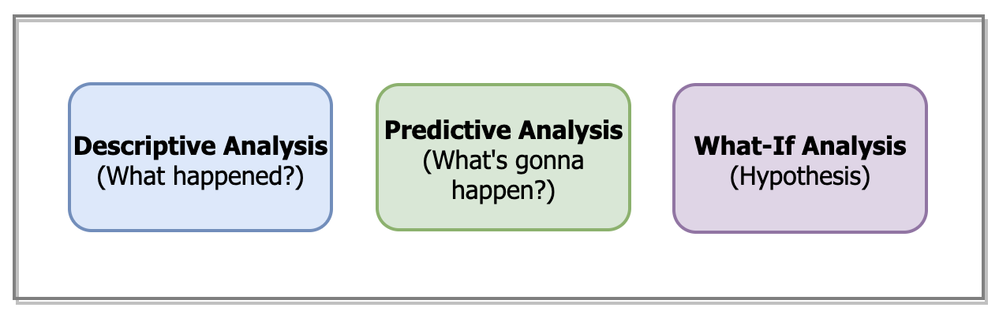
The application of Machine learning techniques to understand & predict customer churn isn’t something new. Several ML algorithms have been used in the field of telecom, banking, insurance, etc. to detect early churn signals. However, just relying on an ML algorithm’s output to understand whether a customer will churn or not isn’t really an optimal approach anymore. To have a thorough understanding of the churn analysis process, the need to amalgamate historical data(what happened in the past?) with the predicted outcome(what will happen in the future?) is paramount.
This is where Qlik Sense’s visual analytics platform serves as an effective solution. Now, using advanced analytics connectors within Qlik Sense SaaS, users can build a Machine Learning model in an AutoML platform, consume the predictions in Qlik Sense and use them along with the Qlik’s data model to take advantage of things such as:
- associative benefits
- faster calculations
- out-of-the-box visualizations
- perform what-if analysis
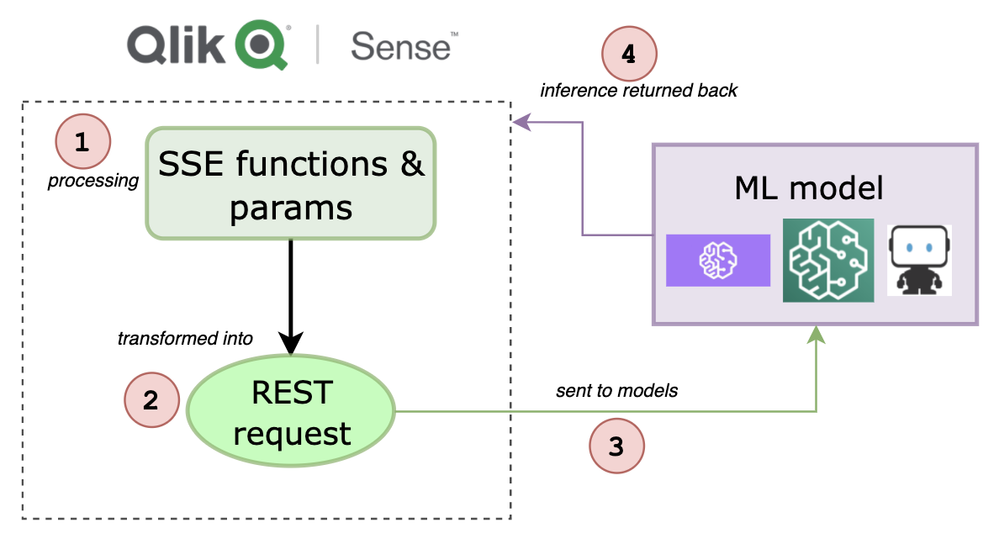
If you want to understand the entire workflow to integrate 3rd-party ML endpoints within Qlik Sense, I highly recommend going through this first part that I wrote a few days back. The generic workflow is depicted below.
In this specific tutorial, we are going to analyze customer churn behavior for a telecom company by building an end-to-end Qlik Sense app and leveraging both historical as well as predicted data. For building the Machine Learning model and hosting the endpoint, we will use the Amazon SageMaker platform. We will keep our focus on building the Qlik Sense app and not on developing the ML model.
Pre-requisite: To be able to use Analytics Endpoints the "Enable machine learning endpoints" parameter should be enabled in the Management Console.
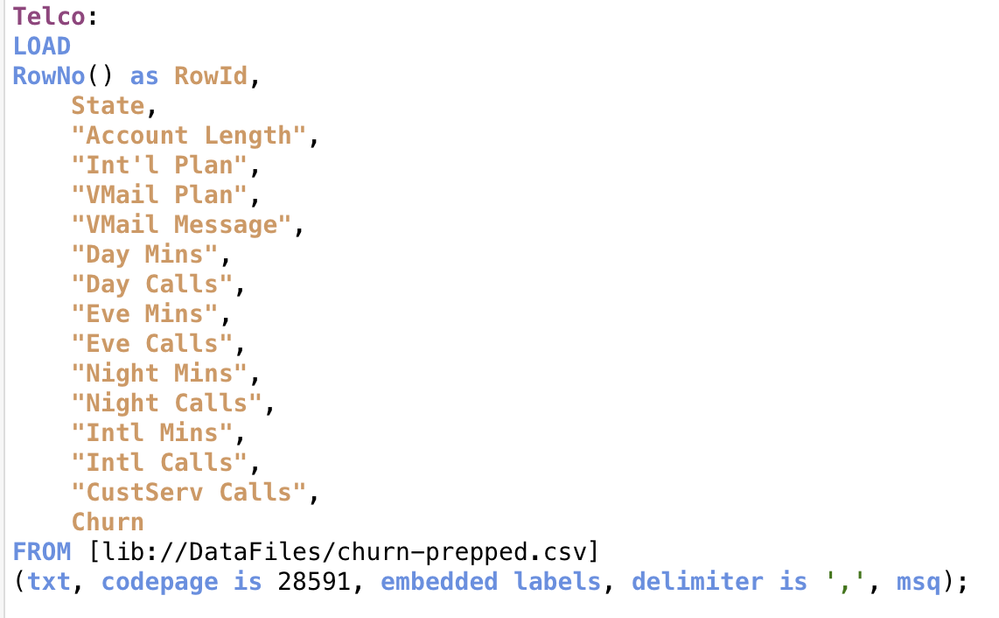
Step 1: Load source data
First, let us load the source data into Qlik Sense using the Data load editor.
We will analyze our dataset in detail when we build our ‘descriptive’ dashboard but for now we know that we have 15 attributes and 3333 records that describe the profile of each customer of the telecom operator.
The last attribute, Churn, is known as the target attribute–the attribute that we want our ML model to predict to know if a customer will churn or not.
Step 2: Train a churn-prediction model & deploy the inference API
Our next step is to build the churn prediction model. The target is to classify each customer into either of the two categories — churn or not churn. Therefore, this is a binary classification problem. We will be leveraging SageMaker Autopilot that allows us to automatically build, train, and tune the best machine learning model based on our data without having to write much code.
Credit: Amazon Web Services YouTube
If you are just getting started with SageMaker Autopilot, here is a great video from AWS to help you understand the basics. I use the describe_auto_ml_job API to look up the best algorithm selected by the SageMaker Autopilot job.
Finally, we will create our model based on the best candidate (automl-churn-28–18–16–29r2UGiyXI-011–5e61e1c5) & deploy it to a hosted endpoint. When the endpoint is ready, the endpoint status will change to ‘InService’ like below.
To make it easier for you to learn about how I trained & deployed my model in SageMaker, I will attach my Python notebook along with this blog.
Step 3: Send data from QS to the ML endpoint for prediction
Now that we have the model endpoint ready for inference, we will send all the fields required by the model from QS to predict if a customer would churn or not. Please note that we will only send 14 attributes and exclude the last one(churn) since we want that prediction to be made by the model.
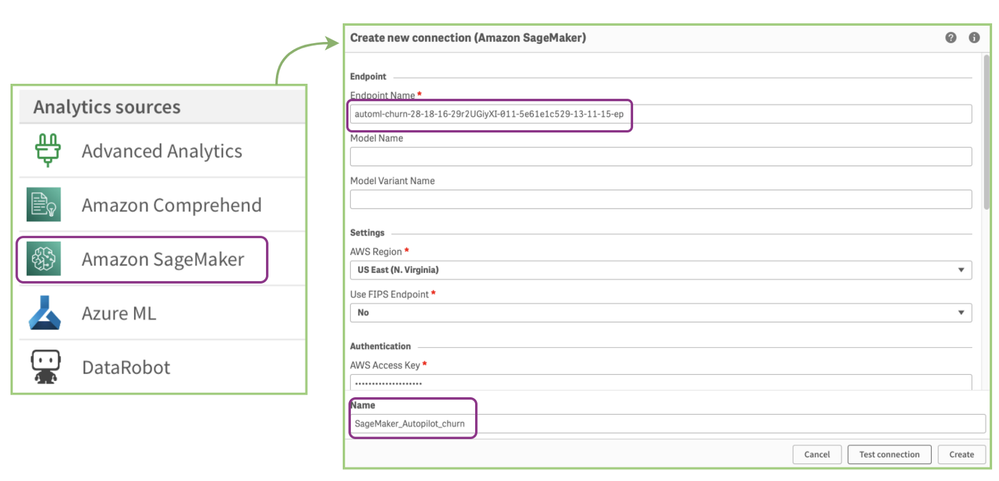
To do so, we go to the Data load editor and create a new SageMaker connection like below. You can read more about creating a new connection here.
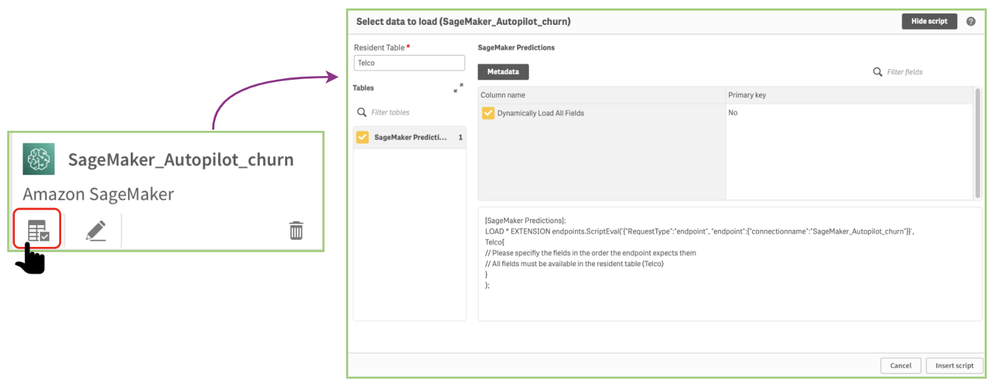
You should now see the SageMaker_Autopilot_churn name in your list of connections. Now, click on ‘select data’ to start sending your data from QS data model to SageMaker.
Click on ‘Insert script’ to get the script in the editor.
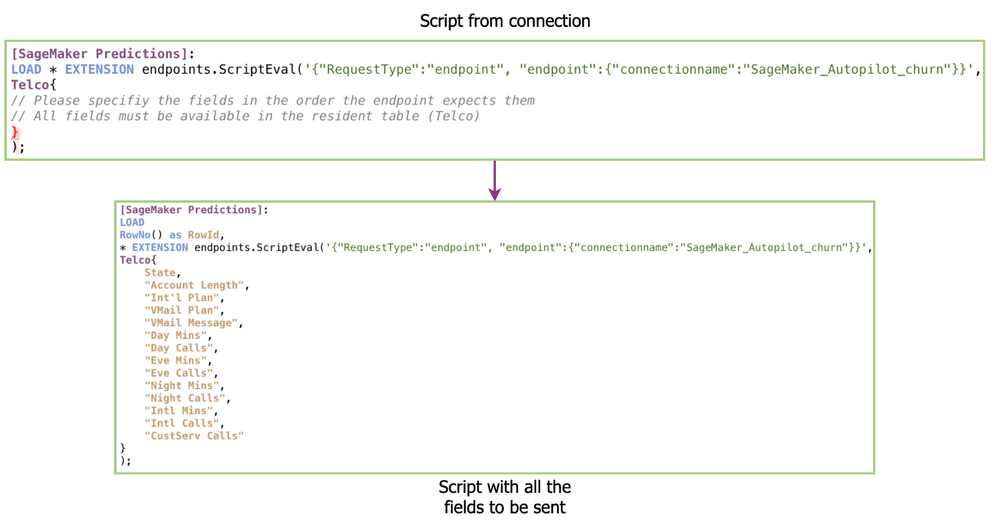
Please note how I have changed the raw script that we got from our connection to include all the 14 fields to be sent to our endpoint. Like our previous use case, we use RowNo( ) here as a field to associate the source data & the returned prediction table.
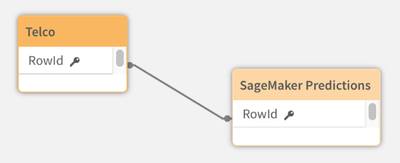
Here’s a peek at our data model after the data is loaded.
Let’s quickly check what is returned by the ML model based on the data we sent from Qlik Sense.
So, for every customer row, we have a predicted_label field that shows whether the customer will stay or leave. We also have the individual class probabilities for deeper analysis.
Step 4: Building the QS analytics app
Our final step is to build a Qlik Sense app so we can perform our analysis and present it to the stakeholders.
We will segregate the app into 3 sheets as shown below each serving its purpose:
Descriptive Analysis sheet:
Goal: This sheet will help us understand the historical source data & allow for detailed analysis.
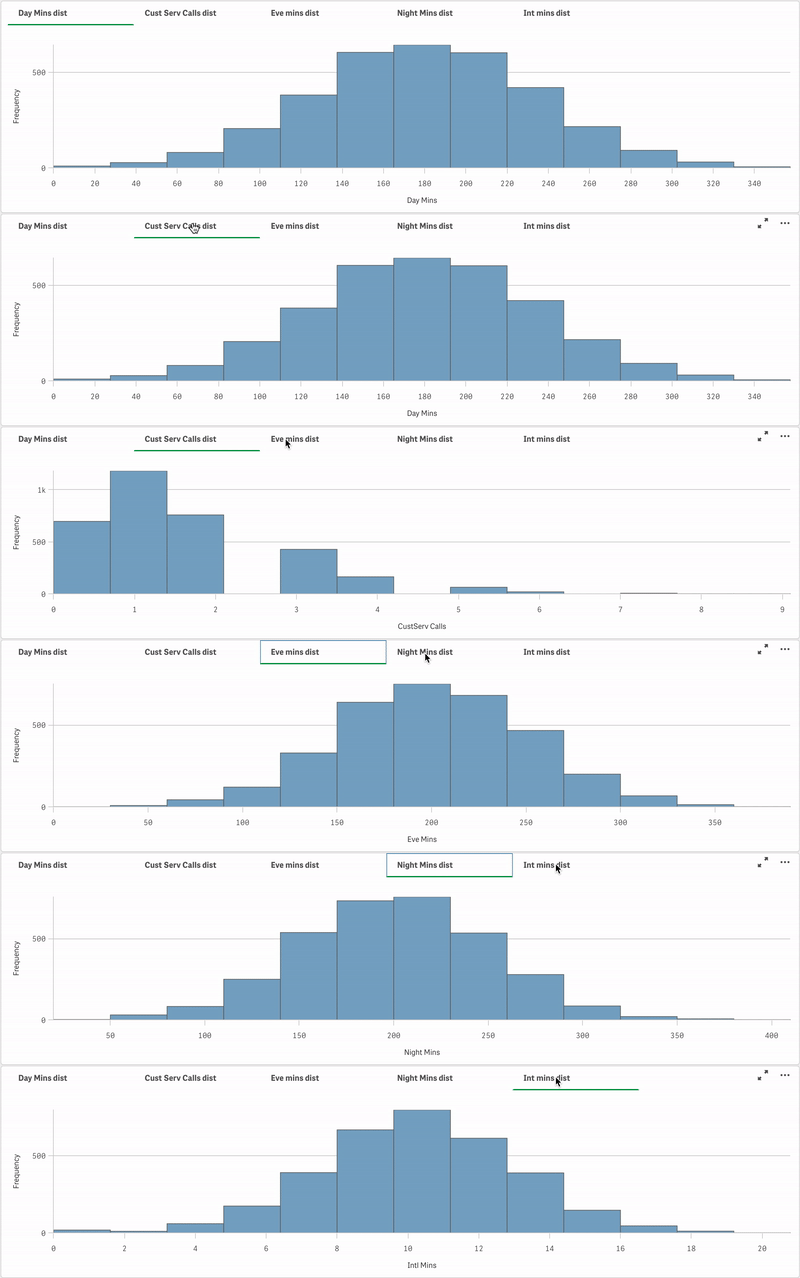
First, I want to understand the distribution of a couple of features and since we have 15 of them, I won’t visualize all of them but highlight the ones that my stakeholders are interested in. In terms of visualization, I will use a container object and add the distributions as histograms like below.
We can see that most of the fields (Day mins, Eve mins, etc.) have a normal distribution while Cust Serv Calls appear to be positively skewed.
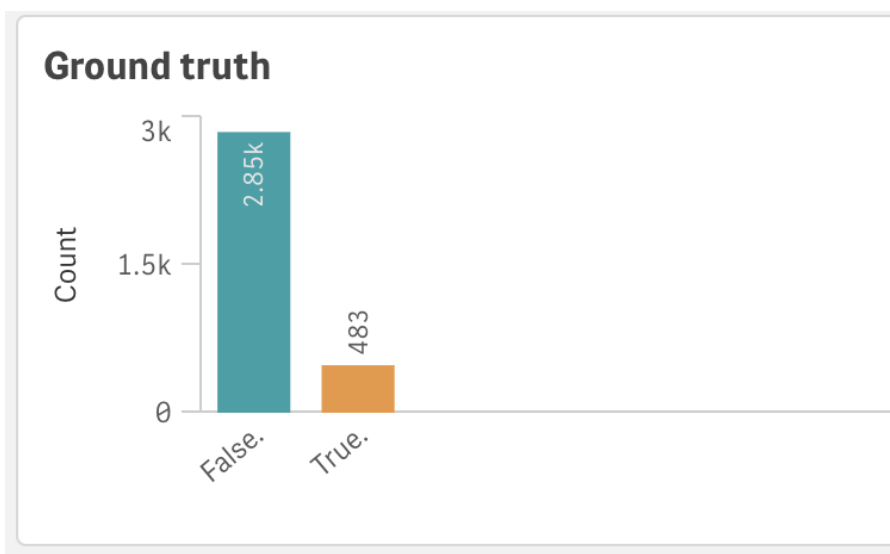
I also wanted to highlight how the target attribute(Churn) was distributed since it is important to know the reality of how many customers can actually churn. Looks like 14.49 % of the customers did churn.
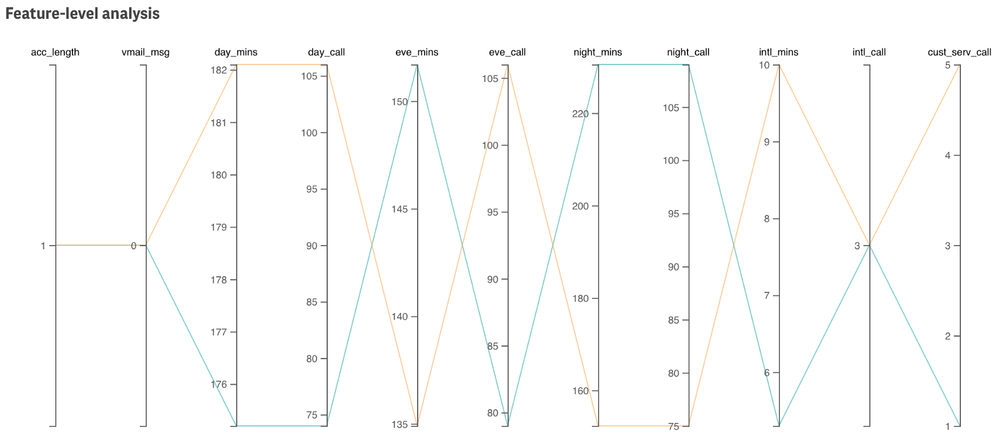
Next, since our data is high-dimensional (10+ features) and I want to enable detailed analysis of individual customers, choosing a visualization that works well with multidimensional data was crucial. I decided to go with a Parallel coordinate plot extension that I built sometime back.
Finally, putting everything together here’s our Descriptive dashboard.
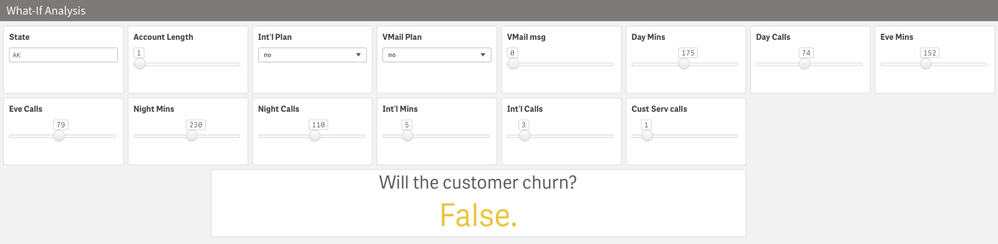
Let’s do a simple analysis. I want to compare a customer who wants to churn with one that does not. So, I randomly select two such rows.
This view allows us to easily compare all the 11 numerical attributes. So, looks like both of these customers are new customers(observe acc_length=1). The orange line represents Churn=‘True’ and the cyan represents Churn=‘False’. For most of the features, we see the lines in a criss-cross form which helps us understand how these 2 customers differ. One thing that stands out is how the customer who churns makes 5 customer service calls in just a day and the other one makes 1. This gives us an indication that the orange customer might have faced some issues with the operator.
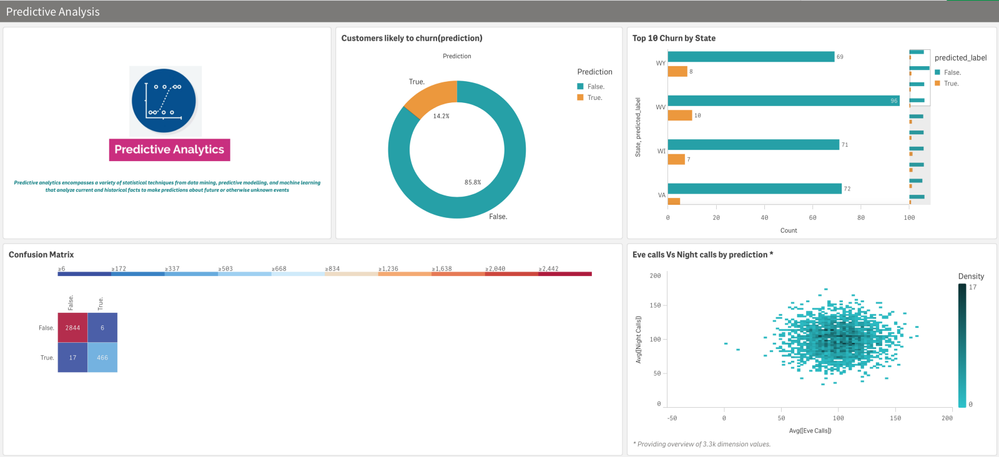
Predictive Analysis sheet:
Goal: This sheet will help us understand the churn predictions that we made using SageMaker & our model’s performance.
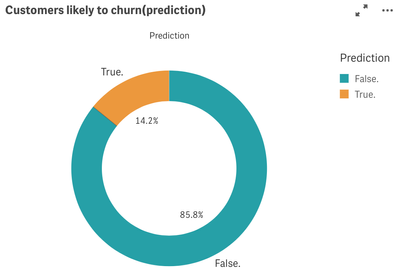
Let’s see how our overall predictions looks like.
The predictions are almost similar to the ground truth.
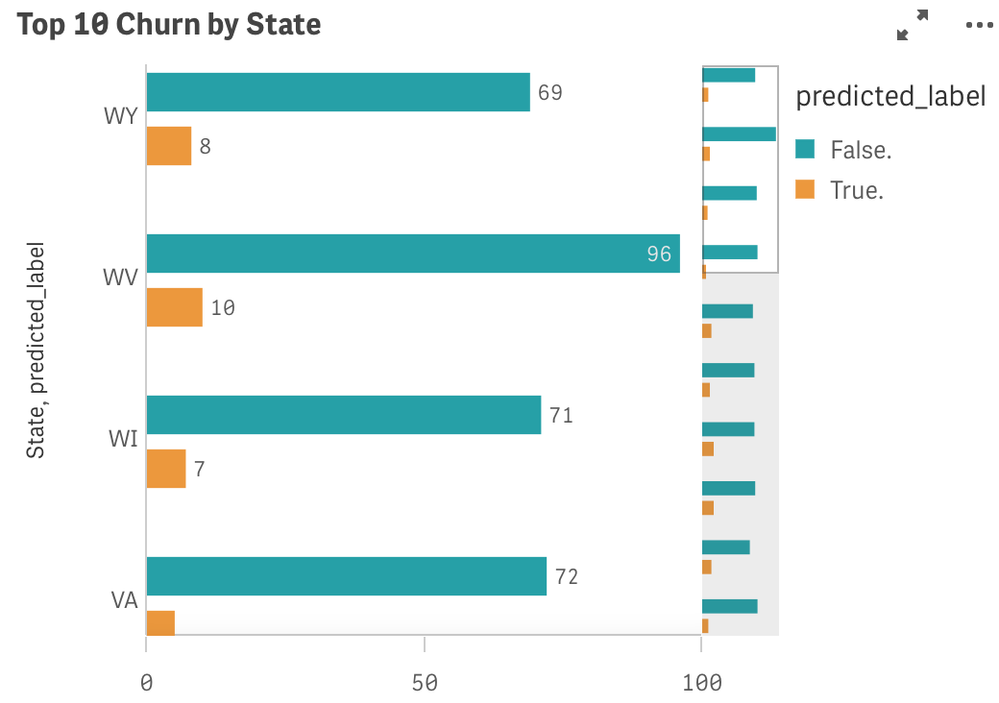
Next, I want to visualize the churn predictions by each state so the telecom operator can keep their focus on those ‘risky’ states.
This is a great example of how using Qlik’s associative property, we were able to integrate both historical and predicted data.
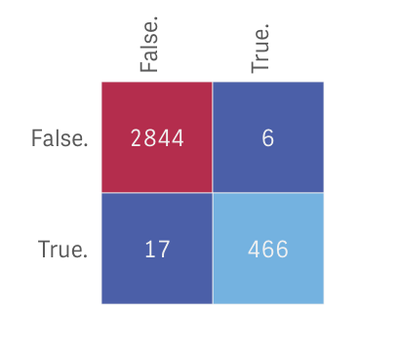
It is also important to understand what mistakes the ML model makes. False negatives are the most problematic because the model incorrectly predicts that a churning customer will stay. The best way to evaluate our model would be to draw a confusion matrix like below.
We have 17 such cases. We can select this ‘17 block’ from our matrix and perform detailed analysis of the special cases by analyzing both descriptive & predictive sheets.
Predictive dashboard:
What-If Analysis sheet:
Our final piece is the ‘What-if’ scenario builder. Personally, I love this native capability of Qlik Sense as it allows us to look beyond traditional analysis. Also, note how easy & quick it is to build this. I have used a custom object called ‘variable input’ that allows me to include sliders, dropdown & text fields.
The ‘Will the customer churn?’ is a KPI object and uses a Server side extension function ScriptAggrStr()as a chart expression which allows us to get predictions in real-time by passing the values dynamically from the input boxes. Here’s the expression -
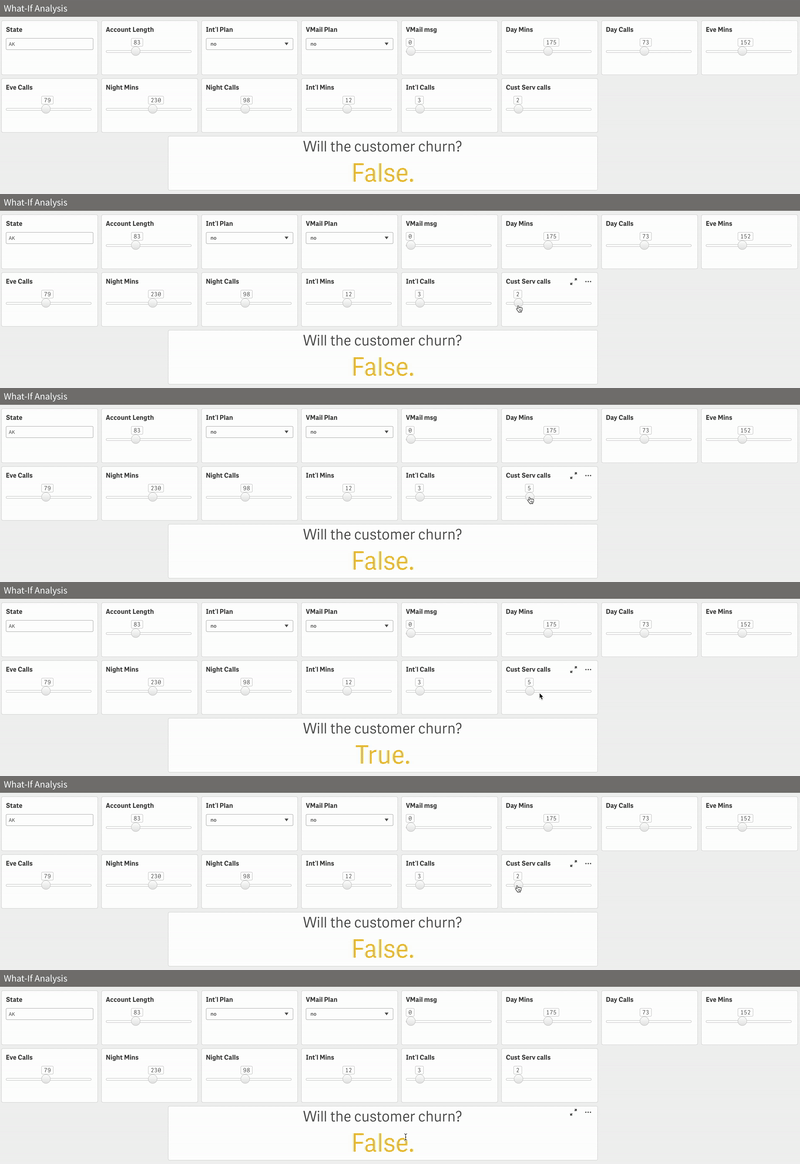
endpoints.ScriptAggrStr('{"RequestType":"endpoint", "endpoint":{"connectionname":"Amazon_SageMaker_Telco"}}',vState,vActLen,vIntPln,vVmailPln,vVmailMsg,vDayMins,vDayCalls,vEveMins,vEveCalls,vNightMins,vNightCalls,vIntMins,vIntCalls,vCustServCalls)Let us do quick & simple what-if analysis. From our Descriptive sheet, we noted that the field Cust Serv calls might be an important one. After all, a happy customer doesn’t need to call customer service. To really prove that correlation, let’s play around.
And looks like the hypothesis makes sense! However, please note that this is just one factor. I tried increasing the Int’l Mins to 15 instead of 12 and even though I had a lot of customer service calls, the prediction was False.
So, maybe providing more Int’l Mins to the customer would be a great idea to retain them. This kind of insight can help businesses dealing with churn to really understand the pitfalls and improvise on them even at a granular level.
That brings us to the end of this exciting blog. The tutorial is a detailed one as the whole idea was to allow Qlik users to quickly adapt to these capabilities and understand the process end-to-end. Let me know what you think!
~Dipankar, Qlik R&D
-
【オンデマンド配信】生成 AI からエージェント AI へ:AI 戦略で今すぐ成果を出すためのロードマップ
AI は未来の技術ではなく、既に今日のビジネスに欠かせない技術として幅広い分野で貢献しています。 本 Web セミナーでは、以下を実現する実践的なヒントやワークフロー、そして AI から価値を得るための知識を共有します。また、先進的な企業の具体的な導入事例や成功事例を通して、データを主要なビジネス... Show MoreAI は未来の技術ではなく、既に今日のビジネスに欠かせない技術として幅広い分野で貢献しています。
本 Web セミナーでは、以下を実現する実践的なヒントやワークフロー、そして AI から価値を得るための知識を共有します。また、先進的な企業の具体的な導入事例や成功事例を通して、データを主要なビジネスワークフローや戦略目標を推進する AI 主導型アプリケーションへと変革する方法をご紹介します。
- AI を戦略的に展開し、確かなビジネス成果を生み出す
- エージェント AI の秘めたる可能性を最大限に引き出し、業務プロセスを変革する
- スムーズな AI 統合のために、信頼性の高いデータ基盤を構築する
※ 参加費無料。パソコン・タブレット・スマートフォンで、どこからでもご視聴いただけます。
-
爆速公開!Qlik ユーザーミートアップ開催報告
満席をいただいた今回のユーザーミートアップは、Qlik Luminary & 幹事の萬様が司会を務められました。同じく幹事の荻本様より、4月に開催された意見交換会などの活動報告がありました。なお、次回は「データガバナンス」をテーマとした意見交換会の開催が予定されています。ぜひお楽しみに! 最初は、... Show More満席をいただいた今回のユーザーミートアップは、Qlik Luminary & 幹事の萬様が司会を務められました。同じく幹事の荻本様より、4月に開催された意見交換会などの活動報告がありました。なお、次回は「データガバナンス」をテーマとした意見交換会の開催が予定されています。ぜひお楽しみに!
最初は、アステラス製薬様より「データドリブンな意思決定に Qlik Sense を ~わたしたちの 3 年間の取組み~」と題して、 BI 専任チームより Qlik アクセスのためのハブ作成、マネジャーへの NPrinting 配信などの取り組みをご紹介いただきました。
続くヒューマンアカデミー様からは、同社の学習プラットフォームのカスタマージャーニーにおける解約防止のためのキーポイントとそこで見るべきデータととるべきアクションといったビジネスプロセスなどをご紹介いただきました。
NECPC 様からは新しいプロジェクトに対応するため、短期間で Qlik Answers の検証を終え、わずか数ヶ月の導入期間・運用で問い合わせの削減という着実な成果を収めた事例を、デモを交えてご紹介されました。
前回に引き続きご登壇いただいた万葉倶楽部・コグニア様は、Qlik Sense を活用した顧客・営業分析の事例として、来館されたお客様のデータに基づき必要な施策を取ることで再訪率を高める取り組みなどをお話しされました。
ユーザー登壇の最後は学研様からの Qilk Connect 参加報告でした。Qlik の最先端に触れることのできるまたとない、かつ楽しい機会であったことを多くの写真と共に熱く語られました。
最後は Qlik より Qilk Connect で発表された数多くの新製品をご紹介しました。また、 第5回データソンが翌日 19日から始まることと、次回のユーザーミートアップと Qlik AI Reality Tour Tokyo が 10月 28日に同日開催されることが発表されました。ぜひ今からこの日は1日空けておいてください!
福岡から駆けつけた幹事松田様の乾杯で始まった懇親会では、新たに参画されたアドボケイトメンバーの紹介などもあり、いつも以上にユーザー様同士の交流が深まっていたようです。中には「次回のミートアップではぜひ登壇したい」と Qilk 社員にお声がけされたユーザー様もいらっしゃいました(ご登壇希望のユーザー様は、営業担当または Marketingjp@qlik.com までご連絡ください。ぜひよろしくお願いします!)。
本日、ご参加・ご登壇いただいた皆様、ありがとうございました!
エージェンティック AI とオープンレイクハウスという新しいソリューションを備えた今後の Qlik にぜひご期待ください。次回お会いするのを楽しみにしております。
-
Making Better Decisions with Data (Even in the Age of AI)
Wharton Business School recently published an article that made a simple but powerful point. When working with data, don’t start by asking what data y... Show MoreWharton Business School recently published an article that made a simple but powerful point. When working with data, don’t start by asking what data you have. Start by asking what decision you’re trying to make. (Wharton, 2024 Better Decisions with Data: Asking the Right Question - Knowledge at Wharton)
Once you know what you’re trying to decide, you can figure out what kind of data is helpful. Otherwise, you may spend time analyzing numbers that don’t matter.
It’s also important to stay curious. Be willing to question what you think you know. Sometimes the real insight comes from looking at things in a new way or noticing what’s missing.
AI is powerful and fast, but it doesn’t understand your goals, context, or values. That’s why human thinking is essential; we need people to see the big picture, ask the right questions, and make ethical, responsible decisions.
The Qlik Academic Program offers free access to powerful analytics tools, training, and certifications. Students build career-ready skills, professors bring real-world tools into the classroom, researchers uncover insights faster, and universities boost innovation in data education.
It’s free and it’s about learning to think with data.
Learn more: qlik.com/academicprogram