Unlock a world of possibilities! Login now and discover the exclusive benefits awaiting you.

Featured Content
-
How to contact Qlik Support
Qlik offers a wide range of channels to assist you in troubleshooting, answering frequently asked questions, and getting in touch with our technical e... Show MoreQlik offers a wide range of channels to assist you in troubleshooting, answering frequently asked questions, and getting in touch with our technical experts. In this article, we guide you through all available avenues to secure your best possible experience.
For details on our terms and conditions, review the Qlik Support Policy.
Index:
- Support and Professional Services; who to contact when.
- Qlik Support: How to access the support you need
- 1. Qlik Community, Forums & Knowledge Base
- The Knowledge Base
- Blogs
- Our Support programs:
- The Qlik Forums
- Ideation
- How to create a Qlik ID
- 2. Chat
- 3. Qlik Support Case Portal
- Escalate a Support Case
- Phone Numbers
- Resources
Support and Professional Services; who to contact when.
We're happy to help! Here's a breakdown of resources for each type of need.
Support Professional Services (*) Reactively fixes technical issues as well as answers narrowly defined specific questions. Handles administrative issues to keep the product up-to-date and functioning. Proactively accelerates projects, reduces risk, and achieves optimal configurations. Delivers expert help for training, planning, implementation, and performance improvement. - Error messages
- Task crashes
- Latency issues (due to errors or 1-1 mode)
- Performance degradation without config changes
- Specific questions
- Licensing requests
- Bug Report / Hotfixes
- Not functioning as designed or documented
- Software regression
- Deployment Implementation
- Setting up new endpoints
- Performance Tuning
- Architecture design or optimization
- Automation
- Customization
- Environment Migration
- Health Check
- New functionality walkthrough
- Realtime upgrade assistance
(*) reach out to your Account Manager or Customer Success Manager
Qlik Support: How to access the support you need
1. Qlik Community, Forums & Knowledge Base
Your first line of support: https://community.qlik.com/
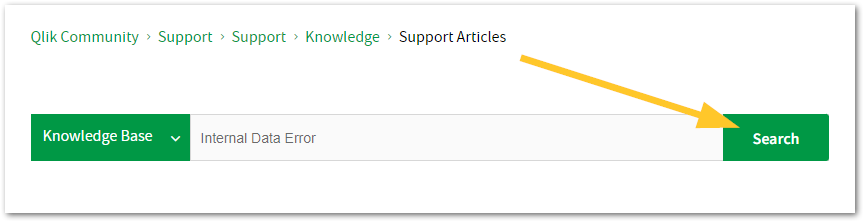
Looking for content? Type your question into our global search bar:
The Knowledge Base
Leverage the enhanced and continuously updated Knowledge Base to find solutions to your questions and best practice guides. Bookmark this page for quick access!
- Go to the Official Support Articles Knowledge base
- Type your question into our Search Engine
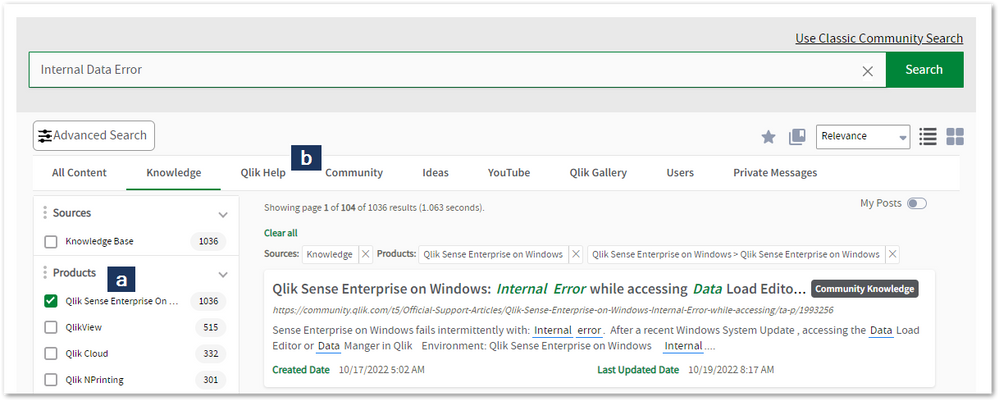
- Need more filters?
- Filter by Product
- Or switch tabs to browse content in the global community, on our Help Site, or even on our Youtube channel
Blogs
Subscribe to maximize your Qlik experience!
The Support Updates Blog
The Support Updates blog delivers important and useful Qlik Support information about end-of-product support, new service releases, and general support topics. (click)The Qlik Design Blog
The Design blog is all about product and Qlik solutions, such as scripting, data modelling, visual design, extensions, best practices, and more! (click)The Product Innovation Blog
By reading the Product Innovation blog, you will learn about what's new across all of the products in our growing Qlik product portfolio. (click)Our Support programs:
Q&A with Qlik
Live sessions with Qlik Experts in which we focus on your questions.Techspert Talks
Techspert Talks is a free webinar to facilitate knowledge sharing held on a monthly basis.Technical Adoption Workshops
Our in depth, hands-on workshops allow new Qlik Cloud Admins to build alongside Qlik Experts.Qlik Fix
Qlik Fix is a series of short video with helpful solutions for Qlik customers and partners.The Qlik Forums
- Quick, convenient, 24/7 availability
- Monitored by Qlik Experts
- New releases publicly announced within Qlik Community forums (click)
- Local language groups available (click)
Ideation
Suggest an idea, and influence the next generation of Qlik features!
Search & Submit Ideas
Ideation GuidelinesHow to create a Qlik ID
Get the full value of the community.
Register a Qlik ID:
- Go to register.myqlik.qlik.com
If you already have an account, please see How To Reset The Password of a Qlik Account for help using your existing account. - You must enter your company name exactly as it appears on your license or there will be significant delays in getting access.
- You will receive a system-generated email with an activation link for your new account. NOTE, this link will expire after 24 hours.
If you need additional details, see: Additional guidance on registering for a Qlik account
If you encounter problems with your Qlik ID, contact us through Live Chat!
2. Chat
Incidents are supported through our Chat, by clicking Chat Now on any Support Page across Qlik Community.
To raise a new issue, all you need to do is chat with us. With this, we can:
- Answer common questions instantly through our chatbot
- Have a live agent troubleshoot in real time
- With items that will take further investigating, we will create a case on your behalf with step-by-step intake questions.
3. Qlik Support Case Portal
Log in to manage and track your active cases in the Case Portal. (click)
Before you can access the Support Portal, please complete your Community account setup. See First time access to the Qlik Customer Support Portal fails with: Unauthorized Access Please try signing out and sign in again.
Please note: to create a new case, it is easiest to do so via our chat (see above). Our chat will log your case through a series of guided intake questions.
Your advantages:
- Self-service access to all incidents so that you can track progress
- Option to upload documentation and troubleshooting files
- Option to include additional stakeholders and watchers to view active cases
- Follow-up conversations
When creating a case, you will be prompted to enter problem type and issue level. Definitions shared below:
Problem Type
Select Account Related for issues with your account, licenses, downloads, or payment.
Select Product Related for technical issues with Qlik products and platforms.
Priority
If your issue is account related, you will be asked to select a Priority level:
Select Medium/Low if the system is accessible, but there are some functional limitations that are not critical in the daily operation.
Select High if there are significant impacts on normal work or performance.
Select Urgent if there are major impacts on business-critical work or performance.
Severity
If your issue is product related, you will be asked to select a Severity level:
Severity 1: Qlik production software is down or not available, but not because of scheduled maintenance and/or upgrades.
Severity 2: Major functionality is not working in accordance with the technical specifications in documentation or significant performance degradation is experienced so that critical business operations cannot be performed.
Severity 3: Any error that is not Severity 1 Error or Severity 2 Issue. For more information, visit our Qlik Support Policy.
Escalate a Support Case
If you require a support case escalation, you have two options:
- Request to escalate within the case, mentioning the business reasons.
To escalate a support incident successfully, mention your intention to escalate in the open support case. This will begin the escalation process. - Contact your Regional Support Manager
If more attention is required, contact your regional support manager. You can find a full list of regional support managers in the How to escalate a support case article.
Phone Numbers
When other Support Channels are down for maintenance, please contact us via phone for high severity production-down concerns.
- Qlik Data Analytics: 1-877-754-5843
- Qlik Data Integration: 1-781-730-4060
- Talend AMER Region: 1-800-810-3065
- Talend UK Region: 44-800-098-8473
- Talend APAC Region: 65-800-492-2269
Resources
A collection of useful links.
Qlik Cloud Status Page
Keep up to date with Qlik Cloud's status.
Support Policy
Review our Service Level Agreements and License Agreements.
Live Chat and Case Portal
Your one stop to contact us.




Recent Documents
-
Talend Studio local patch update in an offline or air-gapped environment (withou...
Talend Studio periodically requires patch updates. In an air-gapped environment with no internet access, Talend Studio cannot reach the default update... Show MoreTalend Studio periodically requires patch updates. In an air-gapped environment with no internet access, Talend Studio cannot reach the default update site (https://update.talend.com/Studio/8/updates/latest) to download and apply patches automatically.
This article describes how to download a Studio patch on a machine with internet access, then apply it locally by pointing Talend Studio's update settings to the downloaded patch file.
- Download the required Talend Studio patch on a machine with internet access, and save it to a folder on the local machine, for example: D:/Talend_Patch/Patch_20260619_R2026-06_v1-8.0.1.zip
For information on how to download the patch, see How to download Qlik Talend Product patches. - Configure Talend Studio to use the local patch in Talend Studio:
- go to Window > Preferences > Talend > Update Settings.
- Change the Update URL field from the default update site https://update.talend.com/Studio/8/updates/latestto the local patch path, for example: jar:file:/D:/Talend_Patch/Patch_20260619_R2026-06_v1-8.0.1.zip!/
- Click Apply and Close.
- Open Feature Manager in Talend Studio, and follow the prompts to complete the local patch installation
Environment
- Talend Studio
- Download the required Talend Studio patch on a machine with internet access, and save it to a folder on the local machine, for example: D:/Talend_Patch/Patch_20260619_R2026-06_v1-8.0.1.zip
-
Qlik Replicate and DB2i source endpoint: source capture "Error parsing"
The IBM DB2 for iSeries source endpoint occasionally encounters an error during the CDC stage. This issue appears to be linked to the presence of the ... Show MoreThe IBM DB2 for iSeries source endpoint occasionally encounters an error during the CDC stage. This issue appears to be linked to the presence of the IBM i Access ODBC Driver versions 7.1.26 and 7.1.27.
The error message in the task log file:
[SOURCE_CAPTURE ]E: Error parsing [1020109] (db2i_endpoint_capture.c:652)
The issue specifically arises during the CDC stage; however, the Full Load stage operates smoothly without any complications.
Resolution:
Qlik has certified the DB2i ODBC driver version 07.01.029. An update to the official Qlik documentation is currently pending.
Either:
- Upgrade your IBM i Access ODBC client to 07.01.029,
- or downgrade from versions 07.01.027/07.01.026 to 07.01.025
For compatibility reasons, it's advisable to revert to version '07.01.025' if you choose to downgrade, as '07.01.026' exhibits the same issue.
Various factors can contribute to encountering the 'Error parsing' message, including:
• DB2i ODBC Version '07.01.027' (as described in this article)
• In a single task, the total number of captured tables exceeds 300
• The source table is created by DDS
• Garbage data in table
• Special characters in table object identifier (table name, or column name)
If you continue to encounter the error after switching to '07.01.025', please reach out to Qlik Support for further assistance.Cause:
The behavior of the IBM DB2i ODBC Versions '07.01.026' & '07.01.027' differ slightly from that of '07.01.025'. In certain scenarios, it may return incorrect column lengths
Internal Investigation ID(s):
#00158029, #00160002, QB-26413
Environment:
- Qlik Replicate All versions
- IBM DB2i All versions
- IBM DB2i Client versions '07.01.026' and '07.01.027'
-
How to prepare your Qlik App for Qlik Answers, Part Two
Your AI is only as good as what it can find. Part One of How to prepare your Qlik App for Qlik Answers laid out a six-step checklist: clarify field ... Show MoreYour AI is only as good as what it can find.
Part One of How to prepare your Qlik App for Qlik Answers laid out a six-step checklist:
- clarify field names,
- streamline the data model,
- check date formats,
- build master items with descriptions,
- configure vocabulary,
- and validate with real queries.
It ended with a simple line: you do not need a perfect data model, you need a clear one. This is what clear means underneath the surface. Keep the shortlist clean, and the model's fluency has good material to work with.
Part Two details what Qlik Answers is doing when it reads your apps and expands your understanding of why those six steps move the needle.
Content
- The mental model: retrieval rather than omniscience
- Lever 1: Visibility
- Lever 2: Names
- Lever 3: Master items
- Lever 4: Descriptions
- Lever 5: Vocabulary
- In Summary
The mental model: retrieval rather than omniscience
It is easy to assume the AI "sees" your entire app and simply needs to be clever enough to choose well. In practice it works a little differently, and for good reason. An app with 500 fields would present far more noise than signal to any model.
Instead, the system builds a search index of your app's metadata. Every visible field and master item gets a compact semantic profile, and that profile is what the system searches against.
For a master measure, that profile is built from several signals together:
- the name of the master item
- the description you have written for it
- the actual expression behind it
- any business glossary term you have linked to it
The system reads these as a whole and forms one understanding of what the asset means. When a question arrives, it retrieves the handful of assets that best match its meaning and passes them to the AI.
That single idea reframes the work. The useful question is rarely "is the AI clever enough to understand my field?" More often it is "will my field be found, and will it be the natural choice when it is?"
We'll tackle this in order, using five different levers. These levers act at different stages, which is why the sequence in which we outline them is important. Visibility decides what exists. Names influence what gets found first. Master items shape what the AI builds your numbers with and whether they carry your definitions. Descriptions help the right things get found at all. Vocabulary closes the last gap between your words and the model's understanding.
Working the later levers on an app still full of visible technical fields means refining assets that are competing with a great deal of noise. It tends to go more smoothly to start with the gate, then the definitions, then the language.
Lever 1: Visibility
The one truly decisive setting.
Hiding a field in your business logic does more than lower its priority. It takes the field entirely out of consideration. A hidden field is never profiled, never indexed, and never retrievable, so it cannot appear in an answer.
That is why visibility is worth looking at first. Every technical field left visible, every surrogate key, ETL timestamp, or FIELD_CODE_2_FINAL, competes with your real business fields. Working through a wide app and hiding the fields that should never be an answer is usually a few hours of work, sometimes less, and it improves every question asked afterwards. It is one of the most approachable, high-value things you can do to an app.
Hide with intent. If people do ask about a field, hiding it takes away their ability to get answers about it. Think of this as curation rather than cleanup.
Lever 2: Names
Names carry weight in retrieval.
When a question contains a term that closely matches an asset's name, that asset is favored strongly in the results.
So it pays to name assets the way your users actually speak. If everyone in the business says "Net Revenue", a master measure called "Net Revenue" tends to be found quickly and reliably. One called "NR_calc_v3" leaves the system to infer what you meant. It often will, and it is worth giving it a clear signal where you can do so easily.
Lever 3: Master items
Define your metrics once, with care.
Master items sit high on this list for a straightforward reason: when a well-defined master item and a raw field could both answer a question, the system leans toward the master item. It is your sanctioned, promoted answer.
The stronger argument, though, is trust rather than mechanics. The model does understand what "net sales" means in general terms. The question is whether you would prefer it to work from the general idea or from your definition.
Does your net sales exclude intercompany transfers? Is it net of returns or gross of them? Which currency, at which exchange rate, over which fiscal calendar? Answered from raw fields, each of those becomes a reasonable assumption. Answered through a master measure, it follows your business logic, your set analysis, and your exceptions, consistently. When the number reaches a report your leadership is reading, a defined metric gives everyone confidence in where it came from. Define the metric once, as a master item, and every answer built on it inherits the definition you stand behind.
It is worth building a master item for every metric that carries a real business definition, while keeping the library tidy. A collection of "Sales", "Sales 2", and "Sales New" tends to reintroduce the very ambiguity master items are meant to resolve, so clear naming here matters as much as the definitions themselves.
Lever 4: Descriptions
Think of them as configuration rather than documentation.
Descriptions are often treated as a nice-to-have for the data catalog. In an AI-ready app, they do more.
The description you write on a field or master item feeds directly into its semantic profile, which is what the system searches. A clear note on what "Net Sales" includes and excludes helps that item surface for the many ways people might phrase the question, and sets it apart from the other sales measures nearby.
There is no need to describe everything. The ones worth your time are the ambiguous ones: lookalike measures, fields whose names are abbreviations, anything a new analyst would have to ask a colleague about. If a person would want the explanation, the search index benefits from it too.
Lever 5: Vocabulary
Focus on your language, not on educating the model.
This is the lever people tend to overthink, so it is worth being clear about its purpose. You are not here to teach the AI general knowledge. There is a genuinely capable model underneath, and it already understands a great deal of the world.
It knows what revenue, profit, and margin are. It understands churn, retention, and attrition. It is comfortable with YoY, MoM, and QoQ, with fiscal quarters, gross versus net, currencies, countries and regions, standard units, and the everyday language of sales, finance, and operations. There is little value in a glossary entry explaining that "revenue" means money coming in.
Where vocabulary earns its keep is the language that is specific to you, which the model has no way to know:
- Your internal product codenames.
- An acronym only your company uses.
- The name your business gave to a segment it defined itself.
- A regional grouping that exists only on your org chart.
- If your business says "GMV" and the field is named "Gross_Merch_Value"
Those are examples the model cannot bridge on its own, and this is precisely where a vocabulary entry helps.
So a small, proprietary vocabulary tends to serve you best. A handful of terms that are truly yours will often do more than a long list restating things the model already knew. Vocabulary is a useful tool with a focused job: teaching the model your dialect rather than the dictionary.
Two items from that checklist do not appear as levers above: date formats and validation. Neither is a retrieval signal. A Date or Timestamp tag is a data type requirement your time-based questions depend on, not something the search index weighs when it ranks assets. Validating with real queries is not a lever at all. It is how you find out whether the five above actually worked.
In Summary
When people ask your app questions in plain language, the AI does not read your whole data model. It searches a curated index of your fields and master items, retrieves a small shortlist, and reasons over that. Most of what helps an app answer well comes down to making sure the right assets land on that shortlist. A sensible order to work through: hide what should never be an answer, name assets the way your users talk, define your real metrics as master items, describe the ambiguous ones, and add vocabulary for the terms that are genuinely yours.
Environment
- Qlik Cloud
- Qlik Answers
-
Qlik Sense Button object background color "none" does not work as expected
Changing the background color of the button object to none causes the button to display with its default background color (#006580). This is working a... Show MoreChanging the background color of the button object to none causes the button to display with its default background color (#006580). This is working as expected as of today.
Resolution
Qlik is reviewing QB-29806 for future improvements.
Workaround
To achieve transparency (mimicking none as the background color):
- In the button's background option, choose "By Expression"
- Fill in the expression as follows:
ARGB(0,0,0,0)
Cause
This feature predates the introduction of transparency in the colorpicker, meaning it was designed to revert to the default color when none is chosen.
Internal Investigation ID(s)
QB-29806
Environment
- Qlik Sense Enterprise on Windows August 2023 and higher
- Qlik Cloud
-
How and when to contact Qlik's Professional Services and Consulting Teams?
Consulting (often referred to as Professional Services) needs to be contacted when either one of the following is true: There is a need for step-by-s... Show MoreConsulting (often referred to as Professional Services) needs to be contacted when either one of the following is true:
- There is a need for step-by-step deployment walk-through assistance.
- The assistance needed is of a "how-to", "development task", "performance baseline/benchmark", and/or of a "health-check" nature and could not be satisfied by Posting to the Qlik Community.
- The assistance needed is not of a break/fix nature, Feature Request, report of known or potential new product defect, or an inquiry in reference to information that can be found under published resources such as Knowledge Base, Release Notes, and Qlik Help.
To begin a Consulting services engagement, begin at Support and Services or contact your Account Manager.
-
Qlik NPrinting Designer crashes when formatting data labels after defining a ran...
Qlik NPrinting Designer crashes when formatting data labels in a Microsoft Excel chart. Resolution Resolving the crash requires enabling a feature (... Show MoreQlik NPrinting Designer crashes when formatting data labels in a Microsoft Excel chart.
Resolution
Resolving the crash requires enabling a feature (DisableOfficeEmbed=1) that allows the Qlik NPrinting Designer to work without embedding Office. With the option enabled, the Designer opens on the left side of the screen, while Office opens the remaining area.
Qlik NPrinting Designer features remain unchanged.
Changes to the configuration files may impact your product. Only make changes documented by Qlik Support.
- Go to the %programdata%/NPrinting folder
- Find the NPrinting.ini file and create a backup copy of it
If the file does not exist, download the attached NPrinting.zip and extract the embedded NPrinting.ini. Then copy the downloaded NPrinting.ini into the %programdata%/NPrinting folder.
You can skip step three; the downloaded file includes the DisableOfficeEmbed=1 flag.
- Open your NPrinting.ini and add the DisableOfficeEmbed=1 feature flag.
To disable the option again, set the value to 0.
Example:
[\Software\NPrinting\Options]
DisableOfficeEmbed=1 - Save and close the file
- Restart your device
The Qlik NPrinting Designer and Server .ini files are overwritten when the product is upgraded or reinstalled. Please ensure you document any changes to this or other configuration files.
Cause
The crash is caused by a component used to embed the Office application into the Qlik NPrinting Designer.
Internal Investigation ID(s)
SUPPORT-11351
Environment
- Qlik NPrinting

- Go to the %programdata%/NPrinting folder
-
Talend Studio: CBP error when building OSGI job
Building an OSGI job in Talend Studio (version 2026-07 and 2026-08) fails with the following error: ERROR] mvn <args> -rf :job_<JOB NAME>at org.talend... Show MoreBuilding an OSGI job in Talend Studio (version 2026-07 and 2026-08) fails with the following error:
ERROR] mvn <args> -rf :job_<JOB NAME>
at org.talend.repository.ui.wizards.exportjob.scriptsmanager.BuildJobManager.buildJob(BuildJobManager.java:305)Resolution
Caused by defect QAPPINT-3008 (SUPPORT-11651) and resolved in the Talend Studio 2026-09 release. See the release notes for details.
Internal Investigation ID(s)
QAPPINT-3008, SUPPORT-11651
Environment
- Talend Studio 2026-07 and 2026-08
-
Kerberos authentication with Qlik Sense Enterprise on Windows
This article explains the steps to configure Kerberos with Qlik Sense Enterprise on Windows. Note that the actual setup, implementation, and configura... Show MoreThis article explains the steps to configure Kerberos with Qlik Sense Enterprise on Windows.
Note that the actual setup, implementation, and configuration of Kerberos for use with Qlik Sense Enterprise on Windows is the responsibility of the local IT administrator.
The following requires appropriate permissions in Active Directory to add Service Principal Names to the account running the Qlik Sense services.
A Service Principal Name may be registered using the following command:setspn -A http/HOST serviceaccount
Where:
- HOST is the name of the server hosting Qlik Sense Enterprise on Windows
- serviceaccount is the account running the services
Once the SPN has been registered:
- Open a command prompt with administrative privileges and type:
setspn -U -S http/QlikServer1 COMPANYX\serviceAccount
Review the command for your respective Windows version.
setspn -U -S http/QlikServer1.companyx.local COMPANYX\serviceAccount - Go to the Qlik Sense Management Console (QMC) > Proxy > Edit the proxy you wish to use
- Tick the Enable Kerberos checkbox.
An SPN must be set for both the short hostname and FQDN for the target Qlik Sense server for Kerberos to work correctly. This is not related to URLs configured in the Web Client allowlist under the Virtual Proxy configuration.
For more information about Service Principal Names, see: Service principal names | learn.microsoft.com.
Important note for Monitoring Apps: If Kerberos is enabled on the proxy service, Windows authentication will fail as the REST connector does not support Kerberos. See Qlik Sense: Modify REST connections for Monitoring Apps to use JWT authentication.
-
How to extract changes from the change store (Write table) and store them in a Q...
This article is currently under review. This article explains how to extract changes from a Change Store and store them in a QVD by using a load scrip... Show MoreThis article is currently under review.
This article explains how to extract changes from a Change Store and store them in a QVD by using a load script in Qlik Analytics.
The article also includes
- An app example with an incremental load script that will store new changes in a QVD
- Configuration instructions for the examples
Scenario
This example will create an analytics app for Vendor Reviews. The idea is that you, as a company, are working with multiple vendors. Once a quarter, you want to review these vendors.
The example is simplified, but it can be extended with additional data for real-world examples or for other “review” use cases like employee reviews, budget reviews, and so on.
The data model
The app’s data model is a single table “Vendors” that contains a Vendor ID, Vendor Name, and City:
Vendors:
Load * inline [
"Vendor ID","Vendor Name","City"
1,Dunder Mifflin,Ghent
2,Nuka Cola,Leuven
3,Octan, Brussels
4,Kitchen Table International,Antwerp
];
The Write Table
The Write Table contains two data model fields: Vendor ID and Vendor Name. They are both configured as primary keys to demonstrate how this can work for composite keys.
The Write Table is then extended with three editable columns:
- Quarter (Single select)
- Action required? (Single select)
- Comment (Manual user input)
Prerequisites
- A shared space
- A managed space (optional but advised for the tutorial)
- A connection to the Change-stores API to the Analytics REST connector in the shared space. A step-by-step guide on creating this connection is available in Extracting write table changes with the REST connector in Qlik Cloud.
Steps
- Upload the attached .QVF file to a shared space
- Open the private sheet Vendor Reviews
- Click the Reload App (A) button and make sure data appears (B) in the top table
- Go to Edit sheet (A) mode
- Drag a Write Table Chart (B) on the top table, and choose the option Convert to: Write Table (C).
This transforms the table into a Write Table with two data model columns Vendor ID and Vendor Name.
- Go to the Data section in the Write Table’s Properties menu and add an editable column
- This prompts you to define a primary key inside the table. Click Define (A) in the table and use both Vendor ID and Vendor Name as primary keys (B).
You can also just use Vendor ID, but we want to show that this also supports composite primary keys. - Configure the editable column:
- Title: Quarter
- Show content: Single selection
- Add options for Q1Y26 through Q4Y26.
Tip! Also add an empty option by clicking the Add button without specifying a value.
- Add another Editable column with the below configuration
- Title: Action required
- Type: Single select
- Options: Yes and No
- Add another Editable column with the below configuration
- Title: Review
- Type: Single select
- Options: Yes and No
- The Write Table is now set up.
Go to the Write Table’s properties and locate the Change store (A) section. Copy the Change store ID (B).
- Leave the Edit sheet mode. Then add changes for at least two records. Save those changes.
- Go to the app’s load script editor and uncomment the second script section by first selecting all lines in the script section (CTRL+A or CMD+A) (A) and then clicking the comment button (B) in the toolbar.
- Configure the settings in the CONFIGURATION part at the end of the load script
- Update the load script with the IDs of the editable columns.
The easiest solution to get these IDs is to test your connection. Make sure the connection URL is configured to use the /changes/tabular-views endpoint and uses the correct change store ID.
- Copy and paste the example load script (for the editable columns only) and paste it in the app’s load script SQL Select statement that starts on line 159:
- Replace the corresponding * symbols in the LOAD statement that starts on line 176:
- Choose which records you want to track in your table by configuring the Exists Key on line 216.
This key will be used to filter the “granularity” on which we want to store changes in the QVD and data model, as the load script will only load unique existing keys (line 235).
- $(vExistsKeyFormula) is a pipe-separated list of the primary keys.
- In this example, Quarter is added as an additional part of the exists key to keep track of changes by Quarter.
- Optionally, this can be extended with createdBy and updatedAt to extend the granularity to every change made:
- Reload the app and verify that the correct change store table is created in your data model. The second table in the sheet should also successfully show vendors and their reviews.
Environment
- Qlik Cloud Analytics
-
Qlik Replicate: Databricks Delta with Cloud Staging (UC Volumes) visibility and ...
Databricks Unity Catalog Volumes do not consistently reflect the current state of a staging path to the very next Qlik Replicate or ODBC operation tha... Show MoreDatabricks Unity Catalog Volumes do not consistently reflect the current state of a staging path to the very next Qlik Replicate or ODBC operation that depends on it. This occurs for either a new or not yet created path, as well as for newly created files.
Both of these scenarios trigger a FileNotFoundException/PATH_NOT_FOUND error from the Databricks backend, but not from Qlik Replicate itself.
Example:
LIST fails on staging subfolder during pre-load cleanup, even with the service account having all required permissions.LIST '/Volumes/…/qlik_volume/qlikstage1/<task-id>/1/'; → HiveSQLException: java.io.FileNotFoundException: No such file or directory ..
[TARGET_APPLY ]E: RetCode: SQL_ERROR SqlState: 08S01 NativeError: 115 Message: [Simba][Hardy] (115) Connection failed with error: SSL_read: error code: 0 [1022502] (ar_odbc_stmt.c:4730)
Resolution
This is caused by the Internal Parameter $info.query_syntax.error_code_connection_failure.
Remove the parameter to resolve the issue.
Environment
- Qlik Replicate
-
How to run an automation with custom parameters through the Qlik Sense button
This article explains how the Qlik Sense app button component can be used to send custom parameters directly to the automation without requiring a tem... Show MoreThis article explains how the Qlik Sense app button component can be used to send custom parameters directly to the automation without requiring a temporary bookmark. This can be useful when creating a writeback solution on a big app as creating and applying bookmarks could take a bit longer for big apps which adds delays to the solution. More information on the native writeback solution can be found here: How to build a native write back solution.
Contents
Button configuration
- In this example, we'll use an app that contains car sales opportunities from Salesforce. The straight table, the variable input dropdown, and the native button are important for this example.
- Start editing the sheet and go to the button configuration section, set the action to "Execute automation" and specify the automation that should run when the button is clicked. If your automation isn't shown, you can copy and paste the automation id.
- Additional input parameters can now be added through the "Add parameter" button.
- Parameters require a key and a value, it's possible to use Qlik Expressions as input for the value. These expressions are evaluated when the button is clicked.
- After adding the parameters, use the "Copy input block" button to copy the all parameters that will be sent to the automation to your clipboard.
Automation configuration
- If you want anyone who can access the button to be able to run the automation, then set the automation's run mode to "Triggered".
If you want to limit this to a specific group of users, you can leave the automation in Manual run mode and place it in a shared space that this group of users can access. More information about this is available here: Introducing Automation Sharing and Collaboration. Make sure to disable the Run mode: triggered option in the button configuration.
- Right-click in the automation canvas and select "Paste Block(s)" to add the Inputs block to the automation. Connect the new Inputs block to the Start block. Apart from the default parameters, you'll also find your custom parameters as Inputs in the block.
- You can now reference the custom parameters from the button in other blocks in the automation by selecting the output from the Inputs block.
Limitations
- The maximum payload size when triggering an automation is 32kb. When using the GetCurrentSelections expression, every field value will be sent to the automation. This could exceed the 32kb limit. Use the temporary bookmark solution as described in this article instead: Native writeback solutions.
- Other automation limitations are available here: Platform limitations.
- More info on configuring the native button can be found here: Creating buttons.
Related Content
Environment
- Qlik Cloud
- Qlik Application Automation
The information in this article is provided as-is and will be used at your discretion. Depending on the tool(s) used, customization(s), and/or other factors, ongoing support on the solution below may not be provided by Qlik Support.
- In this example, we'll use an app that contains car sales opportunities from Salesforce. The straight table, the variable input dropdown, and the native button are important for this example.
-
Qlik Automate automation failure: Missing mandatory parameter "reload_ID"
An automation may fail multiple times with the following error if a block requires a reload ID as an input: code: HTTP-400title: Invalid Request.detai... Show MoreAn automation may fail multiple times with the following error if a block requires a reload ID as an input:
code: HTTP-400
title: Invalid Request.
detail: Missing mandatory parameter "reload_id".Resolution
Resolving the timeout requires us to confirm the Do Reload block's execution time. This is a multi-step process.
- Go to History, then select Run, and Export This Run
- Fetch the "timestamp_start" (start of execution) and "timestamp" (end of execution)
Example of an exported run:{ "block": "DoReload", "index": 1, "in_count": 11, "timestamp_start": 1788341229516403, "timestamp": 1788341410632675, "memory_usage": 6665144, "out_count": 1, "out": "Timeout", "in": { "blendr_on_error": "stop", "datasource": "dc8a0970-08c0-11ec-af77-a15c8651f6af", "app_id": "d15180c1-caac-4aac-85af-7bf606694f22", "run_mode": "Wait for reload to complete", "timeout": 120, "partial": null, "weight": null, "variables": null, "throw_error_on_failed_reload": null, "blendr_snippet_guid": "b5dbb7a0-e715-11ea-b2bf-43bb35adee19", "blendr_connector_guid": "61a87510-c7a3-11ea-95da-0fb0c241e75c" } }
The values in our example are:
"timestamp_start": 1788341229516403
"timestamp": 1788341410632675 - Run the values through a UNIX time converter to see how long the block takes to respond.
- This is not yet enough to decide how long it takes the app to reload; we also need to match what we have in the automation with the app's reload history section.
Example: We see that the block failed with a timeout after 3 minutes, while the reload history instance of the app indicates the total time it took the app to reload is 5 minutes.
Based on this, we come to the following conclusion:
This is expected behaviour from the automation side: the load took 5 minutes, while the automation Do Reload was configured to wait on the load for 2 minutes. We receive back a timeout as a response, rather than the reload ID, triggering the error.From here on, it is necessary to resolve the timeout by reconfiguring the automation. Multiple options (or combinations of them) can be applied:
- Increase the timeout value for the Do Reload block
- Set the Do Reload block to proceed with the automation and report an error, such as by adding a Condition Block after the Do Reload block to check for a timeout before continuing the automation.
- Improve the underlying application reload performance by improving the application structure.
Cause
This failure occurs when a Do Reload block fails (and the reload_id isn't created) or fails with a timeout. This leads to the Do Reload block sending a timeout string as a response, rather than an object with a reload id.
Example response for a failed (timeout) reload:In this example, the Do Reload block is configured to wait for the reload to finish, with a 2-minute timeout if it does not complete within that time.
Setting a timeout on the Do Reload block does not prevent the app from reloading. The reload continues running in the background even after the block times out.
The Do Reload block only starts the app reload and waits for a response before the automation continues. If no response is received within the configured timeout value (2 minutes in this example), the block times out.
If an automation fails this way repeatedly, it usually means only that the app reload is taking longer than the value configured in the Do Reload block's timeout field. This does not indicate an issue with Qlik Automate.
An issue only exists if the app reload completes well within the configured timeout and the block still times out. For example, if the app reload normally takes 2 minutes, but the timeout field is set to 4 minutes, and the block still times out, further investigation is needed.
Environment
- Qlik Automate
-
How to connect to data from SAP OData services and retrieve data with Qlik Cloud...
This article explains how to connect to data from SAP OData services and retrieve data with the Qlik Cloud Analytics ODATA connector. Requirements ... Show MoreThis article explains how to connect to data from SAP OData services and retrieve data with the Qlik Cloud Analytics ODATA connector.
Requirements
- A valid SAP account to access the ODATA services in the SAP environment
Public cloud SAP tenant only.
Configuration
- Create a new application in your Qlik Sense workspace, and go to the Data Load editor
- On the right panel, click New Connection and choose the ODATA connector
- Configure the connection:
- Enter the URL of the SAP ODATA service and your credentials
- Test the connection, then click Save
How to retrieve and load data
- Identify the entities (resources) of the ODATA service
- On the data connection you created, click the Data button
- On the left menu, choose ListResources (A) and enter $format=xml (B) in the OData Query Options, then choose application/atom+xml in Accept (C) and click Preview data (D)
- Retrieve the list of entities
- Check and click GetData, then enter the following parameters:
- The name of the entity from which you want to retrieve data in OData Resource Path
- $format=xml in OData Query Options
- Application/atom+xml in Accept
- Click Preview data
- Click Insert script
Example:
- On the data connection you created, click the Data button
- The next step is to curate the load statement and optionally provide business-friendly names for the SAP fields.
Example: - Repeat all steps for each entity you want to retrieve data from. Then curate the load script to avoid synthetic keys and build a functional data model in your analytic application.
The example in this article is provided as is and only documents a basic option. Further customization can be achieved using a data architecture with QVD layers.
Optional: Instead of manually going through all the steps, it is possible to use an LLM and a skill on SAP and Qlik to generate a first curated version of the full load script by providing the LLM the metadata file of the OData service. It would save some time in the building process.
Environment
- Qlik Sense Enterprise on Windows
- A valid SAP account to access the ODATA services in the SAP environment
-
Qlik Discovery Agent FAQ
This article answers the most frequently asked questions about Qlik Discovery Agent. It is split into five sub-sections: General FAQAvailability and I... Show MoreThis article answers the most frequently asked questions about Qlik Discovery Agent. It is split into five sub-sections:
- General FAQ
- Availability and Integration
- How does Discovery Agent work?
- Technical FAQ
- Insight Generation Logic
If you are looking for information on how to get started, check out the Discovery Agent Interactive Walkthrough and our Discovery Agent Documentation.
General FAQ
What is Qlik Discovery Agent?
Discovery Agent is an AI-powered, always-on monitoring capability in Qlik Cloud that automatically detects meaningful changes, anomalies, and trends in your data. It requires no rules, thresholds, or manual setup. Discovery Agent identifies spikes, drops, trend shifts, baseline changes, and data quality issues, then delivers clear, plain-language insights in a prioritized feed.
What makes Discovery Agent different from traditional alerting?
Traditional BI alerts rely on predefined thresholds or manual logic. Discovery Agent uses the Qlik Analytics Engine and its associative capabilities to evaluate wide combinations of data relationships automatically and proactively surface only those insights that matter. It is context aware, adaptive, and far more scalable than rules driven systems.
Who is Discovery Agent for?
- Executives who want high-level visibility into what changed
- Business users who need easy-to-read insights without deep analytics skills
- Non-technical users who do not want to build dashboards or rules
- Analysts who want automated detection to replace repetitive KPI monitoring
Availability and Integration
Does Discovery Agent work with Qlik Cloud Analytics?
Yes. Discovery Agent is built directly into Qlik Cloud Analytics and leverages the Qlik Analytics Engine for associative, large scale anomaly detection.
A Premium or Enterprise subscription is required. See Qlik Pricing for details or contact your Qlik account representative.
Does Discovery Agent integrate with Qlik Answers?
Yes. You can ask questions directly from an insight card, and context from the insight will be transferred into Qlik Answers.
Is Discovery Agent available on Qlik Sense Enterprise Client-Managed?
No. Discovery Agent is built exclusively for Qlik Cloud.
Does Discovery Agent impact app performance?
No. Monitoring runs outside active dashboards, ensuring no performance impact on live analytics experiences.
Does Discovery Agent follow Qlik Cloud security and governance rules?
Yes. Insight delivery respects user permissions, governed access, and security boundaries.
How does Discovery Agent work?
How does Discovery Agent detect insights?
Discovery Agent analyzes updated app data models using associative evaluation to identify:
- Spikes or dips
- Trend shifts
- New or emerging baselines
- Record highs and lows
- Values above or below expected patterns
- Missing or inconsistent data
No rules or thresholds are required.
Is Discovery Agent real-time?
Discovery Agent is always on, but processes changes when the application’s data model updates. Insights refresh after reload and appear in the feed once the system evaluates new data. Updated are currently capped at one reload per day.
How often does the feed refresh?
The feed automatically refreshes upon reload. For most apps, this occurs once per day or whenever new data is introduced.
Can I customize the insights I see?
Yes. You can follow specific apps or insight categories once the Following tab is released. Filtering options are also planned to help tailor results.
Technical FAQ
What are Insight Triggers?
Insight Triggers are structured metric definitions that serve as the foundation for generating analytical insights within the application. Each trigger is composed of a measure or expression, such as a calculated field or KPI, along with a set of additional configuration parameters. These parameters include the frequency at which the trigger evaluates data and the type of calculation to be applied (example: sum, average, count).
Together, these elements define the conditions under which an insight is surfaced to the user.
Do I Have to Set a Date Period for Each Trigger?
Yes, a date period is required for every trigger you configure.
All insights generated by the system are trend-based, meaning they analyze data over time to identify patterns, changes, or anomalies. This requires a date period to be added to the trigger's associated group. Without a defined time range, the system cannot perform the temporal comparisons necessary to produce meaningful insights.
How Do I Refresh the Insight Feed?
The Insight Feed refreshes automatically each time the page is reloaded. No manual refresh action is required. The feed itself is regenerated once per day, and this regeneration is triggered by the introduction of new data into the application or applications that contain active triggers. As a result, the feed will always reflect the most recent data available as of the last daily reload cycle.
Can I Filter Individual Values in a Dimension?
Filtering functionality is available in the Feed. A Filter button is currently visible at the top of the feed during the preview phase of the application. Users can use this to find specific insights in the feed.
How Many Triggers Can I Create?
- Each application supports a maximum of 50 triggers. For each trigger that has been configured, the system will calculate and present up to 5 insights per reload cycle.
- A tenant-wide guardrail exists to help control the volume of insights in the feed, providing broad analytical coverage across your defined metrics and expressions.
Where Are Triggers Stored?
Triggers are stored directly within the application in which they are created. They are not stored externally or in a centralized repository. That means each application manages its own set of triggers independently, and triggers defined in one application will not carry over to or affect another application.
Can I Ask Questions Directly in the Feed?
Direct question-and-answer functionality within the feed is available.
The Insight Feed is integrated with Qlik Answers, enabling users to ask natural language questions without leaving the feed interface. Because each card displayed in the feed is tied to a specific application, context from the relevant card will be automatically transferred to Qlik Answers to ensure accurate, contextually appropriate responses.
Why Am I Seeing a Large Number of Old Insights?
This behavior is expected and occurs specifically after the first reload following the creation of new triggers.
During this initial reload, the system performs a comprehensive scan of all available historical data, rather than only the most recent data. This allows it to identify any and all qualifying insights across the full dataset. This is a one-time process. All subsequent reloads after this initial one will only evaluate and surface insights based on newly introduced data, so the volume of older insights will not continue to grow with each reload.
Does This Feature Require the Cross-Region Inference Toggle?
Yes. The Insight Feed and its associated trigger functionality require the cross-region inference toggle to be enabled. Please ensure this setting is activated in your environment before attempting to configure triggers or access the feed. If you are unsure how to enable the cross-region inference toggle, contact your system administrator or refer to the relevant configuration documentation.
How Do I Remove Insights from the Feed?
To remove specific insights from the Insight Feed, you must delete the trigger that is generating those insights. Because the feed is dynamically generated based on active triggers, removing a trigger will prevent its associated insights from appearing in future feed reloads.
Deleting a trigger is a permanent action.
If you wish to stop surfacing certain insights temporarily, consider whether disabling or modifying the trigger may be a more appropriate course of action, depending on your platform's available options.
Does This Feature Support Section Access?
Section Access is not currently supported for applications used with the Insight Feed.
Any application that has Section Access enabled is incompatible with this feature at this time. As a result, all users who have been granted access to a given application will be able to see the insights generated from that application's triggers, regardless of any Section Access restrictions that may otherwise apply within that application.
This is an important consideration when deciding which applications to configure with triggers, particularly for datasets that contain sensitive or role-restricted data. Support for Section Access may be introduced in a future release.
Insight Generation Logic
How many data points are required to generate an insight?
Below is the minimum data requirement:
Weekly/Monthly/Quarterly/Yearly aggregation
- Spike detection, record high/low, model deviation: 4–50 data points
- Trend/baseline change: 20–50 data points
Daily aggregation
- Spike detection, record high/low, model deviation: 7–365 data points
- Trend/baseline change: 20–365 data points
Why am I not getting any insights?
Missing dates in the date field may prevent calculations. Creating a master calendar in the
load script can resolve this. Qlik is exploring options for date imputation. -
Qlik Sense Capability Service Logs take up huge amount of disk space
When the Qlik Sense Capability Service Logs takes up a huge amount of disk space you have the possibility to clean the logs and to prevent them from g... Show MoreWhen the Qlik Sense Capability Service Logs takes up a huge amount of disk space you have the possibility to clean the logs and to prevent them from growing as big as they were again.
Resolution
You can clean out the folder using the methods described in How To Reduce Log Folder Size Over Time.
After the folder has been cleaned out there is the possibility to switch off the Capacity Service logging:
- Open the services.conf in C:\Program Files\Qlik\Sense\ServiceDispatcher and add the line --log-level=off under the capabilityservice.parameters section.
[capabilityservice.parameters]
--port=${CapabilityPort}
--file="${PWD}\..\CapabilityService\capabilities.json"
--log-level=off
The parameter can be one of the following:
- info (default)
- warning
- error
- off
- Save the services.conf
- Restart the Qlik Sense Service Dispatcher Service
Cause
Logs in the folder C:\ProgramData\Qlik\Sense\Log\CapabilityService are not automatically archived in the Qlik Sense archived logs folder.
Environment
Qlik Sense Enterprise on Windows February 2019 and above
- Open the services.conf in C:\Program Files\Qlik\Sense\ServiceDispatcher and add the line --log-level=off under the capabilityservice.parameters section.
-
Qlik Cloud Data Integration (QCDI): Create a Primary Key on target table
When only a Unique Index Key is defined in the source, the task will by default create a non-clustered key in the target. This article documents how t... Show MoreWhen only a Unique Index Key is defined in the source, the task will by default create a non-clustered key in the target.
This article documents how to create a Primary Key in the target by introducing an Internal Parameter at the SQL Server target.
Resolution
Source: Oracle
Target: SQL ServerAdd the following parameter:
- $info.query_syntax.create_index
- Value: ALTER TABLE ${QO}${TABLE_OWNER}${QC}.${QO}${TABLE_NAME}${QC} ADD CONSTRAINT ${QO}PK_${TABLE_NAME}${QC} PRIMARY KEY ( ${COLUMN_LIST} )
Make sure columns with a unique index defined at the source, as well as columns that are marked as Key Manually in the UI, have the NOT NULL constraint enabled.
Environment
- Qlik Cloud
- Talend Cloud
-
Talend QTAC-2537 introduced issues with sorting columns in Talend Administration...
QTAC-2537 R2026-08 patch introduced a label sorting issue in the Talend Job Conductor. Sorting the label on the Execution Plan page in previous patche... Show MoreQTAC-2537 R2026-08 patch introduced a label sorting issue in the Talend Job Conductor.
Sorting the label on the Execution Plan page in previous patches works as expected. The issue is specific to sorting label names in the Job Conductor, whereas sorting the label name in ascending or descending order fails.
Resolution
This issue will be fixed in an upcoming Talend Administration Center patch. If a solution is required as soon as possible, another alternative is to revert to a previous patch, as this only impacts version QTAC-2537 (R2026-08).
Review the Talend Release Notes for details.
Internal Investigation ID(s)
QTAC-2707
Environment
- Talend Administration Center
-
Talend Cloud: Job degraded performance when running on dynamic engine
Jobs show significantly degraded performance when running on a Dynamic Engine compared to executing on a Remote Engine. Environment: Talend Cloud ... Show MoreJobs show significantly degraded performance when running on a Dynamic Engine compared to executing on a Remote Engine.
Environment:
- Talend Cloud
Resolution
On a Dynamic Engine, the job runs inside a pod, i.e., a container. This container has its own operating system and libraries, separate from the host node. Because of this, it is sometimes necessary to add Java options at job launch (for example, on a run profile in the Talend Management Console) to allocate more resources to the job inside the container.
There are two main options to add, depending on the root cause of the problem:
Large data volume processing (memory-bound)
This is typically a memory issue. Add the following options:
-
Kubernetes-specific:
- -XX:MaxRAMPercentage= sets the maximum JVM heap size as a percentage of the memory allocated to the container (similar to Xmx).
- -XX:MaxRAMPercentage= sets the maximum JVM heap size as a percentage of the memory allocated to the container (similar to Xmx).
-
Talend-specific, at the container level (not the job itself):
- -K8S:PodRAMRequest=
- -K8S:PodRAMLimit=
These set the memory usage for the pod itself.
Complex data processing (CPU-bound)
When the processing logic itself is complex, it is preferable to adjust the CPU allocation instead. By default, a job is limited to 30% of the Kubernetes node's CPU. This limit exists mainly to prevent a single job from completely freezing the node.
This limit can be raised with the following options, which allocate more CPU to the pod:
- -K8S:PodCPURequest specifies the initial CPU allocation for the pod.
- -K8S:PodCPULimit sets an upper limit on the pod's CPU usage, preventing it from monopolizing CPU resources.
Examples:
- -K8S:PodCPURequest=0.5: request to use 50% of node CPU for the job
- -K8S:PodCPULimit=1: can use up to 100% of node CPU
- -XX:MaxRAMPercentage=50: allocate 50% of pod RAM for the job heap size
Cause
The default CPU usage is 0.3, as defined in the Dynamic Engine's env file. This value is set to prevent any node CPU overhead.
-
Using the Alation Cloud Catalog Connector
Joint customers of Qlik and Alation were dancing for joy the minute they realized that there was Qlik Application Automation Connector for their Alati... Show MoreJoint customers of Qlik and Alation were dancing for joy the minute they realized that there was Qlik Application Automation Connector for their Alation Cloud Catalog.
If reading that phrase was difficult for you, it's ok. It took me a dozen takes trying to say it when I recorded the video you will find below. Powerful, but such a tongue twister. 🤣
Connecting
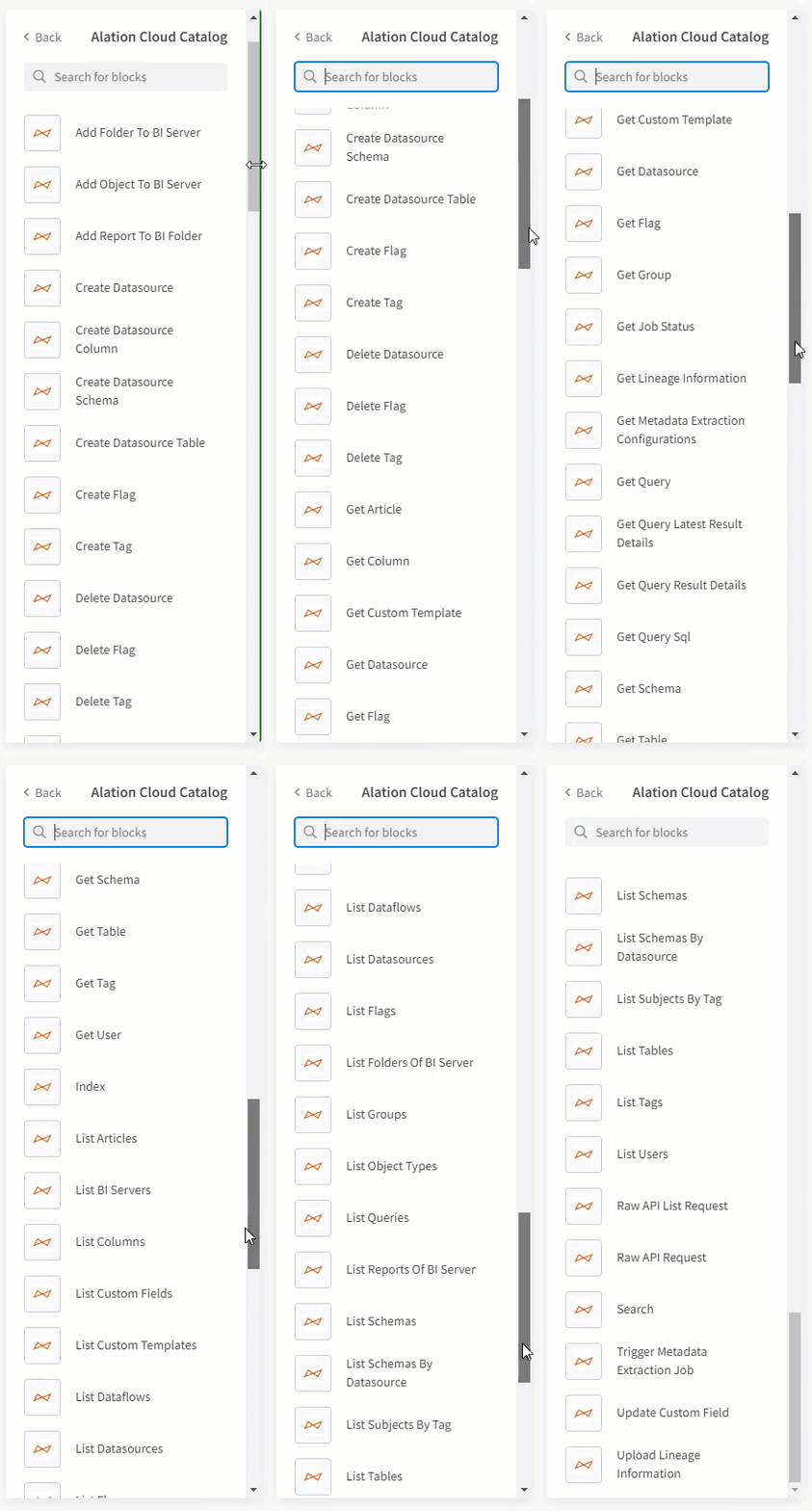
Like with any of the Qlik Application Automation connectors, to get started you will need to drag any of the many many many blocks to your canvas.
Then you will need to establish the connection parameters. Simply provide the name you wan to use for your connection, your login credentials for your Alation Cloud Catalog tenant and lastly your "instance_name." Please notice below you DO NOT want to input the entire instance, just your specific company name that is part of the full name.
Use Case
Considering the fact that I had to scroll for 10 seconds just to make the GIF file above showing the many blocks I suppose I better narrow the use case for the rest of this post down for you ... the main block that I wanted to show you was the brand spanking new block "Add Object to BI Server."
The use case that block was built to support was any scenario where you wanted to build your own user defined hierarchy within Alation. So I chose a use case that affords us the perfect opportunity to do just that ... We will be exporting all of the METADATA about my applications to my Alation Cloud Catalog. [Notice I didn't say saving our applications or sharing our data. I'm just talking about the metadata that describes our applications.]
Spaces --> Applications --> Sheets --> Objects
Thus the goal at the end is to have a folder in your Alation Cloud Catalog for each of your spaces, and inside a list of each of your applications that are part of that space, and inside that a list of each of your sheets that are part of that application, and inside of that a list of all of your objects that are part of that sheet.
I have attached a copy of the Qlik Application Automation project/workspace for you "SendSpaceToAlation.json". So if you want to feel free to upload the workspace into a new Qlik Application Automation and you can follow along.
One thing you will notice in the project, and in the accompanying video, is that I intentionally put two Conditional blocks in my Qlik Application Automation: One that checks for a particular Space name and only goes through the process for it, and a second that checks if the Sheets are public or not. It's always good practice to limit what you are doing so that it's easier to validate everything in an isolated fashion. Once you get it working you can simply drag everything from the Yes condition of the space out, remove the condition and then output all of your spaces. Likewise, if you wish to catalog all of the metadata from your personal sheets in the application feel free to do that. Understand, that they are YOUR personal sheets, not everyone else's.
BI Server
The blocks that I utilize as part of this automation, "Add Folder to BI Server", "Add Object to BI Server", both require you as their names suggest to identify your target BI Server. If I was just building the attached project for myself then perhaps I would utilize Qlik Application Automation's ability to simply select my BI Server from a lookup:
If you have ever watched my You Tube series on Qlik Application Automation you will know I'm kidding. I don't like having to worry about maintenance so I typically make everything a variable. Especially when it is something like the Alation Cloud Connector Server ID that I will use multiple times throughout the project. Which works out well for you because that means when you get a .JSON project from me, like the one attached, all you need to do is modify a few variables and you are up and running.
If you don't know the Server ID to use you have 3 options:
1. Go ahead and choose it 1 time from the lookup and it will give you the ID
2. If you are in your Alation Cloud the Server ID will be listed in the URL path
3. You could swap out the blocks to use the small "List BI Servers" block I left in this project for you. It provides you the same list that shows up if you use the Lookup functionality.
Sleep
My lack of sleep is none of your concern. However, you do need to be aware of the importance of "sleep" when it comes to the Alation Cloud Connector API's. You see they are Asynchronous. Meaning they don't make you wait while they are off and doing their thing, they return control to you immediately so you can multi-task. That is normally a great thing, but in this case we have an issue. I can't add Applications to a Space that doesn't exist yet. I can't add Sheets to an Application that doesn't exist yet. I can't add Objects to a Sheet that doesn't exist yet.
Hence, the need for sleep. Not for you or I, but for the automation. So you will see several blocks within the project set to sleep for X number of seconds after calling the Alation Cloud Connector API's. As I point out in the video depending on your environment you may need to adjust those wait times.
Seeing is Believing
Now that I have laid the ground work for what the use case and the special situations we are dealing with here is a video that will walk you through the project and let you see what the outcome would be in your Alation Cloud tenant.
Above and Beyond
Hopefully, I have provided enough information in text/video to get the attached template working in your environment. But that's really just the beginning. If you listened carefully I showed an alternative template where I created a folder called Sheets under the Application, then put all of the Sheets in it. Perhaps your next step is to make that work as well.
The most important thing about that suggestion was to leave room for other folders under the Applications like "Master Dimensions", "Master Measures" and "Master Visualizations." How cool would that be?
While I could have handed you a project template that did that for you, the most important reason I post content or share content is for YOUR LEARNING. I aim to provide enough to get you comfortable/confident working with new things like this Qlik Application Automation Connector for your Alation Cloud Catalog.
Whether you succeed or fail at the challenge, please feel free to share below. After all, that is what Qlik Community is all about.
The information in this article is provided as-is and to be used at own discretion. Depending on tool(s) used, customization(s), and/or other factors ongoing support on the solution below may not be provided by Qlik Support.
-
SAP OData services and retrieving data in Qlik Sense Client Managed and Qlik Clo...
This article explains how to retrieve data using Qlik Sense Analytics (on-premises and Cloud) from SAP OData services, taking into account the 2026 SA... Show MoreThis article explains how to retrieve data using Qlik Sense Analytics (on-premises and Cloud) from SAP OData services, taking into account the 2026 SAP security patches.
Background
An SAP security patch released in June 2026 technically blocks third-party use of the ODP framework over RFC (SAP Note 3255746). This is the interface most dedicated SAP connectors used. Only ODP via RFC is affected, not RFC in general, and SAP names ODP via OData as the compliant fallback for data access outside SAP systems. A time-limited revert option exists but expires in December 2026 (SAP Note 3731818).
Only Qlik's SAP ODP connector (Qlik Cloud) is affected. Depending on the access level you have in your SAP environment, you can also use our SAP connectors to extract data from SAP NetWeaver SAP connectors in Qlik Sense Client Managed, Qlik Cloud and QlikView (these are not affected by SAP restrictions).
But if data extraction only relies on OData services, Qlik's OData connector or REST connector are the only alternative.Requirements
What is needed on the SAP side (macro level):
- AP Gateway as the OData layer. Every OData service is served by SAP Gateway (NetWeaver Gateway), either embedded in the ABAP system or as a separate hub. In S/4HANA, it's built in. This is the component that turns backend objects into OData endpoints.
- Service activation. A service must be registered and activated in /IWFND/MAINT_SERVICE (plus the underlying ICF node in SICF). SAP ships thousands of standard services inactive by default. Activation per service is a deliberate admin step, not automatic.
- A user and authorizations. A dedicated communication/service user with S_SERVICE for the endpoint plus the application-level authorizations for the data behind it. Gateway auth doesn't bypass application auth — if the user can't see the plant in SAP, the OData service won't return it either.
- Network and authentication. HTTPS with a trusted certificate and an auth method. The consumer supports:
- Basic Auth (the simple on-prem case)
- OAuth2/SAML for cloud scenarios
In S/4HANA Cloud (public edition), the connection runs through communication scenarios/arrangements rather than manual Gateway configuration. For Qlik Cloud Analytics reaching an on-prem Gateway, either the endpoint is reachable from the cloud, or you go through Qlik Data Gateway – Direct Access.
- For ODP-based services, additionally, the Operational Delta Queue (ODQ) must be active, and the source object must be released for ODP extraction. Delta then works via the OData subscription/delta-link mechanism backed by ODQ.
What can be exposed as OData
Two families
Family A: ODP-based OData services. SAP Gateway can generate an OData service on
top of the ODP framework, and then the answer is essentially yes — anything ODP
supports:- DataSources/Extractors. SAPI context: the classic 2LIS_* logistics extractors, FI
extractors, etc., released via RSA5 - ABAP CDS views annotated with @Analytics.dataExtraction.enabled: true (ABAP_CDS
context), delta-capable when the change-data annotations are set - BW/BW4HANA InfoProviders. BW context
- SLT-based table replication. SLT context
- HANA information views
These services are generated in the Gateway Service Builder (SEGW) via the ODP-
extraction wizard. They support full load plus genuine delta — the extractor's delta logic
is preserved and exposed through OData delta tokens.Family B: regular (non-ODP) OData services. Anything the ABAP stack can model:
- A CDS view with @odata.publish: true (one annotation, auto-generated service)
- Hand-built services in SEGW (mapping DDIC tables, CDS as reference data source,
BAPIs/RFCs, or custom code) - RAP service bindings (OData V2/V4). The modern S/4HANA way
- The standard APIs delivered from the SAP Business Accelerator Hub
These have no delta mechanism by default. Incremental loads are your problem as the
consumer. Typically $filter on a change date or timestamp field, which only works if the
underlying object carries one reliably.Limitation with the generic OData connector in Qlik Sense Client Managed
The generic OData connector speaks plain OData, which is fine for Family B and for full loads only from Family A. (delta load can only be managed with a REST connector).
OData is a chatty protocol. While paging, $select to trim width, and gzip help, nobody should plan a nightly full load of BSEG-scale tables over it.
Options to retrieve data from SAP ODATA services
In Qlik Cloud Analytics
- How to connect to data from SAP OData services and retrieve data with Qlik Cloud Analytics REST connector
- How to connect to data from SAP OData services and retrieve data with Qlik Cloud Analytics ODATA connector
In Qlik Sense Enterprise on Windows
- How to connect to data from SAP OData services and retrieve data with Qlik Sense Enterprise on Windows REST connector
- How to connect to data from SAP OData services and retrieve data with Qlik Sense Enterprise on Windows ODATA connector
Environment
- Qlik Cloud
- Qlik Sense Enterprise on Windows
- QlikView