Unlock a world of possibilities! Login now and discover the exclusive benefits awaiting you.

Featured Content
-
How to contact Qlik Support
Qlik offers a wide range of channels to assist you in troubleshooting, answering frequently asked questions, and getting in touch with our technical e... Show MoreQlik offers a wide range of channels to assist you in troubleshooting, answering frequently asked questions, and getting in touch with our technical experts. In this article, we guide you through all available avenues to secure your best possible experience.
For details on our terms and conditions, review the Qlik Support Policy.
Index:
- Support and Professional Services; who to contact when.
- Qlik Support: How to access the support you need
- 1. Qlik Community, Forums & Knowledge Base
- The Knowledge Base
- Blogs
- Our Support programs:
- The Qlik Forums
- Ideation
- How to create a Qlik ID
- 2. Chat
- 3. Qlik Support Case Portal
- Escalate a Support Case
- Phone Numbers
- Resources
Support and Professional Services; who to contact when.
We're happy to help! Here's a breakdown of resources for each type of need.
Support Professional Services (*) Reactively fixes technical issues as well as answers narrowly defined specific questions. Handles administrative issues to keep the product up-to-date and functioning. Proactively accelerates projects, reduces risk, and achieves optimal configurations. Delivers expert help for training, planning, implementation, and performance improvement. - Error messages
- Task crashes
- Latency issues (due to errors or 1-1 mode)
- Performance degradation without config changes
- Specific questions
- Licensing requests
- Bug Report / Hotfixes
- Not functioning as designed or documented
- Software regression
- Deployment Implementation
- Setting up new endpoints
- Performance Tuning
- Architecture design or optimization
- Automation
- Customization
- Environment Migration
- Health Check
- New functionality walkthrough
- Realtime upgrade assistance
(*) reach out to your Account Manager or Customer Success Manager
Qlik Support: How to access the support you need
1. Qlik Community, Forums & Knowledge Base
Your first line of support: https://community.qlik.com/
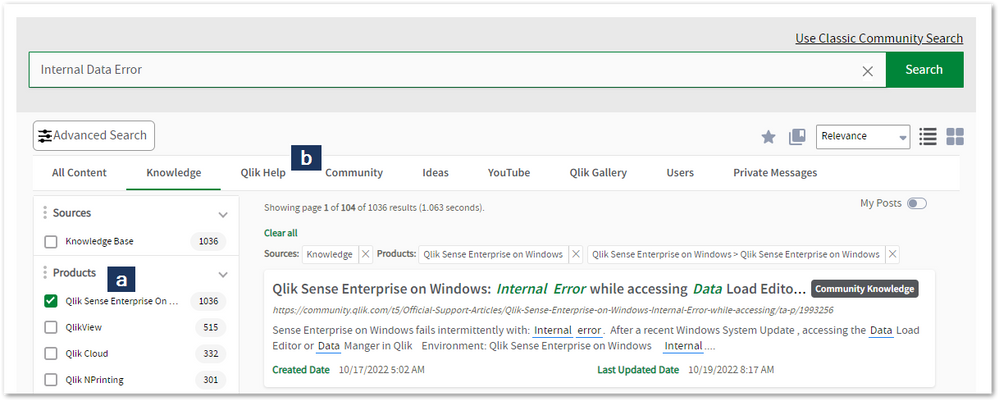
Looking for content? Type your question into our global search bar:
The Knowledge Base
Leverage the enhanced and continuously updated Knowledge Base to find solutions to your questions and best practice guides. Bookmark this page for quick access!
- Go to the Official Support Articles Knowledge base
- Type your question into our Search Engine
- Need more filters?
- Filter by Product
- Or switch tabs to browse content in the global community, on our Help Site, or even on our Youtube channel
Blogs
Subscribe to maximize your Qlik experience!
The Support Updates Blog
The Support Updates blog delivers important and useful Qlik Support information about end-of-product support, new service releases, and general support topics. (click)The Qlik Design Blog
The Design blog is all about product and Qlik solutions, such as scripting, data modelling, visual design, extensions, best practices, and more! (click)The Product Innovation Blog
By reading the Product Innovation blog, you will learn about what's new across all of the products in our growing Qlik product portfolio. (click)Our Support programs:
Q&A with Qlik
Live sessions with Qlik Experts in which we focus on your questions.Techspert Talks
Techspert Talks is a free webinar to facilitate knowledge sharing held on a monthly basis.Technical Adoption Workshops
Our in depth, hands-on workshops allow new Qlik Cloud Admins to build alongside Qlik Experts.Qlik Fix
Qlik Fix is a series of short video with helpful solutions for Qlik customers and partners.The Qlik Forums
- Quick, convenient, 24/7 availability
- Monitored by Qlik Experts
- New releases publicly announced within Qlik Community forums (click)
- Local language groups available (click)
Ideation
Suggest an idea, and influence the next generation of Qlik features!
Search & Submit Ideas
Ideation GuidelinesHow to create a Qlik ID
Get the full value of the community.
Register a Qlik ID:
- Go to register.myqlik.qlik.com
If you already have an account, please see How To Reset The Password of a Qlik Account for help using your existing account. - You must enter your company name exactly as it appears on your license or there will be significant delays in getting access.
- You will receive a system-generated email with an activation link for your new account. NOTE, this link will expire after 24 hours.
If you need additional details, see: Additional guidance on registering for a Qlik account
If you encounter problems with your Qlik ID, contact us through Live Chat!
2. Chat
Incidents are supported through our Chat, by clicking Chat Now on any Support Page across Qlik Community.
To raise a new issue, all you need to do is chat with us. With this, we can:
- Answer common questions instantly through our chatbot
- Have a live agent troubleshoot in real time
- With items that will take further investigating, we will create a case on your behalf with step-by-step intake questions.
3. Qlik Support Case Portal
Log in to manage and track your active cases in the Case Portal. (click)
Please note: to create a new case, it is easiest to do so via our chat (see above). Our chat will log your case through a series of guided intake questions.
Your advantages:
- Self-service access to all incidents so that you can track progress
- Option to upload documentation and troubleshooting files
- Option to include additional stakeholders and watchers to view active cases
- Follow-up conversations
When creating a case, you will be prompted to enter problem type and issue level. Definitions shared below:
Problem Type
Select Account Related for issues with your account, licenses, downloads, or payment.
Select Product Related for technical issues with Qlik products and platforms.
Priority
If your issue is account related, you will be asked to select a Priority level:
Select Medium/Low if the system is accessible, but there are some functional limitations that are not critical in the daily operation.
Select High if there are significant impacts on normal work or performance.
Select Urgent if there are major impacts on business-critical work or performance.
Severity
If your issue is product related, you will be asked to select a Severity level:
Severity 1: Qlik production software is down or not available, but not because of scheduled maintenance and/or upgrades.
Severity 2: Major functionality is not working in accordance with the technical specifications in documentation or significant performance degradation is experienced so that critical business operations cannot be performed.
Severity 3: Any error that is not Severity 1 Error or Severity 2 Issue. For more information, visit our Qlik Support Policy.
Escalate a Support Case
If you require a support case escalation, you have two options:
- Request to escalate within the case, mentioning the business reasons.
To escalate a support incident successfully, mention your intention to escalate in the open support case. This will begin the escalation process. - Contact your Regional Support Manager
If more attention is required, contact your regional support manager. You can find a full list of regional support managers in the How to escalate a support case article.
Phone Numbers
When other Support Channels are down for maintenance, please contact us via phone for high severity production-down concerns.
- Qlik Data Analytics: 1-877-754-5843
- Qlik Data Integration: 1-781-730-4060
- Talend AMER Region: 1-800-810-3065
- Talend UK Region: 44-800-098-8473
- Talend APAC Region: 65-800-492-2269
Resources
A collection of useful links.
Qlik Cloud Status Page
Keep up to date with Qlik Cloud's status.
Support Policy
Review our Service Level Agreements and License Agreements.
Live Chat and Case Portal
Your one stop to contact us.




Recent Documents
-
Tasks in the Qlik Sense Management Console don't update to show the correct stat...
Executing tasks or modifying tasks (changing owner, renaming an app) in the Qlik Sense Management Console and refreshing the page does not update the ... Show MoreExecuting tasks or modifying tasks (changing owner, renaming an app) in the Qlik Sense Management Console and refreshing the page does not update the correct task status. Issue affects Content Admin and Deployment Admin roles.
The behaviour began after an upgrade of Qlik Sense Enterprise on Windows.
Fix version:
This issue can be mitigated beginning with August 2021 by enabling the QMCCachingSupport Security Rule.
Solution for August 2023 and above:
Enable QmcTaskTableCacheDisabled.
To do so:
- Navigate to C:\Program Files\Qlik\Sense\CapabilityService\
- Locate and open the capabilities.json
- Modify or add the QmcTaskTableCacheDisabled flag for these values to true
{"contentHash":"CONTENTHASHHERE","originalClassName":"FeatureToggle","flag":"QmcTaskTableCacheDisabled","enabled":true}
Where CONTENTHASHHERE matches the number in all other features listed in the capabilities.json.
Example:
This will disable the caching on the tasks table only, leaving the overall QMC Cache intact to gain performance. If you had previously set QmcCacheEnabled, QmcDirtyChecking, QmcExtendedCaching to false, please set it to true again. - Restart the Qlik Sense services
Workaround for earlier versions:
Upgrade to the latest Service Release and disable the caching functionality:
To do so:
- Navigate to C:\Program Files\Qlik\Sense\CapabilityService\
- Locate and open the capabilities.json
- Modify the flag for these values to false
- QmcCacheEnabled
- QmcDirtyChecking
- QmcExtendedCaching
- Restart the Qlik Sense services
NOTE: Make sure to use lower case when setting values to true or false as capabilities.json file is case sensitive.
Should the issue persist after applying the workaround/fix, contact Qlik Support.
Internal Investigation ID(s):
Environment
-
Qlik Talend Data Integration: SQLite general error "Code <14>, Message <UNABLE to="" open="" database="" file="">"</UNABLE>
Qlik Talend Data Integration task was unable to resume with the following error: [SORTER_STORAGE ]E: The Transaction Storage Swap cannot write Event (... Show MoreQlik Talend Data Integration task was unable to resume with the following error:
[SORTER_STORAGE ]E: The Transaction Storage Swap cannot write Event (transaction_storage.c:3321) [DATA_STRUCTURE ]E: SQLite general error. Code <14>, Message <unable to open database file>. [1000505] (at_sqlite.c:525) [DATA_STRUCTURE ]E: SQLite general error. Code <14>, Message <unable to open database file>. [1000506] (at_sqlite.c:475)
Resolution
Freeing up disk space or increase the data directory size usually solves the issue.
Cause
It indicates that Qlik Talend Data Integration was no longer able to access its internal SQLite database (used for the sorter, metadata, and task state management).
When the disk space in the Sorter directory becomes full, SQLite can no longer write to the database, which invariably results in Code 14.
After checking the disk space on the Linux server, it was found that it had indeed reached 100% usage, leaving no free space available which caused the issue.
Environment
-
Qlik Sense Enterprise on Windows and changing the Active Directory Domain name
In this article, we detail the 12 steps necessary to successfully configure Qlik Sense Enterprise on Windows after an Active Directory Domain name cha... Show MoreIn this article, we detail the 12 steps necessary to successfully configure Qlik Sense Enterprise on Windows after an Active Directory Domain name change or moving Qlik Sense to a new domain.
Depending on how you have configured your platform, not all the steps might be applicable. Before updating any hostname in Qlik Sense, make sure that the original value is using the old domain name. In some case, you may have configured “localhost” or the server name without any reference to the domain so there is no need in these cases to perform any update.
Environment
Scenario
In this scenario we are updating a three-node environment running Qlik Sense February 2021:
The domain has been changed from DOMAIN.local to DOMAIN2.local
The servers mentioned below are already part of the new domain name DOMAIN2.local and their Fully Qualified Domain Name (FQDN) is already updated as followed:
- QlikServer1.domain.local to QlikServer1.domain2.local: Central node
- QlikServer2.domain.local to QlikServer2.domain2.local: Rim node
- QlikServer3.domain.local to QlikServer3.domain2.local: Dedicated Postgres and hosting the Qlik shared folder
All Qlik Sense services have been stopped on every node.
Step 1: Update the Postgres Configuration File
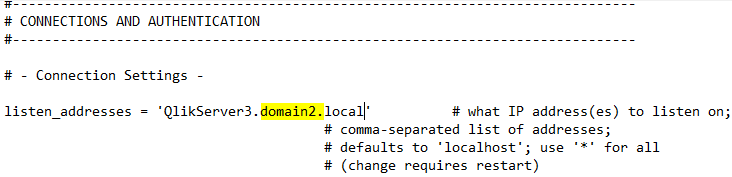
The first step is to update the postgres.conf file to listen on the correct hostname
- Open the postgres.conf (make sure to make a copy) under
- C:\ProgramData\Qlik\Sense\Repository\PostgreSQL\<version> (for an environment running the native Qlik Sense Repository Database)
- C:\Program Files\PostgreSQL\<version>\data (for an environment running a dedicated PostgreSQL database)
- Search for the parameter listen_addresses and update the hostname value if required
- Save the file, close it and start the Qlik Sense Repository Database or PosgresSQL service depending if you are using the native PostgreSQL or a dedicated instance
Step 2: Backup your Qlik Sense site
Before doing any further changes, it is important to take a backup of your Qlik Sense Platform
Step 3: Rename Server Node in QSR database
Now we update the node names in the database with the new Fully Qualified Domain Name.
- Connect to the Qlik Sense Database using Installing and Configuring PGAdmin4 to access the PostgreSQL
- Open the QSR Database and navigate through Schemas -> public ->Tables
- Right-click on ServerNodeConfiguration -> View/Edit Data -> All Rows
- Modify the hostname of each node if required
- Save by clicking on the below icon available in the toolbar
- Close PGAdmin
Step 4: Rename User Directory for existing users
- Connect to the Qlik Sense Database using Installing and Configuring PGAdmin4 to access the PostgreSQL
- Right-click on the QSR Database and select “Query Tool”
- Run the following query
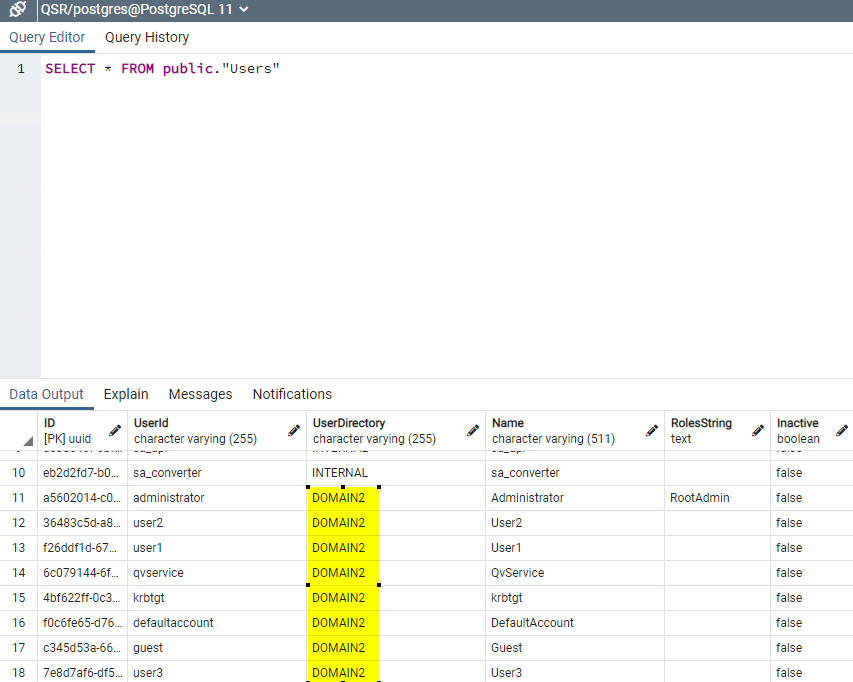
UPDATE public."Users" SET "UserDirectory" = 'DOMAIN2' WHERE "UserDirectory" = 'DOMAIN'; - Validate the change by running the following query
SELECT * FROM public."Users"
The User Directory should be updated to the new domain: - Close PGAdmin
Step 5: Update Service Cluster configuration
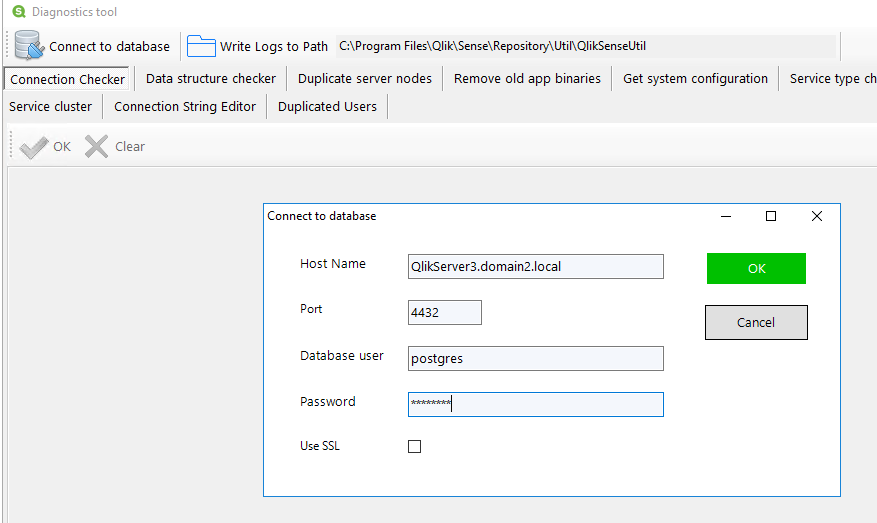
- On the central node run the program C:\Program Files\Qlik\Sense\Repository\Util\QlikSenseUtil\QlikSenseUtil.exe and Connect to Database
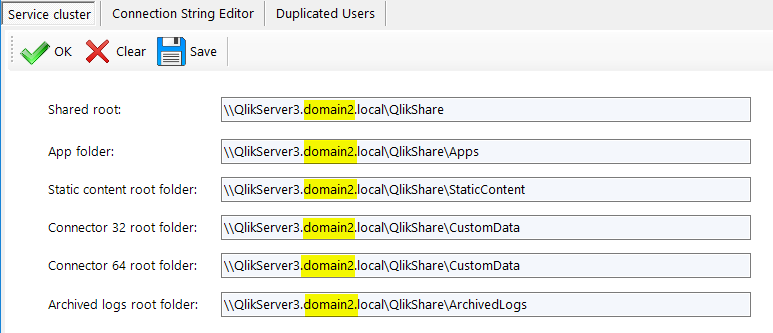
- Once connected, click on Service cluster and then OK
- Update the FQDN with the new domain if required and press Save
- Close QlikSenseUtil.exe
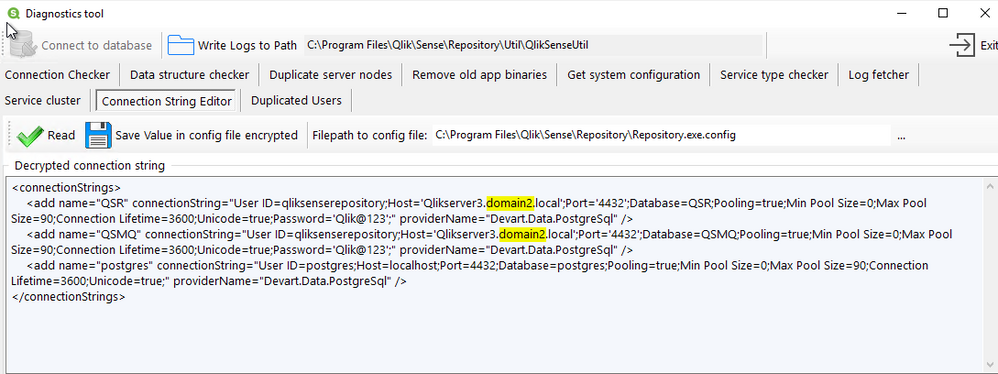
Step 6: Update the repository Connection Strings
- On the central node run the program C:\Program Files\Qlik\Sense\Repository\Util\QlikSenseUtil\QlikSenseUtil.exe
- Select Connection String Editor and click on Read
- Update the FQDN with the new domain if required and press Save Value in config file encrypted
- Close QlikSenseUtil.exe
- Repeat the above steps on every rim node
Step 7: Update the dispatcher services connection strings
Verify if a hostname update is required
- On the central node, open File Explorer and navigate to C:\Program Files\Qlik\Sense\Licenses and open the appsetting.json
- Check if the parameter host contains the old domain name. If it does then you need to follow the below steps to update it otherwise you can jump to the next section
Update hostname on all Qlik Sense Dispatcher subservices
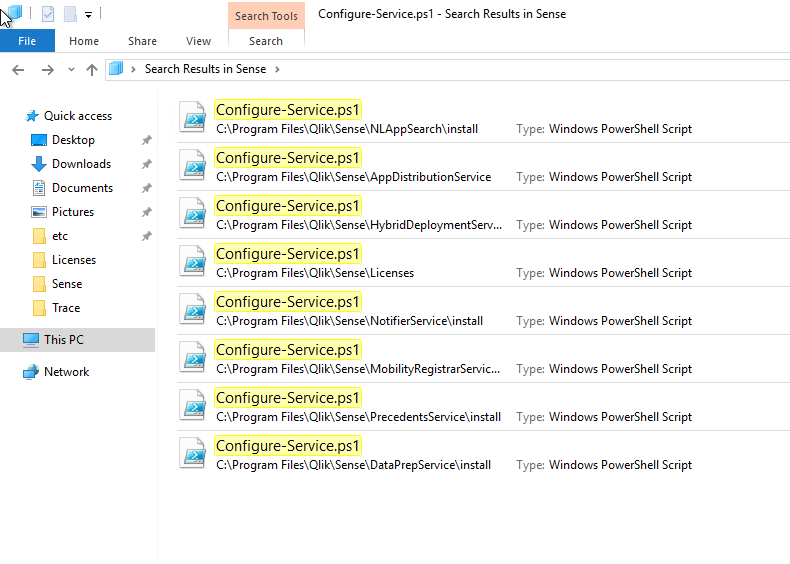
- Search for the file called Configure-Service.ps1
In Qlik Sense February, there are 8 of these files placed in different Qlik Sense Dispatcher sub-services. We need to run each of these files with a specific argument. In the previous or later version of Qlik Sense, the list presented below may need to be adapted. - Run the following command in PowerShell ISE as Administrator
cd "C:\Program Files\Qlik\Sense\NLAppSearch\install" .\Configure-Service.ps1 QlikServer3.domain2.local 4432 qliksenserepository <qliksenserepository_password> cd "C:\Program Files\Qlik\Sense\AppDistributionService" .\Configure-Service.ps1 QlikServer3.domain2.local 4432 qliksenserepository <qliksenserepository_password> cd "C:\Program Files\Qlik\Sense\HybridDeploymentService" .\Configure-Service.ps1 QlikServer3.domain2.local 4432 qliksenserepository <qliksenserepository_password> cd "C:\Program Files\Qlik\Sense\Licenses" .\Configure-Service.ps1 QlikServer3.domain2.local 4432 qliksenserepository <qliksenserepository_password> cd "C:\Program Files\Qlik\Sense\NotifierService\install" .\Configure-Service.ps1 QlikServer3.domain2.local 4432 qliksenserepository <qliksenserepository_password> cd "C:\Program Files\Qlik\Sense\MobilityRegistrarService\install" .\Configure-Service.ps1 QlikServer3.domain2.local 4432 qliksenserepository <qliksenserepository_password> cd "C:\Program Files\Qlik\Sense\PrecedentsService\install" .\Configure-Service.ps1 QlikServer3.domain2.local 4432 qliksenserepository <qliksenserepository_password> cd "C:\Program Files\Qlik\Sense\DataPrepService\install" .\Configure-Service.ps1 QlikServer3.domain2.local 4432 qliksenserepository <qliksenserepository_password> - Repeat the above steps on every node (Including the verification)
Step 8: Update the Qlik Logging Service
If you are using the Qlik Logging Service;
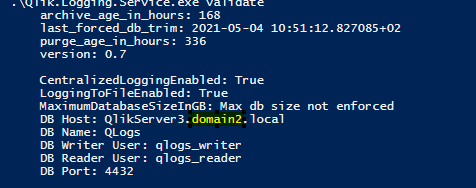
- Run the following command in Command Prompt:
cd "C:\Program Files\Qlik\Sense\Logging" Qlik.Logging.Service.exe validate - If you get something like:
Failed to validate logging database. Database does not exist or is an invalid version.
Then it probably means that the hostname needs to be updated - If so, run the following command in Command Prompt:
cd "C:\Program Files\Qlik\Sense\Logging" Qlik.Logging.Service.exe update -h QlikServer3.domain2.local - Once done, run the validate command again to verify that the connectivity is working
- Repeat the above steps on every rim node
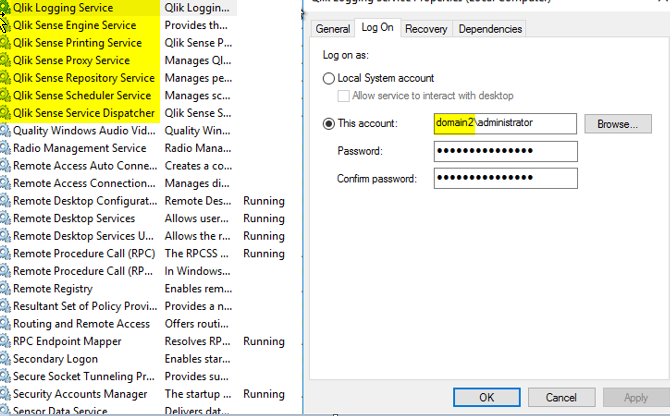
Step 9: Update the service account running the Qlik Sense services
- On the central node, open the Windows Service Console an update each Qlik Sense services with the new domain (DO NOT START THE SERVICE AT THIS POINT)
- Repeat the above step on every rim node
Step 10: Update the host.cfg and remove the certificate
- On the central node login as the service account
- Backup the Qlik Sense certificate following Backing up certificates
- Remove the certificate you have previous backed up from the MMC
- Make a copy of %ProgramData%\Qlik\Sense\Host.cfg and rename the copy to Host.cfg.old
- Host.cfg contains the hostname encoded in base64. You can generate this string for the new hostname using a site such as https://www.base64encode.org/ (You may want to decode the original string to see if it contains the old domain name.
- Open Host.cfg and replace the content with the new encoded hostname.
- Run Windows Command Prompt as Administrator and execute the following command:
"C:\Program Files\Qlik\Sense\Repository\Repository.exe" -bootstrap -iscentral -restorehostname - In parallel start the Qlik Sense Dispatcher services
- When the command has completed successfully you should see the following message in command prompt:
Bootstrap mode has terminated. Press ENTER to exit.. - Start every Qlik Sense services on the central node and try to access the QMC with https://localhost/qmc
Step 11: Distribute the certificate on the rim node(s)
- On the rim node(s) login as the service account
- Backup the Qlik Sense certificate following Backing up certificates
- Remove the certificate you have previous backed up from the MMC
- Start the Qlik Sense services
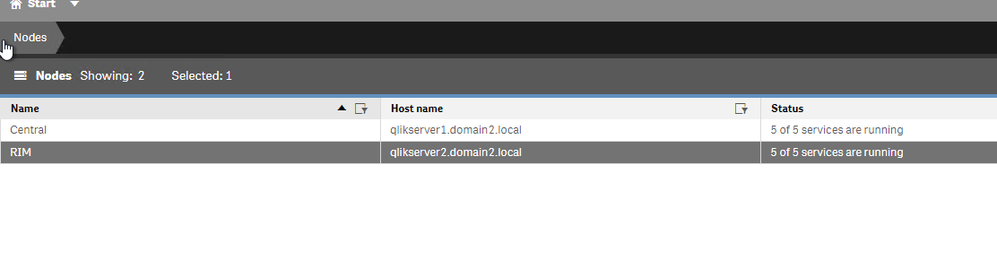
- On the central node, open the QMC and go to Nodes
- After a few minutes the rim node should have the status The certificates has not been installed
- Click on Redistribute and follow the instructions to redistribute the certificates on the rim node(s)
- After a few minutes, the services should be running
Step 12: Additional updates
User Directory Connector
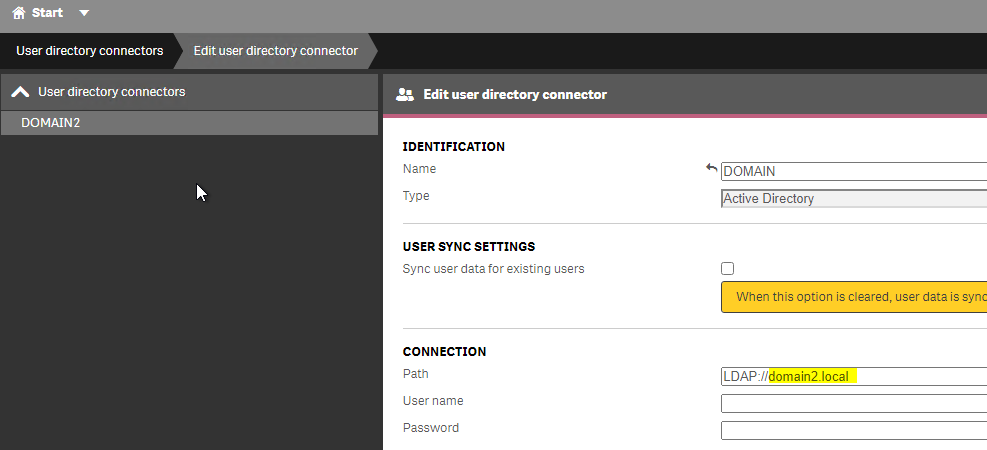
If you are syncing your users with a User Directory Connector you will need to change the LDAP path to point to the new domain.
- In the QMC -> User Directory Connector
- Edit your existing User Directory Connector, check the LDAP Path and update if necessary
Monitoring Application
You will need to update the monitoring apps and their associated data connection to use the new Fully Qualified Domain Name
Data Connections password
- Part of the steps followed earlier, the certificates had to be recreated. As a result, the passwords for the existing data connection needs to be re-typed and saved for all Data Connections and User Directory Connectors that include password information.
Security Rules and Licenses rules
It is possible that you have created rules based on the User Directory. As you have changed the domain name, the user directory has also changed in Qlik Sense so you will need to update those to reflect that.
The information in this article is provided as-is and to be used at own discretion. Depending on tool(s) used, customization(s), and/or other factors ongoing support on the solution below may not be provided by Qlik Support.
-
Upgrading and unbundling the Qlik Sense Repository Database using the Qlik Postg...
In this article, we walk you through the requirements and process of how to upgrade and unbundle an existing Qlik Sense Repository Database (see suppo... Show MoreIn this article, we walk you through the requirements and process of how to upgrade and unbundle an existing Qlik Sense Repository Database (see supported scenarios) as well as how to install a brand new Repository based on PostgreSQL. We will use the Qlik PostgreSQL Installer (QPI).
For a manual method, see How to manually upgrade the bundled Qlik Sense PostgreSQL version to 12.5 version.
Using the Qlik Postgres Installer not only upgrades PostgreSQL; it also unbundles PostgreSQL from your Qlik Sense Enterprise on Windows install. This allows for direct control of your PostgreSQL instance and facilitates maintenance without a dependency on Qlik Sense. Further Database upgrades can then be performed independently and in accordance with your corporate security policy when needed, as long as you remain within the supported PostgreSQL versions. See How To Upgrade Standalone PostgreSQL.
Index
- Supported Scenarios
- Upgrades
- New installs
- Requirements
- Known limitations
- Installing anew Qlik Sense Repository Database using PostgreSQL
- Qlik PostgreSQL Installer - Download Link
- Upgrading an existing Qlik Sense Repository Database
- The Upgrade
- Next Steps and Compatibility with PostgreSQL installers
- How do I upgrade PostgreSQL from here on?
- Troubleshooting and FAQ
- Related Content
Video Walkthrough
Video chapters:
- 01:02 - Intro to PostgreSQL Repository
- 02:51 – Prerequisites
- 03:24 - What is the QPI tool?
- 05:09 - Using the QPI tool
- 09:27 - Removing the old Database Service
- 11:27 - Upgrading a stand-alone to the latest release
- 13:39 - How to roll-back to the previous version
- 14:46 - Troubleshooting upgrading a patched version
- 18:25 - Troubleshooting upgrade security error
- 21:15 - Additional config file settings
Supported Scenarios
Upgrades
The following versions have been tested and verified to work with QPI:
Qlik Sense February 2022 to Qlik Sense November 2024.
If you are on a Qlik Sense version prior to these, upgrade to at least February 2022 before you begin.
Qlik Sense November 2022 and later do not support 9.6, and a warning will be displayed during the upgrade. From Qlik Sense August 2023 a upgrade with a 9.6 database is blocked.
New installs
The Qlik PostgreSQL Installer supports installing a new standalone PostgreSQL database with the configurations required for connecting to a Qlik Sense server. This allows setting up a new environment or migrating an existing database to a separate host.
Requirements
- Review the QPI Release Notes before you continue
-
Using the Qlik PostgreSQL Installer on a patched Qlik Sense version can lead to unexpected results. If you have a patch installed, either:
- Uninstall all patches before using QPI (see Installing and Uninstalling Qlik Sense Patches) or
- Upgrade to an IR release of Qlik Sense which supports QPI
- The PostgreSQL Installer can only upgrade bundled PostgreSQL database listening on the default port 4432.
- The user who runs the installer must be an administrator.
- The backup destination must have sufficient free disk space to dump the existing database
- The backup destination must not be a network path or virtual storage folder. It is recommended the backup is stored on the main drive.
- There will be downtime during this operation, please plan accordingly
- If upgrading to PostgreSQL 14 and later, the Windows OS must be at least Server 2016
Known limitations
- (Limitation removed in QPI 2.1 | Release Notes) Cannot migrate a 14.17 embedded database to a standalone
- (Limitation removed in QPI 2.1 | Release Notes) Using QPI to upgrade a standalone database or a database previously unbundled with QPI is not supported.
- The installer itself does not provide an automatic rollback feature.
Installing a new Qlik Sense Repository Database using PostgreSQL
- Run the Qlik PostgreSQL Installer as an administrator
- Click on Install
- Accept the Qlik Customer Agreement
- Set your Local database settings and click Next. You will use these details to connect other nodes to the same cluster.
- Set your Database superuser password and click Next
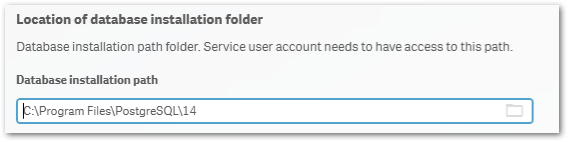
- Set the database installation folder, default: C:\Program Files\PostgreSQL\14
Do not use the standard Qlik Sense folders, such as C:\Program Files\Qlik\Sense\Repository\PostgreSQL\ and C:\Programdata\Qlik\Sense\Repository\PostgreSQL\.
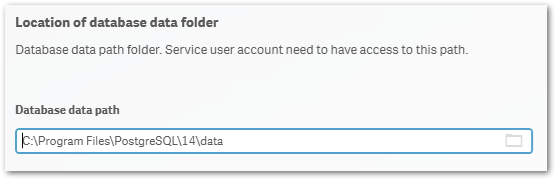
- Set the database data folder, default: C:\Program Files\PostgreSQL\14\data
Do not use the standard Qlik Sense folders, such as C:\Program Files\Qlik\Sense\Repository\PostgreSQL\ and C:\Programdata\Qlik\Sense\Repository\PostgreSQL\.
- Review your settings and click Install, then click Finish
- Start installing Qlik Sense Enterprise Client Managed. Choose Join Cluster option.
The Qlik PostgreSQL Installer has already seeded the databases for you and has created the users and permissions. No further configuration is needed. - The tool will display information on the actions being performed. Once installation is finished, you can close the installer.
If you are migrating your existing databases to a new host, please remember to reconfigure your nodes to connect to the correct host. How to configure Qlik Sense to use a dedicated PostgreSQL database
Qlik PostgreSQL Installer - Download Link
Download the installer here.Qlik PostgreSQL installer Release Notes
Upgrading an existing Qlik Sense Repository Database
The following versions have been tested and verified to work with QPI (1.4.0):
February 2022 to November 2023.
If you are on any version prior to these, upgrade to at least February 2022 before you begin.
Qlik Sense November 2022 and later do not support 9.6, and a warning will be displayed during the upgrade. From Qlik Sense August 2023 a 9.6 update is blocked.
The Upgrade
- Stop all services on rim nodes
- On your Central Node, stop all services except the Qlik Sense Repository Database
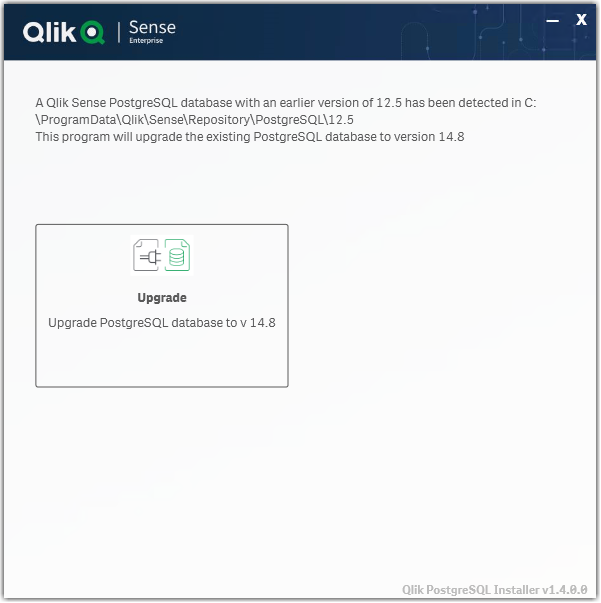
- Run the Qlik PostgreSQL Installer. An existing Database will be detected.
- Highlight the database and click Upgrade
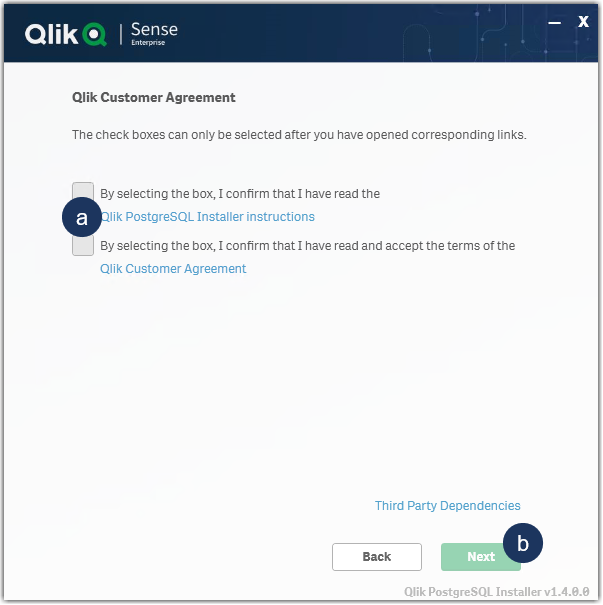
- Read and confirm the (a) Installer Instructions as well as the Qlik Customer Agreement, then click (b) Next.
- Provide your existing Database superuser password and click Next.
- Define your Database backup path and click Next.
- Define your Install Location (default is prefilled) and click Next.
- Define your database data path (default is prefilled) and click Next.
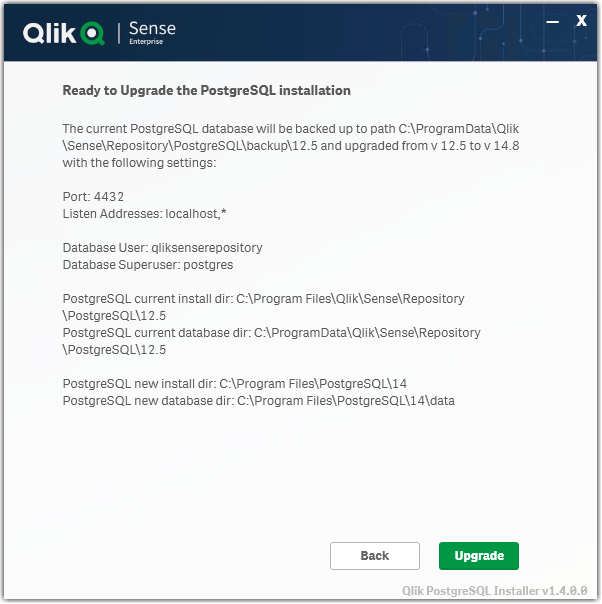
- Review all properties and click Upgrade.
The review screen lists the settings which will be migrated. No manual changes are required post-upgrade. - The upgrade is completed. Click Close.
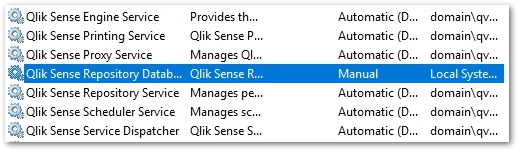
- Open the Windows Services Console and locate the Qlik Sense Enterprise on Windows services.
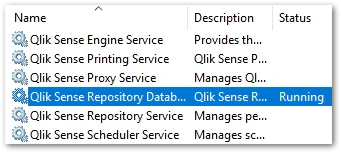
You will find that the Qlik Sense Repository Database service has been set to manual. Do not change the startup method.
You will also find a new postgresql-x64-14 service. Do not rename this service.
- Start all services except the Qlik Sense Repository Database service.
- Start all services on your rim nodes.
- Validate that all services and nodes are operating as expected. The original database folder in C:\ProgramData\Qlik\Sense\Repository\PostgreSQL\X.X_deprecated
-
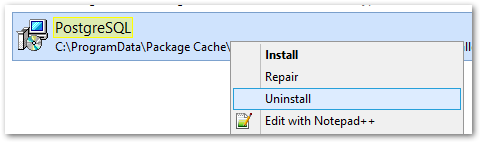
Uninstall the old Qlik Sense Repository Database service.
This step is required. Failing to remove the old service will lead the upgrade or patching issues.
- Open a Windows File Explorer and browse to C:\ProgramData\Package Cache
- From there, search for the appropriate msi file.
If you were running 9.6 before the upgrade, search PostgreSQL.msi
If you were running 12.5 before the upgrade, search PostgreSQL125.msi - The msi will be revealed.
- Right-click the msi file and select uninstall from the menu.
- Open a Windows File Explorer and browse to C:\ProgramData\Package Cache
- Re-install the PostgreSQL binaries. This step is optional if Qlik Sense is immediately upgraded following the use of QPI. The Sense upgrade will install the correct binaries automatically.
Failing to reinstall the binaries will lead to errors when executing any number of service configuration scripts.
If you do not immediately upgrade:
- Open a Windows File Explorer and browse to C:\ProgramData\Package Cache
- From there, search for the .msi file appropriate for your currently installed Qlik Sense version
For Qlik Sense August 2023 and later: PostgreSQL14.msi
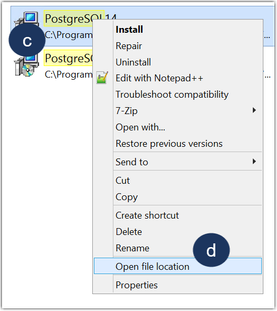
Qlik Sense February 2022 to May 2023: PostgreSQL125.msi - Right-click the file
- Click Open file location
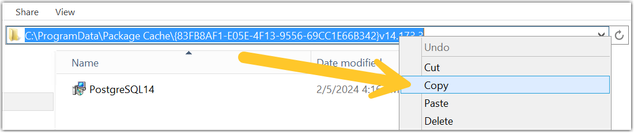
- Highlight the file path, right-click on the path, and click Copy
- Open a Windows Command prompt as administrator
- Navigate to the location of the folder you copied
Example command line:
cd C:\ProgramData\Package Cache\{GUID}
Where GUID is the value of the folder name. - Run the following command depending on the version you have installed:
Qlik Sense August 2023 and later
msiexec.exe /qb /i "PostgreSQL14.msi" SKIPINSTALLDBSERVICE="1" INSTALLDIR="C:\Program Files\Qlik\Sense"
Qlik Sense February 2022 to May 2023
msiexec.exe /qb /i "PostgreSQL125.msi" SKIPINSTALLDBSERVICE="1" INSTALLDIR="C:\Program Files\Qlik\Sense"
This will re-install the binaries without installing a database. If you installed with a custom directory adjust the INSTALLDIR parameter accordingly. E.g. you installed in D:\Qlik\Sense then the parameter would be INSTALLDIR="D:\Qlik\Sense".
- Open a Windows File Explorer and browse to C:\ProgramData\Package Cache
- Finalize the process by updating the references to the PostgreSQL binaries paths in the SetupDatabase.ps1 and Configure-Service.ps1 files. For detailed steps, see Cannot change the qliksenserepository password for microservices of the service dispatcher: The system cannot find the file specified.
If the upgrade was unsuccessful and you are missing data in the Qlik Management Console or elsewhere, contact Qlik Support.
Next Steps and Compatibility with PostgreSQL installers
Now that your PostgreSQL instance is no longer connected to the Qlik Sense Enterprise on Windows services, all future updates of PostgreSQL are performed independently of Qlik Sense. This allows you to act in accordance with your corporate security policy when needed, as long as you remain within the supported PostgreSQL versions.
Your PostgreSQL database is fully compatible with the official PostgreSQL installers from https://www.enterprisedb.com/downloads/postgres-postgresql-downloads.
How do I upgrade PostgreSQL from here on?
See How To Upgrade Standalone PostgreSQL, which documents the upgrade procedure for either a minor version upgrade (example: 14.5 to 14.8) or a major version upgrade (example: 12 to 14). Further information on PostgreSQL upgrades or updates can be obtained from Postgre directly.
Troubleshooting and FAQ
- If the installation crashes, the server reboots unexpectedly during this process, or there is a power outage, the new database may not be in a serviceable state. Installation/upgrade logs are available in the location of your temporary files, for example:
C:\Users\Username\AppData\Local\Temp\2
A backup of the original database contents is available in your chosen location, or by default in:
C:\ProgramData\Qlik\Sense\Repository\PostgreSQL\backup\X.X
The original database data folder has been renamed to:
C:\ProgramData\Qlik\Sense\Repository\PostgreSQL\X.X_deprecated - Upgrading Qlik Sense after upgrading PostgreSQL with the QPI tool fails with:
This version of Qlik Sense requires a 'SenseServices' database for multi cloud capabilities. Ensure that you have created a 'SenseService' database in your cluster before upgrading. For more information see Installing and configuring PostgreSQL.
See Qlik Sense Upgrade fails with: This version of Qlik Sense requires a _ database for _.
To resolve this, start the postgresql-x64-XX service.
The information in this article is provided as-is and to be used at own discretion. Depending on tool(s) used, customization(s), and/or other factors ongoing support on the solution below may not be provided by Qlik Support. The video in this article was recorded in a earlier version of QPI, some screens might differ a little bit.
Related Content
Qlik PostgreSQL installer version 1.3.0 Release Notes
Techspert Talks - Upgrading PostgreSQL Repository Troubleshooting
Backup and Restore Qlik Sense Enterprise documentation
Migrating Like a Boss
Optimizing Performance for Qlik Sense Enterprise
Qlik Sense Enterprise on Windows: How To Upgrade Standalone PostgreSQL
How-to reset forgotten PostgreSQL password in Qlik Sense
How to configure Qlik Sense to use a dedicated PostgreSQL database
Troubleshooting Qlik Sense Upgrades -
Qlik Talend Cloud: The Engine 'Cloud Engine for Design' goes off and automatical...
The "Cloud Engine for Design" is just stopping and goes off rather than running constantly once started. Resolution Please confirm if the cloud engi... Show MoreThe "Cloud Engine for Design" is just stopping and goes off rather than running constantly once started.
Resolution
Please confirm if the cloud engine for design is started and try to start the engine explicitly if needed.
The Cloud Engine for Design is reset on a weekly basis. As such, execution logs and metrics on this type of engine are not persistent from one week to the next.
Cause
It is normal behavior.
Basically, the Engine 'Cloud Engine for Design'( CE4Ds) are getting stopped in case of inactivity after some time, but should be woken up if a new request, such as, Pipelines, reaches the engine. The Cloud engine for design are automatically stopped after 6 hours of inactivity and there is no way to "keep it running" continuously.
Related Content
For more information, please refer to below documentation about: starting-cloud-engine | Qlik Talend Help
Environment
-
Qlik Show-hide and Tabbed container extension missing in Qlik Sense February 202...
Qlik Show-hide (qlik-show-hide-container) and Tabbed container (qlik-tabbed-container) from the Qlik Bundled extensions are missing from custom object... Show MoreQlik Show-hide (qlik-show-hide-container) and Tabbed container (qlik-tabbed-container) from the Qlik Bundled extensions are missing from custom objects in the hub since any Qlik Sense Enterprise on Windows February 2020 and later releases. They are still visible in the Qlik Sense Management Console (QMC).
Environment
- Qlik Sense Enterprise on Windows February 2020 and later
Resolution
This is expected. Those 2 extensions have been deprecated since June 2019 and can no longer be created as new object types.
Existing objects will continue to work.
We recommend using the standard container object instead. See Container
-
Qlik’s Response to Apache Tika vulnerability CVE-2025-66516
Executive Summary In December 2025, the Apache Project announced a vulnerability in Apache Tika (CVE-2025-66516) and provided patches to resolve the ... Show MoreExecutive Summary
In December 2025, the Apache Project announced a vulnerability in Apache Tika (CVE-2025-66516) and provided patches to resolve the issue. Qlik has been reviewing our usage of the Apache Tika product suite and has identified a limited impact as follows.
Affected Software
Apache Tika is used in several Qlik products. However, the vulnerability is only relevant to the case of a Talend Studio route that uses Apache Tika to parse PDFs.
No other use case or product is impacted by the vulnerability. Qlik Cloud and Talend Cloud are not impacted by this vulnerability.
Nevertheless, we are patching all our products that contain Apache Tika out of an abundance of caution. Be on the lookout for a series of product patches for supported and affected versions.
Resolution
Recommendation
The releases listed in the table below contain the updated version of Apache Tika, which addresses CVE-2025-66516.
Always update to the latest version. Before you upgrade, check if a more recent release is available.
Product Patch Release Date Talend Studio R2025-11v2 December 16, 2025 Talend Administration Center QTAC-1472 December 19, 2025 Talend ESB Runtime R2025-12-RT December 19, 2025 Talend Remote Engine Gen 2. Connectors 1.58.8 December 23, 2025 Talend Data Stewardship TPS-6013 December 23, 2025 Talend Data Preparation TPS-6016 January 16, 2026 -
Not able to create data spaces with Qlik Cloud Analytics license
Customers with a Qlik Cloud Analytics license cannot create or edit data spaces. When creating a space, only the options for managed or shared spaces ... Show MoreCustomers with a Qlik Cloud Analytics license cannot create or edit data spaces.
When creating a space, only the options for managed or shared spaces are available:
Resolution
Data Spaces are part of the Qlik Talend Data Integration offering.
Despite the name, “data spaces” are not meant to store Qlik Cloud Analytics data. Qlik Cloud Analytics customers should store their datasets in managed and shared spaces.
To address early misunderstandings and assist customers who had originally stored their datasets there, Qlik has decided to allow analytics customers to keep using data spaces with the following workaround.
IMPORTANT
- The decision to allow this workaround might be reverted at any time, preceded by a timely communication.
- Analytics-only customers who never made use of data spaces should refrain from starting now.
- Analytics-only customers who are already working with data spaces should consider planning to move away from them, migrating their datasets and connections and should not start implementing new workflows involving data spaces.
- Additional Qlik Talend Data Integration-only features, like the possibility to work with pipelines or the Qlik Data Movement Gateway, are not available to Analytics-only customers.
To create and edit spaces:
- Open the Qlik Cloud main menu
- Go to Data Integration
- Open Projects
You can edit existing datasets or create new data spaces from the Projects Activity Center.
Environment
- Qlik Cloud Analytics
-
Qlik Talend Administration Center Error Migrating Nexus OrientDB to PostgreSQL D...
For Talend Administration Center configured with Nexus, when attempting to migrate Sonatype Nexus Repository Manager OSS (versions prior to 3.77.0) fr... Show MoreFor Talend Administration Center configured with Nexus, when attempting to migrate Sonatype Nexus Repository Manager OSS (versions prior to 3.77.0) from the embedded OrientDB database to an external PostgreSQL database, the Database Migrator utility may encounter the following error:
com.sonatype.nexus.db.migrator.exception.WrongNxrmEditionException:Migration to an external database requires Nexus Repository Manager Pro and is not supported for Nexus Repository Manager OSS instances.Resolution
To successfully migrate from OrientDB to PostgreSQL, follow the below migration paths recommended by Sonatype:
Migrating from OrientDB to H2 database (temporary step)
Use the Database Migrator utility to move your data from OrientDB into the embedded H2 database.
Documentation: Migrating from OrientDB to H2 database
Upgrade to Nexus Repository Community Edition (≥ 3.77.0)
PostgreSQL support is available only in Community Edition starting with version 3.77.0.
Documentation: Community Edition Onboarding
Migrating from H2 database to PostgreSQL database
Once upgraded, use the Database Migrator utility again to move from H2 into PostgreSQL.
Documentation: Migrating from H2 database to PostgreSQL database
Important Notes:
- Migration is one‑way: once you move to PostgreSQL, you cannot revert back to OrientDB.
- Ensure you have backups before starting any migration.
- The migration process is managed by Sonatype’s Database Migrator utility and Qlik does not maintain or support this tool.
For issues with the migrator or Nexus Repository itself, contact Sonatype Support directly.
Cause
Nexus Repository OSS (3.70.4-02) does not support migration directly from OrientDB to PostgreSQL.
PostgreSQL support was introduced in the Community Edition starting with version 3.77.0.
Attempting to run the Database Migrator against OSS versions 3.70.4-02 results in the WrongNxrmEditionException.
Related Content
migrating-to-a-new-database | help.sonatype.com
Environment
-
SAML authentication works in Qlik Sense Enterprise on Windows even if the Token ...
The scenario: A Qlik Sense Enterprise on Windows environment is set up to use Azure SAML (AD FS) for authentication. On the Azure side, the Token Sign... Show MoreThe scenario: A Qlik Sense Enterprise on Windows environment is set up to use Azure SAML (AD FS) for authentication.
On the Azure side, the Token Signing Certificate embedded as the X509Certificate in the SAML IdP metadata within the Qlik virtual proxy configuration expired several weeks ago. A new certificate has not yet been issued.
It is still possible to log in to Qlik Sense Enterprise on Windows.
This behavior may raise the questions of:
- Is this a security concern?
- How long will the expired certificate last?
Resolution
In SAML, the IdP (Azure AD/AD FS) signs the assertion with its private key, and Qlik Sense validates it using the public key embedded in the IdP metadata (the X509Certificate).
The expiry date in the certificate is not actively checked by Qlik Sense during assertion validation.
Qlik only verifies that the signature matches the public key it has stored. So even if the certificate is expired, as long as the key pair hasn’t changed and the signature is valid, authentication succeeds. This is a common behavior and not specific to Qlik Sense.
Is this a security concern?
It is not considered a security issue. The expiry matters for trust and compliance, not for the cryptographic check Qlik performs.
When will the expiry become relevant?
- Azure rotates the signing certificate (such as after expiry or manual rollover). If you haven’t updated Qlik virtual proxy metadata with the new certificate, logins will fail because Qlik can’t validate the signature.
- If your organization enforces certificate validity checks at the proxy or via custom code (rare in standard Qlik deployments).
Do we need to update the certificate?
Even though Qlik doesn’t break immediately, we recommend updating the IdP metadata in Qlik Sense as soon as Azure issues a new signing certificate. This ensures future-proofing and compliance.
Environment
- Qlik Sense Enterprise on Windows

-
Qlik Talend Studio: Salesforce Connection Issue - SOAP API login() is disabled b...
While creating a metadata connection to Salesforce in Talend Studio, the connection test fails with the following error message: "SOAP API login() is ... Show MoreWhile creating a metadata connection to Salesforce in Talend Studio, the connection test fails with the following error message:
"SOAP API login() is disabled by default in this org.
exceptionCode='INVALID_OPERATION'"INVALID_OPERATION
Resolution
To resolve this issue, a Salesforce administrator must explicitly enable SOAP API login access in the org before it can be used.
Even when enabled, login() remains unavailable in API version 65.0 and later.
Cause
This error occurs when Talend Studio attempts to authenticate with Salesforce using the SOAP API, but SOAP-based login access is disabled at the Salesforce organization level. As a result, Talend is unable to establish the metadata connection and retrieve Salesforce objects.
The issue is typically related to Salesforce security or API access settings, such as disabled SOAP API access.
Related Content
SOAP API login() Call is Disabled by Default in New Orgs | help.salesforce.com
Environment
-
ERR_SSL_KEY_USAGE_INCOMPATIBLE Error After Qlik Replicate Windows Patch/Upgrade
After upgrading from Windows 10 to Windows 11, or applying certain patches to Windows Server 2016, Qlik Replicate may not load in the browser. The fol... Show MoreAfter upgrading from Windows 10 to Windows 11, or applying certain patches to Windows Server 2016, Qlik Replicate may not load in the browser.
The following error is displayed:
ERR_SSL_KEY_USAGE_INCOMPATIBLE
Data Integration Products November 2021.11 or lower require a manual generation of SSL certificates for use. See Step 5 (options one and two) in the solution provided below.
Environment
Qlik Replicate 2022.11 (may happen with other versions)
Qlik Compose 2022.5 (may happen with other versions)
Qlik Enterprise Manager 2022.11 (may happen with other versions)
Use of the self-signed SSL certificate
Windows 11
Windows server 2016Resolution
This issue has to do with the self-signed SSL certificate. Deleting the existing one and allowing Qlik Replicate/Compose/Enterprise Manager to regenerate them resolves the issue.
- Stop the services for all affected software. Example: AttunityReplicateUIConsole, Qlik Compose or Qlik Enterprise Manager.
- (This step only applies to Qlik Replicate) Rename the data folder under the SSL folder (\Program Files\Attunity\Replicate\data\ssl\data)
- Delete self-signed certificates in the management console
- Open a command prompt and enter MMC to open the console (on Windows Server, open "Manage computer certificates")
- Click the File drop-down menu and select Add/Remove snap-in
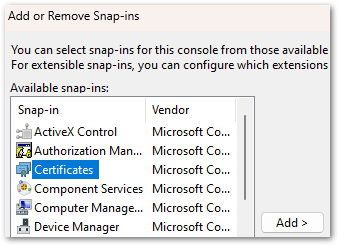
- Select Certificates and click Add
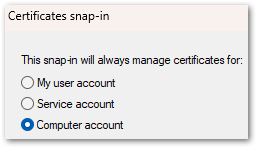
- Select Computer account. Click Next, then click Finish.
- Click OK to close the Add or Remove Snap-ins window
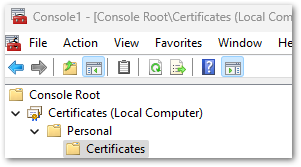
- Open Certificates and navigate to Local Computer, then Personal, then Certificates
- In the list of certificates shown, select the certificates where the "Issued To" value and the "Issued By" value equal your computer name and delete them.
- Close the Management Console.
- Next we will remove the reference to the self-signed certificate in Qlik Replicate:
- Open a command prompt As Administrator
For Qlik Replicate:
Navigate to the ..\Attunity\Replicate\bin directory and then run the following command:
RepUiCtl.exe certificate clean
Navigate to the ..\Qlik\Compose\bin directory and then run the following command:
For Qlik Compose:
ComposeCtl.exe certificate clean
For Qlik Enterprise Manager:
Navigate to the ..\Attunity\Enterprise Manager\bin directory and then run the following command:
aemctl.exe certificate clean - Run the command: netsh http delete sslcert ipport=0.0.0.0:443
Note, that you may get a message that the command failed in the event there are no certificates bound to the port. This message can be ignored.
- Open a command prompt As Administrator
- Add either a self-signed Certificate or a trusted and signed Organization Certificate.
Option One: Trusted and Signed Certificate. Generate an organization certificate that must be a correctly configured SSL PFX file containing both the private key and the certificate.
Option Two: Self-Signed Certificate. Generate a self-signed certificate on the server to replace the existing self-signed certificate. The provided PowerShell examples generate an SSL certificate for 10 years.
Run the following in PowerShell:
$cert = New-SelfSignedCertificate -certstorelocation cert:\localmachine\my -dnsname <FQDN> -NotAfter (Get-Date).AddYears(10) - Once the certificates have been obtained or generated, follow the instructions for the individual product section on how to import a certificate:
- Start the services.
- You may need to clear browser cache/cookies & etc. before you can access the web page outside of incognito mode.
Qlik Replicate will now allow you to open the user interface once again.
If users still cannot log in and are returned to the log in prompt at each attempt, see How to change the Qlik Replicate URL on a Windows host.
It is recommended to use your organization certificates
Related Content:
How to change the Qlik Replicate URL on a Windows host
-
Request license offline approval - April 2020 and onwards
Long term offline capability for the releases April 2020 and onwards requires a change to the license (addition of a further attribute), which can onl... Show MoreLong term offline capability for the releases April 2020 and onwards requires a change to the license (addition of a further attribute), which can only be added after a special approval from the Customer Success Organization.
See below for how to submit the request for approval and proceed.
- Contact the Qlik Support team using Chat or the Qlik Support Portal.
- You will need to sign an offline addendum and share the signed addendum with Qlik Support. Choose between one of the two addenda attached to this article; one for banking and one for non-banking customers.
- Provide the License key that needs to be offline enabled, as well as the current Product version details, and the reason why the connection to Qlik's license back end (LBE) cannot be established.
- Request the support team to update the temporary offline feature (Delayed sync) and activate the product via an SLD key first, providing temporary offline access until the permanent offline feature is enabled. Review: How to activate Qlik Sense, QlikView, and Qlik NPrinting without Internet Access
- Once the license is processed and fulfilled for permanent offline activation, here is how the license activation process for long-term offline is done:
As part of the agreement for granting a customer offline license usage, the customer is required to regularly upload User Assignment log files. See Offline User Assignment logs.
This process is not required for OEM customers; OEM customers can contact support directly through chat or by creating a case using the Support portal to have the offline parameters enabled.
Related Content
Activate Qlik Products without Internet access - April 2020 and onwards
Long term offline use for Qlik Sense Signed Licenses
How to send User Assignment log files to Qlik? (Long term offline license activation) -
Qlik Write Table FAQ
This document contains frequently asked questions for the Qlik Write Table. Content Data and metadataQ: What happens to changes after 90 days?Q: Whic... Show More -
Http listening port already in use by an external service in the system - Unable...
When installing Qlik Sense February 2022 and later, it is possible that you may run into the following error:This issue is caused when another servic... Show More -
Changing the IP address of the Qlik Sense host
Changing the IP address of the Qlik Sense host does not require as much consideration as changing the host name. Some external components might need t... Show More
Changing the IP address of the Qlik Sense host does not require as much consideration as changing the host name. Some external components might need to be taken into account though.
Using an IP address as the hostname while installing Sense is not recommended and can lead to problems with service communication. Refer to While accessing Hub receive error "The service did not respond or could not process the request" .
Environment:Qlik Sense Enterprise on Windows, all versionsResolution:
Things to consider:
- In the PostgreSQL database, an listening_addresses might have been set up during the installation. See PostgreSQL: postgres.conf and pg_hba.conf explained for details.
- Outside configuration steps might need to be taken, such as updating DNS records or firewall rules.
- SAP connector considerations: Ensure that the SAP server is contactable by the new Sense server IP address and the SAP server allows connections from the new Sense IP address.
- Other outside connectors may also operate based on IP allowlist.
Related content:
-
Qlik Replicate: Using bindDateAsBinary Leads to Data Inconsistencies
A Qlik Replicate task may fail or encounter a warning caused by Data Inconsistencies when using Oracle as a source. Example Warning: ]W: Invalid time... Show MoreA Qlik Replicate task may fail or encounter a warning caused by Data Inconsistencies when using Oracle as a source.
Example Warning:
]W: Invalid timestamp value '0000-00-00 00:00:00.000000000' in table 'TABLE NAME' column 'COLUMN NAME'. The value will be set to default '1753-01-01 00:00:00.000000000' (ar_odbc_stmt.c:457)
]W: Invalid timestamp value '0000-00-00 00:00:00.000000000' in table 'CTABLE NAME' column 'COLUMN NAME'. The value will be set to default '1753-01-01 00:00:00.000000000' (ar_odbc_stmt.c:457)Example Error:
]E: Failed (retcode -1) to execute statement: 'COPY INTO "********"."********" FROM @"SFAAP"."********"."ATTREP_IS_SFAAP_0bb05b1d_456c_44e3_8e29_c5b00018399a"/11/ files=('LOAD00000001.csv.gz')' [1022502] (ar_odbc_stmt.c:4888) 00023950: 2021-08-31T18:04:23 [TARGET_LOAD ]E: RetCode: SQL_ERROR SqlState: 22007 NativeError: 100035 Message: Timestamp '0000-00-00 00:00:00' is not recognized File '11/LOAD00000001.csv.gz', line 1, character 181 Row 1, column "********"["MAIL_DATE_DROP_DATE":15] If you would like to continue loading when an error is encountered, use other values such as 'SKIP_FILE' or 'CONTINUE' for the ON_ERROR option. For more information on loading options, please run 'info loading_data' in a SQL client. [1022502] (ar_odbc_stmt.c:4895)
Resolution
The bindDateAsBinary attribute must be removed or set on both endpoints.
Cause
The parameter bindDateAsBinary means the date column is captured in binary format instead of date format.
If bindDateAsBinary is not configured on both tasks, the logstream staging and replication task may not parse the record in the same way.
Environment
- Qlik Replicate
-
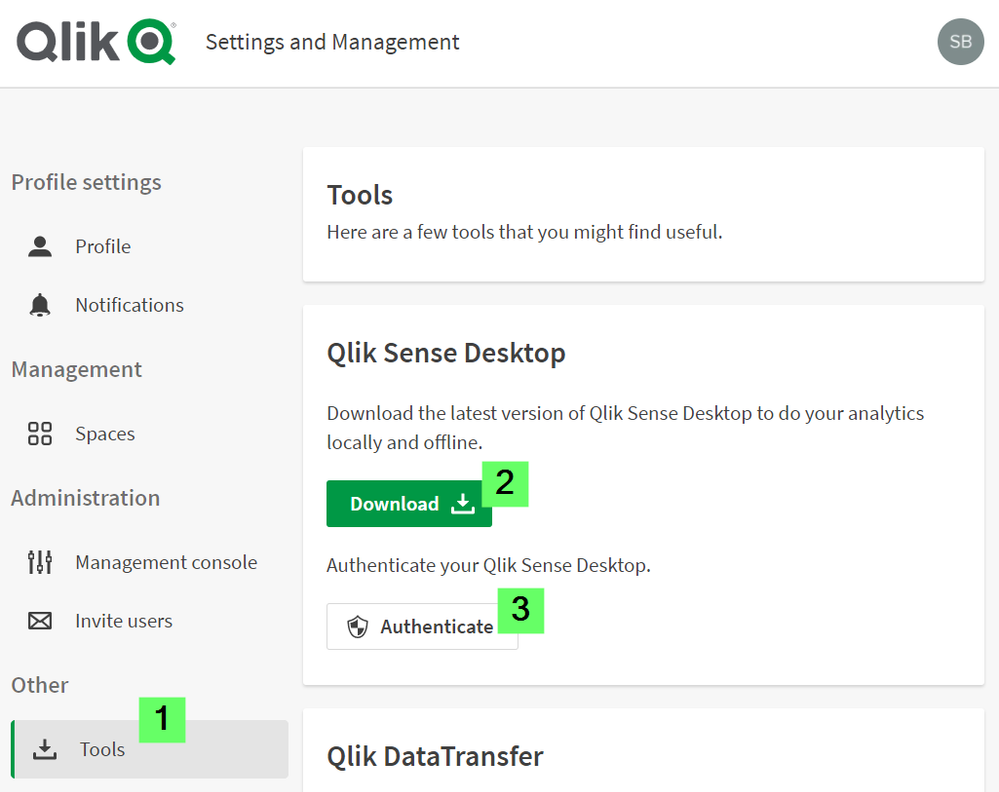
How to authenticate Qlik Sense Desktop against SaaS editions
Click here for video transcript From the June 2020 release, Qlik Sense Desktop can be authenticated against Qlik SaaS editions Qlik Sense Busines... Show MoreEnvironment
- Qlik Sense Desktop, June 2020
- Qlik Sense Business
- Qlik Sense Enterprise SaaS
-
Qlik Sense Enterprise on Windows May 2025: Slow Data Load Editor
The Data Load Editor in Qlik Sense Enterprise on Windows 2025 experiences noticeable performance issues. Resolution Fix Version Qlik Sense May 2025 ... Show MoreThe Data Load Editor in Qlik Sense Enterprise on Windows 2025 experiences noticeable performance issues.
Resolution
Fix Version
Qlik Sense May 2025 SR 6 and higher releases.
Workaround
A workaround is available. It is viable as long as the Qlik SAP Connector is not in use.
- In a Windows file browser, navigate to C:\Program Files\Common Files\Qlik\Custom Data\
- Move the QvSapConnectorPackage directory to a different location
No service restart is required.
Internal Investigation ID(s)
SUPPORT-6006
Environment
- Qlik Sense Enterprise on Windows
-
Qlik Replicate: Dataset Unload Failure Due to LocalDate and String Type Mismatch...
Unloading data from a specific SAP Extractor may fail with the error: [sourceunload ] [VERBOSE] [] Retrieved new data from Extractor 'ZDSGDZ037', Job ... Show MoreUnloading data from a specific SAP Extractor may fail with the error:
[sourceunload ] [VERBOSE] [] Retrieved new data from Extractor 'ZDSGDZ037', Job 'GCDEX67T70NNYN27EH6U4AJ6BRTI4L' row '38932'
[sourceunload ] [VERBOSE] [] Failed to convert value at row 38933 for column 'DATE_FROM' of type 'DATS' value = '~{AQAAALKr+HRru6Zm/c2sIw6hKyA=}~'
[sourceunload ] [VERBOSE] [] value 'JAPAN' replaced by the invalid date placeholder '1970-01-01'
[sourceunload ] [VERBOSE] [] Retrieved new data from Extractor 'ZDSGDZ037', Job 'GCDEX67T70NNYN27EH6U4AJ6BRTI4L' row '38933'
[sourceunload ] [TRACE ] [] Removing existing extraction job for 'ZDSGDZ037' while aborting load data
[sourceunload ] [ERROR ] [] An error occurred unloading dataset: .ZDSGDZ037Resolution
The issue has been resolved by addressing the problematic field in the SAP extractor ZDSGDZ037.
The DATE_FROM field has a short description of “Valid-from date – in current release only 00010101 possible”, and it was determined that this specific SAP date format is not supported by Qlik Replicate.
Change it to a valid value or exclude the DATE_FROM field if it's not necessary.
Cause
A data issue in the SAP extractor caused the failure.
Up to row 38932, all values were processed normally. The failure started at row 38933, where the following field could not be parsed as a valid SAP date:
- Column: DATE_FROM
- Type: DATS
- Value: ~{AQAAALKr+HRru6Zm/c2sIw6hKyA=}~
Qlik Replicate attempted to replace the invalid value with the fallback placeholder 1970-01-01, but failed to when the system produced a ClassCastException. This was caused by the program expecting the value to be a String, but instead receiving a LocalDate object.
The logs show the replaced value "JAPAN" being interpreted as an invalid date, which further confirms that the field contains non-date strings inside a DATS-type SAP field.
This indicates a data format inconsistency in the SAP source extractor, where a date field is populated with non-date content.
Environment
- Qlik Replicate