Unlock a world of possibilities! Login now and discover the exclusive benefits awaiting you.

Analytics & AI
Forums for Qlik Analytic solutions. Ask questions, join discussions, find solutions, and access documentation and resources.
Data Integration & Quality
Forums for Qlik Data Integration solutions. Ask questions, join discussions, find solutions, and access documentation and resources
Explore Qlik Gallery
Qlik Gallery is meant to encourage Qlikkies everywhere to share their progress – from a first Qlik app – to a favorite Qlik app – and everything in-between.
Qlik Community
Get started on Qlik Community, find How-To documents, and join general non-product related discussions.
Qlik Resources
Direct links to other resources within the Qlik ecosystem. We suggest you bookmark this page.
Qlik Academic Program
Qlik gives qualified university students, educators, and researchers free Qlik software and resources to prepare students for the data-driven workplace.
Recent Blog Posts
-
Qlik Sense November 2022 Client-Managed Release - now available
With augmented analytics, you can bring the power of your data to more people in your organization, broadening access, deepening insight, and improvi... Show MoreWith augmented analytics, you can bring the power of your data to more people in your organization, broadening access, deepening insight, and improving efficiency. Insight Advisor in Qlik Sense has been completely redesigned with UI enhancements and an always-available search box, and we have made several enhancements to chat in the hub. Our new Insight Advisor Analysis Types feature automates the creation of sophisticated analyses such as ranking, comparisons, and clustering in a few clicks. And, we’ve made a number of improvements to our visualization, connectivity, and overall platform capabilities. Read on for more details.
Below you will find supporting detail on "What's New" in this November 2022 release:
New Enhancements in Augmented Analytics:
Generate the most relevant insights through selection and search
Insight Advisor Search provides an improved Insight Advisor experience in-app, allowing users to easily auto-generate the most relevant analyses and insights from their data. A new button opens Insight Advisor, where users can select fields and generate insights without having to navigate away from their current sheet. The new Ask Insight Advisor search box is now visible at all times within dashboards, allowing users to easily generate insights using natural language processing. Auto-generated visualizations and analyses can be refined and added directly to dashboards for further exploration.
Create advanced analyses and insights in a few clicks
Insight Advisor Analysis Types is a new experience in Qlik Sense that allows users to request a certain type of analysis, such as a comparison, ranking, trending, etc., which will be generated in the best possibly way by AI. Users can choose from a variety of advanced analysis types and will be guided to select the best data and options. Analyses will then be auto generated and can be edited and added to dashboards for further exploration. With Insight Advisor Analysis, we now support multiple paths to insight – users can either use traditional natural language search or can start with an analysis type in a more directive manner, driving data literacy and insight.
Provide curated list of questions for Insight Advisor Users
Example Questions for Insight Advisor - App creators can now provide example questions for Insight Advisor within the Business Logic layer of an app. This allows them to offer sample questions that are tailored to their specific analytic content, helping users learn how to use natural language. When users ask questions, the examples will be displayed in a drop-down menu where they can be selected, modified, and submitted. And, in chat, example questions from across your apps will be offered.
Support "explore this further" for follow-up questions in Insight Advisor Chat
Insight Advisor Chat now better supports partial intent questions with the "explore this further" option, taking people directly to search-based discovery within apps for deeper analysis. Users can now ask follow-up questions to an original question, and when clicking explore this further, they will be taking into the app with selections applied for the full line of questioning, allowing them to pick up visually where they left off conversationally.
Time series breakdown as a QIX Engine function
Time-Series Decomposition Functions - Several new engine functions now allow you to decompose a time series dataset into trend and seasonality. The trend function identifies direction in the data, and the seasonality function determines seasonality with a known periodicity. The residual function identifies variation that is not associated with seasonal or trend components (i.e., noise). With these functions, you now have increased visibility into the patterns and trends in your time-series data so you can better plan future action.
New distribution functions from Cephes library
The following distribution functions from the Cephes library have been added, allowing you to perform more advanced statistical analysis of simulations. These distribution functions can be used in both the data load script and in chart expressions.
BetaDensity, BetaDist, BetaInv ,BinomDist, BinomFrequency ,BinomInv, ChiDensity, FDensity, GammaDensity, GammaDist, GammaInv, PoissonDist, PoissonFrequency, PoissonInv, TDensity
New Visualizations & Dashboards:
Custom tooltip creation for charts without dimensions
Based on customer request, the ability to create a custom tooltip for the KPI object has been added to Qlik Sense SaaS. This is the first tooltip added on a dimension-less object. The tooltip is conveniently displayed upon hovering over the object.
Add Background Layer & Properties to Agnostic Map
As part of the Nebula conversion of all charts, this will enable us to embed a map chart using Nebula.
Dynamic View Improvement
Users will now still have visibility to the chart whilst it refreshes, allowing for improved usability.
Connectivity:
MongoDB Additional Authentication
The Qlik MongoDB connector has been enhanced with new security features. Organizations can now use SCRAM-SHA-256 and LDAP authentication options when defining their MongoDB connection.
Integration of Standalone Web Connectors in Qlik Sense Enterprise on Windows
The following connectors are now available as part of the installed versions of Qlik Sense on Windows:
Facebook Insights, Google Ads, Google Calendar, Google Search Console, Outlook 365, Mailbox IMAP, Microsoft Dynamics CRM V2, OData, Qualtrics, SMTP, SurveyMonkey, and YouTube Analytics
For most use cases this means that the standalone Web Connectors are not needed, as these connectors now can be configured directly in the Qlik Sense client.
Remove of the “Disable” option for the Bulk Reader
The Bulk Reader load optimization setting was introduced in the August 2021 release, and users were given an option to either “Enable” or “Disable” this feature. This update removes the option to disable the Bulk Reader, and makes it always enabled on new connection definitions, to always ensure high-level performance when working with large datasets.
Platform:
Duplicate Tasks in QMC
Users are now able to duplicate tasks in QMC, much like they already can duplicate an app!
Client Sub-Bar for Windows
We have upgraded the Sub-Bar within Qlik Sense Enterprise Client Managed to match what is already being used in Qlik Sense SaaS. This will create an enhanced user experience for our users of both platforms, and inevitably create a much more consistent flow.
Config Files Persistence: Opt-in or Opt-out
Newly available check-box selection to allow the user to decide if they would like to enable or disable the config files persistence during an upgrade!
Allow Users to Create Custom Banners
Download Qlik Sense November 2022 here
Don't miss the next Qlik Insider, airing on November 16th - Register here
-
【オンデマンド配信】QlikWorld Tokyo オンライン
富士通・DNP が語る、データを活用した DX 推進成功例 昨今、データ活用による DX 推進は、あらゆる企業において最重要事項となっております。特に「リアルタイムデータに基づいた迅速な意思決定と行動」というアクティブインテリジェンスの考え方の重要性は、コロナ禍を経てますます高まっております。 こ... Show More富士通・DNP が語る、データを活用した DX 推進成功例
昨今、データ活用による DX 推進は、あらゆる企業において最重要事項となっております。特に「リアルタイムデータに基づいた迅速な意思決定と行動」というアクティブインテリジェンスの考え方の重要性は、コロナ禍を経てますます高まっております。
この度、アクティブインテリジェンスのためのプラットフォームを提供する Qilk は、「QlikWorld Tokyo オンライン」を開催いたします。本イベントでは、基調講演に富士通株式会社 執行役員 Executive Vice President / CIO / CDXO 補佐 福田譲様をお迎えし、同社の DX の取り組みについてお話しいただきます。また、アクティブインテリジェンスの最新動向や DNP、PayPay 銀行などのお客様の DX 推進事例をご紹介します。
※ 参加費無料。パソコン・タブレット・スマートフォンで、どこからでもご視聴いただけます。
-
Qlik Digest - November 2022
WHAT’S NEW AT QLIK?New Data Integration Capabilities in Qlik Cloud. This comprehensive solution is unique in its ability to deliver real-time data to ... Show MoreWHAT’S NEW AT QLIK?
New Data Integration Capabilities in Qlik Cloud. This comprehensive solution is unique in its ability to deliver real-time data to the cloud, automate the transformation into analytics-ready structures, and unify all enterprise data with a robust catalog and data lineage. Watch Videos
Get up to speed on the latest visualization capabilities in Qlik Sense SaaS. These include application chaining, styling updates, the ability to add a custom tooltip to your KPI object, and more. Learn More
Visit our download site to access the November release of Qlik Sense, Qlik Replicate, Qlik Enterprise Manager and Qlik Catalog.
Qlik Continuous Classroom Translations are LIVE!
You asked, we delivered! Machine translations are now live in the Qlik Continuous Classroom. The translations can be found in the closed captions of the self-paced learning videos and the Qlik Learning Portal pages.
Qlik Insider Webinar
Don’t miss the last webinar of the year on the very latest capabilities across our Data Integration and Analytics portfolio. Join us on November 16 to learn more about the latest Data Integration advancements in Qlik Cloud and Customer Managed Keys for organizations with strict encryption and governance requirements. Register now
On top of the Cloud
Qlik Cloud is helping organizations like Leroy Merlin and Urban Outfitters take advantage of new capabilities, innovate the way they manage their data and ultimately make better and quicker decisions.
Additional Featured Content
New to Qlik Cloud: Customer Managed Keys
-
【オンデマンド配信】(株)ニフコ × Qlik 対談:Qlik で会計データを見える化 - 管理会計分野における活用法とは
エンジニアリングファスナーのリーディングカンパニーである株式会社ニフコでは、約 6 年前から Qlik ソリューションを活用。SAP を基幹システムとして、そこに格納されているデータから管理会計に必要なデータの取り込み、データの活用、さらに数値から業務改善を進めていく仕組みを作り上げています。本講演... Show More -
UK GP Prescribing
UK GP Prescribing Quick Intelligence The NHS provide a wealth of data via Freedom Of Information. By seeing prescribing patterns from GP surgeri... Show MoreUK GP PrescribingQuick Intelligence The NHS provide a wealth of data via Freedom Of Information. By seeing prescribing patterns from GP surgeries pharmaceutical companies can better target their campaigns to get relevant information to the healthcare professionals that need it.
Discoveries
This app shows prescribing trends for a number of diabetes drugs from UK GP surgeries. This can show when there are changes in the types of drugs that are being prescribed for a particular condition. These data can be blended with pharmaceutical company data to show market share in a selected market.
Impact
Having a good understanding of how other products are being prescribed means that pharmaceutical companies can better target their information campaigns, ensuring the right healthcare professionals have the information they need to make informed decisions about which products to prescribe.
Audience
These data would be of particular interest to people working in the SFE area of a pharmaceutical company. They could be of benefit to those developing treatments and to front-line healthcare professionals also.
Data and advanced analytics
The application has been built using freedom of information data and Quick Intelligence's Instant Sense Application. This application is free to download and allows you to upload your own data, along with a set of metadata, to have a working application in minutes and not hours. This is particularly useful for prototyping of applications, but can be used in production also.
See a live demo of the application here:
https://www.quickintelligence.co.uk/sense/prescribe.html
Find out more about the Instant Sense Application here:
https://www.quickintelligence.co.uk/instant-qlik-sense-app/
-
Qlik AutoML on Qlik Cloud now GA! Things You Should Know Before Getting Started
Check out Mike Tarallo's upcoming "Do More with Qlik" Session - REGISTER HERE Qlik AutoML is part of a full suite of augmented analytics capabilities ... Show MoreCheck out Mike Tarallo's upcoming "Do More with Qlik" Session - REGISTER HERE
Qlik AutoML is part of a full suite of augmented analytics capabilities available in Qlik Cloud. Qlik AutoML recognizes patterns and drivers in historical data to create machine learning models that can predict future outcomes; using a simple no code approach for business analysts and analytics teams. First, it generates machine learning models from historical data, which are then used to make predictions in conjunction with your current data - with full explain-ability. You can further explore these predictive analytics and get real-time calculations in Qlik Sense apps, by making interactive selections and testing what-if scenarios with our advanced analytics capabilities.
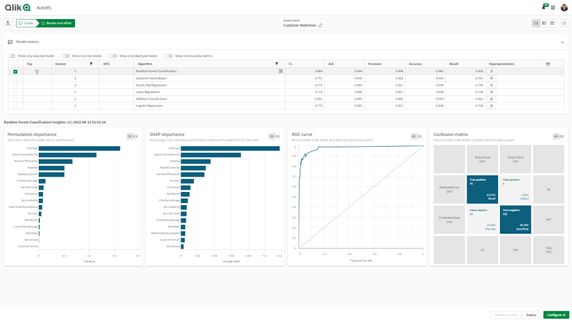
Fig. 1 Qlik AutoML - A ML Experiment results page after generating a machine learning modelMachine learning and predictive analysis go beyond traditional data analytics and it is important to remember that Qlik AutoML should be used to solve the right types of business problems and requires specific ingredients for architecting a machine learning ready data set. Before using Qlik AutoML be sure to check out this brief video to learn what you should know and where you should go before you get started.
Can't see the video - view on the Qlik Video Page
In Product Resource Guide
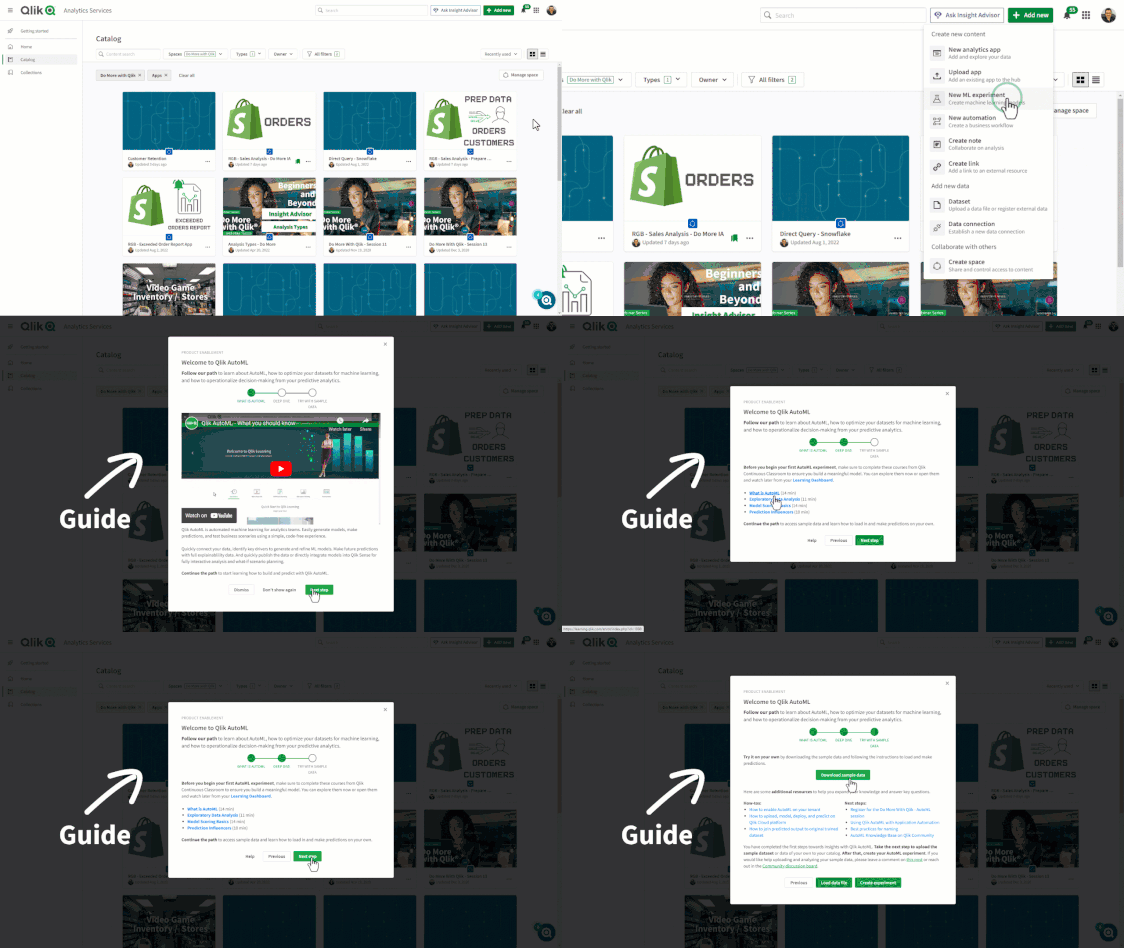
When creating a new Qlik AutoML Machine Learning Experiment in Qlik Cloud, you will see a screen pop up to guide you to the appropriate and additional resources to help you get started. I suggest you take a look at those. I am also linking them here in the post.
NOTE: This resource list will be updated in the next few days with more resources as they are delivered so please check back as needed.
- Qlik AutoML Community Forum (post questions, review documents and more)
- Sample Data Page
- Qlik AutoML Playlist (on YouTube)
- Qlik Help Documents - (will go live 8/16 this week)
- Qlik Continuous Classroom Learning Modules

-
Supporting Universities Virtually!
Last month the Academic Program had another opportunity to provide a workshop to one of our university partners, Penn State Great Valley. In the pas... Show MoreLast month the Academic Program had another opportunity to provide a workshop to one of our university partners, Penn State Great Valley. In the past, most workshops were hosted on campus where as many as 40 students would join. However, after the pandemic, the landscape of education changed and more students either chose to learn remote or did not have a choice.
To accommodate all of our members, we have pivoted the way we host our workshops. Currently we offer a hybrid model so we are able to be on campus for some students and allow others to join via zoom. Workshop information and necessary documents are shared with the class prior to joining and all students are encouraged to sign up for the program to ensure they have software and training they can go back and continue their learning with.
In attendance we have a Qlik Solution Architect on campus @ChrisReiter and @JoeHo on zoom to help field any questions.
If you are interested in a Qlik presentation or mini workshop, please apply to the program by visiting the website qlik.com/us/company/academic-program and then email us at academicprogram@qlik.com

-
5 Questions About Qlik Cloud Data Integration
I encourage you to check out the new web page, product documentation, and great video resources for more information. Finally, we know many of you hav... Show MoreI encourage you to check out the new web page, product documentation, and great video resources for more information. Finally, we know many of you have questions about this offering, so I'll devote the remainder of this article to the top 5 most frequently asked questions about Qlik Cloud Data Integration
1. What is Qlik Cloud Data Integration?
Qlik Cloud Data Integration is a powerful solution for data engineers tasked with deploying enterprise data integration and transformation initiatives. The offering forms a data fabric that delivers, transforms, and unifies your data across your organization via flexible, governed, and reusable data pipelines. These pipelines improve data timeliness, reliability, and scale, which are essential for every analytics, ML, or digital transformation initiative.
Consequently, Qlik Cloud Data Integration ensures that you can securely deliver the correct data (from on-premise or cloud sources) to the right destination (i.e. popular cloud data platforms), in the right format (with out of the box transformation features or custom SQL code), in near real-time.
2. Is Qlik Cloud Data Integration an entierely new offering
No. Qlik's journey to becoming a cloud business provided a unique opportunity for Qlik to rethink how we deliver data integration capabilities. But this wasn't the only factor. We also considered where the data integration market was going, what features our customers were requesting, and if there were opportunities we should pursue.
- Customer requirements – Customers have been assembling their own "data stacks" around the cloud data warehouse stores. The stacks are responsible for ingesting data, transforming data, cleansing data, protecting data, and serving data to various consumers. Our customers have told us repeatedly that managing all these different functions can be overwhelming.
- Market Drivers – The past few years have seen a dramatic rise in the adoption of cloud data platforms such as Snowflake, Databricks, Azure Synapse, Google Big Query, and Amazon Redshift. These platforms have become virtually every Enterprise's central data store for many downstream analytics initiatives.
- Qlik's Experience – Qlik's years of real-time data integration and transformation experience highlighted a gap that transforming transactional records into analytics-ready tables is a highly desirable and repeatedly performed activity. Most
Therefore we decided to create a new offering rather than simply porting existing client-managed solutions after analyzing all the data and research.
3. Where should I use Qlik Cloud Data Integration?
There are three common scenarios where Qlik Cloud Data integration is a great fit today:
- Real-time Data Warehouse Ingestion – You can use Qlik Cloud Data Integration to build a pipeline that continuously ingests data into a cloud data warehouse. Data can be ingested from on-premises data sources such as databases, SAP or mainframe applications in near real time. You can also load data from cloud applications too. The Illustration below demonstrates how two pipelines ingest data into Snowflake from an on-premise Oracle and MySQL database, while the third pipeline loads data from Salesforce.
- Automatic Star Schema Data Mart Generation – The second use case focuses on turning transactional records into analytics-optimized data marts. The beauty of Qlik Cloud Data Integration is that data mart generation is part of the data pipeline. Many market alternatives require the use of third-party data transformation tools, but Qlik doesn't. Qlik offers a visual data modeler, generates the necessary push-down SQL, and takes care of the execution scheduling too. The image below shows the graphical modeler automatically creating the dimension and fact tables within your data warehouse.
- Custom SQL for New Workloads – The last use case is creating pipelines for innovative workloads such as predictive analytics or machine learning. These workloads often require specialized data sets for training and prediction. With Qlik Cloud Data Integration, you can build real-time pipelines that combine data from various sources, filter and prepare the subsets, then deliver the result to the respective training and production environments.
4. Are there any changes to client-managed Qlik Data Integration?
No! Client-managed Qlik Data Integration is still alive and well and in active development. Furthermore, we have a regular release cadence and are committed to supporting our existing customers. We recognize that not all customer workloads can run in the cloud and we're not forcing anyone to migrate. Moreover, we've also made the two solutions interoperate without being integrated for those customers that want to run both on-premises and cloud workloads.
5. How can I try Qlik Cloud Data Integration?
Use this contact form link or call your account manager to get your hands on Qlik Cloud Data Integration today! Our data integration experts will help you make the most of this paid add-on to ensure that your first data integration project is a success.
Conclusion
I'll end the article where I began. I'm really excited that we announced Qlik Cloud Data Integration today, and how you can use it to create pipelines that deliver data and automate transformation in leading cloud data warehouses. However, what excites me most is the anticipation of hearing how the Qlik community and customers will embrace and deploy this fabulous new offering.
REGISTER for "DO MORE WITH QLIK" session on Nov 09 covering "Qlik Cloud Data Integration"
Clive Bearman
Sr Product Manager
-
【開催報告】QlikWorld Tour Tokyo 2022
弊社カントリーマネージャーの今井から開会のご挨拶の後、富士通 CIO の福田様による基調講演から始まりました。「日本は極めて DX への準備ができていない」という理解のもと、富士通における全社 DX の試みを「経営トップのコミットメント」「経路依存性」などのキーワードとともにお話しいただきました。 ... Show More弊社カントリーマネージャーの今井から開会のご挨拶の後、富士通 CIO の福田様による基調講演から始まりました。「日本は極めて DX への準備ができていない」という理解のもと、富士通における全社 DX の試みを「経営トップのコミットメント」「経路依存性」などのキーワードとともにお話しいただきました。
続いて、Qlik 村田からアクティブインテリジェンスの最新情報をご紹介。2社の国内事例を匿名でご紹介しましたが、その方々が本イベントに参加されておりましたので、急遽サプライズとしてご登壇いただき、Qlik への期待をお話しいただきました。また、弊社中嶋からは最新の AutoML、Application Automation、クラウドデータ統合、Snowflake との連携などのデモをご紹介しました。
コーヒーブレイク時には、協賛パートナー様(アシスト、アグニコンサルティング、インサイトテクノロジー、インサイトラボ、日立社会情報)の展示ブースで各社独自のソリューションやサービスが紹介されていました。
後半は事例セッションとなり、Qlik Sense を 2400名以上に大規模展開されている大日本印刷(DNP)様から同社の DX の取り組みと大規模展開のノウハウをご説明いただきました。
続いて、Qlik 古谷がクボタシステムズ、PayPay銀行、千趣会でのデータ統合の導入事例をご紹介しました。
最後に富士通様より、同社におけるデータ戦略を具体的にご紹介、「One Fujitsu」「One Data」の中で、アクティブインテリジェンスの理念と Qlik Sense ならびに Qlik データ統合が重要な役割を果たすことをお話しいただきました。
参加された方には、商売繁盛を祈念したご祈祷や懇親会など、リアルなイベントを楽しんでいただきました。今後もこうした機会を実施しますので、ぜひご参加いただければと思います。
なお、本イベントの講演は「QlikWorld Tour オンライン」として後日公開予定です。ご期待ください!
-
Qlik is Actively Monitoring OpenSSL Vulnerability (CVE-2022-3602 and CVE-2022-37...
Update: Dec 14, 2022 Qlik can confirm that this includes the lower severity issue CVE-2022-3786 which was announced by OpenSSL at the same time. ----... Show MoreUpdate: Dec 14, 2022
Qlik can confirm that this includes the lower severity issue CVE-2022-3786 which was announced by OpenSSL at the same time.
-----------------------------------------------------------------------------------------------------------------------------------------
Update: Nov 2, 2022
Qlik has completed its review of this third-party vulnerability and concluded it does not impact any Qlik product or service
-----------------------------------------------------------------------------------------------------------------------------------------
Update Nov 1, 2022:
The OpenSSL team has assigned the CVE reference CVE-2022-3602 to this issue and downgraded the severity to HIGH – please see https://www.openssl.org/news/secadv/20221101.txt .
Despite the lower severity, Qlik is continuing to review its products and services to ensure there are no concerns. At this time, no exposure has been identified.-----------------------------------------------------------------------------------------------------------------------------------------
Original, October 31, 2022:
Qlik is aware that the OpenSSL project has announced that a critical security issue will be patched in a release targeted for November 1, 2022.
Although we cannot be certain that there will be no impact to Qlik’s products and services until the full details are made public, initial indications are that Qlik is not impacted by this OpenSSL vulnerability.
As more details become available, Qlik will review and update this page accordingly. Subscribe to this post to receive notifications when updated.
Additional information:
https://mta.openssl.org/pipermail/openssl-announce/2022-October/000238.html
-
The Expression Search
Any search string beginning with an equals sign will be interpreted as an expression search, e.g.: =Sum(Sales)>80000 If you use this search s... Show MoreAny search string beginning with an equals sign will be interpreted as an expression search, e.g.:
=Sum(Sales)>80000
If you use this search string in a field listing customers, it will pick out customers for which the total sales number is more than 80000. This means that the Qlik engine will create a hypercube – the same as what you have in a chart – with Customer as dimension and Sum(Sales)>80000 as measure, and use this to determine the search result.
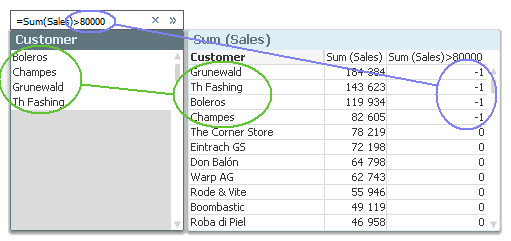
You can of course use the same search string in any field, e.g. Products or Months. But the results will be different, just as the different charts would show different numbers.
There are many implications of the above; implications you need to be aware of in order to make correct use of an expression search.
First of all: A hypercube is normally based on the current selection, which means that the search will not include excluded values. This is different from the wildcard search and the numeric search where the search is made in the symbol tables that hold all values, also excluded ones. If you want to include excluded values in your search, you need to use Set Analysis in your search string, e.g.:
=Sum({1} Sales)>80000
Further, the search string is a Boolean expression. This means that you can have several criteria, e.g.:
=Sum(Sales)>80000 or Count(distinct OrderID)>100
But it also means that you can simplify your expression, using the fact that all non-zero numbers are interpreted as TRUE. As an example, the two following expressions are equal:
=Count(If(Product='Trousers', OrderID))>0
=Count(If(Product='Trousers', OrderID))Finally, the expression search implies an aggregation. This means that you must use an aggregation function. If you don’t, the Only() function will be used. For example, if you want to search for customers from a specific country, you can write
=Country='Germany'
This will work fine if each customer is associated with one country only. However, it will not work if there are several possible values per customer. For example, if you instead want to search for customers that have bought a specific product, you might try:
=Product='Trousers'
Then you will find some customers, but probably not the ones you are looking for. You will find those that have bought only trousers and nothing else, since it is interpreted as Only(Product)='Trousers'. If you want to find all customers that have bought trousers and perhaps also other products, you should instead try one of the following
=Count(If(Product='Trousers', OrderID))>0
=Count({$<Product={'Trousers'}>} OrderID)
=Index(Concat(distinct Product, ','), 'Trousers')
=Sum(Product='Trousers')I admit that neither of the above expressions is very user-friendly, but it is nevertheless how it works.
If you want a simpler way to find these customers, you will just have to do it the manual way: Click on 'Trousers' in the Product list box, then look at the list of customers.

Further reading related to this topic:

-
Qlik Management Console: Integration
Another blog entry, and another section of the Qlik Management Console. Today we will be going over the third section of QMC known as Integration. API... Show MoreAnother blog entry, and another section of the Qlik Management Console. Today we will be going over the third section of QMC known as Integration.
API Keys
Within this section a tenant admin can manage APIs. API keys are used by developers to gain programmatic access to the Qlik platform, acting as their own user. Admins can edit the settings for the keys as well as revoke the keys. Please note that only users with the ‘Developer’ role can generate or delete these keys. In order for someone with an ‘Admin’ status to generate or delete keys, they must assign themselves the ‘Developer’ role.
Content Security Policy
This section displays the origins and the directives of the Content Security Policy HTTP header. Here origins can be added for specific resource types to allow resources to be loaded. This section also allows users to not only add these origins and directives, but once loaded, they can be edited and deleted as well.
OAuth
This section shows the OAuth clients that are used for authentication. OAuth is a standard security protocol that allows third party applications to access API resourced without disclosing the end-user credentials. This means that OAuth allows clients to use a code, instead of their log-in credentials for added security, protecting that information.
Web
Qlik Cloud allows third-party domains to interact with your Qlik tenant. Here you can view the Name, ID, Number of Origins, Updates and Creation dates of these connections. You can also edit and delete these connections once they are added to the tenant.
Webhooks
Webhooks allows Qlik Cloud to send information about events in your tenant to other applications. In this section, the name of the Webhook, along with the Owner, Status, Level, Creator and Updater can be viewed. Users can also view the Endpoint URL, or the destination of these events in this section. This section also allows users to delete a Webhook.
That would be it for the fourth section of the Qlik Management Console: Integration. Thank you for giving this blog post a read, and if you see any information missing, feel free to drop it in a comment below. Join us next time where we’ll take a look at the fourth and final section: Configuration.
-
Help us test a new tool
Hello Qlik Community! For the month of October, we have been on a development freeze which is why we have been quiet. With the rollout of the new navi... Show MoreHello Qlik Community!
For the month of October, we have been on a development freeze which is why we have been quiet. With the rollout of the new navigation, we wanted to make sure everything was stable and work out any kinks that popped up.
Naturally, we couldn’t make it the entire month without pushing out something new. We were close though! 😊
We are piloting a new engagement tool and want your feedback. The goal is to keep you engaged and informed about what’s happening within Qlik Community and Qlik as a whole. It will also give you the opportunity to earn more badges!
In the next couple of days, you may see this on the right hand side of your screen:
THIS IS EXPECTED! Please do not be alarmed 😊
You will need to click the “Login With Qlik” button and your credentials will pass through. You should only need to complete this step once (please tell us in comments if that is not the case for you)
Our initial goal is twofold:
- Offer improvements to the onboarding experience for new members by targeting rank = new member with a link to the 'getting started' guide
- Offer improvements to the onboarding experience for newly registered Partners by targeting rank = partner with a link to the new partner area.Our intention is to start slowly. In fact, after the login, you may not even see anything else for some time.
Tune in next month for another update on our progress.
As always, we welcome your feedback (But please abide by Community Do's and Don'ts when delivering feedback)!
Your Qlik Community Admins,
Melissa, Sue, Jamie, Nicole and Emma
@Melissa_Potvin @Sue_Macaluso @Jamie_Gregory @nicole_ulloa @emmaspickerman
-
Communicating data by storytelling
When you hear the term “data analysis,” what do you think of? Your mind may jump to scouring spreadsheets, implementing algorithms, and making mathema... Show MoreWhen you hear the term “data analysis,” what do you think of? Your mind may jump to scouring spreadsheets, implementing algorithms, and making mathematical calculations—all “hard skills” of data analysis. Yet, hard skills are useless without their soft skill counterparts. It’s not enough to just analyze data; you need to know how to communicate the story it tells in a clear, compelling manner—a skill called data storytelling.
So, WHAT IS DATA STORYTELLING?
Data storytelling is the ability to effectively communicate insights from a dataset using narratives and visualizations. It can be used to put data insights into context for and inspire action from your audience.
To know more about data storytelling and how to craft a compelling data narrative, read this wonderful article by Catherine Cote from HBS Online: https://online.hbs.edu/blog/post/data-storytelling#:~:text=What%20Is%20Data%20Storytelling%3F,inspire%20action%20from%20your%20audience.
If you are a student or educator, and wish to learn data analytics, check out Qlik's amazing academic program resources: qlik.com/academicprogram
-
Academic Program Translations are live!
The Qlik Learning Portal which offers QCC training has completed its translations which are now live! The portal now offers training in 15 languages!... Show MoreThe Qlik Learning Portal which offers QCC training has completed its translations which are now live! The portal now offers training in 15 languages! The training includes ALL of the resources you receive as a member of the Qlik Academic Program member! We hope that you return to your resources and take advantage of the training that may have once been challenging due to language barriers.
For the full blog and explanation about these changes visit the Education Blog Post - Translations
To access your resources as an Academic Program member, visit the QCC - Academic Program, login and select your language and get started!
If you no longer have access to these resource you can reapply as an educator or student by visiting the website, https://www.qlik.com/us/company/academic-program
-
The intelligent responsive design
Sometimes it’s the small details that make a very big difference. Intelligent responsive design is completely integrated in Qlik Sense; it seems so br... Show MoreSometimes it’s the small details that make a very big difference. Intelligent responsive design is completely integrated in Qlik Sense; it seems so brilliant to me that I don’t want it to go unnoticed for you.
Responsive web design (RWD) is an approach to web design aimed at crafting sites to provide an optimal viewing experience—easy reading and navigation with a minimum of resizing, panning, and scrolling—across a wide range of devices (from desktop computer monitors to mobile phones).
A site designed with RWD adapts the layout to the viewing environment by using fluid, proportion-based grids, flexible images (…)
Qlik Sense has taken it one step further than the RWD described above, by adding responsive intelligence into the objects themselves.
Intelligent responsive design is not just adjusting the layout to make objects and charts to fit nicely into your device’s screen, but it’s a product smart enough to know when to switch between summary and detailed information based on the available real estate. Qlik Sense is automatically adjusting and tweaking each individual object and chart to give us the right visualization anywhere, optimizing the entire user experience for the device being used.
Let’s review some of my favorite examples of intelligent responsive design in Qlik Sense:
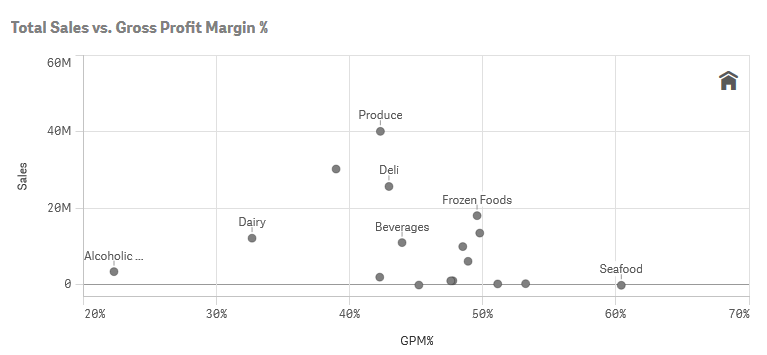
This scatter chart is displaying Product group Sales Amount vs Margin. As soon as I fine-tuned some basic chart properties, Qlik Sense will do the rest, maximizing the information displayed based on the available real estate. It’s a fluid chart.
As you will notice in the scatter chart above not all the labels are visible, Qlik Sense is adjusting the amount of information to increase user comprehension.
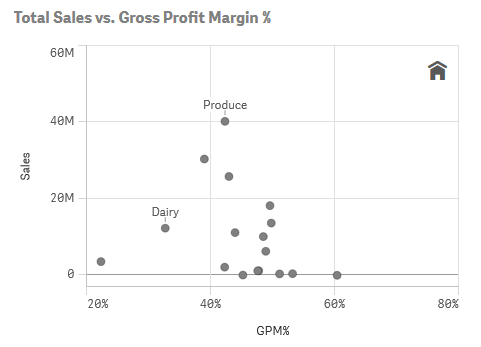
The same chart displayed in a smaller device introduces some changes; first, we notice that even fewer labels are being displayed so we can easily see the patterns and correlation. Second, the x-axis’ scale is a bit wider to avoid adding noise into the chart.
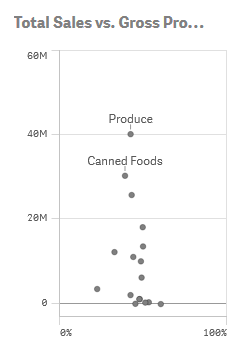
Within the chart shown above, the same visualization is in yet another size while the form factor is adapted to the available real estate. Elements such as dot size, dot labels and axis are scaled again. In this smaller version of the chart, the axis labels and the home icon have been removed automatically and font size has been adjusted.
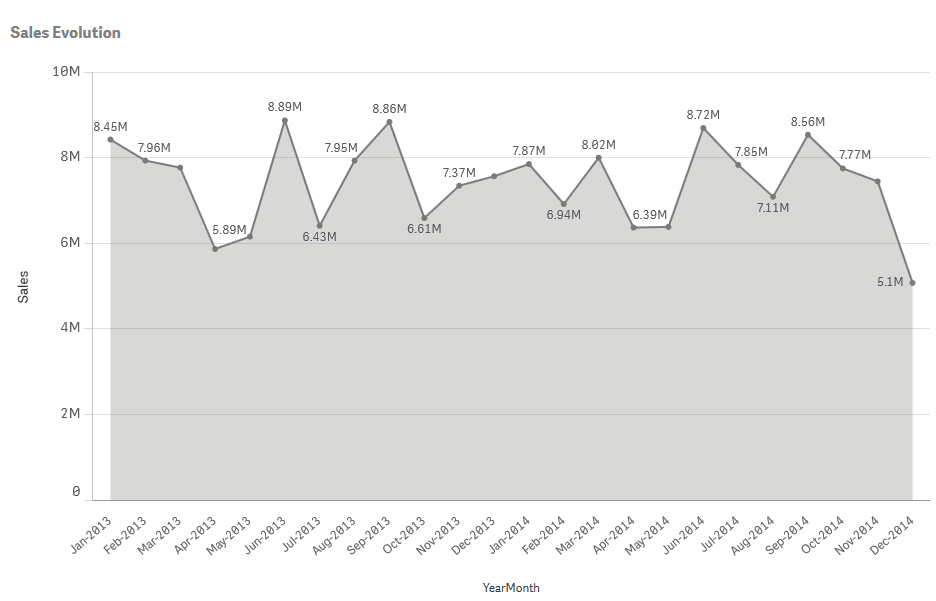
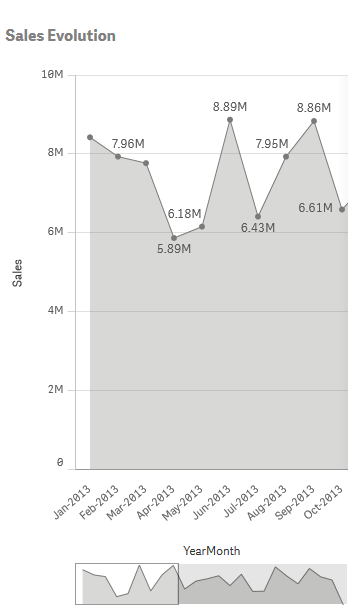
Line thickness is adjusted in line charts and a scrolling mini-charts appears when needed.
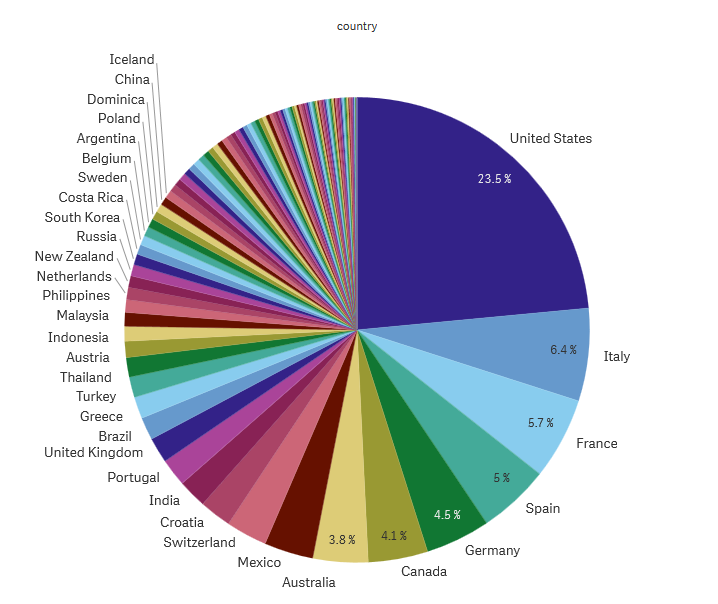
Pie chart labels and values only appear if enough space.
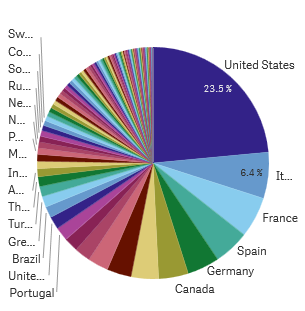
Qlik Sense has adapted these charts, rescaling the level of detail and functionality to maximize the user experience; this is not just resizing, but intelligent responsive design.
Enjoy Qliking!
AMZ
---
PS: I’ve had to force Qlik Sense to let me do a pie chart like that; by default Qlik Sense is preventing me to commit the crime. I do not recommend a rainbow pie chart to represent that data, a bar chart or a treemap would've been more effective… but if you still want to do it, do it in style.

-
Qlik now offers Multitenant Provisioning in Qlik Cloud for our OEM and ISV partn...
Can't see the video? Visit our Qlik Video Page to see this video.Qlik now offers multitenant provisioning in Qlik Cloud for our OEM and ISV partners M... Show MoreCan't see the video? Visit our Qlik Video Page to see this video.
Qlik now offers multitenant provisioning in Qlik Cloud for our OEM and ISV partners
Multitenant provisioning provides our OEM and ISV partners with a deployment model that fits their deployment patterns with each end customer receiving their own tenant. Using multiple tenants logically separates end customers, removing any potential data security issue and, importantly, allowing end customers to use all features in Qlik Cloud.
Multitenant Provisioning for our OEM and ISV partners addresses the following use cases for an OEM partner:
- Creation of a new tenant
- Configuration of a tenant
- Hydration and updates of a tenant
As the preferred cloud deployment pattern, a multitenant approach allows our partners to provision tenants in a low cost, quick and efficient manner with API-supported automations. CTO Tim Burke, at ISV partner Arch Systems, mentioned during his participation in Qlik’s Early Access Program, “One of the things we’ve been excited about collaborating with Qlik on is increased levels of automation for multitenant scenarios like ours…we’re exploring some of the more advanced Qlik APIs they have…allowing us to increase even further our levels of automation around deploying a Qlik app, especially an update to all of our individual customers.”
With this deployment model, our partners will realize the following:
- Faster deployments and time to market for their solutions using public, documented APIs and organizational credentials
- Reduced cost and complexity for maintenance, upgrades, infrastructure and security
- Fewer product walls and custom security requirements
These benefits will improve our OEM and ISV partners’ total cost of ownership, ease the journey to Qlik Cloud and provide immediate access to best in class analytics with a full range of augmented capabilities.
Additionally, our existing Qlik Cloud monitoring apps now support multitenancy. Data spanning multiple tenants will be able to be collected and viewed from a single parent tenant. An ISV partner can now see metrics and information from all of their Qlik Cloud tenants within a single dashboard, which will be made available in the near future as the ‘OEM Dashboard’. This new capability is entirely additive to our existing monitoring apps. This capability can be toggled on or off, allowing both OEM partners (and enterprise customers) to use the same monitoring apps.
To learn more about Qlik’s approach to multitenant provisioning, please watch the following introductory video https://youtu.be/xDhqFTgaBLU
For OEM and ISV partners, our approach will ease your journey to Qlik Cloud with onboarding capabilities that can be integrated into your own onboarding flows so that your customers receive our full platform experience from point of purchase.
Qlik Cloud APIs support provisioning automations and further extend data analytics in an OEM’s solutions downstream – faster, easier time to market, less manual overhead, flexibility to integrate analytics provisioning as an OEM prefers.
We encourage you to learn more about our multitenant approach through the resources below:
- Introductory Blog
- Register and watch the OEM Tech Town Hall here
- Qlik platform operations overview at qlik.dev (live week of October 24th)
This capability can be toggled on or off, allowing both OEM partners (and enterprise customers) to use the same monitoring apps - learn more
We’re here to help you with your journey to Qlik Cloud. Please find additional information on multitenant provisioning in our Partner FAQ.
-
Omnia - Client Profitability
Omnia - Client Profitability HSBC Omnia is the Wholesale Client Reporting Platform in HSBC, providing a complete view of client performance, an... Show MoreOmnia - Client ProfitabilityHSBCOmnia is the Wholesale Client Reporting Platform in HSBC, providing a complete view of client performance, analysis and insights. Omnia includes finance actuals, client plan, deal pipeline and activity reporting accessed through an interactive, intuitive and consistent user experience. The application suite is utilised by 10,000 users across the Wholesale Frontline, Product, Finance and Senior Executive groups.Omnia utilises a Qlik backend, and a custom React front end to create highly bespoke MashupsDiscoveries
Omnia has brought together large data sets across the HSBC Wholesale estate, building a re-useable data asset thats used both within Qlik Sense and outside in other workflow/reporting systems. Utilising Qlik's associative engine, the data has been spliced with a complex entitlements model to restrict data access to only whats required in a users portfolio
Impact
Delivering a one stop shop across the Wholesale frontline for its analytics capabilities. Omnia provides access to granular profitability tro thousands of users, leveraging a custom platform.
Audience
Front line staff including Relationship Managers, Global Bankers, Product Sales, Country/Sector/Product heads, Finance, Business Management, and Senior Executives
Data and advanced analytics
Providing data to the business that was previously unavailable. Joining large quantities of data (billions of rows) into a highly performant data model, with sub 10second response times on even the most complex of visualisations. Analytics capabiltiies include, deep dives, trend analysis, transaction intelligence and ESG insights.
-
Qlik Replicate May 2022 Service Release and Qlik Catalog August 2022 Client-Mana...
Qlik Replicate The Qlik Replicate May 2022 Service Release release is one of two scheduled service releases that Qlik distributes each year. In addit... Show MoreQlik Replicate
The Qlik Replicate May 2022 Service Release release is one of two scheduled service releases that Qlik distributes each year. In addition to bug fixes, we’ve made a number of improvements related to our most popular cloud-based targets:
Databricks
Qlik now supports all-purpose clusters and SQL Warehouses in Databricks
- As part of our close partnership with Databricks and their lake house strategy, this release provides a low-friction method to ingest data into Databricks lake house delta tables on any cloud provider in real-time.
- We’ve also added support for Databricks SQL Warehouse compute, which often comes at a reduced cost for enterprise customers who have Databricks, while providing equivalent performance with Databricks Photon engine.
Continuing support of all-purpose clusters will help organizations planning to migrate to Databricks SQL Warehouse. Organizations on a lower Databricks tier, where SQL Warehouse is not available, can continue to leverage real-time ingestion with Qlik Replicate.
AWS PrivateLink
- We’ve added support for AWS PrivateLink which will help improve secure connections for larger AWS environments. This release supports S3 endpoints and other targets will be added in later releases.
Parquet file format supported across clouds
- The Parquet format is now supported for both ADLS GEN2 and Google Cloud Storage. This builds upon our support for the Parquet format within S3 in an earlier release.
Qlik Catalog
In addition to bug fixes, the Qlik Catalog August 2022 release gives customers more control over how they want to configure LDAP usernames. Qlik Catalog August 2022 also adds support for recent releases of Tomcat, Postgres & Ubuntu so customers can take advantage of new capabilities within these solutions.
We hope you enjoy trying out the new releases and would love to hear your feedback and success stories, especially in the improvement gains.
As always, if you would like to try out this release, go to the Qlik Downloads Site, filter for “Qlik Data Integration”, and then select the product and version you would like to download.
-
Qlik Continuous Classroom Translations are LIVE!
Qlik Education is pleased to announce that machine translations will be available all users on the Qlik Learning Portal starting October 17, 2022. The... Show MoreQlik Education is pleased to announce that machine translations will be available all users on the Qlik Learning Portal starting October 17, 2022. These translations are automatically provided using API calls to Google, without any human intervention.
We offer translations in 14 languages to our customers as a convenience to their learning experience and with awareness of its limitations. The translations are primarily focused in the Qlik Continuous Classroom, self-paced learning video's closed captions (not audio) and Qlik Learning Portal pages. See Machine Translation Updates Page for an exhaustive list.
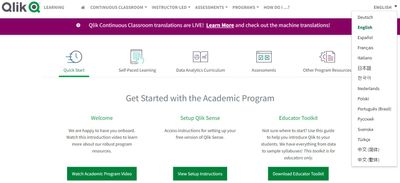
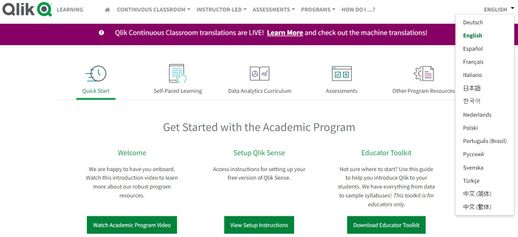
To engage machine translations to translate the text to a different language, select a language from the language Dropdown:
After launching a video from a course page, select CC from the tools to display the closed captions with machine translations:
Additional Notes:
- Limitations mentioned above include inconsistency in Google translations across various languages, and they should not be considered perfect translations.
- See Machine Translation Updates Page for known issues and improvements we are working on.
- For consistency across the in-app experience, other languages and other platforms using this solution, there are words which we have chosen not to translate. These words generally include product names, technical Qlik-specific terminology, user roles, syntax language, etc.
We appreciate your patience and feedback as we work to improve your learning experience. Please provide feedback within any self-paced course.
Access Qlik Learning Portal and check out the Machine Translations!