Unlock a world of possibilities! Login now and discover the exclusive benefits awaiting you.

Analytics & AI
Forums for Qlik Analytic solutions. Ask questions, join discussions, find solutions, and access documentation and resources.
Data Integration & Quality
Forums for Qlik Data Integration solutions. Ask questions, join discussions, find solutions, and access documentation and resources
Explore Qlik Gallery
Qlik Gallery is meant to encourage Qlikkies everywhere to share their progress – from a first Qlik app – to a favorite Qlik app – and everything in-between.
Qlik Community
Get started on Qlik Community, find How-To documents, and join general non-product related discussions.
Qlik Resources
Direct links to other resources within the Qlik ecosystem. We suggest you bookmark this page.
Qlik Academic Program
Qlik gives qualified university students, educators, and researchers free Qlik software and resources to prepare students for the data-driven workplace.
Recent Blog Posts
-
クラウド版Qlik SenseにDirect Queryがリリースされました!
Direct Queryは、SQLプッシュダウンにより、ユーザーの操作に応じて直接クラウドデータベースからデータを参照する機能です。Direct Queryは、業界をリードするQlikの分析エンジンとは異なり、ソースに対してSQLクエリをオンザフライで生成し、データベースレベルでクエリと計算を実行し... Show MoreDirect Queryは、SQLプッシュダウンにより、ユーザーの操作に応じて直接クラウドデータベースからデータを参照する機能です。
Direct Queryは、業界をリードするQlikの分析エンジンとは異なり、ソースに対してSQLクエリをオンザフライで生成し、データベースレベルでクエリと計算を実行します。インメモリにデータを格納しないので、ビッグデータや、リアルタイムのユースケースに適用することができます。Qlikの強力な分析エンジンを補完し、データ分析の幅を拡張することができます。まずはSnowflakeに限定した機能ですが、ロードマップにはDatabricksなどその他のコネクタが予定されています。
Direct Queryの使用手順は次の通りです。
- データ接続を作成
- 新しいアプリを作成し、データ接続を指定
- データの取込画面をDirect Queryに切り替え
- Snowflakeのロール、DB、スキーマを選択
- テーブル、項目を選択
- 複数テーブルの場合は関係を定義
- シート上でビジュアライゼーションの作成
ユーザーがシート上で選択やフィルタリングを行う都度、データベースにクエリが発行されデータベース上で計算が行われます。
TECH TALKで詳しくご紹介しています。
動画:最新データにライブ接続!Qlik Cloud Direct Queryのご紹介
資料:TECHTALK_20220802 Direct Query.pdf
その他の情報(英語)Direct Query now available in Qlik Sense SaaS!
Part 1: Overview and Operation
Part 2: Building Hybrid Analytics Solutions with On Demand App Generation (ODAG)

-
Qlik アドボケイトミートアップを開催しました
この 8月に Qlik の日本オフィスが移転となるため、見納めと企業視察(?)を兼ねて Qlik アドボケイトミートアップを六本木一丁目オフィスにて開催しました。当初はリアル開催のみの予定でしたが、コロナ感染の状況を踏まえ、急遽オンラインとのハイブリッド開催となり、それぞれ10名前後の方が参加されま... Show Moreこの 8月に Qlik の日本オフィスが移転となるため、見納めと企業視察(?)を兼ねて Qlik アドボケイトミートアップを六本木一丁目オフィスにて開催しました。当初はリアル開催のみの予定でしたが、コロナ感染の状況を踏まえ、急遽オンラインとのハイブリッド開催となり、それぞれ10名前後の方が参加されました。
オフィスではビールと軽食を用意し、オンラインの方にも飲み物をご用意いただいて(自社オフィスからご参加の方、申し訳ありませんでした!)カジュアルな雰囲気でスタート。冒頭に、今回から会を進行いただく Qlik Luminary の SEGA 萬さまから、あらためてユーザーが主導するユーザーのための会であるとの位置づけや、一緒に会をリードいただけるメンバーを募集中とのお話をいただきました。
アドボケイトメンバーも増えつつあり、今回はお互いを知るために、自己紹介や各社の取り組み、Qlik に関して一言などをお1人ずつお聞きしましたが、Qlik の話となると盛り上がり、時間内では全員の紹介が終わらず(想定通り?)、若干の延長となりました。いったん、中締めとした後もオフィス組は他のメンバーや Qlik 社員との Qlik 談義が尽きないようでした。
QlikView 時代からのユーザーと新しいユーザー、技術部門と財務部門、アプリを作る方と使う方など様々な立場の方が「Qlik をどう活用していくか」という共通のテーマで議論し広めていく Qlik アドボケイト。ここでの議論や知見を、多くのユーザーの方にもお届けしたいと思います。是非ご期待ください。
-
Qlik Management Console
While working on a project last month, I was introduced to the Qlik Management Console and was amazed at the number of settings contained within the c... Show MoreWhile working on a project last month, I was introduced to the Qlik Management Console and was amazed at the number of settings contained within the console. Being new to the Qlik Community, my eyes were opened to just how much control this menu can give to a user. With this discovery, I sought to learn more about the Qlik Management Console to further educate myself and assist others in learning just how much control you have over your Qlik account so you can make sure that everything is running just how you would like it.
The Qlik management Console is quite expansive, and far too much to go over in just one blog entry. For now, let’s begin with the basics in this entry with a quick overview of the Console. Don’t worry, we’ll be going further in depth in future entries.
The Console is divided into four categories:
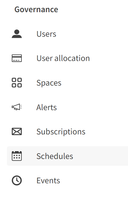
Governance- This is where permission and account-wide preferences can be chosen. Here you can view and allocate your users, view and edit subscriptions, see what has been scheduled, explore upcoming events alerts, and manage spaces.Content- As the title suggests, this is where you’d find the settings for your content contained within your account. You can view every App throughout the account, the data that has been uploaded, automations that have been set up, the extensions that have been integrated into the account as well as the themes that have been created or uploaded.
Integration- This section handles security for anything outside of Qlik that you are bringing into the environment of Qlik Cloud. This section is for making sure authorizations are on the up and up. Here you can monitor your API keys to check for any suspicious activity. This section would be used frequently if you are developing apps that connect to your Qlik tenant.
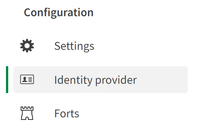
Configuration- In this section you’ll find your settings for your Qlik account with a wealth of options, too many to number in a quick overview. You can also manage your identity providers for logging into the Qlik tenant. Additionally, this is where you would set up a Fort if you would rather bring Qlik Cloud to your data.
Please note that this is only a quick preview of the Qlik Management Console. In upcoming blog posts, we’ll go through each category, looking at each option and how you can use them to get the most out of Qlik Cloud.
-
Qlik's Global Transformation Awards Winner Videos 2022!
The Global Transformation Awards recognize customers using Qlik technologies to drive remarkable business outcomes through data. Below are extensions... Show MoreThe Global Transformation Awards recognize customers using Qlik technologies to drive remarkable business outcomes through data. Below are extensions of the short videos played during QlikWorld 2022. These videos genuinely capture each story in more detail:
- Engage Together
- Amref Health Africa
- Mayborn Group
- Tata Consultancy Services
- Leroy Merlin
- Siemens Healthineers
-
BD Empresas
BD EmpresasFactible coVoz de las MipymesDiscoveriesEstatus de las empreas en MéxicoImpactDefinir el sector que requiere mayor atención en el paísAudie... Show MoreBD EmpresasFactible co Voz de las Mipymes
Discoveries
Estatus de las empreas en México
Impact
Definir el sector que requiere mayor atención en el país
Audience
Empresarios, emprendedores, gobierno
Data and advanced analytics
5 millones de datos de empresas
-
Data Brilliant with Qlik's Chief Learning Officer, Kevin Hanegan!
What is Data Literacy? It's not just a buzz word, its the future of our work force success! Listen in as Kevin Hanegan and Joe DeSantos explore the d... Show MoreWhat is Data Literacy? It's not just a buzz word, its the future of our work force success! Listen in as Kevin Hanegan and Joe DeSantos explore the definition of data literacy and why it means different things to different people during this latest episode of Data Brilliant. Listen now, https://linktr.ee/DataBrilliant

-
A Day in the Life of a Qlik Cloud User - The Art of the Possible
Hey GuysThis is a webinar / presentation extract from the Do More with Qlik Webinar series. "A Day in the life of a Qlik Cloud User" covers many featu... Show MoreHey Guys
This is a webinar / presentation extract from the Do More with Qlik Webinar series. "A Day in the life of a Qlik Cloud User" covers many features and capabilities of the Qlik Cloud Platform that can be used to explore your data, take action on your findings and make informed business decisions.
Can't see the video? YouTube blocked by your region or organization? Check out our company video hosting site here to view this video:
Sign up for the next Do More with Qlik:
https://pages.qlik.com/DoMorewithQlikWebinarJulySession.html?utm_content=mtoYTDITL&utm_medium=social&utm_source=YouTube&utm_team=PDT&utm_term=mtoYTDITL&utm_mpt_id=CGHNVXDo More with Qlik Archive:
https://pages.qlik.com/21Q3_QDEV_DA_GBL_DoMorewithQlikTargetpage_Registration-LP.htmlThe video covers many different capabilities of the Qlik Cloud Platform.
00:00 - Introduction
00:32 - Topics to be covered
02:34 - Alerts, Notifications & Qlik Sense Mobile - Scenario Setup
Let's prevent cancellation of unfulfilled orders! (starting your day )
08:39 - Qlik Sense SaaS Hub
09:40 - Launch a Qlik Sense app - App Overview, Sheets
10:00 - Order Fulfillment Dashboard - Identify the issue, Alert the Staff! (setting variables, kicking off real-time app automation workflows to process notifications, operational report distribution)
16:23 - Data Storytelling - Collect what we learned to present to our management team
18:50 - Let's see how our sales are doing - Current Month Analysis - Explore and Discover
19:50 - Time to take action - Collaborative Notes - Let's tell that Sales Rep "Stop with the discounts!"
22:50 - Ways at presenting the data / information -
25:00 - selections - green, white, gray
28:00 - Insight Advisor - natural language queries - auto chart suggestions
29:45 - link to external applications
30:40 - Global Smart Search
31:24 - share, export charts, pdf, images, excel, iframe, links, email
33:50 - Insight Advisor Analysis Types
37:00 - Explore - creating alerts
38:50 - Insight Advisor - natural language questions - sales guy is taking advantage of discounts (switch back and forth)
39:52 - linking to external applications - KPI drill to another sheet
41:36 - saving selection states - bookmarks
43:00 - changing variables, goal and performance tracking
-
【オンデマンド配信】 Qlik で予測不能な時代のサプライチェーン管理を変革
Qlik で予測不能な時代のサプライチェーン管理を変革老舗食品メーカーの Qlik Cloud® 成功事例 世界各国でサプライチェーンに大規模な障害が起きている中、製造小売業界の最優先事項は、俊敏性です。英国の大手食品メーカー Whitworths 社は、リアルタイムのデータと分析で、この障害に迅... Show MoreQlik で予測不能な時代のサプライチェーン管理を変革
老舗食品メーカーの Qlik Cloud® 成功事例世界各国でサプライチェーンに大規模な障害が起きている中、製造小売業界の最優先事項は、俊敏性です。英国の大手食品メーカー Whitworths 社は、リアルタイムのデータと分析で、この障害に迅速に対応することができました。
本 Web セミナーでは、同社のご担当者より、その取り組みと成功例をご紹介します。サプライチェーン管理への最新のアプローチで、サプライヤー・パートナー・顧客のニーズを継続的にサポートしながら競争優位性を獲得した方法をご確認ください。
※ 参加費無料。パソコン・タブレット・スマートフォンで、どこからでもご視聴いただけます。日本語字幕付きでお届けします。
- 製造 / 出荷 / サプライチェーンの重要な最新データをリアルタイムのアラート機能で監視
- 在庫状況を知らせるアラートとモバイル分析を即座に導入し、最新のイノベーションで部門を強化
- 拡張性の高いクラウドベースのサービスモデルで、インフラとメンテナンスのコストを削減
- データ主導型文化 / データリテラシーの高い文化を支持し、全従業員にリアルタイムのインサイトへのアクセスを実現
- 製造 / 出荷 / サプライチェーンの重要な最新データをリアルタイムのアラート機能で監視
-
Systems Development Lifecycle (SDLC) with the Qlik Active Intelligence Platform ...
In our last video we looked at how to implement complex SDLC environments in Qlik Sense Enterprise SaaS. However we only looked at this from the point... Show MoreIn our last video we looked at how to implement complex SDLC environments in Qlik Sense Enterprise SaaS. However we only looked at this from the point of view of a single path from Development to Production. Some organizations also separate their SDLC tiers horizontally. For example a customer may have Finance, HR and Sales in separate work-streams due to governance, information barriers or simply by preference. How to achieve this is not immediately obvious in Qlik Sense Enterprise SaaS.
In this video we will show how we can build context-aware applications so, your applications will know not just whether they are in Development, Test or production, but also whether they are a Sales, Finance or HR app. We will do this using built-in functionality of Qlik Cloud. We will also look at using these techniques to manage external script libraries so we can ensure we use the correct version of libraries based on where our apps reside.
-
Demo de Ventas
Demo de VentasGPStrategyDemo de ventas de vehículos, se observan Dashboard, analítica y reportes.DiscoveriesAnálisis what if para el descubrimiento de... Show MoreDemo de VentasGPStrategyDemo de ventas de vehículos, se observan Dashboard, analítica y reportes.Discoveries
Análisis what if para el descubrimiento de datos
Impact
Impacta desde la parte estratégica de la compañía
Audience
Gerentes y coordinadores
Data and advanced analytics
What if
-
Additional Styling Options for the Bar Chart
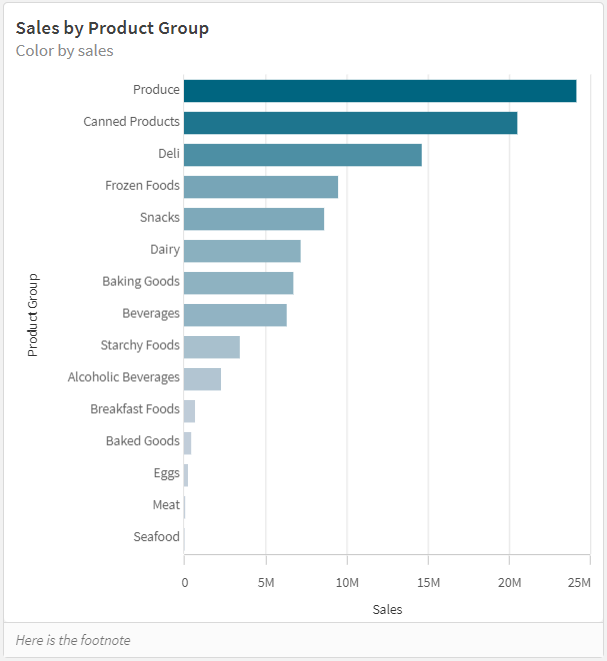
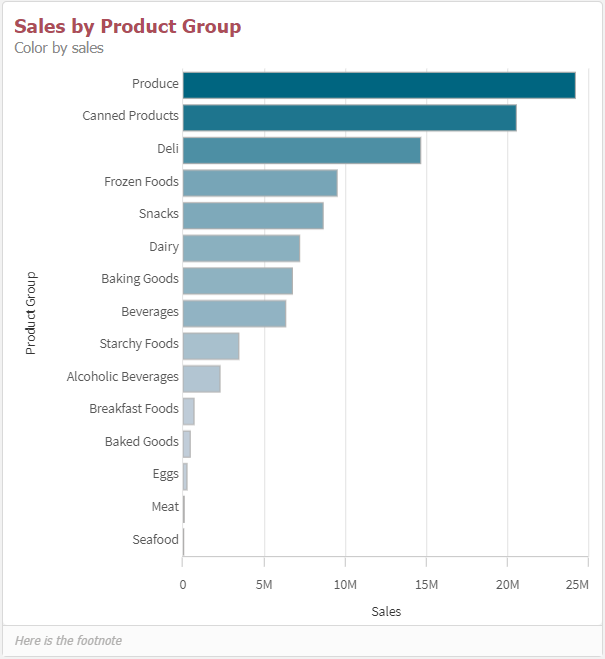
A few months ago, I blogged about KPI color and Map label enhancements that are available in Qlik Sense SaaS. Today, I will add to the list of visuali... Show MoreA few months ago, I blogged about KPI color and Map label enhancements that are available in Qlik Sense SaaS. Today, I will add to the list of visualization enhancements and discuss the bar chart. The bar chart now has additional styling options that allow the developer to style the title, subtitle, and footnote as well as the bars. Below is a horizontal bar chart with the default styling and bars that are colored based on the sales value.
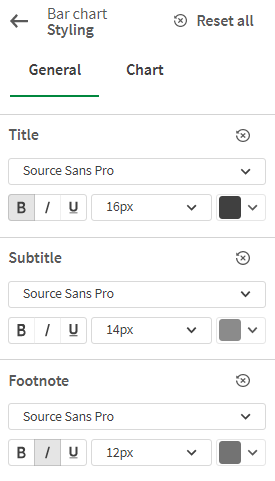
In the bar chart properties window under Presentation, the Styling section can be expanded to view the properties that can be changed.
On the General tab, the font family and font size of the title, subtitle, and footnote can be changed. Developers can also make the text bold, italic or underlined. There is a “reset all” option to undo all changes made and return to the defaults or individual text (title, subtitle or footnote) can be reset. This is nice if you would like to play with various settings to see how it will look and opt to return to the default.
On the Chart tab, there are styling options for the bars. Developers can add an outline – small, medium, or large – and they can adjust the width of the bars. Like the General tab, there are reset options on this tab as well.
Below is the same bar chart with styling changes. The font family was changed to Tahoma for the title, subtitle and footnote and the color of the title was changed to a reddish color. On the Charts tab, the width of the bars was increased, and a small outline was added to the bars. When making these styling changes, keep in mind that the data is the most important part of the visualization, and you want that to stand out and not be overshadowed by distracting color titles, subtitles, or footnotes.
The new bar chart styling options gives developers more ways to customize their visualizations. Check out the styling properties the next time you are building an app. You can also learn more about the bar chart properties in Qlik Help.
Thanks,
Jennell
-
12 million UK workers lack essential digital skills
Last week the BBC published an article about just how much the talent shortage in the UK is impacting the technology sector. Last year there were over... Show MoreLast week the BBC published an article about just how much the talent shortage in the UK is impacting the technology sector. Last year there were over two million job vacancies in the UK tech industry, with nearly 12 million workers lacking in the essential digital skills needed to fill roles.
The roles most impacted include software developers, data scientists, data analysts, enterprise architects and programme and project managers. So, while these are amazing opportunities for graduates, or those looking to change career, most of the UK workforce would be lacking in the basic skills to even apply for such roles in the first place.
To try tackle the problem many companies are offering upskilling and training, however this comes a little too late when we consider that most jobs being advertised still have some form of a digital skill requirement to begin with.
Education is one of the key ways to overcome this problem, many are upskilling by taking additional course while working or enrolling on courses after they finish their studies. Our Qlik Academic Program means students at accredited universities can do this for free. Students who are not studying tech focused degrees can start upskilling and increasing their employability by enrolling on our free program.
Busy university students with a heavy workload might find it difficult to motivate themselves to add something to the to do list. However, our training is structured around easy to follow short videos, and when you consider the fact that tech jobs can pay an average of 80% more than non tech jobs, this investment of time certainly seems worth it!
To learn more about the free Qlik Academic Program and start upskilling, follow this link: www.qlik.com/academicprogram
-
Game on! How Qlik Customers can earn Qlik Nation points through actions you take...
Hello, Qlik Customers! Do you fancy a Qlik-branded Ember mug, or a new t-shirt to show off... Show MoreHello, Qlik Customers!
Do you fancy a Qlik-branded Ember mug, or a new t-shirt to show off your data swagger? Or maybe you’re looking for an opportunity to get a free 3-month subscription to the Qlik Continuous Classroom to enhance your learning? These are only a few of the rewards that you can earn with points in Qlik Nation, our customers-only advocate hub. Qlik Nation members also receive:
- Early notification of new product features, training and webinars
- Opportunities to build your personal brand, highlight your success and influence the Qlik product roadmap
- Exclusive Qlik Nation-only events, discounts and perks
- Points for participating in educational and fun activities, which can be redeemed for rewards
Want to be a “Bounty Hunter”?Thanks to a new integration with Qlik Community, you’ll be able to earn a point bounty in Qlik Nation for being one of the first 3 respondents to an unanswered question in Qlik Community. Here’s how to do it:
First, join Qlik Nation use the same QlikID that you do for Qlik Community. Note, Qlik Nation is a community only for Qlik customers.
Then, go to the Community channel.
Look for a challenge pointing to an unanswered question in Qlik Community. It will usually begin with the words “We need your help on this topic”. Click on the challenge to open it.
The opened challenge will look very similar to this:
Click on the hyperlink to the discussion thread in Qlik Community, answer the question, and then go back and click Accept.
You’ll receive 5 points for every thread you reply to and 10 extra points if your post is deemed an accepted solution to the question!
These challenges are time-sensitive: most only last 5 days, so you need to respond quickly!
Also, for every burning question you want to ask in the Qlik Community, you will receive 20 points in Qlik Nation for every new topic in Qlik Community that you post.
Of course, there are lots of different activity challenges in Qlik Nation in a variety of categories, including a new channel that changes every month! July’s channel is all about healthy habits—learn some great ways to live healthier, lower your stress level, and get points for sharing your favorite tips.
Come on in and check it all out!
@Sarah-Clark on my team manages Qlik Nation—if you have any questions, don’t hesitate to reach out!
Enjoy your “bounty hunting”, learning opportunities, and networking-- and let the games begin!
-
Qlik Sense SaaSに新しい編集モードが追加されます。
Qlikでは、製品を改善するために、ユーザー調査とインタビューを継続的に実施しています。その結果に基づき、新しい編集モードを追加しました。より簡素化された編集画面で、分析画面の作成がさらに容易になります。特にグラフの作成、データの探索、プロパティの定義、フィルタリングなどにすぐアクセスでき、分かりや... Show MoreQlikでは、製品を改善するために、ユーザー調査とインタビューを継続的に実施しています。その結果に基づき、新しい編集モードを追加しました。より簡素化された編集画面で、分析画面の作成がさらに容易になります。特にグラフの作成、データの探索、プロパティの定義、フィルタリングなどにすぐアクセスでき、分かりやすくなっています。この機能のコンセプトのいくつかは、2020年にQlikが買収したKnarr Analytics に由来しています。
現在はプレビュー期間として、管理コンソールの設定>機能のプレビュー>チャートおよび既定のシートの動作の作成をオンにすることで使用できます。このフラグは元に戻せませんのでご注意ください。オンにするとデフォルトの編集モードが新しいモードとなります。
新しい編集モードは、8月中旬にすべてのテナントに適用される予定です。
新しい編集モードには次のような機能があります。
- 編集モードの項目一覧から値や頻度を参照、選択が行えます。
- 編集モードのまま、選択などの分析操作を行うことができます。
- 簡単にビジュアライゼーションに表示するデータにフィルタを適用することができます。
- ビジュアライゼーションの変更やプロパティの変更がすぐに行えます。
- ソーステーブルビューアにより、シートの検証が容易になります。
- 詳細(従来)モードと切り替えて使用することができます。
ビジュアライゼーションの種類やプロパティはよく使用するものに限定しています。
詳細の使用方法については下記をご参照ください。
Qlik TECH TALK 動画:Qlik Sense の新しい編集モード New Authoring Experience のご紹介
Qlik TECH TALK 資料:Qlik Sense の新しい編集モード New Authoring Experience のご紹介
また下記の資料(英語)もご利用ください。
- Qlik Product Innovation Blog:Get ready for the Simplified Authoring Experience in Qlik Sense SaaS
- ヘルプサイト:Managing access to the new authoring experience view
- ユーザーガイド:New authoring experience user guide
- Continuous Classroom:New authoring experience course
新しい編集モードを是非ご活用ください。
-
Spicing up the Community in July!
Hello Qlik Community! We are spicing things up in the Community with our July enhancements! Here are the updates that we pushed out: Top 5 Weekly Pa... Show MoreHello Qlik Community!
We are spicing things up in the Community with our July enhancements! Here are the updates that we pushed out:
Top 5 Weekly Participants
The Homepage lists the Top Participants. We wanted to spice it up a bit and give others a chance! The list will now show the Top 5 Weekly participants based on likes received! Each week, we hope to see a different set of our members! To our overall Top Participants – we still got you! Look for a new exciting page coming in the next couple of months that will share your amazing achievements with the Community.
Qlik Nation members are rewarded for activities in Qlik Community!
Qlik Nation is our invitation-only customer advocate hub. Members who are a part of both Qlik Community and Qlik Nation will now receive Qlik Nation points for activities completed in Community (eg., creating posts, replies, and solutions accepted).
See the Qlik Greenway for more information about Qlik Nation, including a cool new video about the program.
Enter Qlik AutoML cases in the Case Portal
Qlik AutoML customers can now enter cases via the Case Portal. Be sure to also check out the Qlik AutoML forum for peer-to-peer discussions!
Products Alphabetized in Case Portal
Along with the addition of Qlik AutoML, the Product list was alphabetized to make selections easier.
Product Download - Contact Information Updated
The error message for reaching an unauthorized page now includes who to contact for the Downloads page.
Users that should be able to reach the Downloads page should contact Customer Support via the chat or create a case for assistance.Let us know what you think about these enhancements using the comments below. Is there anything you would like to see? Be sure to let us know! We love hearing from you all!
Things will only get hotter as summer continues, so check back next month to see what’s new!
Your Qlik Community Team,
Melissa, Sue, Jamie, Nicole, and Emma
-
Qlik Digest - July 2022
Be a Part of QlikWorld Tour 2022 – We are finally back on the road visiting over 30 cities and can’t wait to see you in person. Meet other Qlik Custom... Show MoreBe a Part of QlikWorld Tour 2022 – We are finally back on the road visiting over 30 cities and can’t wait to see you in person. Meet other Qlik Customers, hear their success stories, and get inspired to own your next big business decision using the power of data. Discover your data swagger at a city near you. Register today
Can’t find a tour location near you? Join the QlikWorld Virtual Event from anywhere in the world, anytime you want.
Calling all cycling fans! Join Qlik for this unique virtual experience with Olympian and cycling commentator Katherine Bates. Qlik is partnering with charity Qhubeka to support their amazing work throughout South Africa, and we need your pedal power! For every kilometer you ride, Qlik will donate on your behalf. For more details check out the Qlik in for Qhubeka site.Do More with Qlik Webinar – Join Mike Tarallo on July 27 as he explores how to extend analytic capabilities for big data and near–real–time use cases with our new Direct Query capability. You will also learn how to securely push data from on–premise sources into an analytics application in Qlik Cloud, thanks to our new Data Gateway – Direct Access, releasing mid–July. Sign up today
Take advantage of Data Integration and Analytics enhancements in Qlik Cloud!
Qlik Cloud Release Highlights for JulySimplified Authoring – create visualizations even more easily with a new all–in–one drag and drop interface – learn more
Data Services
Coming soon, new Data Integration capabilities in Qlik Cloud will help securely replicate on–prem data to the cloud (Real–time Hybrid Data Delivery using Data Gateway), and quickly standardize, enrich or define fit–for–purpose data sets and automatically generate the necessary SQL code for push–down execution in your data warehouse (Data Transformation). Available soon in early access, please work with your account team to learn more.
To stay up–to–date on what’s new, bookmark qlik.com/roadmap for access to all product innovation resources, including our Product Innovation Blog. You can also subscribe to the RSS feed for our SaaS Change log."The analysis tool of dreams"…well, according to Kazutaka Yourozu of SEGA’s Game Content Service Division at least! In a world with rapid change, SEGA needed a reliable platform to help them understand current trends and act on their data. Learn how SEGA enables deep–dive analysis and slick, responsive mobile game management with Qlik.
Solving challenges and save time – Hear from Dinesh Soni from India’s National Stock Exchange on how they’re using core features, like the associative engine, data visualization and integration of data from multiple sources.Qlikkie Spotlight – Don’t know Mike Tarallo yet? We need to fix that, stat! Mike is Qlik’s Principal Technical Marketing Manager and one of the best Qlik Evangelists out there. You might recognize him from the popular, “Do More with Qlik” webinar series, where Mike introduces the latest and greatest Qlik features every month. He loves kicking the tires on new Qlik products and sharing them with our community. When he’s not at work you can find Mike gaming or enjoying just about anything Star Wars related. #TeamJedi
Fun facts about Mike
Favorite Food: Mostly everything and anything...Oh, except liver and onions 🙂
Favorite Place in the World: Sitting on the couch, holding my wife’s hand, watching movies- Make sure you check out the new Qlik YouTube Community Page for polls and news on the latest happenings at Qlik
- We have re–structured our Qlik Community home page to reflect what Community is all about: learning, searching and asking! Explore this update, and others, and be sure to tell us what you think!
- Discover the new Data Integration training available for Qlik Replicate and Qlik Compose.
- Quick Qlik Sense tip: To add charts with annotations, use the combo chart and custom marker layers on a secondary axis. Add a custom expression for the marker and the label. Tweak the axis and the expression to get the markers on the right place.
This month we want to know which tech buzz words drive you crazy! Have your say in our flash poll and find out how everyone else is voting.
Enjoyed this month’s edition? Subscribe for more news every month.
Connect with us on LinkedIn, Facebook, and Twitter. If you have any comments or feedback we would love to hear from you. Please contact lucy.bannister@qlik.com. -
Students at XJTLU China develop apps using Qlik Sense
At XJTLU China, during a summer school boot camp, participants worked on a business scenario to prepare for a business case to develop and challenge ... Show MoreAt XJTLU China, during a summer school boot camp, participants worked on a business scenario to prepare for a business case to develop and challenge their assumptions at different stages. Participants were divided into project teams and discussed those assumptions in virtual rooms. Project teams collected, interpreted, analyzed various forms of internal and external data, and presented their results in the form of digital artifacts (visual dashboards of performance indicators) to a Judge Panel using the Technological Authoring Tool Application (Qlik Sense).
To read more about this, visit: https://www.learningmall.cn/en/homepage/ceie/project-based-learning-on-learning-mall-on-data-analytics-using-qlik-sense-(technological-authoring-tool-application).htmlFor access to the Qlik Academic Program's free resources including training and certifications visit: qlik.com/academicprogram
-
【オンデマンド配信】実務に応用可能!(株)デンソー様講演:第 2 回 Qlik データソン最優秀賞受賞アプリのご紹介
大手自動車部品メーカー、株式会社デンソーのご担当者様より、第 2 回 Qlik データソンにて最優秀賞を受賞したアプリをご紹介いただきます。製品の製造から納入までに関わるあらゆるデータを紐づけて分析できる、All-in-One アプリです。経営、稼働、品質、環境、物流、多様なフォーマットのデータを紐... Show More -
アクティブインテリジェンスフォーラム 2022 開催報告
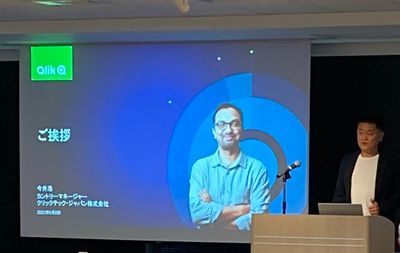
先月のご報告になりますが、Qlik では「アクティブインテリジェンスフォーラム2022」を開催しました。久しぶりの対面イベントということもあり、多くのお客様にご来場いただきました。 当日はカントリーマネージャー今井のご挨拶に続き、セールスディレクター槙野から、国連でのデータ活用の取り組みや今後企業に... Show More先月のご報告になりますが、Qlik では「アクティブインテリジェンスフォーラム2022」を開催しました。久しぶりの対面イベントということもあり、多くのお客様にご来場いただきました。
当日はカントリーマネージャー今井のご挨拶に続き、セールスディレクター槙野から、国連でのデータ活用の取り組みや今後企業に求められる経営指標とそのために必要なことなどを、また営業本部村田よりアクティブインテリジェンスのグローバル事例、技術本部中嶋より最新のアクティブインテリジェンスのデモをご紹介しました。
後半は、お客様事例として Qlik アドボケイトであるコマツ伊藤様より QlikViewのクラウド上での活用と今後の全社データ基盤構想をご紹介いただきました。同じく Qlik アドボケイトである学研ホールディングス福田様、横尾様からは Qlik 活用基盤構築やダッシュボード作成のノウハウ、最新機能の Application Automation の活用例などをお話しいただきました。トリドールホールディングス磯村様からはクラウド化のお取り組みを中心に同社のDX推進戦略をご紹介いただきました。
フォーラム終了後は Qlik Luminary である SEGA 萬様から乾杯のご発声をいただき、懇親会を開催しました。ご参加の方々は、ご講演者や Qlik アドボケイトメンバーとこの場ならではの貴重な意見交換をされていらっしゃいました。
本フォーラムの内容はオンデマンドで視聴可能です。ぜひご登録・ご視聴ください。
-
Heatmaps with the updated Grid Chart
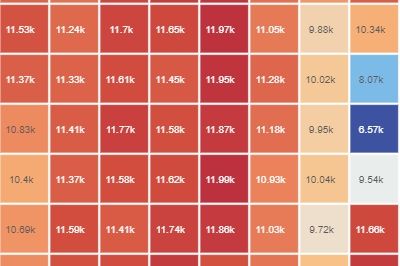
How to create a heatmap with the new GridChart What is a heatmap chart? Heatmaps are two-dimensional representations of data that show magnitudes as c... Show MoreHow to create a heatmap with the new GridChart
What is a heatmap chart?
Heatmaps are two-dimensional representations of data that show magnitudes as colors. A color variation - may be based on hue or intensity - gives a clear indication to the reader of how the data measured is distributed or varies over space.
The result should be a data piece that doesn't require a lot of explanation. Typically, warm high-contrast colors are used to represent high-value data points, while cool colors represent low-value data points in heatmaps.
Most common Birth Dates (US)
Qlik Sense Feb 22 (day of the month/month)
The chart above is an excellent use case for a heatmap, it is simple and straight to the point. Births are fairly evenly distributed throughout the year, with a slight bias towards the summer months. The average number of births drops significantly on some days, such as 4th July, 24th-25th December, and January 1st.
There is also a very popular version control product out there that displays a punch-card-like activity chart like the one below that I think is an excellent implementation of a heatmap.
Not my profile
With the February 22 release, the Grid Chart will be your first choice when it comes to heatmaps. In addition to all the features that one expects in a Grid Chart, there is now a shortcut that lets us create a heatmap just like that.
Remember that this chart is especially useful if it is self-explanatory, so try to avoid complex combinations of dimensions. This chart is best suited to time-series-based dimensions.
Enjoy it!
Arturo