Unlock a world of possibilities! Login now and discover the exclusive benefits awaiting you.

Analytics & AI
Forums for Qlik Analytic solutions. Ask questions, join discussions, find solutions, and access documentation and resources.
Data Integration & Quality
Forums for Qlik Data Integration solutions. Ask questions, join discussions, find solutions, and access documentation and resources
Explore Qlik Gallery
Qlik Gallery is meant to encourage Qlikkies everywhere to share their progress – from a first Qlik app – to a favorite Qlik app – and everything in-between.
Qlik Community
Get started on Qlik Community, find How-To documents, and join general non-product related discussions.
Qlik Resources
Direct links to other resources within the Qlik ecosystem. We suggest you bookmark this page.
Qlik Academic Program
Qlik gives qualified university students, educators, and researchers free Qlik software and resources to prepare students for the data-driven workplace.
Recent Blog Posts
-
Qlik Sense Qualification Exams in Continuous Classroom - Updated!
This week, Qlik Education released an new version of the Qlik Sense Qualification Exams for Business Analysts and Data Architects.These exams are FREE... Show MoreThis week, Qlik Education released an new version of the Qlik Sense Qualification Exams for Business Analysts and Data Architects.
These exams are FREE to Continuous Classroom subscribers and students who attend our introductory Instructor Led Training courses.
To learn more about these fundamental-level exams, visit the Certifications & Qualifications web page.

-
Qlik NPrinting 技術情報リンク集
Qlik NPrinting は、QlikView および Qlik Sense Enterprise on Client Managed(on Windows) のデータを使用してレポートを作成し、様々な形式のレポートを、スケジューリングにより自動配信できるレポート プラットフォームです。ここでは... Show MoreQlik NPrinting は、QlikView および Qlik Sense Enterprise on Client Managed(on Windows) のデータを使用してレポートを作成し、様々な形式のレポートを、スケジューリングにより自動配信できるレポート プラットフォームです。ここでは Qlik NPrinting を理解するための技術情報リンクをご紹介します。
尚、Helpについては May 2021 のリンクとなっています。ご使用時は最新バージョンのページをご覧ください。
参考サイト
- Qlik Help サイト :Qlik 製品のヘルプサイト(日本語・英語)
- Qlik NPrinting Documents :Qlik Community の NPrintingに関連する技術資料を公開(英語)
- Qlik NPrinting Discussion :Qlik Community の NPrintingに関連するQAやディスカッション(英語)
- Qlik NPrinting ヘルプドキュメント :Helpサイトの情報のPDF(日本語)
概要説明・全般
- Qlik NPrinting 製品ご紹介資料 :製品の特長や機能概要説明(日本語)
- Qlik NPrinting のご紹介(日本語動画) :製品の特長や機能概要説明の動画(日本語)
- Qlik Sense+Qlik NPrinting でセルフサービスBIから定型帳票の配信までをカバー :Qlik TECH TALK Webセミナー資料(日本語)
- Qlik Sense+Qlik NPrinting でセルフサービスBIから定型帳票の配信までをカバー(日本語動画):Qlik TECH TALK Webセミナー録画(日本語)
展開計画
- Help 展開の計画 :NPrintingの導入の計画・準備に必要な情報(日本語・英語)
- Qlik Nprinting Scalability :NPrintingのベンチマークテストのホワイトペーパー(英語)
インストール
- Help Qlik NPrinting のインストール :インストールの手順説明(日本語・英語)
- Help Qlik NPrinting のアップグレード :アップグレードの手順(日本語・英語)
移行
- Help 移行 :QlikView NPrinting 16 から Qlik NPrinting November 2019 以降のバージョンへの移行手順(日本語・英語)
バックアップと復元
- Help Qlik NPrinting のバックアップと復元 :バックアップと復元方法(日本語・英語)
セキュリティ
- Help セキュリティ :認証・承認などのセキュリティ設定(日本語・英語)
レポート作成
- Help レポートのデザイン :レポート作成機能の説明(日本語・英語)
- Help レポートの公開 :レポートの配信設定(日本語・英語)
- Qlik NPrinting Report Development Best Practices :効率的なレポート開発のための補足資料(英語)
管理
- Help 管理 :エンジンの管理、レポートのスケジューリング、ユーザーなどの管理機能の説明(日本語・英語)
- NPrinting Governance Dashboard :NPrintingの運用状況を管理するQlik Senseアプリ(英語)
API
- Help Qlik NPrinting の拡張:NPrinting APIに関する概要(日本語・英語)
- Qlik NPrinting API :拡張機能開発のためのAPIドキュメント(英語)
-
Datathon Webinar Now Available - Getting Started!
Qlik Academic Program Datathon – There Is No Planet B!Earlier Qlik hosted a webinar covering topics of interest related to the Qlik Academic Program ... Show MoreQlik Academic Program Datathon – There Is No Planet B!
Earlier Qlik hosted a webinar covering topics of interest related to the Qlik Academic Program Datathon and HOW TO GET STARTED. In case you were unable to attend the live session or would like to listen to it again, you may do so at the following link: https://qt-lss.s3.amazonaws.com/AP/Datathon/2022QWDatathon/Webinar_2022.03.03.mp4
Topics covered included:
- Overview of Qlik and the Qlik Academic Program
- Overview of Qlik Corporate Responsibility and Qlik.org
- Overview of the United Nations SDGs Summary
- Overview of the Datathon Challenge
- How to Get Started/Demo
- Additional Resources available to you
- Next Steps and Reminders regarding the Datathon eligibility, deadlines and submission details
- Review of PPT template – INCLUDING NEW FTP instructions!
A couple of key reminders:
- To be eligible for the Datathon:
- You must be a current member of the Qlik Academic Program
- Sign up here: qlik.com/academicprogram
- If you have a team of 2 people, BOTH team members must register for the Datathon and accept the Datathon Terms and Conditions
Submissions: You will need to submit your applications and slide deck using FTP. Instructions on how to do so have been added to the Datathon Toolkit. Download a copy of the Toolkit via the link or read the new instructions below. https://qt-lss.s3.amazonaws.com/AP/Datathon/2022QWDatathon/Datathon_Toolkit.zip
Qlik UN SDG Datathon FTP Instructions:
- File Name Convention: University-TeamName-Challenge#-MM-DD-YYYY.zip
- FTP Site
- server name: ftpus.qliktech.com
- user: datathon
- password: j3uLg73h$
- port: 22
- Free Open Source FTP Clients
- FileZilla. Topping the list is FileZilla, an open source FTP client.
- Cyberduck. Cyberduck can take care of a ton of your file-transferring needs: SFTP, WebDav, Amazon S3, and more.
- FireFTP. This Mozilla Firefox add-on gives you a very capable FTP/SFTP client right within your browser.
- Classic FTP or WinSCP.
Join Qlik and the United Nations to help address climate issues currently facing our planet!

-
Qlik Senseで思い通りのチャート集計を実現–SET分析
■ SET分析とは?Qlik Senseでは、例えば「年」のフィルタで「2021年」を選択すると全てのチャートに対して絞り込みが反映され、集計範囲を絞って分析を行うことができます。その中で今回ご紹介する「SET分析」は例外で、どのような年の選択絞り込みを行っても特定のチャートでは常に最新年を表示し... Show More■ SET分析とは?
Qlik Senseでは、例えば「年」のフィルタで「2021年」を選択すると全てのチャートに対して絞り込みが反映され、集計範囲を絞って分析を行うことができます。
その中で今回ご紹介する「SET分析」は例外で、どのような年の選択絞り込みを行っても特定のチャートでは常に最新年を表示したり、細かい条件を指定してその条件に合致する範囲でのみ集計対象とするなど、多岐に渡った集計の手法を活用することができます。ここではこのSET分析についてご説明します。■ 事前の準備
以下のリンクからサンプルデータをダウンロードし、ダウンロードしたZIPファイルを任意の場所に解凍してください。このデータを使って、このエントリでご説明する式などを試してみることができます。
まず、Qlik Senseを開いて名前の新規アプリを作成し、ダウンロードしたZIPファイルに含まれるファイルを取り込んでください。
■ 基本的な構文
では、まずSET分析の基本的な構文についてご説明します。
SET分析は集計関数の内部に記述します。以下の式を例にとってSET分析を記述する流れを3つのステップでご説明したいと思います。
Sum([販売価格])
ステップ1:波括弧の追加
SET分析を記述する場所のマーカーとして波括弧を追加します。
Sum({} [販売価格])ステップ2 : SET識別子の追加
波括弧の中にSET識別子($, 1, 1-$)を追加します。以下の例では「現在の選択範囲」を表す「$」を追加しています。
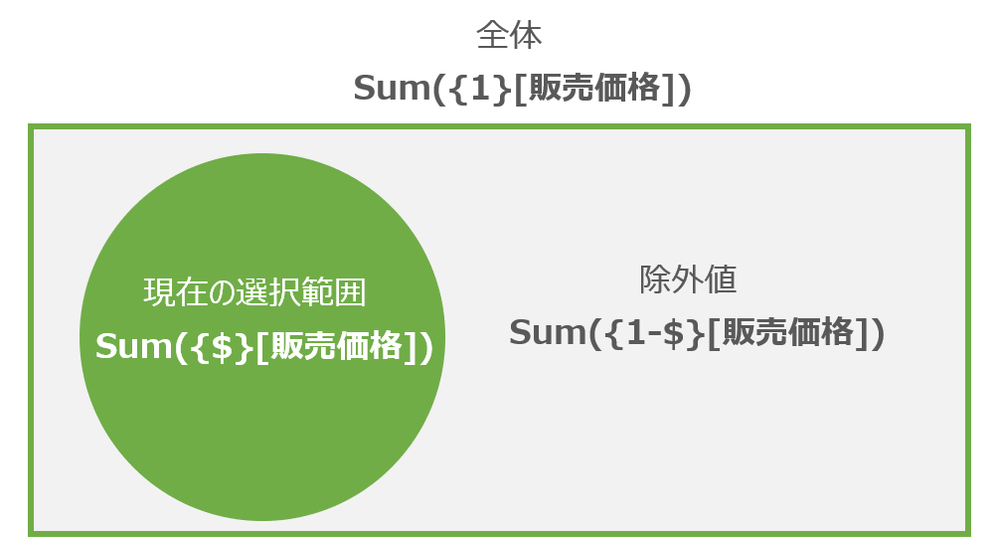
Sum({$}[販売価格])ここでは「どの範囲のレコードセットを対象とするか?」を指定し、主には以下の「$」, 「1」, 「1-$」の3つになります。
例えば「都道府県」で「東京」を選択している場合、「Sum({$} [販売価格])」では「東京」のみを範囲の対象とします。「Sum({1} [販売価格])」ではその選択条件を無視して全都道府県を集計の対象とし、「Sum({1-$} [販売価格])」では「東京」以外を対象とします。
ステップ3 : SET修飾子の追加
ステップ2でレコードセットの大枠の範囲を定義し、このステップ3でさらに細かい条件を指定してその範囲を調整します。まず、「<>」を「$」の後に追加し、その中に条件を記述します。
Sum({$<年 = {2021}>} [販売価格])上記の例では現在の選択範囲から「年」が「2021年」のみを対象として集計を行います。このSET修飾子は<軸名 = {メンバー一覧}, 軸名 = {メンバー一覧}・・・>という形式で記述ができ、以下の様な形で複数の軸を条件に含まることも可能です。
Sum({$<年 = {2021}, 月 = {1}>} [販売価格])また、以下のSET演算子を利用することも出来ます。
+ : 和集合(Union)
– : 排除(Exclusion)
* : 共通集合(Intersection)
/ : 排他的論理和例えば、以下の場合には現在の選択範囲に「2021年」が含まれない場合にも「2021年」が追加されて集計が行われます。
Sum({$<年 += {2021}>} [販売価格])また、逆に以下の場合には「2021年」を除外して集計が行われます。
Sum({$<年 -= {2021}>} [販売価格])このSET修飾子には多様な条件を設定することができます。次の章で幾つかのパターンをご紹介したいと思います。
■SET修飾子のパターン
メンバーの指定
基本的な構文の例でご説明した通り、SET識別子に<軸名 = {メンバー一覧}>という形式で指定を行え、以下の形でメンバーを{}内にカンマ区切りで複数指定することもできます。
Sum({$<年 = {2020, 2021}>} [販売価格])メンバーの文字列に「-」やスペースなどが含まれる場合には以下の形でクオートで囲む必要があります。
Sum({$<商品名 = {'8畳用エアコン H22SX','12畳用エアコン F21SX'}>} [販売価格])文字列検索
以下を使った文字列検索を行って対象を特定することが出来ます。
* : 任意の文字列(ワイルドカード)
? : 1文字以下の例では商品名に「エアコン」の文字列を含む商品を対象とします。
Sum({$<商品名 = {"*エアコン*"}>} [販売価格])特定軸の選択条件無視
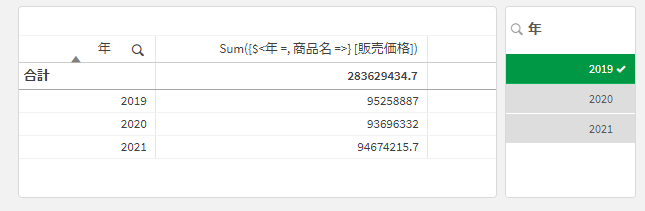
<軸名 = >の形式でメンバーを空白で指定すると、その軸での選択を無視して全てのレコードを集計の対象とすることが出来ます。(<軸名 = {*}>という形式での記述も可能です)
Sum({$<年 =, 商品名 =>} [販売価格])ただし、以下の形で「年月」という他の列項目で年の範囲が絞り込まれた場合、その選択は反映されますので、この点留意が必要です。
数値の範囲指定
以下の様な形で数値の範囲を指定することが可能です。以下の例では3月以降のみを集計の対象とします。
Sum({$<月={">2"}>} [販売価格])また、以下の形で上限・下限を指定することも可能です。
Sum({$<月={">=4 <=6"}>} [販売価格])変数の利用
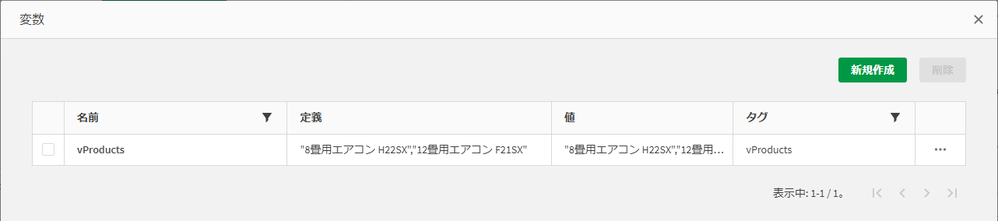
SET識別子で変数を利用することも可能です。以下では「vProducts」という変数を作成し、定義に「"8畳用エアコン H22SX","12畳用エアコン F21SX"」という値が設定されています。
この時、以下の形でこのvProductsの変数を利用することが出来ます。
Sum({$<商品名 = {$(vProducts)}>} [販売価格])同様に、数値の範囲指定などでもvStartMonthとvEndMonthの変数を作成して、以下の形で変数を利用することも可能です。
Sum({$<月={">=$(vStartMonth) <=$(vEndMonth)"}>} [販売価格])関数の利用
関数は<軸 = {“$(=関数(引数))”}>という形式で利用することが可能です。以下の例ではMax関数を使い、現在の選択範囲の中での最新年のみを集計の対象とします。
Sum({$<年 = {"$(=Max(年))"}>} [販売価格])また、このSET識別子の中の関数にSET修飾子を付加することも可能で、以下の場合には現在の選択を無視して全体から最新年を返します。
Sum({$<年 = {"$(=Max({1} 年))"}>} [販売価格])以下の様な形で-1を追加すると最新年-1を対象とすることが出来ますので、上記の数式と組み合わせて前年比などの計算を行うことができます。
Sum({$<年 = {"$(=Max(年)-1)"}>} [販売価格])メンバーを返す関数の利用
SET識別子で関数を利用し、そこで指定した条件に合致するメンバーのみを集計の対象とすることが出来ます。以下の例では、「販売価格の合計が10,000,000円を超える商品」を集計の対象としています。
Sum({$<商品名={"=Sum([販売価格])>10000000"}>} [販売価格])また、内部の関数にもSET分析を適用して「2020年に500万円の売上を超えた商品」を集計の対象とするようなこともできます。
Sum({$<商品名={"=Sum({1<年 = {2020}>} [販売価格])>5000000"}>} [販売価格])P()とE()の利用
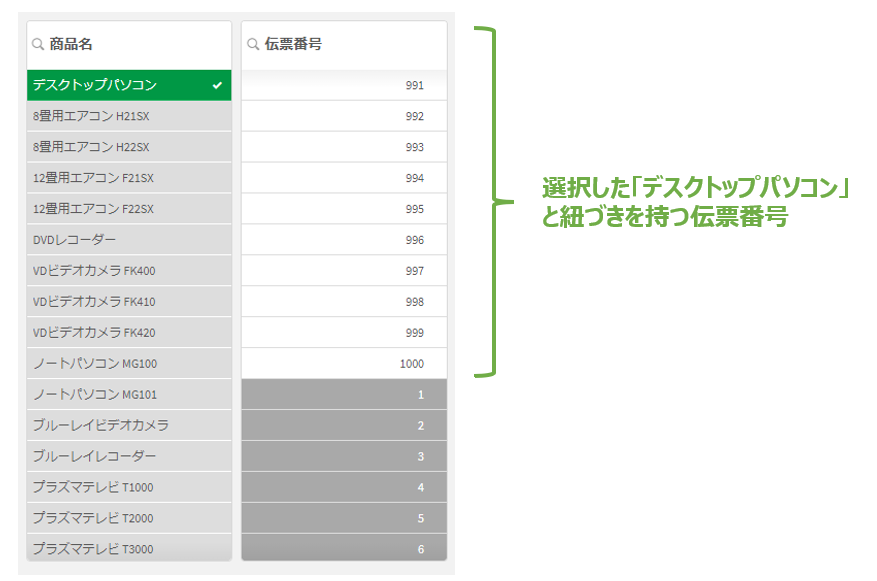
P()とE()はQlik Senseの連想技術を活用した集計範囲の絞り込みを行うことができます。例えば、「デスクトップパソコンが販売されている伝票のみに絞り込んで売上の集計を行いたい」といったケースを考えます。この様な場合、以下のイメージの様に、マニュアル作業で「商品名」から「デスクトップパソコン」を選択すると(緑色でハイライト)、この商品と紐付く伝票番号は白色で表示されてそれ以外は灰色で表示されますので、この白色で表示された伝票番号を選択することで絞り込みは行うことが出来ます。
この様な作業に相当することを行えるのがP()とE()になります。P()は上記の白色の項目に対応する「可能な値(Possible)」を返すために利用でき、例えば以下によって「商品名」が「デスクトップパソコン」を選択した時に「可能な値」となる「伝票番号」のみを絞り込むことが出来ます。
Sum({$<伝票番号 = P({1<商品名={'デスクトップパソコン'}>})>} [販売価格])また逆にE()は上記の灰色の項目に対応する「除外値(Excluded)」を返し、以下の例では上記の灰色の伝票番号を集計の対象とします。
Sum({$<伝票番号 = E({1<商品名={'デスクトップパソコン'}>})>} [販売価格])2つのフィールドの比較
<軸 = {“=(真偽の判別)”}>という形式で、2つのフィールドを比較して合致するもののみを集計の対象とすることが出来ます。以下の例では、販売日付と出荷日付が同じ伝票のみを集計の対象としています。
=Sum({$<伝票番号 = {"=(出荷日付 = 販売日付)"}>} [販売価格])また、以下の様な形で「販売から7日以内に出荷された伝票」のみに絞り込むことも出来ます。
Sum({$<伝票番号 = {"=(出荷日付 - 販売日付 < 7)"}>} [販売価格])■ まとめ
以上、SET分析構文の基本と、パターンに分けたSET分析の利用方法をご説明しました。ここでご説明した通り、SET分析を利用することで、思い通りのチャート集計を実現するために多岐に渡った手法を用いることができます。
-
Qlik Sense Desktopの無料トライアル利用開始手順
Qlik Sense Desktopは、個人ユーザーのローカルPCに導入して利用する製品となっています。(Windowsのみ対応)Qlik Sense Desktopは上記のQlik Sense Businessの無料トライアルを登録後、Qlik Sense Business上のサイトからダウンロ... Show MoreQlik Sense Desktopは、個人ユーザーのローカルPCに導入して利用する製品となっています。(Windowsのみ対応)Qlik Sense Desktopは上記のQlik Sense Businessの無料トライアルを登録後、Qlik Sense Business上のサイトからダウンロード・利用の開始を行えます。以下、その手順をご説明します。
Qlik Sense Businessの無料トライアル開始
Qlik Sense Desktopは、Qlik Sense Businessの無料トライアルの利用に含まれています。まずは、以下の記事を参考にQlik Sense Businessの無料トライアルを開始します。
Qlik Sense Business(SaaS版)の無料トライアル開始手順 - Qlik Community - 1899279
Qlik Sense Desktopのダウンロード
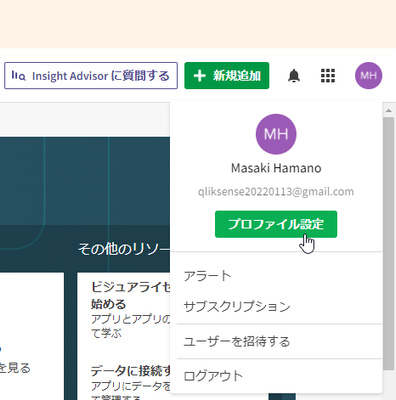
1. Qlik Sense Businessのトップ画面のハブ上で、画面右上のユーザープロファイルのアイコンをクリックし、[プロファイル設定]を選択します。
2. [ツール]タブ上で、Qlik Sense Desktopの[ダウンロード]ボタンをクリックすると、Qlik Sense Desktopのインストールファイルをダウンロードすることができます。当ファイルを実行してインストールを完了してください。
Qlik Sense Desktopのインストール
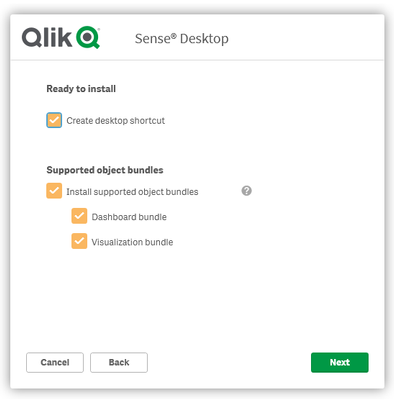
1. ダウンロードしたファイルを実行します。
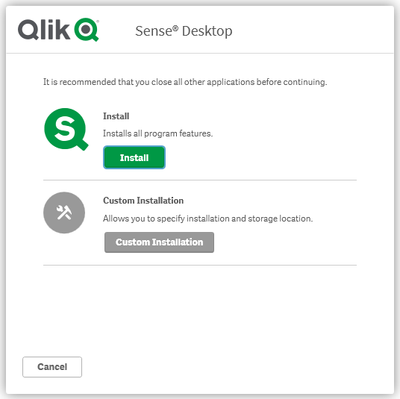
2. [Install]をクリックします。
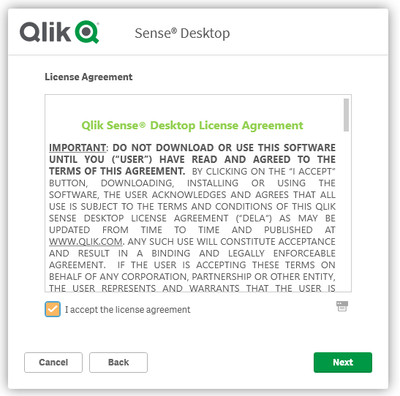
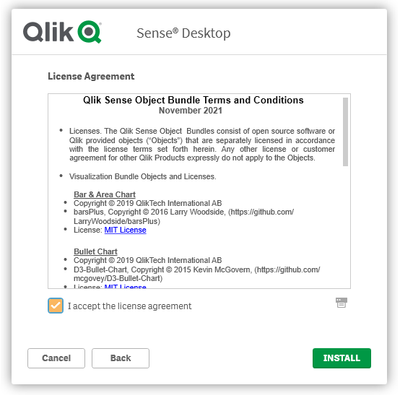
3. [I accept the license agreement]のチェックボックスをオンにし、[Next]をクリックします。
4. [Next]をクリックします。
5. [I accept the license agreement]のチェックボックスをオンにし、[INSTALL]をクリックします。
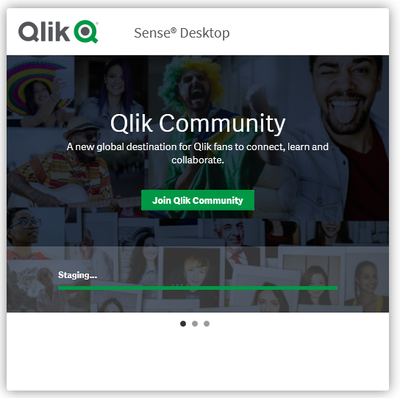
6. インストールが開始します。
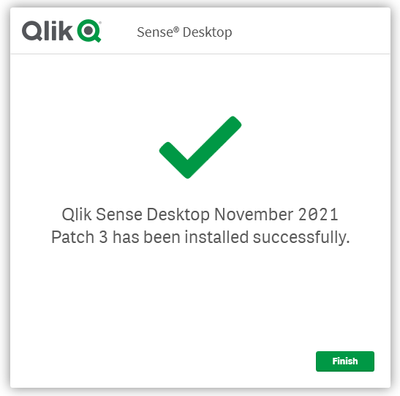
7. インストールが完了したことを確認します。
Qlik Sense Desktopの認証
Qlik Sense Desktopの利用を開始するには、登録が完了しているQlik Sense Businessに対して認証を行う必要があります。
1. インストール完了後、Qlik Sense Businessの画面に戻り、[認証]ボタンをクリックします。
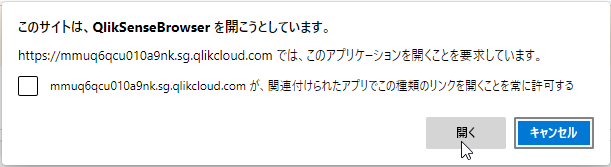
2. [開く]をクリックします。
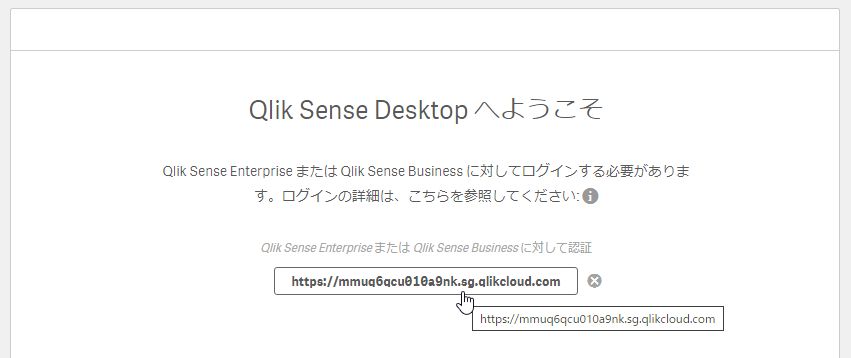
3. テナントのURLが登録されますので、登録されたURLをクリックします。
4. Qlik Sense Businessの登録時に利用したメールアドレス、パスワードでログオンを行います。
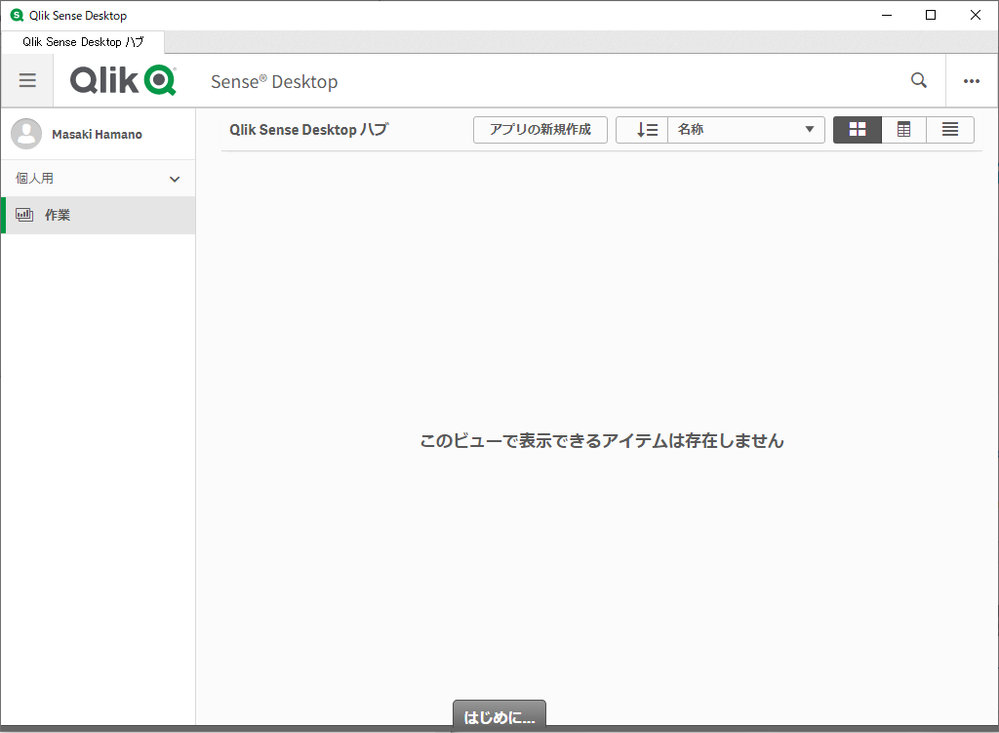
5. Qlik Sense Desktopのトップ画面が開きますので、ここから製品の利用を開始することができます。
-
Qlik Sense Business(SaaS版)の無料トライアル開始手順
Qlik社はSaaS/クラウドのサービスとしてQlik Sense BusinessとQlik Sense Enterprise SaaSをご提供しており、下位エディションのQlik Sense Businessが無償・即日で利用可能となっています。(クレジットカードの登録などは不要で、30日間の... Show MoreQlik社はSaaS/クラウドのサービスとしてQlik Sense BusinessとQlik Sense Enterprise SaaSをご提供しており、下位エディションのQlik Sense Businessが無償・即日で利用可能となっています。(クレジットカードの登録などは不要で、30日間の無料トライアルを開始することができます。)以下、その手順をご説明します。
1. Qlik Sense Business の登録サイトにアクセスし、必要な情報を入力して[体験版にアクセス]をクリックします。
https://www.qlik.com/ja-jp/trial/qlik-sense-business2. 登録したメールアドレスに確認メールが届きます。本登録を行うために、[さあ、はじめましょう。]のボタンをクリックします。
3. パスワードを入力します。[利用規約]をクリックして内容を確認し、承諾のボックスをチェックして[アカウントを作成]をクリックします。
4. テナントが配置される地域を選択します。ご自身の所在地に基づき選択してください。日本でご利用の方は「アジア太平洋地域1(シンガポール)」を選択し、[完了]をクリックします。なお、セットアップ完了後は地域を変更できませんのでご注意ください。
5. Qlik Sense Business のアカウントとテナントの作成が完了するとトップのハブ画面が表示されます。登録したメールアドレスにテナントURLなどが含まれた確認メールが送信されますので、それらの情報を控えておいてください。
以上の手順でQlik Sense Businessの利用を開始することができます。
-
Using Webhook Filters in Qlik Application Automation
Hey Guys -I wanted to share the improvements we have made around availability and usability with Webooks integration in the Qlik Active Intelligence p... Show MoreHey Guys -
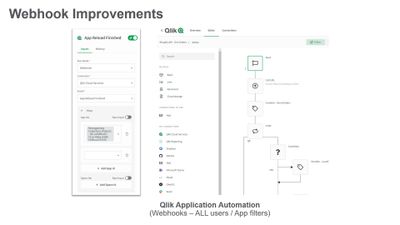
I wanted to share the improvements we have made around availability and usability with Webooks integration in the Qlik Active Intelligence platform. Briefly, Webhooks provide a fast and easy way for enterprise applications to communication with one another when an event occurs. In this case the Qlik Active Intelligence platform allows you to trigger Qlik Application Automation workflows when certain events in Qlik Cloud occurs - such as adding and deleting users and apps or even when a app has finished reloading. In a previous release you needed to be a tenant admin to set these Webhooks up in the management console and users of Qlik Application Automation had to build filters in their flows to control which apps and spaces they wanted the Webhooks to work with - well in this latest update - now any user of Qlik Application Automation can do this - along with new filter parameters to select apps and spaces built directly in the Webhook Start Block - let me show you how it works.
Can't see the video? YouTube blocked by your organization or region? Download the attached .mp4 below.

-
Welcome back Blerim Emruli - Qlik Educator Ambassador Class of 2022!
@eblerim is a Senior Lecturer at the University of Lund Informatics which coincidently happens to be the birthplace of Qlik! At the university he te... Show More@eblerim is a Senior Lecturer at the University of Lund Informatics which coincidently happens to be the birthplace of Qlik! At the university he teaches courses such as Decision Support Systems, Business Intelligence, and Business and Artificial Intelligence, in both the undergraduate and graduate level. When he is not teaching students, he spends his time working on research projects, designing training courses for businesses. Most recently he designed and delivered a one-day course to business in Skåne and Blekinge (two counties located in the south of Sweden), entitled “Is AI something for our company?”. Despite all of the work he does, teaching is his passion and one of the reasons he embeds Qlik and the Academic Program into his teaching is because he firmly believes that “jobs and education go hand in hand”, so it is of the upmost importance to collaborate with industry.
When discussing why he feels he was chosen as a Qlik Educator Ambassador Blerim says, “I believe that the team from Qlik recognized my efforts to educate students to be prepared for the data literate workforce by addressing real-world projects and using practitioner-oriented tools.”
Blerim prepares his students for the data-informed workplace by incorporating a range of Qlik resources into his teaching. Since becoming an Educator Ambassador last year, he has since incorporated the Qlik Academic Program even further, “Currently, I'm updating my courses by including parts from the Data Literacy Program and Data Analytics Curriculum and steering the students to finish Qlik Qualifications and Certifications. In addition, he also likes to take advantage of additional offerings such as Qlk’s Student Datathon, “I have used the Qlik Academic Program Datathon C40 Cities Challenge as part of a group project where students work in a group of 3 and submit their work that accounts for almost 50% of the final grade in the course”.
On asking Blerim whether he has seen positive results in terms of student employability from incorporating Qlik into his course he says “Many of my students immediately or even before graduating are taking on roles in industry as BI analysts, developers etc. In particular, I'm very proud that a number of the expat female course participants quickly got employed”.
Having been selected as a Qlik Academic Program Educator Ambassador for the second year in a row, Blerim hopes that this will enable him to “further increase [his] credentials to be even more vocal within the Department, Faculty, University, the region and the world in order to elevate Qlik and especially the Qlik Academic Program to a greater level”.
The Qlik Academic Program is honored to have Blerim Emruli back for a second year. If you’re interested in knowing more about the Datathon mentioned in this blog, registration for this years Datathon is now open and you can read more about it here. To learn more about the Qlik Academic Program visit this page qlik.com/academicprogram
-
How to resolve addresses into Qlik Sense Geo Points?
The requirements During the last few days I’ve been working in a new project around weather data, we wanted to visually represent how temperatures had... Show MoreThe requirements
During the last few days I’ve been working in a new project around weather data, we wanted to visually represent how temperatures had risen during the last decades. We have a bunch of temperature data points gathered at weather stations across the globe. We were curious to check if a map would help us to visualize warming, we wanted to check whether or not the global warming is indeed global. Are the co2 emissions affecting more to the northern hemisphere? Are some continents/countries more affected?
The data issue
Qlik Sense provides with a compelling mapping object out-of-the box that would help us to geographically understand the data. However, in order to get the map object to work, it needs a latitude and longitude geo point to be able to represent the data. In this particular case we had address data of each one of the weather stations where the measurement were taken but we didn’t have geo points or any other geo reference.
The solution
Luckily we have a bunch of smart guys in the community that can help us all to solve most of our issues. GetGeoCoords is a Qlik Sense app created by Christof Schwarz( cschwarz) that does exactly what I needed. It will enrich my app by not only adding latitude and longitude data points to each one of the existing locations, but it will also include some other useful geo-information like country, state, county, district, neighborhood, city, etc.
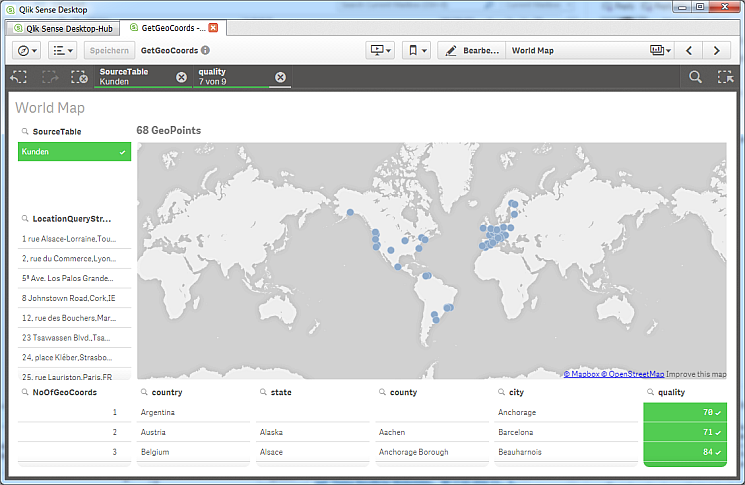
Christof describes the app as following:
The main purpose of the app is to stand in the middle of data loads, it inputs tables and outputs files. So you likely don't need the frontend unless you like to make sanity checks of your geographic data, You may also be creative and take the code into your own final app to avoid one load sequence in the middle. My code would work in other apps as well.
You can grab the app here and learn how it works watching the video tutorial
Hope you find it as useful as I do.
AMZ
PS: Just a friendly reminder about app support. As most of the community based content this material comes with no support but the support provided by the community itself.

-
Systems Development Lifecycle (SDLC) with the Qlik Active Intelligence Platform ...
Most organizations follow some form of Systems development lifecycle (SDLC) and incorporate this into their analytics lifecycle. For Qlik customers mo... Show MoreMost organizations follow some form of Systems development lifecycle (SDLC) and incorporate this into their analytics lifecycle. For Qlik customers moving from a client-managed environment (Windows on-premise) to Qlik Sense Enterprise SaaS; they have multiple environments such as Development, Test and Production and are uncertain how to map this to a SaaS environment.
Question: Can this be done in one SaaS tenant, or is a tenant required for each tier?
In this video we will look at how organizations can map their SDLC environments into Qlik Sense Enterprise SaaS and some of the key techniques that make this possible. We will examine the roles of spaces, connections and publishing and how these allow you to run complex SDLC environments in a single SaaS tenant.
Stay tuned for Part 2 - coming soon!
-
Meet Javier Leon - Qlik Educator Ambassador Class of 2022!
Today begins an exciting time for the @Anonymous #academicprogram where we begin to introduce our new educators as part of the Educator Ambassador cla... Show MoreToday begins an exciting time for the @Anonymous #academicprogram where we begin to introduce our new educators as part of the Educator Ambassador class of 2022!
Today, I am honored to introduce Educator, Javier Leon! Javier began teaching at Saint Joseph’s University in Philadelphia in 2017 and shortly after, he joined the Qlik Academic Program and has been an active member ever since!
Utilizing Qlik Sense and the training provided by the Academic Program has allowed Javier’s students to obtain hands-on experience they can bring to their other business classes and beyond graduation. In fact, since Javier joined the Qlik Academic Program, he has introduced Qlik Sense to 4 universities! The most recent being a course about Market Research at Rowan University in New Jersey.
When speaking about the course and Qlik Javier says "They learn about how to use multiple different software to generate insights from the data. I feel Qlik is one of the most important software I show them because it allows them to visually understand large data sets. It creates AHA! Moments thanks to its data handling capabilities with different graphs and charts, and it drives the point home because of its ease of use. They feel they can use it too and work with their own data sets to generate visualizations. I encourage them to do it, even when the class is not solely focused on data visualization.
While teaching at the other universities, he focuses on courses such as Business Analytics for Business Intelligence and Critical Performance Management. His goal in these courses is to teach Qlik but also help the students create visualizations for their portfolios. He believes this will help them showcase their experience while looking for jobs.
As an adjunct Educator, Javier uses analytics at work which helps him explain to his students the importance of bringing these skills to the job as he explains “With hands-on experience, students learn how to create different applications. When students leave school, they can show employers that they have experience with one of the most coveted tools in BI.“
While Javier is not dedicating his time to his full time job and his passion for teaching, he is very busy at home! He owns 4 Olde English Bulldogges and is currently taking care of 12 puppies! Right now he is training them and looking to match them with special families!
Please join us in welcoming Javier to the Ambassador Program and congratulating him on his many accomplishments as a Educator and Qlik enthusiast!
To learn more about Javier, connect with him on LinkedIn, https://www.linkedin.com/in/javier-leon-55b2a5108/
To learn more about the Educator Ambassadors visit https://www.qlik.com/us/company/academic-program/ambassadors
-
Qlik Sense February 2022 Client-Managed release is now available!
Qlik continues to prioritize SaaS in product development efforts, delivering capabilities to the Qlik Cloud in a fast and agile way to meet the needs ... Show MoreQlik continues to prioritize SaaS in product development efforts, delivering capabilities to the Qlik Cloud in a fast and agile way to meet the needs of our customers and the demands of the market. Our rapid innovation in SaaS allows us to then bring many of these capabilities to our Windows customers, supporting them on their journey until they are ready to go to the cloud.
Our release cadence for Qlik Sense on Windows remains the same – we will have quarterly releases in the second month of the quarter typically including capabilities previously released to SaaS.
New Augmented Analytics Capabilities include:
Insight Advisor
Insight Advisor now returns more robust period-over-period analyses in the form of entire dashboards when users select or search for applicable fields. Instead of a simple chart, you get one or more charts and KPIs, along with a filter pane, allowing users to make selections and further explore comparative performance
Insight Advisor can now recognize expressions contained in variables and utilize them when generating analytics, allowing customers that manage expressions in variables to generate more relevant insights.
Business Logic
Business Logic allows users to define the default grain for a calendar period, such as a yearly, quarterly, or monthly basis. When users create behaviors such as default calendar periods, they can now specify whether to use or ignore the grain for a particular analysis, providing more advanced fine-grain controls.
We have added several new parameters to business logic that help fine-tune the analysis generated by Insight Advisor. These include setting trend direction and sort order for a measure, specifying favorite types of analyses to be used by the system, and specifying the overall aggregation type for complex expressions in support of NLG.
Visualization and Dashboarding Improvements:
Improvements to the Grid Chart
In addition to the Auto labeling option, a new All option allows you to show labels for each data point in the chart. The All option forces all labels visible in all cases. Plus, the Auto option has been improved to show more labels by default. Also, in preparation for the deprecation of the Heatmap extension in February 2022, the grid chart now includes two layout options, Standard and the new Heatmap. The Heatmap layout adds the functionality of a heatmap chart to the grid chart. As of February 2022, the Heatmap chart extension will no longer be supported.
Improved Variables UI
A top request through our Ideation Program - the updated, more flexible variable UI simplifies the management of chart variables. It surfaces all variable elements, including name, description, value, and tags; and allows you to add, sort, search, and duplicate variables. You can even delete multiple (up to 20) variables simultaneously. These capabilities alleviate manual work and help teams of users work more efficiently.
Formatted Export to Excel
Requested by our customers, Qlik Sense now supports formatting options when exporting straight tables to Excel. Exported tables now include totals and styling, as they appear in Qlik Sense.
New and Expanded Connectivity
Qlik Sense connector for Google Drive is now available to all customers who have Qlik Sense Enterprise Client-managed. This enables any user to have their Qlik app access data that’s stored in Google Drive.
Google Drive for Spreadsheets: we moved the Qlik Connector Google Drive for Spreadsheets to be included within the core Qlik Sense Enterprise Client-managed product. This means that administrators no longer need to separately install the Qlik Web Connectors package if users want their Qlik apps to access data that’s within Google Spreadsheets.
The Qlik Snowflake connector now supports the use of key pair authentication. This will enable organizations to utilize enhanced security measures when users access Snowflake from Qlik Sense.
The Qlik Redshift connector now supports the use of IAM credentials authorization. This will enable organizations to assign role-based access privileges in addition to designating access rights individually.
Administration and Platform
For this February 2022 update, we’ve released several platform and administrative enhancements that modernize reload tasks controls and visibility for non-admins, optimize security elements and extend the flexibility for administrators to nimbly manage their sites.
Reload Tasks
Administrators and analytics champions will be happy to hear that reload tasks can now have an end date making it easy to create tasks that can run between business operation-specific hours like 9 am-6 pm, store hours, etc.
Also, self-service task management will be available to users with the appropriate permission to start, stop, and view reloads right in their hub.
Security
We’ve modernized security components to Qlik Sense Client-Managed including an accessible UI for QMC Administrators to modify cache-content controls and now supporting SCRAM encryption with the ability to enable it as a persistent setting.
Platform
As communicated in 2021, we have now fully retired centralized logging to enhance performance and reliability. Going forward after the February 2022 release of Qlik Sense Client-Managed, you will not be able to configure or install centralized logging anymore. The even better news is that those types of insights can now be found in our various monitoring applications. Additional controls have been enabled to offer administrators the option to define a listening port during a silent installation and setting the database maximum connection pool size. With this update and part of the recent library update of Nebula.js, developers can now generate a Nebula.js visualization that can be used as an extension in Qlik Sense. This also allows developers to generate a legacy extension to run in an environment older than Qlik Sense Client-Managed 2020.
To download the latest version of Qlik Sense on windows, you can now go to our community area for an improved experience and an easy way to communicate with your peers on the latest product build.
As always, subscribe to our SaaS change log to get a glimpse of the newest innovations available in SaaS and register for the upcoming Qlik Insider Webinar to learn about these features and future product deliveries!
-
Are you getting the most from your Qlik solutions?
Qlik Sense is easy to start with, nevertheless, to have a good competency requires the right foundational knowledge. Qlik Education will help:save tim... Show MoreQlik Sense is easy to start with, nevertheless, to have a good competency requires the right foundational knowledge. Qlik Education will help:
- save time searching answers
- minimize errors
- avoid some unnecessary risks
- filter the info you need
- obtain right vocabulary to work with third party companies
Register for one of our live instructor-led courses; held in virtual classrooms online. You will access the courses via web conferencing technologies and are provided access to software via a cloud-based solution. An expert instructor will lead through demonstrations and hands-on exercises.
Business Analysts / Data Architects
Advanced users
System Administrator
Web Developer
- Create Visualizations with Qlik Sense
- Data Modeling for Qlik Sense
- QlikView Designer
- QlikView Developer
Additional class schedules include Create Report with Qlik NPrinting and Qlik GeoAnalytics.
Seats are limited, register today!
Questions? Contact Education@qlik.com Happy Learning!

-
enigma.js with React Hooks API and React Context
For our projects on the Qlik Demo Team, we’re now using React Hooks with functional components in place of class components. I’ve been playing around... Show MoreFor our projects on the Qlik Demo Team, we’re now using React Hooks with functional components in place of class components. I’ve been playing around with ways to connect to a doc with enigma.js and use it in React components and this is what I’ve come up with most recently. Check out the code and notes below, or download the files and try it out yourself, and let me know what you think, if you like it or if you’re doing anything similar or if you have any ideas on improving it.
src/qDoc.config.js
This file imports enigma.js and defines the config for connecting to a Qlik doc, and exports an openDoc function which returns a promise which will resolve to the doc.
const enigma = require('enigma.js');
const schema = require('enigma.js/schemas/12.20.0.json');
const SenseUtilities = require('enigma.js/sense-utilities');

const config = {
  host: 'sense-demo.qlik.com',
  secure: true,
  port: 443,
  prefix: '',
  appId: '372cbc85-f7fb-4db6-a620-9a5367845dce',
};

const url = SenseUtilities.buildUrl(config);
const session = enigma.create({ schema, url, suspendOnClose: true });

// open doc and return promise which will resolve to doc
export const openDoc = () => (
  session.open().then((global) => global.openDoc(config.appId))
);

// close session
export const closeSession = () => (
  session.close()
);
src/components/QDoc.jsx
This file creates and exports a React context and creates and exports a QDocProvider component. The QDocProvider component is responsible for connecting to the doc by calling the openDoc function from src/qDoc.config.js and storing the doc in state. Once the doc is available it renders the context provider and children.
import React, { useEffect, useState } from 'react';
import PropTypes from 'prop-types';
import { openDoc, closeSession } from '../qDoc.config';

export const QDocContext = React.createContext();

const QDocProvider = ({ children }) => {
  const [qDoc, setQDoc] = useState(null);
  useEffect(() => {
    (async () => {
      setQDoc(await openDoc());
    })();
    return closeSession;
  }, []);
  return (
    <>
      {!qDoc && <div>Connecting to Qlik...</div>}
      {qDoc && (
        <QDocContext.Provider value={qDoc}>
          {children}
        </QDocContext.Provider>
      )}
    </>
  );
};

QDocProvider.propTypes = {
  children: PropTypes.oneOfType([
    PropTypes.arrayOf(PropTypes.node),
    PropTypes.node,
  ]),
};
QDocProvider.defaultProps = {
  children: null,
};

export { QDocProvider };
src/components/App.jsx
This component is the entry point component and just wraps a component called SomeConsumer in the QDocProvider component imported from src/components/QDoc.jsx.
import React from 'react';
import { QDocProvider } from './QDoc';
import SomeConsumer from './SomeConsumer';

const App = () => (
  <>
    <QDocProvider>
      <SomeConsumer />
    </QDocProvider>
  </>
);

App.propTypes = {};

export default App;
src/components/SomeConsumer.jsx
This component consumes the QDoc context and can use the Qlik doc.
import React, { useContext } from 'react';
import { QDocContext } from './QDoc';

const SomeConsumer = () => {
  const qDoc = useContext(QDocContext);
  console.log(qDoc); // print qDoc to console to make sure everything is working
  return (
    <>

    </>
  );
};

export default SomeConsumer;
Project is attached. Download it, play around, sound off.
-
Student Datathon now open!
Join Qlik to help the United Nations create solutions to address climate issues currently facing our planet! Qlik has launched a Datathon challenge t... Show MoreJoin Qlik to help the United Nations create solutions to address climate issues currently facing our planet!
Qlik has launched a Datathon challenge to help develop solutions towards achieving three of the United Nations 17 Sustainable Development Goals: Goal 13 Climate Action, Goal 14 Life Below Water, and Goal 15 Life on Land. All three of these climate goals are focused on protecting our planet.
For details and registration visit Qlik Academic Program Datathon: There Is No Planet B Challenge
Updates to the Datathon and questions can be submitted on the dedicated datathon community page
-
Using Qlik Sense to Analyze Students Internet Availability
By now, its no surprise that the pandemic altered the way students received their education around the world. Switching to a remote learning environm... Show MoreBy now, its no surprise that the pandemic altered the way students received their education around the world. Switching to a remote learning environment was stressful but for some people, it wasn't even an option due to the lack of stable internet. Forcing educators, students, and parents to depend on stable internet for the last 3 years has uncovered many gaps. To prove this, the University of Wisconsin Platteville in the United States recently surveyed local students, teaching faculty, and staff members about their internet access, their overall satisfaction of the internet service, the availability of the internet, the advertised internet speed vs their actual internet speed, and the extra monthly payment for upgrading the internet.
To analyze the results of the survey, the university used Qlik Sense and with the help of Educator @Xiaoguang Ma and his students, they were able to uncover some powerful insights. This was possible through the Qlik Academic Program who provided a year of free Qlik Sense, training, and other resources!
Overall, the top 3 insights were:
- Except cable and fiber, all other internet access technologies have low satisfaction rate. By comparing Fig. 1 and 2, the zip codes with the lowest percentage of cable and fiber had the lowest satisfaction rating.
- Fig. 4. reveals the uneven development of cable and fiber internet infrastructure in rural areas.
- Fig. 5. shows that people in the areas without cable and fiber and willing to pay much more per month for better internet infrastructure.
Review the document attached to learn more about the analysis and what you can do to help!
-
qdt-components - A Components Library that can be used in simple HTML, Angular 5...
qdt-components (Qlik Demo Team Components) is a library of components that we have developed in the demo team and that have been used in most of our m... Show More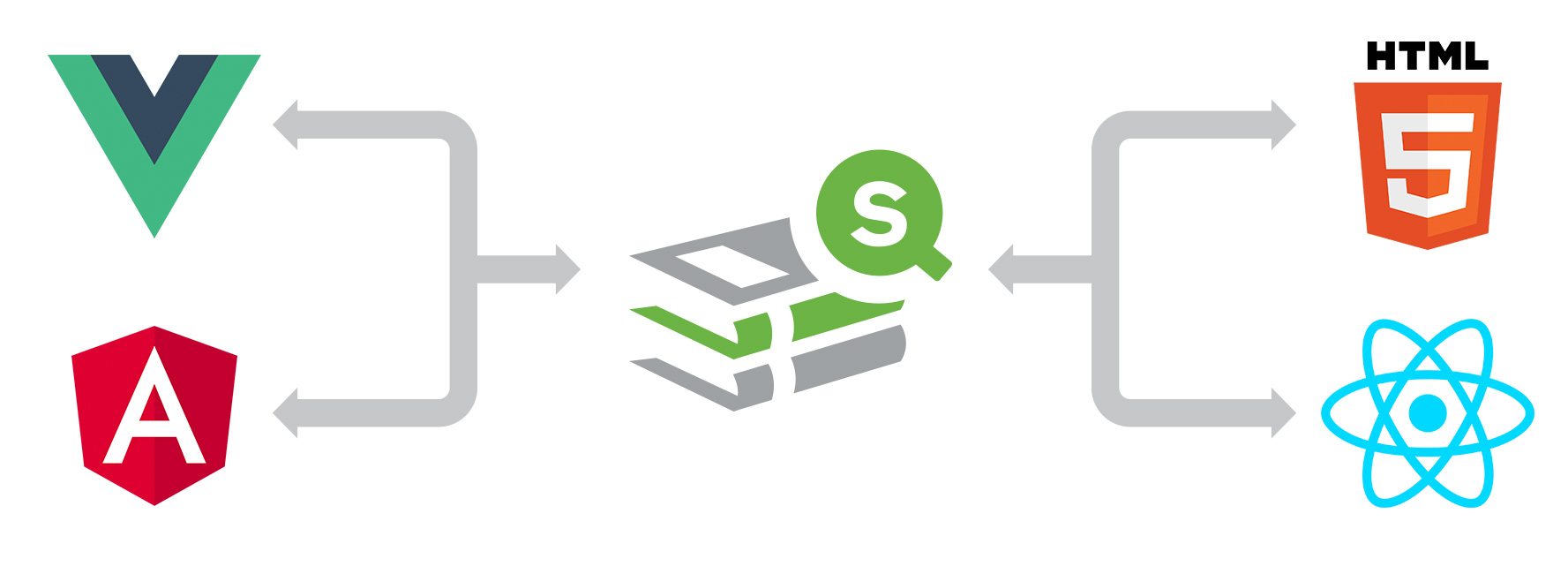
qdt-components (Qlik Demo Team Components) is a library of components that we have developed in the demo team and that have been used in most of our mashups found in webapps.qlik.com and demos.qlik.com. It's a collection of filters, tables, barcharts, selection toolbars, or even simple getting/creating object methods from the Visualization Api. You do not have to worry about connection strings, loading Requirejs, jQuery etc. Everything is taken care for you! The library can be used in a simple html page by loading the qdt-components.js or in React and Angular2+ via npm.
Today, I will show you how to load a simple object and create a session barchart, in simple html and Angular 5
Simple HTML
- In your HTML, add the following:
<head> <script type="text/javascript" src="qdt-components.js"></script> </head> <body> <div id="qdt1"></div> </body>- In your Javascript code, add:
var qConfig = {
   "config": {
      "host": "your-sense-server.com",
      "secure": true,
      "port": 443,
      "prefix": "/",
      "appId": "133dab5d-8f56-4d40-b3e0-a6b401391bde"
   },
   "connections": {
      "vizApi": true,
      "engineApi": false
   }
}

var QdtComponent = new window.qdtComponents.default(qConfig.config, qConfig.connections);

var element = document.getElementById('qdt1');

QdtComponent.render('QdtViz', {id: 'a5e0f12c-38f5-4da9-8f3f-0e4566b28398', height:'300px'}, element);
And you are done.
Simple HTML template: GitHub - qlik-demo-team/qdt-html-template: A simple html template that uses qdt-components
Live Demo: Simple html with qdt-components
Angular 5
- Install Angular CLI (https://cli.angular.io/) or get the prepared template
- Install the package:
npm install --save qdt-components
- Create new component by typing in the command line
ng generate component components/qdt-components --style=less
- In your qdt-component.component.ts import the library and import or set the qConfig with the connection details
import { Component, OnInit, ElementRef, Input } from '@angular/core'; // import * as qConfig from '../../../qConfig.json'; import QdtComponents from 'qdt-components'; let qConfig = { "config": { "host": "sense-demo.qlik.com", "secure": true, "port": 443, "prefix": "/", "appId": "133dab5d-8f56-4d40-b3e0-a6b401391bde" }, "connections": { "vizApi": true, "engineApi": false } }- Replace the class with:
export class QdtComponentComponent implements OnInit { @Input() Component: Function; @Input() props: object; static QdtComponent = new QdtComponents(qConfig.config, qConfig.connections); constructor(private elementRef: ElementRef) { } ngOnInit() { QdtComponentComponent.QdtComponent.render(this.Component, this.props, this.elementRef.nativeElement); } }- After this, you can start using it in any other component. In the HTML, add:
<qdt-component [Component]="'QdtViz'" [props]="{id: 'a5e0f12c-38f5-4da9-8f3f-0e4566b28398', height:'300px'}"></qdt-component>Angular Template: GitHub - qlik-demo-team/qdt-angular-template: An Angular 5 template that is using qdt-components for connecting to Qlik …
Live Demo Angular 5: https://webapps.qlik.com/qdt-components/angular5/index.html
Live Demo Angular 6: https://webapps.qlik.com/qdt-components/angular/index.html
React 16.3
Live Demo: https://webapps.qlik.com/qdt-components/react/index.html
Git Repo: https://github.com/qlik-demo-team/qdt-react-template
Vue 2.5
Live Demo: https://webapps.qlik.com/qdt-components/vue/index.html
Git Repo: https://github.com/qlik-demo-team/qdt-vue-template
qdt-components
Branch: Qlik Branch
Npm: qdt-components
Yianni
-
Qlik Continuous Classroom Live Instructor Webinars
Live Instructor Webinars are 1-hour sessions, delivered twice per day by Qlik's expert instructors at 10:00 in the associated time zone on variety of ... Show MoreLive Instructor Webinars are 1-hour sessions, delivered twice per day by Qlik's expert instructors at 10:00 in the associated time zone on variety of advanced Qlik topics.
If you are unable to attend a particular session, be sure to register to receive a link to the recording.
Access Webinar Schedule to register for a live instructor webinar today! If you do not have a Qlik Continuous Classroom subscription, learn more.
-
UPDATED- Educator shares updated Qlik Sense project!
If you downloaded the original materials shared on May 24th, then please open the link below which has been updated with the latest materials.Recently... Show MoreIf you downloaded the original materials shared on May 24th, then please open the link below which has been updated with the latest materials.
Recently, I sat down with Qlik Academic Program Educator Ambassador, Jerry Roek who shared an amazing Qlik Sense project that we hope will inspire your own course development. Thanks to Jerry, all of his content for the fun Qlik Sense ice cream project has been made available for you to download.
For access to the entire zip file visit Qlik Sense Project-TC Ice Cream (if you downloaded the original, you may have to clear your cache to access the most recent documents link)
The zip file includes the following:
- PDF Business requirements document contain the data model and dictionary
- QVF starter file with data
- Links to youtube project videos and kahoot game quizzes
Educators can reach out to Jerry on Qlik Community for additional course information regarding this project, including the solution files. His username is jerryr125
Key Learning Objectives:
- Uploading a QVF file
- Creating Master Dimensions and Measures
- Design and Formatting of key visualizations:
- Pie Chart
- Line Chart
- Bar Chart
- Map
- Pivot Table
- Filters
- Table
- Line Chart
- Scatter Plot
- KPI
- Gauge
- Creating and using variables
- Design a variable input for forecasting (intro)
- Filtering
-
Qlik Learning Portal Enhancements are here!
Since our previous refresh to the Qlik Learning Portal last year, we have been listening to your feedback to improve learning experience. This release... Show MoreSince our previous refresh to the Qlik Learning Portal last year, we have been listening to your feedback to improve learning experience. This release will include the ability to modify Custom Learning Plans, updates to the Calendar view, a new search & filter capability on My Learning Dashboard and more!
Modify Custom Learning Plans
You can now even further customize your learning plans by adding and removing courses from your existing custom learning plans. Want to see it in action? Log into Qlik Learning Portal to access the Custom Learning Plans page, choose one of your saved custom learning plan links, and click on Edit this plan to modify.
Modify Plans
Search and Filter on My Dashboard
We have added Search and Filter capabilities on My learning dashboard (In Progress, Recently Viewed or Completed Courses). Freely search, or search by product or level on the dashboard to find courses easily!
An information/help icon has been added for the In Progress, Recently Viewed and Completed KPIs. On rolling over the help icon, it will display a tool tip with a description of what the number displays and how the list of courses appears.
See a full list of enhancements here. Happy Learning!