Unlock a world of possibilities! Login now and discover the exclusive benefits awaiting you.

- Qlik Community
- :
- All Forums
- :
- Qlik NPrinting
- :
- Re: NPrinting Server : .net 4.8 installation error
- Subscribe to RSS Feed
- Mark Topic as New
- Mark Topic as Read
- Float this Topic for Current User
- Bookmark
- Subscribe
- Mute
- Printer Friendly Page

 ankita0906
- Mark as New
- Bookmark
- Subscribe
- Mute
- Subscribe to RSS Feed
- Permalink
- Report Inappropriate Content
NPrinting Server : .net 4.8 installation error
Hi All,
I'm setting up new Server for NPrinting as my old server was on Windows 2016.
I'm trying to install .net 4.8 in new Server,it doesn't have Nprinting Server/Engine installed.
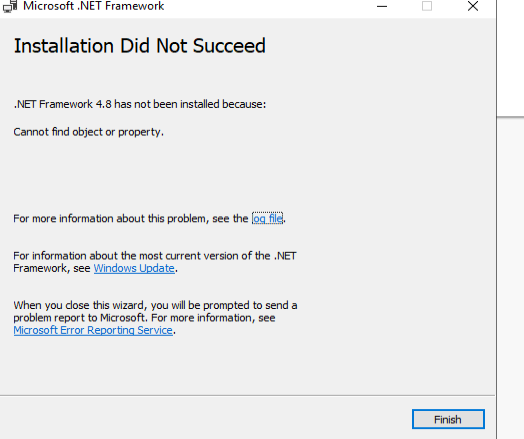
I'm getting error while installing the .net framework 4.8 for windows 2019 server
Error message: 0x80092004 -can not find object or property
Can anyone suggest what could be the issue?
Error is attached.
Thanks in advance

Accepted Solutions

 Ruggero_Piccoli
- Mark as New
- Bookmark
- Subscribe
- Mute
- Subscribe to RSS Feed
- Permalink
- Report Inappropriate Content
Hi,
The setup will download and install the correct version of .NET needed https://help.qlik.com/en-US/nprinting/February2025/Content/NPrinting/DeployingQVNprinting/System-req... so you could allow it to install the needed .net.
Googling your error message I found that it could appears when .Net 4.8 is already installed. In this case the Qlik NPrinting setup will skip the installation. Please check if you are in this scenario.
Another suggestion I found was to check if Windows 2019 is updated.
Best Regards,
Ruggero
Best Regards,
Ruggero
---------------------------------------------
When applicable please mark the appropriate replies as CORRECT. This will help community members and Qlik Employees know which discussions have already been addressed and have a possible known solution. Please mark threads with a LIKE if the provided solution is helpful to the problem, but does not necessarily solve the indicated problem. You can mark multiple threads with LIKEs if you feel additional info is useful to others.
Ruggero_Piccoli
- Mark as New
- Bookmark
- Subscribe
- Mute
- Subscribe to RSS Feed
- Permalink
- Report Inappropriate Content
Hi,
Arte you installing .net stand-alone or is it the installation made by Qlik NPrinting wizard? If it is a stand-alone for Qlik NPrinting you can simply allo to the wizard to install the needed version. Be sure to fill all the listed requirements.
Best Regards,
Ruggero
Best Regards,
Ruggero
---------------------------------------------
When applicable please mark the appropriate replies as CORRECT. This will help community members and Qlik Employees know which discussions have already been addressed and have a possible known solution. Please mark threads with a LIKE if the provided solution is helpful to the problem, but does not necessarily solve the indicated problem. You can mark multiple threads with LIKEs if you feel additional info is useful to others.
ankita0906
- Mark as New
- Bookmark
- Subscribe
- Mute
- Subscribe to RSS Feed
- Permalink
- Report Inappropriate Content
@Ruggero_Piccoli I have .exe file of .net .I am trying to install 4.8 from that.
 Frank_S
- Mark as New
- Bookmark
- Subscribe
- Mute
- Subscribe to RSS Feed
- Permalink
- Report Inappropriate Content
If you are manually installing .net framework and it is failing, please check with your IT team to determine what may be blocking your manual installation of .NET framework (or have them install it for you). It's possible you may have:
- Active DirectoryGroup policy that prevents your account from installing DOT.net framework (and possibly other software including Nprinting server).
- The DOTnet file 'might' be corrupted. Try to download it again and make sure to 'unblock' the file before executing the file
Otherwise:
- Put your Windows server 'online' to the internet temporarily and run windows updates.
- Once all the updates are complete, then take it back offline from the internet again. (it possible that windows requires other files/file dependencies, before .NET Framework can be installed/updated).
Kind regards...
Opens in new window
PDF Download
Word Download
Excel Download
PowerPoint Download
Document Download
Ruggero_Piccoli
- Mark as New
- Bookmark
- Subscribe
- Mute
- Subscribe to RSS Feed
- Permalink
- Report Inappropriate Content
Hi,
The setup will download and install the correct version of .NET needed https://help.qlik.com/en-US/nprinting/February2025/Content/NPrinting/DeployingQVNprinting/System-req... so you could allow it to install the needed .net.
Googling your error message I found that it could appears when .Net 4.8 is already installed. In this case the Qlik NPrinting setup will skip the installation. Please check if you are in this scenario.
Another suggestion I found was to check if Windows 2019 is updated.
Best Regards,
Ruggero
Best Regards,
Ruggero
---------------------------------------------
When applicable please mark the appropriate replies as CORRECT. This will help community members and Qlik Employees know which discussions have already been addressed and have a possible known solution. Please mark threads with a LIKE if the provided solution is helpful to the problem, but does not necessarily solve the indicated problem. You can mark multiple threads with LIKEs if you feel additional info is useful to others.
ankita0906
- Mark as New
- Bookmark
- Subscribe
- Mute
- Subscribe to RSS Feed
- Permalink
- Report Inappropriate Content
Thanks @Ruggero_Piccoli .net was already installed
