Unlock a world of possibilities! Login now and discover the exclusive benefits awaiting you.

- Qlik Community
- :
- All Forums
- :
- Qlik NPrinting
- :
- Re: Nprinting Excel Formatting Issue.
- Subscribe to RSS Feed
- Mark Topic as New
- Mark Topic as Read
- Float this Topic for Current User
- Bookmark
- Subscribe
- Mute
- Printer Friendly Page

 infosense_devel
- Mark as New
- Bookmark
- Subscribe
- Mute
- Subscribe to RSS Feed
- Permalink
- Report Inappropriate Content
Nprinting Excel Formatting Issue.
Hello,
I am using excel template for my report designing I have issue with some trailing space, one of my table have whitespace below it.
I have added each field In each excel cell not using keep source formatting,
Please find below screenshot for reference.
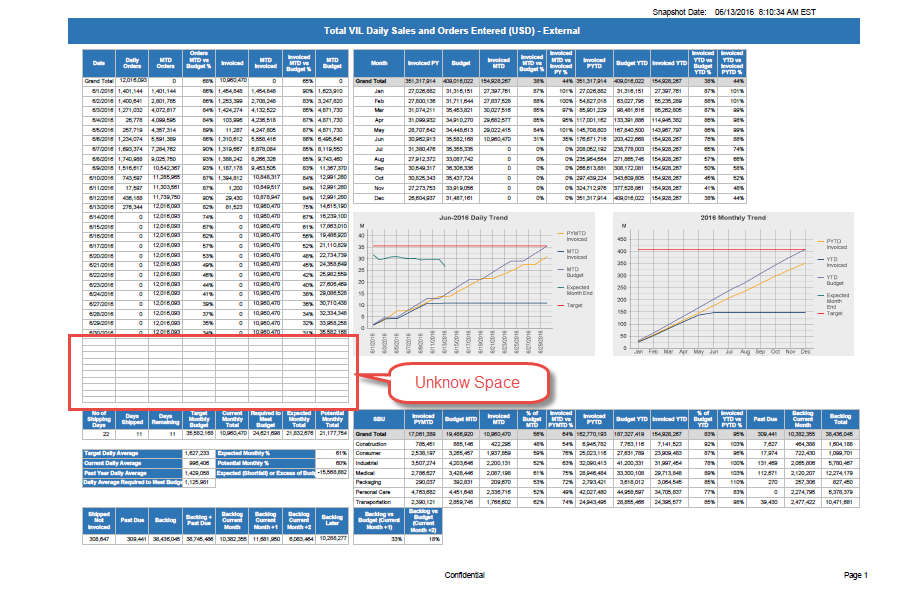
There is No container object in Qlikview for this table.
Also I have added border to cells to show whitespace.
Thanks In Advance.

- Mark as New
- Bookmark
- Subscribe
- Mute
- Subscribe to RSS Feed
- Permalink
- Report Inappropriate Content
I think the table on the left is expanded so it alignes at the bottom with with the chart on the right.
infosense_devel
- Mark as New
- Bookmark
- Subscribe
- Mute
- Subscribe to RSS Feed
- Permalink
- Report Inappropriate Content
Hello,
Thanks for Reply.
You are right table row is expanded for right side table chart.
Any solution for that?
I have tried with hiding row of that object but it will not helpful.
Thanks in Advance.
- Mark as New
- Bookmark
- Subscribe
- Mute
- Subscribe to RSS Feed
- Permalink
- Report Inappropriate Content
YW
Some solutions:
- make the chart smaller so it doesn't exceed the left table length
or
- move the chart to the left and place it under the table.