Unlock a world of possibilities! Login now and discover the exclusive benefits awaiting you.

Analytics & AI
Forums for Qlik Analytic solutions. Ask questions, join discussions, find solutions, and access documentation and resources.
Data Integration & Quality
Forums for Qlik Data Integration solutions. Ask questions, join discussions, find solutions, and access documentation and resources
Explore Qlik Gallery
Qlik Gallery is meant to encourage Qlikkies everywhere to share their progress – from a first Qlik app – to a favorite Qlik app – and everything in-between.
Qlik Community
Get started on Qlik Community, find How-To documents, and join general non-product related discussions.
Qlik Resources
Direct links to other resources within the Qlik ecosystem. We suggest you bookmark this page.
Qlik Academic Program
Qlik gives qualified university students, educators, and researchers free Qlik software and resources to prepare students for the data-driven workplace.
Recent Blog Posts
-
【特設サイト 】2026年、押さえておくべきデータ・AI・分析に関する 12 のトレンド
多くの企業が AI に投資しているにもかかわらず、投資利益率を高めている企業はごく少数です。何を改善すべきなのか?AI を最大限に活用するには、新たなモデルの導入が必要です。Qlik は、「DARE インテリジェングリッド」という枠組みに沿って、企業が成功するために押さえておくべき 12 のトレン... Show More多くの企業が AI に投資しているにもかかわらず、投資利益率を高めている企業はごく少数です。何を改善すべきなのか?AI を最大限に活用するには、新たなモデルの導入が必要です。
Qlik は、「DARE インテリジェングリッド」という枠組みに沿って、企業が成功するために押さえておくべき 12 のトレンドを特定しました。データ・エージェント・人間がタッグを組むことで、初めてデータ・分析・AI から真の価値を得ることができます。特設サイトでは、登録無料で 2026年のトレンド Web セミナーやスペシャル動画を視聴したり、ガイドブックをダウンロードいただけます。
-
【オンデマンド配信】どんな学生が成長する?大域的な教育データ分析に基づく修学支援の試み
本 Web セミナーシリーズでは、Qlik でデータからアクションを起こすデータ主導のビジネスで成功しているお客様より、課題から導入の経緯、デモンストレーション、活用例などをご紹介します。 ※ 視聴無料。パソコン・タブレット・スマートフォンで、どこからでもご視聴いただけます。 【オンデマンド配信】ど... Show More本 Web セミナーシリーズでは、Qlik でデータからアクションを起こすデータ主導のビジネスで成功しているお客様より、課題から導入の経緯、デモンストレーション、活用例などをご紹介します。
※ 視聴無料。パソコン・タブレット・スマートフォンで、どこからでもご視聴いただけます。
【オンデマンド配信】
どんな学生が成長する?大域的な教育データ分析に基づく修学支援の試み金沢工業大学では、2004年以降、大学のさまざまな業務の遂行や学生の管理に情報システムが利用されてきました。一方、システムに蓄積されていたデータは、各部署で局所的に分析に利用されていましたが、入学から卒業まで大域的につないで、どのような学生が成長しているのか、もしくは修学に躓くのかを明らかにすることには利用されていませんでした。その中、2021年に文部科学省からの補助金を得て、大学全体のデータを接続し、Qlik Sense を導入して大域的な分析を行うプラットフォームを構築しました。このことにより、学生の学びのプロセスをより詳細に分析できるようになり、学生の成長をデータに基づきながら支援できるようになっています。
本 Web セミナーでは、プラットフォームの構築や分析手法、結果に基づく学生の修学支援の内容について、お話しいたします。また、導入の経緯や今後の展望などについて、クリックテック・ジャパンの公共担当営業との対談で詳しくお話しいたします。 -
Qlik Talend Cloud and Qlik Stitch: Upcoming Xero API Changes effective April 28t...
Xero has announced the deprecation of several Accounting API objects, effective 28th of April 2026. These changes will impact existing Qlik Talend Clo... Show MoreXero has announced the deprecation of several Accounting API objects, effective 28th of April 2026. These changes will impact existing Qlik Talend Cloud and Qlik Stitch Xero connectors.
What exactly is changing?
The following objects will be deprecated by Xero:
- Employees
- This object will be fully removed
- There is no replacement object
- Data for the Employees table will no longer be available after deprecation
- For more information, see Employees (Deprecated) | developer.xerox.com
- Expense Claims and Receipts
- Xero recommends using the Invoices object as a replacement
- Customers must enable the Invoices table to continue receiving equivalent data
- For more information, see Expense Claims (Deprecated) | developer.xerox.com and Receipts (Deprecated) | developer.xerox.com
What action is Qlik taking?
To support customers ahead of the deprecation date, Qlik plans two minor connector releases:
26 March 2026
This update introduced intentional failures designed to prompt you to take action before the endpoint is removed:
- Connections that have Employees, Expense Claims, or Receipts selected will begin to fail post-sync
- To minimize disruption and inbox noise, failures will occur no more than once per week per connection
27 April 2026
All references to the Employees, Expense Claims, and Receipts endpoints will be fully removed from the connector.
From this date forward:
- Employees data will no longer be available
- Expense Claims and Receipts data will only be accessible via the Invoices table (if enabled)
If you have any questions, we're happy to assist. Reply to this blog post or take your queries to our Support Chat.
Thank you for choosing Qlik,
Qlik Support - Employees
-
Successful Hackathon at Anurag University
The Department of Data Science, Anurag University, organized another successful hackathon, "Data Dynamo 2.0" on January 30-31, 2026 where a number of ... Show MoreThe Department of Data Science, Anurag University, organized another successful hackathon, "Data Dynamo 2.0" on January 30-31, 2026 where a number of students from the city of Hyderabad and Telangana State participated.
The event marked a significant initiative to bring aspiring data enthusiasts from diverse educational institutions together. Designed with the dual purpose of promoting experiential learning and encouraging innovative problem-solving, the hackathon provided a platform for students to apply theoretical knowledge to real-world data challenges. The hackathon was conducted across the following domains: Web/App Dev, AI/ML & LLMs, Data Analytics, IoT, and Blckchain/Cybersecurity.
Qlik was associated with the data analytics domain.
Beyond technical rigor, the event fostered collaboration, creativity, and intellectual growth, making it a great learning experience. This Hackathon was conducted under the leadership and guidance of Dr.M.Sridevi, Head of the Department, Data Science, Ms. B. Jyothi, Assistant Professor, Data Analytics Technical Club Convener, Mr.Salar Mohammad, Datum Technical Club Convener.
The total number of students participating in this Hackathon was more than 600 across 190 teams.
The number of students participating in the Qlik domain for data analytics was 150.
Students who participated in the Qlik domain were oriented about the basics of Qlik Sense along with explaining the key features and building dashboards, through two bootcamps. These camps were conducted by Qlik Educator Ambassador, Manikant Roy from Jaipuria Institute of Management and former student and winner of last year's Datathon, Moguluri Koushik.
Participating students registered for the Qlik Academic Program so that they have access to the free software, training and qualifications. The software was used during the datathon and the training helped them build apps and dashboards.
Winners: Visionary coders, Anurag UniversityFirst Runner Up : Dediocons, Anurag UniversitySecond Runner Up : Coding Rats, Srinidhi Institute of Technology,Hyderabad -
【オンデマンド配信】トレンドを語る:AI の勢いを持続的なビジネス成果へ
AI の勢いを持続的なビジネス成果へ アジア太平洋地域全体で AI の勢いが高まっている中、ビジネスでの試験的な活用が進み、期待も高まっています。 課題は、「AI の適用開始」ではなく「持続」です。多くの企業で AI 戦略の障壁となっているのは、テクノロジーの問題ではありません。サイロ化されたデー... Show MoreAI の勢いを持続的なビジネス成果へ
アジア太平洋地域全体で AI の勢いが高まっている中、ビジネスでの試験的な活用が進み、期待も高まっています。
課題は、「AI の適用開始」ではなく「持続」です。多くの企業で AI 戦略の障壁となっているのは、テクノロジーの問題ではありません。サイロ化されたデータ、レガシー環境の複雑性、人材のスキル不足、不明瞭な意思決定です。
Web セミナー「トレンドを語る:AI の勢いを持続的なビジネス成果へ」にご参加ください。分断や見えないリスクを回避して AI の勢いを行動につなげるには?アジア太平洋地域の企業が押さえておくべき 2026年のトレンドについて、データのエキスパートが議論します。
本 Web セミナーでは、試験段階から本番運用への移行、スピードと信頼のバランス、全社展開を支える基盤の構築など、実際の現場に適用できるポイントを中心に掘り下げます。
※ 視聴無料。パソコン・タブレット・スマートフォンで、どこからでもご視聴いただけます。
-
データをエージェンティック AI の原動力に(Qlik Blog 翻訳)
本ブログは "How to Make Data Work for Agentic AI" の翻訳です。 著者:Brendan Grady 数十年にわたり、組織はデータを活用してより良い意思決定を行い、成果を向上させる取り組みを続けてきました。データはビジネスの生命線となり、AI は今や新たな方... Show More本ブログは "How to Make Data Work for Agentic AI" の翻訳です。
数十年にわたり、組織はデータを活用してより良い意思決定を行い、成果を向上させる取り組みを続けてきました。データはビジネスの生命線となり、AI は今や新たな方法でその可能性を解き放つ力を備えています。ダッシュボードやビジュアルインターフェースから AI 駆動の体験へと、パラダイムは移行しつつあるのです。
しかし、依然として大量のデータがサイロ化され、不完全で不正確なまま放置されている現実があります。多くの分析ワークフローは手作業に依存したままであり、これが価値創出までの時間を遅らせ、インサイトの質を制限し、コストを押し上げています。AI 支援作業でさえ停滞することがあります。なぜなら、アナリストは依然として入力データを集め、正確な質問を投げかけなければ答えに辿り着けないからです。
もし AI が、安全かつ確実に、より多くの重労働を担うことができたらどうでしょう?
それが「エージェンティックAI」の約束であり、急速に現実のものとなりつつあります。エージェンティック AI は、多段階の問題を推論し、アプローチを適応させ、最小限の人間の関与で目標達成に必要な能力を活用できます。適切に運用されれば、インサイトの加速とコスト削減を実現し、チームが手作業ではなくビジネスの遂行に集中できるよう支援します。
Qlik のビジョンは、人間のように協調するエージェントのインテリジェントネットワークです。問題を分解し、適切なリソースとデータを収集し、意思決定を行い、最適な次行動を実行します。
発表内容
本日、構造化データ分析、非構造化知識、異常検知、ヘルプ&アシスタンス向けのターンキーエージェントを含む、新たなエージェンティック体験を提供開始します。さらに、サードパーティ製 AI アシスタントが Qlik の機能を活かしたカスタム AI ソリューション構築を可能にする MCP サーバーを導入します。
当社のエージェントを利用する場合も、MCP 経由で Qlik にアクセスする場合も、Qlik の独自の機能により AI の真の可能性を最大限に引き出せます。
信頼性の高いデータ製品は、AI 向けに厳選された高品質データセットであり、タイムリーで正確かつガバナンスの効いた基盤を構築します。当社独自の分析エンジンは、高速かつコスト効率の高い計算で思考連鎖を可能にし、新たなレベルの文脈理解を実現することで、そのデータを活用します。これらを統合することで、当社のエージェンティック体験が実現され、データ・エージェント・アシスタント・プラットフォームを統合し、強力な分析、多段階タスクの自動化、複雑な目標達成を可能にします。
入り口は2つ設けられています。
- Qlik から:当社の AI アシスタント「Qlik Answers」は、分析エンジンとデータ製品を基盤とした統合インターフェースです。そのため、回答は迅速で説明可能、かつコンテキストに基づいています。チームが既に信頼しているものを再構築することなく、迅速に価値を実感できるよう設計されています。
- 既存のアシスタント経由で:当社の MCP Server は、ガバナンスと監視機能を備えつつ、Qlik のエージェント機能をサードパーティ製 AI アシスタントやエージェント開発環境に提供します。お客様は選択したアシスタントを利用でき、Qlik は信頼できるデータ基盤、文脈豊かな分析、管理されたアクションパスを提供します。
提供状況
すでに一般提供を開始しています。Qlik Answers(Qlik 内の AI アシスタント)は提供開始されました。また、MCP Server は外部アシスタントやカスタムビルドを通じて Qlik への管理されたアクセスを提供します。
Qlik Cloud Analytics Premium/Enterprise および Qlik Sense Enterprise SaaS に付属する「Data Products for Analytics」は、これらの体験を支える厳選されたタイムリーで正確な管理対象データセットとしてまもなく提供開始します。さらに「Discovery Agent」がディメンション横断的な KPI を監視し、有意な変化を検知。ユーザーは発見結果を直接 Qlik Answers で確認することが可能になります。
データを AI の原動力に
これらの発表は、3つの実践的な方法で当社の約束を強化します。Qlik は単なる基盤ではありません。基盤に注力しつつ、より優れたビジネス成果の実現を推進しています。
- AI の実現:Qlik Answers は信頼できる回答を Qlik にもたらし、MCP はチームが好みのアシスタントを使い続けられるようにします。その間も Qlik はガバナンスとコンテキストを保持します。
- AI の加速:顧客は Qlik データモデルとビジネスロジックに数千時間を投資しています。この基盤を強化することで、価値を迅速に実証し、AI の利用拡大に伴い拡張できます。
- AI の適応:エージェンティック体験は単一のアシスタント、ベンダー、スタックでは成り立ちません。当社のアーキテクチャは相互運用性を設計に組み込んでおり、顧客は一からやり直すことなく進化できます。
プライベートプレビューで得られた知見
実際の顧客環境、現場のリアルデータ、実際の役割、具体的な課題のもとで迅速に学ぶため、エージェンティック体験をプライベートプレビューで提供しました。特に顕著だった事例をいくつかご紹介します。
- 営業責任者は「今四半期の契約更新にどのような変化があったか?次に何をすべきか?」と問いかけました。価値は、要因、セグメント、関連する背景情報を一元的に把握し、それを次の顧客との対話に向けた計画に転換できた点にあります。
- 運用チームはサービス問題の急増を調査し、複数のアプリや文書を繋ぎ合わせる必要なく、「何か異常が起きている」状態から「集中している箇所」「相関関係」「最初に確認すべき事項」へと迅速に移行しました。
- 財務チームはトレーサビリティを徹底的に追求し、説明と数値の整合性を図り、「証拠を見せてほしい」という声に対応しました。信頼は回答を説明できる能力に依存するからです。
ベンチマーク調査でもこれを実証しました。構造化データ向け Qlik Answers と主要競合製品を比較した社内ベンチマークでは、Qlikは 69.6% の精度(競合65.2%)を達成。さらに「質問1件ごとに課金」というシンプルな価格体系と、単なるクエリ出力ではなく洞察に富んだ回答に重点を置いた点が評価されました。
アクセス、アクティベーション、およびアップグレードパス
特に迅速な移行を希望されるお客様向けに、導入が容易な設計としています。
- Qlik Cloud Analytics をご利用のお客様:MCP Server は 2 月 10 日より全世界で提供開始、Qlik Answers は 2 月 10 日より AWS リージョンごとに順次提供開始となります。Data Products は 2 月 24 日に提供開始、Discovery Agent はその後提供開始予定です。
- Qlik Sense Enterprise SaaSをご利用のお客様:MCP Server は 2月 10日より全世界で提供開始。Qlik Answers は 2月 24日、Data Products は 2月 24日提供開始、Discovery Agent はその後間もなく提供開始となります。
- フルスケールでの容量ベースのエージェント機能をご希望の場合:アカウント担当チームが Qlik Cloud Analytics 容量ベースへのアップグレードパスをご案内します。これは Qlik Cloud Analytics と Qlik Talend Cloud 全体での広範な導入基盤となります。
- オンプレミス環境をご利用の場合:妥協や再構築は不要です。クラウド移行プランでエージェント機能を解放し、2026年にはガバナンスを維持しつつ、段階的・実践的・価値主導の移行計画で顧客を支援します。
私の見解
AI の進化はモデル開発の段階を既に超えています。真の課題は、AI を信頼性が高く説明可能で業務フローにおいて有用なものにすることです。分析と知識を結びつけられず、次の行動を統制できない場合、それは自律型 AI ではなく、説明責任のない自動化に過ぎません。
「AIのためにデータを活用する – データを 人工知能 の原動力に」とはまさにこういうことです。 -
Qlik Bump Chart: a custom extension to visualize ranking evolution over time
When building dashboards that involve any kind of leaderboard or competitive comparison, it’s always good to show how rankings shift over time. Not ju... Show MoreWhen building dashboards that involve any kind of leaderboard or competitive comparison, it’s always good to show how rankings shift over time. Not just "who's #1 right now," but the full story: who climbed, who dropped, when the shift happened.
Qlik Sense doesn't have a native bump chart. The usual workaround is a line chart with pre-calculated ranks, but I wanted to push this further and add some more interactivity and options.
The idea for creating this extension came after doing some updates on the Formula1 web app which uses a native D3.js chart, so I wanted to transfer that code over to a Qlik Sense extension that can be reused in other apps.
The extension makes it easy for you. You just add two dimensions and one measure, and it takes care of everything else: ranking, time sorting, labels, hover highlighting, and field selections. The object properties will let you customize it to your needs.
In this post I'll walk through what it does, how it's structured, and how you can use it for various use cases.
Github Repo: https://github.com/olim-dev/qlik-bump-chartWhat is a Bump Chart?
A bump chart shows how entities change position relative to each other over time. Each entity gets a colored line. Rank #1 sits at the top. As rankings shift, lines cross, and you immediately see who's moving up, who's falling, and when an overtake happens.
What can you do with this extension?
- Track rankings over any time dimension (quarters, months, weeks, laps)
- Highlight top performers, bottom performers, or biggest movers automatically
- Toggle between rank mode (auto-calculated) and position mode (raw measure as Y-axis)
- Replay the line-drawing animation
- Click labels or lines to make Qlik selections
- Customize everything: line style, dot size, colors, labels, grid, tooltips
Use Cases
The pattern is always the same: entities, time periods, and a measure.
- Sales: rep leaderboard over months
- Marketing: brand awareness tracking, campaign effectiveness over quarters
- Finance: fund performance rankings
- HR: employee performance trends, team productivity rankings
- Operations: supplier quality rankings, efficiency metric evolution
- Sports: league standings, player rankings across a season, F1 race position over laps
How to set it up
Add two dimensions and one measure:
- Dimension 1: the entity to rank (Product, Sales Rep, Team, Driver)
- Dimension 2: the time period (Quarter, Month, Week, Lap)
- Measure: the value that determines rank (Sum(Sales), Avg(Score), Max(Position))
I have attached a Text file with some sample datasets that you can inline-load in a new app to test it.Quick tour of the object properties
The property panel has clear labels for which dimension goes on which axis. Here are the sections that matter most:
Chart Settings: Maximum Entities (2-30, sweet spot is 8-15), Rank Direction (highest or lowest value = #1), Line Style (smooth, straight, step).
Position Mode: Instead of auto-calculating ranks, use the raw measure value as the Y position. Great for race data where position is already known.
Labels: Position them on the right, left, or both sides. Rank change indicators (triangle arrows) show how many spots an entity moved. Clicking a label triggers a Qlik selection.
Highlight: Automatically highlight top N, bottom N, or biggest movers with a configurable glow color.
Colors: Six built-in palettes (Vibrant, Qlik Classic, Category 10, Extended 20, Cool, Warm) plus a custom background color.
Animation: Toggle transitions on/off, adjust duration (100-1500ms), and a "Replay Animation" button to re-run the line-drawing effect.
Selections: Toggle selections on/off
The extension folder structure
qlik-bump-chart/
qlik-bump-chart.qext Extension definitions
qlik-bump-chart.js Main entry (Qlik lifecycle, paint, selections)
qlik-bump-chart-properties.js Property panel definition
qlik-bump-chart-renderer.js D3 rendering engine
qlik-bump-chart-data.js Data processing, ranking, time sorting
qlik-bump-chart-constants.js Defaults, palettes, timing values
qlik-bump-chart-style.css All CSSlib/
d3.v7.min.js D3.js v7- The main JS handles the Qlik lifecycle.
- The data module processes the hypercube, sorts time periods, and calculates ranks.
- The renderer draws everything with D3.
- The properties file defines the right-panel UI.
- The constants file holds all defaults, color palettes, and timing values in one place.
Tips
- Limit entities to 8-15 for readability. More than that and lines become hard to follow.
- Use Highlight Mode to draw attention to the story (top performers, biggest movers).
- Position Mode is great for pre-calculated position data like F1 race results.
- Pair with a table or KPI object nearby for exact values at glance.
Let me know in the comments if you have any questions or feedback!
Thanks for reading.
Ouadie
-
Qlik Talend Studio 2026-06 will move from Java 17 to Java 21
To all Talend customers, This is an advance notice that, to enhance both your security and experience, Java 21 will be required to launch Talend Studi... Show MoreTo all Talend customers,
This is an advance notice that, to enhance both your security and experience, Java 21 will be required to launch Talend Studio starting with the 2026-06 release.
This change only concerns the Talend Studio desktop application. It has no impact on the Jobs and Services you build with it, which will continue being compliant with Java 17 runtime environments (and Java 8 for Big Data Jobs).
You have multiple options to make a smooth transition:
- The Talend Studio embedded upgrade mechanism (Feature Manager) will offer handling the JDK version upgrade
- Should you prefer, a new installer of Talend Studio 2026-06 with JDK 21 embedded will also be provided
- You will also be free to manually configure Talend Studio to start with JDK 21, provided you are on Talend Studio 2025-09 or higher
Additional details:
Along with this change, the June release will come with many additions from a Java version perspective:
- Talend Studio will allow building Jobs and Services for Java 21 runtimes, in addition to Java 17 runtimes. Java 17 will remain the default setup for runtimes for the time being
- Remote Engines, Cloud Engines, Dynamic Engines, Job Server, and Talend Runtime will support running Jobs and Services in Java 21, in addition to the Java versions they already support
- Talend Administration Center (TAC), Data Preparation (client-managed), Data Stewardship (client-managed), Talend SAP RFC Server, Talend Semantic Dictionary, and Talend Identity and Access Management will also support running with Java 21 in addition to Java 17
For further questions, please start a chat with us to contact Qlik Support and subscribe to the Support Blog for future updates.
Thank you for choosing Qlik,
Qlik Support -
Platform Operations with Qlik Application Automation
This video shows you how to use Qlik Application Automation to perform common Platform Operations on your Qlik Cloud tenant. This can come in especial... Show MoreThis video shows you how to use Qlik Application Automation to perform common Platform Operations on your Qlik Cloud tenant. This can come in especially handy if you need to manage multiple Qlik Cloud tenants.
Resources:
Support Article: https://community.qlik.com/t5/Official-Support-Articles/Qlik-Application-Automation-How-to-get-started-with-the-Qlik/ta-p/2038740
About OAuth https://qlik.dev/authenticate/oauth

-
Iceberg Lakehouse Myths Debunked: What You Really Need to Know
Modern data world is buzzing with statements like: “Iceberg is the future of the lakehouse.” “Iceberg is basically a data warehouse on S3.” “Iceberg ... Show MoreModern data world is buzzing with statements like:
- “Iceberg is the future of the lakehouse.”
- “Iceberg is basically a data warehouse on S3.”
- “Iceberg is just Delta Lake but open.”
- “If you’re doing CDC, you need Iceberg.”
- ...
The reality is: Iceberg is an extremely powerful technology — but it’s also one of the most misunderstood.
And those misunderstandings matter. They lead teams to build the wrong architecture, expect warehouse-like performance overnight, or avoid Iceberg entirely because they assume it’s “only for big data companies.”
So let’s clear the air.
Here are the biggest myths about Apache Iceberg and the lakehouse — and what’s actually true.
Myth #1: Iceberg is just a file format (or “just Parquet with metadata”)
This is probably the most common misunderstanding.
Iceberg is not a storage format like Parquet or ORC. Parquet defines how data is stored inside files. Iceberg defines how those files are managed as a table.
Iceberg provides a full table abstraction including:
- snapshot-based versioning
- atomic commits
- partition evolution
- schema evolution
- metadata-driven planning
- support for deletes, updates, and merges
In other words, Iceberg isn’t “a better Parquet.” It’s the layer that makes object storage behave more like a database/data warehouse.
Iceberg is a database-like table abstraction for a data lake. That’s why it’s such a powerful building block for lakehouse architecture.
Myth #2: Iceberg replaces your data warehouse
This is probably one of the most debated topics in the lakehouse world. Some people hear “Iceberg lakehouse” and assume the conclusion is obvious: “So Iceberg replaces Snowflake / Redshift / BigQuery?”
Reality: Iceberg is increasingly replacing the warehouse as the storage layer, but not always replacing the warehouse as a query engine.
Iceberg enables organizations to store data in open object storage while still gaining database-like capabilities such as transactional updates, schema evolution, atomic commits and consistent reads.
On its own, Iceberg is “just” a table format. But the ecosystem around Iceberg has evolved rapidly. Managed lakehouse solutions like Qlik Open Lakehouse, and Snowflake-managed Iceberg tables (along with catalogs like Glue, Polaris, and others) now provide many of the features that teams historically depended on data warehouses for:
- managed compute and scaling
- automated optimization and compaction
- governance via centralized catalogs
- access control and auditing
- growing BI ecosystem compatibility
This is why the modern architecture trend is shifting toward a new model:
- Iceberg becomes the system of record (storage layer)
- multiple compute engines (including warehouses) query Iceberg directly
- workloads gradually shift away from warehouse-managed storage to the open lake storage
- data duplication across systems becomes optional, not mandatory
- warehouses increasingly act as one of many query engines
So Iceberg doesn’t always eliminate warehouses — but it does change their role dramatically.
Iceberg isn’t just competing with warehouses. It’s redefining them. "Iceberg is replacing the warehouse as the storage layer, while warehouses increasingly become just another compute engine.”
Myth #3: Iceberg automatically solves performance
Iceberg enables performance. It doesn’t magically deliver it.
Yes, Iceberg introduces powerful capabilities such as:
- metadata pruning
- partition pruning without hard-coded directory structures
- snapshot planning
- table statistics
- faster planning for large datasets
But Iceberg is not a “set it and forget it” system. Performance still depends heavily on operational practices:
- compaction (small file management)
- partitioning strategy and partition evolution
- clustering / sorting
- snapshot expiration and metadata cleanup
- compute engine choice (Spark vs Trino vs Flink, etc.)
This is where many teams get surprised. They adopt Iceberg expecting instant warehouse-like performance, but forget that warehouses continuously optimize tables behind the scenes.
In the Iceberg world, that optimization work must be done either:
- by your platform team, or
- by a managed lakehouse solution (such as Qlik Open Lakehouse, or other managed Iceberg platforms)
Without this, even an Iceberg-based lakehouse can degrade over time into something that looks like the old data lake problem: too many files, slow queries, rising compute cost, and unpredictable performance.
Iceberg isn’t a magic speed button.
It’s a system that makes optimization possible and sustainable but only with operational discipline.Myth #4: Iceberg is only for huge data volumes
This myth is surprisingly common, especially among teams who associate Iceberg with “big data” platforms.
But Iceberg is not only valuable at petabyte scale.
Even smaller organizations benefit because Iceberg solves painful operational problems that show up early:
- schema changes breaking pipelines
- inconsistent reads across jobs
- unreliable partitioning logic
- lack of rollback when data is corrupted
- messy S3 folder conventions
- hard-to-manage incremental loads
But the biggest reason Iceberg matters early isn’t scale — it’s interoperability. And,
Interoperability = future-proofing
Iceberg lets you store your data once in object storage and query it from multiple engines: Spark, Trino, Flink, Athena, and even modern warehouses: Snowflake, Databricks, Redshift.
That means you don’t have to copy and duplicate datasets across multiple warehouses, marts, or analytics platforms just to support different teams and tools. You avoid building an architecture where every new use case requires another data copy.
This becomes even more important as you grow. Most organizations start with one analytics tool — but over time they add BI workloads, ML pipelines, real-time ingestion, governance requirements, and multiple compute engines.
If your data foundation is closed or warehouse-specific, growth often forces a painful redesign. Iceberg helps you avoid that. It’s about building a data architecture that won’t force you to rebuild everything when you grow.
Iceberg isn’t about big data. It’s about reliable tables on object storage.
And yes — cost matters
Iceberg doesn’t just reduce storage cost. It reduces the bigger hidden cost in data platforms:
duplicating the same datasets across multiple systems.
Even at smaller scale, fewer copies means less ETL, less operational overhead, and fewer expensive warehouse storage footprints.
Myth #5: Iceberg is only for CDC (streaming ingestion)
Iceberg is often discussed alongside Debezium, Kafka, Flink, and incremental ingestion pipelines. That leads many people to believe:
“Iceberg is mainly for CDC pipelines.”
CDC is a great use case — but it’s not the whole story.
Iceberg works extremely well for traditional workloads too:
- batch ETL pipelines
- curated data marts
- BI reporting datasets
- ML feature tables
- audit-friendly datasets requiring reproducibility
- GDPR deletes and corrections
- incremental batch pipelines (even without Kafka)
Streaming ingestion is one reason Iceberg is popular, but Iceberg’s real strength is broader:
it brings transactional table management and consistent reads to the data lake.
CDC is a use case. Iceberg is the table layer.
The Real Story: What Iceberg Actually Gives You
Iceberg is best understood as a modern table system designed for object storage. It provides three major outcomes:
- Reliability
Atomic commits, consistent snapshots, and rollback capability.
- Flexibility
Multi-engine access across Spark, Trino, Flink, Athena, and more.
- Long-term scalability
Metadata-driven planning, partition evolution, and manageable table growth.
This is why Iceberg has become so central to lakehouse architecture. It’s not just a format. It’s not just for streaming. It’s not only for “big data.”
It’s a way to make your data lake behave like a real platform — a buffet-style platform where you can pick the tools and engines that work best for each use case.
If you’re exploring Iceberg adoption, table maintenance strategies, or lakehouse architecture patterns, feel free to reach out or connect — I’d love to compare notes.
-
🚀 New to Qlik Learning?
Whether you're just getting started or looking to make the most of Qlik Learning, this session will help you confidently navigate your learning journe... Show MoreWhether you're just getting started or looking to make the most of Qlik Learning, this session will help you confidently navigate your learning journey, build the right skills faster, and stay on track toward certification.
🔎You’ll Learn How To:
✅ Navigate Qlik Learning with ease
✅ Assess your current skills and discover curated learning paths
✅ Track your progress and stay motivated
✅ Prepare for certification👥 Who Should Attend?
✅ New users and administrators
✅ Existing users who want to rediscover and maximize Qlik LearningRegister for an Upcoming Webinar
Log in to Qlik Learning and under Course Sessions, access the Welcome to Qlik Learning webinar, and register for an upcoming webinar that works for you:
Don’t miss this opportunity to accelerate your skills and get the most out of Qlik Learning.
We look forward to seeing you there!

-
Introducing Agentic AI with Qlik
Qlik's Agentic experience is here. The Qlik Agentic experience introduces a unified conversational interface for working with data and analytics, del... Show MoreQlik's Agentic experience is here.
The Qlik Agentic experience introduces a unified conversational interface for working with data and analytics, delivering fast, explainable, context-aware responses through Qlik Answers. It also enables customers to securely use external LLMs with trusted Qlik data with our MCP server, and includes specialized agents that automate analysis and action—while allowing users to stay in their preferred AI interface.
And it is, of course, underpinned by Qlik's core strengths:
- Trusted data products built from high-quality, governed data
- Our unique analytics engine optimized for fast, incremental calculations supporting chain-of-thought reasoning
- An open agentic architecture that allows both Qlik agents and third-party AI assistants to tap into the full range of Qlik capabilities
With this launch:
- Qlik Answers becomes your unified agentic AI assistant, reasoning across structured and unstructured data with the power of AI’s knowledge and capability to deliver insight, assistance, and automation.
- Qlik MCP server delivers the power of Qlik to third-party AI assistants for building custom agentic solutions powered by governed data and our unique analytics engine.
- Discovery Agent will provide always-on anomaly and change detection, proactively surfacing meaningful, high-priority outliers and anomalies through a simple insights feed. Available in March.
- Data products in Analytics extend data products and quality capabilities into the analytics workflow, strengthening the foundation for agentic AI. Available February 24th.
You can read about all four launch highlights in our Innovation Blog post, Qlik’s Agentic Experience is Here, where we'll walk you through the details on each.
And when you're ready to get started and learn more, explore our resources:
- What’s New in Qlik Cloud | Qlik Help
- Qlik Answers | Qlik Help
- Deploying and administering Qlik Answers | Qlik Help
- Best practices for creating and managing assistants and knowledge bases | Qlik Help
- Best practices for preparing applications for Qlik Answers | Qlik Help
- Qlik MCP Server | Qlik Help
- Deploying and administering Qlik MCP server
- Qlik Answers Agentic Experience FAQ | Community Article
- Qlik Model Context Protocol (MCP) FAQ | Community Article
Ready? Turn on AI Features in your tenant's Qlik Cloud Administration Center > Settings!
Thank you for choosing Qlik,
Qlik Support -
New Qlik Sense Enterprise on Windows patches available to address post-upgrade O...
The patches resolving the post-upgrade ODBC-based connectors issue announced in this blog post have been released today. Check the download page for t... Show MoreThe patches resolving the post-upgrade ODBC-based connectors issue announced in this blog post have been released today.
Check the download page for the following releases:
- Qlik Sense Enterprise on Windows November 2025 Patch 3 (Release Notes)
- Qlik Sense Enterprise on Windows May 2025 Patch 13 (Release Notes)
- Qlik Sense Enterprise on Windows November 2024 Patch 25 (Release Notes)
For more information, see Upgrade advisory for Qlik Sense on-premise November 2024 through November 2025: ODBC-based connectors.
If you have any questions, we're happy to assist. Reply to this blog post or take your queries to our Support Chat.
Thank you for choosing Qlik,
Qlik Support -
Upgrade advisory for Qlik Sense on-premise November 2024 through November 2025: ...
Edit February 12th, 2026: Follow-up patches have been released.Edit January 21st, 2026: Updated the title and content to include the November 2024 rel... Show MoreEdit February 12th, 2026: Follow-up patches have been released.
Edit January 21st, 2026: Updated the title and content to include the November 2024 releaseThe patches resolving the ODBC-based connectors issue post-upgrade have been released as of February 12th, 2026. Check the download page for the following releases:
- Qlik Sense Enterprise on Windows November 2025 Patch 3
- Qlik Sense Enterprise on Windows May 2025 Patch 13
- Qlik Sense Enterprise on Windows November 2024 Patch 25
During recent testing, Qlik has identified an issue that can occur after upgrading Qlik Sense on-premise to specific releases. While the upgrade completes successfully, some environments may experience problems with ODBC-based connectors after the upgrade.
The issue is upgrade path dependent and relates to connector components that are included as part of the Qlik Sense client-managed installation.
The advisory applies to the following releases:
- Qlik Sense Enterprise on Windows November 2024
- Qlik Sense Enterprise on Windows May 2025
- Qlik Sense Enterprise on Windows November 2025
Recommendation: After upgrading Qlik Sense on-premise, verify your connector functionality as part of your post-upgrade checks.
How can I identify if I am affected?
The issue can typically be identified by files being missing after the upgrade. In this example, the Athena connector is not working, and the following file is missing:
C:\Program Files\Common Files\Qlik\Custom Data\QvOdbcConnectorPackage\athena\lib\AthenaODBC_sb64.dll
In this example, all ODBC connectors stopped working:
C:\Program Files\Common Files\Qlik\Custom Data\QvOdbcConnectorPackage\QvxLibrary.dll
With the QvxLibrary.dll missing, both existing and newly created ODBC connections will fail.
How do I resolve the issue?
Fixes were released on February 12th, 2026.
Check the download page for the following releases:
- Qlik Sense Enterprise on Windows November 2025 Patch 3
- Qlik Sense Enterprise on Windows May 2025 Patch 13
- Qlik Sense Enterprise on Windows November 2024 Patch 25
Stay up to date with the most recent version by reviewing our Release Notes.
Workaround
If your connectors have been impacted by this upgrade, rollback your ODBC connector package to the previously working version based on a pre-update backup. See How to manually upgrade or downgrade the Qlik Sense Enterprise on Windows ODBC Connector Packages for details.
The workaround is intended to be temporary. Apply the fixed Qlik Sense Enterprise on Windows patch for your respective version as soon as it becomes available.
If you are unable to perform a rollback, please contact Support.
If you have any questions, we're happy to assist. Reply to this blog post or take your queries to our Support Chat.
Thank you for choosing Qlik,
Qlik Support -
MCP for Data Engineering in Qlik Talend Cloud
The problem? Many roles across organizations are experimenting with AI tools alongside their existing analytics work. The results are often impressive... Show MoreThe problem?
Many roles across organizations are experimenting with AI tools alongside their existing analytics work. The results are often impressive at first glance, but harder to rely on once real business data is involved. Answers can sound confident while being difficult to validate, and it isn’t always clear which assumptions were made along the way.
This is typically a data context issue rather than a limitation of the models themselves. Enterprise data carries meaning beyond structure: definitions, ownership, quality signals, and constraints that have been established over time. When that context isn’t available, AI tools fill the gaps as best they can, which isn’t always desirable.
Support for the Model Context Protocol (MCP) in Qlik Talend Cloud directly addresses this issue by allowing AI-enabled tools to access governed Qlik assets directly, rather than working from extracts or simplified representations.
What is MCP and what does it offer?
In practical terms, MCP provides a standard, API-based way for external tools to interact with Qlik using the same permissions and governance that already apply in your environment. The assets exposed are the ones you have deliberately published and curated: data products, governed datasets, business definitions, lineage, and trust information.
MCP does not introduce alternative models or reinterpret your data. Instead, it makes existing assets available in a controlled and consistent way.
For data engineers who already use Qlik extensively, this is largely about extending the value of work you’ve already done. Many environments contain well-defined data layers, agreed metrics, and known data quality limitations. Historically, that context has been consumed primarily through dashboards and apps. When AI tools are introduced, teams often find themselves re-explaining definitions or validating results after the fact because that context isn’t shared.
Query Qlik Talend Cloud governed data sets directly within your AI assistant
With MCP, AI tools can access the same definitions and constraints from the outset. They can identify relevant datasets, understand how those datasets relate to one another, and recognize where limitations apply. This doesn’t remove the need for judgement, but it does make AI outputs easier to understand, explain, and trust.
This is particularly relevant in the early stages of analysis, where AI tools are often used to explore questions or test ideas before more formal work begins. When those early steps are based on governed assets rather than ad hoc context, the transition into dashboards or deeper analysis is more consistent and requires less rework.
Which MCP Tools are available?
Qlik is pleased to announce the first release in a scheduled rollout of MCP tool features for Qlik Talend Cloud customers, providing access to the following capabilities:
Search
Search for relevant Qlik resources using queries, enabling quick discovery of the right assets to work with.Datasets
Inspect datasets by viewing schema, freshness, samples, and metadata, and update dataset names and descriptions when required.Data Products
Create and manage data products, including retrieving metadata and documentation, updating properties and spaces, and activating or deactivating products.Data Quality
Check dataset quality signals, including quality computation status and trust score, and request quality recomputation when needed.Glossary
Create and manage business glossaries, including categories and terms; search for terms; link terms to resources; export glossary content; and update term status.Lineage
Retrieve lineage for datasets or apps to understand data origins, transformations, and downstream usage.These tools also support interaction with Qlik analytics content, allowing users to read chart data and metadata, inspect fields and values, and apply or clear selections for in-context exploration.
Running these capabilities from your AI client of choice results in persistent, governed assets within Qlik Talend Cloud, providing flexibility for engineering and analytics teams while maintaining consistency across the Data Fabric.
Full documentation is available here!
How does my team get started?
Support for MCP is available in Qlik Talend Cloud and must be explicitly enabled at the tenant level by an administrator. Once enabled, MCP provides API-based access to governed Qlik assets, respecting existing role-based permissions and security settings. These assets can then be accessed from your AI assistant of choice.
Add your data project to your AI assistant of choice
After connecting to your data, you may want to adjust the default permissions for the connector within your AI platform. For example, changing the default settings can help avoid repeated authorization prompts during use.
Once configured, users can interact naturally with their AI assistant, which will automatically surface the data and insights they are authorized to access based on their role.
MCP usage is metered using Qlik’s questions-based model, the same approach used by Qlik Answers. A question represents a logical interaction with Qlik through MCP, rather than individual technical calls. This helps keep usage predictable while teams experiment.
For existing Qlik Cloud customers, MCP includes an initial allocation of questions intended to support early, real-world use. This is typically sufficient to connect MCP to your AI assistant, explore governed data, and understand how it behaves with your own assets. In practice, the simplest way to get started is to identify a realistic scenario, grant access to the supporting data assets, and work hands-on with your AI assistant using a model that fits your needs.
What MCP AI features are coming for Data Engineering?
Qlik Insider: 2026 Product Roadmap
The Qlik team will be sharing more on our vision for MCP and the broader platform during our product roadmap session. You can learn more in our Qlik Insider Roadmap Webinar
Qlik Connect 2026
If you’d like to see MCP in action or discuss practical use cases, join us at Qlik Connect 2026, taking place April 13–15, 2026 at the Gaylord Palms Resort & Convention Center in Kissimmee, Florida. This global customer event brings together practitioners, product teams, and peers to explore real-world uses of data, analytics, and emerging capabilities.
You can register here. If you’re attending, please introduce yourself—we’d love to discuss how MCP could fit into your workflows and walk you through the technology.
We want to hear from you, how can Qlik help?
If you have questions or would like to discuss a potential use case, please post below and our team will be happy to help. Qlik's MCP tools enable you to easily expose governed Qlik Talend Cloud data directly to your users’ AI workflows.
-
Are you really ready to use AI?
Technology drives change. People make it real. AI doesn’t think by itself.AI needs people who understand data. That means being able to: Understand w... Show MoreTechnology drives change. People make it real.
AI doesn’t think by itself.
AI needs people who understand data.That means being able to:
- Understand where data comes from
- Know what data really means
- Interpret what the results are actually saying
AI hallucinations are real.
Without people who are confident in the language of data, AI can lead organizations to wrong or risky decisions.That’s why data literacy matters more than ever.
How strong is data literacy in your organization?
We created the Data Literacy Organization Benchmark Survey to help organizations:
- Understand how strong these skills really are across teams
- Identify gaps that limit adoption and value
- Compare results with the Qlik Corporate Data Literacy Index
- Define clear next steps to strengthen data literacy capabilities
This benchmark is based on data from 600+ publicly traded organizations across 17 industries and roles.
Want to explore it?
- 📊 If you want to explore the benchmark for your organization, contact us at dataliteracy@qlik.com
- ✅ If you want to evaluate your own understanding and application of data literacy principles, you can do it for free on the Data Literacy - Skills Assessment page in Qlik Learning
-
Entitlement Analyzer for Qlik Sense Enterprise SaaS (Cloud only)
We are happy to share with you the new Entitlement Analyzer for Qlik Sense Enterprise SaaS! This application will enable you to answer questions like:... Show MoreWe are happy to share with you the new Entitlement Analyzer for Qlik Sense Enterprise SaaS! This application will enable you to answer questions like:
- How can I track the usage of my Tenant over time? How are my entitled users using the Tenant?
- How can I better understand the usage of Analyzer Capacity vs. Analyzer & Professional Entitlements?
The Entitlement Analyzer is only available for Qlik Cloud subscription types. Refer to the compatibility matrix within the Qlik Cloud Monitoring Apps repository for an overview of which monitoring app is compatible with which subscription type.
The Entitlement Analyzer app provides insights on:
- Entitlement usage overview across the Tenant
- Analyzer Capacity – Detailed usage data and a predication if you have enough
- How users are using the system and if they have the right Entitlement assigned to them
- Which Apps are used the most by using the NEW "App consumption overview" sheet
- And much more!
The Entitlement Analyzer uses a new API Endpoint to fetch all the required data and will store the history in QVD files to enable even better Analytics over time.
A few things to note:
- This app is provided as-is and is not supported by Qlik Support.
- It is recommended to always use the latest app.
- Information is not collected by Qlik when using this app.
The app as well as the configuration guide are available via GitHub, linked below.
- QVF: https://github.com/qlik-oss/qlik-cloud-entitlement-analyzer/releases/latest/download/entitlement-analyzer.qvf
- Release Notes: https://github.com/qlik-oss/qlik-cloud-entitlement-analyzer/releases/latest
- Installation Guide: https://github.com/qlik-oss/qlik-cloud-monitoring-apps/releases/latest/download/qlik-cloud-monitorin...
Any issues, questions, and enhancement requests should be opened on the Issues page within the app’s GitHub repository.
Be sure to subscribe to the Qlik Support Updates Blog by clicking the green Subscribe button to stay up to date with the latest Qlik Support announcements. Please give this post a like if you found it helpful!
Kind regards,
Qlik Platform Architects
Additional Resources:
Our other monitoring apps for Qlik Cloud can be found below.
- App Analyzer
- Reload Analyzer
- Access Evaluator
- OEM Dashboard (for OEM Partners and multi-cloud tenants)
-
Big News: The Qlik Academic Program Is Leveling Up!
The program has recently reached an important milestone with the introduction of Premium Analytics and Premium Data capabilities, giving educators and... Show MoreThe program has recently reached an important milestone with the introduction of Premium Analytics and Premium Data capabilities, giving educators and students access to powerful new tools that expand what can be taught — and what can be learned — with Qlik.
With the addition of Qlik Predict, learners can explore predictive analytics directly within their existing workflows, moving beyond traditional reporting to understand how forecasts and forward-looking insights can support real decision-making. Alongside this, Qlik Answers introduces a natural-language AI experience that enables users to ask questions and receive contextual responses based on their own data, helping make analytics more accessible while strengthening data literacy skills.
Another significant development is the inclusion of Qlik Talend Cloud licenses within the Academic Program. Data integration is an essential part of the analytics journey, yet it is often underrepresented in academic environments. By providing access to Qlik Talend Cloud, educators can now guide students through the entire process — from preparing and transforming data to building visualizations and exploring AI-driven analysis. This end-to-end experience reflects how organizations work with data in practice and helps bridge the gap between theory and industry expectations.
These new capabilities build on the broader Academic Program ecosystem, which continues to provide free access to structured learning pathways such as the Qlik Business Analyst and Data Architect learning plans. Combined with hands-on experience and the opportunity to earn Qlik product Qualifications, students can develop practical, industry-aligned skills that support their transition from education into the workplace.
As universities continue to adapt to a rapidly changing analytics landscape, the Qlik Academic Program remains focused on empowering educators with tools that support innovative teaching and meaningful learning experiences. To explore everything now included in the program, or to get started, visit qlik.com/academicprogram.
-
Creating a write back solution with Qlik Cloud is now possible!
Static, read-only dashboards are a thing of the past compared to what's possible now in Qlik Cloud. ‘Write back’ solutions offer the ability to input... Show MoreStatic, read-only dashboards are a thing of the past compared to what's possible now in Qlik Cloud.
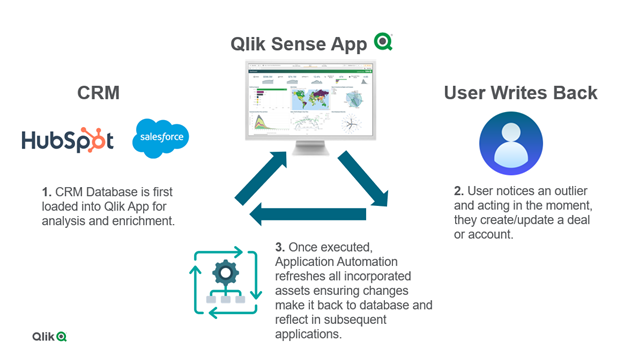
‘Write back’ solutions offer the ability to input data or update dimensions in source systems, such as databases or CRMs, all while staying within a Qlik Sense app.
The solution incorporates both Qlik Cloud and Application Automation to enable users to input data from a dashboard or application and run the appropriate data refresh across the source system as well as the analytics.
Example Use Cases:
- Ticket/ Incident Creation
- Create Ticket or Incident in JIRA or ServiceNow.
- Data Changes
- Update Deals/Accounts in a CRM like HubSpot or Salesforce.
- Data Annotations
- Add a comment to or more records in a source system.
This new feature is possible with all of the connectors located in Application Automation, including:
- CRMs like HubSpot or Salesforce
- Databases like Snowflake, Databricks, Google Bigquery
- SharePoint
- and more!
Below you can see technical diagram based around using Application Automation for a write back solution.
The ability to write back in Qlik Cloud is a game changer for customers who want to operationalize their existing Qlik Sense applications to enhance decision making right inside an app where the analytics live. This not only streamlines business processes across an ever-growing data landscape, but it also enables users to to act in the moment. With Application Automation powering the write back executions, customers can unlock more value across their data and analytics environment.
To learn more for a more ‘hands-on tutorial’ please see video here.
- Ticket/ Incident Creation
-
Operations Execution Dashboard
Operations Execution DashboardCOFCOThe operations team uses it, to allow them to control the payment requests created overtime and have a visual infor... Show MoreOperations Execution DashboardCOFCO The operations team uses it, to allow them to control the payment requests created overtime and have a visual information of the the countries with must PRs created and how the distribution is being done.
Discoveries
Allows the team to see where we can grow our business and were we alreay have a big impact.
Impact
Shows how the business is progressing and where we can grow.
Audience
Used by operations team manager.
Data and advanced analytics
Has helped the operations team to manage how the payment requests are being impacted over time.