Unlock a world of possibilities! Login now and discover the exclusive benefits awaiting you.

Product Innovation
By reading the Product Innovation blog, you will learn about what's new across all of the products in our growing Qlik product portfolio.
Support Updates
The Support Updates blog delivers important and useful Qlik Support information about end-of-product support, new service releases, and general support topics.
Qlik Academic Program
This blog was created for professors and students using Qlik within academia.
Community News
Hear it from your Community Managers! The Community News blog provides updates about the Qlik Community Platform and other news and important announcements.
Qlik Digest
The Qlik Digest is your essential monthly low-down of the need-to-know product updates, events, and resources from Qlik.
Qlik Learning
The Qlik Learning blog offers information about the latest updates to our courses and programs, as well as insights from the Qlik Learning team.
Recent Blog Posts
-
【オンデマンド配信】信頼構築からのスタート!乗り越えて実現した業務データの活用
企業のビジネス活動において、データはこれまで以上に必要不可欠な資産となっています。増え続けるデータを管理・統合・分析し、データでアクションを起こす必要性が増している現在、成功している企業はどのようなデータ戦略を実行しているのか?本 Web セミナーシリーズでは、Qlik でデータからアクションを起こすデータ主導のビジネスで成功しているお客様より、課題から導入の経緯、デモンストレーション、活用例などをご紹介します。 ※ 参加費無料。パソコン・タブレット・スマートフォンで、どこからでもご視聴いただけます。 オンデマンド配信:信頼構築からのスタート!乗り越えて実現した業務データの活用 株式会社 QTnet では、Excel や Access で利用してきたデータ活用を 2010年から本格的に BI ツールである Qlik によるデータ活用へ移行しました。しかし、データ抽出が大半でデータの可視化や分析、活用は一向に進まない状況でした。2019年、Qlik Sense の導入を契機にシステム部門で... Show More企業のビジネス活動において、データはこれまで以上に必要不可欠な資産となっています。増え続けるデータを管理・統合・分析し、データでアクションを起こす必要性が増している現在、成功している企業はどのようなデータ戦略を実行しているのか?
本 Web セミナーシリーズでは、Qlik でデータからアクションを起こすデータ主導のビジネスで成功しているお客様より、課題から導入の経緯、デモンストレーション、活用例などをご紹介します。※ 参加費無料。パソコン・タブレット・スマートフォンで、どこからでもご視聴いただけます。
オンデマンド配信:
信頼構築からのスタート!乗り越えて実現した業務データの活用株式会社 QTnet では、Excel や Access で利用してきたデータ活用を 2010年から本格的に BI ツールである Qlik によるデータ活用へ移行しました。しかし、データ抽出が大半でデータの可視化や分析、活用は一向に進まない状況でした。2019年、Qlik Sense の導入を契機にシステム部門でデータ整備からアプリまで一貫した提案型の開発に挑戦しました。ところが、穏やかな船出とはいかず、業務部門との信頼関係を築くことからスタートしました。
今回は、ユーザと共に作り上げてきたアプリについて、その成果(自動化や可視化を達成)に関する具体例について、デモを交えて紹介します。 -
Connector Factory – January 2024 releases
This month, Connector Factory has released more capabilities related to our data analytics connectors. -
New Process for Submitting a Feature Request for All Talend Customers and Partne...
We are very excited to let all our Talend Customers and Partners know that making your voice heard is easier than ever! -
Qlik Digest - January 2024
January 16th, 2024 marked a pivotal moment for Qlik as we launched our new brand and website to the world. This transformation reflects our story of growth, innovation, and change. But more importantly, it is an evolution of how you can experience Qlik: our shared values, our vision, and our expanded product portfolio to deliver real business value for you. It is also our commitment to you – to be the catalyst that empowers you to leverage data f... Show MoreJanuary 16th, 2024 marked a pivotal moment for Qlik as we launched our new brand and website to the world. This transformation reflects our story of growth, innovation, and change. But more importantly, it is an evolution of how you can experience Qlik: our shared values, our vision, and our expanded product portfolio to deliver real business value for you. It is also our commitment to you – to be the catalyst that empowers you to leverage data for substantial business outcomes.
-
Make it your goal to upskill in 2024!
In 2023 the World Economic Forum published it's Future of Jobs report in which it detailed the most in demand skills for the future. Now that it’s the start of 2024, its worth considering what these skills are and making it your goal to upskill in 2024. -
-
Harness the Power of Outcomes: Solve Problems, Drive Success
You will see how Qlik works where and how you work, whether you are on a computer or mobile device.
-
-
Concatenate
Concatenate is a prefix that can be used when loading a table in the script. Using concatenate explicitly states that you want the data that is currently being loaded to be appended to the end of a specified table. According to Qlik Help, the syntax looks like this: Concatenate is often used when different sets of data, often from different data sources, need to be added to the same table such as a fact table. I often use concatenate when addi... Show MoreConcatenate is a prefix that can be used when loading a table in the script. Using concatenate explicitly states that you want the data that is currently being loaded to be appended to the end of a specified table. According to Qlik Help, the syntax looks like this:
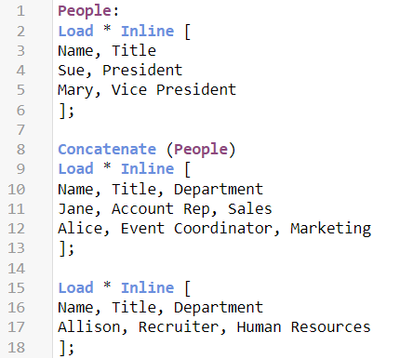
Concatenate is often used when different sets of data, often from different data sources, need to be added to the same table such as a fact table. I often use concatenate when adding new data to a link table in my data model. This is an example of explicitly using concatenate to append rows to an existing table. If the data sets do not have the same data structure, the concatenate prefix must be used, otherwise a synthetic table will be created and the data sets will be store in separate tables. In the script below, the People table is loaded with two fields, Name and Title. The second data set, starting on line 8, is loaded using the concatenate prefix because the field Department does not already exist in the People table. By concatenating the table, the Department field will be added to the People table and the data in the second table will be appended to the end of the People table. The third table, starting on line 15, is implicitly added to the People table and does not require the concatenate prefix because it has the same three fields, Name, Title, and Department) as the new People table.
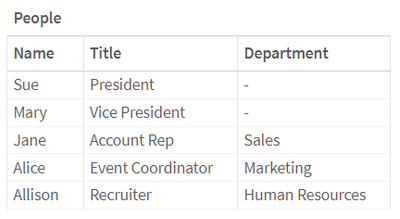
Below is the resulting table. Notice that the first two rows have null in the Department field because this data is from the initial data set that did not include the Department field.
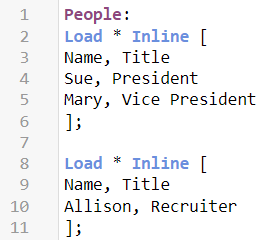
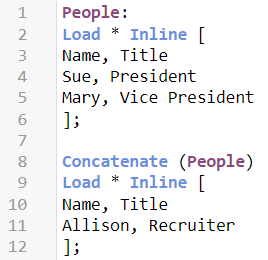
Let’s look at another example of implicit concatenation. If a table is being loaded with the same fields as an existing table, the data will be appended to the end of the existing table even though the concatenate prefix is not used. For example, below in the script on the left, the data from the table starting on line 8 would be appended to the end of the People table because the second table has the same fields as the People table. This can happen even if these two data sets are loaded in different parts of the script. They do not need to be loaded sequentially. The script below, on the right, using the concatenate prefix will produce the same results explicitly. I prefer to explicitly concatenate to avoid any confusion.
The resulting table will look like this:
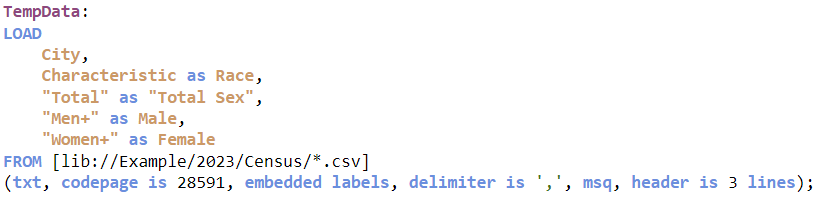
In preparing this blog, I learned another way I could load multiple files with the same data structure taking advantage of implicit concatenation. The script below shows how I use the wildcard (*) to load several files with the same data structure.
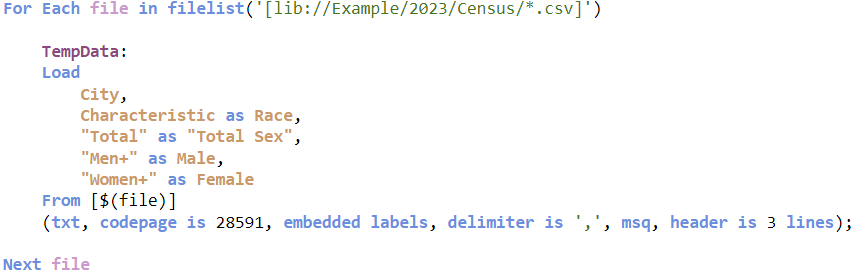
What I learned is that I can also use a loop and implicit concatenation to do the same thing. After the script below runs, the TempData table will have all the data from the CSV files. The first time through the loop, the TempData table is created and subsequent times through the loop, the data is appended to the end of the now existing TempData table.
After 14 years with Qlik, I am still picking up new things. That is what makes my job so much fun!
Thanks,
Jennell
-
New Year, New Qlik
Read on to learn more about the January 2024 enhancements for Qlik Community. -
新しい Qlik ブランドをご紹介します
ブログ著者:Mike Capone(本ブログは Revealing The New Qlik Brand の抄訳です) 市場は変わりました。そして私たちはその準備ができています。 今日、Qlik はブランドとウェブサイトを一新し、エキサイティングな旅を続けます。この変革は見た目にとどまらず、データ統合、分析、AI の最前線における私たちのダイナミックな進化を象徴するものです。私たちの新しいブランドは、革新性、明快さ、敏捷性を象徴しています。 現在、最高経営責任者(CEO)は AI を効果的に活用するという大きな課題に直面しています。柔軟でベンダー非依存なソリューションを提供する能力と、大規模に AI を拡張してきた豊富な経験を併せ持つ Qlik は、AI の複雑性を乗り越えるための不可欠なパートナーです。 この新しいブランドは、単に外観を変えるものではありません。現実的な AI ソリューションを切望している市場に対し、当社の役割を新たに示すものです。つまり、私たちのコミットメントー... Show Moreブログ著者:Mike Capone(本ブログは Revealing The New Qlik Brand の抄訳です)
市場は変わりました。そして私たちはその準備ができています。
今日、Qlik はブランドとウェブサイトを一新し、エキサイティングな旅を続けます。この変革は見た目にとどまらず、データ統合、分析、AI の最前線における私たちのダイナミックな進化を象徴するものです。私たちの新しいブランドは、革新性、明快さ、敏捷性を象徴しています。
現在、最高経営責任者(CEO)は AI を効果的に活用するという大きな課題に直面しています。柔軟でベンダー非依存なソリューションを提供する能力と、大規模に AI を拡張してきた豊富な経験を併せ持つ Qlik は、AI の複雑性を乗り越えるための不可欠なパートナーです。
この新しいブランドは、単に外観を変えるものではありません。現実的な AI ソリューションを切望している市場に対し、当社の役割を新たに示すものです。つまり、私たちのコミットメントー企業がデータ活用を通じた変革で真のビジネス成果を得るという変化の時代をリードするーの大胆な宣言なのです。
Qlik の変わらない目的と自身のルーツからの進化
1993年に「QuikTech」として創業した Qlik は、品質(Quality)、理解(Understanding)、相互作用(Interaction)、知識(Knowledge)の基本的な価値観によって定義された旅の始まりでした。初期にはすでに Quik から Qlik に変わりましたが、私たちの旅の目的は常にデータソリューションを超えるもの、つまり戦略的なビジネス成果を提供することだったのです。
この新しいブランドで、複雑なデータソリューションをより直感的でアクセスしやすいものにしたいと考えます。このロゴのフレッシュでモダンなタイポグラフィとその合理的なデザインは、明快さと効率性への誓いであり、当社の高度なソリューションがユーザー中心であり続けることを宣言するものです。
Qlik の象徴であるグリーンを新しいロゴにも採用した理由は、お客様やパートナー様の心に深く響くものであることが、私たちの調査からも証明されています。このグリーンは単なる色ではなく、成長と機会を表すものであり、データ分析を通じてビジネスを強化するという当社のコミットメントを反映しています。このグリーンは、躍動、革新、そして進化し続けるデータテクノロジーへの当社の適応性を意味しています。
Talend社の戦略的買収は、データ管理、品質、分析、AI/MLのあらゆる機能を統合するマイルストーンであり、Qlik の成長の鍵です。グリーンとグレーを基調とした新しいデザインの Qlik ロゴは、この統合を反映し、Talend の円のモチーフと呼応し、統合と発展を意味しています。
「データがあるところに機会はある」という新しい企業理念が新しいロゴと並んで掲げられています。これは、データを戦略的資産として見なすという市場のトレンドを反映しています。当社のお客様は、データ統合、分析、AI/MLの包括的なソリューションを提供する当社の拡張されたポートフォリオにより、これらの機会をいままさに解き放とうとしています。当社はこの戦略的な位置づけにより、単なるツールプロバイダーではなく、データ主導の世界におけるビジネス変革の実践者となるのです。
直感的でユーザー中心の新しい外観
リブランディングの要であるウェブサイトのリニューアルは、この進化を反映します。製品中心の視点を超えて、当社の多様な顧客ベースに響くソリューションと成果にスポットライトを当てています。この変革は、専門知識の有無にかかわらず、すべてのユーザーにとってデータ分析の旅を直感的でわかりやすいものにするという私たちのビジョンを具現化したものです。
*新しい日本語サイトの公開は今春を予定しています。
ウェブサイトは、当社のサービスをダイナミックに紹介し、洞察とデータ探索のハブとして発展してきました。このウェブサイトは、データ分析の複雑さを解明し、当社の洗練されたソリューションにアクセスしやすくし、十分な情報に基づいた意思決定の文化を育み、イノベーションおよびユーザー中心主義へのコミットメントと当社のデジタルプレゼンスを一致させることを目的としています。
新時代の到来: あらゆる面をブランドに統合
Qlik のリブランディングは、単なる美しさの追求ではなく、お客様や市場の進化する要求に応えることを示すものです。私たちは、デジタルプレゼンスからお客様との対話に至るあらゆるタッチポイントにこの新しい外観を統合することで、Qlik という存在が一貫性を保ち、ユーザー中心の理念が示されるようにしています。
この変革は、お客様やパートナー様とのコラボレーションでもあります。新しいブランドは、私たちがサービスを提供する皆様との対話、あるいは共同の旅なのです。Qlik という存在は、皆様と密接に協働することで、お互いの成長と進化を反映しながら、より豊かなものとなるのです。
新しく生まれ変わった私たちのブランドは、最先端のテクノロジーとビジネスに改めてコミットします。お客様のデータジャーニーにおける触媒となり、実質的なビジネス成果のための洞察を提供することをお約束します。新しいというだけでなく、イノベーション、明快さ、そしてデータ業界における具体的な成果を示す道標でもある新しいブランドのもとで、このワクワクする進化をご一緒しませんか。
-
Qlik Sense Enterprise for Windows - New Security Patches Available Now
Edited 20th November 2023: CVE number updated.Edited December 1st 2023: Added November 2023 IR release Hello Qlik Users, A security issue in Qlik Sense Enterprise for Windows has been identified, and patches have been made available. Details can be found in the Security Bulletin Critical Security fixes for Qlik Sense Enterprise for Windows (CVE-2023-48365). Today, we have released eight service releases across the latest versions of Qlik Sense to... Show MoreEdited 20th November 2023: CVE number updated.
Edited December 1st 2023: Added November 2023 IR releaseHello Qlik Users,
A security issue in Qlik Sense Enterprise for Windows has been identified, and patches have been made available. Details can be found in the Security Bulletin Critical Security fixes for Qlik Sense Enterprise for Windows (CVE-2023-48365).
Today, we have released eight service releases across the latest versions of Qlik Sense to patch the reported issues. All versions of Qlik Sense Enterprise for Windows prior to and including these releases are impacted:
- August 2023 Patch 1
- May 2023 Patch 5
- February 2023 Patch 9
- November 2022 Patch 11
- August 2022 Patch 13
- May 2022 Patch 15
- February 2022 Patch 14
- November 2021 Patch 16
No workarounds can be provided. Customers should upgrade Qlik Sense Enterprise for Windows to a version containing fixes for these issues. The listed fixes also address CV-2023-41266 and CVE-2023-41265 (link).- November 2023 IR
- August 2023 Patch 2
- May 2023 Patch 6
- February 2023 Patch 10
- November 2022 Patch 12
- August 2022 Patch 14
- May 2022 Patch 16
- February 2022 Patch 15
- November 2021 Patch 17
This issue only impacts Qlik Sense Enterprise for Windows. Other Qlik products including Qlik Cloud and QlikView are NOT impacted.
All Qlik software can be downloaded from our official Qlik Download page (customer login required). Follow best practices when upgrading Qlik Sense.
Qlik provides patches for major releases until the next Initial or Service Release is generally available. See Release Management Policy for Qlik Software. Notwithstanding, additional patches for earlier releases may be made available at Qlik’s discretion.
The information in this post and Security Bulletin Critical Security fixes for Qlik Sense Enterprise for Windows (CVE-2023-48365) is disclosed in accordance with our published Security and Vulnerability Policy.
Clarifications and Frequently Asked Questions:
What can be done to mitigate the issue?
No mitigation can be provided. An upgrade should be performed at the earliest. As per Qlik's best practices, the proxy should not be exposed to the public internet, which reduces the attack surface significantly.
What authentication methods are affected?
All authentication methods are affected.
Are environments with HTTP disabled impacted?
Environments will be affected regardless if HTTP or HTTPS are in use. These vulnerabilities affect the HTTP protocol overall, meaning even if HTTP is disabled, the environment remains vulnerable.
These attacks don’t rely on intercepting any communication, and therefore, are indifferent whether the HTTP communication is encrypted or not.
Kind regards, and thank you for choosing Qlik,
Qlik Global Support
-
Ctrl-Q
Ctrl-Q Ptarmigan Labs Ctrl-Q is an open source (free!) tool that makes life easier for Qlik Sense admins and developers. How? By automating the boring stuff: View task dependencies as network diagrams, trees or tables Viewing and deleting user sessions on the fly. Individual sessions can be deleted, as well as all sessions connected via a virtual proxy. Exporting reload task definitions to disk files Creating reload tasks from definitions... Show MoreCtrl-QPtarmigan Labs
Ctrl-Q is an open source (free!) tool that makes life easier for Qlik Sense admins and developers.
How?
By automating the boring stuff:- View task dependencies as network diagrams, trees or tables
- Viewing and deleting user sessions on the fly. Individual sessions can be deleted, as well as all sessions connected via a virtual proxy.
- Exporting reload task definitions to disk files
- Creating reload tasks from definitions in a Excel or CSV file
- Importing apps from disk and create associated reload tasks
- Show (and optionally store to disk) definitions for master dimensions and measures
- Import master dimensions and measures from definitions in an Excel file
- Delete master dimensions and measures from Sense apps
- Update custom properties for multiple tasks
- Show (and optionally store to disk) definitions for all bookmarks in Sense apps
- Show (and optionally store to disk) definitions for all variables in Sense apps
- Scramble fields in Sense apps
- Get load script for Sense apps
https://ctrl-q.ptarmiganlabs.com
https://ptarmiganlabs.comCtrl-Q runs on Windows, Linux and macOS.
Works with client-managed Qlik Sense Enterprise on Windows.Reload tasks visualised by Ctrl-Q

Discoveries
Using Ctrl-Q's network view for reload tasks, it is possible to get an overview of hundreds or thousands of tasks, as well as drill into the details of individual reload and external program tasks. More info and examples here: https://ptarmiganlabs.com/visualising-qlik-sense-reload-tasks-using-ctrl-q/
Impact
Manually managing dozens or hundreds of apps and associated tasks, apps and master items can both take lots of time and be prone to manual errors. By using Ctrl-Q's bulk export and import features for apps, tasks, master items and variables, Sense developers and admins can both save time and achieve more consistent and higher-quality work results. Achieving more in less time, simply. Examples here: https://ptarmiganlabs.com/ctrl-q-3-14-bulk-task-export-import-for-qlik-sense/
Audience
Qlik Sense developers and admins.
Data and advanced analytics
By automating creation of master items (dimensions and measures) the risk of incorrectly defined master items is greatly reduced, leading to better quality Sense apps that ultimately serve the business better.

-
Macquarie University Workshop
The Academic Program hosted a Qlik Sense workshop for students at Macquarie University in Australia! The University joined the program in 2016 when Professor Dominic Soh introduced Qlik Sense to his undergraduate students in an Auditing and Assurance Services course. Since the university joined, there have been more than 300+ students accepted into the program, all who have received free software and training for a full year!Professor Soh uses Q... Show More
The Academic Program hosted a Qlik Sense workshop for students at Macquarie University in Australia! The University joined the program in 2016 when Professor Dominic Soh introduced Qlik Sense to his undergraduate students in an Auditing and Assurance Services course. Since the university joined, there have been more than 300+ students accepted into the program, all who have received free software and training for a full year!
Professor Soh uses Qlik Sense to teach data analytics, specifically within the accounting/auditing context. He utilizes the programs free resources which have helped him train his students and build his curriculum. In the course, students are assigned to watch 5 QCC videos and take 5 quizzes each week, and are also required to use Qlik in their final assignment.
The free resources combined with the workshops that the program provides have proven to be really valuable to the professor and the students at Macquarie University!

-
Introducing Key Driver Analysis - SaaS in 60
With key drivers, users can better understand the reasons for historical results, not just the what but the why, providing deeper insight and supporting more meaningful action.
-
Embedding Qlik Analytics and the End of Third-Party Cookies
Hello everyone, Google finally set Q3 2024 as the date for 100% blocking all content relying on third-party cookies rendered on web pages in Chrome. At Qlik, the date is not a surprise to us, and to all our customers who embed Qlik Sense, we appreciate your collaboration and patience. What does this mean for my embedded analytics? Qlik has been working hard for two years to prepare our products to handle this change and the impact it has on your... Show MoreHello everyone,
Google finally set Q3 2024 as the date for 100% blocking all content relying on third-party cookies rendered on web pages in Chrome. At Qlik, the date is not a surprise to us, and to all our customers who embed Qlik Sense, we appreciate your collaboration and patience.
What does this mean for my embedded analytics?
Qlik has been working hard for two years to prepare our products to handle this change and the impact it has on your end users. We've documented additional information for you, which we believe will help you understand how to best configure Qlik Cloud and Qlik Sense Enterprise Client-Managed and keep embedded analytics working smoothly with your web applications and mashups.
Read all about it in Need to Know: Embedding Qlik Analytics and the End of Third-Party Cookies.
Thank you for choosing Qlik,
Qlik Support -
Happy New Year from the Qlik Academic Program!
We hope to reach even more educators and students in 2024! -
Timeline Chart Demo
Timeline Chart Demo AnyChart Timeline charts let you explore a series of events in chronological order. See all the major features of the Timeline Chart extension by AnyChart in this Qlik Sense demo app Discoveries Delve into multiple options to visualize and customize ranges and moments, set markers and labels, configure axes, navigation, tooltips, and much more demonstrated in action. Impact Timeline charts ensure an illuminati... Show MoreTimeline Chart DemoAnyChartTimeline charts let you explore a series of events in chronological order. See all the major features of the Timeline Chart extension by AnyChart in this Qlik Sense demo appDiscoveries
Delve into multiple options to visualize and customize ranges and moments, set markers and labels, configure axes, navigation, tooltips, and much more demonstrated in action.
Impact
Timeline charts ensure an illuminating overview of a series of events in chronological order.
Audience
Data visualizers and analysts seeking to create compelling timeline charts within their applications in Qlik Sense.
Data and advanced analytics
This app features timeline visualizations powered by AnyChart's Timeline Chart extension for Qlik Sense, using fictional data to illustrate its capabilities.
-
Yes! It's That Easy - AI-Generated Goal Management and Tracking with Insight Adv...
See how AI-enhanced Insight Advisor Analysis Types: Smart Sheets can automatically generate an interactive performance management dashboard to keep track of your goals in just a few clicks. Yes it is that easy!
-
Introducing Tabular Reporting - Create and Distribute Operational Reports
This week Qlik Cloud customers can now address common operational report and distribution requirements with our new Tabular Reporting capabilities.