Unlock a world of possibilities! Login now and discover the exclusive benefits awaiting you.

Product Innovation
By reading the Product Innovation blog, you will learn about what's new across all of the products in our growing Qlik product portfolio.
Support Updates
The Support Updates blog delivers important and useful Qlik Support information about end-of-product support, new service releases, and general support topics.
Qlik Academic Program
This blog was created for professors and students using Qlik within academia.
Community News
Hear it from your Community Managers! The Community News blog provides updates about the Qlik Community Platform and other news and important announcements.
Qlik Digest
The Qlik Digest is your essential monthly low-down of the need-to-know product updates, events, and resources from Qlik.
Qlik Learning
The Qlik Learning blog offers information about the latest updates to our courses and programs, as well as insights from the Qlik Learning team.
Recent Blog Posts
-

-
Qlik データゲートウェイ - Direct AccessでファイアウォールやVPCの背後にあるデータへ安全にアクセス
この記事は下記の英語版記事の翻訳です。Securely access data behind a firewall or VPC with Qlik Data Gateway - Direct Access Qlik データゲートウェイ - Direct Accessは、Qlik Cloudへの暗号化された接続を提供し、Qlik Sense SaaSアプリケーションが、企業のネットワークセキュリティを損なうことなく、企業のファイアウォールの内側にあるデータに安全にアクセスして分析することを可能にします。Qlik データゲートウェイ - Direct Accessは、保護されたデータがオンプレミスまたは仮想プライベートクラウドにあるかにかかわらず、Qlik Sense SaaSで安全かつ確実にデータを分析する方法を提供します。 あらゆるレベルの組織が、クラウドをより有効に活用するために、ビジネスシステムとオペレーションのデジタル化および近代化のための大規模な投資を行っています。しかし、す... Show Moreこの記事は下記の英語版記事の翻訳です。
Securely access data behind a firewall or VPC with Qlik Data Gateway - Direct Access
Qlik データゲートウェイ - Direct Accessは、Qlik Cloudへの暗号化された接続を提供し、Qlik Sense SaaSアプリケーションが、企業のネットワークセキュリティを損なうことなく、企業のファイアウォールの内側にあるデータに安全にアクセスして分析することを可能にします。Qlik データゲートウェイ - Direct Accessは、保護されたデータがオンプレミスまたは仮想プライベートクラウドにあるかにかかわらず、Qlik Sense SaaSで安全かつ確実にデータを分析する方法を提供します。
あらゆるレベルの組織が、クラウドをより有効に活用するために、ビジネスシステムとオペレーションのデジタル化および近代化のための大規模な投資を行っています。しかし、すべての企業がビジネスのあらゆる部分を簡単に移行できるわけではありません。規制やファイアウォールの厳格なポリシーによって、一部の業務やデータはファイアウォールの内側や仮想プライベートクラウド(VPC)内に維持する必要があります。
このカテゴリーに属するお客様は、SaaS製品を採用したいが、データはそのままにしておきたい、という狭間で立ち往生しています。幸いなことに、QlikはQlik Cloudをご利用のお客様が、ファイアウォールの内側で息づいているデータに安全かつセキュアにアクセスできる、完全なエンタープライズSaaS分析環境を導入することを可能にしました。
Qlik データゲートウェイ - Direct Accessは、Qlikクラウドへの暗号化された接続を提供し、Qlik Sense SaaSアプリケーションは組織のファイアウォールの内側に存在するデータに安全にアクセスして分析できるようにします。保護されたデータがオンプレミスまたは仮想プライベートクラウドにあるかにかかわらず、Direct AccessはQlik Sense SaaSでそのデータを安全に分析する方法を提供します。
Qlik Cloudは、データがクラウド上にあっても、ファイアウォールの内側にあっても、組織のデータランドスケープに統制されたアクセスを行ってQlik Sense SaaSへのデータ取り込むための、エンタープライズグレードのソリューションを提供します。
How it Works
Qlik データゲートウェイは、データソースからQlik Cloudへのブリッジとして機能し、Qlik Sense SaaSアプリケーションがファイアウォール内またはVPC内のデータに安全にアクセスし、分析することを可能にします。
データゲートウェイは、ファイアウォールの内側にある組織のネットワーク内のシステムにインストールされ、データソースとQlik Cloudのテナントとの間の安全な暗号化された接続を可能にします。データゲートウェイは、HTPPSを使用して相互認証された暗号化された接続を確立します。
Qlik Cloudはゲートウェイにクエリを送信し、ゲートウェイはコネクタで設定された定義済みのデータソースにクエリを中継します。データはデータソースからQlik Cloudに直接転送されます。データは常に転送されており、物理的にGatewayに存在することはないということが重要です。
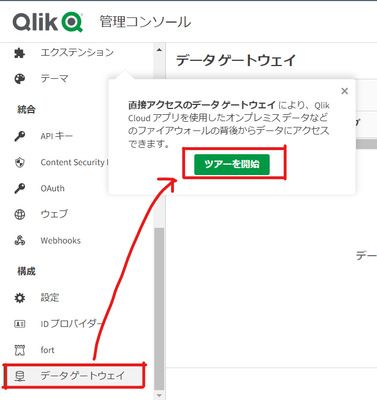
QMCの左側の「構成」から「データゲートウェイ」を選択すると、ガイドツアーを見ることができます。
Qlik Data GatewayとDirect Accessは、オンプレミスやVPC内に残さなければならないデータをお持ちのお客様のSaaSでのアナリティクス利用を可能にします。
Qlik Cloudは、クラウド導入を加速させる安全なソリューションであらゆるタイプのデータランドスケープをサポートし、お客様が分析の素晴らしさをさらに追求するために必要なイノベーションを提供します。
こちらからデモアプリでお試しいただけます。
-
Testing and using expressions with Master Items
An overview on how to text and use expressions with Master Items. -
Troubleshooting Qlik Sense Desktop Authentication
Hello Qlik Users!With the recent change to Qlik Sense Desktop, we have seen some users facing issues with authentication. Users are reporting the following error message:Failed to authenticate against the selected server. Please make sure your internet connection is working and try again.There are a few reasons why this error could occur.ReasonSolutionThe firewall is blocking the required ports.Contact your local IT/network administrator and ensu... Show MoreHello Qlik Users!
With the recent change to Qlik Sense Desktop, we have seen some users facing issues with authentication. Users are reporting the following error message:
Failed to authenticate against the selected server. Please make sure your internet connection is working and try again.
There are a few reasons why this error could occur.
Reason
Solution
The firewall is blocking the required ports.
Contact your local IT/network administrator and ensure that the following URLs can be reached using https (port 443): *qlik.com, *.auth0.com and *qlikcloud.com.
Version of Qlik Sense Desktop.
Verify that you have the most up to date version of Qlik Sense Desktop installed.
A proxy is being used to access the internet.
It may be necessary to bypass the Proxy to log on and authenticate or to contact your local/IT network administrator to ensure the appropriate ports are opened.
A VPN is being used.
Disconnect from the VPN or contact your l local/IT network administrator to ensure the appropriate ports are opened.
The incorrect license was granted in Qlik Sense Enterprise.
A professional or user access license is required to authenticate against Qlik Sense Enterprise.
For more information on these solutions, please see this article. If you have any questions about authenticating against SaaS editions, please see How to authenticate Qlik Sense Desktop against SaaS editions.
Please let us know if you have any questions. If you found this blog useful, please give it a like! Also, subscribe to the Qlik Support Updates Blog by clicking the green Subscribe button.
Kind regards,
Qlik Digital Support
-
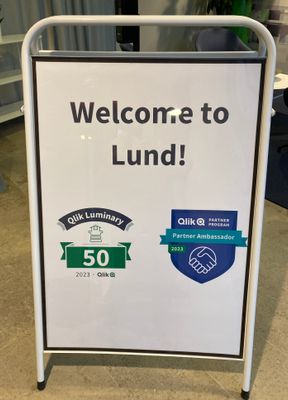
【参加レポート】Qlik Luminary Meetup in Lund
毎年恒例の Qlik Luminary のミートアップが、Qlik の創業の地&開発拠点であるスウェーデンのルンドにある Qlik オフィスで 2日に渡り開催され、今年は日本から2名が参加されました。 -
Indoor Map - Factory
Indoor Map - FactoryNTechExample of how we can use Qlik Sense to associate data with an indoor/outdoor map. This example use a chemical factory, but you can use with indoor places like a eventes, shows, shoppings and others.DiscoveriesView the main points on the factory map, the level of safety risk in each area, classification of factory areas and the number of people working in each location.ImpactIndoor/outdoors maps are tools that combine art... Show MoreIndoor Map - FactoryNTech Example of how we can use Qlik Sense to associate data with an indoor/outdoor map. This example use a chemical factory, but you can use with indoor places like a eventes, shows, shoppings and others.
Discoveries
View the main points on the factory map, the level of safety risk in each area, classification of factory areas and the number of people working in each location.
Impact
Indoor/outdoors maps are tools that combine art and science to guide, optimize strategies and promote accessibility in indoor or outdoor environments, allowing resources to be allocated efficiently and adopt strategies based on data.
Audience
Discovering data on indoor/outdoor maps: Optimize strategies and promote accessibility in indoor or outdoor environments, allowing you to allocate resources efficiently and adopt data-based strategies.
Data and advanced analytics
Associating data with internal geolocation is a great opportunity to learn more about and look for opportunities in each space of your enterprise.
-
Walking in a Winter Wonderland
Hello Qlik Community! It’s an old cliché, but the year has truly flown by! We are so thankful for each one of you and the excitement you bring to the Qlik Community. All your collaboration and engagement motivates us to improve, enhance, and cultivate an educational yet fun experience. We have some big things planned for 2024 and could not be more excited! As one last surprise, we wanted to spread some cheer and give everyone a “Winter Wonderlan... Show MoreHello Qlik Community!
It’s an old cliché, but the year has truly flown by! We are so thankful for each one of you and the excitement you bring to the Qlik Community. All your collaboration and engagement motivates us to improve, enhance, and cultivate an educational yet fun experience. We have some big things planned for 2024 and could not be more excited!
As one last surprise, we wanted to spread some cheer and give everyone a “Winter Wonderland” for the Holidays! Should you not enjoy the snow, there is a toggle button on the right-hand side that allows you to disable and enable it.
Wishing you joy, peace, love, and data! We will see you in 2024!
Your Qlik Community Admins,
Melissa, Sue, Jamie, and Nicole
-
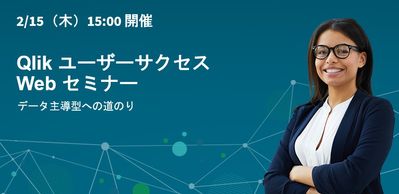
【オンデマンド配信】ユーザー主導で実現!SAP データと DIVA データの活用
企業のビジネス活動において、データはこれまで以上に必要不可欠な資産となっています。増え続けるデータを管理・統合・分析し、データでアクションを起こす必要性が増している現在、成功している企業はどのようなデータ戦略を実行しているのか?本 Web セミナーシリーズでは、Qlik でデータからアクションを起こすデータ主導のビジネスで成功しているお客様より、課題から導入の経緯、デモンストレーション、活用例などをご紹介します。 ※ 参加費無料。パソコン・タブレット・スマートフォンで、どこからでもご視聴いただけます。 オンデマンド配信:ユーザー主導で実現!SAP データと DIVA データの活用 株式会社ニフコでは、2015年より BI ツールとして Qlik の利用を開始しました。SAP データを利用して、Qlik で世界各国の拠点における製造原価・販売金額の経営層向けレポートを作成。国内外の生産子会社での多品種にわたる製品ごとの原価管理の可視化を実現しています。SAP 未導入の海外子会社についても、... Show More企業のビジネス活動において、データはこれまで以上に必要不可欠な資産となっています。増え続けるデータを管理・統合・分析し、データでアクションを起こす必要性が増している現在、成功している企業はどのようなデータ戦略を実行しているのか?
本 Web セミナーシリーズでは、Qlik でデータからアクションを起こすデータ主導のビジネスで成功しているお客様より、課題から導入の経緯、デモンストレーション、活用例などをご紹介します。※ 参加費無料。パソコン・タブレット・スマートフォンで、どこからでもご視聴いただけます。
オンデマンド配信:
ユーザー主導で実現!SAP データと DIVA データの活用株式会社ニフコでは、2015年より BI ツールとして Qlik の利用を開始しました。SAP データを利用して、Qlik で世界各国の拠点における製造原価・販売金額の経営層向けレポートを作成。国内外の生産子会社での多品種にわたる製品ごとの原価管理の可視化を実現しています。SAP 未導入の海外子会社についても、各国通貨での限界原価管理を実施しています。
IT 部門に頼らず、財務・経理部が主体となって推進した「Qlik による SAP と DIVA データの活用の具体例」について、同社のご担当者よりアプリのデモを交えてご紹介します。 -
Qlik Digest - December 2023
Welcome to the December Qlik Digest newsletter. We have some exciting news and updates this month – 2023 Gartner® Magic Quadrant™ for Data Integration Tools report is out, and we share news about upcoming webinars. 2023 Gartner Magic Quadrant is in, and so are we! Could there be any stronger proof that Qlik and Talend were meant to work together than being recognized as a leader in Gartner’s Data Integration Magic Quadrant? After making th... Show MoreWelcome to the December Qlik Digest newsletter. We have some exciting news and updates this month – 2023 Gartner® Magic Quadrant™ for Data Integration Tools report is out, and we share news about upcoming webinars.
2023 Gartner Magic Quadrant is in, and so are we!
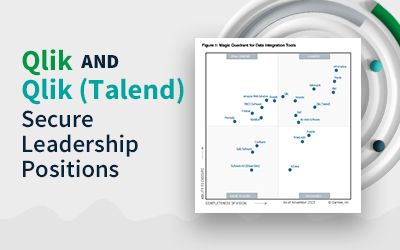
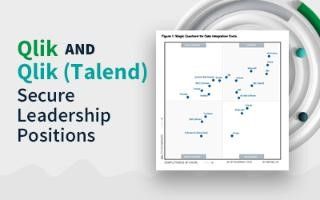
Could there be any stronger proof that Qlik and Talend were meant to work together than being recognized as a leader in Gartner’s Data Integration Magic Quadrant?
After making the list 8 years in a row, Talend has moved further along the visionary axis, while Qlik moved even further up the execution axis. The combined companies consistently scored in the top 5 across all Gartner defined use cases. See how this achievement translates into giving your data a leg up on the competition. #DoubleQlik
Webinar January 17: Data, Analytics, & AI Trends’24
Qlik Trend 2024 explores the top 10 hottest data, analytics, and AI trends, revealing what you need to know and do to stay ahead this year.
Unlock the Power of Data with Qlik Cloud
Have you had the chance to explore the transformative potential of Qlik Cloud? With offerings like advanced AI capabilities, seamless automation integration, and robust Machine Learning, this isn’t something you want to miss out on.
Check out our most recent Do More with Qlik webinar OnDemand to learn more.
Become a Qlik Insider
For the most recent product updates, tune in OnDemand to our Product Release webinar.
Here’s a small teaser: We announced the integration of Qlik Cloud with Amazon Bedrock, expanding customers’ ability to scale AI for impact.
Check out this press release outlining how.
Tips & Tricks of the Month
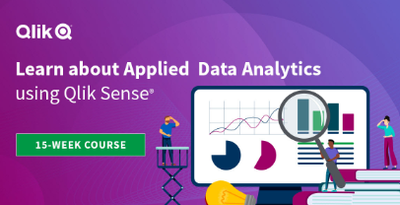
Are you feeling the pressure to raise your Data Analytics and Data Literacy game? This course may be the answer you are looking for. Become an analytics leader and get your digital badge in only 15 weeks. Learn more & register here.
-
New upload limits for zip files in Qlik Cloud extensions and custom themes
Hello Qlik Users, To strengthen the reliability of the Qlik platform, Qlik is introducing limits for themes and extensions uploaded to Qlik Cloud. These limits will be introduced on January 24. Files which exceed these new requirements will fail to upload once the change has gone into effect. Files uploaded before the change will continue to function as expected. The new limits: Archive size: 30MB (currently: no limit) This is larger than any t... Show MoreHello Qlik Users,
To strengthen the reliability of the Qlik platform, Qlik is introducing limits for themes and extensions uploaded to Qlik Cloud. These limits will be introduced on January 24. Files which exceed these new requirements will fail to upload once the change has gone into effect.
Files uploaded before the change will continue to function as expected.
The new limits:
- Archive size: 30MB (currently: no limit) This is larger than any theme currently deployed to Qlik Cloud. We recommend making themes as small as possible to ensure they do not impact the load time in Qlik Sense.
- Max size of an individual file, uncompressed: 30MB (currently: 250MB) This is directly linked to the archive size.
- Max total size of all files in a theme or extension, uncompressed: 100MB. This value is based on the uncompressed size of items in the archive; in most cases, users will be limited based on the maximum archive size of 30 MB.
- Max number of files in archive: 500. If the theme or extension has more files than this, consider leveraging a bundler to build similar file types together.
We expect the impact to be minimal, if not non-existent, but you are recommended to verify all the themes and extensions currently being developed.
For more information, see Guardrails will be added to archive properties for Extensions and Themes APIs.
Thank you for choosing Qlik,
Qlik Support -
12 business days until 2024?!
Check out our latest enhancements over November and December! -
Introducing Qlik's intelligent AI assisted Conversational Analytics in Microsoft...
Great news! Qlik has recently introduced conversational analytics in Microsoft Teams. With our new Teams app, you can easily chat with Insight Advisor, Qlik's intelligent AI assistant, to explore data using natural language directly within Teams. Users can now ask questions through individual or group chat, and Qlik will respond with AI-generated data visualizations and insights using data from across your Qlik apps. And because it's Microsoft ... Show MoreGreat news!
Qlik has recently introduced conversational analytics in Microsoft Teams. With our new Teams app, you can easily chat with Insight Advisor, Qlik's intelligent AI assistant, to explore data using natural language directly within Teams.
Users can now ask questions through individual or group chat, and Qlik will respond with AI-generated data visualizations and insights using data from across your Qlik apps. And because it's Microsoft Teams, you can collaborate with others in real-time, collectively making decisions using the insights generated by Qlik. Insight Advisor within Teams provides a powerful new way to help more people find the right answers, make better decisions and collaborate together where and how they work.
Look for the Qlik app in the Teams App Store to get started.
Want to know more about Qlik's Conversational Analytics in Microsoft Teams?
We have put together resources to help you get started.
Video tutorials (SaaS in 60):
Introduction to Qlik Conversational Analytics in Teams
Microsoft Teams Integration Setup - Part 1
Microsoft Teams Integration Setup - Part 2Qlik Documentation:
Accessing Insight Advisor Chat through external collaboration platforms
Exploring app content with conversational analytics in Microsoft Teams
Managing connections to external collaboration platforms
Availability of the Qlik chatbot app in Microsoft TeamsThank you for choosing Qlik,
Qlik Support -
Qlik Sense November 2023 (Client-Managed) now available!
We are happy to announce the next version of our client-managed analytics offering, Qlik Sense November 2023. This version includes improvements primarily focused on new visualizations, formatting and functionality, a new AI-powered natural language object, and scripting improvements. -
Assess Your Qlik Skills and Get Started with Personalized Training Recommendatio...
You can't improve what you don't measure, Qlik invites you to a free skills assessment! Assess Your Qlik Skills for Free and Get Started with Personalized Recommendations,
-
Qlik Sense Workshop Queen Mary University London
At the end of November we travelled to Queen Mary University London to teach students about Qlik Sense. -
【オンデマンド配信】生成 AI は信頼できるのか?データは量から質の時代へ
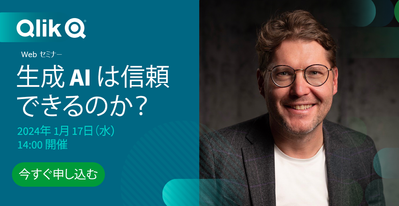
データは量から質への転換が求められる AI ブームの真っ只中、生成 AI は新たな生産性と発展の時代へ導く要素として期待が高まっています。期待を実現に変えるには、より優れた信頼できるデータを生成する新しいモデルが必要です。2024年のデータ・分析・AI のトレンドとは?競争優位性を高めるために押さえておくべきポイントとは? 来たる 1月 17日(水)、Qlik は「 Web セミナー:生成 AI は信頼できるのか?データは量から質の時代へ」を開催します。2024年のキーワードは、「信頼」です。ビジネスに影響をもたらすデータ・分析・AI のトップ 10 トレンドを探掘りしてご紹介します。 ※ 参加費無料。パソコン・タブレット・スマートフォンで、どこからでもご視聴いただけます。日本語字幕付きでお届けします。 ビジネスにおける AI の信頼性AI は、意思決定のスピードや精度の向上に革新をもたらします。従来型 AI と生成 AI を確実に活用するために必要な準備とは?押さえておくべきポ... Show Moreデータは量から質への転換が求められる
AI ブームの真っ只中、生成 AI は新たな生産性と発展の時代へ導く要素として期待が高まっています。期待を実現に変えるには、より優れた信頼できるデータを生成する新しいモデルが必要です。2024年のデータ・分析・AI のトレンドとは?競争優位性を高めるために押さえておくべきポイントとは?
来たる 1月 17日(水)、Qlik は「 Web セミナー:生成 AI は信頼できるのか?データは量から質の時代へ」を開催します。2024年のキーワードは、「信頼」です。ビジネスに影響をもたらすデータ・分析・AI のトップ 10 トレンドを探掘りしてご紹介します。
※ 参加費無料。パソコン・タブレット・スマートフォンで、どこからでもご視聴いただけます。日本語字幕付きでお届けします。
ビジネスにおける AI の信頼性
AI は、意思決定のスピードや精度の向上に革新をもたらします。従来型 AI と生成 AI を確実に活用するために必要な準備とは?押さえておくべきポイントをご紹介します。信頼できるデータ=価値あるデータ
データを 2 度収益化するには?
まず、データで収益の増加につながる意思決定の向上が可能になります。そして、データを取引可能な商品として確立することです。 -
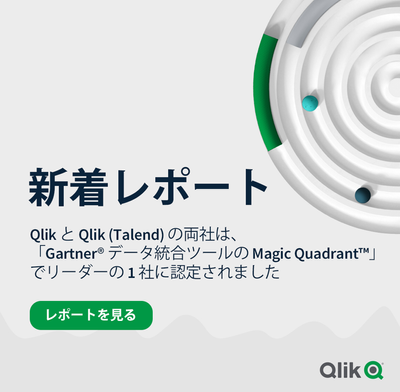
【新着レポート】Qlik と Talend の両社が データ統合分野でリーダーの 1 社に!
「2023年 Gartner® データ統合ツールの Magic Quadrant」が発表になりました。Gartner 社は 21 社のデータ統合ベンダーを評価し、Qlik と Talend の両社を データ統合分野でリーダーの 1 社に認定しました。Talend は、これで連続 8 年目になります。 本レポートで、データ統合市場の全容とツールの簡単比較、各企業が Gartner® 社の定める「ビジョンの完全性」と「実行能力」の基準に、どの程度適合しているのかをご確認いただけます。 リアルタイムのデータで、より迅速に優れたインサイトを獲得:広範なシステムから最新のデータを継続的に提供します。 素早くデータを提供:データウェアハウスおよびデータレイクを自動化して、迅速なアクションを促す、分析に適したデータを提供します。 信頼できるエンタープライズ対応データ:データの取り込みから公開まで、すべてのデータを正確で安全に保ち、カタログ化します。 レポートを見る -
Techspert Talks - Exploring Data Essentials with Qlik Cloud
Hi everyone, Want to stay a step ahead of important Qlik support issues? Then sign up for our monthly webinar series where you can get first-hand insights from Qlik experts. The Techspert Talks session from December looked at Exploring Data Essentials with Qlik Cloud. But wait, what is it exactly?Techspert Talks is a free webinar held every month, where you can hear directly from Qlik Techsperts on topics that are relevant to Customers and Partne... Show MoreHi everyone,
Want to stay a step ahead of important Qlik support issues? Then sign up for our monthly webinar series where you can get first-hand insights from Qlik experts.The Techspert Talks session from December looked at Exploring Data Essentials with Qlik Cloud.
But wait, what is it exactly?
Techspert Talks is a free webinar held every month, where you can hear directly from Qlik Techsperts on topics that are relevant to Customers and Partners today.In this session, we cover:
- Navigating the Qlik Cloud Hub
- Leveraging Collaboration tools
- Best practices for finding insights
Click on this link to see the presentation.

-
Get Your Digital Badge as a Data Expert!
Learn More and Register to get started and save your spot today!
-
Qlik Sense Hub and QMC with a custom SSL certificate
If you’ve just installed Qlik Sense Enterprise, then this image probably looks familiar. Alternatively, Chrome might display The site's security certificate is not trusted, while Firefox may report This Connection is Untrusted. By default, Qlik Sense uses a self-signed certificate to enable HTTPS access across both the Hub (https:// YourSenseServer/hub) and the Management Console (https://YourSenseServer/qmc). But self-signed certificates cannot... Show MoreIf you’ve just installed Qlik Sense Enterprise, then this image probably looks familiar. Alternatively, Chrome might display The site's security certificate is not trusted, while Firefox may report This Connection is Untrusted.
By default, Qlik Sense uses a self-signed certificate to enable HTTPS access across both the Hub (https:// YourSenseServer/hub) and the Management Console (https://YourSenseServer/qmc). But self-signed certificates cannot be validated or trusted by web browsers and tend to prompt a warning message.
That's alright though. All we need is the following:
- An additional (signed) certificate.
- A brief (5 minute) downtime of the Qlik Sense Proxy.
- And, I suppose, this blog post for the instructions.
So, let’s get started.
What is the current certificate used for?
During the initial install, the Qlik Sense Repository Service creates a set of certificates. Their purpose is to:
- Secure Service Communication and Service Authentication.
Qlik Sense uses certificates to authenticate its service across all nodes. See the Qlik Sense Online Help for details. In addition, other products (such as Qlik NPrinting) require these certificates to be establish a connection.
- HTTPS enabled access for the Hub the QMC.
Note: We will not modify, replace, or remove the originally created certificates. Doing so will break service communication.
What we’ll do instead is to add an additional one.
Certificate options, or: What type of certificate is right for me?
There are three possible types of certificates for us to use.
- A certificate purchased from and signed by a trusted CA (Certificate Authority) such as VeriSign, Thawte, Geotrust, etc.
- A certificate provided and signed by your own Enterprise CA (Certificate Authority).
- And, of course, a self-signed one. Those can be created by any number of applications, such as Microsoft IIS, but is generally only recommended for test environments. More so, it has the potential side effect of teaching users to ignore browser warnings, which we do not want.
Requirements, or: What to look out for when getting your cert.
- The certificate itself must contain a private key
- Has an up to date valid from / valid to date range
- Is signed by a valid and OS or browser configured Certificate Authority
When support gets questions, they are most often related to a certificate missing the private key. Always verify the certificate comes bundled with one when you install it.
It’ll look like this:
As far as formats and algorithms are concerned, the following are confirmed to work with Qlik Sense:
- Certificates that are x509 version 3
- Use signature algorithm sha256RSA
- Use signature hash algorithm sha256
Where to get a certificate and how to do a CSR?
The Certificate Authority you chose will have instructions for this, and if you are looking to get a self-signed one or one from your corporation's CA, then a local administrator can provide the certificate to you.
Either way, you are going to need to generate a Certificate Signing Request (CSR) to pass on to your CA. There are tools out there to get that done with, such as certreq from Microsoft (found here), and SSLhopper has a great article on that, which I often send to customers when they ask us about CSRs and how to do them.
Once you obtain the certificate, we'll move on to installing it and activating it in Qlik Sense. This will be done in three quick steps:
- Import
- Get the Thumbprint
- Provide Thumbprint to the Proxy
Importing the Certificate
As mentioned before, we are not replacing certificates. The already existing ones will not be deleted. Doing so would break service authentication between the individual Qlik Sense services and render the system… broken.
Step 1:
On the Qlik Sense node running the Qlik Sense Proxy, log on with the user running the Sense services. This is important since the certificate needs to be accessible for this account.
Step 2:
If the certificate was saved in the .pfx format, then all you need to do is double click the file. Follow the prompt to import the certificate into the Personal store.
Longer Step 2:
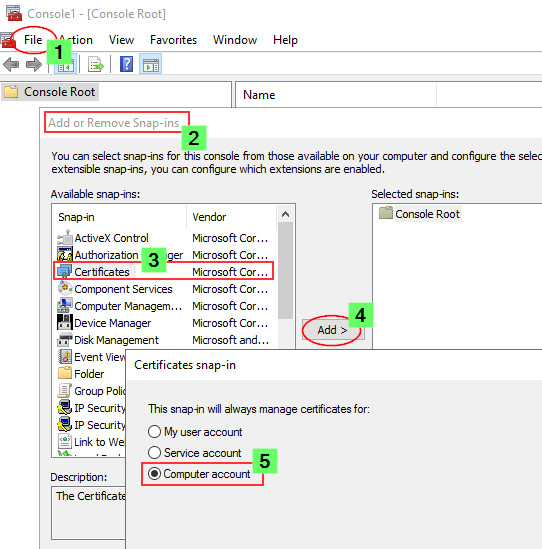
If you want to import it manually or verify if it was correctly installed, then we'll need to do a little more work.
- Launch the Microsoft Management Console (mmc.exe) on the Proxy node
- In the MMC, go to File > Add / Remove Snap-in...
- Select Certificates and click Add
- Select Computer account, click Next, select Local computer and click Finish
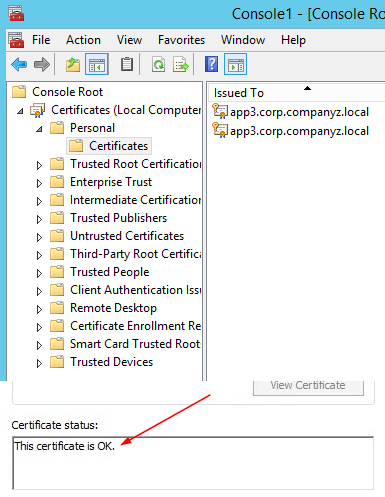
- In the MMC, go to Certificates (Local Computer)/Personal
- In the MMC, go to Actions > All Tasks > Import...
- Browse to the certificate file provided to you from your CA
- Follow the instructions on the screen to import the certificate, including the private key
- Verify the new certificate has been imported into Certificates (Local Computer) > Personal > Certificates and that it contains a private key
- Double-click the Certificate > Certification Path and confirm it shows "This certificate is OK"
Getting the Thumbprint
Well, since we are already in the MMC, let's open the freshly installed certificate again.
- Switch to the Details tab and scroll down until you find Thumbprint
- Mark the entire thing and copy it into, for example, Notepad.
Configuring the Qlik Sense ProxyAlmost done!
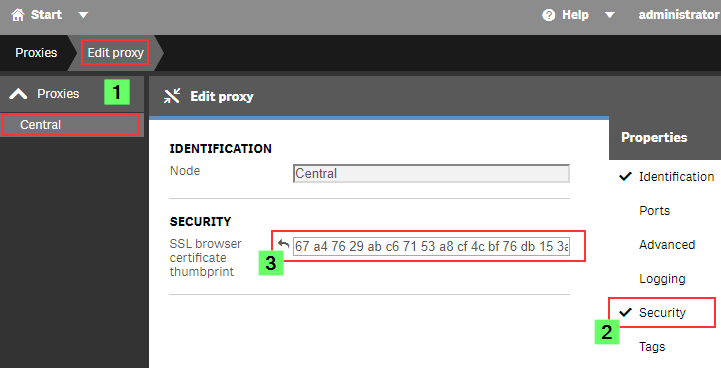
- Open the Qlik Sense Management Console (QMC)
- Go to Proxies
- Double click the Proxy you want to use (or select and choose Edit)
- Enable the Security options in the Properties panel on the right
- Paste the certificate Thumbprint into the SSL browser certificate thumbprint text box.
Click Apply.
The Sense Proxy will now restart. During the restart, it will be using Windows API calls to correctly bind the new certificate to its SSL ports.
Verification, or: How to prove the certificate was accepted.
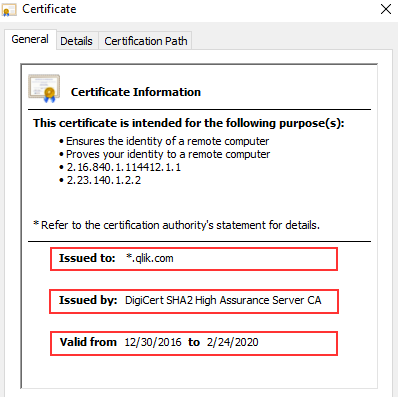
In the web browser:When opening the Qlik Sense Hub or QMC, the certificate will now be displayed in the browser. This may look different depending on the web browser, but in Google Chrome you can click the padlock to the left of the URL to verify what certificate is used.
The information displayed needs to match the properties of the certificate you installed.
In the log files:
If you’d rather see what the Qlik Sense Proxy service is doing, then you can directly check up on that, too.
On the Proxy node, go to C:\ProgramData\Qlik\Sense\Log\Proxy\Trace and open the Security log file from just after the last start.
It will now print a slightly different message than before:
Security.Proxy.Qlik.Sense.Common.Security.Cryptography.LoggingDigester DOMAIN\_service Setting crypto key for log file secure signing: success
Security.Proxy.Qlik.Sense.Common.Security.Cryptography.SecretsKey DOMAIN\_service retrieving symmetric key from cert: success
Security.Proxy.Qlik.Sense.Common.Security.Cryptography.CryptoKey DOMAIN\_service setting crypto key: success
Security.Proxy.Qlik.Sense.Communication.Security.CertSetup 'CN=localhost' (08C871933A58E072FED7AD65E2DB6D5AD3EAF9FA) as SSL certificate presented to browser, which is a 3rd party SSL certificate
And that's it!
There isn't much more to it in a standard Qlik Sense Enterprise installation, but if you have more questions, then maybe a few of these articles can help:
I applied my certificate and it seems to be using it correctly, but browsers are still saying the Common Name is Invalid?
ERR_CERT_COMMON_NAME_INVALID when using 3rd party certificate
Qlik Sense keeps reverting to the default and complains it can't find a valid ssl certificate with the thumbprint.
The certificate may not have a Private key or the service account does not have access to it.
How to: Manage Certificate Private Key
The Qlik Sense Service account doesn't have admin privileges and the certificate is not accepted.
I hope that this was useful 😊 Stay tuned for an upcoming post where we’ll focus on QlikView and how to enable HTTPS for its AccessPoint, and don’t forget to subscribe to this blog for more content delivered by #QlikSupport. We’ll be watching for your comments and questions and we’ll to get back to you as soon as possible. Your feedback is always appreciated.