Unlock a world of possibilities! Login now and discover the exclusive benefits awaiting you.

Featured Content
-
How to contact Qlik Support
Qlik offers a wide range of channels to assist you in troubleshooting, answering frequently asked questions, and getting in touch with our technical e... Show MoreQlik offers a wide range of channels to assist you in troubleshooting, answering frequently asked questions, and getting in touch with our technical experts. In this article, we guide you through all available avenues to secure your best possible experience.
For details on our terms and conditions, review the Qlik Support Policy.
Index:
- Support and Professional Services; who to contact when.
- Qlik Support: How to access the support you need
- 1. Qlik Community, Forums & Knowledge Base
- The Knowledge Base
- Blogs
- Our Support programs:
- The Qlik Forums
- Ideation
- How to create a Qlik ID
- 2. Chat
- 3. Qlik Support Case Portal
- Escalate a Support Case
- Phone Numbers
- Resources
Support and Professional Services; who to contact when.
We're happy to help! Here's a breakdown of resources for each type of need.
Support Professional Services (*) Reactively fixes technical issues as well as answers narrowly defined specific questions. Handles administrative issues to keep the product up-to-date and functioning. Proactively accelerates projects, reduces risk, and achieves optimal configurations. Delivers expert help for training, planning, implementation, and performance improvement. - Error messages
- Task crashes
- Latency issues (due to errors or 1-1 mode)
- Performance degradation without config changes
- Specific questions
- Licensing requests
- Bug Report / Hotfixes
- Not functioning as designed or documented
- Software regression
- Deployment Implementation
- Setting up new endpoints
- Performance Tuning
- Architecture design or optimization
- Automation
- Customization
- Environment Migration
- Health Check
- New functionality walkthrough
- Realtime upgrade assistance
(*) reach out to your Account Manager or Customer Success Manager
Qlik Support: How to access the support you need
1. Qlik Community, Forums & Knowledge Base
Your first line of support: https://community.qlik.com/
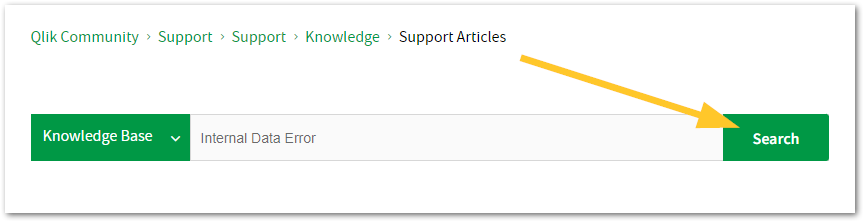
Looking for content? Type your question into our global search bar:
The Knowledge Base
Leverage the enhanced and continuously updated Knowledge Base to find solutions to your questions and best practice guides. Bookmark this page for quick access!
- Go to the Official Support Articles Knowledge base
- Type your question into our Search Engine
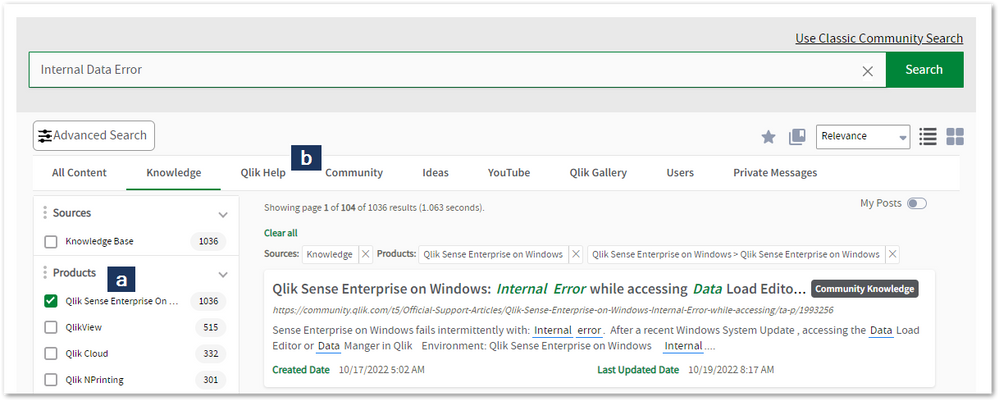
- Need more filters?
- Filter by Product
- Or switch tabs to browse content in the global community, on our Help Site, or even on our Youtube channel
Blogs
Subscribe to maximize your Qlik experience!
The Support Updates Blog
The Support Updates blog delivers important and useful Qlik Support information about end-of-product support, new service releases, and general support topics. (click)The Qlik Design Blog
The Design blog is all about product and Qlik solutions, such as scripting, data modelling, visual design, extensions, best practices, and more! (click)The Product Innovation Blog
By reading the Product Innovation blog, you will learn about what's new across all of the products in our growing Qlik product portfolio. (click)Our Support programs:
Q&A with Qlik
Live sessions with Qlik Experts in which we focus on your questions.Techspert Talks
Techspert Talks is a free webinar to facilitate knowledge sharing held on a monthly basis.Technical Adoption Workshops
Our in depth, hands-on workshops allow new Qlik Cloud Admins to build alongside Qlik Experts.Qlik Fix
Qlik Fix is a series of short video with helpful solutions for Qlik customers and partners.The Qlik Forums
- Quick, convenient, 24/7 availability
- Monitored by Qlik Experts
- New releases publicly announced within Qlik Community forums (click)
- Local language groups available (click)
Ideation
Suggest an idea, and influence the next generation of Qlik features!
Search & Submit Ideas
Ideation GuidelinesHow to create a Qlik ID
Get the full value of the community.
Register a Qlik ID:
- Go to register.myqlik.qlik.com
If you already have an account, please see How To Reset The Password of a Qlik Account for help using your existing account. - You must enter your company name exactly as it appears on your license or there will be significant delays in getting access.
- You will receive a system-generated email with an activation link for your new account. NOTE, this link will expire after 24 hours.
If you need additional details, see: Additional guidance on registering for a Qlik account
If you encounter problems with your Qlik ID, contact us through Live Chat!
2. Chat
Incidents are supported through our Chat, by clicking Chat Now on any Support Page across Qlik Community.
To raise a new issue, all you need to do is chat with us. With this, we can:
- Answer common questions instantly through our chatbot
- Have a live agent troubleshoot in real time
- With items that will take further investigating, we will create a case on your behalf with step-by-step intake questions.
3. Qlik Support Case Portal
Log in to manage and track your active cases in the Case Portal. (click)
Before you can access the Support Portal, please complete your Community account setup. See First time access to the Qlik Customer Support Portal fails with: Unauthorized Access Please try signing out and sign in again.
Please note: to create a new case, it is easiest to do so via our chat (see above). Our chat will log your case through a series of guided intake questions.
Your advantages:
- Self-service access to all incidents so that you can track progress
- Option to upload documentation and troubleshooting files
- Option to include additional stakeholders and watchers to view active cases
- Follow-up conversations
When creating a case, you will be prompted to enter problem type and issue level. Definitions shared below:
Problem Type
Select Account Related for issues with your account, licenses, downloads, or payment.
Select Product Related for technical issues with Qlik products and platforms.
Priority
If your issue is account related, you will be asked to select a Priority level:
Select Medium/Low if the system is accessible, but there are some functional limitations that are not critical in the daily operation.
Select High if there are significant impacts on normal work or performance.
Select Urgent if there are major impacts on business-critical work or performance.
Severity
If your issue is product related, you will be asked to select a Severity level:
Severity 1: Qlik production software is down or not available, but not because of scheduled maintenance and/or upgrades.
Severity 2: Major functionality is not working in accordance with the technical specifications in documentation or significant performance degradation is experienced so that critical business operations cannot be performed.
Severity 3: Any error that is not Severity 1 Error or Severity 2 Issue. For more information, visit our Qlik Support Policy.
Escalate a Support Case
If you require a support case escalation, you have two options:
- Request to escalate within the case, mentioning the business reasons.
To escalate a support incident successfully, mention your intention to escalate in the open support case. This will begin the escalation process. - Contact your Regional Support Manager
If more attention is required, contact your regional support manager. You can find a full list of regional support managers in the How to escalate a support case article.
Phone Numbers
When other Support Channels are down for maintenance, please contact us via phone for high severity production-down concerns.
- Qlik Data Analytics: 1-877-754-5843
- Qlik Data Integration: 1-781-730-4060
- Talend AMER Region: 1-800-810-3065
- Talend UK Region: 44-800-098-8473
- Talend APAC Region: 65-800-492-2269
Resources
A collection of useful links.
Qlik Cloud Status Page
Keep up to date with Qlik Cloud's status.
Support Policy
Review our Service Level Agreements and License Agreements.
Live Chat and Case Portal
Your one stop to contact us.




Recent Documents
-
How to create NPrinting GET and POST REST connections
NPrinting has a library of APIs that can be used to customize many native NPrinting functions outside the NPrinting Web Console. Environment: Qlik N... Show MoreNPrinting has a library of APIs that can be used to customize many native NPrinting functions outside the NPrinting Web Console.
Environment:
An example of two of the more common capabilities available via NPrinting APIs are as follows
- Connection reloads
- Publish Task executions
These and many other public NPrinting APIs can be found here: Qlik NPrinting API
In the Qlik Sense data load editor of your Qlik Sense app, two REST connections are required (These two REST Connectors must also be configured in the QlikView Desktop application>load where the API's are used. See Nprinting Rest API Connection through QlikView desktop)
- GET
- POST
Requirements of REST user account:
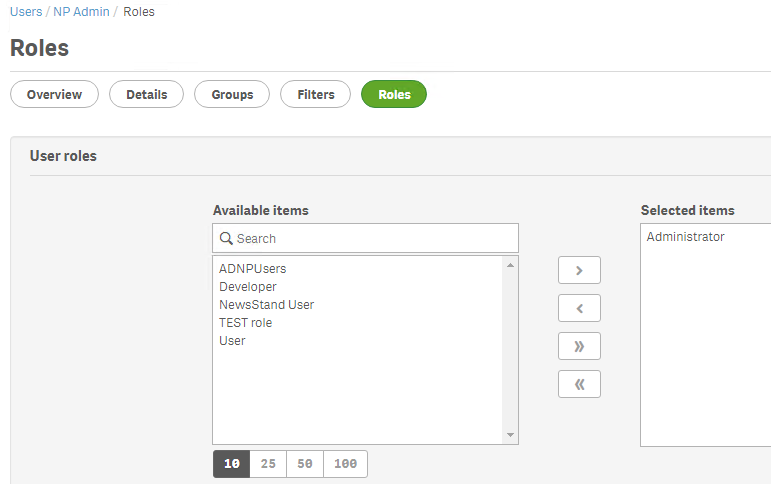
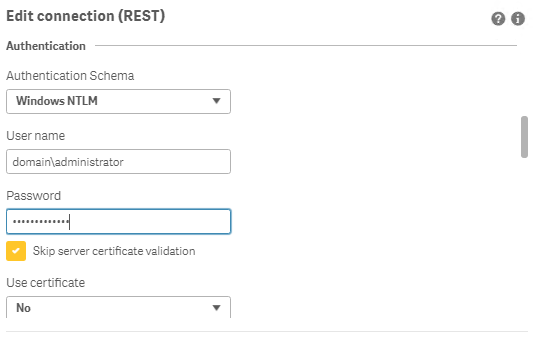
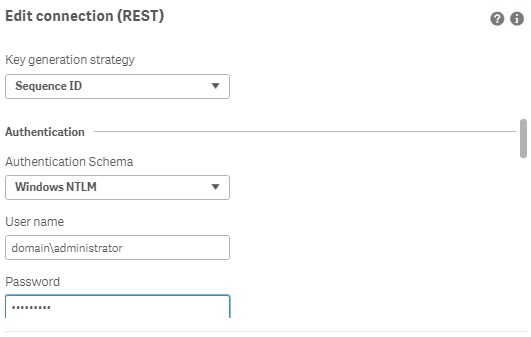
- Windows Authentication is required in both these connectors. The required user account is the NPrinting service account (which is also ROOTADMIN on the Qlik Sense server)
- This user account must also be a member of the NPrinting 'Administrators' Security Role on the NPrinting Server.
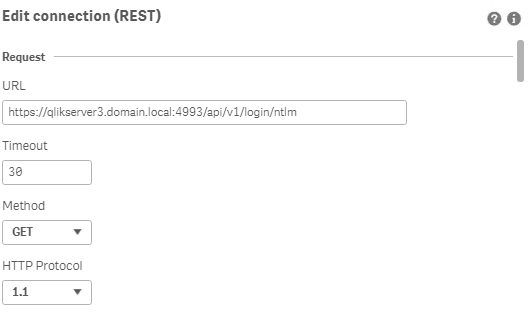
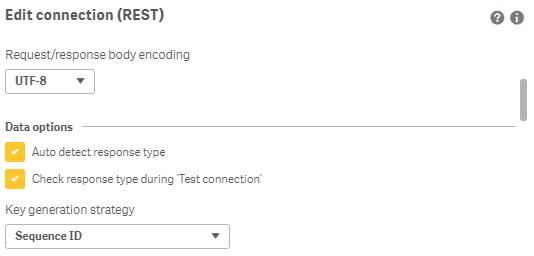
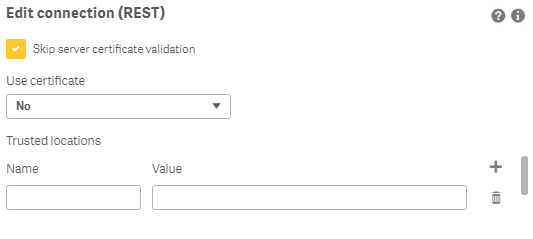
Creating REST "GET" connections
Note: Replace QlikServer3.domain.local with the name and port of your NPrinting Server
NOTE: replace domain\administrator with the domain and user name of your NPrinting service user account
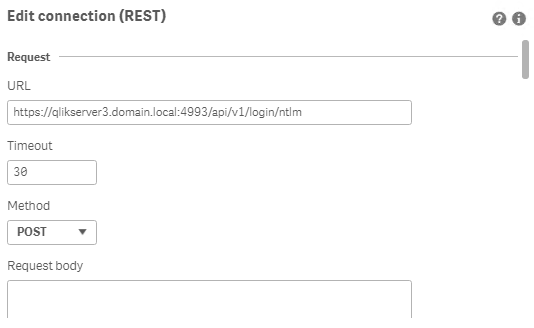
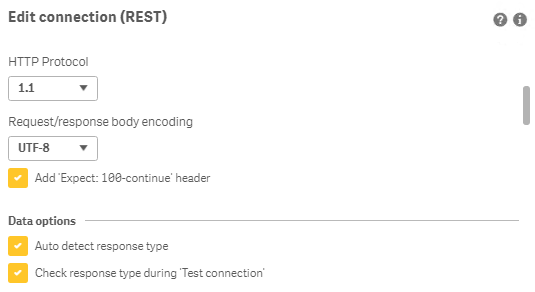
Creating REST "POST" connections
Note: Replace QlikServer3.domain.local with the name and port of your NPrinting Server
NOTE: replace domain\administrator with the domain and user name of your NPrinting service user account
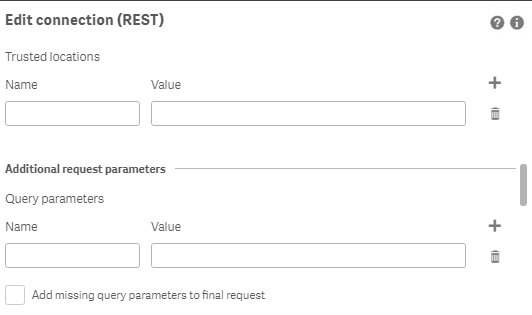
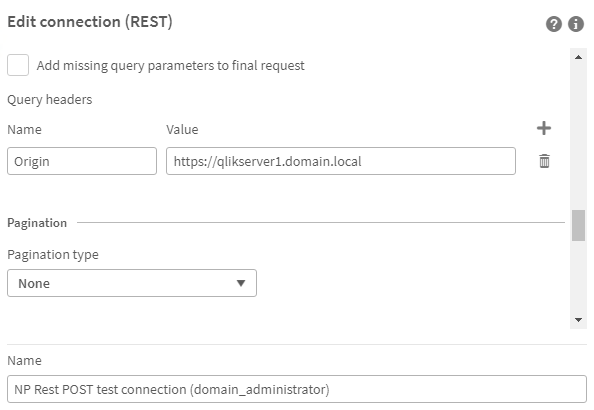
Ensure to enter the 'Name' Origin and 'Value' of the Qlik Sense (or QlikView) server address in your POST REST connection only.
Replace https://qlikserver1.domain.local with your Qlik sense (or QlikView) server address.
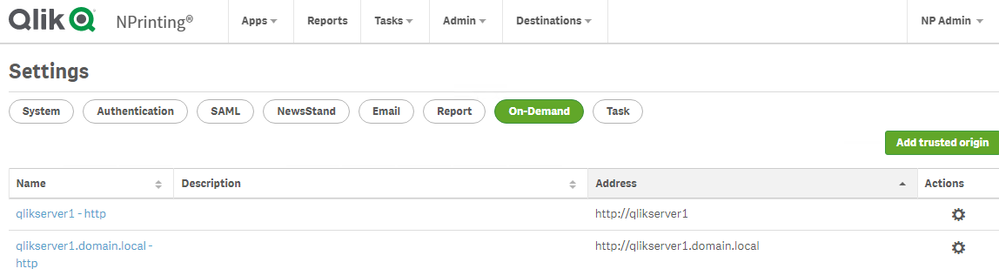
Ensure that the 'Origin' Qlik Sense or QlikView server is added as a 'Trusted Origin' on the NPrinting Server computer
Related Content
- Distribute NPrinting reports after reloading a Qlik App
- Extending Qlik NPrinting
- Run a Qlik NPrinting API POST command via QlikView reload script
- Troubleshooting Common NPrinting API Errors
NOTE: The information in this article is provided as-is and to be used at own discretion. NPrinting API usage requires developer expertise and usage therein is significant customization outside the turnkey NPrinting Web Console functionality. Depending on tool(s) used, customization(s), and/or other factors ongoing, support on the solution below may not be provided by Qlik Support.
-
How to Replace the Operations Monitor App
Take a backup of the app and data associated with the app: Export the existing Operations Monitor app via the QMC (Apps > More actions > Export). Ba... Show More- Take a backup of the app and data associated with the app:
- Export the existing Operations Monitor app via the QMC (Apps > More actions > Export). Backup to a safe location.
- Backup the QVD files in the Central Node Log directory (C:\ProgramData\Qlik\Sense\Log by default)
- Verify you have an Operations Monitor QVF file in the DefaultApps section of the Qlik installation directory (C:\ProgramData\Qlik\Sense\Repository\DefaultApps by default). Ask support for a copy for your version of Qlik Sense if you cannot locate the file.
- Write down any reload tasks associated with the app so that you can restore them later
- Write down the original owner of the app (should be the internal repository user, INTERNAL\sa_repository)
- Remove the Operations Monitor App and associated data files:
- Delete the Operations Monitor app via the QMC (Apps > Delete). This removes both the app and associated reload tasks.
- Delete the QVD files associated with the Operations Monitor App (governance*.qvd) in the Central Node Log directory (C:\ProgramData\Qlik\Sense\Log by default)
- Restart all Qlik Sense services.
- Re-import the Operations Monitor App from the installation directory:
- Locate the default Operations Monitor app in the DefaultApps section of the Qlik installation directory (C:\ProgramData\Qlik\Sense\Repository\DefaultApps by default)
- Import the app via the QMC (Apps > Import)
- Change ownership of the app to the same user as before (should have been the internal repository user, INTERNAL\sa_repository)
- Recreate any reload tasks noted from step 1
- Reload the app, and verify the app works as expected.
- Take a backup of the app and data associated with the app:
-
How to use task chaining with Qlik Automate
This article explains how to perform task chaining for your Qlik Cloud apps using Qlik Automate. It'll start with a simple app reload example and fin... Show More -
Qlik Sense Enterprise on Windows and Security Vulnerability CVE-2023-26136 (toug...
Is Qlik Sense Enterprise on Windows affected by the security vulnerability CVE-2023-26136 (nvd.nist.gov)? CVE-2023-26136 is a vulnerability detected i... Show MoreIs Qlik Sense Enterprise on Windows affected by the security vulnerability CVE-2023-26136 (nvd.nist.gov)?
CVE-2023-26136 is a vulnerability detected in Node.js, a third-party component used by Qlik Sense Enterprise on Windows. Security scans may flag the vulnerability in a Qlik Sense Enterprise on Windows environment.
While Qlik was not directly impacted, the affected third-party component has been updated across supported versions.
Qlik Sense versions up to the following would be flagged by security scans:
- Qlik Sense Enterprise on Windows May 2024 patch 23
- Qlik Sense Enterprise on Windows November 2024 patch 17
- Qlik Sense Enterprise on Windows May 2025 patch 5
Resolution
Upgrade to any of the following (or later) versions:
- Qlik Sense Enterprise on Windows May 2024 patch 24
- Qlik Sense Enterprise on Windows November 2024 patch 18
- Qlik Sense Enterprise on Windows May 2025 patch 6
- Qlik Sense Enterprise on Windows November 2025 IR, and all subsequent versions, such as May 2026 IR and upward
In some instances, the Qlik Sense patch installer updates service binaries but does not remove leftover node_modules folders from previous installations. The old request/node_modules/tough-cookie directories may still exist on disk even though the running service no longer uses them.
If you notice stale folders post-upgrade:
- Run the following PowerShell script as Administrator to clean up stale folders:
# Qlik Sense - tough-cookie stale folder cleanup # Run as Administrator after upgrading to v14.231.26 or later # Take a backup or snapshot before running Write-Host "Starting tough-cookie cleanup..." -ForegroundColor Cyan # Step 1 - Stop Service Dispatcher (this will stop all dependent Qlik Sense services) Stop-Service -Name "QlikSenseServiceDispatcher" -Force -ErrorAction SilentlyContinue Write-Host "Stopped: QlikSenseServiceDispatcher" -ForegroundColor Yellow Start-Sleep -Seconds 5 # Step 2 - Remove tough-cookie directories $paths = @( "C:\Program Files\Qlik\Sense\ConverterService\node_modules\tough-cookie", "C:\Program Files\Qlik\Sense\DownloadPrepService\node_modules\request\node_modules\tough cookie", "C:\Program Files\Qlik\Sense\MobilityRegistrarService\node_modules\request\node_modules\tough cookie", "C:\Program Files\Qlik\Sense\NotifierService\node_modules\request\node_modules\tough-cookie" ) foreach ($path in $paths) { if (Test-Path $path) { Remove-Item -Path $path -Recurse -Force Write-Host "Removed: $path" -ForegroundColor Green } else { Write-Host "Not found (already clean): $path" -ForegroundColor Gray } } Write-Host "`nCleanup complete. Restart Service Dispatcher manually to bring all services back online." -ForegroundColor CyanThis script may need to be re-run after any future Qlik Sense Enterprise on Windows patch or reinstallation, as the installer may restore these directories.
The script is provided as is and to be used at your own risk.
- Restart the Qlik Sense Service Dispatcher service
Internal Investigation ID(s)
- SUPPORT-2237
-
Quota is exceeded error displayed when publishing an app in Qlik Sense client-ma...
Publishing an app in a Qlik Sense Enterprise on Windows (client-managed) environment may fail with the error: Quota is exceeded Resolution Reduce the ... Show MorePublishing an app in a Qlik Sense Enterprise on Windows (client-managed) environment may fail with the error:
Quota is exceeded
Resolution
Reduce the size of files attached to the app. Alternatively, delete unnecessary files you have attached to it.
You can review what files you have attached to the app from the Qlik Sense Management Console:
- Open the Qlik Sense Management Console in a supported browser
- Go to Apps
- Locate and highlight the app you cannot publish
- Click Edit
- Open the App content menu tab on the right side of the screen; this will provide an overview of your attached files and how large they are.
You can now choose to review the files and reduce them in size, or: - Choose the file you wish to delete and click Delete
Cause
The maximum file size of an individual file attached to an app is 50 MB, while the maximum total size of files attached to the app (including image files uploaded to the media library) is 200 MB.
See Attaching data files and adding the data to the app for details.
Related Content
Attaching data files and adding the data to the app | Qlik Sense on Windows Help
Environment
- Qlik Sense Enterprise for Windows
-
How to Check the Patch Level of your Qlik Talend JobServer
There are two different ways to check the patch version of your Qlik Talend JobServer: Log in to your Qlik Talend Administration Center (TAC) and nav... Show MoreThere are two different ways to check the patch version of your Qlik Talend JobServer:
- Log in to your Qlik Talend Administration Center (TAC) and navigate to Conductor (A) > Servers (B)
The patch level can be found below the Server Version (C) column, as shown below.
The version will not be listed for any JobServers that are disconnected from Qlik Talend Administration Center. -
On the server that JobServer is installed, navigate to <JobServer>/agent
-
If the version of Talend JobServer is TPS-6002 (R2025-04) or higher, the patch level for JobServer can be found in the branding.properties file.
- If the branding.properties file is missing, then a lower version of Jobserver is being used. The full version can be found in <JobServer>/agent/lib and reviewing the org.talend.remote file extension name:
Example: org.talend.remote.server-8.0.2.20250129_0823_patch indicates the patch level is R2025-01 (TPS-6002)
-
Environment
- Qlik Talend Administration Center
- Log in to your Qlik Talend Administration Center (TAC) and navigate to Conductor (A) > Servers (B)
-
Qlik Compose Storage Zone Connection Failure Missing Hive JDBC Driver
After recreating the Amazon EMR cluster and updating the Storage Zone configuration in Qlik Compose with the new EMR master IP, the connection validat... Show MoreAfter recreating the Amazon EMR cluster and updating the Storage Zone configuration in Qlik Compose with the new EMR master IP, the connection validation failed with the following error:
Storage Zone connection failed
COMPOSE-E-ENGCONFAI
Java connection failed
SYS-E-GNRLERR, Required driver class not found:
com.simba.hive.jdbc41.HS2DriverThis issue caused the Storage Zone connection to fail, impacting data pipeline operations.
Resolution
- Verify that the required Hive JDBC driver (HiveJDBC41.jar) is present in the following directory on the Qlik Compose Agent server:
<Compose Install directory>/java/jdbc/ - Restart the Qlik Compose Agent service to ensure the driver is loaded:
sudo service compose-agent stop
sudo service compose-agent start - Validate the service is running:
sudo service compose-agent status
- Retest the Storage Zone connection in Qlik Compose UI, which succeeded after the restart.
Cause
The Hive JDBC driver (HiveJDBC41.jar) required for connecting to EMR HiveServer2 was either:
- Missing from the Compose Agent jdbc directory, or
- Added but not loaded because the Compose Agent service was not restarted
Qlik Compose does not dynamically load new JDBC drivers. The driver becomes available only after restarting the Compose Agent service.
See Prerequisites | Qlik Compose.
Environment
- Qlik Compose
- Verify that the required Hive JDBC driver (HiveJDBC41.jar) is present in the following directory on the Qlik Compose Agent server:
-
Qlik Enterprise Manager: patchendpoint API Error
QEM API used: PatchEndpointEndpoint for patching: SQL Server The following error occurs when trying to update the PatchEndpoint endpoint with the prop... Show MoreQEM API used: PatchEndpoint
Endpoint for patching: SQL ServerThe following error occurs when trying to update the PatchEndpoint endpoint with the prop value seen for the fields. The prop value seen for this endpoint is DO.SqlserverSettings.server.
{"error_code":"AEM_PATCH_ENDPOINT_INNER_ERR","error_message":"Failed to patch replication endpoint \"HS_MSSQL_ISOPROD\" from server \"dev\". Error \"SYS-E-HTTPFAIL, Failed to apply json-patch.\", Detailed error: \"SYS,GENERAL_EXCEPTION,Failed to apply json-patch,Failed to apply patch remove/replace for item '/db_settings/DO.SqlserverSettings.server'; item does not exist; Failed to apply json patch\"."}
Resolution
The correct prop value in this instance is 'server' for the server field. The prop value in this endpoint contains the combined value of the parent prop, while other endpoints will separate the parent prop value into its own parameter.
Sample JSON file with the correct prop value:
[
{ "op":"replace", "path":"/db_settings/server",
"value":"server_ip_address_here" }
]
Cause
SQL Server endpoint elements did not separate the parent prop value, leading to a misleading element inspection. The last part of the prop value is all that is needed for the JSON file.
Environment
- Qlik Enterprise Manager
-
Upgrading and unbundling the Qlik Sense Repository Database using the Qlik Postg...
In this article, we walk you through the requirements and process of how to upgrade and unbundle an existing Qlik Sense Repository Database (see suppo... Show MoreIn this article, we walk you through the requirements and process of how to upgrade and unbundle an existing Qlik Sense Repository Database (see supported scenarios) as well as how to install a brand new Repository based on PostgreSQL. We will use the Qlik PostgreSQL Installer (QPI).
For a manual method, see How to manually upgrade the bundled Qlik Sense PostgreSQL version to 12.5 version.
Using the Qlik Postgres Installer not only upgrades PostgreSQL; it also unbundles PostgreSQL from your Qlik Sense Enterprise on Windows install. This allows for direct control of your PostgreSQL instance and facilitates maintenance without a dependency on Qlik Sense. Further Database upgrades can then be performed independently and in accordance with your corporate security policy when needed, as long as you remain within the supported PostgreSQL versions. See How To Upgrade Standalone PostgreSQL.
Index
- Supported Scenarios
- Upgrades
- New installs
- Requirements
- Known limitations
- Installing anew Qlik Sense Repository Database using PostgreSQL
- Qlik PostgreSQL Installer - Download Link
- Upgrading an existing Qlik Sense Repository Database
- The Upgrade
- Next Steps and Compatibility with PostgreSQL installers
- How do I upgrade PostgreSQL from here on?
- Troubleshooting and FAQ
- Related Content
Video Walkthrough
Video chapters:
- 01:02 - Intro to PostgreSQL Repository
- 02:51 – Prerequisites
- 03:24 - What is the QPI tool?
- 05:09 - Using the QPI tool
- 09:27 - Removing the old Database Service
- 11:27 - Upgrading a stand-alone to the latest release
- 13:39 - How to roll-back to the previous version
- 14:46 - Troubleshooting upgrading a patched version
- 18:25 - Troubleshooting upgrade security error
- 21:15 - Additional config file settings
Supported Scenarios
Upgrades
The following versions have been tested and verified to work with QPI:
Qlik Sense February 2022 to Qlik Sense November 2024.
If you are on a Qlik Sense version prior to these, upgrade to at least February 2022 before you begin.
Qlik Sense November 2022 and later do not support 9.6, and a warning will be displayed during the upgrade. From Qlik Sense August 2023 a upgrade with a 9.6 database is blocked.
New installs
The Qlik PostgreSQL Installer supports installing a new standalone PostgreSQL database with the configurations required for connecting to a Qlik Sense server. This allows setting up a new environment or migrating an existing database to a separate host.
Requirements
- Review the QPI Release Notes before you continue
-
Using the Qlik PostgreSQL Installer on a patched Qlik Sense version can lead to unexpected results. If you have a patch installed, either:
- Uninstall all patches before using QPI (see Installing and Uninstalling Qlik Sense Patches) or
- Upgrade to an IR release of Qlik Sense which supports QPI
- The PostgreSQL Installer can only upgrade bundled PostgreSQL database listening on the default port 4432.
- The user who runs the installer must be an administrator.
- The backup destination must have sufficient free disk space to dump the existing database
- The backup destination must not be a network path or virtual storage folder. It is recommended the backup is stored on the main drive.
- There will be downtime during this operation, please plan accordingly
- If upgrading to PostgreSQL 14 and later, the Windows OS must be at least Server 2016
Known limitations
- (Limitation removed in QPI 2.1 | Release Notes) Cannot migrate a 14.17 embedded database to a standalone
- (Limitation removed in QPI 2.1 | Release Notes) Using QPI to upgrade a standalone database or a database previously unbundled with QPI is not supported.
- The installer itself does not provide an automatic rollback feature.
Installing a new Qlik Sense Repository Database using PostgreSQL
- Run the Qlik PostgreSQL Installer as an administrator
- Click on Install
- Accept the Qlik Customer Agreement
- Set your Local database settings and click Next. You will use these details to connect other nodes to the same cluster.
- Set your Database superuser password and click Next
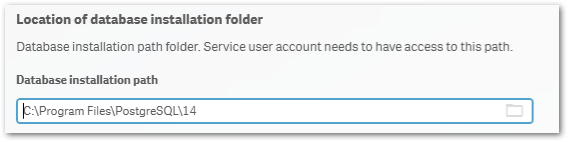
- Set the database installation folder, default: C:\Program Files\PostgreSQL\14
Do not use the standard Qlik Sense folders, such as C:\Program Files\Qlik\Sense\Repository\PostgreSQL\ and C:\Programdata\Qlik\Sense\Repository\PostgreSQL\.
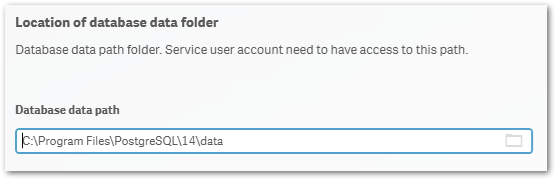
- Set the database data folder, default: C:\Program Files\PostgreSQL\14\data
Do not use the standard Qlik Sense folders, such as C:\Program Files\Qlik\Sense\Repository\PostgreSQL\ and C:\Programdata\Qlik\Sense\Repository\PostgreSQL\.
- Review your settings and click Install, then click Finish
- Start installing Qlik Sense Enterprise Client Managed. Choose Join Cluster option.
The Qlik PostgreSQL Installer has already seeded the databases for you and has created the users and permissions. No further configuration is needed. - The tool will display information on the actions being performed. Once installation is finished, you can close the installer.
If you are migrating your existing databases to a new host, please remember to reconfigure your nodes to connect to the correct host. How to configure Qlik Sense to use a dedicated PostgreSQL database
Qlik PostgreSQL Installer - Download Link
Download the installer here.Qlik PostgreSQL installer Release Notes
Upgrading an existing Qlik Sense Repository Database
The following versions have been tested and verified to work with QPI (1.4.0):
February 2022 to November 2023.
If you are on any version prior to these, upgrade to at least February 2022 before you begin.
Qlik Sense November 2022 and later do not support 9.6, and a warning will be displayed during the upgrade. From Qlik Sense August 2023 a 9.6 update is blocked.
The Upgrade
- Stop all services on rim nodes
- On your Central Node, stop all services except the Qlik Sense Repository Database
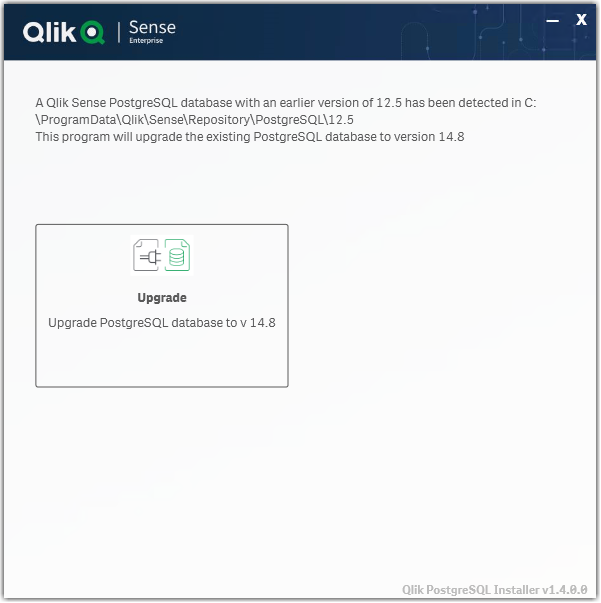
- Run the Qlik PostgreSQL Installer. An existing Database will be detected.
- Highlight the database and click Upgrade
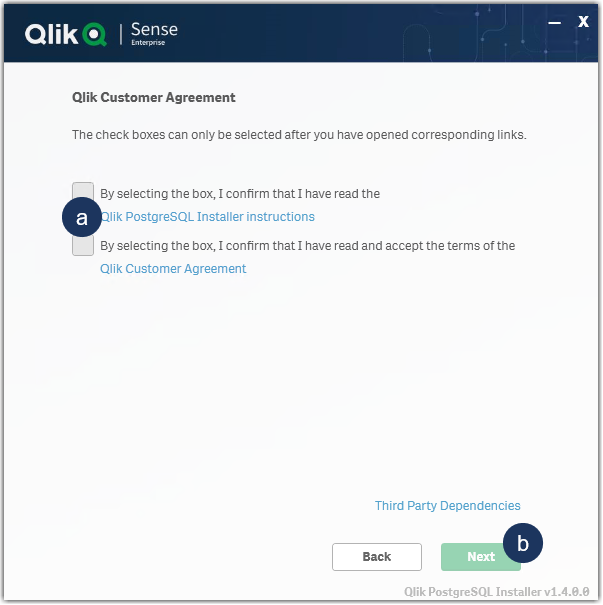
- Read and confirm the (a) Installer Instructions as well as the Qlik Customer Agreement, then click (b) Next.
- Provide your existing Database superuser password and click Next.
- Define your Database backup path and click Next.
- Define your Install Location (default is prefilled) and click Next.
- Define your database data path (default is prefilled) and click Next.
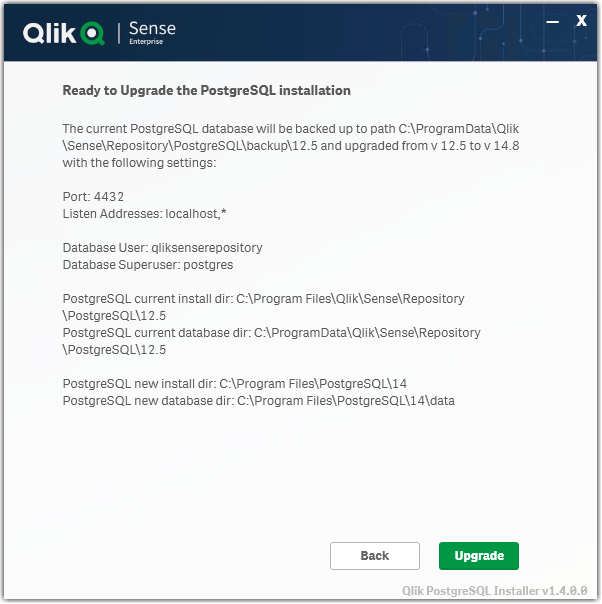
- Review all properties and click Upgrade.
The review screen lists the settings which will be migrated. No manual changes are required post-upgrade. - The upgrade is completed. Click Close.
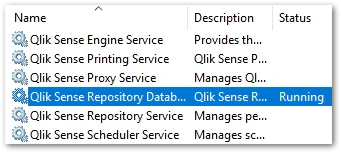
- Open the Windows Services Console and locate the Qlik Sense Enterprise on Windows services.
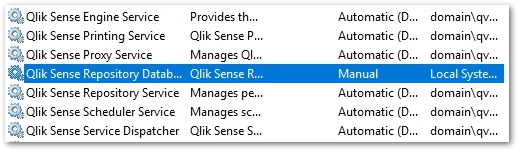
You will find that the Qlik Sense Repository Database service has been set to manual. Do not change the startup method.
You will also find a new postgresql-x64-14 service. Do not rename this service.
- Start all services except the Qlik Sense Repository Database service.
- Start all services on your rim nodes.
- Validate that all services and nodes are operating as expected. The original database folder in C:\ProgramData\Qlik\Sense\Repository\PostgreSQL\X.X_deprecated
-
Uninstall the old Qlik Sense Repository Database service.
This step is required. Failing to remove the old service will lead the upgrade or patching issues.
- Open a Windows File Explorer and browse to C:\ProgramData\Package Cache
- From there, search for the appropriate msi file.
If you were running 9.6 before the upgrade, search PostgreSQL.msi
If you were running 12.5 before the upgrade, search PostgreSQL125.msi - The msi will be revealed.
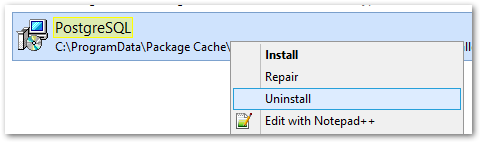
- Right-click the msi file and select uninstall from the menu.
- Open a Windows File Explorer and browse to C:\ProgramData\Package Cache
- Re-install the PostgreSQL binaries. This step is optional if Qlik Sense is immediately upgraded following the use of QPI. The Sense upgrade will install the correct binaries automatically.
Failing to reinstall the binaries will lead to errors when executing any number of service configuration scripts.
If you do not immediately upgrade:
- Open a Windows File Explorer and browse to C:\ProgramData\Package Cache
- From there, search for the .msi file appropriate for your currently installed Qlik Sense version
For Qlik Sense August 2023 and later: PostgreSQL14.msi
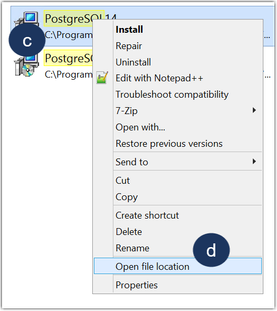
Qlik Sense February 2022 to May 2023: PostgreSQL125.msi - Right-click the file
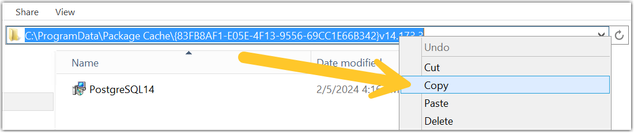
- Click Open file location
- Highlight the file path, right-click on the path, and click Copy
- Open a Windows Command prompt as administrator
- Navigate to the location of the folder you copied
Example command line:
cd C:\ProgramData\Package Cache\{GUID}
Where GUID is the value of the folder name. - Run the following command depending on the version you have installed:
Qlik Sense August 2023 and later
msiexec.exe /qb /i "PostgreSQL14.msi" SKIPINSTALLDBSERVICE="1" INSTALLDIR="C:\Program Files\Qlik\Sense"
Qlik Sense February 2022 to May 2023
msiexec.exe /qb /i "PostgreSQL125.msi" SKIPINSTALLDBSERVICE="1" INSTALLDIR="C:\Program Files\Qlik\Sense"
This will re-install the binaries without installing a database. If you installed with a custom directory adjust the INSTALLDIR parameter accordingly. E.g. you installed in D:\Qlik\Sense then the parameter would be INSTALLDIR="D:\Qlik\Sense".
- Open a Windows File Explorer and browse to C:\ProgramData\Package Cache
- Finalize the process by updating the references to the PostgreSQL binaries paths in the SetupDatabase.ps1 and Configure-Service.ps1 files. For detailed steps, see Cannot change the qliksenserepository password for microservices of the service dispatcher: The system cannot find the file specified.
If the upgrade was unsuccessful and you are missing data in the Qlik Management Console or elsewhere, contact Qlik Support.
Next Steps and Compatibility with PostgreSQL installers
Now that your PostgreSQL instance is no longer connected to the Qlik Sense Enterprise on Windows services, all future updates of PostgreSQL are performed independently of Qlik Sense. This allows you to act in accordance with your corporate security policy when needed, as long as you remain within the supported PostgreSQL versions.
Your PostgreSQL database is fully compatible with the official PostgreSQL installers from https://www.enterprisedb.com/downloads/postgres-postgresql-downloads.
How do I upgrade PostgreSQL from here on?
See How To Upgrade Standalone PostgreSQL, which documents the upgrade procedure for either a minor version upgrade (example: 14.5 to 14.8) or a major version upgrade (example: 12 to 14). Further information on PostgreSQL upgrades or updates can be obtained from Postgre directly.
Troubleshooting and FAQ
- If the installation crashes, the server reboots unexpectedly during this process, or there is a power outage, the new database may not be in a serviceable state. Installation/upgrade logs are available in the location of your temporary files, for example:
C:\Users\Username\AppData\Local\Temp\2
A backup of the original database contents is available in your chosen location, or by default in:
C:\ProgramData\Qlik\Sense\Repository\PostgreSQL\backup\X.X
The original database data folder has been renamed to:
C:\ProgramData\Qlik\Sense\Repository\PostgreSQL\X.X_deprecated - Upgrading Qlik Sense after upgrading PostgreSQL with the QPI tool fails with:
This version of Qlik Sense requires a 'SenseServices' database for multi cloud capabilities. Ensure that you have created a 'SenseService' database in your cluster before upgrading. For more information see Installing and configuring PostgreSQL.
See Qlik Sense Upgrade fails with: This version of Qlik Sense requires a _ database for _.
To resolve this, start the postgresql-x64-XX service.
The information in this article is provided as-is and to be used at own discretion. Depending on tool(s) used, customization(s), and/or other factors ongoing support on the solution below may not be provided by Qlik Support. The video in this article was recorded in a earlier version of QPI, some screens might differ a little bit.
Related Content
Qlik PostgreSQL installer version 1.3.0 Release Notes
Techspert Talks - Upgrading PostgreSQL Repository Troubleshooting
Backup and Restore Qlik Sense Enterprise documentation
Migrating Like a Boss
Optimizing Performance for Qlik Sense Enterprise
Qlik Sense Enterprise on Windows: How To Upgrade Standalone PostgreSQL
How-to reset forgotten PostgreSQL password in Qlik Sense
How to configure Qlik Sense to use a dedicated PostgreSQL database
Troubleshooting Qlik Sense Upgrades -
Installing Drivers for your Qlik Data Gateway
Purpose The purpose of this post is to help you install the database drivers necessary to allow your Qlik Data Gateway to communicate with your compa... Show MorePurpose
The purpose of this post is to help you install the database drivers necessary to allow your Qlik Data Gateway to communicate with your company's servers once you have completed the Qlik Data Gateway installation itself.
Background
If you are anything like me, perhaps you panicked a bit at the thought of installing the Qlik Data Gateway in a Linux environment. I have a lot of experience with .EXE installations in Windows environments. You know "Next – Next – Next – Finish." But an .RPM file? I had never even see that extension type before. If you were a Linux connoisseur beforehand, you probably guessed that my image for this post is an homage to the Fedora flavor of Linux. Otherwise you just thought it was an advertisement for the new "Raiders of the Lost Data" movie.
In any event, by now you have created your first Data Gateway, applied the registration key, completed the setup instructions and thankfully the command to check your Data Gateway service shows that it is running.
When you go back to the Data Gateway section of the Management Console and do a refresh your eyes fill you with happiness because your brand spanking new Data Movement Gateway shows "Connected.”
A lesser person would go celebrate right now. But you've decided to try and connect to a source before doing your happy dance. So, you create a new Data Integration project to the destination of your choice. While you will ultimately have many different data sources, let's imagine that you decide to start with a "SQL Server (Log Based)" connection, as your first source test.
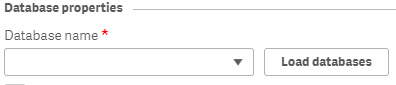
You input the server connection details, but your SQL Server doesn't use a standard port for security. Finally, you find information online that you should input your server IP followed by a "comma and the port #". As an example, if your servers IP is 39.30.3.1 and your security port is 12345 you would input "39.30.3.1,12345'. Next you input the user and password credentials. Your last step is to choose the database. Easy peezy, lemon squeezey. Right?
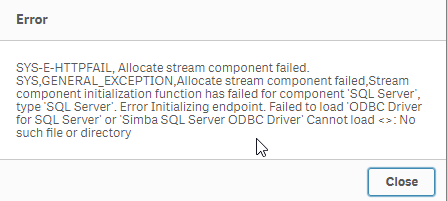
You press the "Load databases" button but suddenly a dialog comes up telling you that the Data Gateway can't connect because it can't find a SQL Server driver.
Driver Installation
Your heart starts beating quickly but naturally as a pro, you remain calm on the outside. Eventually you realize that whether on Windows or Linux, applications have always required drivers to communicate with servers. This is nothing new, we just got excited when we saw that connected message and thought we were done. Upon going back to the setup guide
you realize that there is in fact a link labeled "Setting up Data Gateway – Data Movement source connections."
So, you go ahead and click the link and it takes you to:
Wow, so many sources, and so many additional links to click to ensure the required drivers are in place for the sources your company will need. All the documentation is there, but I know firsthand that it can get a bit overwhelming, especially if Linux isn't your native language, which is the reason for this post.
Obviously every one of you reading this works in an environment that may require different data source connections than the others. Thus, there is no way for me to predict and help with your exact configuration. However, odds are strong that most of you likely require at least: SQL Server, Databricks, Snowflake, Postgres or MySQL, various combinations of them, or perhaps all of them.
As tedious, or imposing as it may be, I highly recommend you walk through the documentation for each data source you will need. But thanks to my buddy John Neal, I have attached a Linux shell script that can be executed to configure all 5 of those data sources for you. Given the many flairs and versions and configurations of Linux I can't ensure that it will work for everyone, but at least it is a start for those that may want to press an easy button, and those that like me may be somewhat or brand new to Linux.
If you choose to take advantage of it, understand that it is only being offered a shelp, and is not meant to replace the documentation. To utilize it you will need to do the following (Please note in my examples I have changed to the root user. If you are logged in as a normal user account, you may need to use SUDO "super user do"):
- Copy the attached "repldrivers-el7.sh.txt" file your Linux home directory where you placed the gateway .RPM file.
- Change the file name to simply be "repldrivers-el7.sh" so that it's clear that it is a shell script in case you or others see it in the future.
- Issue the following command from your prompt: "chmod 775 repldrivers-el7.sh" so that the file has the appropriate security allowing it to be executed.
- Issue the following command from your prompt: "./ repldrivers-el7.sh"
- Issue the following command from your prompt: "cd /etc"
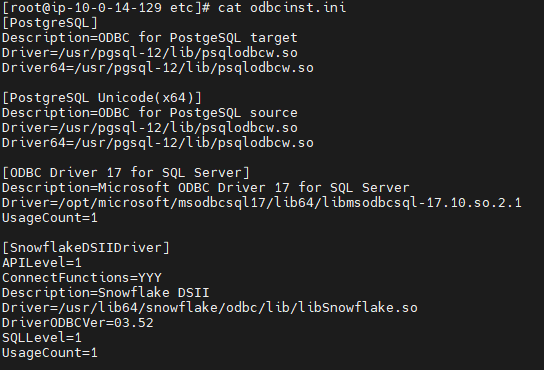
- Issue the following command from your prompt: "/etc/odbcinst.ini"
If all went well with the installation your output should look like similar to the following image that was part of my file:
It's almost time to do our happy dance, but let's hold off until we test. In my starting example I asked you to assume we wanted to test against a "SQL Server (Log Based) connection." When we left off it was because we got an error message we had no driver while trying to load the list of databases. I will try that again.
Oh no, the heart rate is going up again.
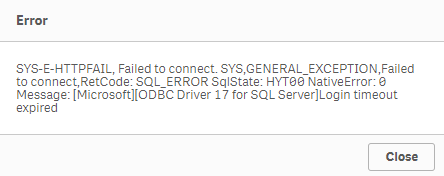
We have successfully installed the Qlik Data Gateway. We have successfully installed the required drivers. Yet, we are getting this new error message. Let's focus on our breathing and try and digest the situation. What could cause our attempt to connect to our data source to timeout? I got it.
It's likely network security. We know what we want to talk to. We know the location. We know the credentials. But our networks aren't always wide open to do the talking. Resolving your connectivity/firewall issues may or not be with your abilities and if you are like me, you may need to seek the help of your IT/Networking team.
When I reached out to my friendly IT guru, here within Qlik, he was able to help me get everything in place so that my Linux server could speak with my database servers, including all of the needed ports.
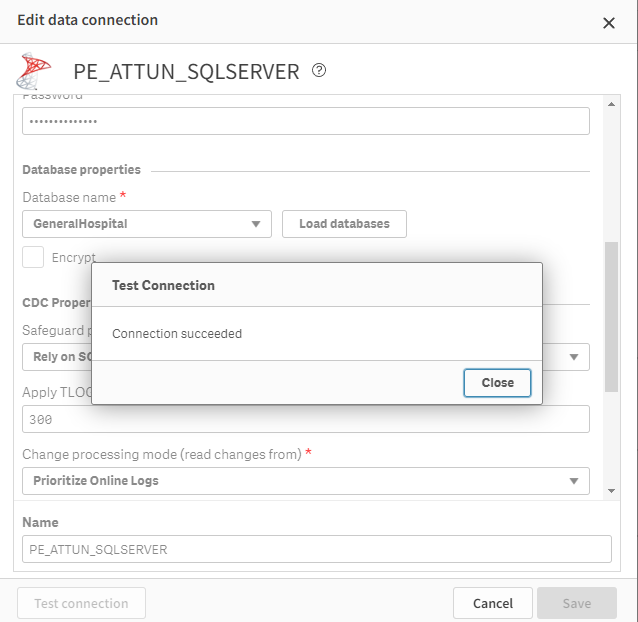
Once they were completed I was able to test and sure enough my data connection succeeded.
Whether or not you do a happy dance, as I did, I hope that this post has helped you get to that sweet smell of success. After all, someone has to be known as the amazing person who got your Qlik Data Gateway going so that others in the Data Engineering team could create all of those lights out Qlik Cloud Data Integration projects that would be feeding data in near real time to all of those wonderul analytics use cases. Hopefully with the help of the documentation and this post, that person is you my friends.
Challenge
One of the things I've long admired about the Qlik Community is their willingness to help each other through this Community site. If you are a Linux guru and are so inclined I would love to see you share other versions of the shell script that I have started. Maybe your organization is using another flair/version of Linux and you needed to make a few tweaks to my file. Maybe your organization needed Oracle added and you can tweak my file. Whatever the reason, I sure hope you will give back to the community by sharing all of those tweaks here. Who knows, your help might help them be able to do their happy dance. And we all know the world is a better place when more people do their happy dance.
Related Content
Qlik Data Gateway - Data Movement prerequisites and Limitations - https://help.qlik.com/en-US/cloud-services/Subsystems/Hub/Content/Sense_Hub/Gateways/dm-gateway-prerequisites.htm
Setting up the Data Movement gateway - https://help.qlik.com/en-US/cloud-services/Subsystems/Hub/Content/Sense_Hub/Gateways/dm-gateway-setting-up.htm
PS - I created both of the images here using a generative AI solution called MidJourney. I hope they've added to the fun of this post.
-
How to identify end user Client Browser, OS, Device and IP address in Qlik Sense
Is there any option to find out, which Browser, OS, Device and IP address of our users using to log in to Qlik Sense production system? Can this data ... Show MoreIs there any option to find out, which Browser, OS, Device and IP address of our users using to log in to Qlik Sense production system? Can this data be found in the Qlik Sense monitoring apps or Qlik Sense logs?
Note that this article covers the historic analysis of data and does not include how to identify access live and have Sense react accordingly.
Environments:Qlik Sense any versionMethod 1, using the Qlik Sense Proxy logs
This method requires for the Proxy log files logging level to be increased, and for Extended Security Environment to be enabled. Extended Security Environment has consequences in the environment, such as disabling the potential of sharing sessions across multiple devices. See the Qlik Online help for details.
Settings to Enable:- In the Qlik Sense Management Console, select the required Proxy
- Navigate to Logging
- Set the Audit Log level to Debug
- In the Qlik Sense Management Console, select the required Virtual Proxy
- Navigate to Advanced
- Enable "Extended Security Environment"
The proxy will now log additional information in:
C:\ProgramData\Qlik\Sense\Log\Proxy\Trace\[Server_Name]_Audit_Proxy
Example Output:
Audit.Proxy.Proxy.Core.Connection.ConnectionData [X-Qlik-Security, OS=Windows; Device=Default; Browser=Chrome 67.0.3396.99; IP=::ffff:172.16.16.100; ClientOsVersion=10.0; SecureRequest=true; LicenseContext=UserAccess; Context=AppAccess; ] || [X-Qlik-User, UserDirectory=DOMAIN; UserId=administrator]
For more information on where to find the logs see
How To Collect Qlik Sense Log FilesMethod 2, using the Qlik Sense HubService logs
A much more lighter-weight approach than method 1 would be to parse the HubService logs in C:\ProgramData\Qlik\Sense\Log\HubService. No additional settings are required.
Example Output:::ffff:192.168.56.1 - - [31/May/2019:12:36:40 +0000] "GET /about HTTP/1.1" 304 - "https://SERVERNAME/hub/?qlikTicket=9mDlmVfE-E1Nc3RT" "Mozilla/5.0 (Windows NT 10.0; Win64; x64) AppleWebKit/537.36 (KHTML, like Gecko) Chrome/74.0.3729.169 Safari/537.36"
-
About the deprecation of Qlik Analytics charts
Qlik constantly refines its Analytics, over time replacing old charts with new, modernized alternatives. These deprecations are announced well in adva... Show MoreQlik constantly refines its Analytics, over time replacing old charts with new, modernized alternatives. These deprecations are announced well in advance and include instructions on how best to replace these old charts, whether that is to use a new one, several new ones, or to make use of new settings.
As an example, seven visualization bundle charts are scheduled for deprecation in May 2027, most of which have already been removed from the asset panel and are no longer in use in recent applications. See Upcoming deprecation of Qlik Analytics charts in May 2027.
What do I use instead?
Charts that are up for deprecation are often no longer in use. However, if you happen to still have a very old application and need to replace it, see Visualization bundle > Deprecated charts for more information on what to use instead. The list will be updated whenever a new set of charts is deprecated.
How do I find out if my apps are using the deprecated charts?
Qlik recommends reviewing your apps for old charts. Depending on your platform (Qlik Cloud or Client-managed), there are different methods you can deploy.
Qlik Cloud
Qlik Cloud administrators should use the Qlik Cloud Monitoring Apps to track the usage. The App Analyzer has a sheet dedicated to where deprecated charts are being used on a tenant in Qlik Cloud. The App Analyzer is based on usage events rather than scanning every app. Use the App Analyzer to find which apps and sheets have charts that need to be updated to newer and more modern alternatives. The easiest way to install and update the Qlik Cloud Monitoring Apps is to use the automation template. If you already have the App Analyzer, just remove the automation and install a new one to get the latest version of the App Analyzer.
Client-managed
For client-managed installations, use the Monitoring apps. The Content Monitor app has a sheet for tracking deprecated charts. At reload, the Content Monitor app scans every app in the installation in order to list all applications and sheets that are using charts that are being deprecated. It also lists the installed extensions and their deprecation status. The Monitoring apps are bundled with the Qlik Analytics installation. The first version with the new sheet will be included in the May 2026 release. If you want to track usage in prior versions, the deprecated chart usage scanner will also be available on the product download page.
Environment
- Qlik Cloud Analytics
- Qlik Sense Enterprise on Windows
-
Qlik Sense Analytics: Unable to sort measures when using chart function
In Qlik Sense Enterprise Analytics, using the Above() function in a measure can lead to unexpected behavior when sorting; when a measure includes the ... Show MoreIn Qlik Sense Enterprise Analytics, using the Above() function in a measure can lead to unexpected behavior when sorting; when a measure includes the Above() function, sorting (including other measures on the same chart or table) is not supported.
Example:
In the following Straight Table, the third column (Running Total) uses an expression in its measure to calculate a running total by adding the previous row's value.
rangesum(above(Sum(SalesAmount),0,RowNo()))
In this case, you cannot change the sorting order to ascending or descending for the second column, "Sum(sales)", or the third column, "Running Total", since the Above() function is used in the third column.
This is working as designed:
Sorting on y-values in charts or sorting by expression columns in tables is not allowed when the chart function (Above, Below, Bottom, Column, Dimensionality) is used in any of the chart's expressions. These sort alternatives are therefore automatically disabled. When you use this chart function in a visualization or table, the sorting of the visualization will revert back to the sorted input to this function.
Source: Above - chart function | Limitations
Resolution
As a workaround, you can use a structured (sort) parameter in the Aggr() function.
For example, you change the expression like the following:
sum(Aggr(Rangesum(Above(Sum(SalesAmount),0,rowno())),(SalesAmount, (Numeric, Ascending)) ))Now you can change the sort to ascending or descending order in measure columns.
However, it does not recalculate based on the new sorting order due to a limitation of the Aggr() function, which returns results based on the calculated hypercube. The expression (Numeric, Ascending) part will have to be modified in order to reflect another sort order if necessary.
Internal Investigation ID(s)
SUPPORT-9243
Environment
- Qlik Sense Enterprise on Windows
- Qlik Cloud
-
Qlik Talend Studio: Error tDataStewardshipTaskInput unable to connect to Talend ...
Qlik Talend Studio job fails connecting to the Data Stewardship Application in Qlik Talend Cloud with the error below: tDataStewardshipTaskInput_1 Una... Show MoreQlik Talend Studio job fails connecting to the Data Stewardship Application in Qlik Talend Cloud with the error below:
tDataStewardshipTaskInput_1 Unable to connect to Talend Data Stewardship.
java.io.IOException: Unable to connect to Talend Data Stewardship.Caused by: java.net.UnknownHostException: No such host is known (tds.eu.cloud.talend.com)
Resolution
To resolve this issue:-
Intermittent UnknownHostException can be caused by regional service outages. Check the Talend Cloud Status page for any ongoing incidents.
- Verify that you are targeting the correct URL for your account's data center.
Example: For the AWS EU region, the valid URL is https://tds.eu.cloud.talend.com
If your account is in a different region (US or Asia), replace eu with the correct code, such as us or ap.
See Talend Cloud Regions documentation to verify your specific data center's URLs. - Verify your network and proxy configuration:
- Check Proxy Settings: If you are behind a corporate firewall or proxy, Qlik Talend Studio or the Remote Engine may not be able to "see" the external URL.
In Qlik Talend Studio, go to Window > Preferences > General > Network Connections and configure your proxy. - Allowlist URLs: Ensure your network team has added *.cloud.talend.com to your organization's firewall allowlist. All required allowlist URLs can also be found in the Talend Cloud Regions documentation
- Check Proxy Settings: If you are behind a corporate firewall or proxy, Qlik Talend Studio or the Remote Engine may not be able to "see" the external URL.
- If you have verified all the above, but are still seeing the issue, you may be seeing other network-related issues, such as with DNS.
- Test name resolution: Run a command-line test to see if your OS can resolve the host:
Windows: nslookup tds.eu.cloud.talend.com
Linux/Mac: dig tds.eu.cloud.talend.com or ping tds.eu.cloud.talend.com - Flush DNS Cache: If the manual test fails, try flushing your DNS cache or restarting the application to clear any "bad" cached entries.
- Test name resolution: Run a command-line test to see if your OS can resolve the host:
Cause
This error indicates that the Qlik Talend Studio job was unable to resolve the hostname to an IP address at that instant, in this case, Qlik Talend Cloud Data Stewardship.
Environment
- Qlik Talend Studio
- Qlik Talend Cloud
-
-
Qlik Direct Access Gateway: 1.7.13.0 installation stuck. "Microsoft Visual C++ 1...
Installing Qlik Data Gateway v1.7.13.0 on Windows may fail. The installation remains stuck in a loop. The system first requires a restart of Windows, ... Show MoreInstalling Qlik Data Gateway v1.7.13.0 on Windows may fail. The installation remains stuck in a loop.
The system first requires a restart of Windows, but will not complete the installation afterwards. Instead, a Microsoft Visual C++ Redistributable Modify Setup prompt will be displayed:
Whatever option is chosen, a new pop-up appears stating, 'Please restart your system before running the Qlik Data Gateway - Direct access installation'. This will restart the loop.
Resolution
Install v1.7.14.0 when available.
If it's necessary to perform a new installation in the meantime, use v1.7.11.0.
Cause
This is a known defect (SUPPORT-8964) affecting v1.7.13.0.
Internal Investigation ID(s)
SUPPORT-8964
Environment
- Qlik Direct Access Gateway
-
Qlik NPrinting and the CVE-2025-32433 Erlang/OTP vulnerability
Erlang/Open Telecom Platform (OTP) has disclosed a critical security vulnerability: CVE-2025-32433. Is Qlik NPrinting affected by CVE-2025-32433? Reso... Show MoreErlang/Open Telecom Platform (OTP) has disclosed a critical security vulnerability: CVE-2025-32433.
Is Qlik NPrinting affected by CVE-2025-32433?
Resolution
Qlik NPrinting installs Erlang OTP as part of the RabbitMQ installation, which is essential to the correct functioning of the Qlik NPrinting services.
RabbitMQ does not use SSH, meaning the workaround documented in Unauthenticated Remote Code Execution in Erlang/OTP SSH is already applied. Consequently, Qlik NPrinting remains unaffected by CVE-2025-32433.
All future Qlik NPrinting versions from the 20th of May 2025 and onwards will include patched versions of OTP and fully address this vulnerability.
Environment
- Qlik NPrinting

-
Qlik Replicate: Improving Databricks ODBC resilience with EnableRetryWithoutRetr...
This article documents how to improve Databricks ODBC resilience with the EnableRetryWithoutRetryAfterHeader parameter. Content Why does settingEnabl... Show MoreThis article documents how to improve Databricks ODBC resilience with the EnableRetryWithoutRetryAfterHeader parameter.
Content
- Why does settingEnableRetryWithoutRetryAfterHeader matter?
- The Default Retry Behavior
- Retry behavior withEnableRetryWithoutRetryAfterHeader
- When to apply EnableRetryWithoutRetryAfterHeader
- How to enableEnableRetryWithoutRetryAfterHeader
- Prerequisites
- Configuration
- Errors addressed byEnableRetryWithoutRetryAfterHeader
- HTTP 503 with No Retry-After Header (SqlState: 08S01)
- Delta Transaction Log Truncation (SqlState: 42K03)
The Databricks ODBC driver parameter EnableRetryWithoutRetryAfterHeader is a connection-level setting that controls how the driver responds to server-side failures when the server does not include a Retry-After HTTP header in its response.
By default, this parameter is disabled (0). When enabled (1), it instructs the driver to retry failed requests, even in the absence of explicit retry guidance from the server. This makes pipelines significantly more resilient to transient service disruptions and recoverable error conditions that would otherwise cause tasks to stall indefinitely.
The EnableRetryWithoutRetryAfterHeader parameter is available with driver version 2.9.1+.
Why does setting EnableRetryWithoutRetryAfterHeader matter?
The Default Retry Behavior
The Databricks ODBC driver includes built-in retry logic to handle transient failures. However, by default, this logic only activates when the server includes a Retry-After header in the error response (the standard HTTP signal that tells a client how long to wait before retrying).
In practice, not all Databricks server error responses include this header. When it is absent:
- The driver has no retry signal to act on
- The failure is treated as terminal rather than transient
- The request is abandoned entirely
- Tables dependent on that connection enter a queued state with no further progress
This gap between intent (retry on recoverable errors) and behavior (skip retry without the header) is the source of a class of pipeline failures that can be difficult to diagnose because the driver produces no additional retry activity. It simply stops.
Retry behavior with EnableRetryWithoutRetryAfterHeader
Setting EnableRetryWithoutRetryAfterHeader=1 closes the retry gap. The driver no longer requires the Retry-After header to be present before retrying. Instead, it applies its retry logic to all eligible failures, using a built-in backoff strategy, regardless of whether the server explicitly instructs it to do so.
The practical benefits are:
- Transient 503 errors are recovered automatically: temporary service unavailability no longer causes immediate task failure
- Recoverable Delta read errors are retried: failures that would succeed on a subsequent attempt are allowed to do so
- Queue buildup is prevented: tables are not left stranded in a queued state due to a single unretried failure
- Pipeline stability improves without changes to data architecture or retention policies
When to apply EnableRetryWithoutRetryAfterHeader
This parameter should be considered a standard configuration for any Databricks ODBC connection where pipeline reliability is a priority, particularly in environments that:
- Process high volumes of tables or run long-duration tasks
- Are subject to Delta Lake log retention policies
- Connect to Databricks endpoints that may return 503 responses during maintenance windows or high-load periods
- Have previously experienced unexplained queued states or stalled tasks
How to enable EnableRetryWithoutRetryAfterHeader
Prerequisites
- Databricks ODBC Driver version 2.9.1 or higher (parameter is not available in earlier versions)
- Recommended: upgrade to version 2.9.2 or later for the most stable behavior
Configuration
Add the following to the Databricks Delta endpoint connection using the following internal parameter:
additionalConnectionProperties=EnableRetryWithoutRetryAfterHeader=1No other changes to the connection string or data architecture are required.
Errors addressed by EnableRetryWithoutRetryAfterHeader
The following errors are direct indicators that the driver encountered a failure without retry-header guidance. Both have been observed to be resolved by enabling the parameter.
HTTP 503 with No Retry-After Header (SqlState: 08S01)
RetCode: SQL_ERROR
SqlState: 08S01
NativeError: 124
Message: [Simba][Hardy] (124) A 503 response was returned but no Retry-After header was provided. Original error: HTTP Response code 503,
TEMPORARILY_UNAVAILABLE: HTTP Response code: 503 [1022502]
Alternative:
RetCode: SQL_ERROR SqlState: 08S01 NativeError: 124 Message: [Simba][Hardy] (124) A 503 response was returned but no Retry-After header was provided. Original error: UnknownWhat is happening: The Databricks service returned an HTTP 503 Service Unavailable, a standard, transient condition signaling that the server is temporarily unable to handle the request. The correct behavior is to wait briefly and retry.
Why it fails without the parameter: The driver's retry mechanism is waiting for a Retry-After header that was not included in the response. Without it, the driver takes no retry action and the connection is treated as a hard failure.
How the parameter helps: With EnableRetryWithoutRetryAfterHeader=1, the driver retries the request using its internal backoff strategy, allowing the pipeline to recover transparently from the temporary service disruption.
Delta Transaction Log Truncation (SqlState: 42K03)
RetCode: SQL_ERROR
SqlState: 42K03
NativeError: 35
Message: [Simba][Hardy] (35) Error from server: error code: '0'error message: 'org.apache.hive.service.cli.HiveSQLException:Error running query: [DELTA_TRUNCATED_TRANSACTION_LOG]
com.databricks.sql.transaction.tahoe.DeltaFileNotFoundException:[DELTA_TRUNCATED_TRANSACTION_LOG]
Unable to reconstruct state at version 16 as the transaction log has been truncated due to manual deletion or the log retention policy (delta.logRetentionDuration=30 days) and checkpoint retention policy
(delta.checkpointRetentionDuration=2 days)What is happening: Delta Lake could not reconstruct the table state because the transaction log had been truncated, either through manual deletion or by the log retention policy (delta.logRetentionDuration=30 days) and checkpoint retention policy (delta.checkpointRetentionDuration=2 days). The required log file (00000000000000000000.json) was no longer present, preventing reconstruction of the state at version 16.
Why it fails without the parameter: When the driver encounters a server-side error response without a Retry-After header, it does not retry. Conditions that may be transiently recoverable, such as a momentary log unavailability, are never reattempted, and the task stalls.
How the parameter helps: Enabling retries allows the driver to reattempt the read operation, recovering from transient log access issues that do not persist beyond the initial attempt.
Environment
- Qlik Replicate
-
Security fix for Qlik Talend Administration Center cross-site scripting vulnerab...
Executive Summary A stored cross-site scripting security issue in the Qlik Talend Administration Center has been identified. This issue was resolved ... Show MoreExecutive Summary
A stored cross-site scripting security issue in the Qlik Talend Administration Center has been identified. This issue was resolved in a patch, which is already available.
This issue was discovered by Ahsan.
Affected Software
All versions of Qlik Talend Administration Center before Patch_20260123_QTAC-1883 (cumulative patch)_R2026-01_v1-8.0.1 are affected.
Severity Rating
Using the CVSS V3.1 scoring system (https://nvd.nist.gov/vuln-metrics/cvss), this issue is rated medium.
Vulnerability Details
CVE-2026-pending
Severity: CVSS:3.1/AV:N/AC:L/PR:L/UI:R/S:C/C:L/I:L/A:N: (5.4 Medium)
A stored cross-site scripting vulnerability has been found in Qlik Talend Administration Center. An attacker with permission to manage servers can store an XSS payload that can be triggered by a different user.
Resolution
Upgrade at the earliest. The following table lists the patch versions addressing the vulnerability (CVE-2026-pending).
Always update to the latest version. Before you upgrade, check if a more recent release is available.
Product Patch Release Date Qlik Talend Administration Center QTAC-1883 January 23, 2026 -
Security fix for Qlik Talend Administration Center URL access control vulnerabil...
Executive Summary A broken access control issue has been identified in Qlik Talend Administration Center, which allows a user with View permission to... Show MoreExecutive Summary
A broken access control issue has been identified in Qlik Talend Administration Center, which allows a user with View permission to modify the Qlik Talend Studio update URL. This issue was resolved in a patch, which is already available.
This issue was discovered by Kaushik Roy.
Affected Software
All versions of Qlik Talend Administration Center before Patch_20251121_QTAC-1471_R2025-11_v1-8.0.1.
Severity Rating
Using the CVSS V3.1 scoring system (https://nvd.nist.gov/vuln-metrics/cvss), this issue is rated high.
Vulnerability Details
CVE-2026-pending
Severity: CVSS:3.1/AV:N/AC:H/PR:L/UI:N/S:C/C:H/I:H/A:N: (8.2 High)
A broken access control issue has been identified in the Qlik Talend Administration Center, which allows a user with View permission to modify the Qlik Talend Studio update URL. This could be exploited to download malicious software to a Qlik Talend Studio instance.
Resolution
Upgrade at the earliest. The following table lists the patch versions addressing the vulnerability (CVE-2026-pending).
Always update to the latest version. Before you upgrade, check if a more recent release is available.
Product Patch Release Date Qlik Talend Administration Center QTAC-1471 November 21, 2025 -
Qlik Talend Administration Center: Update jdbc driver jar caused NoSuchFileExcep...
After updating the SQL Server JDBC driver in the Talend Administration Center (TAC), executing metaservlet calls to associate task results in a deploy... Show MoreAfter updating the SQL Server JDBC driver in the Talend Administration Center (TAC), executing metaservlet calls to associate task results in a deployment failure. The system specifically fails because it is still searching for the old driver version, resulting in a NoSuchFileException.
Resolution
To resolve the dependency conflict and refresh the application cache, follow these steps:
- Verify JAR Location and ensure the new JDBC JAR file exists only in the following directory:
/talend/tac/apache-tomcat/webapps/tac/WEB-INF/lib/Do not keep multiple versions or duplicates in other library folders to avoid classpath conflicts.
- Stop the Qlik Talend Administration Center service and Tomcat instance
- Clear Tomcat Cache
Since Tomcat caches compiled JSP files and session data, manually clear the work and temp directories by renaming the current folders:
- tomcat/work > tomcat/work_bak
- tomcat/temp > tomcat/temp_bak
- Create new, empty work and temp folders
- Start the Qlik Talend Administration Center service
Tomcat will rebuild the cache using the current libraries present in the WEB-INF/lib folder.
Cause
The error indicates that although the old driver was removed from the file system, Qlik Talend Administration Center (or the underlying Tomcat container) still holds a reference to the deleted JAR file. This suggests a caching issue within the Tomcat application server.
Environment
- Qlik Talend Administration Center
- Verify JAR Location and ensure the new JDBC JAR file exists only in the following directory: