Unlock a world of possibilities! Login now and discover the exclusive benefits awaiting you.

Analytics & AI
Forums for Qlik Analytic solutions. Ask questions, join discussions, find solutions, and access documentation and resources.
Data Integration & Quality
Forums for Qlik Data Integration solutions. Ask questions, join discussions, find solutions, and access documentation and resources
Explore Qlik Gallery
Qlik Gallery is meant to encourage Qlikkies everywhere to share their progress – from a first Qlik app – to a favorite Qlik app – and everything in-between.
Qlik Community
Get started on Qlik Community, find How-To documents, and join general non-product related discussions.
Qlik Resources
Direct links to other resources within the Qlik ecosystem. We suggest you bookmark this page.
Qlik Academic Program
Qlik gives qualified university students, educators, and researchers free Qlik software and resources to prepare students for the data-driven workplace.
Recent Blog Posts
-
Do you have what it takes to be a Qlik Academic Program Educator Ambassador?
The Qlik Academic Program provides educators, students, and researchers from accredited universities with free Qlik software and learning resources to... Show MoreThe Qlik Academic Program provides educators, students, and researchers from accredited universities with free Qlik software and learning resources to educate and train the next generation of experts leading with data. Our Educator Ambassador Program aims to shine a spotlight on our most active educator members. Our ambassadors will champion our vision to make more students data literate and to prepare them for the data-driven workplace.
Are you a current educator member who is:
- Passionate about the Qlik Academic Program and all of the program resources
- Dedicated to preparing students for the data-driven workplace
- An active promotor of the Qlik Academic Program to academic peers as well as students
- Willing to share your experience of the Qlik Academic Program at (virtual) events, in forums, on social media, and in the press
- A contributor to blogs, forums, university publications, professional journals, papers, or other materials that promote the Qlik Academic Program
If you answered YES to one or more of the above, then we encourage you to apply to the Educator Ambassador Program! Learn more and apply now!
All current educator members are eligible to apply. If you have not already signed up for the Qlik Academic Program, you can do so at qlik.com/company/academic-program and then check out our current 2024 Educator Ambassadors.
Application Deadline: The application deadline is November 15 2024, and the new class of ambassadors will be announced in early 2024.
Ambassador Benefits:
If you are selected as a Qlik Academic Program Educator Ambassador, you will receive a host of benefits including:
- Insight: Exclusive webinars with Qlik leaders, customers, and partners covering the latest trends in analytics and other industry topics
- Credibility: A digital badge to certify ambassador status and a featured online profile
- Exposure: Outreach opportunities to showcase your experience with the Qlik Academic Program via Qlik marketing channels or speaking engagements
- Perks: Discounts on Qlik events and other exclusive rewards
- Community: Network and collaborate with other educators across various fields and geographies
- Opportunity: Potential to advance your career, including meeting university requirements for scholarly contribution beyond the classroom
-
New Straight Table Enhancements
The new straight table, found in the Qlik Visualization bundle, has two new enhancements in Qlik Cloud. The first is expression-based text styling and... Show MoreThe new straight table, found in the Qlik Visualization bundle, has two new enhancements in Qlik Cloud. The first is expression-based text styling and the second is measure modifiers. Let’s look at how these new enhancements can be used.
With the first enhancement, columns in a straight table can be styled based on an expression. This is done in the properties of a column in the Text style expression.
There are four styles that can be applied in the expression. They are:
- Bold: <b> or <B>
- Italics: <i> or <I>
- Underlined: <u> or <U>
- Strikethrough: <s> or <S>
In the expression, the style can be in written in uppercase or lowercase letters and it should be enclosed in single quotes. Here is an example of an expression that can be used to bold the text in the Customer column if the Customer is Boombastic.
The results in the table look like this:
To bold all the text in the Customer column, '<b>' can be used in text style expression without the if statement.
In the example below, the text in the Discount column and the Product Name column is strikethrough if the discount is equal to 0. The same expression below is used in both columns to format the text.
Text styles can also be combined in an expression. In the example below, the text is bold, italicized and underlined if the Sales value is greater than $1,000. Notice that all the style codes are included in the single quotes.
Multiple styles can be used in the same expression based on different criteria as well. For example, Sales values can be bold if over $1,000 and strikethrough if under $100.
While text styles can be combined, use with care and use the text styles to highlight something in the data, not clutter it.
The second enhancement of the new straight table are measure modifiers. Modifiers are not new to Qlik Sense, but they are new to the straight table. In the properties of a measure, there is an option to add a modifier. The four modifier options are: accumulation, moving average, difference and relative numbers (see image below). When a modifier is selected, other modifier settings will be made available for developers to edit as needed.
Let’s look at each modifier briefly. The accumulation modifier will accumulate the measure value over dimension(s). In the table below, the Sales – Accumulation value will accumulate over the Year Month dimension.
The moving average modifier will average the measure value over a specified period. In the properties below, the moving average modifier is set to full. Also notice the output expression which shows the expression used for the modified measure – this is available for all modifier options.
With these settings, the results off the modifier will look like the table below. With every row, the Sales value is included to calculate the new moving average.
The difference modifier will display the difference between the measure value as seen in the table below. In this case, the difference between the previous row and current row values.
The relative numbers modifier will display relative percentages that can change based on the properties selected. In the example below, the year 2023 is selected. If the selection scope is set to current selections, then the resulting table will show the percentages for 2023 only.
If the selection is disregarded, then the percentages ignore the 2023 selection and show percentages across all the month year timeframes. Below in the resulting table, the percentages are a lot lower since they are across a larger dataset.
To learn more about these enhancements, check out Qlik help using the links below.
Thanks,
Jennell
-
Qlik Sense May 2024 (Client-Managed) now available!
Visualizations and dashboards Add the Styling option to add Background Color Opacity The color picker gets an opacity control! By adding this feature,... Show MoreVisualizations and dashboards
Add the Styling option to add Background Color Opacity
The color picker gets an opacity control! By adding this feature, we are making it easier to adjust the transparency of the color with the new addition and option to utilize slider functionality. Here are some use cases that you may find this feature very useful:
- Allow the sheet background to shine and make a statement along with the data you’re showing!
- Add more elegance to stacked charts
For those of you who will stick to hex codes, don’t worry – we made that easier too! Moving forward, you’ll be able to paste your codes with or without the “#” symbol.
Cyclic Dimensions
Cyclic master dimensions introduce a novel dimension type, empowering users to select dimensions from a group and seamlessly switch them across the entire application. Unlike drill-down groups, cyclic dimensions lack a hierarchical structure, yet they resemble alternative dimensions, extending their influence app-wide. By employing cyclic dimensions, valuable app and screen space is conserved, allowing a series of charts to offer multifaceted analyses. For instance, transitioning from temporal to geographical or product category-based measures is effortless. Toggling the dimension is facilitated either through a button action or axis label. Additionally, with cyclic dimensions, naming the levels within cyclic and drill-down groups becomes possible. Engine functions exist to query the group's state, aiding in the creation of dimension-dependent measures or indicating the state through labels.
Table ImprovementsWe continue to improve on the new Straight table and Pivot table because they are not only classics, but they’re also favorites!
- Straight Table
- Smaller columns
- URL links
- Pivot Table
- Dimension limits
- Measure formatting
- Text alignment, dimension and measures values and titles
- Null value styling measures
- URL links
Button Enhancement
The following navigation enhancement has been added to the Button: “Go to Sheet: specify chart”. Check out some of the bulleted use cases below where this will come in handy:
- Navigating to a specific chart
- Single page design
- Jump to Section
- Back to top
Hyperlinks for new tables
Finally, you now have the options to display values as clickable links within dimension columns, for both the straight and pivot tables!
*Part of the visualizations bundle
Move quick sheet navigation arrows from sheet header!
When hiding the sheet title, the sheet navigation buttons will be available in the selection bar instead of being hidden.
Connectivity
SAP ODP Connector for Qlik Windows
Like our Qlik Cloud Data Integration provides multiple methods of capturing data from your SAP system. This release enhances existing capture methods with support for SAP ODP. The ODP connector provides connectivity to the SAP ODP framework, enabling data capture from multiple types of data artifacts such as Extractors, CDS views, BW objects, and SAP HANA Information views.
Hub & Engine
Preload Apps Functionality
Available now in Qlik Sense is the ability for customers to configure and schedule the preloading of apps! This has been a highly requested feature and rightfully so, customers can improve their end-users experience by making datasets nearly immediately available within an application (especially useful for larger apps) upon utilizing the preload functionality.
To make the management of these tasks intuitive and seamless, within the Qlik Management Console you will now find new Support options for the following: Preload Tasks: Create, Edit & Delete
Qlik Connect 2024
Get the skills needed to be a data and analytics wizard. Workshops are filling up. Now’s the time. Join us for 2+ days of learning, networking, and the biggest party Qlik has ever thrown with exclusive access to Universal Islands of Adventure this June 3-5 in Orlando, FL at Qlik Connect. Register Today -
HELLO SalesAI
Historically, customer service and account representatives have had access to content from various departments to support them and their education. Bu... Show MoreHistorically, customer service and account representatives have had access to content from various departments to support them and their education. But merely having access to this content isn’t enough; traditional search methods are highly time-consuming and can lead to key details slipping through the cracks. So, what’s the solution?
It’s practicing what we preach. Qlik is now using Qlik Answers internally to support our customer-facing teams – equipping them with a tool to enhance customer satisfaction and improve productivity.
SalesAI is a generative AI asistant leveraging new sales and marketing knowledge bases created within Qlik Answers. This means SalesAI isn’t web scraping for information – this tool solely generates answers from trusted Qlik documents, helping sales and service teams provide relevant and explainable answers to customers in seconds.
Since launching on July 29th, thousands of questions have already been asked – confirming that it’s a game-changer. But what exactly is it used for? Here are three key benefits to SalesAI:
- Immediate Answers
Imagine you’re about to engage with a manager of a call center and need to prepare. You can ask SalesAI questions like…
What KPIs do call center managers typically track?
Does Qlik offer a solution for reducing average response time?
Can you write me an email to a call center manager explaining how Qlik reduces average response time?
With a few simple prompts like these, SalesAI helps you to prepare for your meeting efficiently and effectively – ensuring you walk into the meeting well-prepared.
- Efficient Source Retrieval
Sometimes you may get an answer but need to know more - or maybe the specific detail you’re looking for wasn’t included in the answer. No need to worry – SalesAI also provides the sources of its answers, eliminating the painstaking search through bottomless content repositories.
“I really like using it for competitive information. It pulls in all our competitive intelligence documents and saves me from sorting through files in SharePoint and Mindtickle. SalesAI frees up time to spend on selling rather than finding answers.”
– Christine Leabo, Mid-Market Account Executive
- Enhanced Product Knowledge
SalesAI also provides team members the opportunity to further their product knowledge.
They can enter in prompts such as…
What is Qlik Talend Cloud?
What is Qlik Talend Cloud’s pricing and packaging?
How does Qlik Talend Cloud compare to Informatica and Fivetran?
Getting a brief overview on the products allows sellers to approach each call with more confidence and expertise – facilitating more effective communication and increasing their success.
In addition to the value provided to our customer-facing team members, this internal implementation helped us to learn more about how to set customers up for success with Qlik Answers. Here are three key takeaways:
- Curated Documents
To ensure consistent and accurate responses, careful document curation is vital. The knowledge base must be regularly updated with relevant, curated information, rather than just including all available content. This provides users with the clear and accurate answers they need.
- System Governance
Our experience also emphasized the importance of governance in ensuring the system’s effectiveness. Clearly defined content ownership is necessary to manage the content and maintain its relevancy. Subject matter experts should also have the ability to review answers and address any issues or inaccuracies as they arise.
- Organizational Buy-In
Even if the documents are curated and governed, successful AI adoption requires comprehensive enablement programs and training across the organization. To fully leverage this technology, it’s crucial to provide opportunities to gain hands-on experience and train users on prompt writing.
It’s also important to emphasize that SalesAI isn’t built on a mere handful of documents. It includes hundreds of documents accessible to the salesforce from many business functions. This means that successfully using SalesAI, and generative AI in general, to move the organization forward requires the whole organization’s collaboration and buy-in behind it.
The launch of Qlik Answers brings an exciting opportunity for our community to share real-world use cases – and we hope this example is helpful. If you are interested in seeing SalesAI in action, there are two easy ways to do so:
- SalesAI has a demo feature built into the app – which allows our customer-facing team members to demonstrate how Qlik Answers can integrate with various knowledge bases and tailor to different user groups within the company. Contact your account team today for a demo.
- Additionally, customers can join our upcoming Qlik Insider Webinar on September 17th, where our very own Michael Fawcett will talk about the app’s use and let attendees see it in action. You can register for the event in your region here.
By showcasing our own adoption of Qlik Answers, we’re aiming to prove its real-world application and effectiveness. If you have a great use case, we would love to hear from you in the comments!
-
Qlik Sense Version Control
There is no doubt that having some sort of version control system baked into your development workflow is very important especially when challenges li... Show MoreThere is no doubt that having some sort of version control system baked into your development workflow is very important especially when challenges like storing and maintaining different backup versions of a project or collaborating with other members of your team become a nightmare.
A version control system makes all these problems disappear as it enables you to commit changes you make throughout the lifetime of a project, giving you access to historical versions that you can easily roll back to. It also allows for easier collaboration as multiple people can simultaneously work on the same project by branching out into their own isolated environments without impacting the work of others in a controllable and maintainable manner.
When it comes to Qlik Sense, the lack of version control capabilities has opened the door to both simple solutions that can work for a smaller context as well as more creative ones to fill in the gap. From copying applications that may lead to a cluttered workspace, to manually creating your own system using a combination of Git and serializing your Qlik Sense apps, to sophisticated third-party solutions that take care of the heavy lifting, you can test and choose the option that fits your needs.
You can visit this Knowledge Base post to discover more Qlik Sense version control solutions.
In this blog post, I gave one of these solutions a go to see how adding version control can change the way you develop your Qlik Sense apps in the future.
Gitoqlok is a chrome extension that does just that, it integrates your VCS of choice such as Github, BitBucket, Gitlab, Gitea, etc … with your Qlik Sense App through their respective APIs. It uses the concept of serializing application objects to JSON and deserializing them back. The supported objects include story, sheet, measure, dimension, masterobject, snapshot, variable, bookmark, appprops, and fields.
Source: gitoqlik.comTo get started, install the chrome extension here.
1. Connect Gitoqlik to the Github API using your personal token:
Visit Github to generate a new token and check the “repo” scope. Copy over your newly generated token into the "Git Settings" page of the extension. Make sure to go over the settings including your repository visibility (private or public), how your repo and branches will be named by default, etc..2. Once you create your app, you are ready to use the extension to create a repository. Gitoqlok makes this easy as it automatically detects your Qlik app, generates a default repo name based on the settings previously selected, and creates a master branch.
3. As you’re making progress developing the app (loading data, scripting, creating a data model, analyzing and visualizing data), you can commit your changes into the repo every time. Your commits can include the Load Script, the App Objects, Reload Tasks, and Data Connections.
You can use the git commit history to view your changes and revert to a previous state.
4. You can collaborate with other people from your team so that each team member works on their own copy of the app in their own workspace.
Each team member would create an isolated branch inside the repository so that their changes do not affect the master branch. Gitoqlik makes this process seamless as it detects that copies of the main application have been created and finds the main repository allowing you to branch out with a single click.For more information about this tool, check out the docs.
I would love to hear what techniques you use to collaborate or track your changes when developing QS apps. If you have any suggestions for integrating version control with Qlik Sense, please leave them in the comments below.
-
School Information
School Information JBTCYH Provide information on Schools in Singapore (eg Secondary Schools) Discoveries Information for Sec 1 posting ... Show MoreSchool InformationJBTCYH Provide information on Schools in Singapore (eg Secondary Schools)
Discoveries
Information for Sec 1 posting
Impact
Allow parents to access to such information
Audience
For Parents/Students
Data and advanced analytics
Easy reference for School information in SG

-
Qlik Cloud 8月の新機能
分析の新機能 セルフサブスクリプションに動的な数式を利用 シートやチャートのサブスクリプションを指定するときに、データについて選択をしておくとそれがレポートに反映されますが、動的な数式フィルターでデータを制限することもできるようになりました。レポート作成時に、数式検索を使用して、日付式、計算値などに... Show More分析の新機能
セルフサブスクリプションに動的な数式を利用
シートやチャートのサブスクリプションを指定するときに、データについて選択をしておくとそれがレポートに反映されますが、動的な数式フィルターでデータを制限することもできるようになりました。レポート作成時に、数式検索を使用して、日付式、計算値などに基づいてデータをフィルター処理し、より正確なレポートを作成できます。
Visualization bundle とDashbord bundle のスタイル強化
Visualization bundle とDashbord bundle のすべてのチャートで、タイトルのフォントスタイルや背景色や背景画像、境界線と影などのスタイルが使用できるようになりました。
今回、次のチャートにスタイルが追加になっています。
- マルチ KPI
- ネットワーク
- PL ピボット
- レーダー
- トレリス
- 分散ウォーターフォール
- ワード クラウド
- アニメーター
- 日付範囲ピッカー
- 変数入力
表形式のレポート テンプレートの管理の改善
表形式のレポートは、Microsoft Excel 用の Qlik アドインで、レポートのレイアウトを作成してテンプレートとしてアプリに紐づけて利用します。これまでは、テンプレートを作成したアプリと異なるアプリで利用したい場合、Excel 用の Qlik アドイン上で新たなアプリに対して接続を作成する必要がありました。
今回の改善で、作成済みのレポートテンプレートを、互換性のあるアプリに直接アップロードすることができるようになりました。新たなアプリに直接テンプレートをアップロードすると、アップロード中に接続が作成されます。
新たなアプリでテンプレートのアップロードをする際に、下記の確認画面が表示されます。
数式エディターでの検索と置換
スクリプト エディターやデータ ロード エディターと同様に、Qlik Senseアプリの数式エディター内でテキストの検索と置換ができるようになりました。この機能には「すべて置換」オプションが含まれており、1つの複雑な数式を素早く一括編集できます。
変更を保存せずに閉じるときには、確認ダイアログが追加されています。
項目ラベルでの数式利用
ドリルダウンおよびサイクリック・ディメンションのフィールド・ラベルで式を使用できるようになりました。わかりやすい名前を指定したり、多言語アプリなどに応用することができます。
データ統合の新機能
Qlik Talend Data Integration 改善点 - Qlik Data Gateway - Data Movement 2024.5.7
機能強化
- レプリケーションとレイク ランディング タスクでのメタデータの変更時、変更テーブルのみの再作成をサポート
- データ タスク中にソース データベースに作成され、含めるパターンに一致するテーブルを、タスクに自動的に追加
- Microsoft SQL Server (MS-CDC) ソースについての強化
- 個々のレコードごとにタイムスタンプとトランザクション ID の保存
- トランザクション ID のバイトを正しい順序でエンコード
- Databricks Unity Catalog によるデータ パーティションの変更機能のサポート
- MySQL での SHA-2 プラグイン可能な認証のキャッシュのサポート
新たに認定されたプラットフォーム、エンドポイント、バージョン
データ ソース: PostgreSQL 16.x、MySQL 8.1、IBM DB2 for z/OS 3.1、
ターゲット プラットフォーム: PostgreSQL 16.x、MySQL 8.1、Databricks 14.3 LTS
ドライバー: SQL Server ODBC Driver 18.3
サポート終了
- Oracle 19.x より前のすべての Oracle バージョンおよびドライバー
- Microsoft SQL Server 2014、MySQL 5.7、PostgreSQL 11、IBM DB2 for LUW 10.5、IBM DB2 for z/OS: z/OS 2.3

-
Introducing Qlik Answers
At Qlik, we have always been about informing decisions through structured data and analytics. However there is vast, un-tapped potential to do the sa... Show MoreAt Qlik, we have always been about informing decisions through structured data and analytics. However there is vast, un-tapped potential to do the same from unstructured content. People that rely on information from unstructured sources such as document repositories, knowledge libraries, or operational systems often can’t find what they need, and operate without the right knowledge and resources – leading to poor decisions and outcomes.
For decades, organizations have relied on traditional search to deliver information, but this approach has largely failed. Search only provides a list of possible results, not an actual answer, requiring users to manually investigate and assemble the information they need. Built-in search tools only serve content from a single source, and often people don’t even know where to look to begin. The result has been a large gap between what’s available and what gets properly utilized.
But with the onset of Generative AI, there’s now a better way. Qlik Answers is a new plug-and-play, Generative AI-powered knowledge assistant that uses cutting edge RAG (retrieval augmented generation) to provide business users with personalized, contextually relevant answers to questions from unstructured data. You just ask it a question and get an answer – it’s that simple. Answers are reliable and consistent, and with full explainability, you’ll always know where things came from and have access to those sources – ensuring consistency, trust and transparency. And responses come from a variety of content artifacts, carefully curated into domain specific knowledge bases.
Generative AI offers new potential to take full advantage of your unstructured data, giving users all the information they need at their fingertips. To get started, you can use Qlik’s trusted enterprise connectors to access a broad range of systems and platforms out of the box. Unstructured content can be indexed where it resides without the need to move it – just create a knowledge base in Qlik Cloud and point it at a repository of unstructured content. You then create an embeddable AI assistant to answer user questions based on one or more of your knowledge bases. All in a few simple steps.
Generative AI-driven solutions are new, and customers often think they have to build it themselves. However, there is significant risk and cost involved with properly designing and building a RAG solution. With Qlik Answers, you get a complete out-of-the-box, self-service oriented solution that takes advantage of the IP and best practices from our acquisition of Kyndi, a leading innovator in natural language processing, search, and generative AI. Qlik takes care of the heavy lifting, combining and encapsulating powerful, cutting-edge semantic search, generative AI and RAG techniques under the hood into a simple, cost effective, plug-and-play solution.
Qlik Answers offers a practical, targeted way to directly support decisions and drive tremendous value from mountains of un-tapped unstructured data, complementing our powerful analytics capabilities for structured, quantitative data. Our long-term vision is to combine Generative AI-driven insights from both structured and unstructured data to provide a complete experience to business users supporting all their information needs.
For now, you can unlock vast new potential in your unstructured data – so don’t wait to get started.
Resource:
Learn More:
- Visit Qlik Answers and learn how easy it is to get started today.
-
Cyclic Dimension
Today I am going to blog about cyclic dimensions. A cyclic dimension is a group of dimensions that can be cycled through in a visualization. The dimen... Show MoreToday I am going to blog about cyclic dimensions. A cyclic dimension is a group of dimensions that can be cycled through in a visualization. The dimensions do not have to be related or have a hierarchical relationship. The dimensions only have to make sense with the measures used in the visualizations. Cyclic dimensions can be very useful when it is valuable to view a visualization across many dimensions. It becomes even more valuable if there are multiple visualizations on a sheet, or in an app, that use the same cyclic dimension. When a cyclic dimension is switched to the next field, all visualizations that use the cyclic dimension will be changed to the same field. This is a time saver. You may wonder if alternate dimensions can do the same thing. Alternate dimensions allow a user to change the dimension in a chart, but it only changes it for the specified chart whereas a cyclic dimension can change the dimension for multiple charts. Alternate dimensions can also be used in a visualization with a cyclic dimension.
Building a cyclic dimension is very easy and there are few ways to use them. You create a cyclic dimension the same as you do a single or drill-down dimension. From the Master items, create a new dimension. At the top select Cyclic dimension type, then add the fields to include. Give the cyclic dimension a name and save. Labels can be added to give the fields a different name and description. At least two fields need to be added to a cyclic dimension.
A cyclic dimension can be added to a visualization the same way a single dimension is added. Once they are added to a visualization a cycle icon will appear next to the field name as well as an arrow. By default, the first field in the cyclic dimension will be displayed. To change the dimension in the visualization, a user can click on the cycle icon or click on the label or down arrow and select another dimension.
Another way a user can cycle through the dimensions is to use a button. In the What’s New app, buttons have been created to cycle through the cyclic dimensions.
In all three buttons, the action is set to Step cyclic dimension and the Step is set to backward for the left arrow and forward for the right arrow and the cycle button in the middle.
Left arrow button
Right arrow & cycle buttons
In the What’s New app, you can also see how changing the cyclic dimension in one visualization, updates all the visualizations using the cyclic dimension. In the screenshot below, Category Name is the current cyclic dimension.
If I switch the dimension, using any of the ways I have described above, Country Code is the dimension. Notice that the dimension in all the visualizations have been updated to Country Code in the screenshot below.
Check out Qlik Help to learn more about cyclic dimensions and to be aware of the limitations. Also watch Michael Tarallo’s SaaS in 60 video on Cyclic Group Dimensions. Try them out in your next app.
Thanks,
Jennell
-
Celebrating Summer Solstice with Streamlined Scripting
As we embrace the longest day of the year, the summer solstice, I am reminded of the importance of making the most of every moment. While the sun shin... Show MoreAs we embrace the longest day of the year, the summer solstice, I am reminded of the importance of making the most of every moment. While the sun shines brightly, we want our dedicated Qlik developers, consultants, and "Qlik script rock-stars" to enjoy the weather rather than spend countless hours in the script editor interface. That’s why we are excited to introduce our latest improvements, designed to enhance your scripting experience and give you more time to bask in the summer glow.
Keep reading to explore the enhancements we've made to the script and data load editors, ensuring a more efficient, consistent, and enjoyable user experience. Whether you're tackling data prep or loading data into a Qlik Sense app, these updates will streamline your workflow and promote best practices, allowing you to spend less time on scripts and more time soaking up the sunshine.
Fixing pain points in autocomplete
Autocomplete has been a persistent issue for many of you, often causing more frustration than convenience. Recognizing this, we released an update on February 15th, to make autocomplete less aggressive in both script and expression editors. This seemingly small bug fix has had a significant impact, earning praise from our developer community.
A few days ago on June 18th, we released an enhancement that allows you to enable or disable autocomplete according to your preference. This flexibility addresses one of the biggest pain points raised by our script writers, empowering you to work more efficiently.
For more details, check out the community discussion by Partner Ambassador – Ometis.
Consistent user experience across script editors
We are committed to providing a consistent user experience across our platforms. In November 2023, we released a standalone script editor for data prep use cases. This year, we’ve ensured that the functionality in the standalone script editor is mirrored in the Data Load Editor used by over 11k users for loading data into Qlik Sense apps.
Promoting good practices with reusable and modular code
We’ve also made strides in promoting good coding practices. We introduced QVS file support, allowing you to upload, preview, and include QVS files in your scripts. This feature, released on April 31st in the script editor and on May 21st in the Data Load Editor, supports the reuse of script parts and encourages modularity.
Stay tuned for future updates… because we are planning to take the current functionality of read only to the next level and include editable scripts within Qlik Cloud!
This enhancement not only promotes best practices but also helps with a smoother transition to Qlik Cloud for those heavily utilizing QVS files in client-managed deployments.
Explore community feedback:
Enhanced Data Load EditorThe Enhanced Data Load Editor, released on May 21st, brings a host of new functionalities aimed at improving usability. These include the ability to preview loaded data directly from the editor, the introduction of a STORE command wizard, and resizable panels. With these improvements the script coding experience is more intuitive and efficient, aligning it with the capabilities of the enhanced script editor in Qlik Cloud.
Key features include:
- Data preview with limited loading and table/profile previews for troubleshooting during development without switching between app sheets or data model viewer, allowing quick checks on script effects on a limited number of rows.
- Resizable panels for a customizable workspace
Note: These enhancements were previously introduced in the standalone script editor in November 2023 for data prep use cases. If you missed that update, catch up here:
Community reactions
The release of these improvements in the Data Load Editor has inspired positive reactions across the Qlik community. Here’s what some of our Partner Ambassadors and consultants had to say:
- Partner Ambassador Alex Walker - Ometis
- Partner Ambassador Cristof Schwarz - Databridge
- Consultant Paul Verkooijen - BZTRS Agency
Embracing a 'Cloud-First' approach
While we emphasize a cloud-first strategy, we understand the importance of supporting both cloud and client-managed environments. The standalone script editor and script object improvements are currently supported in Qlik Cloud. However, enhancements to the Data Load Editor and expression editor are also included in Qlik Sense client-managed, with major updates planned for the November 2024 release.
These updates, including enhanced Data Load Editor features and QVS file support, not only improve the current experience but also encourage a gradual move to Qlik Cloud.
Looking forward
As we continue to innovate and improve the Qlik scripting experience, your feedback remains invaluable. Be on the lookout for more updates, and let’s make the most of these long summer days together!
To learn more:
- What’s New in Qlik Cloud | Qlik Help
- Creating reusable load script with QVS files | Qlik Help
- Scripting to load or export data | Qlik Help
-
August Qlik Digest
Welcome to the August Qlik Digest, where you can find all Qlik’s latest updates. This month, we’ll discuss the official release of Qlik Answers, two ... Show MoreWelcome to the August Qlik Digest, where you can find all Qlik’s latest updates. This month, we’ll discuss the official release of Qlik Answers, two new and exciting customer stories, and more!
Unlock new opportunities with unstructured data using Qlik Answers!
Following it’s release at Qlik Connect, Qlik Answers was officially released on July 30th. Qlik Answers
is a Generative AI-powered Knowledge Assistant that provides users with personalized answers to questions sourced from the vast amount of unstructured content across organizations.
Visionary Voices Episode 4: Mid-Year AI Insights and Future Focus
Interested in what experts from around the world are saying about data and AI trends for the rest of 2024?
Tune in to Qlik’s exclusive mini-series “Visionary Voices in AI” to find out where they are placing their data and AI bets for the rest of the year on Visionary Voices Episode 4.
Are you still using Qlik on-prem?
Now is your chance to migrate to Qlik Cloud Analytics leveraging our limited time ‘Move to Cloud’ program. Talk to your account manager today or click here to learn more about Qlik Cloud Analytics.
Customer Success Stories
Reworld: Data-Driven Sustainability in Waste Management
Reworld, a leading waste management specialist, leveraged Qlik's data integration platform to create a centralized data hub, enabling data-driven decisions and cost optimization. This foundation also facilitated the integration of AI, opening new markets and enhancing sustainability solutions.
Van Oord: Protecting coastal ecosystems and communities
Van Oord prioritizes ocean health to foster a sustainable relationship between humanity and nature. Its Qlik-based Climate Risk Overview tool safeguards at-risk ecosystems and optimizes Van Oord's operations. The tool is gaining recognition, contributing to the UN Ocean Decade initiative, and engaging stakeholders at COP conferences from diverse sectors.
Limited Time Offer! Get Qlik Trained at Discounted Rates
Are you ready to take your Qlik skills to the next level? Then we have got exciting news for you!
Qlik offers a wide variety of courses and delivery methods to suit your learning needs. Take the training you need to achieve your learning goals with these recently released promotions:
- 30% off Public training courses
- 20% off Qlik Continuous Classroom Individual & Unlimited subscriptions
- 20% off Talend Academy Individual subscription
-
This is How You Enable Your Sales Team with Qlik Answers
In the past, Qlik, like other companies, has been challenged to get the right enablement materials into the hands of our sales team. People simply did... Show MoreIn the past, Qlik, like other companies, has been challenged to get the right enablement materials into the hands of our sales team. People simply didn’t know where to look to find the information they need. But now with Qlik Answers, the game has changed.
Resources:
SaaS in 60 - Qlik Answers: https://youtu.be/dKlStbslh6I
Quick Product Demo: https://youtu.be/VWrnxKHgDZY
Can't see the video? YouTube blocked by your region or organization? Click here:

-
The Document Locale
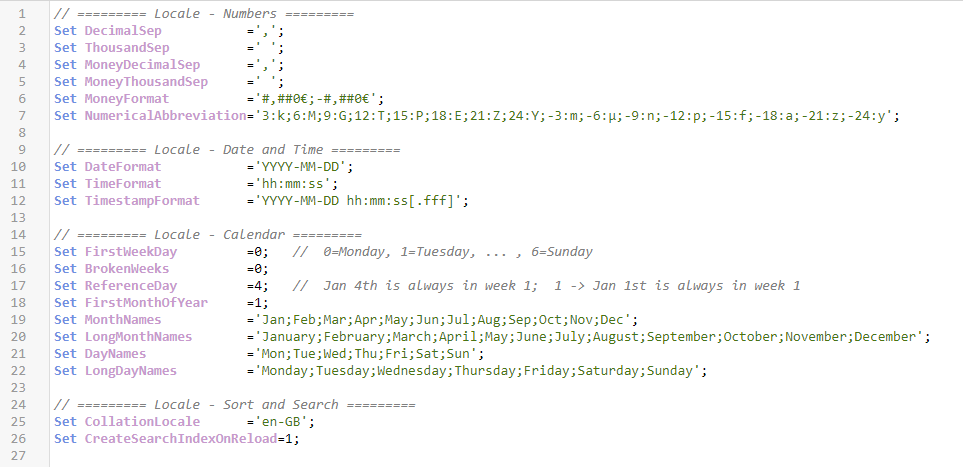
In the beginning of the load script you will find a number of Set statements defining the environment variables. These determine the date format, the ... Show MoreIn the beginning of the load script you will find a number of Set statements defining the environment variables. These determine the date format, the month names and a number of other things that pertain to the regional settings.
This is the Document Locale.
In other products or situations, there is usually a locale per computer or per user, but for Qlik Sense and QlikView the locale is per app. The reason is that the locale affects selections and set expressions internally in the Qlik logic, so it wouldn’t work with different locales for different users. Examples:
- The date format: Should {<Date={7/11/2022}>} refer to July 11th or to Nov 7th? The interpretation is different in different countries.
- The collation: Should {<Text={"*a*"}>} also match ‘å’, ’ä’, ‘ā’, or ’æ’? This is different in different countries.
Since we want a measure containing a set expression or a bookmark to return the same value for different users, we cannot have different locales for different users. Everyone within the same app must use the same locale. The solution is to have a document locale.If the set statements are organized a little, it becomes easier to see what they do. The following shows the locale I usually use:
First, you have some variables that pertain to numbers, decimal symbol, thousand separator, etc. These will be used for interpreting text as numbers when loading data, as well as for formatting the values. Then you have some variables that pertain to date and time. Also these are used for interpretation and formatting, but now of dates and timestamps.
Then you have some variables that pertain to calendars; names of months and week days, how the week numbers should be calculated etc.
All of the above variables are used internally by the Qlik functions, so if you change a variable, some functions will return a different value. For example, the WeekStart() function obviously uses the value of FirstWeekDay. Further, the month and day names are linked to format codes. For example, Date(Date,'MMMM') will always return one of the values in LongMonthNames.
Many functions have parameters that can override the environment variables, i.e. the variables define a default, but as a user you can change that. Example:
Date(Date) will use the date format of the variable DateFormat
Date(Date,'YYYY MMMM DD') will use the date format of the parameterThe week numbering is a chapter of its own: In some countries, the ISO week numbering is used: The week starts on a Monday, one week number may well span two years, and Jan 4th is always in week 1. This corresponds to
Set FirstWeekDay =0; // 0=Monday
Set BrokenWeeks =0;
Set ReferenceDay =4; // Jan 4th is always in week 1But in other countries, e.g. USA, a different system is used: The week starts on a Sunday, a week number never spans two years, and Jan 1st is always in week 1:
Set FirstWeekDay =6; // 6=Sunday
Set BrokenWeeks =1;
Set ReferenceDay =1; // Jan 1st is always in week 1We recently had a bug that caused some problems: The MakeWeekDate() function ignored the environment variables and instead always returned the ISO8601 values (the ISO standard assumes that Monday always is the first day of the week). This was an obvious error and was fixed, but unfortunately the fix caused negative effects for some customers, and we apologize for that. More info on the support blog.
Finally, the CollationLocale affects sort orders of text strings and searches: Which field values should be matched for a given search string.
Feel free to change these variables should you need to!
HIC
Read more about interpretation and formatting and about collation.

-
Natural Language Insights – Powerful AI on Dashboards
We have recently introduced a new, natural language object in Qlik Sense SaaS that can be added directly to dashboards and applications to deliver AI-... Show MoreWe have recently introduced a new, natural language object in Qlik Sense SaaS that can be added directly to dashboards and applications to deliver AI-generated insights. This capability extends our NLG capabilities beyond the Insight Advisor experience, allowing a much broader audience of Qlik Sense users to benefit from narrative interpretations and readouts when exploring in dashboards, boosting data literacy and delivering improved data storytelling.
Access to YouTube blocked? Watch on the Qlik site instead: SaaS in 60 - Natural Language Insights on Dashboards
App creators can configure the NLG object to produce narratives for any context by choosing dimensions, measures, and applicable analysis types – delivering insights for an overall sheet, describing a group of visualizations, or creating readouts for individual visualizations. It will automatically identify the appropriate analysis types based on the data selected, and the user can change what analysis types are included if they choose. Users have a variety of options for customizing the NLG, including generating paragraph format, bulleted format, and limiting the list (i.e. to the top recommendation per analysis type). And like all objects in Qlik Sense, our NLG is fully dynamic and responsive to selections, leveraging our associative engine to refresh with a new list of the most important insights after each click.
By utilizing AI to generate narrative insights and interpretations, we can effectively drive “in-product” data literacy for more users, especially those who may not be able to infer the best takeaways from a visualization or dashboard. This ability also provides a key ingredient for Data Storytelling, auto-generating the most relevant narrative insights which can be delivered in analytic data stories and reporting runs to PDF and PowerPoint.
NLG on a dashboard is another step in our journey to bring augmented analytics to all areas of our user experience, from a BI Developer working with data to a Business Analyst using AutoML and creating dashboards to a Business User interacting with apps and asking questions. In all these cases will be exploring best-in-class ways to surface AI and ML in our core analytics workflows targeted at automating and simplifying tasks, broadening and deepening insight, and expanding access and data literacy.
For now we would encourage you to take advantage of this new and exciting capability and make it part of all your apps. Learn more
-
Qlik Sense Enterprise on Windows: New Patches available for May 2024, February 2...
Hello all, The following patches for Qlik Sense Enterprise on Windows have been released today: May 2024 Patch 4 (Release Notes) February 2024 Patch ... Show MoreHello all,
The following patches for Qlik Sense Enterprise on Windows have been released today:
- May 2024 Patch 4 (Release Notes)
- February 2024 Patch 8 (Release Notes)
- and November 2023 Patch 11 (Release Notes)
All installation files are available on our Download site. Log in with your Qlik ID, apply your version's relevant filter, and download the new patch release.
Looking for product lifecycle information? See Qlik Sense Enterprise on Windows Product Lifecycle.
Wondering why we have not seen an August 2024 major release? See Release Cadence Update: Qlik Sense Enterprise Client-Managed.Thank you for choosing Qlik,
Qlik Support -
A Summer of Learning with the Qlik Academic Program
During the months of October to March we have our busiest time for the Academic Program and our support for universities in the UK and Europe, but lea... Show MoreDuring the months of October to March we have our busiest time for the Academic Program and our support for universities in the UK and Europe, but learning continues well into the summer for some schools. So far this summer we've had two sessions with universities to get students introduced to Qlik Sense and data analytics.
On 11th July the Academic Program gave a guest lecture to students at DHBW Mannheim in Germany, studying a dual study course in Digital Commerce Management. This session was lead by Lukas Lohmann, an alumni of DHBW Mannheim and a member of the DACH presales team here at Qlik. During this kick-off session we introduced them to Qlik and the Academic Program, before giving a demonstration of the software and talking about Qlik Sense use cases. In September we will return to the class to give an in depth, hands on workshop in Qlik Sense before setting the students an assignment. This is a collaboration that started last year to give students practical skills in data analytics to apply to their future career and it has received brilliant feedback from both students and educators. We are thrilled to continue supporting this course and if you'd like to learn more about how we can support your teaching, please reach out to us.
On July 26th the Academic Program conducted a hands-on Qlik Sense workshop with Masters students studying Controlling at the University of Maastricht, in the Netherlands. This module is lead by one of our very own Educator Ambassadors, Daniel O Leary from the University of Southern California. These students were all full time professionals already pursuing careers in business, some of them were aware of Qlik but many had never had the chance to learn about us and our software. After a short introduction from me about Qlik and the resources available through the Academic Program, Technical Product Marketing Manager, David Freschl, took students through an introduction to building their first app and creating visualizations. Each student completed the workshop in their own Qlik Sense Business tenant, accessed for free through the Qlik Academic Program. This was a short session of an hour and a half, to give students a taste of just how powerful Qlik Sense is.
Make the most of your time off this summer by upskilling with the Qlik Academic Program! To learn more visit qlik.com/academicprogram.
-
Australia is the new hub for a data analytics career
Australia is an attractive destination for Indian students considering a career in business analytics. The country offers high-quality educational pro... Show MoreAustralia is an attractive destination for Indian students considering a career in business analytics. The country offers high-quality educational programs, some of which are accredited by professional bodies such as the Australian Computer Society (ACS). These programs provide a comprehensive curriculum that blends theoretical knowledge with practical skills, ensuring graduates are well-prepared for the job market.
To read more on this article, visit: https://www.freepressjournal.in/study-abroad/emerging-trends-in-business-analytics-and-career-opportunities-for-indian-students-in-australia
To learn about how you can access free resources in data analytics if you are a student or professor, visit, qlik.com/academicprogram -
Conditional Show/Hide Dimensions and Measures in a Chart
Conditional show or hide is available in line and bar charts giving the user the ability to toggle dimensions or measures on or off in a single chart.... Show MoreConditional show or hide is available in line and bar charts giving the user the ability to toggle dimensions or measures on or off in a single chart. This allows developers to customize line and bar charts and save space by using one chart to show various metrics and dimensions. Let’s look at a simple way of using this feature to show or hide lines in a line chart. In the Overall Equipment Efficiency demo found on the Demo Site, there is a line chart accompanied by buttons that are used to toggle the lines on and off in the line chart.
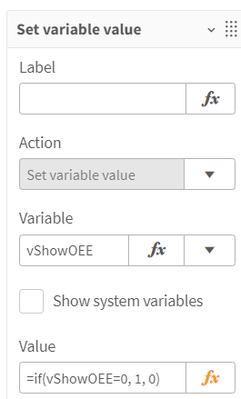
This is done by using variables. When each button is clicked, the respective variable is toggled from 0 to 1 or 1 to 0 depending on its current value. See the value expression in the image below.
In the measure expression in the line chart, this variable is checked to determine if the expression should be evaluated and displayed or if the measure should be set to null.
This is a perfectly good way to toggle the lines, but with the ability to use conditional show and hide in line and bar charts, this process can be simplified. First, in the measure expression, we no longer need to use an if statement which can help reduce calculation time. We can simply use our normal expression and the “Show measure if” setting, with the respective variable, to evaluate if a line should be shown in the visualization or not.
The “Show measure if” and “Show dimension if” settings evaluate the expression and will show the line if the expression evaluates to true. In my example, vShowOEE will be either 1 or 0. If it is 1, the line will be displayed. If it is 0, then it will not be displayed. We can continue to use the buttons to toggle the respective variable (from 1 to 0 and vice versa) for each line.
My example is basic, but more complex expressions can be used as well. For example, you may want to show/hide lines based on a selection or a calculated value or you may want to use some business logic to determine which dimension or measure should be displayed. The expression can be as simple or complex as needed, as long as it returns a true or false value. Keep in mind, that this show setting is optional and can be left blank. When no expression is entered, the line (or bar) is displayed.
There are a few limitations of this new feature to be aware of: 1) Custom tooltips are disabled when using a conditional dimension, 2) Time series forecasting is not available when using conditional dimensions or measures. While the “Show measure if” and the “Show dimension if” can both be used in the same chart, it is recommended that you use only one at a time. Check out Qlik Help to learn more and test this new feature out in your next line or bar chart.
Thanks,
Jennell
-
Social Media Report
Social Media Report Clay TechSystems Consulting Private Limited You can gather information on the reach, impressions, and visitors of your socia... Show MoreSocial Media ReportClay TechSystems Consulting Private LimitedYou can gather information on the reach, impressions, and visitors of your social media posts with this app. It provides analysis on a monthly and yearly basis, allowing you to prioritize your marketing efforts.
Discoveries
We obtained more in-depth analysis of the data, allowing us to concentrate on areas that are currently not being targeted.
Impact
Data-driven insights can assist organizations in adopting a customer-centric approach by expanding the scope of targeted areas and enabling a focus on content preferred by audiences.
Audience
This social media post app is intended for business stakeholders, marketing teams, and business owners as its target audience.
Data and advanced analytics
By utilizing user-friendly dashboards, businesses can easily monitor their social media performance, enabling them to identify trends, patterns, and areas that need improvement. This valuable insight allows companies to personalize their marketing campaigns to better appeal to their target audience, resulting in increased engagement and heightened brand recognition.
-
LinkedIn Personal Data
LinkedIn Personal Data BriefCam LinkedIn provides data about your profile, such as your connections, post reactions, messages and a huge list of... Show MoreLinkedIn Personal DataBriefCamLinkedIn provides data about your profile, such as your connections, post reactions, messages and a huge list of other files you can analyze and get quick insights. Using Qlik I created an app that monitors my LinkedIn activity.Discoveries
Analyze personal usage in LinkedIn network
Impact
Get insights about your LinkedIn profile
Audience
LinkedIn users who want to explore their activity on LinkedIn
Data and advanced analytics
It encourages other LinkedIn users to request their own data and create a personal dashboard