Unlock a world of possibilities! Login now and discover the exclusive benefits awaiting you.

Analytics & AI
Forums for Qlik Analytic solutions. Ask questions, join discussions, find solutions, and access documentation and resources.
Data Integration & Quality
Forums for Qlik Data Integration solutions. Ask questions, join discussions, find solutions, and access documentation and resources
Explore Qlik Gallery
Qlik Gallery is meant to encourage Qlikkies everywhere to share their progress – from a first Qlik app – to a favorite Qlik app – and everything in-between.
Qlik Community
Get started on Qlik Community, find How-To documents, and join general non-product related discussions.
Qlik Resources
Direct links to other resources within the Qlik ecosystem. We suggest you bookmark this page.
Qlik Academic Program
Qlik gives qualified university students, educators, and researchers free Qlik software and resources to prepare students for the data-driven workplace.
Recent Blog Posts
-
Date# Function vs. Date Function
What is the difference between the Date# function and the Date function? These two functions seem quite similar, but they have different purposes. It ... Show MoreWhat is the difference between the Date# function and the Date function? These two functions seem quite similar, but they have different purposes. It took me a while to understand when to use one over the other. Now that I have a handle on it, I thought I would share what I have learned. The Date# function is an interpretation function. According to Qlik Help, “Date# evaluates an expression as a date in the format specified in the second argument, if supplied.” I use the Date# function when I am loading a value that I want to be perceived as a date. For example, in the partial script below, I loaded “YR” from an Excel file and to ensure that the value was evaluated as a date with the year format ‘YYYY’, I used the Date# function.
The syntax of the Date# function is as follows:
Date#(text[, format])
The format parameter of the Date# and Date functions is optional. If it is not included in the expression, it uses the date format set in the system variables in the script. Using Date#() is an important step if the “Year” field is used later in the script to join data or to compare to data that has a date value. When evaluating 2 values, you want to ensure that they are formatted the same and that you are comparing apples to apples.
The Date function is a formatting function. According to Qlik Help, “Date() formats an expression as a date using the format set in the system variables in the data load script, or the operating system, or a format string, if supplied.” I use the Date function to format a date a specific way. For example, I may format a date as ‘YYYY’ if I only am interested in seeing the year. I could also format the date like this ‘M/D/YYYY’ to see the month, day and year.
The syntax for the Date function is as follows:
Date(text[, format])
In the example below, I am formatting the “Yr” field as a 4-digit year (i.e. 2021).
I can also format a date as seen below. This expression will return 09/17/2021.
On occasion, I have used both the Date# and the Date functions in the same expression. For example, if I am loading text with the format YYYYMM and I want to format it as MMM-YYYY, I cannot simply use the expression Date(text, ‘MMM-YYYY’) because it does not pick up that the text is a date. So, I need to first interpret the text as a date and then I can format it. This expression works:
Date(Date#(text, ‘YYYYMM’), ‘MMM-YYYY’)
The Date# function first identifies the text as a date and indicates the format the date is in (‘YYYYMM’). Then the Date function formats the text like this ‘MMM-YYYY’.
Both the Date# and Date functions can be used in script and chart functions. Date#() interprets the data as a date and Date() formats the date as specified. I hope this was helpful.
Thanks,
Jennell
-
JOINS
JOINSBredenmasterVisually show and explain the main join that can be used in scriptDiscoverieseasily explain to people how relations between tables sh... Show MoreJOINSBredenmaster Visually show and explain the main join that can be used in script
Discoveries
easily explain to people how relations between tables should be done, and what it means for data
Impact
people easily can get and cross the right and confidence data, without thinking that you are affecting development
Audience
developers and analysts, during trainings and workshops
Data and advanced analytics
reliable data and optimal resources consumption
-
Qlik Datathon in India's Silicon Valley is a big success!
On August 8th, Kristu Jayanti College, Bangalore organised a datathon for its students in association with Qlik. Kristu Jayanti College is one of the ... Show MoreOn August 8th, Kristu Jayanti College, Bangalore organised a datathon for its students in association with Qlik.
Kristu Jayanti College is one of the leading colleges in Bangalore, also known as India's Silicon Valley. The college has multiple courses in engineering, business studies, arts, science, social sciences etc. More than 15,000 students study on the campus each year.
This was the first datathon organised by Kristu Jayanti and it was led by Dr. Kalaiselvi who is also the Qlik Educator Ambassador for 2024. She was supported by her staff members including Dr. Sasikumar, Dr. Sevuga Pandian, other faculties and students. A day prior, a bootcamp was led by Manikant Roy, Ph.d candidate from IIT Delhi, also an ex Professor.
More than 130 students participated in this day long event from 9 am to 7 pm. Students were given data sets with diverse topics such as Sales data, E Commerce data and data on Health. Most students were familiar with Qlik Sense since they had registered for the Qlik Academic Program previously and knew how to build dashboards and create visualisations. This event culminated into presentations by students and based on their output, three teams were selected as the winners.
Kristu Jayanti and the Qlik Academic Program will embark on many such initiatives to get students enabled in data analytics. To learn about how you can engage with us, if you are a student or a professor, visit qlik.com/academicprogram and benefit from a world class analytics training, software and qualifications!
-
KC Tech Checkpoint
KC Tech CheckpointPomerol PartnersAccess data surrounding the most in-demand Kansas City tech positions Explore the most common tech skills listed on ... Show MoreKC Tech CheckpointPomerol PartnersAccess data surrounding the most in-demand Kansas City tech positions Explore the most common tech skills listed on active KC tech job listings Review Kansas City versus U.S. tech workforce data Navigate the distribution of new, active and closed Kansas City tech jobs Compare Kansas City tech median wages in correlation with occupations, employers, certificates, industries, job titles and locations Browse Kansas City tech trend graphs featuring job listings and median wages by month Export custom reportsDiscoveries
In 2022, Pomerol transformed Kansas City Tech Council's monthly jobs report (previously a PDF report) into an interactive web mashup and mobile app that empowers business professionals to easily explore local tech workforce trends.
Impact
The transformation boosted engagement and increased email open rates by 11%.
Audience
Public, available to download here: https://www.kctechcouncil.com/kc-tech-checkpoint-app/
Data and advanced analytics
The delivery mechanism and data capturing (GPS, multi-media) offers extension opportunities. Getting users to update data on a device they use exponentially more frequently, can turn the usage tide (or make it more difficult to ignore/de-prioritize).
-
Summer may be winding down, but we are not!
Hello Qlik Community! Summer is winding down here in the States (though the hot, muggy weather will persist in the south until October). It always goe... Show MoreHello Qlik Community!
Summer is winding down here in the States (though the hot, muggy weather will persist in the south until October). It always goes by so quick, doesn’t it?
We have some more enhancements to share for the month of August. Here they are:
Qlik Community Video on Homepage
If you were at Qlik Connect this past June, you may have caught a glimpse of this video playing behind our booth! While on the homepage, the video will play and if you scroll down, the video will follow. You can collapse the video by clicking the button and the action will persist the next time you visit the homepage.
Subscribe to Products
If you’re on the Official Support Articles or Release Notes pages, you can now subscribe to Products! Get notified when there is a new article or release note available!
Women Who Qlik Badge
Women Who Qlik is a space to celebrate women leveraging Qlik to drive impactful outcomes, support women in data-driven roles, and amplify ally voices. Are you a member of the Women Who Qlik group? If not, join and receive the new badge!
Privacy & Cookie Notice
We’ve added the policy directly to the footer for convenience.
Do Not Share My Info
Manage your consent preferences for Cookies.
Let us know what you think of the latest changes using the comments below. The next official sprint is in October so stay tuned!
Your Qlik Community Admins,
Melissa, Sue, Jamie, Nicole, and Caleb
@Melissa_Potvin @Sue_Macaluso @Jamie_Gregory @nicole_ulloa @calebjlee
-
Check Out Qlik Cloud's New Look!
The revamped Qlik Cloud experience includes an enhanced left side navigation menu, new activity center, sheet grouping, and custom navigation. This ne... Show MoreThe revamped Qlik Cloud experience includes an enhanced left side navigation menu, new activity center, sheet grouping, and custom navigation.
This new platform navigation is available to those with Qlik Cloud; however, system administrators will need to turn on the feature in their Management Console Settings:
- Under Management Console, select Settings
- Scroll Down to the Feature Control Setting
- Select the Toggle for New Platform Navigation
- A message will appear prompting Admins to reload for the updated experience.
Note: These navigation updates can be toggled on or off for the remainder of the summer to give your organization time and practice with the new design. Come September, this will become Qlik’s default setting.
With the toggle on, you can now leverage the left side waffle menu as your guide, so key product features are always easily accessible.
Additionally, users can see improved sheet navigation capabilities in their analytics apps alongside other assets like bookmarks and notes.
Check out more highlights from this launch here:
Happy exploring!
Qlik Global Support
-
Developer menu in Qlik Sense client
Did you know there's a secret developer menu in Qlik Sense? I'm going to let you in on the secret and show you how to access it and what it contains. ... Show MoreDid you know there's a secret developer menu in Qlik Sense? I'm going to let you in on the secret and show you how to access it and what it contains. Just remember, this isn't documented or officially supported, and is subject to change in the future.
To access the developer menu, follow the steps below:
- Open a sheet in a Qlik Sense app in your browser
- Add /options/developer to the url
- Right click on an object and choose "Developer"
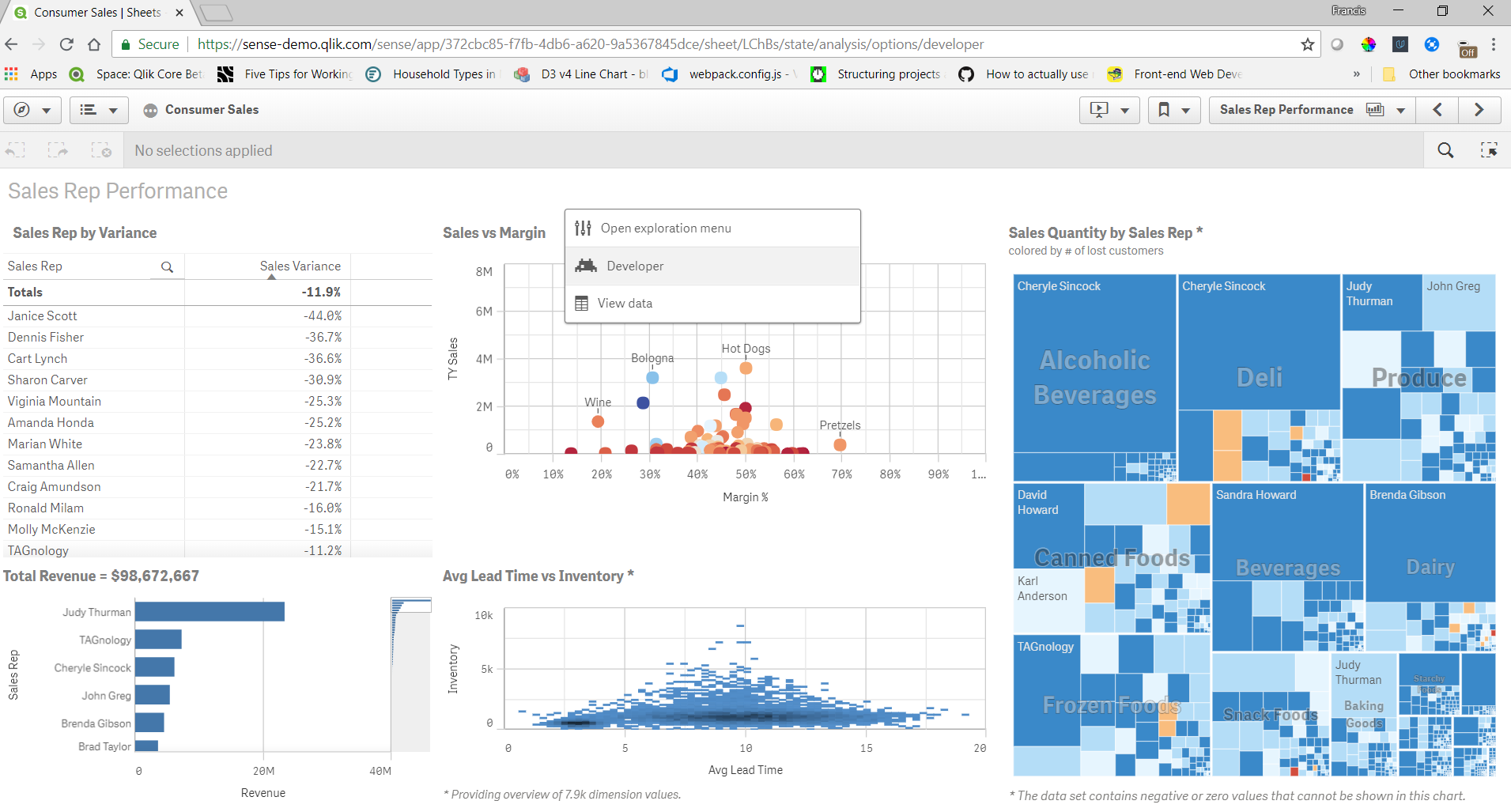
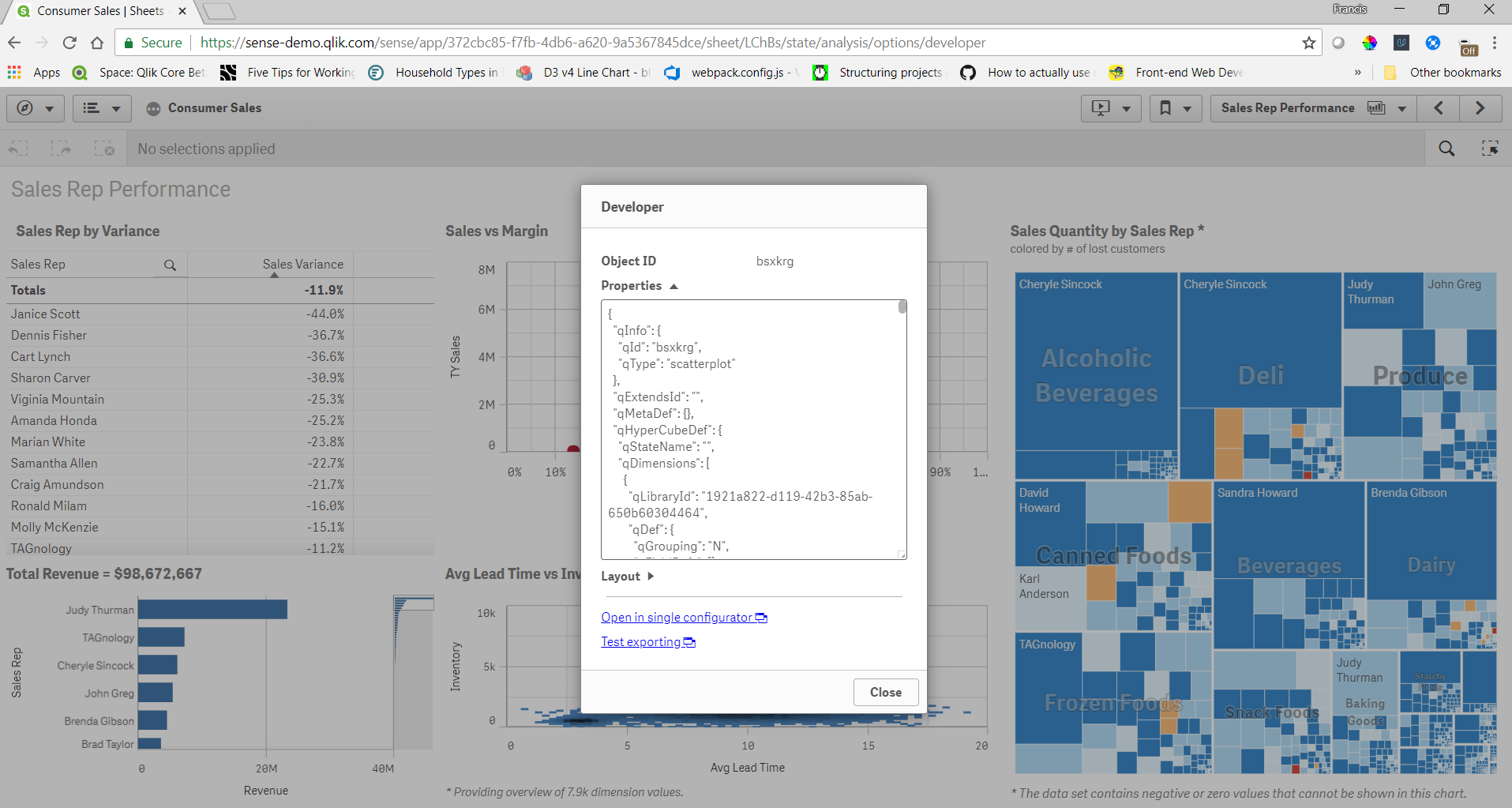
You can get the object id, properties, and layout of any object this way. There's also a link to open the object in single configurator, and test exporting. The object id's are useful for embedding visualizations. The properties are useful if you are creating your own objects and want to check the properties of an object in a Qlik Sense app for reference. In my opinion this is the most useful feature of the developer menu. Sometimes if I don't know the correct properties to set to achieve what I want I'll create a similar object in the Qlik Sense client just to check the properties. The layout shows what is returned by the engine for the layout of the object, and can be useful to see what the layout will look like before you actually create an object yourself. And the single configurator link is a handy way to get to the single configurator of an object directly from a sheet.
And now you know about the secret developer menu.
-
Qlik Cloud Wordpress plugin
Happy Friday everyone. If you have a Wordpress website and you want to incorporate visualizations from our Qlik Cloud, then you are at the right place... Show MoreHappy Friday everyone. If you have a Wordpress website and you want to incorporate visualizations from our Qlik Cloud, then you are at the right place. Below are the steps needed to install, configure and use the plugin by iframing an entire app sheet or creating a page with nebula.js and pulling just by ids.
Installation into WordPress
- Login to your WordPress Admin Portal.
- On the left navigation panel, select "Plugins".
- Towards the top of the plugins list, click the "Add New" button.
- In the search box towards the right-hand side, type "Qlik" and hit enter to search.
- The Qlik Saas plugin is currently one of only two results returned. Click the "Install Now" button next to it.
- WordPress will then download and install the plugin for you. Once complete, "Install Now" button will change to "Activate". Click the "Activate" button to complete the installation.
Configure Qlik Cloud
- Create a public / private key pair for signing JWTs
- Configure JWT identity provider
- Add the public key to the configuration
- Input Issuer & Key ID
https://qlik.dev/tutorials/create-signed-tokens-for-jwt-authorization#input-issuer-and-key-id-values
Configure plugin
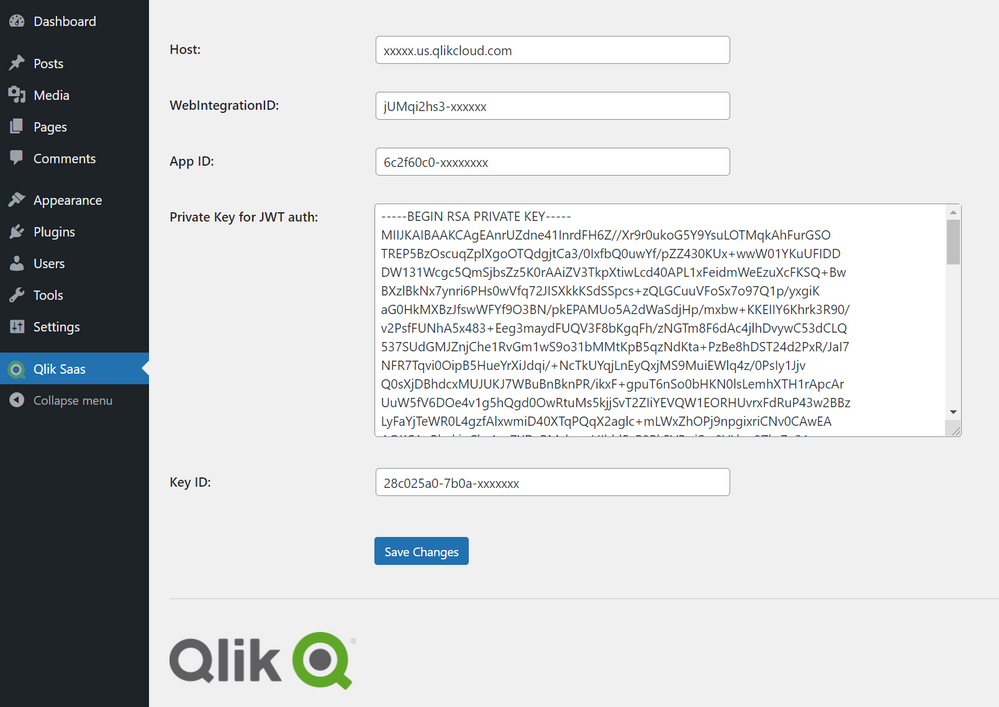
- Add Host of Qlik Saas as <tenant>.<region>.qlikcloud.com
- Add your WebIntegrationID
https://qlik.dev/tutorials/implement-jwt-authorization#configure-a-web-integration-id
- Add you AppID
- Add your Private key from previous step “Create a public / private key pair for signing JWTs”
- Add the Key ID created from previous step
https://qlik.dev/tutorials/create-signed-tokens-for-jwt-authorization#input-issuer-and-key-id-values
Using the plugin
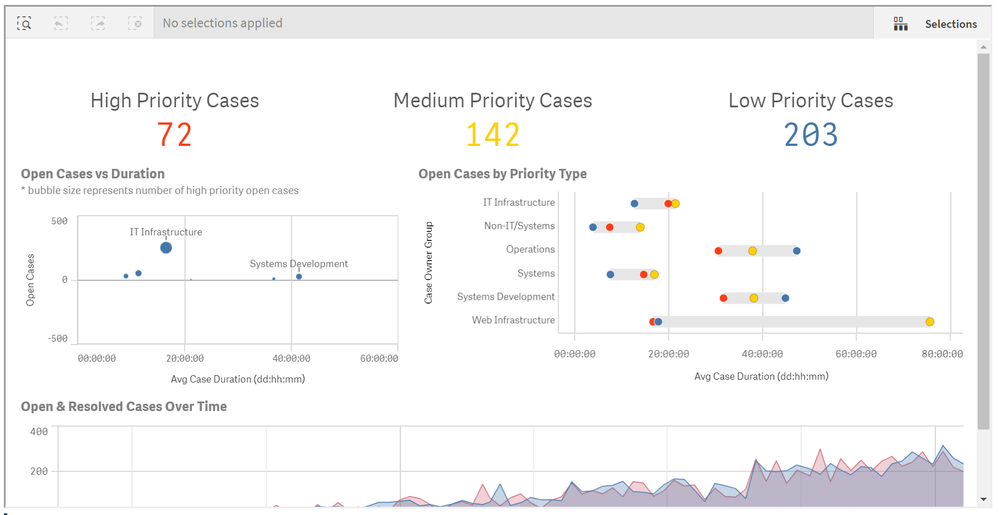
- iFrame an entire sheet by adding the shortcode into your page
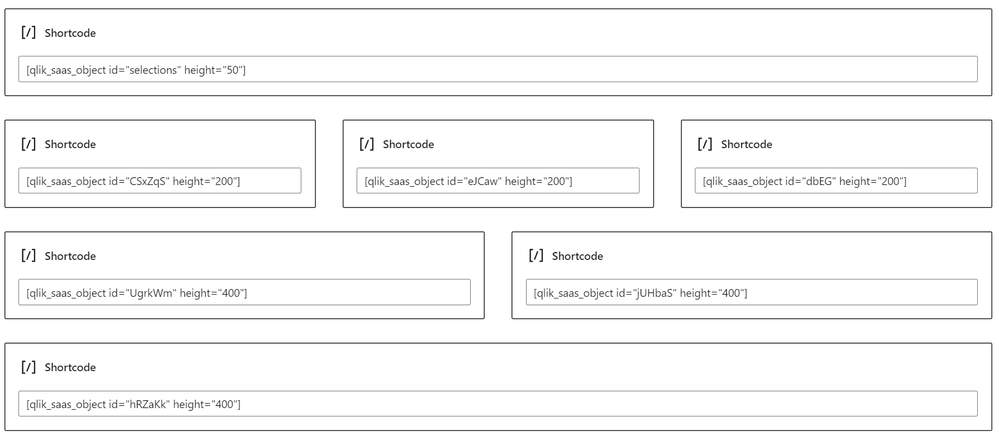
[qlik-saas-single-sheet id="1ff88551-9c4d-41e0-b790-37f4c11d3df8" height="400" width="500"]- Add object by adding the object id or "selections" for the current selections toolbar, with a shortcode into your page
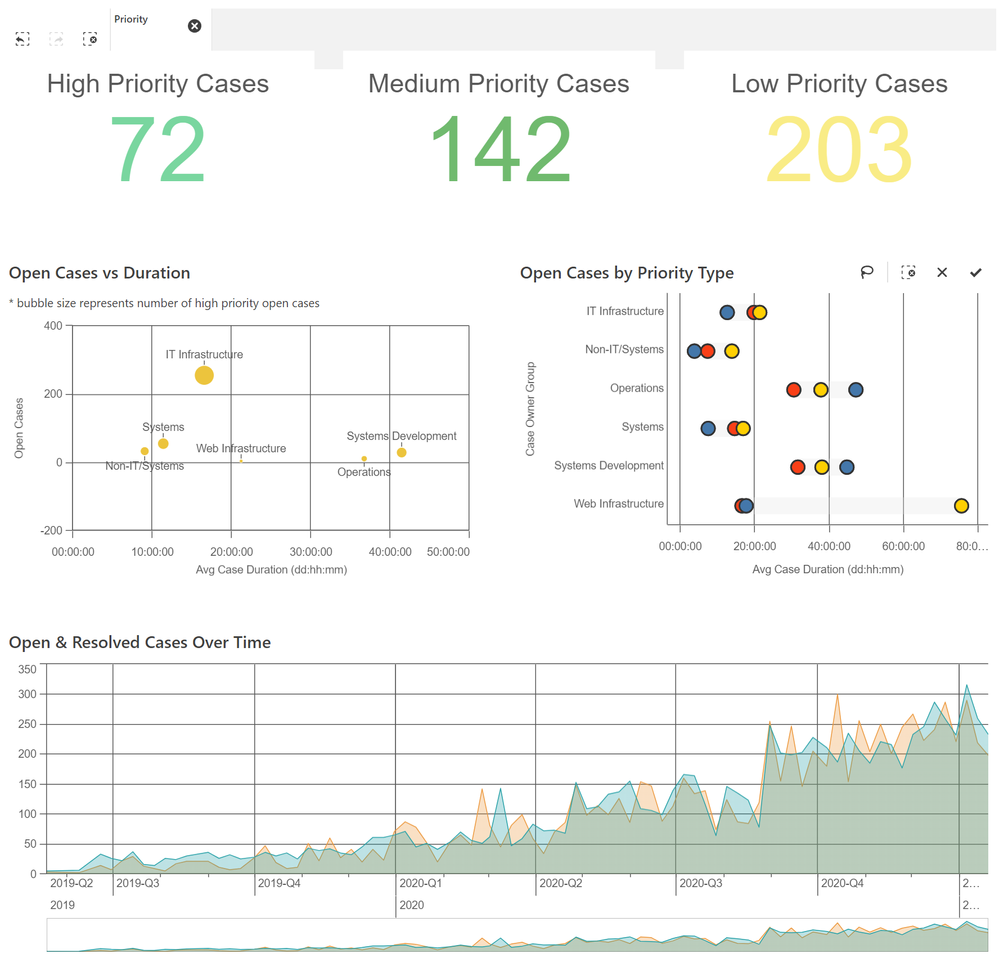
[qlik_saas_object id="selections" height="50"][qlik_saas_object id="CSxZqS" height="400"]iFrame sheet shortcodeiFrame sheet previewMashup shortcodesMashup Helpdesk sheet 1 and 2 with nebula.js and object IDsSheet 2That's it!/Yianni -
Unlock Qlik Answers
Qlik has launched a plug-and-play Generative AI-powered Retrieval Augmented Generation (RAG) solution, Qlik Answers. Here, organizations can tap into ... Show MoreQlik has launched a plug-and-play Generative AI-powered Retrieval Augmented Generation (RAG) solution, Qlik Answers. Here, organizations can tap into their unstructured sources like document repositories, knowledge libraries, or even operational systems. You’ll be able to leverage trusted enterprise connectors to connect to a broad range of systems and platform out of the box, ask questions directly to the prebuilt UI, and have access to trusted content which will empower your users to substantiate answers.
Watch our quick demo below to see how you can bring knowledge to your fingerprints from your unstructured data with just a simple question.
Add Qlik Answers to your solution set by contacting us.
For those who have already made the move, you’ll be able to create Qlik Answer cases in your Customer Portal starting Thursday, August 8, 2024. If you need any troubleshooting assistance prior, please don’t hesitate to contact us through our live chat.
Thanks for choosing Qlik!
Qlik Global Support
-
Qlik Cloud 7月の新機能
Qlik Answers のリリース Qlik Answers はパーソナライズされた、コンテキストに関連した回答をビジネスユーザーに提供するプラグアンドプレイの生成AIを搭載したナレッジアシスタントです。 ※現時点では、US、EU、Sydney リージョンで利用できます。 Introducing ... Show MoreQlik Answers のリリース
Qlik Answers はパーソナライズされた、コンテキストに関連した回答をビジネスユーザーに提供するプラグアンドプレイの生成AIを搭載したナレッジアシスタントです。
※現時点では、US、EU、Sydney リージョンで利用できます。
Qlik Answers では大規模言語モデルを使ったプラグアンドプレイのアシスタントにより、非構造化データを素早く活用することができます。ナレッジベースにテキストやPDFなどのデータを蓄積し、回答するためのインデックスをつけます。
アシスタントでは自然言語により回答を得ることができ、回答のもととなったソースを参照することもできます。
分析の新機能
Visualization bundle の新しいストレート テーブルの修飾子と数式ベースのテキスト スタイル
- 修飾子が使えるようになりました。 累計、移動平均、差分、相対数から選べます。
- テキストスタイル式で書式を設定できるようになりました。
<B>: 太字、<I>: 斜体、<U>: 下線、<S>: 取り消し線
if(sum(案件金額)>3000000000,‘<B>’)のように条件付けも可能
表形式レポート関連機能の改善
- スペースとアプリへの再接続の操作改善
Microsoft Excel の Qlik アドインで、テンプレートをアプリのコピーまたは別のスペースやテナントのアプリに再接続する必要があるときに、選択リストから目的のスペースとアプリケーションを簡単に選択できるようになりました。
- PDFの日付と数値書式への地域設定改善
レポートタスク開発者は、PDF形式レポートについて地域の書式設定を指定できるようになりました。
PDF形式で作成されるオンデマンドの表形式レポートでは、ユーザーのQlik Cloud のロケールがレポート内の日付と数値のフォーマットを決定します。
Microsoft Excel用のQlikアドインからPDF形式でプレビューを生成する場合、ユーザーのMicrosoft Excelロケールがレポート内の日付と数値のフォーマットを決定します。
Qlik データゲートウェイー直接アクセス 新バージョン
- プロセス分離の作業時におけるポート割り当てのサポート
以前は、既定のポート番号と範囲設定を使用する場合、[ODBC|SAPBW|SAPSQL]_MAX_PROCESS_COUNT 値を 10 より大きく設定することはできませんでした。このバージョンから、ポートは自動的に割り当てられるようになり、同時リロード プロセスの数を 10 より大きく設定できるようになりました。
- SQP SQL (Direct Access gateway 経由) コネクタを使用する場合のメタデータ ページングの強化
10,000 個以上のテーブルが取得される場合、タイムアウトを防ぐために、テーブルは 10,000 個のバッチで取得されます。
- データ チャンク回復メカニズム
欠落または破損したデータチャンクの送信のサポートが導入されました。リロードされたデータチャンクのメモリサイズを制御するために、configuration.properties ファイルに新しいプロパティが追加されました: RELOAD_CACHE_MEMORY_MB
このプロパティの設定方法については、「Storing corrupted or missing data chunks for future reloads」 (破損または欠落したデータチャンクを将来のリロードのために保存する)を参照してください。
データ統合の新機能
データ製品カタログ
データマーケットプレイスで信頼できるデータを選択・利用することができます。
- データ製品マネージャーがデータ製品を作成し、データセットを追加します。Read meや連絡先の付加も可能です。
- データ品質スコアの算出と、セマンティック タイプの検出機能があります。現時点では Snowflake データセットでのみ使用できます。
- データセットについて系列と影響分析をみることができます。
- データセットを選択して、分析アプリを作ることができます。
-
Qlik Talend Cloud の Enterprise エディションが必要です。
SaaS アプリケーション コネクタの強化
- ゲートウェイレスデータローダー機能
ゲートウェイやドライバーをインストールする必要のない、新しいデータ ローダー機能が導入されました。SaaS ベースのクラウド ソースと一部のデータベース ソース向けに設計されています。Qlik Talend Cloud のStarter エディション以上でご利用いただけます。
- 多数のSaaS アプリケーション コネクタ
新しいデータ ロード機能のリリースに合わせて、Qlik Talend Cloud が接続できる SaaS アプリケーションの数が大幅に増加しました。 100 以上のアプリケーションのデータに、アクセスすることができます。サポート対象のすべてのアプリケーションを確認するには、Supported SaaS applications をご参照ください。
新しい Qlik Talend データ統合のランディング ページ
Qlik Talend データ統合のランディングページには、有効に活用するための重要なアクションが強調表示されます。最近更新された項目や通知に関するコンポーネントも追加されており、作業中のコンテンツにすばやくアクセスでき、重要な更新を見逃すことがなくなります。
メタデータの更新
データセットがソースオブジェクトに基づいている場合に、データセットのメタデータを手動でリフレッシュする機能を提供します。これにより、新しい列や削除された列、データ型の変更など既存の列の変更、列名の変更が検出されます。タスクのメタデータは、タスクの [デザイン] ビューでソースのメタデータの変更に合わせてリフレッシュできます。タスク内のすべてのデータセットのメタデータを更新したり、個別のデータセットを選んで更新することができます。
SQL Expression プロセッサ
SQL Expressionプロセッサが、データ統合のデータ変換フローの一部として利用できるようになりました。SQL Expressionプロセッサを使用すると、データ変換フローの中で、カスタムのSQL式を記述できます。SQL Expression processor
Microsoft SQL Server での変換フローのサポート
Microsoft SQL Serverをターゲットとして使用するデータパイプラインプロジェクトで、変換フローがサポートされるようになりました。ユーザーは、カスタムSQLベースの変換と一緒にグラフィカルな変換を開発し、データを再構築するための複雑な要件をサポートできるようになりました。

-
Exploring the Latest Developments in Qlik Embedding
In previous blog posts (1, 2, 3) , we explored different topics around Qlik's embedding library, qlik-embed, and how to integrate it seamlessly with O... Show MoreIn previous blog posts (1, 2, 3) , we explored different topics around Qlik's embedding library, qlik-embed, and how to integrate it seamlessly with OAuth for authentication. Today, we'll delve into the latest updates and new features, including embedding Qlik Answers, go over UI capabilities, and advanced configuration options.
Recap: What is qlik-embed?
qlik-embed is a versatile library designed to facilitate the embedding of Qlik Sense analytics into web applications. By using web components, it allows developers to easily integrate Qlik's powerful analytics capabilities without dealing with the complexities of traditional embedding methods. The library supports various authentication methods, including Qlik Cloud API keys, OAuth2 clients, and Qlik Sense Enterprise interactive login.
In our previous discussions, we highlighted the ease of use and the flexibility qlik-embed offers, supporting components such as chart, field, selections, and entire app.
New Feature: Embedding Qlik Answers
One of the most exciting additions to qlik-embed is the ability to embed Qlik Answers. Qlik Answers leverages AI to provide natural language querying capabilities, allowing users to interact with their data using conversational language (If you haven’t already checked that out, visit this Community post or watch this demo video). The new UI component ai/assistant enables this functionality directly right within your web app.
Here's an example of how you can integrate Qlik Answers into your application:
<qlik-embed
  ui="ai/assistant"
  assistant-id="<assistant-id>"
  appearance="qlik-light"> // or "qlik-dark"
</qlik-embed>
This simple integration can greatly enhance user interaction by allowing them to ask questions and receive insights in real-time, making data exploration more intuitive and user-friendly.
More on UIs and Parameters
As I mentioned before, the qlik-embed framework supports a variety of UIs, each designed for specific purposes. Let’s take a quick overview on each one:
- analytics/sheet: For embedding entire Qlik Sense sheets with full selectivity but without additional features like alerts or notes. (Supports sheets that contain only nebula.js visualizations, for a full list: see here: https://qlik.dev/embed/foundational-knowledge/visualizations/)
<qlik-embed id="visualization" ui="analytics/sheet" app-id="13b05004-2752-4f39-a077-7a71c5816997" object-id="bdGHw"></qlik-embed> - analytics/chart: For embedding single chart objects or creating charts on the fly with better performance. (Supports nebula.js objects only, see full list above)
<qlik-embed id="visualization" ui="analytics/chart" app-id="13b05004-2752-4f39-a077-7a71c5816997" object-id="hshG"></qlik-embed> - analytics/field: A lightweight listbox for a specific field (dimension or measure)
(To find the library-id, you can add /options/developer to the URL when editing a sheet, right click on a object containing your master dimension or measure then click on Developer and look for the qLibraryId value)<qlik-embed id="visualization" ui="analytics/field" app-id="13b05004-2752-4f39-a077-7a71c5816997" library-id="BfXheUu" type="dimension"></qlik-embed> - analytics/selections: Displays a selection bar with controls for managing selections.
<qlik-embed id="visualization" ui="analytics/selections" app-id="13b05004-2752-4f39-a077-7a71c5816997"></qlik-embed> - classic/app: Provides a full-featured Qlik Sense sheet analysis and authoring experience.
<qlik-embed id="visualization" ui="classic/app" app-id="13b05004-2752-4f39-a077-7a71c5816997"></qlik-embed> - classic/chart: Backwards-compatible for single chart objects (legacy), including support for extensions.
<qlik-embed id="visualization" ui="classic/chart" app-id="13b05004-2752-4f39-a077-7a71c5816997" object-id="hshG" iframe="true"></qlik-embed>
Each UI type can be configured with various parameters to customize the appearance and functionality. For example, you can set the theme, dimensions, measures, and even complex properties for charts.
Here’s an example of embedding a dynamic chart (See here for more info about Charts on the Fly)
<qlik-embed
  ui="analytics/chart"
  app-id="YOUR_APP_ID"
  type="barchart"
  dimensions='["Category"]'
  measures='["Sum(Sales)"]'
  properties='{"orientation": "horizontal"}'>
</qlik-embed>
This flexibility allows you to create highly dynamic and interactive dashboards that can adapt to users' needs in real-time.
Advanced Configuration: Context Parameters and Themes
A cool feature of qlik-embed is the ability to pass context parameters using the context__json attribute. This allows for more granular control over the embedded visualizations, enabling customization of themes, interactions, and other properties directly within the web component.
Reference my previous post about this here.
Accessing the App Model through qlik-embed
With qlik-embed, you can access the metadata of a Qlik Sense application, including, but not limited to, obtaining a list of sheets and adding them to a dropdown list element for instance.
Keep in mind that this won't work with the classic/app UI
<!DOCTYPE html>
<html lang="en">

<head>
    <meta charset="UTF-8" />
    <meta name="viewport" content="width=device-width, initial-scale=1.0" />
    <meta http-equiv="X-UA-Compatible" content="ie=edge" />
    <style>
        body,
        html {
            margin: 0;
            padding: 0;
            font-family: sans-serif;
            font-size: 14px;
            background-color: #f5f5f5;
            color: #333;
            height: 100%;
            width: 100%;
        }

        .container {
            padding: 8px;
            gap: 8px;
            position: relative;
            flex: 1 0 auto;
            display: flex;
            flex-direction: column;
            align-items: stretch;
            box-sizing: border-box;
        }

        .classic-app {
            height: 800px;
            width: 1200px;
            border: 1px solid #bbb;
            flex-grow: 1;
            border-radius: 3px;
            box-shadow: 1px 1px 10px rgba(0, 0, 0, 0.2);
            position: relative;
            box-sizing: border-box;
            overflow: auto;
            position: relative;
        }

        .viz {
            width: 1200px;
            height: 900px;
            padding: 16px;
            border: 1px solid #bbb;
            border-radius: 3px;
            box-shadow: 1px 1px 10px rgba(0, 0, 0, 0.2);
            position: relative;
        }
    </style>
    <title>@qlik/embed-web-components example - using OAuth</title>
    <script crossorigin="anonymous" type="application/javascript"
        src="https://cdn.jsdelivr.net/npm/@qlik/embed-web-components"
        data-host="https://YOUR_TENANT.us.qlikcloud.com" data-client-id="CLIENT_ID"
        data-redirect-uri="https://localhost:3000/index_oauth_object.html" data-access-token-storage="session"></script>

    <script type="module">
        const embeddedObject = document.getElementById("visualization");
        const refApi = await embeddedObject.getRefApi();
        console.log('refApi -> ', refApi);
        const doc = await refApi.getDoc();
        const appSheetList = await doc.getSheetList();

        //add the sheet references to a dropdown list
        let dd = document.getElementById('sheetdrop');
        dd.length = 0;
        let defaultOption = document.createElement('option');
        defaultOption.text = "Select a sheet to navigate to";
        dd.add(defaultOption);
        dd.selectedIndex = 0;

        let option;
        for (let i = 0; i < appSheetList.length; i++) {
            option = document.createElement('option');
            option.text = appSheetList[i].qMeta.title;
            option.value = appSheetList[i].qMeta.id;
            dd.add(option);
        }

        //add a listener to change the object-id property in the qlik-embed element
        dd.addEventListener("change", function () {
            if (dd.selectedIndex > 0) {
                let selOption = dd.options[dd.selectedIndex];
                console.log(selOption.value);
                embeddedObject.setAttribute('object-id', selOption.value);
            }
        });
    </script>
</head>

<body>

    <div id="main-app">
        <div class="container">
            <h1>@qlik/embed-web-components Example</h1>
        </div>

        <div>
            <select id="sheetdrop" name="SheetList">
            </select>
        </div>

        <div id="analytics-chart" class="container">
            <div class="viz">
                <qlik-embed id="visualization" ui="analytics/sheet" app-id="27018b4a-eaa7-4658-a8c2-ecf48d321371"
                    object-id="d568340d-1264-473e-bbdf-68d2555f007e"></qlik-embed>
            </div>
        </div>
</body>

</html>
The continuous evolution of qlik-embed brings exciting new features that enhance the integration of Qlik analytics into web applications. Stay tuned for more updates and explore the full potential of qlik-embed on qlik.dev. - analytics/sheet: For embedding entire Qlik Sense sheets with full selectivity but without additional features like alerts or notes. (Supports sheets that contain only nebula.js visualizations, for a full list: see here: https://qlik.dev/embed/foundational-knowledge/visualizations/)
-
Summer fun means Qlik Community enhancements!
Hello Qlik Community! Summer has officially kicked off here in the States! Does anyone have any exciting summer plans? My plan is to enjoy the local p... Show MoreHello Qlik Community!
Summer has officially kicked off here in the States! Does anyone have any exciting summer plans? My plan is to enjoy the local pool, travel on vacay to another pool, then come back to enjoy the local pool some more. 😄 Oh, and during that time, we will still be pushing out updates and enhancements!
Here are the enhancements for June:
Product Labels added to Release Notes page
Find all the posts related to Products on the Release Notes page!
Receive Notifications to Release Note Updates
A new setting has been implemented that allows users to be notified of updates to Release Notes.
Simplified breadcrumbs under Support
Now only shows the page your own and the Qlik Community homepage to lessen any confusion. Look for more cleanup in other areas throughout the year.
More updates to Email Notifications
We’ve been working on making the email notifications more organized and follow Qlik branding. We’ve removed the banner at the top of the email as it was having trouble with resizing and updated the @mention template.
Check back in a few weeks for our July enhancements as well as our contest winners!
Your Qlik Community Admins,
Melissa, Sue, Jamie, Nicole and Caleb
@Melissa_Potvin @Sue_Macaluso @nicole_ulloa @calebjlee
-
Qlik Sense SAML – A standardized approach to authentication
Hello everyone, today I have the pleasure of introducing Jeff Goldberg as our guest blogger - (jog) - Jeff is a Senior Enterprise Architect on the Am... Show More
Hello everyone, today I have the pleasure of introducing Jeff Goldberg as our guest blogger - (jog) - Jeff is a Senior Enterprise Architect on the Americas Pre-sales team who has worked in various technology positions for over 15 years. In between running half-marathons and crushing crossfit workouts , Jeff focuses on integration, deployment, automation, security, and api topics across a wide range of software. If you have a technical challenge, Jeff can put you on a path to figuring out the best way to overcome it. Jeff has the extreme pleasure of introducing you to SAML authentication with Qlik Sense, not only in text - but as well in supporting videos. Thanks for this valuable contribution Jeff!
Qlik Sense SAML
With the release of Qlik Sense 2.0, we introduced SAML as an authentication option between enterprise identity management systems (known as identity providers) and Qlik Sense. While SAML is a standard for authentication and authorization, it is open to interpretation and variability in its implementation. Consequently, implementing SAML can be a bit tricky. The goal of this blog post is to demystify SAML and provide some examples you can use to implement it with Qlik Sense.
SAML stands for Security Assertion Markup Language, an xml based authentication and authorization standard for web applications to exchange user credentials and attributes. SAML works between two parties, an identity provider (IdP) and a service provider (SP), to facilitate single sign-on access to secure content for a user.
Identity providers come in a variety of shapes and sizes. Salesforce.com, Active Directory Federation Services, and Ping Federate are just a few of the options available for handling the authentication components of the SAML handshake. The service provider is the system with the content we want to access. In this case, Qlik Sense is the service provider.
The figure below illustrates the SAML authentication process.
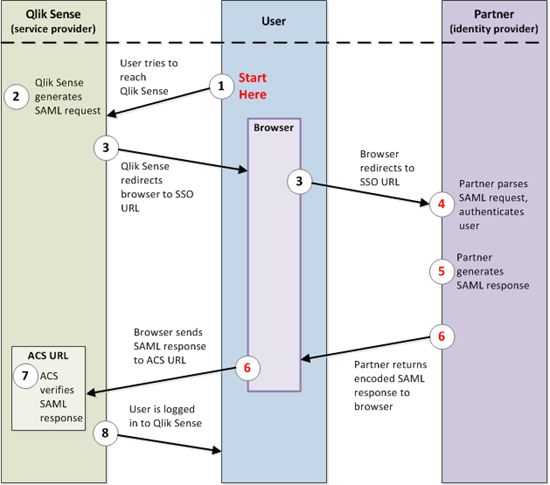
Keep in mind the SAML protocol is an open standard, therefore, implementing the solution between the SP and the IdP differs based on the requirements of the chosen provider.
For example:
- ADFS metadata contains a whole section of information that needs to be removed before it is imported into Qlik Sense.
- With Ping Federate, the IdP configuration needs to have the name ID format for the SAML response manually set to transient or the user authentication to Qlik Sense will fail.
- One login doesn’t care about the name ID format for the response.
Bottom line, expect some trial and error when configuring SAML, regardless if it’s with Qlik Sense or some other solution.
To ease the pain and hopefully reduce frustration, we have created some videos to help walk through configuring different SAML identity providers with Qlik Sense. As we encounter more flavors of IdP, we will create content to help with configuration.
For now, have a watch of the following videos, enjoy!

-
【オンデマンド配信】25 年の Excel 体制から脱却なるか!?BI ツール導入奮闘記
企業のビジネス活動において、データはこれまで以上に必要不可欠な資産となっています。増え続けるデータを管理・統合・分析し、データでアクションを起こす必要性が増している現在、成功している企業はどのようなデータ戦略を実行しているのか?本 Web セミナーシリーズでは、Qlik でデータからアクションを起こ... Show More企業のビジネス活動において、データはこれまで以上に必要不可欠な資産となっています。増え続けるデータを管理・統合・分析し、データでアクションを起こす必要性が増している現在、成功している企業はどのようなデータ戦略を実行しているのか?
本 Web セミナーシリーズでは、Qlik でデータからアクションを起こすデータ主導のビジネスで成功しているお客様より、課題から導入の経緯、デモンストレーション、活用例などをご紹介します。※ 参加費無料。パソコン・タブレット・スマートフォンで、どこからでもご視聴いただけます。
【オンデマンド配信】
25 年の Excel 体制から脱却なるか!?BI ツール導入奮闘記株式会社イノベーションでは、Excel ・スプレッドシートによる分析と共有の文化が根強く、有効なデータ活用が進んでいませんでした。情報をデータベース化して Qlik Sense に取り込むことで、あらゆる指標の日次データを取得し、顧客別など細分化されたレベルの分析が可能になりました。
本講演では、最近 Qlik を導入した背景とそのプロセス、現時点で得られた成果についてご紹介します。Excel に頼っていたデータ管理からの脱却を目指し、迅速なデータモデリングと可視化を実現するために Qlik を選んだ理由とは?1 人プロジェクトで社内の反発や課題をどのように乗り越えたのか、導入半年のリアルな姿や将来展望についてお話しします。 -
Hot Wheels Card Game
Hot Wheels Card GameBildenThis application was built with the aim of practicing and exploring the possibilities of Layout Container in QlikSense. The ... Show MoreHot Wheels Card GameBildenThis application was built with the aim of practicing and exploring the possibilities of Layout Container in QlikSense. The card game has a similar mechanic to the game Top Trumps, where the player chooses an attribute of his card and compares it with that of his opponent. It is not an application for commercial use, although many of the resources used have applications in real analytical dashboards, such as modal pop-ups, logic control in variables and others. I tried to make the most of the new features made available in the latest updates, such as the Layout Container, border customizations, shadows and component background images.Discoveries
Flexibility and countless visualization possibilities with Layout Container and new features from Qlik
Impact
New ways to build interfaces, using knowledge of visual resources improved in this application
Audience
Mainly Qlik developers, but also any enthusiast of the tool who is interested in new possibilities
Data and advanced analytics
As the focus of this application is the visual part, there is no relevant data or insight to highlight.
-
Managing your Analytics lifecycle in Qlik Sense Enterprise SaaS
Our Leigh Kennedy, Master Principal Enterprise Architect, is back sharing his in the trenches experience with you. In the attached document Leigh educ... Show MoreOur Leigh Kennedy, Master Principal Enterprise Architect, is back sharing his in the trenches experience with you. In the attached document Leigh educates you on applying software development life cycle (SDLC) concepts to your Qlik Sense Enterprise SaaS tenants. Take it away Leigh!
Introduction
The majority of customers use some form of software development lifecycle in their organizations. When moving to SaaS customers are sometimes unsure of if or how to apply these techniques to a Qlik Sense Enterprise SaaS environment.
We will explore some of the technical processes that need to occur within or interacting with a Qlik Sense Enterprise SaaS tenant as part of a software development lifecycle. We look at a number of areas including setting up your SaaS tenant in a way that supports your SDLC, encouraging re-use, building context aware applications, and many other topics. This document covers Qlik Sense Enterprise SaaS only and does not focus on our Hybrid Data Delivery or Qlik Application Automation offerings - they deserve a doc of their own and we hope to bring you one in the near future!
The aim of this document is not to provide a strict SDLC process for customers to follow, rather it aims to provide examples of how SDLC processes could work in a Qlik Sense Enterprise SaaS environment. We encourage you to implement or amend the parts or this you need so Qlik Sense Enterprise SaaS fits into your organization.
PDF attached in this post.
-
【10/2(水)13:00 開催】Qlik AI Reality Tour Tokyo:最新の AI イノベーションや事例をご紹介!
AI の現実(Reality)をテーマに、 最新の AI イノベーションや事例をご紹介! 来たる 10/2(水)、「Qlik AI Reality Tour Tokyo」を開催します。 AI は既に未来ではなく、企業において今日のビジネスを支える「現実」となっています。一方で、AI をビジネスに導... Show MoreAI の現実(Reality)をテーマに、 最新の AI イノベーションや事例をご紹介!
来たる 10/2(水)、「Qlik AI Reality Tour Tokyo」を開催します。
AI は既に未来ではなく、企業において今日のビジネスを支える「現実」となっています。一方で、AI をビジネスに導入するには多くの課題があることも「現実」です。
本イベントでは、この 2 つの AI の現実(Reality)をテーマに、Qlik の最新の AI イノベーションやユーザー事例をお届けします。基調講演をはじめ、Qlik のユーザーが語るデータと分析の最新事例、Qlik のパートナー企業による最新のテクノロジーやソリューション、展示ブースなど、貴社の AI 戦略を成功に導く最新情報をご紹介します。講演概要は、順次公開します。
【主な講演内容】
- Qlik ユーザーおよびパートナー企業による、AI 戦略のヒントとなる先進的な事例とソリューション
- Qlik グローバル戦略 / 市場開発部門長 Josh Good による、AI 活用に向けた Qlik のビジョンとロードマップ
- Qlik Talend Cloud / Qlik Answers / SAPソリューションなど、Qlikの最新技術および製品情報
お申し込みの締め切りは、9月 25日(水)17:00 までです。お早めにお申し込みください。
※ 定員に達し次第、お申し込みを締め切らせていただきます。
※ 定員を上回った場合は、参加をお断りする可能性がございますので、予めご了承ください。
※ プログラムは予告なく変更になる可能性があります。予めご了承ください。
※ 開催報告記事などのための撮影が入る予定です。お姿や資料などが認識できない形での公開に配慮いたしますが、予めご了承ください。【開催概要】
日時:2024年 10月 2日(水)13:00(12:00 受付開始)
懇親会 18:00 - 19:00
会場:大手町三井ホール&カンファレンス
東京都千代田区大手町1-2-1参加費:無料
お問い合わせ:Marketingjp@qlik.com までお問い合わせください。 -
【オンデマンド配信】2 年間で何が変わる?BI ツールによる SAP データ活用の成功と課題
企業のビジネス活動において、データはこれまで以上に必要不可欠な資産となっています。増え続けるデータを管理・統合・分析し、データでアクションを起こす必要性が増している現在、成功している企業はどのようなデータ戦略を実行しているのか?本 Web セミナーシリーズでは、Qlik でデータからアクションを起こ... Show More企業のビジネス活動において、データはこれまで以上に必要不可欠な資産となっています。増え続けるデータを管理・統合・分析し、データでアクションを起こす必要性が増している現在、成功している企業はどのようなデータ戦略を実行しているのか?
本 Web セミナーシリーズでは、Qlik でデータからアクションを起こすデータ主導のビジネスで成功しているお客様より、課題から導入の経緯、デモンストレーション、活用例などをご紹介します。※ 参加費無料。パソコン・タブレット・スマートフォンで、どこからでもご視聴いただけます。
【オンデマンド配信】
2 年間で何が変わる?BI ツールによる SAP データ活用の成功と課題株式会社クレハでは、 SAP のデータを Qlik Sense に取り込んで可視化し、販売の予実管理や各月の在庫の品目別推移、地図上での配送コストなどの分析を可能にしました。これにより、あまり活用されていなかった SAP データを、各担当が自分の業務に活用して組織で情報共有できるようになりました。SAP データを Snowflake に格納し、ディープラーニングなどを含む幅広い活用のためのデータ基盤とするプロジェクトも進行中です。
どの企業でも課題となっている BI ツールの社内活用の普及は、同社でも簡単ではありませんでした。担当者が語る、2 年間にわたる具体的な施策や得られた効果とは?成功事例や失敗事例も交えてお話しします。